
 Member
 manugupt1
GSoC Meetup : Jamia Millia Islamia Faculty of Engineering
It all began abruptly, when Akif Khan ( a prospective student ) asked me to discuss my GSoC experiences at his college. The idea instigated quickly instigated me as I longed to visit a College Campus and meet real open source people after a long time, so I agreed without giving a second thought, we decided that we will meet up on Saturday at Faculty of Eng, Jamia Millia Islamia.
I reached Jamia Millia at time and was pleased to find an enthusiastic culture of open source led by the students over there. Lots of students from other colleges were a part of the meetup too. A few things that I noted my experience there are as follows :
- Students were enthusiastic and really wanted to contribute to open source. Since most of them were fresh(wo)men, they were enthusiastic about the GSoC experience and how it could help them.
- Discussion how to select a project, write a proposal and how to communicate with the organizations was taken up.
One of the most enthusiastic things that I heard was “I really want to do it, despite of getting through GSoC” which is pretty much any open source organization wants. Hopefully, we have more students who think like this and even more who turn their thoughts into action. Overall, it was an excellent talk with a bunch of enthusiastic people :).
There were a lot of interesting questions asked, one of them being was “How do I start contributing to it?” . Recently, I had one of the more interesting reads on quora which gives a answer to the question https://www.quora.com/Software-Engineering/Which-open-source-projects-are-actively-looking-for-contributors in a very succint way.


Recent documents in LibreOffice
This is again one of those little improvements that make LibreOffice much more usable, and that I so much love hacking on. I implemented a dropdown for the Open toolbar button that brings an easy access to the Recent Documents, and sent that the UX mailing list for feedback. I got some really useful hints. Even better - I gave Samuel code pointers to play with this a bit, and he came up with a beautiful patch that implements his ideas. And here is the result:

Samuel - thank you for this! :-) For anybody who would like to bring this functionality to the Start Center too (the screen you see when you start LibreOffice), here is an Easy Hack that will result in reusing the code for the Start Center too; and also will delete lots of duplicate code.

Install Gitlab on OpenSUSE 12.3
Private Git Repo Hosting
Gitlab brings the social coding Github experience to your own network. In contrast to the commercial product Github which only allows to host open source git repository projects using the free plan, you can install the free/libre software Gitlab wherever you like and do what you want. Therefore you need to setup a RubyOnRails environment. Officially, Gitlab supports Debian/Ubuntu. Read on how to install it on OpenSUSE.
The presented solutions features a btrfs
filesystem RAID-1 :) and some custom patches. Instead of init.d startup scripts,
we use systemd. I recommend to use nginx as a webserver.
Please be aware that the development of Gitlab continues rapidly. This might break this how-to at some point. Please read everything before starting!
Install OS
- Download OpenSUSE 12.3 32bit, Network edition http://download.opensuse.org/distribution/12.3/iso/openSUSE-12.3-NET-i586.iso
- I chose 32bit, because Ruby Binary Extensions might have problems with lib64 path structure. We workaround this bug.
- I chose networkinstall, because we need only very few packages and don’t need to download everything. only 200MB are downloaded during install
- the image can easily copied to a usb pen drive using the gui tool “imagewriter” (executed as root)
- Partition: There are 2 big hard drives. I created on both of them first a primary pratition of 1GB of type LINUX-RAID
- I use the yast software raid setup during the install to connect both partitions to a software raid-1 partititon of ext4 to mount in /boot
- I created on both hard drives a btrfs partition (50GB), but only mount the one on /dev/sda to /
- I created on both hard drives a swap space of 2 GB and mount both to swap
The system gets installed and the configuration follows.
- I open ssh. I disable ipv6.
- I disable dhcp and configure the hostname to “leise” and the site to our internet domain, the nameserver and the gateway is set to be the mail server.
- The server gets the fixed ip: 192.xxx.xxx.184
- The network check passes successfully and I apply immedately online updates.
- I leave the user input dialog blank and only set a root password
The installation is done. I test everything with a restart using reboot.
Now the root filesystem has to be turned to a btrfs raid system.
- I add a second device to the root file system:
btrfs device add /dev/sdb2 / - I convert the striped btrfs mode to the raid1 mode for filesystem data and metadata:
btrfs filesystem balance start -dconvert=raid1 -mconvert=raid1 /
Install Gitlab
- Homepage: http://gitlab.org/
- Source Code: https://github.com/gitlabhq/gitlabhq
The following steps apply to version 5.0 and try to copy the step by step tutorial which is refered from the README: https://github.com/gitlabhq/gitlabhq/blob/master/doc/install/installation.md
Install dependencies:
zypper ar http://download.opensuse.org/repositories/devel:/languages:/ruby:/extensions/openSUSE_12.3/devel:languages:ruby:extensions.repo

zypper in patterns-openSUSE-devel_basis ca-certificates-cacert nginx rubygem-rb-inotify rubygem-ffi redis mysql-community-server mysql-community-server-client rubygem-bundler ruby19 ruby19-devel libmysqlclient-devel zlib-devel libyaml-devel libgdbm4 libreadline6 libncurses5 libffi47-devel curl git-core postfix checkinstall libxml2-devel libxslt-devel libcurl-devel libicu-devel
# accept deinstallation of patterns-openSUSE-minimal_base-conflicts

python2 --version # make sure to have version > 2.5 but < 3.0

ruby1.9 --version # make sure to have a compatible version (in my case 1.9.3)
cat /usr/bin/bundle # make sure to have ruby version 1.9 in the shebang line (first line in file)

systemctl daemon-reload # reparse config for systemd (necessary, because we installed mysql)
systemctl start mysql.service  # start mysql
systemctl enable mysql.service # make mysql autostart
cp /etc/redis/default.conf{.example,}
chown redis.redis /etc/redis/default.conf
systemctl enable redis.service
systemctl start redis.service
Prepare system for Gitlab
- create a user git:
useradd -ms /bin/bash git
Prapare Gitlab (using account git)
su git # (change to the account of git)
cd # (change to the home directory /home/git)
git clone https://github.com/gitlabhq/gitlab-shell.git
cd gitlab-shell
cp config.yml.example config.yml
vim config.yml # change domain to the domain of this computer
cd
ssh-keygen # to be sure, create ssh key (not mentioned in official docu) with empty passphrase
Follow the setup of the mysql data base: https://github.com/gitlabhq/gitlabhq/blob/master/doc/install/databases.md#mysql
mysql -u root- follow the guide for mysql commands
We continue with the setup of the GitLab Rails application:
gem1.9 install charlock_holmes --version '0.6.9' # execute as root
su git
cd
git clone https://github.com/gitlabhq/gitlabhq.git gitlab
cd gitlab
git checkout 5-0-stable # not possible yet, I use master instead
vim config/gitlab.yml
# ^- email_from: gitlab@atech.de, support_email: admin@atech.de, default_projects_limit: 100
# disable username_changing_enabled
chown -R git log/ tmp/
chmod -R u+rwX log/ tmp/
mkdir /home/git/gitlab-satellites
mkdir tmp/pids/
chmod -R u+rwX tmp/pids/
cp config/unicorn.rb.example config/unicorn.rb
cp config/database.yml.mysql config/database.yml
vim config/database.yml # edit password and username
bundle install --deployment --without development test postgres # takes a while
bundle exec rake db:setup RAILS_ENV=production
bundle exec rake db:seed_fu RAILS_ENV=production
bundle exec rake gitlab:setup RAILS_ENV=production # chose yes
bundle exec rake gitlab:shell:setup RAILS_ENV=production # chose yes
git config --global user.name  "GitLab"
git config --global user.email "gitlab@atech.de"
Install Check:
su git
cd /home/git/gitlab
bundle exec rake gitlab:check RAILS_ENV=production
Go to yast firewall and open port http (and https port): 80, (443)
# update services
su
cd /usr/lib/systemd/system/
wget https://gist.github.com/veprbl/5115638/raw/9d18a341217f109accb67f57e8ad420c9de442fd/gitlab.service # TODO wrong mysqld
wget https://gist.github.com/veprbl/5115638/raw/be78658953cd5967a4d874f5b0a019667cf090af/gitlab-worker.service # TODO same
# double-check content of these files!
chmod 644 gitlab.service gitlab-worker.service
# TODO edit /etc/nginx/vhost.d/*
systemctl daemon-reload
Review of Fluendo Codec Pack and DVD Player in openSUSE with Gnome
For this test I did a clean install of +openSUSE 12.2 with the +GNOME 3 environment. I endeavored where possible to only use the multimedia applications included as part of our Gnome 3 pattern. So for most things I've used either Totem or +Banshee which both use the GStreamer framework, which is what the Fluendo Codec pack is for, and what their DVD Player is based on.
The Fluendo codec pack promises superior playback capability with hardware acceleration. It certainly delivers an overall better multimedia experience. As I mentioned I have endeavored to keep a minimal install. Typically I have found Banshee to be glitchy and unpredictable. Though I knew Banshee was a darling media player for many, I hadn't the least idea why. However, after installing the Fluendo Codec Pack the way Banshee works is inexplicably better, and I to have become a fan. Also Totem (which is usually a steaming pile of $%!^) behaved much better with the Fluendo Codec Pack. Overall, my opinion on purchasing this would be this; whether you need it or not, the refined playback and compatibility make for a more enjoyable multimedia experience under Linux with less fuss than other means.
Unlike their Codec Pack, the Fluendo DVD Player was disappointing. Now, it does play DVD's, and plays them beautifully. However, I have found a few cases where disks that should have played, simply didn't. The interface leaves much to be desired. It is not suitable to new users since in order to use this software properly you'd need to have at least an elementary understanding of how devices are depicted in the Linux filesystem. I found that most of the configuration options that were shown either were unresponsive, or broken to the point of being unintelligible. There has been an update fixing that now, though the usage of the software is still ridiculously complicated. Bottom line is this; get it if you watch a lot of DVD movies, and know how devices are shown in a Linux filesystem.
Interesting sidenote: +Novell holds a license to redistribute these. I think they were going to include them in +SUSE Linux Enterprise Desktop, or maybe try making a home desktop.


Another Proposal
Here is an SVG wallpaper proposal for a default wallpaper on openSUSE 13.1. I tried to go for typical bamboo reeds and a dark background. The design reminds me a lot of regular plants that one can feature in an office so the idea here is to link that to the wallpaper. There is also a very subtle complexity on the graphics. I tried toning down the green strength so that it does not become busy.
I hope you like it.

Now remember that this submissions will end in about 6 weeks, at which time "Ilmehtar" will work with the images and start the packaging process and then the rest of the designs will continue to come up.
It is great seeing that a few of you have made submissions and be sure that they are taken into account once an overall design for the next distribution is started based on the chosen wallpaper.
Keep up the good work!
PS: I placed an SVG version of the "aurora" wallpaper I made a few weeks ago and it is on GIT. Obviously the quality is different and so are the colors. If there is a better feel for the svg version, let's work with that one.

What's on in Nightly?
We ownCloud Client devs were quite busy doing bug investigations and two releases the last couple of weeks. But that does not mean that nothing went into feature branches. It did, and now we can start to think of a release 1.3.0 with a couple of new features for the client.
Here is a small overview of what went into ocsync master (actually the dav branch) and into mirall master.
Note that this is alpha state software, but it’s already available for testing from our nightly builds at the ownCloud nightly repository.
If you enable the nightly package repository on your system, please be sure to use the machine for testing purposes only. Windows and Mac nightly builds can be found here to download.
csync: Big File Chunking
Handling big files over HTTP is difficult, if files grew bigger than a gigabyte, we faced multiple problems. To deal with that, we thought of splitting up big files and transmit the parts to let the server finally assemble the file again once all parts are there.
We wrote a little library to implement that, called httpbf. It is now integrated in the current development branch. You will see files big files split up into parts for transmission to the server. With that there should not be a filesize limit to work with any more, except the limits we have from the operating system etc.
Up- and Download Resume
With big file chunking, we also introduce up- and download resume. If a file transmission was interrupted and is started over again later, only the missing parts are going to be pushed again. However, we’re not yet transmitting only changed chunks for existing files yet, just to answer that question here before it comes up. That will be subject of more enhancements.
Source File Verification
Another problem with big files is that if one gets copied into the synced dir on the local machine, the copy is not finished before the sync acutally starts. That can result in useless transmissions because inconsistent data is synced.
We added code to the httpbf library that checks for the integrity of the source file. When the first chunk is transmitted, it is checked if the file has still the size and mod time from the beginning. If not, the library waits for two seconds and starts over with a check again. That way, it waits until the source file has stabilized. A final check if the source file hasn’t changed during upload is done for every file when the upload is finished.
CSync Context Reuse
There is the very unpleasant problem on some distros (namely Ubuntu and Fedora) that the ownCloud Client wastes file descriptors. We figured that this is because the system libraries on that platforms fail to unload the csync ownCloud module properly.
Version 1.2.5 contains a quick fix for that, but the real fix is to reuse the csync context within mirall and not build it up and down for every sync run as we did until now. So we developed the function csync_commit which commits the results of the sync run to the database and leaves the csync context intact for the next run. That way we just load and unload the ownCloud module on time and not every 30 seconds. The csync patch already went upstream.
Mirall: New Setup Dialog
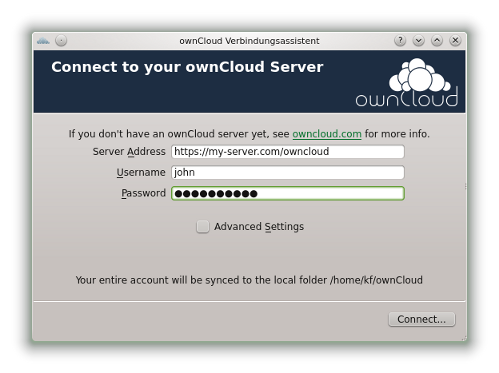 There is also the new setup dialog in the nightly builds: It is much more simplified compared to the old one, user only needs to add the url and user credentials and thats it. Also, it syncs the whole ownCloud to a local folder, just like other boxes do. That is one of the most often heard enhancement requests, and here we go.
That all I think would qualify for a good 1.3.0 release, but we need more time to fine tune,polish, test and bugfix. But we would appreciate if people could help test. Please report bugs in the client’s bugtracker. We need to find bugs prior the release, and that happens with your help!
Have fun & Thanks a lot for testing!
Fosscomm 2013 at Athens
Fosscomm is the annual conference of the Greek Free Software communities. This year took place on April 20-21 at the Harokopio University of Athens and I had a presentation with Ευστάθιος Ιοσιφίδης (Eustathios Iosifidis). We organized the road trip with friends from Volos and Thessaloniki.
openSUSE-el
The greek openSUSE community had a handful of presentations (most of them done by or together with Ευστάθιος Ιωσηφίδης (Efstathios Iosifidis).
Iosifidis had a whole six of them, however i only managed to watch the first one about OwnCloud.
Then we co-presented “Developments and Usage of E17 on openSUSE 12.3” a talk about the excellent Desktop Shell Enlightenment 17 and what work has been done for it to be packaged and ready so you can get an awesome openSUSE flavored experience while running it :).

Αγγελος Τζότσος (Aggelos Tzotsos) also took part as openSUSE community representative at the panel held before the closing of the conference.
Gentoo-el
This year the greek Gentoo community also had a booth in the conference like openSUSE and Fedora. There were Gentoo stickers of varying sizes and for the price of 1 Euro one could get a Gentoo pin to support the foundation. Παύλος Ράτης (Pavlos Ratis) also took part as Gentoo representative at the Communities Panel held before the closing of the conference.
Other Presentations and Stuff
This year a few new community members and friends tagged along (Φανή Δήμου (Fani Dimou) and Χάρης Αντωνάτος (Charis Antonatos)), we also watched a few presentations together and participated in a mini workshop for the LibreOffice BoF.
Winnie: a framebuffer window system
In this presentation Ελένη-Μαρία Στέα (Eleni-Maria Stea) showed us her new project.
A windowing system named Winnie that talks directly to the framebuffer (thus needs no X to run).
Mandatory Screenshot and link to source:
 Source Code Demo Video
CSS in the 4th dimension: Not your daddy’s CSS animations
In this presentation done by Λία Βέρου (Lea Verou) we learned about the upcoming support in recent(or not that recent) versions of web browsers of CSS features like Transitions and Animations.
Dancing with teraFLOPS: parallelism and multiprocessing
John Tsiobikas talked about openC, GPU programming technologies and about openMP. He also showed a few video examples of the progression of a raytracing demo from running in a serial way to being parallelised with openMP.
PROTOS: An Open Source Early Warning System
In this presentation done by Vasilios Vlachos we learned about the PROTOS warning system. The PROactive Thread Observatory System, which is basically a server/client based IDS, PROTOS
Security BoF
I don’t remember the precise title of this session but it was really interesting, here we talked about topics ranging from mobile to distro and enterprise security standards. We also discussed a few recent insidents and breaches that happened this year.
LibreOffice / Vocabulary / Linguistics / Thesaurus BoF
This BoF was coordinated by Pantelis Koukousoulas a Libre Office contributor and a founder/developer of openthesaurus.gr. We discussed about the current state of Greek Vocabularies and Thesaurus in LibreOffice, how people could help resolve the issues and how one could contribute to the projects.
I spent the rest of the conference helping around at the various booths (mostly on Gnome-el, Gentoo-el, openSUSE-el) and talking with people. I also met old friends and people i had only talked to online (via IRC).
Congratulations to the people from HUA for the organization! :)
Here are a few albums with photos from the conference fosscomm photos
- Update: Fixed the description for winnie and added a more recent Demo Video
Decorating your Xamarin.iOS code with Behaviors

Every time you have to ask your user "What's your favourite colour" or "What is the air-speed velocity of an unladen swallow?" from within your iOS application, you have to ask yourself "Wait, will the field still be visible with the virtual keyboard displayed ?"
I don't know how you do it (experience sharing is welcome), but me, I do it this way:
public override void ViewDidLoad ()
{
 base.ViewDidLoad ();

 //Set Bindings and Commands
 placeField.Bind (ViewModel, "Place");
 sendButton.Command (ViewModel.SendCommand);
 busyIndicator.Bind (ViewModel, "IsBusy");

 //Slide the view on keyboard show/hide
 placeField.EditingDidBegin += (sender, e) => {
  UIView.BeginAnimations ("keyboardslide");
  UIView.SetAnimationCurve (UIViewAnimationCurve.EaseInOut);
  UIView.SetAnimationDuration (.3f);
  var frame = View.Frame;
  frame.Y = -100;
  View.Frame = frame;
  UIView.CommitAnimations();
 };

 placeField.EditingDidEnd += (sender, e) => {
  UIView.BeginAnimations ("keyboardslide");
  UIView.SetAnimationCurve (UIViewAnimationCurve.EaseInOut);
  UIView.SetAnimationDuration (.3f);
  var frame = View.Frame;
  frame.Y = 20;
  View.Frame = frame;
  UIView.CommitAnimations();
 };

}
It works fine, but looks messy next to readable code setting bindings or commands (those come from a very light Binding library I'm working on). Then yesterday evening, I had a realisation. It looks very similar to Silverlight Behaviors, so this code could just be like:
placeField.Attach (new SlideOnEditBehavior (View, defaultPosition:20, alternatePosition:-100));
And the SlideOnEditBehavior is kept aside (OnDetaching implementation left out for clarity):
public class SlideOnEditBehavior : Behavior{ UIView view; int defaultPosition; int alternatePosition; public SlideOnEditBehavior (UIView view, int defaultPosition, int alternatePosition) { this.view = view; this.defaultPosition = defaultPosition; this.alternatePosition = alternatePosition; } protected override void OnAttached () { base.OnAttached (); AssociatedObject.EditingDidBegin += (sender, e) => { UIView.BeginAnimations ("keyboardslide"); UIView.SetAnimationCurve (UIViewAnimationCurve.EaseInOut); UIView.SetAnimationDuration (.3f); var frame = view.Frame; frame.Y = alternatePosition; view.Frame = frame; UIView.CommitAnimations(); }; AssociatedObject.EditingDidEnd += (sender, e) => { UIView.BeginAnimations ("keyboardslide"); UIView.SetAnimationCurve (UIViewAnimationCurve.EaseInOut); UIView.SetAnimationDuration (.3f); var frame = view.Frame; frame.Y = defaultPosition; view.Frame = frame; UIView.CommitAnimations(); }; } }
Cleaner. Simpler. Reusable. And it also supports BehaviorCollections:
 placeField.Attach (new BehaviorCollection {
  new SlideOnEditBehavior (View, defaultPosition:20, alternatePosition:-100),
  //Any other behavior here
 });
As expected, the code for all of this is trivial, but if you like the idea and save yourself the 30 minutes it takes to write it, it's on Github.
[UPDATE: 2013-04-26] I updated the code as per Stuart Lodge suggestion (of MvvmCross) to use WeakReference to NSObjects. Doesn't change the API at all.
Scheme? Functional Programming? Why?
Studying functional programming is an opportunity to greatly broaden your horizons, discover a whole new way to represent programs, to approach problems and reach solutions while thinking about languages. Programming in a functional language is pretty much fundamentally similar to programming in any other type of language (like logic programming), it represents programs and algorithms through distinct forms of abstraction and gives you a new toolset with which to solve programming problems. many of the techniques of functional programming are beginning to be included in new mainstream languages, so taking the time now to immerse yourself in them will leave you with a headstart and a thorough understanding of those techniques.
In that regard i started learning Scheme and reading/solving the exercises in the book “Structure and Interpretation of Computer Programs. Scheme is a very small language which is one of the two major lisp dialects (the other being Common Lisp), one of the oldest functional programming languages. Scheme is small and elegant (the entire language can be built on top of a handful of primitive list manipulating operations), there is also a multitude of sources and educational material to choose from (should you decide to study it too). As such, Scheme is the perfect place to dive into the techniques of functional abstraction. In your new venture make sure to have a look and get accustomed with techniques like:
- recursion
- macros
- closures
- first class functions
- lamda expressions
Vim ? with a Lisp Variant?
Yes, i love vim and in no way am i changing editor just to write in a new language so no Emacs is not an option.
Movement
" A few lisp specific settings
 set lisp               " enable vim's lisp mode
 set autoindent         " new lines copy previous indent
 set showmatch          " shows matching paren/brace/bracket
 set cpoptions=-m       " when included a showmatch will always wait half a second,
                        " when not it will either wait half a second or until you type a char.
 set foldmethod=indent  " fold indented text

 %     " find the matching paren/brace/bracket
 [(    " go to previous unmatched "("
 [)    " go to previous unmatched ")"

 " this saved me a few keystrokes
 :map [9 [(
 :map [0 [)

 " these can help for searching "(" or ")"
 :map <C-F9> /(<cr>
 :map <C-F10> /)<cr>

 " selecting stuff
 ib   " inner block selection
 ab   " outer block selection

 " like C you can indent and reindent stuff with "=" and "=="
TSlime.vim
TSlime is a simple vim script to send portion of text from your vim buffer to a running interpreter session. You only need to be running vim inside a tmux session and provide the session name,window,pane number to tslime so that it knows where to send subsequent commands.
Then you just select your desired block of text and send it over with

My openSUSE 12 Journal 14: IBM Notes 9 on 12.3

Back in the days of using 12.2, IBM Notes 9 was in Beta and I have blogged about how I installed and configured this combination here.
With my move to 12.3, I was going to install the now GA version of IBM Notes 9. Given how impressed I was with 12.3, and all the additional software and customizations applied in 12.2 seems to transfer seemlessly to 12.3, I was naturally mildly surprised (and annoyed) that installation of IBM Notes 9 did not go quite as smoothly as Notes 9 Beta on 12.2.
Let me jump to the crux of the matter, one particular library (libjpeg62) has been removed from the media and default online repositories of 12.3. This libjpeg62 was previously in 12.2 and earlier versions of openSUSE. As such, IBM Notes 9 installer and even zypper were not able to install execute successfully.
Here's how I arrive at this conclusion and was able to successfully install IBM Notes 9 on openSUSE 12.3. While I have not tried this on the enterprise flavour of openSUSE (ie SUSE Linux Enterprise Desktop 11), should you encounter the same challenges, the steps below may be of help.
Read more »