
 cabelo
Native NPU support for openSUSE Linux.
As an Intel Innovator, I received the AI PC DevKit. This machine is a fully upgraded modular mini PC that combines premium design with powerful performance, targeting users needing high-load computing and localized AI processing. It features the latest Intel® Core Ultra 7 processor with a 16-core (6P+8E+2LP) configuration, integrated Intel® Arc 140T GPU, and a built-in NPU, offering up to 96 TOPS of AI computing power. With LPDDR5X 8400MHz memory and advanced architecture, it supports demanding tasks like 8K video editing, 3D rendering, and AI model training.

Intel AI PCs: Powering the Future of Local AI
Intel AI PCs lead the way in AI-driven innovation, seamlessly integrating advanced hardware and software to provide exceptional performance tailored for enterprise and developer needs.
Now with this equipment, I will provide NPU support for the openSUSE Linux distribution natively. With this, NPU support will be used natively in this distribution without the need for any additional installation. The results are encouraging using openVINO technology with NPU, the final result of the work will take a while but news will be coming soon.
To get everyone excited, we will have AI assistants in the VIM/VI editor and also in Linux Shell commands with OpenVINO and Intel’s NPU.

I will be able to provide more efficient support, as I will be able to test technical calls like the example below.


 Member
Tumbleweed – Review of the week 2025/14
Dear Tumbleweed users and hackers,
Week 14 saw the continuation of the significant updates rolling into Tumbleweed. Following the trends of the previous weeks, users can expect a modern and evolving Linux experience. We have published four snapshots (0328, 0329, 0331, and 0402, containing, amongst others, these changes:
- strace 6.14
- Linux kernel 6.14.0
- Mozilla Firefox 136.0.4
- LLVM 20
- VirtualBox 7.1.6a
- fwupd 2.0.7
- Ghostscript 10.05.0
- GTK 4.18.3
A few things are in the pipeline for the next few days/weeks, namely:
- KDE Plasma 6.3.4
- Mesa 25.0.3
- Meson 1.7.1
- Qt 6.9.0
- GCC 15 as distro compiler, see https://build.opensuse.org/staging_workflows/openSUSE:Factory/staging_projects/openSUSE:Factory:Staging:Gcc7
- CMake 4.0
- Python setuptools 78.0
- Removal of pcre(1). Please help with that cleanup and port it to PCRE2. See https://lists.opensuse.org/archives/list/factory@lists.opensuse.org/thread/BK3SPPFOM3LI6K5PTXPKZMKMIUIPOEXS/
- More work towards proper display-manager service integration, https://en.opensuse.org/openSUSE:DisplayManagerRework
- The removal of the HPC stack has been proposed. See https://lists.opensuse.org/archives/list/factory@lists.opensuse.org/thread/7VAP572DMVET3CPGOSB2OCOFEQ5CPWJE/

UI/UX Improvements For the Redesigned Request Page
Installing nightly syslog-ng arm64 packages on a Raspberry Pi
Last week, I posted about running nightly syslog-ng container images on arm64. However, you can also install syslog-ng directly on the host (in my case, a Raspberry Pi 3), running the latest Raspberry OS.
Read more at https://www.syslog-ng.com/community/b/blog/posts/installing-nightly-syslog-ng-arm64-packages-on-a-raspberry-pi

syslog-ng logo

Seamless migration from Windows
Windows 10 End of Life is approaching and Linux distributions show creativity to attract Windows 10 users.
openSUSE takes a step further by offering users a seamless migration tool for migration from Windows 10 and 11 to openSUSE Leap and Tumbleweed. The migration tool covers the migration of the NTFS filesystem to Btrfs, user data, Steam game library, and most of the common applications that coexist on both platforms.

Advanced users will appreciate the command line interface of the opensuse-migration-tool.

Users can choose to upgrade their Windows systems to either openSUSE Leap, or Tumbleweed.


After the migration is done and the system is rebooted users can enjoy the user-friendly interface of openSUSE Leap or Tumbleweed with their favorite apps and much more.

I hope you’ve enjoyed reading our 1st of April article that is not really that far from reality, which is just not as seamless as the article presents it 😉.
Get your new favorite Linux distribution at get.opensuse.org before Windows 10 End of Life and stay supported.
A friendly community awaits you at forums.opensuse.org.
Tumbleweed Monthly Update - March 2025
Tumbleweed continues to showcase the strength of a well-maintained rolling release as we move through 2025. March delivered several snapshots and several impactful changes across the software stack.
This month brought the debut of GNOME 48, delivering modern User Interface polish, performance improvements and new features like digital wellbeing tools and HDR support. On the KDE side, Plasma 6.3.3 refined fractional scaling, display handling and usability. Mesa 25.0.1 introduced ray tracing support for Intel Arc GPUs and Emacs 30.1 enhanced org-protocol handling, security, and completion features. Other packages updated were PipeWire 1.4.1, libvirt 11.1.0, GStreamer 1.26.0, PHP 8.3.19 and more. Tumbleweed now includes experimental support for parallel package downloads and a new media backend that was introduced with zypper 1.14.87 and libzypp 17.36.4; this offers a major speed boost for package management as it cuts package fetch times by more than half.
With these updates, rolling release users can enjoy an updated Linux experience that is well tested with continual integration of upstream innovations.
As always, be sure to roll back using snapper if any issues arise.
Happy updating and tumble on!
For more details on the change logs for the month, visit the openSUSE Factory mailing list.
New Features and Enhancements
GNOME 48: This release brings notification stacking to reduce clutter, and delivers major performance gains, including dynamic triple buffering and faster file browsing in Files. The new image viewer adds editing tools like crop and rotate, while support for RAW formats expands functionality. The release debuts new fonts — Adwaita Sans and Mono — enhancing legibility and language support. Digital Wellbeing tools now track screen time, enforce usage limits, and provide break reminders. Battery lifespan is protected with a new 80 percent charging cap option for supported hardware. A minimalist Audio Player app joins the core apps, focusing on simple playback with waveform views. HDR support makes its system-level debut, and Text Editor receives a cleaner interface with better formatting controls. Additional features include global shortcuts for apps, improved window placement, and expanded keyboard shortcut support. Updates to Contacts, Settings, Calendar, Maps, Web, and Orca improve accessibility, UX, and performance across the desktop.
harfbuzz 11: This new major version introduces new font-function integrations for CoreText, DirectWrite, and the Rust-based Skrifa library, accessible via the new hb_font_set_funcs_using() Application Programming Interfaces. Additional APIs allow loading font-faces directly from files or blobs for FreeType, CoreText, and DirectWrite backends. The DirectWrite shaper now fully supports font variations and user features, and its API is no longer marked experimental.
emacs 30.1: This major release introduces several enhancements, including improved org-protocol handling on GNU/Linux, native code execution for the default process filter, and better input handling with consistent mouse wheel events. It tightens network security by warning about weak crypto standards and ensures HTTP requests don’t expose user emails. Support for Tree-Sitter submodes was added, and icomplete-in-buffer improvements enhance completion behavior. The GTK xwidgets build is disabled due to a webkit2gtk regression.
Mesa 25.0.1 and 25.0.2: The 25.0.1 version enables ray tracing support for Intel Arc GPUs (boo#1238732) and improves build configuration by switching to %gcc_version instead of hardcoded CXX. A workaround was added to explicitly set CXX=g++-14 to resolve compiler detection errors during build. Also includes fixes for building on Tumbleweed and ensures GCC 13 is used for Leap/SLES 15 builds (bsc#1238713). The 25.0.2 version maintains OpenGL 4.6 and Vulkan 1.4 API support, though actual reported versions vary by driver. This update fixes VRAM detection problems, flickering in Resident Evil 2, a Vulkan issue with DOOM 2016 on AMD 780M, a segmentation fault in AMD VDPAU deinterlacing, and crashes on Raspberry Pi 5 with v3dv.
KDE Plasma 6.3.3: KWin resolves several issues, including tiling, stacking, and modifier state bugs, and adds better support for hardware with complex display setups. Discover improves changelog visibility and flattens case-sensitive sorting for offline updates. Breeze adjusts menu bar styling and resolves Qt6 MinGW build regressions. Plasma Desktop patches task manager tooltips and improves keyboard layout handling, while Plasma Workspace improves system tray tab focus and resolves calendar navigation bugs. Powerdevil enhances Dell laptop charging support and warns users of power settings that increase energy use. KPipewire, KScreenLocker, and Spectacle all receive targeted fixes, and QQC2 Breeze Style syncs its visual elements with the desktop style for consistency.
KDE Gear 24.12.3: KDE’s Dolphin resolves a crash when opening new tabs with search and prevents view settings loss. Podcast app Kasts addresses playback and sorting issues, while Kate improves HUD behavior, session handling, and editor font consistency. Kdenlive eliminates multiple crash scenarios related to audio playback and clip transitions. Okular refines digital signature handling and fixes display bugs. Konsole patches escape sequence behavior, avoids infinite loops, and improves session settings. Konqueror restores proper translation extraction for UI elements. Kitinerary expands extractor support with new scripts for Eventyay, SBB, and Ghotel reservations. Tokodon and PlasmaTube improve UI consistency and media playback, particularly for PeerTube and Akkoma. Multiple apps, including Umbrello, Cantor, and Calligra, gain compatibility with CMake 4, ensuring smoother builds.
selinux-policy 20250305: This update brings fixes like labeling /var/log/php-fpm.log as httpd_log_t and allowing systemd-networkd to read/write memfd objects in tmpfs. Support was added for SSH keygen to connect via vsockets and for Plymouth debug logs. Apache2 binaries are now labeled correctly, and the kmscon module is enabled. Packaging improvements remove bashisms from scriptlets, fix a broken variable reference, improve the rpmlintrc, and reduce duplicates using fdupes.
systemd 257.4: Notable changes include better handling of posix.fork() in triggers (bsc#1238566), updates to systemctl edit to handle missing unit masking errors more gracefully, and improved verity settings for MountImages. Shell completions now include systemd-creds, and additional test coverage was added for verity and extension features. Journalctl respects --quiet with --setup-keys, and logind now starts system-wide idle tracking at initialization. The update also fixes some man page typos and improves compatibility with openSUSE in mkosi builds.
php8 8.3.19: This update fixes memory leaks in BCMath, GD, Phar, and zlib, as well as crashes and unexpected behavior in the core engine, FFI, and Opcache JIT compilation. Several CVEs were resolved in the shutdown sequence and enhancements were also made to FPM path handling.
gimp 3.0.2: One of the first minor updates from the 3.0 version resolves crashes related to brush selection and font handling in the text tool and improves UI consistency with adjustments to headerbar colors, spacing, and dark theme panel separation. Tools and plug-ins received usability improvements, including reordered line art detection options, new toggle icons, and fixes for metadata editor and gradient flare crashes. The build system includes packaging cleanups and now requires GEGL 0.4.58.
ovmf 202502: A quarter’s worth of updates adds X64 support for SRAT and MADT table generation, introduces dynamic stack cookie support across multiple architectures, and integrates RNG PPI and PEI libraries. It also updates to OpenSSL 3.4.x and enhances CI tooling. The release also resolves bugs such as image relocation overflows, QEMU random number generation support, and uninitialized variable warnings in various components.
Key Package Updates
Kernel Source 6.13.6 - 6.13.8: The 6.13.8 release re-enables OpenVPN support after fixing related issues. Notable updates involve improvements and bug fixes across subsystems such as memory management, networking, RDMA, Bluetooth, Wi-Fi, DRM, and various architecture-specific components. The 6.13.7 kernel introduces OVPN Data Channel Offload, including multi-peer support, TCP transport, key and peer management via netlink and integration with ethtool. Additional updates address memory leaks, use-after-free vulnerabilities in ksmbd, hardware compatibility for Dell and Lenovo systems in Advanced Linux Sound Architecture, and multiple improvements across RDMA, KVM for LoongArch, Btrfs, and DRM subsystems. The 6.13.6 release includes numerous fixes and enhancements across subsystems such as RDMA, networking, SCSI, NFS, and Bluetooth. Key updates address memory and race condition bugs in RDMA/mlx5, correct behavior in NFS O_DIRECT writes, and improve error handling across various drivers. It also includes architecture-specific improvements for x86 and arm, and adds forgotten AMD models to microcode SHA checks. The update resolves several bugs noted in bsc#1012628.
sdbootutil: This update includes several fixes and enhancements. Boot entry measurement is now supported for grub2-bls, and set-default-snapshot is made consistent. It now validates the ESP mount point and ensures correct behavior when called from snapper. Additional improvements include quieting OpenSSL output, storing passwords in the cryptenroll keyring, updated help entries, typo fixes, and stricter input validation.
git 2.49.0: This version introduces support for shallow clones from arbitrary commits and adds git backfill to bulk-fetch missing blobs in blobless clones. git gc gains a --expire-to option, and git repack can now use an alternative path-hash for better delta selection. The [help] autocorrect = 1 setting now runs typo corrections immediately, and git rev-list --missing=print-info provides more detail on missing objects.
PipeWire 1.4.1: Fixes were made for device disappearance issues caused by incorrect SplitPCM channel specs and restores MIDI functionality on older kernels lacking UMP support. It resolves crashes in audioconvert due to resampler misconfigurations and adds improved error reporting for UCM config issues. Bluetooth stability is improved with a fix for crashes during incoming calls.
nvme-cli 2.12: This user space tooling introduces new commands like reachability-associations-log, host-discovery-log, and rotational-media-info-log, enhancing NVMe 2.1 log support and diagnostics. The release improves error handling, completion scripts, and JSON outputs, while also updating documentation and plugins, including OCP 2.6 telemetry. Several bugs and build issues were fixed, and libnvme dependencies were updated.
Evolution 3.56.0: This personal info management application introduces numerous bug fixes and UI improvements across Mail, Calendar, Tasks, and Contacts. Highlights include corrected time zone comparisons in Tasks, improved memory handling, better icon handling, a fix for crashes on quit, and enhancements to Unified Inbox behavior. The update replaces legacy GTK widgets with modern equivalents like GtkGrid, removes deprecated APIs (e.g., GTimeVal, GtkAlignment, GtkArrow), and now requires glib 2.70. Multiple translation updates and interface refinements round out the release.
GTK3 3.24.49 and GTK4 4.18.2: The 3.24.49 version fixes crashes related to IM context and drag-and-drop with GtkPlug/GtkSocket. On Wayland, it improves cursor handling and resolves menu malfunctions caused by bad crossing events. With 4.18.2, there were enhancements and fixes for popovers, clipboard leaks, Wayland drag surfaces, and X11 scaling behavior. New features include Wayland cursor-shape protocol support, OpenGL backend for Android, and improvements to font rendering, accessibility, and inspector tools.
GStreamer 1.26.0: Major features including support for H.266/VVC and LCEVC video codecs, closed caption enhancements and new HLS/DASH sinks. It introduces elements for AWS and Speechmatics transcription, new Vulkan and CUDA improvements, and richer RTSP, RTP, and WebRTC capabilities. There’s expanded support for Matroska, MPEG-TS, and ISO MP4 formats, plus tools for real-time analytics and visualization. Notable changes include new QUIC-based elements, advanced A/V encoder/decoder support, and GTK, Qt, and Direct3D12 backend upgrades.
libvirt 11.1.0: The ‘fs’ storage backend was de-modularized and is now built-in. Support for VirtualBox 6.1 APIs were dropped due to upstream end of life. New features include support for ccwgroup-based qeth devices on mainframes, event handling for cloud-hypervisor VMs, virtio-mem memory devices for s390 guests and passt as a backend for vhostuser interfaces. The QEMU driver now retains I/O error messages for later retrieval via virDomainGetMessages(). Bug fixes include better domain status checking in ssh-proxy, AppArmor profile updates for SGX memory, and a crash fix when starting domains on hosts with unknown CPU models.
Bug Fixes and Security Updates
Several key security vulnerabilities were addressed this month. Common Vulnerabilities and Exposures this month are:
Security Updates
apache2-mod_php8 8.3.19:
- CVE-2024-11235: This vulnerability identifier has been reserved for future disclosure.
- CVE-2025-1219: This vulnerability identifier has been reserved for future disclosure.
- CVE-2025-1736: This vulnerability identifier has been reserved for future disclosure.
- CVE-2025-1861: This vulnerability identifier has been reserved for future disclosure.
- CVE-2025-1734: This vulnerability identifier has been reserved for future disclosure.
- CVE-2025-1217: This vulnerability identifier has been reserved for future disclosure.
- CVE-2025-24855: Fixed a use-after-free in libxslt during nested XPath evaluations, leading to potential crashes.
- CVE-2024-55549: Fixed a use-after-free in libxslt’s namespace handling related to result prefix exclusions.
php8 8.3.19:
- CVE-2024-11235: This vulnerability identifier has been reserved for future disclosure.
- CVE-2025-1219: This vulnerability identifier has been reserved for future disclosure.
- CVE-2025-1736: This vulnerability identifier has been reserved for future disclosure.
- CVE-2025-1861: This vulnerability identifier has been reserved for future disclosure.
- CVE-2025-1734: This vulnerability identifier has been reserved for future disclosure.
- CVE-2025-1217: This vulnerability identifier has been reserved for future disclosure.
- CVE-2025-24201: An out-of-bounds write issue was addressed with improved checks to prevent unauthorized actions. Maliciously crafted web content may be able to break out of the Web Content sandbox.
-
CVE-2025-1632: Fixed a null pointer dereference in libarchive’s
bsdunzip.c, which could lead to local crashes. -
CVE-2025-25724: Fixed unchecked
strftimereturn inlist_item_verbose, which could cause denial of service with crafted TAR files.
389-ds 3.1.2~git+:
- CVE-2025-2487: Fixed a NULL pointer dereference in 389 Directory Server during MODDN operations, potentially causing denial of service.
zvbi 0.2.44:
-
CVE-2025-2173: Fixed an uninitialized pointer in
vbi_strndup_iconv_ucs2, which could lead to remote crashes. -
CVE-2025-2174: Fixed an integer overflow in
vbi_strndup_iconv_ucs2, potentially leading to remote exploitation. -
CVE-2025-2175: Fixed an integer overflow in
_vbi_strndup_iconv, which could be exploited remotely. -
CVE-2025-2176: Fixed an integer overflow in
vbi_capture_sim_load_caption, potentially leading to remote exploitation. -
CVE-2025-2177: Fixed an integer overflow in
vbi_search_new, which could be exploited remotely.
- CVE-2025-24912: Fixed improper handling of crafted RADIUS packets in hostapd, which could cause authentication failures.
Users are advised to update to the latest versions to mitigate these vulnerabilities.
Conclusion
March 2025 highlighted what makes Tumbleweed a standout rolling release: fast access to the latest technologies, paired with the stability of rigorous automated testing. From introducing GNOME 48’s digital wellbeing tools and HDR support, KDE Plasma 6.3.3’s usability improvements, to delivering ray tracing support for Intel Arc GPUs with Mesa 25, this month brought substantial upgrades for users across desktop and hardware stacks.
The addition of parallel package downloads and media backend enhancements in zypper marks a significant step forward for performance and user experience.
Slowroll Arrivals
Please note that these updates also apply to Slowroll and arrive between an average of 5 to 10 days after being released in Tumbleweed snapshot. This monthly approach has been consistent for many months, ensuring stability and timely enhancements for users.
Contributing to openSUSE Tumbleweed
Stay updated with the latest snapshots by subscribing to the openSUSE Factory mailing list. For those Tumbleweed users who want to contribute or want to engage with detailed technological discussions, subscribe to the openSUSE Factory mailing list . The openSUSE team encourages users to continue participating through bug reports, feature suggestions and discussions.
Your contributions and feedback make openSUSE Tumbleweed better with every update. Whether reporting bugs, suggesting features, or participating in community discussions, your involvement is highly valued.
Traveling to oSC25? Important Information About Visas
If you are planning to attend the openSUSE Conference 2025 2025 from June 26 – 28, there are important visa requirements you should be aware of.
If you are not a citizen of a Schengen country, you should check the visa requirements and exemptions for entry into Germany. Some participants may also need a formal invitation letter explaining the nature of the visit. An alphabetical list of countries requiring an invitation letter is available on the Federal Foreign Office website. If you require such a letter, please email ddemaio@opensuse.org as soon as possible.
The Travel Support Program does not cover the cost of obtaining a visa. Attendees are responsible for any visa-related expenses.
The conference is scheduled to take place in Nuremberg, Germany.
The call for presentations is still open. Consider submitting a talk for the conference before April 30. People can submit talks based on the following length and topics:
Presentations can be submitted for the following length of time:
- Lightning Talk (10 mins)
- Short Talk (30 mins)
- Virtual Talk (30 mins)
- Long Talk (45 mins)
- Workshop (1 hour)
The following tracks are listed for the conference:
- Cloud and Containers
- Community
- Embedded Systems and Edge Computing
- New Technologies
- Open Source
- openSUSE
- Open Source for Business: Beyond Code into Sustainability Track
Volunteers who would like to help the with the organization of the conference are encouraged to email ddemaio@opensuse.org or attend a weekly community meetings.
Conferences need sponsors to support community driven events to keep events free and open to new contributing members. Companies can find sponsorship information or donate to the Geeko Foundation to assist with funds that will go toward the conference.
Vangelis
On this day in 1943 Vangelis was born. The very first CD I bought over three decades ago was composed by him: Chariots of Fire. After so many years, I still love his music.
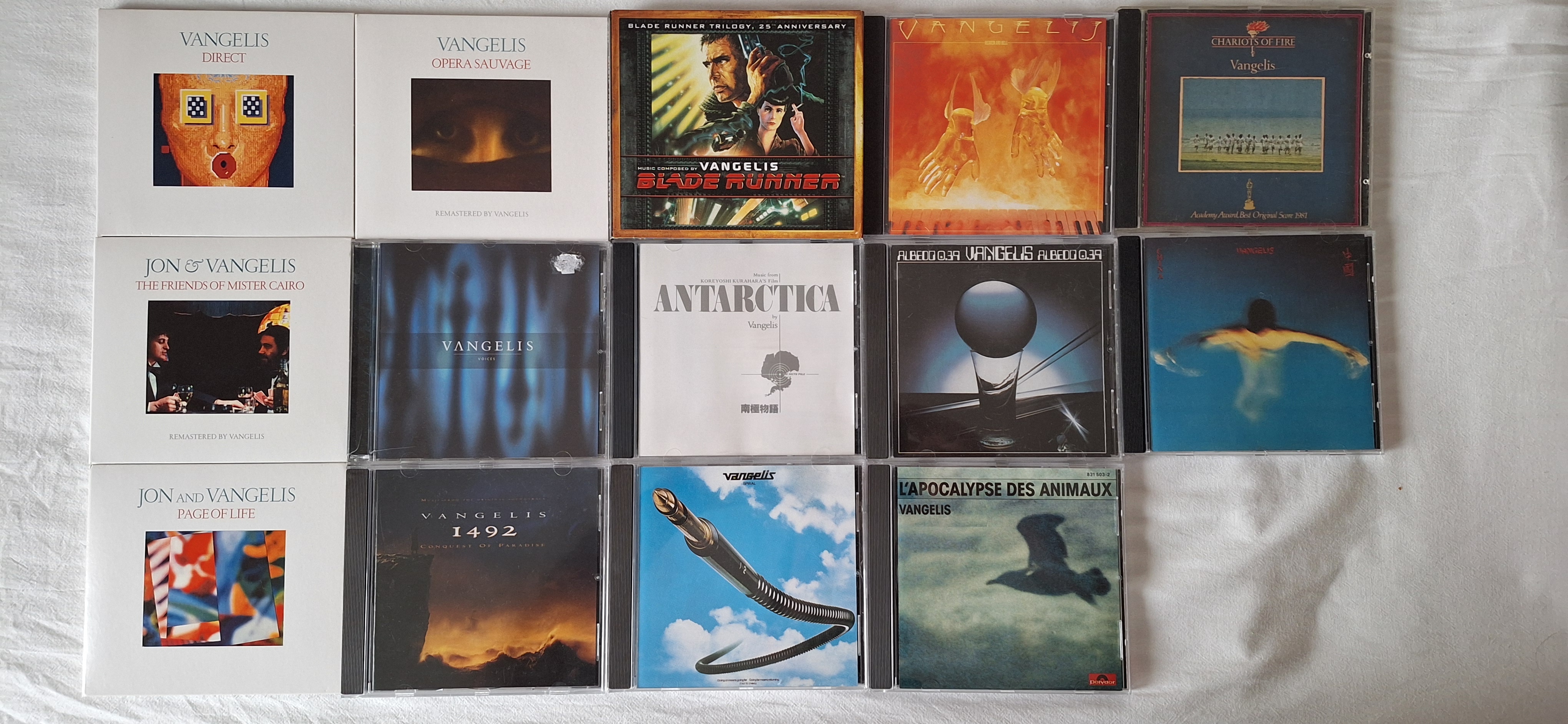
My Vangelis collection
As you can see, I do not have everything by him. I do not like his earliest and latest works that much, but almost everything in between. Unfortunately I could not find everything on CD. For example, I loved “Soil Festivities”, especially since I was a soil engineer during my college years. But not only is it not available on CD (even used), it is also missing from streaming services.
Several times I learned years later that the music I was listening to was actually a movie soundtrack. Chariots of Fire is one of them, as well as Blade Runner. It became one of my favorite movies, and it’s the only movie I have on 4K bluray.
I’m listening to Vangelis right now and expect to listen to a few more of his albums today :-)
Or, on TIDAL: https://listen.tidal.com/album/103208768
Tumbleweed – Review of the week 2025/13
Dear Tumbleweed users and hackers,
The latest snapshot is just hot off the press and ready to consume – It’s just the latest in a series of five snapshots (0320, 0321, 0324, 0325, and 0326) published this week. Unlike last week, this week, most changes were more in the background.
The five snapshots brought you these changes:
- Samba 4.22.0
- Linux kernel 6.13.7 & 6.13.8
- Mesa 25.0.2
- Shadow 4.17.4
- Bind 9.20.7
- Gimp 3.0.2
- Poppler 25.03.0
- Timezone 2025b
From what we’ve seen, either in the staging areas or from announcements on the mailing list, these are the topics being worked on:
- Linux kernel 6.14.0
- GCC 15 as distro compiler, see https://build.opensuse.org/staging_workflows/openSUSE:Factory/staging_projects/openSUSE:Factory:Staging:Gcc7
- CMake 4.0
- Python setuptools 78.0
- LLVM 20: breaks build of Mozilla Firefox
- Removal of pcre(1). Please help with that cleanup, port to PCRE2. See https://lists.opensuse.org/archives/list/factory@lists.opensuse.org/thread/BK3SPPFOM3LI6K5PTXPKZMKMIUIPOEXS/
- More work towards proper display-manager service integration, https://en.opensuse.org/openSUSE:DisplayManagerRework
- The removal of the HPC stack has been proposed. See https://lists.opensuse.org/archives/list/factory@lists.opensuse.org/thread/7VAP572DMVET3CPGOSB2OCOFEQ5CPWJE/
Zypper Adds Experimental Parallel Downloads
A new zypper experimental media backend and support for parallel package downloads have been introduced with the release of libzypp version 17.36.4 and zypper version 1.14.87.
These enhancements, according to an email on the factory mailing list, improve the performance of package management by reducing the time required to fetch packages and metadata.
The update provides two main features: an ability to fetch packages using concurrent connections, and a simplified media backend that improves connection reuse and metadata handling. Both features are currently in an experimental phase and must be manually enabled.
Before the feature is officially enabled by default, parallel package downloading can be enabled by setting an environment variable before executing a zypper operation. This allows multiple packages to be downloaded simultaneously, improving overall speed.
To Enable parallel downloads
env ZYPP_PCK_PRELOAD=1 zypper dup
The number of concurrent downloads can be configured in the zypp.conf file using the following directive:
download.max_concurrent_connections = 5
The default is 5. However, higher values may yield better performance depending on system resources and network conditions.
The new media backend can be enabled with a separate environment variable. The backend eliminates overhead by avoiding metalink fetching and multi-server file splitting. It is optimized for better connection reuse during metadata fetches.
To enable the new media backend
env ZYPP_CURL2=1 zypper ref
While these two features are separate, they are most effective when used together. Using metalink= URLs in .repo files can further improve mirror performance. However, baseurl= remains the preferred setting for production systems due to its trusted key behavior.
The following versions are required to use the new features:
-
libzyppversion 17.36.4 or newer -
zypperversion 1.14.87 or newer
These are available in Tumbleweed and Slowroll. Users can test out these new enhancements on Leap or immutable desktop variants Aeon and Kalpa using Distrobox.
Users of openSUSE-repos on Tumblweed gained mediahandler=curl2 as part of the repository urls as well as preset ZYPP_PCK_PRELOAD=1 via /etc/profile.d/opensuse_repos.sh with the latest openSUSE-repos update.
Leap 15 and 16 users can currently get the zypper update with these enhancements from the development repository.
To install the updated packages, users can switch to a root shell with sudo su - and run zypper in <package-name>.
Unfortunatelly calling sudo zypper does not processs /etc/profile.d/ files and the variable ZYPP_PCK_PRELOAD=1 is unset.
Users who are used to call sudo zypper can create an alias or use pass the variable manually (see the env ZYPP_PCK_PRELOAD=1 example) .
This cumbersome part will be gone once the parallel download feature is mature and gets enabled by default in zypper.
https://download.opensuse.org/repositories/zypp:/Head/
The parallel downloads should allow systems on slow or high-latency connections to make better use of available bandwidth. Metadata refreshes become more efficient with the new backend. These improvements also reduce setup time in CI/CD pipelines and automated environments.
The following are some benchmark results listed in the email on the factory mailing list:
Scenario                                           Time
--------------------------------------------  --------
Download 100MB / ~250 packages
Default (MultiCurl)                               68.7 sec
New Backend (ZYPP_CURL2=1)                        29.6 sec
Parallel Downloads (ZYPP_PCK_PRELOAD=1)           13.1 sec

Download 1.02GB / 407 packages into empty rootfs
Default (MultiCurl)                               281.1 sec
New Backend (ZYPP_CURL2=1)                        208.5 sec
Parallel Downloads (ZYPP_PCK_PRELOAD=1)           119.6 sec
These results show significant improvements in real-world scenarios with total execution time reduced by more than 50 percent in some cases.
Although still experimental, these options are available now for users who wish to enable and test them.
Users who’d like to provide feedback can respond to the mailing list thread or submit a bug report against libzypp bugzilla component.
The more feedback the sooner the feature can be made official.
Tutorial
Watch our tutorial on the openSUSE YouTube channel showing its use and setup.