
Flash on Android 4.4 KitKat
There has been some some talk recently about the Flash situation on Android 4.4. While it’s no secret that Adobe discontinued support for Flash on Android a while back, there are still a lot of folks using it on a daily basis. The Firefox for Android team consistently gets feedback about it, so it didn’t take long to find out that things were amiss on KitKat.
I looked into the problem a few weeks ago in bug 935676, and found that some reserved functions were made virtual, breaking binary compatibility. I initially wanted to find a workaround that involved injecting the missing symbols, but that seems to be a bit of a dead end. I ended up making things work by unpacking the Flash APK with apktool, and modifying libflashplayer.so with a hex editor to replace the references to the missing symbols with something else. The functions in question aren’t actually being called, so changing them to anything that exists works (I think I used pipe). It was necessary to pad each field with null characters to keep the size of the symbol table unchanged. After that I just repacked with apktool, installed, and everything seemed to work.
There is apparently an APK floating around that makes Flash work in other browsers on KitKat, but not Firefox. The above solution should allow someone to make an APK that works everywhere, so give it a shot if you are so inclined. I am not going to publish my own APK because of reasons.

Discussing about the future of openSUSE
This week, the openSUSE team blog is written by Agustin, talking about the proposals the team has done for openSUSE development.
A few months ago the openSUSE Team started a journey that achieved an important milestone last Tuesday, Nov 26th 2013. We have worked on creating a picture of relevant areas of the project in 2016 together with some of the actions we think should be taken during the following months to achieve it. To stop working and raise your head once in a while to analyze what is around you and setting a direction is a very good exercise.
The process we followed
The first step was working on data mining. After many hours of analysis, we identified some clear trends that helped us to establish a solid starting point to begin to work with. Once that phase was over (this is an ongoing process, in fact), we worked for a few weeks/months in trying to define that future picture interviewing several dozens of people. We refined that first attempt through several iterations, including many of those who participated in the original round and others who didn’t. Susanne Oberhauser-Hirschoff was the person who drove that process with Agustin.
We soon realized that discussing high level ideas in a community used to “Get shit done” was going to be easier if we complement them with some more down to earth proposals, specially in technical aspects. We cannot forget that, after all, openSUSE is a technical (and very pragmatic) focused community.
So, in parallel with the already mentioned refinement of the big picture, we started discussing within the team the actions needed to take to make the big picture a reality, the openSUSE development version a.k.a Enhanced/New Factory. After many hours of (sometimes never ending) discussions, we agreed on the ideas we are currently being published, together with the motivations behind them.
Another aspect we tried to bring to the discussion has been a strong dose of realism, trying to ensure that whatever we came up to was compatible with the nature of the project. We have also put focus on making sure that the initial proposal is achievable. So as part of community, we understand very well we cannot succeed alone. We need to work with you. So we just opened with the community a process analogous to what we went through within the team. It might be different in form but similar in principles and goals.
What are we going through these days?
These days the proposals are being discussed in different mailing lists. We are collecting feedback, discussing it, summarizing it, adapting the proposal to it … trying to reach agreements before defining what to do next.
What the proposal looks like?
We divided the proposal in a series of smaller proposals we are publishing in the project mailing list, where the general community topics in openSUSE are discussed, and/or factory ML, where the more technical discussions take place.
-
openSUSE 2016: taking a picture of openSUSE today
This mail summarizes the analysis phase we went through. We have tried to provide a simple picture of openSUSE today so the following articles can be justified to some extend. -
openSUSE 2016 picture
This text summarizes the proposed picture for the end of 2016 (in three years). The goal is to set a direction for openSUSE -
O Factory – Where art Thou?
Stephan Kulow summarizes the Action Plan for the first aspect pointed in the previous picture: the new Development process (Factory).
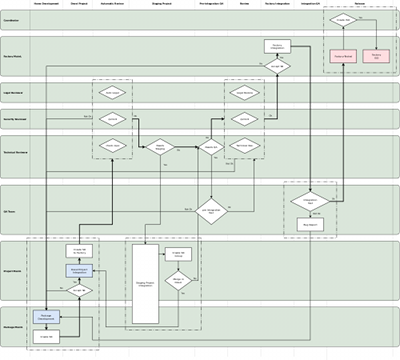
openSUSE Development Workflow
The following articles describe in more detail some relevant (also new) elements pointed in the previous article, since they are new or modify the current process significantly. Some of the articles are in the queue to be published.
-
One of the options for staging projects
In this mail Michal Hrusecky provides some details and examples on how the new staging projects might work in the future. -
openQA in the new proposal
This text, written by Ludwig Nussel, explains the principles that should drive the inclusion of openQA in the Factory development process, according with the proposed workflow. -
Karma for all
This mail, written by Ancor González, summarizes our ideas to include a social feature in the process to help achieving Factory goals. -
Policies, or why it’s good to know how to change things
The new process needs to be adaptive. Antonio Larrosa proposed a way, taking what other projects do in this regard as reference.
There might be an eighth article describing some smaller, still relevant, ideas. After publishing the “content”, we will release one last article providing a information about how to achieve these ideas, describing also our compromise in terms of effort and pointing out the challenges we perceive in the plan from the execution point of view.
We would like to invite you to the debate if you haven’t raised your opinions yet.

Fridrich Štrba, candidate for TDF Board of Directors
The time has come when The Document Foundation will elect a new Board of Directors. As you might already know, there are many good candidates. And since I clearly think I am the best of them, I am writing this to ask you to vote for me. Some of you might know me a bit already, but it is never bad to present myself.
My name is Fridrich Štrba, national of Switzerland and Slovakia, happily married with Susan since more then 12 years and father of 3 wonderful children: Patrick (9), Miriam (6) and Nathanael (3).
My story with LibreOffice started around 2004, with its predecessor, OpenOffice.org. I was just trying to contribute to libwpd which is the horse-power of our WordPerfect import and the OpenOffice.org integration was an interesting thing to contribute to. And since then, my love story with our project went through different stages, but we are still together and sometimes even happy.
I have been mentoring Google Summer of Code students since 2006 and recently I was co-responsible for several import filters for reverse-engineered formats (i.e. Visio, CorelDraw, MS Publisher). I can frankly say that my development and marketing work around the filters are a huge part of the reason why LibreOffice is called the "Swiss army knife of file-formats". We managed quite recently to bootstrap a vibrant community of filter-writers and the the amount of supported file-formats will only grow.
Between 2007 and 2013, I was highly blessed to be working on LO as my day-job, employed by Novell, then SUSE. Since September 2013, I am again a volunteer as many of you. This new-acquired independence is an advantage. I have no monetary interests of any kind in LibreOffice and, if elected, I will take decisions only and only considering the good of the project as such.
The advantage of my election would be that I am part of various native language communities. I speak several languages and can understand the aspirations of the corresponding communities. Besides that, I was part of the Membership Committee from 2010 and the last year, I was its Chairman. In this quality, I was able to push forward my vision of diverse and open and inclusive community that goes beyond personal sympathies or aversions. And this is the vision I desire to pursue if you give me your trust.
And since it is written "You don't have because you don't ask", with this message I ask you to cast your vote for me.
Fridrich Štrba, candidate for TDF Board of Directors
The time has come when The Document Foundation will elect a new Board of Directors. As you might already know, there are many good candidates. And since I clearly think I am the best of them, I am writing this to ask you to vote for me. Some of you might know me a bit already, but it is never bad to present myself.
My name is Fridrich Štrba, national of Switzerland and Slovakia, happily married with Susan since more then 12 years and father of 3 wonderful children: Patrick (9), Miriam (6) and Nathanael (3).
My story with LibreOffice started around 2004, with its predecessor, OpenOffice.org. I was just trying to contribute to libwpd which is the horse-power of our WordPerfect import and the OpenOffice.org integration was an interesting thing to contribute to. And since then, my love story with our project went through different stages, but we are still together and sometimes even happy.
I have been mentoring Google Summer of Code students since 2006 and recently I was co-responsible for several import filters for reverse-engineered formats (i.e. Visio, CorelDraw, MS Publisher). I can frankly say that my development and marketing work around the filters are a huge part of the reason why LibreOffice is called the "Swiss army knife of file-formats". We managed quite recently to bootstrap a vibrant community of filter-writers and the the amount of supported file-formats will only grow.
Between 2007 and 2013, I was highly blessed to be working on LO as my day-job, employed by Novell, then SUSE. Since September 2013, I am again a volunteer as many of you. This new-acquired independence is an advantage. I have no monetary interests of any kind in LibreOffice and, if elected, I will take decisions only and only considering the good of the project as such.
The advantage of my election would be that I am part of various native language communities. I speak several languages and can understand the aspirations of the corresponding communities. Besides that, I was part of the Membership Committee from 2010 and the last year, I was its Chairman. In this quality, I was able to push forward my vision of diverse and open and inclusive community that goes beyond personal sympathies or aversions. And this is the vision I desire to pursue if you give me your trust.
And since it is written "You don't have because you don't ask", with this message I ask you to cast your vote for me.

 Member
 dragotin
openSUSE to Develop
Have you ever wondered why openSUSE is the platform for development? Because it offers all that is needed for professional development, also if development goes beyond the basics.
A nice proof that openSUSE has more than others was posted here by our friend Thomas, a convinced Debian user. He writes about setting up openSUSE in vagrant to be easily able to build (master build) the ownCloud Client for Win32 in it. Very easy and cool stuff. But that can be even easier without vagrant through this link ;-).
Btw, there is an appliance in SUSE Studio to ease experiments with vagrant with openSUSE as base. I haven’t tested yet, experiences?
Updated App Icons

GNOME 3.12 will feature an improved Software experience. Richard has been fearlessly working on making the backend snappy and Software app itself cleaner and more fun.
There are many great improvements to the App pages, where you can learn what the app is about and see it in action. Having a great overview of the apps showed just how many apps don't seem to care about their identities or didn't manage to attract any graphics designer and things aren't all rosy.


We've identified some key apps that are either featured in individual categories or are part of a set that needs a facelift as a group, such as the GNOME games. Number of apps that publish proper appdata is growing, so the todo list probably won't shrink any time soon. If you feel like helping us out, check out the guidelines and get in touch!
openSUSE Election Platform
This is a copy of my openSUSE Election Platform, that I'm putting here with the shameless intention of doing my best to ensure as many people read my thoughts as possible. The original can be found on our official wiki
Introduction and Biography
Hi! I'm Richard Brown, 31 years old, and since last month living in Nürnberg in Germany.
Originally from London, England, I used to joke that I had been steadily moving south and was on my way to becoming French, however it seems once I crossed the Channel I turned left, skipped right past France, and ended up in a land of good Beer and Bratwurst :)
- Email: RBrownCCB at openSUSE.org
- IRC: ilmehtar on irc.freenode.org
- I'm @sysrich on twitter
- My Blog is here
I currently work as a QA Engineer for SUSE, the wonderful Enterprise Linux company that also is the main sponsor of our openSUSE Project.
Previously I worked as a Systems Manager for City College Brighton and Hove, a large UK further education college where we use a lot of openSUSE, SUSE, and other FOSS technologies. I was also the UK Representative on the Advisory Board of the TTP Academic User Group, an usergroup for sysadmins working in Academia that deals with SUSE, Novell, and NetIQ products, with good links to the developers and management teams in these companies and their partners. The TTP is very supportive of both SUSE & the openSUSE Project, and was proud to have a track of sessions during our oSC 12 conference in Prague.
I've used SUSE/openSUSE since 2003, and have found myself getting more involved as time has gone on.
I'm part of the team which maintains GNOME in openSUSE, as well as lead maintainer for the 'Branding' packages in openSUSE, which leads me to work very closely with our great Artwork team. I also am heavily involved in Marketing, as well as the Advocates & Local Coordinators Programmes, where I was involved in implementing many of the changes transforming the former 'Ambassadors' programme into its new structure.
I'm an active Advocate for our project, who regularly attends conferences where I do my best to to both evangelise about our work, but also gather ideas and feedback on how we could improve. My session at oSC 12 "Using openSUSE for Real Work" really helped gather feedback which shaped my efforts to improve our project over the last year. At oSC13 I gave talks about the transformation of the Ambassador programme into the Local Coordinator and Advocates groups, as well as a talk about the work involved in Branding openSUSE. I also led the organisation of openSUSE's presence at the last two FOSDEM conferences.
I'm a keen tester who especially enjoys the crunch in the weeks leading up to releases, frantically testing and packaging patches to try and get bugs big and small squashed out so our releases are as polished as possible. I'm also very interested in Power Management, and have done a lot of work finding ways to optimise Power consumption on Intel laptop chipsets
I spend a lot time in our IRC channels, where I go by the handle ilmehtar (a very obscure Lord of the Rings/JRR Tolkien reference, I'll owe a prize to anyone who figures it out)
I have very broad interests which finds me often getting involved in both the technical and more 'community' aspects of our project.
I'm always keen to help out, try and resolve issues, come up with ideas, and then get my hands dirty trying to implement them.
I'm very happy learning new things and trying to help out in areas outside of my 'comfort zone', such as this year where I was given the opportunity to join the openSUSE Board - and after a year of hard work and interesting challenges, I'm back again hoping for your votes so I can continue the work I started this year.
Issues
Managing Change - In the last few weeks the openSUSE team from SUSE have initiated a number of discussions (1), (2), (3) proposing changes to our projects goals and practical changes to our 'Factory' development distribution. Over these next few weeks and (if I am elected) into the early months of next year I intend to work hard to ensure that the discussions progress well and we, together as a cohesive project, find an exciting way forward.
I do not expect this to be a painless process, and I expect there will be occasions where some people will want things to develop in one direction, while others pull for another. This is precisely the sort of issue the Board is there to deal with, and I'm prepared to put in the work to make sure everyone can contribute to shaping the future of our Project and its Distribution(s).
Improve Working Relationship with the openSUSE Team @ SUSE - The Board have a responsibility to 'Facilitate communication with all areas of the community' - ie. We need to make sure all the Teams that make up our project have strong communication and therefore are able to work effectively with each other.
This is important for every Team in our project, but especially so for the openSUSE Team at SUSE, because not only are they contributing to openSUSE to make it better for themselves as well as everyone else, but as paid employees of our primary sponsor (SUSE) they currently control some aspects of the project the 'wider community' have little or no involvement in. As has been mentioned on our mailing lists, over the last year, the working relationship between the openSUSE Team and the Board has become strained.
I have already begun working on this issue, and if I am elected, I intend to continue to work hard to improve the situation. I think the Board can do a better job of keeping the members of the openSUSE Team informed about the current needs, wants, desires and 'pain points' of our wider openSUSE community, and inversely, I think with improved communication between us, the Board will be in a better position to help the openSUSE Team at SUSE in their communications with the wider openSUSE community. We need to squash the feeling of 'us & them' which has started to creep into that narrative, we're all one Project and one Community, and it's down to the Board to keep it that way.
openSUSE Membership - I think the Project needs to start thinking about changing the way 'openSUSE Membership' works. With our growing maturity as an independent project, it's very important that we have a healthy way of making big decisions which impact the entire Project. I do not think our current system is wholly broken (it's certainly healthy enough for these elections), but I'm concerned about a number of areas, especially the growing number of 'former Members' who maintain full voting rights. If I am elected, I intend to begin the discussions to reform the openSUSE membership, focusing first on a suitable way of 'retiring' openSUSE members who are no longer involved in the project, and after that looking at other issues such as improving the selection/approval process and the 'perks' of becoming an openSUSE member.
Role of the board
Last year, I said that I wanted the board to become more approachable and more prepared to 'step in' and help resolve issues.
While I think we have been broadly successful in achieving this, there is always room for improvement, and I'm hoping will a fully staffed Board we'll be able to build on the improvements we've seen in these last 12 months.
I don't think leadership in a project like ours should be dictatorial. I feel the board should act as 'enablers', 'cheerleaders', 'champions', and troubleshooters. The board's job should be to help you (the community) by proactively identifying where the project is going wrong and help pull people together to steer it in the right direction.
The board should be the primary point of contact for contributors and users to raise issues that cant be addressed elsewhere, which is why our board needs to be active, visible, and accessible. I do not think enough of our community know the Board is there to address their issues, so I think we need to make a big push to advertise our purpose and availability.
The board should also be a source of new ideas and proposals for the community to consider, and should also encourage other contributors to field their own ideas and help keep the great green Geeko rolling forward
Why you should vote for me?
- I've worked hard for you all as a Board member this year, and would like the opportunity to continue to do so.
- SuSE/openSUSE is my first distribution and I've been a loyal user and contributor since 2003. I care a great deal about seeing our project continue and improve.
- I've provided both technical and non-technical contributions to the project, and so have a strong working knowledge both the technical and community aspects of our project.
- While I have my own opinions and will often argue passionately for them, I always listen to and consider the opinion of others, especially when they disagree with me. If I am elected I will continue to champion the desires of the community, not just my own agenda.
- My experience outside of openSUSE, especially as a board member of the TTP, give me skills and knowledge I think will help me here
- I enjoy learning and getting involved in new things, and see working on the board as an opportunity to get help out in parts of the project that I'd probably otherwise not see.
Aims/Goals
If elected I will strive to
- Continue the work I've started over the last year as a Board Member
- Investigate ways to better advertise the work the Board is doing for the project
- Be involved in the recently started discussions about the Future of our project to find a viable plan for our Project going forward, especially one that addresses the needs of both our users desiring stability and a moderate pace of change, and for those whom using the latest and greatest stable versions is more important.
- Listen to the our users and contributors as much as possible, to figure out what you want the Board to be doing
Endorsements
Michal '-miska-' Hrusecky
I know Richard for few years and he always cared a lot about openSUSE. He is active on our channels and whenever he sees some troubles, he steps up and do his best to help the project. Not only technically but also on ''boring'' organization tasks. I can imagine, that being part of the board is a hard work although not that appreciated and visible to the outside. But nevertheless it is important for the project and I believe that Richard will continue to represent us very well. What is also great about Richard as board candidate is that he is not a classical politician - he doesn't do long speeches without content and he prefers to cut to the chase.
tune2fs: to fsck, or not to fsck?
fsck on the root filesystem at boot, and how often, are important ones for administrators. Here's some minimal information to get started:Read more »

Better Docker experience on openSUSE
I don’t know if you are aware of that, but Docker 0.7.0 has been released a couple of days ago.
You can read the full announcement here, but let me talk about the biggest change introduced by this release: storage drivers!
Docker has always used AUFS, a “unionfs-like” file system, to power its containers. Unfortunately AUFS is neither part of the official kernel nor of the openSUSE/SLE one.
In the past I had to build a custom patched kernel to run Docker on openSUSE. That proved to be a real pain both for me and for the end users.
Now with storage drivers Docker can still use AUFS, but can also opt for something different. In our case Docker is going to use thin provisioning, a consolidated technology which is part of the mainstream kernel since quite some time.
Moreover Docker’s community is working on experimental drivers for BTRFS, ZFS, Gluster and Ceph.
What changes now for openSUSE?
Running Docker is incredibly simple now: just use the 1 click install and download it from the ‘home:flavio_castelli:docker’ project.
As I said earlier: no custom kernel is required. You are going to keep the one shipped by the official openSUSE repositories.
Just keep in mind that Docker does some initialization tasks on its very first
execution (it configures thin provisioning). So just wait a little before hitting its
API with the Docker cli tool (you will just get an error because docker.socket
is not found).
The road ahead
Support SLE
Right now Docker works fine on openSUSE 12.3 and 13.1 but not on SLE 11 SP3. During the next days I’m going to look into this issue. I want to have a stable and working package for SLE.
Make it more official
Once the package is proved to be stable enough I’ll submit it for inclusion inside of the Virtualization project on OBS.
So please, checkout Docker package and provide me your feedback!
recoll: indexed file searching that works
grep and find work fine, grep for example was not designed to run searches with multiple search keys, and neither of them use an index, so every search walks the filesystem anew. Another traditional tool, locate, uses an index for speed, but it only knows how to search filenames (and paths), not file contents.Anyway,
recoll appears to be the open-source file indexing and searching tool that I was looking for. Here's how to install it in openSUSE:Read more »