
WebYaST Terminal Plugin
During the SUSE Hackweek Vladislav Lewin (member of the YaST team) has had the nice idea writing a WebYaST plugin which provides a console terminal witch which the user has the opportunity to login on a console on the target machine. He sould be able to start any console based application there ( of course even YaST :-))
So the benefit is to login on a target linux machine from a computer which
- has not to be a unix machine and
- is without any VPN configuration stuff.
Just a simple Web browser is needed to get a login via the Web on another linux machine:
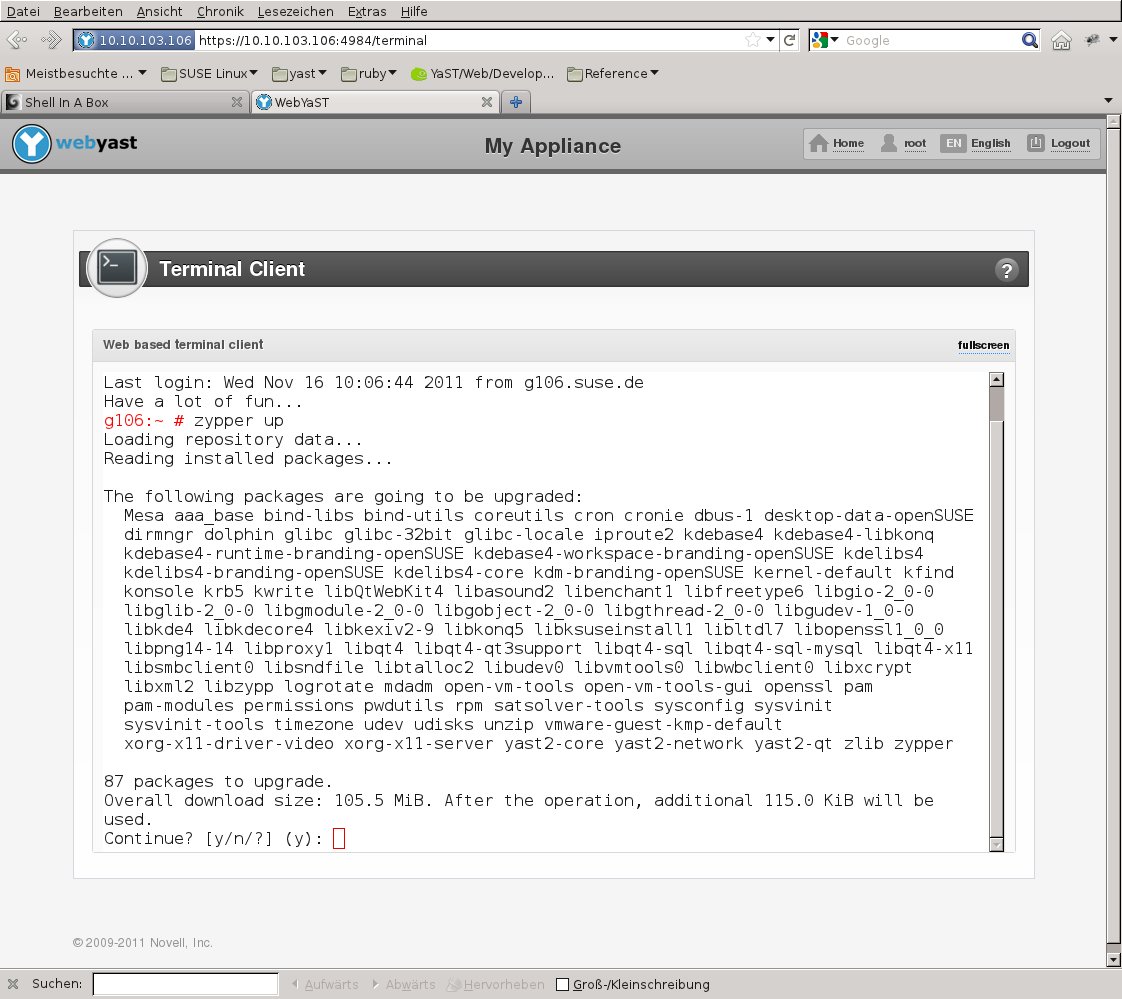
Mainly the architecture is based on shellinabox which we have packaged together with the WebYaST Terminal Plugin. These RPMs are now available for download.
BTW: You will be surprised that the source code of the WebYaST Terminal Plugin has about 100 lines only !!!
How to get:
7th ODF Plugfest in Gouda
For those that might care, your servant will be attending this week the ODF Plugfest #7 in Gouda (Netherlands).
I will have on Friday a short presentation of the best free and open source library for parsing Microsoft Visio Documents. The other exciting thing is that after more then 6 years of common collaboration I will get to meet personally one of my libwpd co-maintainers, Johannes Marcus Maurer also know as "uwog".
What an exciting time before us!!!

Greek openSUSE community, Translation of openSUSE Weekly news in Greek (issue 200)

Hello everyone!
I am very pleased to announce the new issue (200) of openSUSE Weekly News in Greek.
In this issue you will read about:
* Help us spread the word on openSUSE 12.1!
* openSUSE Medical Project searches for new Leadership and other participation
* Linux Journal/Bruce Byfield: Four Hidden Tools in Scribus
* linuxcareer.com/Writing manual pages on Linux
* Jun Auza: How to Convince Your Friends to Use Linux Without Being a Jerk
As well as many interesting news about openSUSE and useful advice, which can make our lives easier.
Enough said though... Read more at: http://own.opensuse.gr, http://el.opensuse.org/Weekly_news or www.os-el.gr
We are always looking forward to receiving your comments as well as suggestions regarding things you would like to read about in our next issue.
The openSUSE Weekly News is being translated in the Greek language from issue #150. You can read older translated issues here: http://el.opensuse.org/Κατηγορία:Weekly_news_issues

 Member
 FunkyPenguin
Running for the openSUSE Board (2011)
shutting down a iomega storcenter
All management is done by web interface and I needed a way to shut it down from a script.
Here is the script.
1 COOKIE_FILE=/tmp/iomega-stor-center-cookie.txt
2 IP=192.168.1.3
3 curl -c $COOKIE_FILE -k --data "login=admin&passwordx=" https://$IP/index.html
4 #curl -b $COOKIE_FILE -k --data "restart=identifyDevice" https://$IP/stg-device.html?t=6
5 curl -b $COOKIE_FILE -k --data "restart=Poweroff" https://$IP/stg-device.html?t=6
6 rm /tmp/iomega-stor-center-cookie.txt

FOSDEM 2012: announcing the devrooms
Just sent out the ack/nack emails for the developer rooms at FOSDEM 2012, the latter part always being pretty tough, but we have to make choices.
On the good side: here is the list of the devrooms for FOSDEM 2012.
Mind you, that list does not include the Distribution Miniconf, which will take place in two rooms during both days and will gather sessions, talks, ideas from many (mostly Linux) distribution projects.

Smartphones - Acquired Necessity
Smartphones - An acquired necessity
I have used a Motorola E398 mobile phone for the last 6 years. For the last one month, I tried using a Samsung Galaxy S2 smartphone. I have concluded that Smartphones are an acquired necessity and is not needed for most of my workflows. I will not buy a smartphone in the near foreseeable future.
Smartphones gives an impeccable improvement for one workflow - Email. If your work involves time-sensitive emailing, a smartphone is a crucial tool. However, if it doesn't, then you are better off buying a good desktop/laptop and a normal mobile phone, imho. A shortlog of things observed in this one month are:
Observations:
- Vibration: Smartphones are too thin and don't have enough vibration, if you are used to thick phones (Not a big problem)
- Poor signal reception: A biiiig problem. In the quest to slim the phone, the signal reception abilities of the phone are heavily hampered. While we were travelling in a car (from Bangalore to Chennai), A cheap Samsung GURU E1081 consistently beat Galaxy S2 in terms of signal strength. Most of the times the Galaxy S2 was showing "Emergency calls only" only. May be a phone from a real phone-maker like Motorola/Nokia may not have this problem. We had to keep the phone upright near the car window too.
- Typing: Even with the on-screen-keyboard, swype etc. the phone is totally unsuitable for typing long text. We can do only twitter/facebook updates and not do any serious document editing or long blogpost(s). The requirement for Siri (Voice Control) is just a natural demand. I wonder how the folks at Google missed this big requirement. They should have introduced this with a big bang and not play catch-up to Siri. Probably they missed it as they were busy tomato-saucing Google+ to all their applications ;-)
- Screen Estate: The screen size is totally unsuitable for reading books, blogs. It is okay for occasional blog reading, but it is straining. There are people who read blogs using their phone primarily. But I am spoiled by my employer who gave me an iPad, a Samsung GalaxyTab and a Thinkpad to play with, for some mobile related coding. I did not prefer the smartphone even once when I had my good old Thinkpad. Tablets and laptops provide far better reading experience and are equally handy. The GalaxyTab can act as a phone too for all your needs.
- Fragile: Smartphones need extreme care. Not ideal for rough use, unless you are using a rugged phone like Motorola Defy+ (which has its own set of problems). A friend once dropped a Google phone from his hands while taking from pant pocket (~3 Feet) and the glass shattered into pieces. I have thrown my E398 numerous times (atleast few dozen times from ~5.6 feet) and nothing has happened except an automatic restart.
- A Patentable Idea: The unlock pattern (of Android) leaves fingerprints and so your phone is not really secure. If you look at the phone, by keeping the screen flat in front of your nose, you can easily detect the unlock pattern finger prints. This may be fixed soon with the advent of touchscreens that do not leave a finger print. I wonder why can't we just authenticate based on the fingerprint in a smartphone !? That may be cool. I should probably patent it, as it seems in mobile phones any stupid thing can be patented. Think: SYSTEM and METHOD for RECORDING and AUTHENTICATION of users to mobile phones via fingerprints, by letting them swipe on either the surface/camera/etc.
- Battery Life: Even after switching off the wireless, due to the rich display, the battery life of all the smartphones is very less. My phone battery did not last more than 3 days. With wireless on and just GMail app running, the battery lasted for just about 1 day. Some of the non-smart phones these days have close to 2 weeks battery life. If battery life is your criteria or travel a lot, you must order a extra battery if you are buying a smartphone.
- Muscle Memory: After laying in my bed for sleep, many times, I have taken my motorola phone, unlocked it, launch the alarm application, set alarm for a specific time, exited the application, locked the phone again. I do all this while keeping my eyes closed. The normal phones with keypad are easily operable in one hand. I can take a call in one hand, while the other hand is balancing my body in a bus moving through the high-traffic streets of India. Contrary to what you hear, smartphones require both hands to be used and is not so easily adaptive for muscle memory. For a basic operation like calling a recently called number, you will take more time in a smartphone than a phone with a dedicated CALL button.
- COST: The single biggest reason why I won't buy a smartphone is Cost. Smartphones from any decent hardware maker are very costly. Personally, with my Indian mentality that takes pride in being cheap, I find it stupid to spend 30,000 INR (600 USD) on a phone which will be valued at 1,000 INR (20 USD) after may be 3 years. This inference is based on the Motorola Razor handset pricing in India. Compare this to a new Samsung GURU phone with color-display, USB charging capacity etc. that costs a mere 1000 INR (20 USD) and has battery life of about 1 week with normal usage. However, there is a big demand for cheap smartphones in markets like India. If and when Nokia releases their cheap smartphones in India, they are sure to repeat their success story in India, just like they did with their Torchlight series phones.
Samsung-specific-observations:
- The default alarm application does not have snooze option. There is no excuse for this.
- Samsung Kies - Ahem :/
Also, it is not available on Linux. Good news is that with the recent versions, the software update can be done within the phone itself without Kies. - The indic support patch is not upstreamed yet. But kudos to Samsung as they are the only Android handset makers who support Indic fonts native as of today, afaik. A few of my Tamil friends bought Samsung phones just for this reason.
- OLED - Amazingly rich screen, especially while displaying black color.
- The front camera in S2 is just a joke. Totally useless for my needs.
Android:
- "Android" brand has a better image than "Linux" in the consumer market. It is not without reasons. There are a lot of positive things about Android. I have not mentioned any of them because you can find them easily.
- However, To be honest, the usability of Android phones is *not* jaw-droppingly-awesome, imho. They are just as normal (good ?) as say Meego UI or GNOME 3. But consumers love them. If enough money is spent on marketing, pigs really can fly. I wish some of the earlier projects like openmoko/maemo/meego had rich companies that were as committed as Google is to Android.
- I hope ChromeOS opens a door for Linux on Desktops, just as how Android made Linux the most dominant operating system on mobiles. That may help PC OEM vendors to think a little instead of their current act of blindly worshipping Microsoft.
- The biggest positive impact of Android imho is: Android made companies which usually don't bother about Linux users (like Evernote) to write applications for Linux.

Every-Packet's Changing... my Keane Parody

Every-Packet's changing and I start to go insane
You're gone from here, soon you will disappear
Fading into tri-colored light
Cause Every-Packet's changing and I don't feel right
Every-Packet's changing and I start to go insane
Every-Packet's changing and I don't feel the same
Ooooh, Every-Packet's changing and I report abends...
gpodder 2 vs 3 in Packman
The gpodder project introduced its new major release 3.0.0 today and, unfortunately, it seems like I didn't pay attention to the complete change announcement, as I just bumped the gpodder package in Packman to 3.0.0 (from 2.18).
Now, gpodder 3.0.0 does introduce a lot of changes, notably in the UI but also regarding its database format and requires migrating the database from 2 to 3. It doesn't seem to have all of the features of 2.20 either. So what happens is that when you just upgrade the gpodder package, you end up with something you don't necessarily want to use. At least as of now.
Upstream will still maintain the 2.x branch for quite a while, and gradually port features from 2 to 3 and, hence, it actually makes sense to do it differently. What I have done now is to revert the gpodder package at Packman to the 2.xx branch (and upgrade to 2.20 at the same time).
If you want to use gpodder 3.0.0, then just install the package gpodder3 instead: zypper or YaST2 will tell you to remove gpodder in order to do so, as you cannot have both installed at the same time (they have file conflicts).
Now, if, in between those changes, you already did the upgrade, do one of the following:
-
if you want to keep using 3.x: then run
rpm -e gpodder && zypper install gpodder3(as root) -
if you want to go back to 2.x: then run
rpm -e gpodder && zypper install gpodder(as root)
On a side note, please wait a couple of hours (after this blog post) before doing so, as our main repository server is only synced to some mirrors after 4 hours (after 1 hour for most though).
Sorry for the inconvenience.
Network Installation of openSUSE
What is the Motivation for this setup?
1) Local Area Networks (LANs) are ubiquitous... even in homes where, chances are, you have a modem to the Internet and next to it is a wireless/ethernet router for multiple wifi and ethernet capable devices (PCs, Laptops, Smartphones, Tablets etc) to connect and surf the web.
2) If you are a Linux/OSS enthusiast, you would be constantly downloading the latest ISOs from the web, burning them onto a DVDs and installing them on physical/virtual machines. This is time/resource intensive... time to download, time to burn a DVD, time/money spent on blank DVDs etc. Of course, if you install openSUSE on virtual machines, you avoid the DVD part of the process but you would still have lots of ISOs on your filesystem... if you have a classroom of 20 machines... well, you get the idea.
3) Almost all PCs and Laptops these days have an ethernet port and are capable of booting up from the network (ie PXE-boot). This means you physically power them on, tell it to go into PXE-boot mode and it will go onto the network and seek out an installation server to download and install the openSUSE binaries.
4) This is an efficient way to install openSUSE onto both physical and virtual machines in a LAN environment where there is only one central place for your software binaries.
Pre-requisites:
i) You have a LAN environment connecting a few machines via the network cable. Although booting from wifi is possible but it is out of the scope of this discussion.
ii) You have a physical machine (preferably*) with openSUSE installed and this will be the designated network installation server.
*It is possible to set this up on a virtual machine but you need to ensure it is connected to the physical LAN in a Bridge networking mode and not the usual NAT networking mode for typical virtual machines.
3 Simple^ Steps to Success:
^Simple - it will become more simple as you do this more frequently.
Step 1: Install and configure Apache2 webserver to host and distribute openSUSE binaries.
Please refer to my other blog entry on this subject - Using Apache2 to deploy & maintain SUSE
Step 2: Install and configure tftpboot server to enable initial boot of target machines over the network.
Please refer to my other blog entry on this subject - Install and configure TFTP server for PXE boot environment
Step 3: Install and configure dhcpd server to provide an IP address for target machines and redirect them to the tftpboot server.
Please refer to my other blog entry on this subject - Install and configure DHCP server
Step 4: On the target physical machines, on boot and depending on the BIOS, activate the boot from LAN option and watch it get an IP address from the Installation Server (via Step 3), followed by connecting to the TFTP server and presenting an installation menu (via Step 2). Enter the choice of OS to install and your installation will commence over the LAN (via Step 1).
Additional points of note:
a) Everything discussed here applies to SLES, SLED and openSUSE. The steps documented are based on openSUSE 11.x and should work on older versions and even the enterprise editions of SUSE.
b) Software installation (apache2, tftpboot, syslinux, dhcpd etc) assumes your SLE or openSUSE server have access to their respective binaries, either in DVD (also ISO) or software repository on the web.
References:
- openSUSE.org - SDB:PXE boot installation
- Novell Cool Solutions - Setting Up a SUSE PXE Installation Server in an Existing NetWare Environment
- Novell Article - Setting up a PXE Boot Server
Enjoy!