
 knocte
Calling hackers who care about Android+Banshee
Unfortunately my Android phone broke completely (don't ask me the details...) so I cannot work on the patch anymore. Anyone wants to continue the work?
If yes, go ahead and ask me anything you want, I'm usually in irc://irc.gnome.org/banshee with the "knocte" nickname, or you could also ask the question on the channel if I'm not there, there are usually awesome contributors there that will try to help. If you haven't ever coded for banshee, check the Contributing page first.
BTW, kudos to all the people involved in the Banshee v.2.0 release!

Gnome 3 Launch Party MadLab Manchester April 10th 2011

Feedback from MadLab Gnome3 Launch, a talk was given by a Gnome Developer on the latest and greatest features of gnome3, however it was also mentioned that it only works on Intel 3D graphics cards at the moment, due to the closed source nature of the NVidia drivers as well as the ATI events these cards are not supported.

On a more general note the attendees were general linux and FreeBSD Users one user was from ArchLinux, 2 users were from Ubuntu (although one - the presenter was disgruntled that as of ubuntu 11.04 Unity is default, gnome 2.x as backup for users not happy with unity and from ubuntu 11.10 gnome fallback will be dropped completely. Other users represented Debian, Linux Format Magazine and Manchester Linux User Group.
I gave out old 11.3 Promo DVD's and I had and introduced the concept of the Retail Boxes. Comment was made that Fedora and openSUSE only exist to serve Redhat and SLED - open source distributions which exist to serve as beta software for their enterprise cousins.
I argued that openSUSE was more than just a launch platform for enterprise systems, and whilst I cannot argue for Fedora I would doubt they would accept that claim also. I stated that through the retail boxes my aim was to get openSUSE available in high street computer shops as well as online.
Discussion was made that Microsoft pressurize retailers to include Windows on their computers, that a real opportunity was last after the release of Windows Vista to target disgruntled windows users through NetBooks.
Comments were also made that HP have announced they will be shipping WebOS PC's where all documents are stored online and all applications are launched online so no operating system will be required. Is the age of the OS (Windows or Linux) dead regardless so there is little or no point in launching any kind of legal claim against Microsoft for shipping oem windows.
Many users were dissatisfied with both Gnome 3 and Unity I suggested that instead of promoting Ubuntu for those new to Linux they should now seriously consider promoting openSUSE instead. Those interested took Live DVD's and promised to take a look.
It was argued also that Novell and RedHat provide more developers into Gnome than Canonical have ever done. Ubuntu may have brought a lot of positives into Gnome in terms of desktop users but this is likely to change as Ubuntu switches to Unity.
Further from a developers point of view Canonical's submission agreement is quite vague in its wording, and if followed to the letter could result in Canonical using code in corporate versions, without the permission of the developer and all rights being transferred to Canonical's ownership by default.

WTF reduction
What it basically does is a bit of what I call WTF reduction: you will no longer get a confusing message like "For property 'Foo' expected 'Bar' of type 'Bar' but got 'Bar' of type 'Bar'" when unit testing your entities' properties.
AFAIK the next release will include this, and will be the first one to link to the new version of NHibernate, 3.0, which I've found that works very well.

Optimizing Merge Sort
A number of years ago I wrote about the Merge Sort algorithm. One of the advantages of Merge Sort is that it is a stable sort, meaning that elements that compare as being equal remain in their original order after being sorted.
Well, today I had need of employing a stable sorting routine for sorting elements by a ZIndex in Moonlight. Up until today, we had been using qsort() which, while not guaranteed to be a stable sort on any platform, happens to be implemented in glibc as a stable sort except in out-of-memory conditions. Since we'd like Moonlight to work on platforms other than Linux+glibc (such as Mac OS or BSD), it has become important enough to implement properly.
To start, I dusted off my generic MergeSort() implementation from years ago when I was writing articles about various sorting algorithms. This is what I had to start with:
#define MID(lo, hi) (lo + ((hi - lo) >> 1))

static void
msort (void *array, void *buf, size_t low, size_t high, size_t size,
       int (* compare) (const void *, const void *))
{
    register char *lo, *hi, *b;
    char *al, *am, *ah;
    size_t mid;

    mid = MID (low, high);

    if (mid + 1 < high)
        msort (array, buf, mid + 1, high, size, compare);

    if (mid > low)
        msort (array, buf, low, mid, size, compare);

    ah = ((char *) array) + ((high + 1) * size);
    am = ((char *) array) + ((mid + 1) * size);
    al = ((char *) array) + (low * size);

    b = (char *) buf;
    lo = al;
    hi = am;

    while (lo < am && hi < ah) {
        if (compare (lo, hi) <= 0) {
            memcpy (b, lo, size);
            lo += size;
        } else {
            memcpy (b, hi, size);
            hi += size;
        }

        b += size;
    }

    if (lo < am)
        memcpy (b, lo, am - lo);
    else if (hi < ah)
        memcpy (b, hi, (ah + size) - hi);

    memcpy (al, buf, ah - al);
}

int
MergeSort (void *base, size_t nmemb, size_t size,
           int (* compare) (const void *, const void *))
{
    void *tmp;

    if (nmemb < 2)
        return 0;

    if (!(tmp = malloc (nmemb * size))) {
        errno = ENOMEM;
        return -1;
    }

    msort (base, tmp, 0, nmemb - 1, size, compare);

    free (tmp);

    return 0;
}
Since performance is very important, I clocked this implementation against qsort() and got the following results on my Intel Core2 Quad Q6600 2.4 GHz machine using arrays of 10 million ints:
- Randomized input: 14.13s vs qsort()'s 6.77s
- Sorted input: 4.41s vs qsort()'s 1.54s
- Reversed input: 4.26s vs qsort()'s 1.90s
Clearly the above MergeSort() implementation did not fare well against glibc's qsort() on my system, so it was time to look at what I could do to improve the performance.
The most obvious optimization I could see was to try and batch my memcpy() calls. In other words, instead of calling memcpy() to copy each and every element into our temporary buffer, it'd be more efficient to copy blocks of elements at a time:
static void
msort (void *array, void *buf, size_t low, size_t high, size_t size,
       int (* compare) (const void *, const void *))
{
    char *al, *am, *ah, *ls, *hs, *lo, *hi, *b;
    size_t mid;

    mid = MID (low, high);

    if (mid + 1 < high)
        msort (array, buf, mid + 1, high, size, compare);

    if (mid > low)
        msort (array, buf, low, mid, size, compare);

    ah = ((char *) array) + ((high + 1) * size);
    am = ((char *) array) + ((mid + 1) * size);
    al = ((char *) array) + (low * size);

    b = (char *) buf;
    lo = al;
    hi = am;

    do {
        ls = lo;
        hs = hi;

        if (lo > al || hi > am) {
            /* our last loop already compared lo & hi and found lo <= hi */
            lo += size;
        }

        while (lo < am && compare (lo, hi) <= 0)
            lo += size;

        if (lo > ls) {
            memcpy (b, ls, lo - ls);
            b += (lo - ls);
        }

        if (lo < am) {
            /* our last compare tells us hi < lo */
            hi += size;

            while (hi < ah && compare (hi, lo) < 0)
                hi += size;

            memcpy (b, hs, hi - hs);
            b += (hi - hs);
        }
    } while (lo < am && hi < ah);

    if (lo < am)
        memcpy (b, lo, am - lo);
    else if (hi < ah)
        memcpy (b, hi, ah - hi);

    memcpy (al, buf, ah - al);
}
The results were promising. For the exact same inputs (including the exact same random array), we now get:
- Randomized input: 10.45s
- Sorted input: 2.08s
- Reversed input: 2.03s
The only other way that we can reduce the number of memcpy() calls we make is to avoid copying leading and trailing elements into our temporary buffer if it's not necessary to merge them. Here's the solution I came up with:
static void
msort (void *array, void *buf, size_t low, size_t high, size_t size,
       int (* compare) (const void *, const void *))
{
    char *a1, *al, *am, *ah, *ls, *hs, *lo, *hi, *b;
    size_t copied = 0;
    size_t mid;

    mid = MID (low, high);

    if (mid + 1 < high)
        msort (array, buf, mid + 1, high, size, compare);

    if (mid > low)
        msort (array, buf, low, mid, size, compare);

    ah = ((char *) array) + ((high + 1) * size);
    am = ((char *) array) + ((mid + 1) * size);
    a1 = al = ((char *) array) + (low * size);

    b = (char *) buf;
    lo = al;
    hi = am;

    do {
        ls = lo;
        hs = hi;

        if (lo > al || hi > am) {
            /* our last loop already compared lo & hi and found lo <= hi */
            lo += size;
        }

        while (lo < am && compare (lo, hi) <= 0)
            lo += size;

        if (lo < am) {
            if (copied == 0) {
                /* avoid copying the leading items */
                a1 = lo;
                ls = lo;
            }

            /* our last compare tells us hi < lo */
            hi += size;

            while (hi < ah && compare (hi, lo) < 0)
                hi += size;

            if (lo > ls) {
                memcpy (b, ls, lo - ls);
                copied += (lo - ls);
                b += (lo - ls);
            }

            memcpy (b, hs, hi - hs);
            copied += (hi - hs);
            b += (hi - hs);
        } else if (copied) {
            memcpy (b, ls, lo - ls);
            copied += (lo - ls);
            b += (lo - ls);

            /* copy everything we needed to re-order back into array */
            memcpy (a1, buf, copied);
            return;
        } else {
            /* everything already in order */
            return;
        }
    } while (hi < ah);

    if (lo < am) {
        memcpy (b, lo, am - lo);
        copied += (am - lo);
    }

    memcpy (a1, buf, copied);
}
Once again, reducing the amount of copying paid off:
- Randomized input: 9.80s
- Sorted input: 0.95s
- Reversed input: 2.05s
Update 2011-05-18: One final optimization that can be tried is pre-calculating the optimum way to copy elements between buffers. This calculation, while not terribly expensive itself, adds up with every call to memcpy(). Let's start off by writing some handy macros:
#define COPYBY(TYPE, a, b, n) {         \
    long __n = (n) / sizeof (TYPE);     \
    register TYPE *__a = (TYPE *) (a);  \
    register TYPE *__b = (TYPE *) (b);  \
                                        \
    do {                                \
        *__a++ = *__b++;                \
    } while (--__n > 0);                \
}

#define MEMCOPY(dest, src, n) {                 \
    switch (copy_mode) {                        \
    case 1: COPYBY (long, dest, src, n); break; \
    case 2: COPYBY (int, dest, src, n); break;  \
    default: memcpy (dest, src, n);             \
    }                                           \
}
Now that these handy macros are written, we can plug them into our Merge Sort implementation:
static void
msort (void *array, void *buf, size_t low, size_t high, size_t size,
       int copy_mode, int (* compare) (const void *, const void *))
{
    char *a1, *al, *am, *ah, *ls, *hs, *lo, *hi, *b;
    size_t copied = 0;
    size_t mid;

    mid = MID (low, high);

    if (mid + 1 < high)
        msort (array, buf, mid + 1, high, size, compare);

    if (mid > low)
        msort (array, buf, low, mid, size, compare);

    ah = ((char *) array) + ((high + 1) * size);
    am = ((char *) array) + ((mid + 1) * size);
    a1 = al = ((char *) array) + (low * size);

    b = (char *) buf;
    lo = al;
    hi = am;

    do {
        ls = lo;
        hs = hi;

        if (lo > al || hi > am) {
            /* our last loop already compared lo & hi and found lo <= hi */
            lo += size;
        }

        while (lo < am && compare (lo, hi) <= 0)
            lo += size;

        if (lo < am) {
            if (copied == 0) {
                /* avoid copying the leading items */
                a1 = lo;
                ls = lo;
            }

            /* our last compare tells us hi < lo */
            hi += size;

            while (hi < ah && compare (hi, lo) < 0)
                hi += size;

            if (lo > ls) {
                MEMCOPY (b, ls, lo - ls);
                copied += (lo - ls);
                b += (lo - ls);
            }

            MEMCOPY (b, hs, hi - hs);
            copied += (hi - hs);
            b += (hi - hs);
        } else if (copied) {
            MEMCOPY (b, ls, lo - ls);
            copied += (lo - ls);
            b += (lo - ls);

            /* copy everything we needed to re-order back into array */
            MEMCOPY (a1, buf, copied);
            return;
        } else {
            /* everything already in order */
            return;
        }
    } while (hi < ah);

    if (lo < am) {
        MEMCOPY (b, lo, am - lo);
        copied += (am - lo);
    }

    MEMCOPY (a1, buf, copied);
}

int
MergeSort (void *base, size_t nmemb, size_t size,
           int (* compare) (const void *, const void *))
{
    int copy_mode;
    void *tmp;

    if (nmemb < 2)
        return 0;

    if (!(tmp = malloc (nmemb * size))) {
        errno = ENOMEM;
        return -1;
    }

    if ((((char *) base) - ((char *) 0)) % sizeof (long) == 0 && (size % sizeof (long)) == 0)
        copy_mode = 1;
    else if ((((char *) base) - ((char *) 0)) % sizeof (int) == 0 && (size % sizeof (int)) == 0)
        copy_mode = 2;
    else
        copy_mode = 0;

    msort (base, tmp, 0, nmemb - 1, size, copy_mode, compare);

    free (tmp);

    return 0;
}
This handy trick seems to have worked out rather well:
- Randomized input: 7.79s
- Sorted input: 0.99s
- Reversed input: 1.69s
At this point, I can't think of any other obvious optimizations so I'm going to call it a day.
For a recap, here are the results of all 4 implementations compared side-by-side with the results from qsort():
| qsort() | msort() v1 | msort() v2 | msort() v3 | msort() v4 | |
| random: | 6.77 | 14.13 | 10.45 | 9.80 | 7.79 |
| sorted: | 1.54 | 4.41 | 2.08 | 0.95 | 0.99 |
| reversed: | 1.90 | 4.26 | 2.03 | 2.05 | 1.69 |
New era GNOME 3.0
Looking forward to contribute to 3.x release cycles and i hope i'll be here for GNOME 4.0. Special thanks to everyone that made GNOME 3.0 possible.
See you soon :)

 Member
GNOME3 Live image 1.0.0 released - It is about time

just in time for GNOME 3.0 release, I'm please to announce GNOME 3 Live Image version 1.0.0 release.
As you might expect, this release is built with GNOME 3.0.0. Other features, compared to latest image release :
- radeon KMS should be fixed (it was preventing GNOME Shell to start since version 0.3.1)
- speech-dispatcher is used for speech synthesis (ie Orca)
- tracker is installed on the image
- more fonts are installed by default
As always, you can download the image from http://gnome3.org/tryit.html
For openSUSE 11.4 users, we will soon make a stable repository available with GNOME 3.0, watch this space for more info ;)

As a side note, I'd like to thanks my employer (Novell) and my managers who allowed me to work on GNOME 3 for weeks fulltime.
Enjoy.

Banshee 2.0 is here!
We are thrilled to announce the release of Banshee 2.0! It's the culmination of six months' work by 36 developers and dozens of translators, documenters, bug reporters, and testers. It is a stable release, the successor to Banshee 1.8.
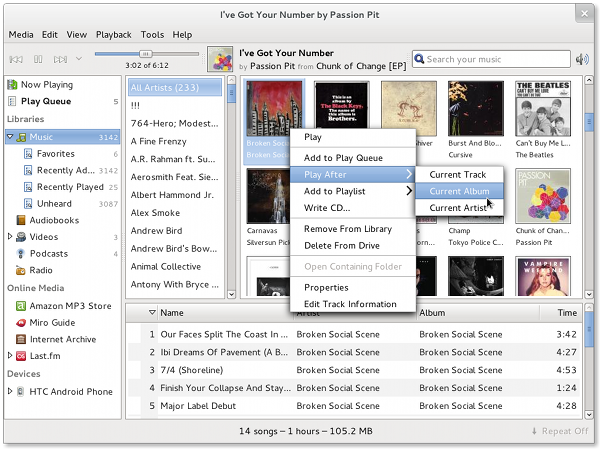
New Features:
- Artist/Album Browser Track Actions
- Play After Queue Options
- Sleeker UI, Less Wasted Space
- Video Subtitle Support
- Lots of new devices supported
- Amazon Cloud Player download support
- Hundreds (277, to be exact) of bugs fixed, and dozens more minor enhancements!
View the release notes for much more information, or head straight to the download page.
The Banshee community has come a long way in the last six months.
- We now support Windows in addition to Linux and OS X. Our Windows installer has been downloaded by 12,729 unique IPs.
- We are donating $1,200 USD per month to the GNOME Foundation — that's over $15,000 annually, or 5% of GNOME's 2009 budget.
- And Ubuntu decided to make us their default music player, joining the ranks of openSUSE and Foresight Linux.
Congratulations and many thanks to everybody who made all this possible! If you want to learn more about Banshee, how you can contribute, get in touch, get help, etc, head over to our website.

Versionitis
The voting on how to do the versioning is over and the “old school” has won by 55 per cent (of 98 participants). Thanks to all that participated in the two votes and the discussion around the topic.
As Coolo said in on the project list, we’d like to make a small change to the numbering:
We will not have a .0 release but only .1, .2, .3 release. Since we have releases in three months, the November
release is always the .1 release, the July release the .2 and the March release the .3.
So, the plan is that the next release will be called openSUSE 12.1 and launched on the 10th of November, 2011! Two years later – on the 14th of November, 2013 – we will then have the openSUSE 13.1 release.
So, the next four releases are called:
- November 2011: openSUSE 12.1
- July 2012: openSUSE 12.2
- March 2013: openSUSE 12.3
- November 2013: openSUSE 13.1
Detailed results for logged-in openSUSE members are available at the connect poll page and I have reproduced them here as well:
- A: “old school”: Like currently but only counting the right number until 3:
55% (54 votes) - B: “Fedora style”: Just integers:
29 % (28 votes) - C: “Ubuntu style”: YY.MM:
16 % (16 votes)
This is also consistent with the results of the first public voting.
Note that openSUSE does not have a major and minor numbering, even if it seems so. There is right now no difference in any way between what we would do for openSUSE 11.4 or 12.0 or 12.1 – and no sense to speak about openSUSE 11 or openSUSE 11 family. We also had in the past no process on how to name the next release (when to increase which parts of the number).
I think this new versioning is still consistent with the old one but also an improvement since it’s now clear that we change the first digit every two year. The first poll showed that half of our users prefer a date based versioning and the other a consecutive numbering. So, depending on your point of view, you can see this as a mixture of both or as consecutive numbering 
So, time now to make openSUSE 12.1 a great release!

Welcome
My name is Priyanka. I like to code, and adore PHP, Ruby-on-Rails, C and C++. In the past couple of weeks, stemmed by the urge to learn, I have been grasping a lot of new things.
Apart from having worked on PHP and RoR for college activities, I ventured into the territory of NoSQL databases. I like MongoDB in this respect. One of my pet-projects is 'Ask' which is a scalable Q&A application. It is under GNU GPL, and you can have a peep at http://www.github.com/priyanka-m/ask . I am in the initial stages, but you are most welcome to clone it and send a pull request my way.
Looking forward to an awesome summer.
Happy Hacking.
26 Sales, Gnome 3, Lets Party!!
Well what can I say? 4 sales in on calendar week, and 2 sales to kick start April and this ain't no fool!!
Friday was an amazing day for Bolton Linux, 2 sales back to back took our sales to 4 for the week for the first time, all be it 2 on Wednesday and Two on Friday, it shows there is a market, and that it is growing.
To celebrate the launch of Gnome 3.0 (three point zero) Free Software UK are throwing a party in Manchester Next Sunday 10th April from 2pm till 5pm Bolton Linux will be giving a presentation on Gnome, Novel and openSUSE.
We would welcome everybody to join us.
This does mean that however, we will not be attending Sheffield market this month. Instead we will arrange for PC Centre North West to carry some stock on our behalf.
But I am sure you will all agree a party is better than hard slog at a market :)