
 Member
 fcrozat
GNOME 3 Live image 1.2.0 released / GNOME 3.0.1 for openSUSE 11.4
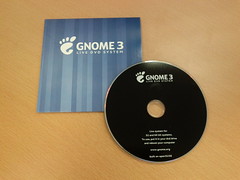
two news for this week-end :
- GNOME 3.0.1 is now available for openSUSE 11.4, in GNOME:STABLE:3.0 repository. See http://en.opensuse.org/openSUSE:GNOME_3.0 on how to use this repository.
- Live image has been regenerated to use GNOME 3.0.1. It is available at http://www.gnome.org/getting-gnome/ (version 1.2.0)
Enjoy !

subversion with libserf
I packaged subversion to built against libserf in addition to neon. This adds a second repository access module to handle http and https schemes with potential improvements. To enable, install the packages from my home repository See updated package location.
To enable, adjust your ~/.subversion/servers file:
[global]

http-library = serf
Beyond this, the package tracks the package from devel:tools:scm:svn.

Tokamak 5: The Pancake Sprint
Flat things are good. I'm at Tokamak 5 in Nijmegen, the KDE sprint where we plough a deep furrow into the future of the Free Desktop and sow KDE seeds that will grow into exciting, novel interfaces and make the stuff we already have even faster and more reliable.
So what about the flat things I mentioned? We've just guzzled our way through a stack of pancakes of geological proportions, produced for us by pancake-flipper and KDE allrounder par excellence Adriaan de Groot. Other good flat things are tablets (I won't call them 'tablet computers' in case I sound old fashioned), which are in evidence here in a variety of makes and models. We're working on several things that will make KDE on tablets as easy and fun to consume as Adriaan's pancakes.
I'm here for a few days to make KConfigXT, KDE's proven automatic configuration persistence layer, work with user interfaces programmed in Qt Quick, and to support the Plasma Active work going on in the openSUSE Build Service with my geeko skills.

GNOME 3 Live image version 1.1.0 released

In the past week, we have been working on both GNOME:STABLE:3.0 repository and on creating a GNOME 3 Promo DVD, based on this live image, but with more content on it (LibreOffice, Banshee 2.0, etc..). Because of this, image size has increased a bit (950MB)
Good news too, we fixed KMS issues with some Radeon cards people reported when using live image (problem was fixed once the image was installed).
This new image (1.1.0) is now based on GNOME:STABLE:3.0 repository and contains all security and bugfix updates for openSUSE 11.4.
To download the image, go to http://www.gnome.org/getting-gnome/
Enjoy !

openSUSE Conference 2011, first program commitee meeting
I'm part of this year's openSUSE Conference program committee, in order to bring in some of my experience with organizing the awesome FOSDEM conference ;)
So we had our first program committee meeting today, and the summary is available on the wiki, on the forums and the opensuse-project mailing-list.
GNOME 3.0 available for openSUSE 11.4

openSUSE GNOME team has been busy polishing GNOME 3.0 packages for openSUSE 11.4 but here they are, for your pleasure
Everything is explained at : http://en.opensuse.org/openSUSE:GNOME_3.0
including :
- how to install GNOME 3 using 1-click install from your favorite Web browser,
- how to switch from my previous repository (home:fcrozat:gnome3, which will be soon phased out) to the new repository. This is important to continue receiving updates, for instance, if you installed live image on your system.
A new live image will be available shortly, based on this new repository (but this will be for another blog post).
Enjoy !
Development and build environments: schroot on openSUSE -- part 2
Schroot is a "chroot manager" - it allows configuring chroots so that users on the system can run shells and processes in them, and it takes care of all the setup/tear down I described at the end of my previous post. It is a part of the Debian buildtools, for building Debian packages in a safe and repeatable environment, just like openSUSE uses build.
Advantages of using schroot to setup development environments
Vs Full Virtualization:
- low hardware requirements
- easy network setup (just copy /etc/resolv.conf into the chroot)
- can run X apps directly into running host X display
- easy to share - host always has access to all guest files
- can just run out of a directory
- can easily setup multiple environments
- can run out of disk images or actual devices
- takes care of all the setup work
- manages sessions
- good cleanup of any leftover processes and mounts on exit
- No real process isolation - no difference between a process inside the chroot and outside the chroot. Even 'ps' shows processes both inside and outside the chroot (/proc is shared)
- No real security - trivial for a malicious program to break out of a chroot, full host hardware access by mounting all of /dev (unless you spend the time to only allow through specific devices)
- OS is never actually booted (no init) or shutdown, just specific processes run, so harder to run daemons
First step was packaging schroot, no problem there, except that it doesn't seem to exist anywhere except in the Debian package system. I just grabbed the source from their source dpkg. I found that flichtenheld also had schroot packaged in his home project on OBS, so I grabbed some patches that looked useful (thanks!). The package is currently in my home project, it's been SR'ed to devel:tools, but is also waiting on a security review (since it runs setuid)
Next was configuring it. Read the schroot manpages, they are quite complete. schroot comes with three chroot types: default, desktop, and minimal. Since I wanted to run X apps, I used the desktop type, with a few modifications. All you have to do is create a configuration file in /etc/schroot/chroot.d/. For example, here's my development environment.
[devel]
type=directory
description=Development 11.4 installation
groups=wheel
root-groups=wheel
script-config=desktop/config
directory=/home/chroot
Note that I've allowed anyone in the "wheel" group (just me atm) to use this chroot, as a user or as root.
Then I setup the directory /home/chroot. Zypper has a very nice feature that allows bootstrapping openSUSE installs in situations like this: the "-R, --root" option where zypper behaves as if that is the root directory.
#first add a repository - I had my 11.4 dvd handy so I decided to save some bandwidth
sudo zypper -R /home/chroot ar dvd:///
#then install needed packages. base or minimal_base pattern is a good idea. sw_management installs zypper
sudo zypper -R /home/chroot in -t pattern base sw_management
Now you can chroot in with
schroot -c devel
A nice chroot is all set up for you, you can do your work, and when you leave it's all cleaned up. I was quickly able to run X apps, screen, and all my development tools - so far I've been able to do everything I need to. Excellent!
Schroot also comes with some pretty cool support for LVM and brtfs-based chroots - it can automatically create temporary sessions based off a "source chroot", which I thought was pretty cool and might use that in the future.
schroot is quite an extensible program; for example, it runs the scripts it finds in /etc/schroot/setup.d/ to create the chroots - you can easily add to this. I added tweaks to change the bash prompt so I know I'm in a chroot, allow ssh-agent access from the chroot, setup X11 authorizations properly to run X apps, and allow 'screen' usage.
If you want dbus system bus to work in your chroot, add to /etc/schroot/desktop/fstab
/var/run/dbus /var/run/dbus none rw,bind 0 0I also commented out /home since I didn't want my home dir shared into the chroot.
In /etc/schroot/desktop/config, I added these lines to give some config values to my custom script:
#Environment variables and values to copy over
ENVVARS="DISPLAY=:0"

#Display to extract authorization from
DISPLAY_AUTH=":0"
And I created the file below that is run every time a chroot is setup by schroot. Note it runs as root, outside the chroot. Anything that needs to be setup inside the chroot can be done via for example /etc/bash.bashrc.local, as I do for setting the prompt below. The variables used are all documented in the schroot man pages.
/etc/schroot/setup.d/75setupsuse contents:
#!/bin/sh
# Copyright © 2011 Tejas Guruswamy <tejas.guruswamy@opensuse.org>
#
# schroot is free software: you can redistribute it and/or modify it
# under the terms of the GNU General Public License as published by
# the Free Software Foundation, either version 3 of the License, or
# (at your option) any later version.
#
# schroot is distributed in the hope that it will be useful, but
# WITHOUT ANY WARRANTY; without even the implied warranty of
# MERCHANTABILITY or FITNESS FOR A PARTICULAR PURPOSE.  See the GNU
# General Public License for more details.
#
# You should have received a copy of the GNU General Public License
# along with this program.  If not, see
# <http://www.gnu.org/licenses>.
#
#####################################################################

set -e

. "$SETUP_DATA_DIR/common-data"
. "$SETUP_DATA_DIR/common-functions"

if [ -f "$CHROOT_SCRIPT_CONFIG" ]; then
    . "$CHROOT_SCRIPT_CONFIG"
elif [ "$STATUS" = "ok" ]; then
    fatal "script-config file '$CHROOT_SCRIPT_CONFIG' does not exist"
fi

if [ $STAGE = "setup-start" ] || [ $STAGE = "setup-recover" ]; then

  info "Setting chroot environment and display"

  info "Grabbing .Xauthority from ${AUTH_USER} $DISPLAY_AUTH"
  su ${AUTH_RUSER} -c "xauth -f /home/${AUTH_RUSER}/.Xauthority extract ${CHROOT_PATH}/home/${AUTH_USER}/.Xauthority $DISPLAY_AUTH"

  info "Finding running ssh-agent"
SSH_AUTH_SOCK=$(find /tmp -user ${AUTH_RUSER} -name "agent*")
SSH_AGENT_PID=$(pidof ssh-agent)

  info "Adding ssh-agent variables to environment"
ENVVARS="SSH_AGENT_PID=$SSH_AGENT_PID SSH_AUTH_SOCK=$SSH_AUTH_SOCK $ENVVARS"

  vars=''
  for var in $ENVVARS; do
    info "export $var"
    vars=$(echo -e "$vars\nexport $var")
  done

  info "Setting chroot bash prompt"
  cat >"${CHROOT_PATH}/etc/bash.bashrc.local" <<'EOF'
if [ -z "$debian_chroot" ] && [ -r /etc/debian_chroot ]; then
debian_chroot=$(cat /etc/debian_chroot)
fi
PS1="${debian_chroot:+($debian_chroot)}$PS1"
EOF

  echo "$vars" >> "${CHROOT_PATH}/etc/bash.bashrc.local"

  info "Creating temporary directories necessary for screen"
  mkdir -m 0755 ${CHROOT_PATH}/var/run/screens
  mkdir -m 1777 ${CHROOT_PATH}/var/run/uscreens

fi

if [ $STAGE = "setup-stop" ]; then

  rm -f ${CHROOT_PATH}/home/${AUTH_USER}/.Xauthority
# rm -f ${CHROOT_PATH}/etc/bash.bashrc.local
  rm -rf ${CHROOT_PATH}/var/run/screens
  rm -rf ${CHROOT_PATH}/var/run/uscreens

fi
Development and build environments: the search -- part 1
For a while my solution was to create virtual machines in VirtualBox - which works great but has a very high overhead for the task. Especially when I am away from my desktop and only have my slightly underpowered laptop (no VT-x extensions, only 2GB RAM), running an entire virtualized system just to try out some packaging changes was painful.
So recently I started experimenting with some other solutions. My requirements were
- low system requirements
- easy full network access in the guest
- able to run X apps (I like to have a development environment where I run KDevelop, plus most of the apps I develop are graphical)
- process isolation (don't want a bad command ruining my host system)
- file-level isolation (don't want my host polluted with loads of debuginfo, devel, and unstable packages/files)
- at the same time, it should be able to share files if necessary
- minimum of modification to the host system
My first experiment was with Xen. Since my laptop doesn't have hardware virtualization extensions (even though it is a relatively recent Intel cpu, it's a cheap one), I had to use paravirtualization. Xen dom0 (host) needs a different kernel, but this was easy in openSUSE (Novell have traditionally supported Xen) install and setup went fine - in fact YaST has a module "Install Hypervisor and Tools". I was able to create and install a VM via virt-manager. But even paravirtualization was really, really slow on this machine - and interacting with the VM via vnc was quite awkward. All in all no better than the full virtualization I had before.
Next I tried LXC - Linux Containers. They are basically super-chroots, using the power of the new kernel cgroups. Initially it looked like exactly what I needed - similar to FreeBSD jails. Overall it is comparable to OpenVZ (I didn't try OpenVZ because it needs a special kernel), almost but not quite virtualization (also called "operating system level virtualization"). It is a very new project though, and it showed, as there were no easy frontends to configure and run them. libvirt / virt-manager was supposed to have support for LXC, but I couldn't get it to work quite satisfactorily. Also, the OS running inside it needs heavy modification as LXC doesn't present any hardware by default (just a chroot, remember). To get the installed guest OS to boot, all the init scripts need to be gutted to remove anything trying to interact with hardware directly (HW clock, console, display, udev, hal). This was a painful process, and I couldn't get it quite right even with some extensive (but out of date?) documentation on the openSUSE wiki and elsewhere. On the plus side the hardware requirements of this were very low, as you would expect for a chroot. Perhaps in the future, when easy frontends exist, and distro's have versions suitable for installation in LXC, this would be an excellent solution.
So the chroot-based LXC was almost what I needed - I looked around for other chroot-based systems. The openSUSE "build" script sets up chroots for build environments but is too focused on that, it doesn't give you much help for using the chroots for anything else. I found that ssh can automatically chroot users on login, so I tried setting up a "devel" user, configuring appropriately, and ssh'ing into localhost. But the purpose of ssh's chroots is security, so it doesn't help much with the task here either.
I tried writing my own chroot management scripts. What is needed is to mount various directories (/dev, /sys, /proc) into the chroot so applications have access to the kernel/hardware, and possibly copy over some settings (e.g. /etc/resolv.conf for network access). It should also have some cleanup functions so that when the work in the chroot is done, it removes these mounts, ensures there aren't any stray processes, and leaves the host system in a consistent state. I had a few attempts at this, but it turned out to be harder than it seemed. I figured someone else must have experienced this issue, this is Linux after all, there must be something that does what I need. After spending most of my time looking at RPM-based distro solutions to this problem, I had the idea to look at Debian - and they seemed to have exactly what I needed. One of the Debian buildd-tools is a program called schroot.
In part 2 I cover how I got schroot working on openSUSE and my experiences with it so far.
on Macaw, Aurora, and Miramar
With Firefox 4 released a few weeks ago it’s time for me to look into what comes next.
The first to follow are maintenance updates for Firefox 4 which are now codenamed Macaw. 4.0.1 is in upstream beta testing for a few days now. At some point in future we will have a SeaMonkey 2.1 release which will be (most likely) based on the same Gecko version as Firefox 4 and you can get 2.1b3 snapshots for that from mozilla:beta. From the same repository you can also install a new Thunderbird 3.3a4 (codename Miramar). Please note that this early package has no Enigmail support yet.
Now to some interesting changes which are coming up with Firefox development and releases. Mozilla switched to a “rapid release cycle” after the release of FF4. This means that we will see new Firefox major releases around every 6 weeks. Firefox 5 is currently planned for end of June 2011. Firefox now is developed through different stages before the final release where Aurora is branched already for FF5 and will enter the beta stage in a few weeks. A current Firefox Aurora build is available in mozilla:alpha.
This changed release process also means that there won’t be long maintained branches anymore which has an impact on how we deal with updates during a distribution lifetime. Nothing has been discussed on that topic yet though. Another fallout is that our Firefox packages will be standalone packages again after several years of being based on XULRunner. What will happen to XULRunner in the distribution is yet another thing we need to figure out.