
Completely Off Topic
| Sometimes you have to got a little nuts and free your mind (TM) by doing something extraordinary - for instance driving a super sportscar like the Audi R8 over the alps for 4 days, accelerating uphill, cutting corners. Fits perfectly with six-course gourmet menus and lots of wine in the evenings. Guess what I just did. |

Now back to doing something useful like fixing bugs in OpenSUSE...

openSUSE@ARM/GSoC: weekly status
openSUSE@ARM/GSoC: weekly status
The topic of this week was to speed up the build. As I mentioned last week, the
prototype in Base:build:arm is compiling in an emulated environment and thus is
quite slow.
I prepared a cross-toolchain from the sources of binutils, gcc44 and glibc from
openSUSE:Factory. Now its time to integrate this into the build process.
This will improve the performace of the compilation itself. But other areas
in the build process can also be improved, just think of the bash.
Some patches for the Build Service were also commited to svn.
In progress / todo:
* prepare / submit fixes for rpm
* more work on cross-toolchain

 ungethym
Updating OpenSUSE 11.0 to 11.1
But after I solved the dependences OpenSUSE 11.1 work really great.
 Member
Netbeans 6.5 is going to Factory
As you might know, the netbeans package was a part of openSUSE, but for some historical reason, it was a monolithic package in non-oss repository. Last weeks I have worked on import 29 new packages to Factory, which allows us to build netbeans from source and include it to regular free repository. Fortunately thanks for hard work of guys from jpackage project it was easy to adapt their spec files for SUSE and push them into the Factory.
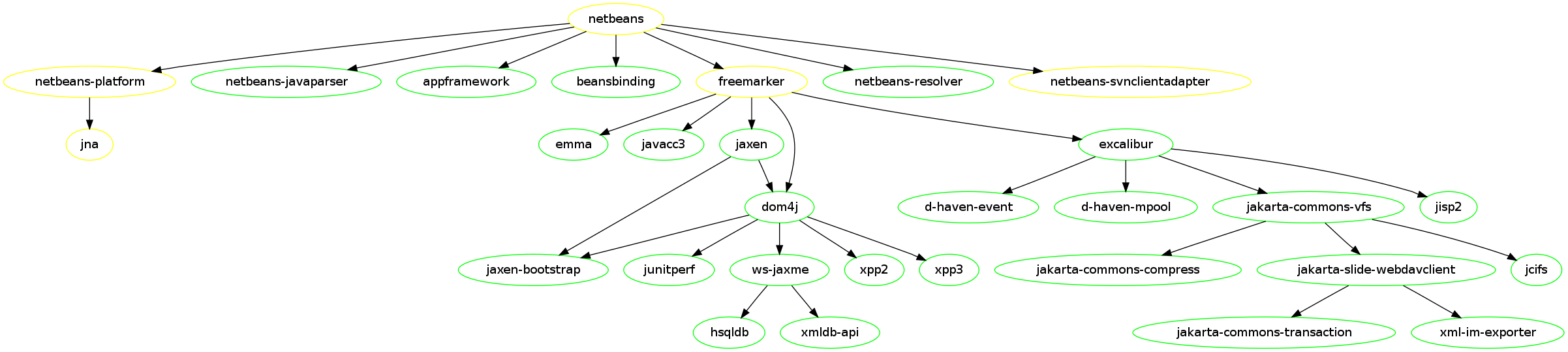
Majority of those packages was reviewed and included into Factory during last weeks, but five (including netbeans) itself are currently in review process, so they would be available later. Following graph shows netbeans and it’s build dependencies. Green color means – package is in Factory, yellow means package is in review process.
In a meanwhile the netbeans for openSUSE Factory and 11.1 is available in Java:packages BuildService repository, so feel free to install and test it.
MonoDevelop installer for Windows
- Fixed the GTK# designer add-in. It is now fully working.
- Implemented a new backend for the Subversion add-in. I tried using the add-in we have for Linux, but the libraries I could find for Win32 have some differences in the API and the bindings doesn't work. I finally decided to refactor a bit the SVN add-in to support different backends, and implemented a new one based on SharpSvn. So the SVN add-in is also fully working.
- Added support for debugging, based on the debugger that comes with .NET. This is still work in progress, although most of features already work: stepping, breakpoints, inspecting variables with drill down and evaluation of expressions.
- Support for .NET 4.0. This new version can now be selected in the project properties.
- Improved the look of the main window. Reduced some spacing, improved the rendering of the tabs when docking several pads together, and other cosmetic fixes.
- Improved the performance of the text editor. It now feels more responsive.
- ... and many other fixes.


Now, here is what you've been waiting for: a MonoDevelop installer for Windows. You can get it from the Windows Preview page in the MD site. Read carefully the instructions in that page. You'll have to install the latest GTK# package, also linked in that page. Also, beware that this is a preview built from trunk, so you can expect to find stability issues. In any case, bug reports are always welcome. Enjoy!
Sending Proxy Settings via DHCP
It’s a bit “overdressed” for my little homenet, but playing around with DHCP, DNS and YaST is always interesting….
My DHCP Server at home is configured to use LDAP – and I’ve done the configuration via YaST. Now I read in some M$ pages, that it’s possible to tell the Clients via DHCP (and Apache) to use my Proxy server automatically. (Yes, my wife still needs Win** for her schoolwork.)
First, I had to figure out how I can insert two “non standard” options into the LDAP configuration of the DHCP server. I called “yast2 dhcp-server” (thanks for the tab completion, btw!), marked the “Global Options” entry and clicked on “Edit” (not Add!). On the next page, click on “Add” to add a new Option. Just delete the first available entry “allow” and replace it with the full line as you would write it in dhcpd.conf. In my case, this is
option wpad code 252 = text;
and
option wpad “http://myserver/proxy.pac\n”;
(dunno if the “\n” is really needed). That’s the trick. Have a look at /var/log/messages in a separate terminal when you finish the yast2 dhcp-server module to catch possible errors.
Now all what’s left is a running apache server on “myserver” delivering the “proxy.pac” file to your users. The file content is well known – and google would find hundreds of examples for you.
"Vaani", new project started
The package structure is--
1. sourcemorph.nlp.vaani -- for this project
2. sourcemorph.nlp.shabd -- for nl text to bash command ("shabd" means word in Hindi)
3. sourcemorph.nlp.swar -- for speech to nl text ("swar" roughly means voice in Hindi).
10 years
I had some sarcastic and depressing comments here, but I deleted them.
(Just for the record ... I like my job and I don't intend to stop doing it.)

It's all about synchronization
Who could have imagined at that time, that 3 years later I would not only be working for Novell, but also be able to contribute to it at normal work hours! Yes, this is ITO, and our team spent a week hacking on other projects. In my case, I worked with the awesome guys Stephen Shaw and Mario Carrión. We managed to create an iFolder appliance for the server based on openSUSE 11.1, very easy to install thanks to SUSE Studio and to a new OBS repository where we packaged a preview of Mono 2.4.2 and some fixes needed to make it work.
We even created some demos! (Sorry for the quality of the sound, we had some problems when recording them)
The first one: setting up the appliance.
The second one: creating a user and using the Linux iFolder client.
Now, the next two videos are intended to show the second part of our work on that innovation week: new features.
The third one: automatic/immediate local detection of changes, server side trash can.
The fourth one: automatic/immediate remote synchronization of changes.
How cool is that? Unfortunately, the patches still need work and cleanup (help welcome!), but I plan to do it soon and/or on next hack week.
Before coming back to hacking on iFolder, I wanted to finish some stuff am working on for Banshee, which is also about synchronization! Look at this bug for more details. Yes! bidirectional Rating synchronization, not only from Banshee to the iPod but from the iPod to Banshee. The patch is working fine for me, be sure to give it a go and provide some feedback. Thanks!
Another thing I have on my TODO list is integrate some old mono-based GPL ed2k library into monsoon, now that it's getting MonoAddins support! (Lately there's been many people asking me for the source code.) And now that I talk about monotorrent, how cool would be to make iFolder work with this awesome library??
PS: Hello PlanetSUSE! First post. Hola Planeta GnomeHispano ;)
UPDATE Jun-08-2009: It seems someone wants to resurrect the lphant kernel as well, but using WPF! (WTF?): http://sourceforge.net/projects/hathi/.
openSUSE@ARM/GSoC: weekly status
Hi everyone!
This week was exciting – we deployed a first prototype of a minimal ARM environment on build.opensuse.org in the repository Base:build:arm. It’s a set of packages which is capable of bootstrapping itself and still in an early stage as it’s using full emulation. Next station: speed-up !
I submitted also some patches for inclusion into the openSUSE Build Service. One of these patches will help us to a address an issue with rpmbuild when doing builds for the ARM architecture.
In progress / todo:
* tools for speed-up
* submission of needed patches to factory
* cross-compiler integration