
 Member
 anaumov
Free BEER for free people
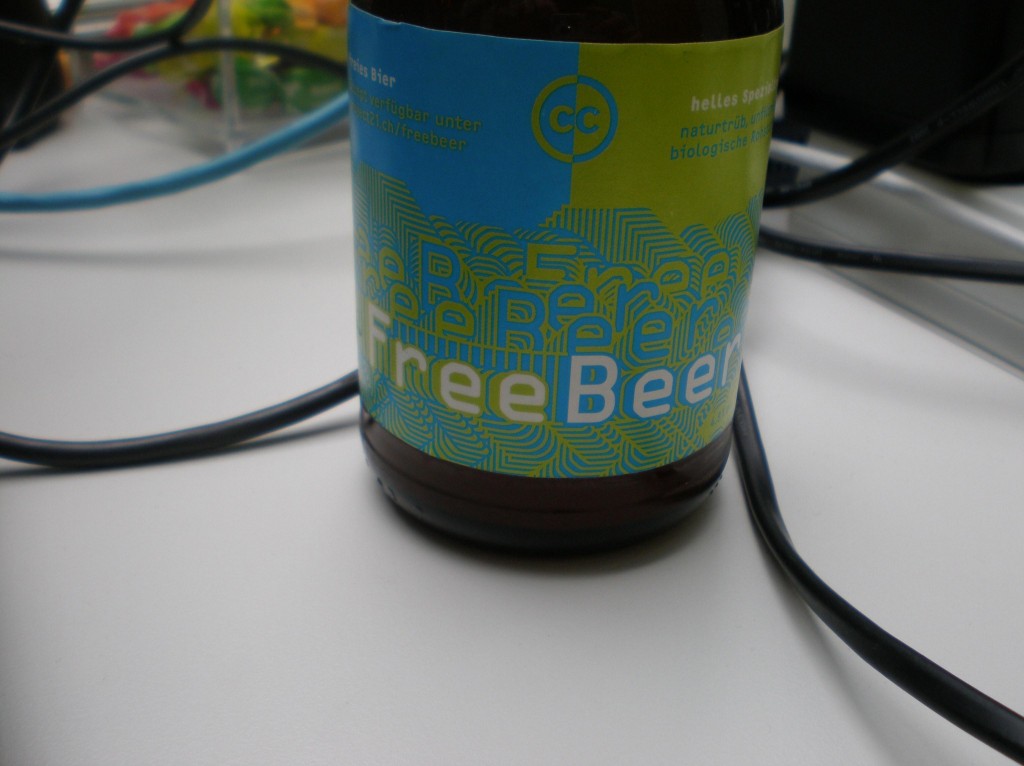 When we call beer “free”, we mean that it respects the users’ essential freedoms: the freedom to drink it, to study and change it, and to return empties with or without some changes. This is a matter of freedom, not price, so think of “free speech”… but in this case also “free beer” too.
Why man have to choose a free beer? Because it’s open and free to use. Everybody can give some feedback on the freebeer’s twitter page.
The project was started by Wädi Bräu in Switzerland like “open source beer” project. On the home page you can get more information about this project, for example, news and last updates.
License: creative commons.
Alcogol vol: 4.8 %
Size: 0.33 L
Be free… drink free beer 
p.s. Who know, maybe Novell will be sponsored this great open source project (?)

FireBreath 1.2 released
This is an open source project that one of my friends at school started. Here is a quick description of the project.
FireBreath aims to be a cross-platform plugin architecture, targeting:
- NPAPI browsers on windows, mac, and linux:
- Gecko/Firefox
- Google Chrome
- Apple Safari
- ActiveX Control hosts:
- Microsoft Internet Explorer 6, 7, and 8
FireBreath is licensed under a dual license structure; this means you can choose which of two licenses to use it under. FireBreath can be used under the New BSD license or the GNU Lesser General Public License v2.1.
Here is his announcement and reflections on starting an open source project.

Strategy is mighty!

This is a follow up to my friend Jos' post about strategy.
I love strategy! (Strategy was one of my major subjects at university and a research focus of the chair I worked and taught over four years.) So I might be biased. Nevertheless I want to
Why do we invest time into that valuable strategy discussion?
There are several studies about the success of organizations. The strategy is in most cases playing an important part. I explain why:
What is the benefit of a strategy?
A good strategy should
1. show your major future challenges and provide an answer to those challenges,
2. point into a direction where the team wants to move and
3. unite the team.
Challenges
"Prediction is very difficult, especially about the future. " (Niels Bohr) But you have to try to anticipate the challenges. Otherwise you have no chance to act. You could only re-act and that is not an advantage. It is always easier to change things when you are in the driving seat. These challenges include the development of customer needs as well as of the competitors. Business tools (like them or not) can help to see some things clearer.
Direction
A good strategy gives a direction where the herd is aiming at. In an environment with no strong top down control (like in communities), having the same targets and values are essential. This direction - called the vision or mission - summarizes the common goals in one sentence. This goal is far enough away that you have to move yourself and close enough that it is possible to reach.
Uniting
A strategy can help a community to glue together, to find the things they have in common and to define (together) the way they want to go (together). In business many strategies are defined by the top management and fail because they are not wholeheartedly supported by the employees. The best strategy is worth nothing if it is not filled with life. Therefore, the perhaps most important part of a good strategy is the process how this strategy was created. Who was involved? How were the opinions collected and summarized? Is the process open enough? Is the communication and the flow of information transparent? How many people outside of the organization were involved? Etc. [This would fill a whole blogpost of it's own.]
Strategy is for communities!
Most strategy projects at university I did with NPO (non profit organization). We worked with kindergartens, with schools, with the youth welfare office etc. I can assure you: those projects were a blast. I am convinced that it works for communities as well!
Strategy is mighty!
A brilliant strategy, developed in an open environment by the community and external persons can take your open source project to the next level of success. Focus on the processes not (only) the content. Don't write down a strategy just to have one. Make it move your world!
Another openSUSE kernel git repo
The mirror of the openSUSE kernel-source repository has been around for several months already, now there is something new: A repository that is actually usable :-). The current kernel-source repository is a series of patches managed in git, which has some upsides, like the ability to easily cherry-pick a patch and port it to a different branch or send it upstream. But it is quite painful if you want to work with the code itself and not with patch files. A task as simple as determining if drivers/…/foo.c in openSUSE-11.3 has or does not have a certain change requires checking out the branch and running the sequence-patch script to be able to look at the file. If you need to know when was the file changed, you have to run ‘quilt patches <file>’ to find out what patches touched the file and then ask git about the history of these patches. Neither convenient nor efficient. That’s why we have a second repository, that contains the mainline tree with all the suse patches applied. It’s located at http://gitorious.org/opensuse/kernel, the clone url is git://gitorious.org/opensuse/kernel.git. If you already have a clone of the mainline tree, then you can download just the differences with
git remote add suse git://gitorious.org/opensuse/kernel.git
git remote update suse
git checkout suse/master
The above task is then solved by opening the required file in an editor or typing ‘git show branch:file’. And you don’t even need to clone the tree to quickly check something in the source, just use the web viewer. Also, bisecting is much easier, because you avoid the sequence-patch step now. There are some gotchas though:
- Not every commit to the kernel-source repository results in a change in the kernel repository. For instance updating config files in the kernel-source repository results in a commit that has no text changes. The gitorious viewer is confused by this and tells you that you are viewing the initial commit. In a local clone, you can exclude such commits with ‘git log .’ (note the dot).
- When the patch series does not apply, there isn’t much to show in the kernel repository. In such case, the commit only adds a ‘BROKEN’ file to the toplevel directory and uses the tree from the previous commit. When using a bisect script, you can skip such commits with e.g. ‘test -e BROKEN && exit 125’.
- When patches such as xen are temporarily disabled while updating to newer upstream versions and later enabled, it generates huge diffs back and forth. That’s usually not a problem unless you are bisecting something xen-related.
Anyway, I’m sure this will be useful for anyone who needs to debug something in the openSUSE kernel.
Introduction
I have been running GNU/Linux distributions for almost 8 years now. My first experience was with Mandrake (today Mandriva) Linux - downloading 6 CD's on dialup was fun - and after some distro hopping I soon found a home with SuSE 9.2. Since then I've stuck with openSUSE as my main distro while also running the *buntu's and others on testing machines. My preference has always been for KDE - which is why I've never been a fan of Ubuntu - but every so often I'll fire up Gnome, Xfce, LXDE to see what progress has been made. I'm just as happy hacking away from a console.
Over the years I've picked up a fair few scripting and coding skills. Given a bit of time to remember the syntax, I can generally get what I want done in most common languages - bash, awk, sed, perl, C/C++.
My main contributions to the FOSS software environment are RPM packaging/maintenance (made super easy by the OpenSUSE Build Service), and C++/Qt/KDE application maintenance and patching. One of the first projects I became directly involved in is the SynCE project, where I ported some simple KDE3 applications to KDE4. Since then I've been active on the openSUSE mailing lists and occasionally on the forums.
My openSUSE Build Service home project is accessible here.

Version Tolerant Serialization with Mono
(Zoot Woman - Lonely By Your Syde)
During the last months I've kept working {with|on} Mono, but not working for Novell anymore.
Today I'm proud to blog about a bit of work I've done on Mono towards a better Binary Serialization experience:
-
mono-api-info command now can output ABI instead of API if you append the flag --abi. It has been useful for us in LindenLab while working on binary serialization compatibility between versions (already upstream!, so will be available in Mono v2.8, even with a new man page).
If you ever wondered why your .NET code is no longer capable of deserializing some old binary object you had in your servers, instead of fixing the problem in a case-by-case basis, you can now see the whole picture by just diffing the output of mono-api-info --abi from your current and old codebase! A small TODO that I haven't completed yet is to deal with automatic properties (because we still don't use them) so that would be an exercise for the reader! - Fix for upstream Mono to act as .NET in regards to Version Tolerant Serialization, a patch to which I have just added a lot more unit tests (soon to be pushed hopefully).
You can see the patch of this quite old mono bug here. Disclaimer: to be honest you will only need the previous --abi tool if you use a Mono version prior this fix, because from my testing VTS in MS.NET works as if every new field had an [OptionalField] attached! (At least the BinaryFormatter, the TODO here for the reader is to test the SoapFormatter ;) )
On a totally unrelated note: kudos to the MonoDevelop team for making such a great releases lately (and fixing the bugs I report so promptly). I've been testing it the last months on Windows and I can say it's a great experience to see your favorite IDE working cross-platform and making you not depend on VS anymore if you need to work on Windows from time to time (I know the Express versions are free, and are great! but they do not support plugins :( ). BTW, I've been lately experimenting with the C language support in this IDE, and have had some problems, but the real culprit seems to lay behind some wierd behaviour of my gdb in opensuse. Taking advantage that I'm in opensuse planet, can I do a couple of lazyweb requests?:
a) If you're quite familiar with gdb, can you take a look at these 2 bugs in case it rings any bell for you? BNC#588175, BNC#459274
b) Can you try to reproduce those bugs in openSUSE 11.3? (I haven't migrated yet from 11.2 because I fear about the HALlessness of it :) )
PS: Wondered why the video on the top? Well, I like the trend that some people have about posting random photos in their blog posts even when they may be completely unrelated, but in my case I love music so I figured this would suit better. Of course I would rather embed a WebM video or, even better, something that can preview a song (without video) in a "normally-lower-quality-than-what-you-can-buy" way, so if you have any hints, those are welcome! I especially mention the latter in this case because the Album version of the song above is much much better (synth pop FTW!).
UPDATE 28-AUG-2012: Found a video-less alternative to youtube for embedding songs! It is GoEar.
Hello Planet SUSE
The openSUSE strategy discussion has scratched my itch and I started to contribute more to openSUSE.
What could you expect?
Don't expect much code from me. My experiences are more in the area of strategy, marketing and promotion. Perhaps I could also share some results from my researches during the last years about open source communities.
So be curios and stay tuned.
I am happy to join the openSUSE community and I am looking forward to know more of you.
Let's have a lot of fun!
Cheers,
Thomas
Recompiling wxRuby
Who uses Ruby might be interested to try this interesting multiplatform library that allows the development of GUI (Graphic User Interface) with a considerable visual impact and compatible with the three most popular Operating Systems: Linux (via GTK) Windows (with Native controls) and OSX (via Aqua). (This article is also available for italian users)
Usually need install the wxGTK libraries and the gem wxruby (or wxruby-ruby19 if using ruby 1.9) and start creating your own scripts.
$ sudo zypper in wxGTK wxGTK-gl

$ sudo gem install wxruby
But sometimes we could find an Error for a wrong compatibilty between the installed version of the wxGTK libraries and the wrapper library included in the gem.
/usr/lib/ruby/gems/1.8/gems/wxruby-2.0.1-x86-linux/lib/wxruby2.so:

symbol _ZN13wxAuiNotebook14ShowWindowMenuEv, version WXU_2.8.5 not defined in file libwx_gtk2u_aui-2.8.so.0 with link time reference -

/usr/lib/ruby/gems/1.8/gems/wxruby-2.0.1-x86-linux/lib/wxruby2.so
When an error like this appear, the unique solution is recompile the gem.
What we need:
- rubygems: Tool for manage the ruby’s gems;
- rake: the Ruby’s version of the popular make, will help us to compile wxRuby;
- wxGTK, wxGTK-gl, wxGTK-devel: Library and headers needed for run our scripts and produce the object’s file;
- SWIG: Build the wrapper classes in Ruby from the C++ sources, wxRuby 2.0.1 need the version 1.3.8;
- gcc-c++: The C++ compiler used for build the wrapper library;
- wxRuby: We have to download the source’s package directly from Rubyforge.
Added the repository which contains the Ruby extensions (warning to the portion of the address that refers the version of openSUSE), we can proceed with the installation confirming the request of the dependent packages:
$ sudo zypper ar http://download.opensuse.org/repositories/devel:/languages:/ruby:/extensions/openSUSE_11.3/ RubyExtensions

$ sudo zypper ref

$ sudo zypper install rubygems rubygem-rake gcc-c++ wxGTK-devel rubygem-ffi-swig-generator make
It’s time to download the sources of SWIG version 1.3.38 from sourceforge, then uncompress and install it:
tar -xvf swig-1.3.38.tar.gz

cd swig-1.3.38

./configure && make

sudo make install
All the packages are ready, we have to set some environment variables before continue:
export SWIG_CMD=/usr/local/bin/swig

export WXRUBY_EXCLUDED=GLCanvas

export WXRUBY_VERSION=2.0.1
The second instruction is important for ignore all the references to the openGL library, which are not availables in unicode version.
The next step is download the wxRuby’s source from Rubyforge and start to compile
tar -xvf wxruby-2.0.1.tar.gz

cd wxruby-2.0.1

rake
After this procedure end you can remove the old gem and build & install the new:
rake gem

sudo gem install wxruby-2.0.1-x86-linux.gem
Personally, I needed recompile wxRuby in openSUSE 11.2; with the new version (11.3) standard packages work fine, anyway i wished share my experience for someone could meet the same trouble in the future :))
What’s cooking in openSUSE’s GNOME for 11.4
The openSUSE GNOME team has launched itself full throttle into preparations for openSUSE 11.4, which will be released with GNOME 2.32 as one of the desktops. Along the way, we decided on our focus points for the upcoming release:-
-
New packages: More applications for a richer desktop experience
While there are a large number of excellent GNOME/Gtk-based apps in openSUSE already, this looked like a great time to start getting more apps catering to a variety of requirements into the GNOME:Apps and GNOME:Factory build service projects. Since deciding on this, several new packages have already been worked on and are now available in the corresponding repositories. The status of new applications is tracked here. Many of these applications will, subject to review, reach Factory and a few might even become part of the default openSUSE GNOME desktop.
You are welcome to request the packaging of applications you have found particularly useful or impressive, and if you are in earnest, why not join us at #opensuse-gnome and start packaging them for yourself? Requests for new applications may be made through comments here, on the mailing-list or at irc, but the best way to do this would be to open a feature request and tag it as “gnome-wishlist-packages”.
-
The GNOME Pet Peeves Project: Dealing with minor irritants on the desktop
I bet there have been times when you have come across a little but pesky irritant or a usability issue that left you feeling “this could have been done so much better…” We decided to track down such issues and try to have them fixed before the next release. Thus the GNOME Pet Peeves Project, where we note and research such issues, their workarounds and solutions. As you can see, we have located a few of these already, and started working on them.
We invite you to report your pet peeve with GNOME through comments here or otherwise. Of course, the good Samaritan is more than welcome to help with the process of solving such problems as well by providing fixes, pointing to existing upstream patches or even nudging upstream developers at bugzilla or irc, to ensure a more polished GNOME desktop on openSUSE.
- There is much to celebrate about, in GNOME-land come March 2011… and we hope to join the party, as well, with an (unofficial) GNOME3 take on openSUSE 11.4 to be released on the GNOME3 release day!
That and more… indeed there is so much to look forward to, with the launch of 11.4, from the GNOME desktop user’s perspective. With your feedback and other contribution, you can help shape that perspective while also having a lot of fun.

n2n package improved
Thanks to happyman_eric and Grief, openSUSE Build Service already contained a package. I have made an improved version, adding an init script and a sysconfig file. Get the sources in my home project, or the binaries.