
Project Halfway there with Git Workflow Adoption
Leap 16 now accepts contributions exclusively via the new git workflow. This shift reflects a broader trend: many development projects in the Open Build Service have already adopted Git, and new ones are being onboarded daily.
Tumbleweed has not yet switched to the new Git workflow. The openSUSE release team is evaluating the new staging to ensure it can scale effectively as we need to make sure that pre-intergration acceptance testing remains effective to handle up to 1,500 submissions a week.
Leap 16.0 is near the end of its development. Since there are few submissions expected per week until its release, simplified pre-integration workflow is less of a concern as that of Tumbleweed’s weekly submissions. We wanted to avoid having two different systems for managing sources in Leap 16 and to ensure git adoption in its first release.
The transition to Git should be completed by the end of the year. Once scaling concerns are addressed, Tumbleweed is expected to fully adopt Git as well. Developers can reach out to the factory mailing list if they have any questions.
This blog is meant to help contributors understand the shift to a Git-based workflow in both Leap and Tumbleweed, so they can align their packaging practices and people are encouraged to read the Documentation on the Git Packaging Workflow.

 cabelo
OpenVINO™ 2025.3.0 now natively available on openSUSE!

We’re excited to announce the new OpenVINO 2025.3.0 release, now available for installation directly from the official openSUSE repository. It expands native support for running generative AI and LLM models with acceleration on Intel® CPUs, GPUs, and NPUs!
Highlights of the 2025.3.0 release:
Expanded coverage for GenAI and LLMs:
- New supported models: Phi-4-mini-reasoning, AFM-4.5B, Gemma-3 (1B-it, 4B-it, 12B).
- NPU support for Qwen3-1.7B, 4B, and 8B — with optimized models from the OpenVINO Hugging Face repository.
- Preview support for OpenVINO Execution Provider in Windows ML, leveraging the power of the new Intel® Core
 Ultra line.
Performance and advanced compression:
- Contexts of up to 8K tokens, dynamic prompts, and dynamic LoRA for NPU-based LLMs.
- Dynamic batch size with automatic reshaping and control of multiple concurrent requests.
- New per-channel cache compression technique, in addition to per-token KV-cache, further improving accuracy in GenAI.
Portability and performance anywhere:
- Official support for Intel® Arc Pro B50 and B60 GPUs.
- GGUF models in OpenVINO Model Server, with support for DeepSeek, Qwen2, Llama 3, etc.
- Data-aware int4 weight compression for ONNX in NNCF: less memory, same accuracy!
With this integration in openSUSE, developers can now take full advantage of the Linux ecosystem to build, test, and deploy AI in a more efficient, portable, and optimized way.
Install via Zypper and take your AI to the next level.
openvino #opensuse #GenAI #LLM #NPU #IntelCoreUltra #huggingface #edgeAI #IAopensource #multicortex #aiopensource #openvino2025 #intel
https://build.opensuse.org/request/show/1303034

 Member
Tumbleweed – Review of the week 2025/36
Dear Tumbleweed users and hackers,
Another week has passed at full speed, bringing five new snapshots to the Tumbleweed userbase. As usual, the snapshots (0828, 0829, 0901, 0902, and 0903) are packaged with software updates and fixes, just as you are accustomed to from Tumbleweed snapshots.
The most relevant changes were:
- fwupd 2.0.14
- postfix 3.10.4
- inxi 3.3.39
- Qt 6.9.2
- PHP 8.4.12
- PCRE2 10.46
- Mozilla Firefox 142.0.1
- SDL 3.2.22
- icewm 3.9.0
- LibreOffice 25.8.1.1
- libvirt 11.7.0
After the last snapshot is just before the next snapshot. In this spirit, 0904 is currently already in openQA and is being tested. As part of that snapshot, and plans taken from the Staging dashboard, you can expect these changes anytime soon:
- Linux kernel 6.16.4
- GCC 15.2
- cmake 4.1.0
- Mesa 25.2.x

The New Request Workflow is Going Live!
openSUSE Leap and Leap Micro doubles down on support
openSUSE Leap and Leap Micro doubles down on support
openSUSE Leap 15 is a record breaker. It will keep receiving updates until April 30 2026, delivering a lengthy amount of unmatched community support.
The usual lifecycle is 12 months plus 6 months of overlap for a smooth upgrade, but Leap 15.6 has been stretched by an additional 4 months so we can maintain the familiar six month overlap after the release of Leap 16.0 in October 2025.
Altogether, Leap 15 delivered more than 1.5 times the typical 60 months of support offered by most long-term support distributions.
We are excited to announce that the record will not stand for long. Leap 16 will take things even further by supporting users with maintenance updates over two releases, giving each release a full 24 months of community support. Unless there is a strategic change the final, the Leap 16 release will go to 16.6 in Fall 2031 and it will keep receiving updates until Leap 17.1 arrives two years later.
Essentially the same applies to our immutable server distribution openSUSE Leap Micro, which is adopting the Leap 16 lifecycle and effectively becomes one of the Leap 16 appliances.
And for those who need even more than 24 months of support for a point release, the opensuse migration tool makes it simple to move to SUSE Linux Enterprise or SLE Micro where decades of support are available.
This long lifecycle is only possible because Leap keeps sharing its binary core with SUSE Linux Enterprise, which is also extending its general support to 24 months.
The long lifecycle of Leap 15 also brought some complaints that parts of the system became outdated. Leap 15.6 and the corresponding SLES refresh already solved many of the biggest pain points such as old versions of Ruby and system Python.
Learning from the past, openSUSE Leap 16 is better prepared. We plan to revisit the tic toc model and give product management more flexibility to deliver larger ecosystem updates when needed, rather than strictly enforcing a feature release followed by a maintenance release.
I believe this is GREAT NEWS for everyone looking for a free stable modern and predictable community-supported platform to base their solutions on.
The
The openSUSE.Asia Summit brought together developers, students and open-source advocates together at Manav Rachna International Institute of Research and Studies (MRIIRS) from Aug. 29 - 30 and celebrated 20 years of the project.
The two-day event opened with a ceremony and keynotes from Satyakam Goswami and I. Goswami covered the history of open-source and pulled off his shirt to reveal an openSUSE-themed T-shirt, underscoring his enthusiasm for the project. My keynote reflected the past two decades of the project and highlighted the milestones in the community’s growth.
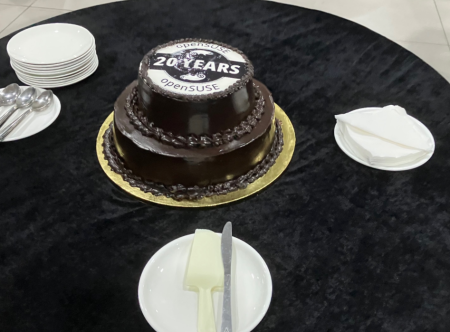
Cake:
Talks ranged from healthcare to cloud computing. Axel Braun addressed the risks of commercial health data platforms and showcased GNU Health while Prakhar Bansal shared his experience deploying GNU Health at AIIMS during the COVID-19 pandemic, emphasizing the need for collaboration and code-sharing in India’s public sector.
Other sessions included virtualization strategies for enterprises, openSUSE’s role in data science with Python and Jupyter, and a shorter workshop on SELinux as well as a presentation on its advances and being the default security layer in openSUSE Tumbleweed. The project also had a few Google Summer of Code mentees provide talks at the event.
Google Summer of Code:
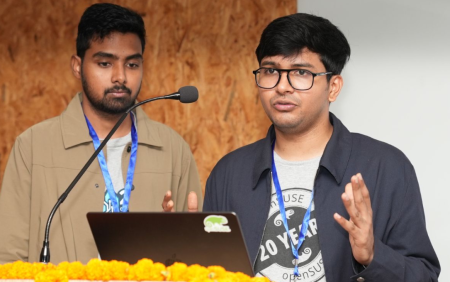
Google Summer of Code:

Lubos Kocman previewed the upcoming Leap 16.0 release and Patrick Fitzgerald argued the reasons for Linux adoption in governments and businesses as the end of Windows 10 opens the door for openSUSE. The summit was organized with the support of MRIIRS faculty and students, who worked alongside many speakers. More than 600 people attended the event.
Between talks, students and speakers bonded over tea breaks sharing interests, exchanging technical knowledge and personal stories.
The cultural exchange extended beyond the campus; on Sunday after the summit, a group of speakers, student helpers and organizers traveled to visit the Taj Mahal, capping the event by seeing one of India’s most iconic landmarks and one of the New 7 Wonders of the World.
Trip to Taj Mahal:

For many participants, the trip highlighted how open-source events can transcend technical learning and build networks for learning.
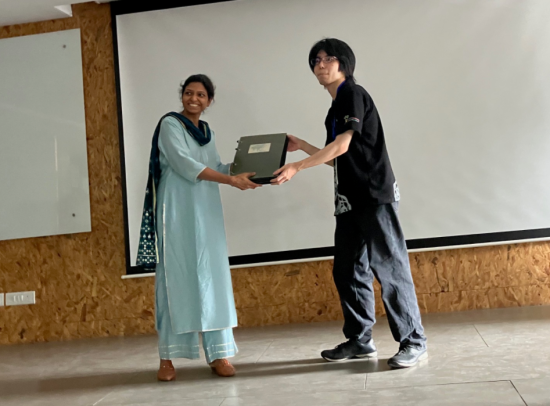
The book containing images of all the openSUSE Asia Summits was handed over to organizers of this year’s summit in India from last year’s organizers in Japan.
Summit Book:
openSUSE Asia Summit A Journey of Wonder
The openSUSE.Asia Summit brought together developers, students and open-source advocates together at Manav Rachna International Institute of Research and Studies (MRIIRS) from Aug. 29 - 30 and celebrated 20 years of the project.
The two-day event opened with a ceremony and keynotes from Satyakam Goswami and I. Goswami covered the history of open-source and pulled off his shirt to reveal an openSUSE-themed T-shirt, underscoring his enthusiasm for the project. My keynote reflected the past two decades of the project and highlighted the milestones in the community’s growth.
Cake:
Talks ranged from healthcare to cloud computing. Axel Braun addressed the risks of commercial health data platforms and showcased GNU Health while Prakhar Bansal shared his experience deploying GNU Health at AIIMS during the COVID-19 pandemic, emphasizing the need for collaboration and code-sharing in India’s public sector.
Other sessions included virtualization strategies for enterprises, openSUSE’s role in data science with Python and Jupyter, and a shorter workshop on SELinux as well as a presentation on its advances and being the default security layer in openSUSE Tumbleweed. The project also had a few Google Summer of Code mentees provide talks at the event.
Google Summer of Code:
Google Summer of Code:
Lubos Kocman previewed the upcoming Leap 16.0 release and Patrick Fitzgerald argued the reasons for Linux adoption in governments and businesses as the end of Windows 10 opens the door for openSUSE. The summit was organized with the support of MRIIRS faculty and students, who worked alongside many speakers. More than 600 people attended the event.
Between talks, students and speakers bonded over tea breaks sharing interests, exchanging technical knowledge and personal stories.
The cultural exchange extended beyond the campus; on Sunday after the summit, a group of speakers, student helpers and organizers traveled to visit the Taj Mahal, capping the event by seeing one of India’s most iconic landmarks and one of the New 7 Wonders of the World.
Trip to Taj Mahal:
For many participants, the trip highlighted how open-source events can transcend technical learning and build networks for learning.
The book containing images of all the openSUSE Asia Summits was handed over to organizers of this year’s summit in India from last year’s organizers in Japan.
Summit Book:
Tumbleweed Monthly Update - August 2025
Several software packages were updated in openSUSE Tumbleweed during August that brought new features, performance improvements and some important security fixes for rolling release users.
Major updates included glibc 2.42 with support for new C standards, VirtualBox 7.2.0 and Bash 5.3.3, which improves script handling and adds new built-ins. KDE Gear 25.08.0 also landed to enhance applications for travel, file management, and encrypted communication.
These updates were complemented by refinements to xfce4-session 4.20.3, xfce4-settings 4.20.2, improvements to multimedia with GStreamer 1.26.5, HarfBuzz 11.4.1, and graphics stability enhancements were also realized through the Mesa 25.1.7 update. Kernel 6.16.0 expanded hardware support by notably adding integration for the Raspberry Pi 5 RP1 chipset.
Other essential tools saw progress as well. Read more below and as always, be sure to roll back using snapper if any issues arise.
For more details on the change logs for the month, visit the openSUSE Factory mailing list.
New Features and Enhancements
KDE Gear 25.08.0: This is a fresh wave of app updates focused on travel, productivity, and usability for KDE Plasma users. Itinerary gets major upgrades, letting users manually add trips, view live maps, check delays, and even find ferry and flight alternatives. Dolphin adds a faster file search, direct Filelight integration for visualizing disk usage, and more sorting and view options. Akonadi cuts memory usage by up to 75 percent for smoother email, contacts, and calendar syncing, while Kleopatra now supports multiple encrypted notepads. Neochat introduces polls and Angelfish improves browsing shortcuts. A was a well-rounded release that makes KDE apps faster, smarter, and travel-ready.
xfce4-session 4.20.3: This update improves startup speed and stability for Xfce users, especially on Wayland. The auto-start timeout has been reduced to make sessions launch faster, which addresses slow startups. Several enhancements improve Wayland integration, including better keyboard layout detection, avoiding duplicate D-Bus sessions, and removing unnecessary settings like the SDL video driver variable. Screen casting support has been improved with updated portal configurations, and default settings for Labwc (a Wayland-compatible window manager) have been added. This update changes make Xfce sessions more responsive and better optimized.
xfce4-settings 4.20.2: The Xfce settings update fixes a memory leak and enhances security when reading hardware identification data. The update improves display handling on both X11 and Wayland and ensures screen modes and flags are processed correctly to reduce unnecessary communication with the display server. Debug logging has been improved for easier troubleshooting, and a minor build system update ensures resources are properly included at runtime.
glibc 2.42: This release adds support for the latest ISO C23 and upcoming C2Y standards, which include new math functions like pown, rsqrt, and compoundn. Performance is improved with enhancements to the memory allocator and a new lightweight stack guard feature helps prevent stack overflow attacks.
VirtualBox 7.2.0: The interface has been redesigned to make tools easier to access with this release. On ARM-based systems, VirtualBox now supports running Windows 11 ARM virtual machines, which expands compatibility for developers and testers. Linux users gain improved video playback performance with hardware-accelerated video decoding when 3D support is enabled. Additionally, the NVMe storage controller emulation has been moved into the open-source base package and advances storage features to all users by default.
Bash 5.3.3: Bash fixes how the wait command handles process IDs in POSIX mode and improves script detection by checking the first two lines. The shell now better preserves quotes during command completion and reports more accurate error locations in scripts. New features include a GLOBSORT variable to control how file names are sorted, a ${ command; } syntax for faster command substitution without forking, and new built-ins like strptime and kv. Security and stability are enhanced by removing outdated reliance on shm_open and improving signal handling during completions. These changes make daily terminal use smoother and more predictable for developers and system administrators.
GStreamer 1.26.5: This fixes a regression in audio conversion, prevents crashes when adding URIs without available decoders, and resolves memory leaks during video resolution changes. Support for modern formats like JPEG XS is now available in videorate and imagefreeze, and GPU memory handling is improved for closed caption overlays. The update also brings better device monitoring and screen capture, along with numerous fixes for thread-sharing and streaming, which result in smoother media playback, fewer glitches, and better performance.
HarfBuzz 11.4.1, 11.4.3, 11.4.4: The text shaping engine introduces general speedups for shaping and subsetting fonts, making applications that display complex text faster and more responsive. ccuracy has been improved by fixing a regression that affected mark glyphs in certain fonts and correcting the pruning of mark filtering sets during subsetting, which previously caused unintended shaping changes. The Graphite backend now properly handles cases where glyph spacing could turn negative, enhancing text layout quality. Subsetting is further optimized by removing unused mark-attachment lookups to reduce font size, and a new experimental shaping backend offers flexibility for testing and performance evaluation.
ModemManager 1.24.2: This update fixing issues with CDMA/EVDO detection, NB-IoT reporting, and manual registration refresh. It enhances system stability by ensuring bearers disconnect before suspend and disabling unwanted 3GPP events during quick suspend/resume cycles.
Key Package Updates
Kernel Source 6.16.0: One of the biggest additions to the Linux kernel is expanded support for the Raspberry Pi 5 through the integration of the RP1 chipset, so people can see it put to use with openSUSE arm development. New drivers and configurations have been added to enable RP1 clocks, GPIO, pin control, and miscellaneous device features, ensuring full compatibility with Raspberry Pi’s latest hardware. Several security and stability fixes are included, such as resolving issues with Btrfs log tree recovery, SPI property handling, and HKDF cryptographic operations in FIPS mode. Configuration files have been refreshed for ARM and x86 platforms. This release also improves device tree bindings and clock management while addressing multiple driver and architecture-specific issues.
Mesa 25.1.7: This 3D Graphics package update resolves issues like high GPU usage in Zink, crashes in Chromium’s accelerated video decoding, X11 image acquire segfaults, and some video color conversion bugs. Fixes also address performance regressions, race conditions with timeline semaphores, Vulkan device creation issues in Lavapipe, and some RadeonSI and RADV driver problems. While no new features are introduced; this release improves reliability across OpenGL and Vulkan implementations.
btrfsprogs 6.16: This update improves how the Btrfs filesystem handles data and storage. It fixes incorrect size reporting for partitions, prevents accidental overwriting of existing filesystems, and adds better detection for storage device features. There’s also a new option to disable file compression during defragmentation, along with improved support for Android builds and updated documentation.
NetworkManager-openvpn 1.12.2: This update improves the stability and security of OpenVPN connections in NetworkManager. It fixes a bug where invalid or expired authentication challenges were being reused to ensure safer connection handling. Support has been added for the data-ciphers option and its fallback setting along with a graphical interface to manage these settings more easily. The authentication dialog has been updated to GTK4 for a more modern look, and certificate handling has been improved by importing them into the user’s data directory. Additional fixes improve password export handling, translation updates, and overall reliability.
git 2.51.0: This update introduces a better way to save and move certain changes between repositories, improves performance when pushing and fetching updates, and adds support for modern authentication like OAuth2. Git is also preparing for version 3.0, which will include a faster storage format and stronger SHA‑256 security by default.
QEMU 10.0.3: The update of for the machine emulator and virtualizer fixes critical issues in PCIe SR-IOV configuration that could lead to state desynchronization (CVE-2025-54566, CVE-2025-54567), resolves a buffer overflow in the network backend, and corrects bugs in register handling and CPUID emulation. The release also improves ARM virtualization on HVF, fixes VNC performance, and enhances virtio-net migration with RSS support.
hplip 3.25.6: The HP Linux printing software now supports more printers, including the HP LaserJet Enterprise Flow MFP 8601z, HP Envy Photo 7900 series, and HP OfficeJet Pro 9130 series. It also fixes crashes when setting up printers and improves compatibility with certain configuration files.
opensuse-welcome 0.1.10: The welcome app that appears after installing openSUSE has been streamlined. It now hides itself automatically on GNOME desktops, removes unused options, and adds new translations in multiple languages for a smoother experience.
wireless-regdb 20250710: This update improves Wi-Fi compatibility worldwide. It adds updated regulations for using the 6 GHz band in multiple countries, including the UK, Brazil, Egypt, Indonesia, and Vietnam, which allows for faster and more reliable wireless connections.
GTK3 3.24.50: The themes have been refreshed with updated CSS, better symbolic icon support, and a new progress-working icon, while removing the dependency on the hardcoded Cantarell font. The GtkShortcutsWindow now visually differentiates all keypad symbols for improved accessibility. Integration has been enhanced by allowing unsandboxed apps to register with desktop portals to improve compatibility in modern environments. Important fixes include resolving a crash on Wayland, improving window geometry handling on X11, and making compose sequence visuals configurable for better input control. Printing support has been improved with compatibility for libcups 3.
libvirt 11.6.0: This release has a new flag allowing computing baseline CPU models on any host, which makes cross-host compatibility easier. QEMU TLS settings can now be controlled via qemu.conf, helping avoid potential crashes during live migrations. For s390 domains, deprecated CPU model features are now disabled by default, ensuring better compatibility when migrating workloads to newer systems. Several enhancements improve usability and compatibility, including switching the default SCSI controller model to virtio-scsi on ARM and RISC-V for better operating system support. Users can now set zero discard granularity for block devices, helping systems like Windows avoid unwanted disk trimming. Timeout handling for bhyveload has been added, along with improved debugging for NSS modules and relaxed TLS certificate requirements to better support TLS 1.3.
Qt 6.9.2: This update finclude more accurate URL handling, stricter QByteArray::toDouble() parsing, better font family support, and fixes for window focus and orientation reporting. Multimedia sees crash fixes, more reliable FFmpeg integration. WebEngine and Wayland stability are improved, while QML and Qt Quick address crashes, rendering issues, and input glitches. Bundled libraries such as SQLite, libpng, libjpeg-turbo, and Harfbuzz are updated, ensuring a more secure and reliable development base.
PHP 8 8.4.12: This release resolves issues with property handling, iterators, generators, and compiler crashes. LDAP, LibXML, and MbString received stability updates to prevent segmentation faults and shutdown crashes. Opcache improvements prevent use-after-free errors and crashes related to hooks and JIT restarts. OpenSSL fixes address incorrect return checks and segmentation faults in key derivation.
Bug Fixes and Security Updates
tpm2-0-tss 4.1.3: This update improves TPM2 software stack stability and POSIX compliance. Version 4.1.3 fixes name collisions during dlopen() on certain linkers. Version 4.1.2 corrects a POSIX compliance issue in configure.ac and replaces the deprecated use of which with command -v. Version 4.1.1 fixes the inclusion of .map and .def files in release tarballs, ensuring proper packaging. Overall, this release focuses on compatibility, cleaner builds, and enhanced reliability across supported environments.
Several key security vulnerabilities were addressed this month. Common Vulnerabilities and Exposures this month are:
Security Updates
postgresql 17.6:
-
CVE-2025-8713: Fixed issue where PostgreSQL optimizer statistics could expose sampled data within a view, partition, or child table.
-
CVE-2025-8714: Patched vulnerability in
pg_dumpallowing a superuser on the origin server to execute arbitrary code in thepsqlclient. CVE-2025-8715: Addressedpg_dumpflaw where a newline in object names could trigger arbitrary code execution in both thepsqlclient and the restore target server.
QEMU 10.0.3:
-
CVE-2025-54566: Fixed migration state inconsistency which could trigger unexpected behavior and potentially a denial-of-service.
-
CVE-2025-54567: Addressed logic flaw in handling the VF Enable bit write mask within QEMU’s SR‑IOV code (
hw/pci/pcie_sriov.c), which could lead to improper control of virtual function configuration.
python-pycares 4.10:
-
CVE-2025-48945: Fixed use-after-free vulnerability in the Python module pycares, where a
Channelobject could be garbage collected while DNS queries were still pending—leading to interpreter crashes.
**unbound **:
- CVE-2025-5994: A multi‑vendor cache poisoning vulnerability—dubbed the “Rebirthday Attack” affects caching DNS resolvers that support EDNS Client Subnet (ECS). This segregation enables attackers to exploit the birthday paradox, guessing DNS transaction IDs with non‑ECS poison responses to contaminate the cache.
- CVE-2025-7039: Fixed a buffer underrun vulnerability that could lead to memory corruption or instability.
-
CVE‑2025‑8194: Resolved a high‑severity infinite‑loop and deadlock flaw in CPython’s
tarfilemodule. When parsing maliciously crafted.tararchives containing entries with negative offsets, the vulnerable code fails to validate these offsets properly, which can result in an infinite loop and parser deadlock. The issue was addressed in Python 3.14.0 and has backported patches.
GnuTLS 3.8.10:
-
CVE-2025-6395: Fixed a NULL pointer dereference in GnuTLS’s
_gnutls_figure_common_ciphersuite()when the second Client Hello omits a pre‑shared key (PSK), which could lead to memory corruption or a denial‑of‑service (DoS). -
CVE-2025-32989: Patched a heap-buffer-overread vulnerability in the handling of Certificate Transparency (CT) Signed Certificate Timestamp (SCT) extensions during X.509 certificate parsing in GnuTLS. A specially crafted SCT extension could expose sensitive data.
-
CVE-2025-32988: Addressed a double‑free vulnerability due to incorrect ownership handling in Subject Alternative Name (SAN) export logic for
otherNameentries in GnuTLS. Malformed OID data could trigger freeing of memory twice, potentially causing memory corruption or DoS. -
CVE-2025-32990: Fixed an off‑by‑one heap-buffer-overflow in GnuTLS’s
certtooltemplate parsing logic. When reading certain template file settings, this could trigger a NULL pointer write outside intended bounds, leading to memory corruption and DoS.
Users are advised to update to the latest versions to mitigate these vulnerabilities.
Conclusion
August’s updates reinforced why openSUSE Tumbleweed is a premier rolling release that brings modern standards, polished desktop environments, and rapid security fixes consistently. From adding cutting-edge hardware support to enhancing developer tools, the distribution continues to evolve at a rapid pace. Users can reliably enjoy stability, security and keep rolling with the pace of development.
Slowroll Arrivals
Please note that these updates also apply to Slowroll and arrive between an average of 5 to 10 days after being released in Tumbleweed snapshot. This monthly approach has been consistent for many months, ensuring stability and timely enhancements for users. Updated packages for Slowroll are regularly published in emails on openSUSE Factory mailing list.
Contributing to openSUSE Tumbleweed
Stay updated with the latest snapshots by subscribing to the openSUSE Factory mailing list. For those Tumbleweed users who want to contribute or want to engage with detailed technological discussions, subscribe to the openSUSE Factory mailing list . The openSUSE team encourages users to continue participating through bug reports, feature suggestions and discussions.
Your contributions and feedback make openSUSE Tumbleweed better with every update. Whether reporting bugs, suggesting features, or participating in community discussions, your involvement is highly valued.
A pair of no-name speakers for (almost) everything
Those who follow my blog are already aware that I love and listen to “Made in Hungary” high-end audio gear: https://peter.czanik.hu/posts/zsolt-audio-turns-40-this-year/. This weekend I visited Zsolt Audio again. He showed us his latest creation, a pair of speakers, which he called “no-name” and “anti-marketing”.

The Zsolt Audio listening room
However, when I arrived at today’s event, music was still playing on another pair of loudspeakers. Last time I wrote about a pair of classical floor-standing speakers, a reincarnation of the StandArt line of loudspeakers. It is now turned into a proper product and should be available soon. No more beautiful code names, instead it’s called C35, where C refers to classical design, and 35 to the years of his experience in loudspeaker production.
After a few songs Zsolt changed to the main attraction: a completely boring looking, bookshelf loudspeaker. A slightly larger 12 liter brick. Spoiler alert: “No-name” and “anti-marketing” only describes the look, not the sound…

The new No-name speaker
Someone recommended him to check out Wavecor speakers. He built a loudspeaker around the sample pair of speakers he received from the manufacturer, and was impressed about the result. We had a chance to listen to the design which is considered to be final, and as far as I could tell, everyone in the room was impressed about the no-name loudspeakers as well. :-)
Once upon a time I became a Zsolt Audio fan, because I heard the Enigma 5 loudspeakers at an event. They are non-directional speakers, and I love the spatial sound they create. These “no-name” loudspeakers are directional, at least by the look. Of course they cannot match the Enigma 5, but these boring looking loudspeakers do a really good job playing back any acoustic music, be it jazz, classical or contemporary recordings, in a spatial way. Voices and instruments are not just right and left, as with most speakers, but a bit also up and down, close and far away, which is usually Enigma territory. Somewhere between the C35 and the Enigma 5.
The above list of genres of course also means that something is missing. (Prog)rock and metal, where it’s not just the ear, but the whole body is sensing the sound, are a kind of weak point on these loudspeakers. Except when you double them. Note: Do not try this at home! :-) Zsolt connected a second pair of “no-name” loudspeakers to the amplifier, and we listened to some Rammstein. The result was considered as perfect also by the rockers in the room!

Double
I just realized recently that Zsolt also has loudspeakers, which combine directional and non-directional sound. This event was of course not about these, I’m not even sure if they are still produced. But I hope that one day I can listen to the Envoy:

Envoy
