
 Member
 henne
henneFree Software Kicks Ass
This is a plea to the Free Software Community. This is an appeal to you. This is a incitement to kick ass!

Kick Ass by Henne Vogelsang licensed CC BY 4.0
So you think that you are not entitled to decide something?
YOU ARE > GO KICK ASS!
Despite the fact that our community is around for some time we are a very young movement. We don't have much organization. No hierarchy, very little processes, no roles or functions, no directions and only very general rules. If you’re hesitant now and try not to stick your neck out, this community will fail.
You participate in a time where it’s only you that makes a difference.
Don’t be shy. You're a peach! Don’t be modest, KICK ASS!
Waiting for something “official”?
THERE IS NO ONE OFFICIAL > GO KICK ASS!
There is only you and the people next to you. There is no one steering the Free Software community, there is only you pushing your topic. There is no mastermind behind all this, there is only you thinking about your thing. There is no management, there is only you running your things. If you do something it’s what Free Software does. If you decide something it’s what Free Software decides.
Don't hesitate, just do it. Don’t wait, KICK ASS!
You’re worried about your idea being liked?
THEY LOVE IT > GO KICK ASS!
Push for your goal. In this community we value others’ opinions. We value openness. We value critique. We do NOT value consensus. It’s nice if it happens, it makes you feel warm and fuzzy on the inside but consensus is not the prerequisite for action.
Try to incorporate the feedback you get as good as you can. Be open minded and willing to try new things. But also keep your goal in mind. You started with an idea on how to do something, don’t let the feedback kill your idea. Remember, there are always many people who just like your idea and don’t say anything.
Don’t let the nay-sayers stop you, KICK ASS!
You're afraid of contradiction?
WE ARE NOT A LOGICAL CONSISTENT COMMUNITY > GO KICK ASS!
We can have a team but no leader. We can have vim and emacs. We can be self-contradictory! Free Software consists of so many projects, ideas, values and people that they can’t possibly all be on the same page. You don’t need to prove to yourself or anyone else that you conform. There can be two or more things of the same kind even if they do exactly the same thing.
Don't buy into conformity. KICK ASS!
You are unsure about something?
TRY IT > GO KICK ASS!
Here we don’t think everything through to the end. We are playful! You need to release early, release often. Everything! Not only code but your frustrations, ideas and plans also. That means that people will see your mistakes. People will spot your inconsistencies. People will get on your nerves with their own ideas about your stuff. But it also means you don’t have be 100% correct, don’t have to be 100% ready and you don’t have to do 100% yourself.
Put everything out there, KICK ASS!
You Fear Falling Down?
More often then we like it, the things we dream of, the ideas we come up with, the lines of code we produce STINK. And that’s okay, shit happens. Don’t be afraid of making mistakes, nobody will think less of you. In this community people will scrape you off the ground and put you on your feet again. Failure is punished by a pat on the back and a smile. Don’t doubt that for a second.
Fail and KICK ASS!
Stop contemplating!
Stop holding back!
Stop worrying!
KICK ASS!

European Legal Network (ELN) Workshop Amsterdam Day-1
Moreover, it was nice to hear presentations of up to date casework of GPL violations, casework from professionals about industry adoption of F/OSS and how the OSS industry is gathering momentum and legitimacy at lightning speeds ;-) Also, it was nice to hear the current information about the recent legal developments on a country by country level in Europe and also the recent development at the EU parliament level. Thank you especially to the small, but hard working group of lobbyists that attended!!
The organizers and presenters did a great job of keeping theoretical concepts to a minimal and successfully explained their issues and topics in layman terms. I thank you all for your openness and collaboration and must say I have never experienced an event quite like this with legal council and industry professionals that was so open, free flowing and transparent without having the feeling or worry of those luring second agendas.
I look very much forward to continuing our discussion and developments on Day 2.

api.kde.org down! so what?
KDE Developers may have noticed that the developer documentation server at api.kde.org is down. This is due to a hardware failure which will be recovered next week. That need not put the brakes on your work though, since if you have the source code on your system you can build the API docu locally yourself, as HTML, as man pages, or as Qt Assistant help files to view in Qt Assistant or Qt Creator.
Read all about it on techbase: http://techbase.kde.org/Development/Tools/apidox
Call for testing: unzip feature
Hello Planet!
Have you ever faced a bug like this bnc#540598 ?
When you create zip archive with non-English filenames and try to unpack it on openSUSE, filenames within archive become unreadable. It can irritate, isn’t it?
It seems as if we found a solution for Russian language. We tested it and it works for us.
It would be helpful if some of you could test your local language. And check whether core functionality still works 
Here is a list of languages that are potentially affected by this bug: Ukrainian,Belorussian, Bulgarian, Croatian, Czech, Estonian, French, German,Hungarian, Italian, Lithuanian, Latvian, Polish, Slovak, Spanish,Slovenian, Swedish.
So it is worth to test them in the first place.
The reproducer is pretty simple:
- create zip archive on windows with file named in you local language
- transfer archive to openSUSE system
- unpack it
- see if filenames are readable
What needs to be tested:
- if this bug applicable to you language
- if core functionality of unzip still works
Please share your experience by commenting on bug.
Package to test located in Lazy_Kent home project
Thanks in advance
Installing Ruby 1.9 on openSUSE 11.2
It’s been a while since I’ve posted or been active in the community, so I thought I’d toss an update out there. I’ll cross post this on my personal blog and on Cool Solutions (modified for SLEx 10). This is a pretty rudimentary post as installation from source is pretty straightforward, but perhaps it’ll be useful to someone.
The only requirements for this build that I’m aware of at this time are make, gcc, and the openssl/openssl-devel packages.
The default Ruby distribution in 11.2 is 1.8.7, contrasting the current stable release of 1.9.1. If you already have Ruby installed via zypper, you’ll need to uninstall it (‘sudo zypper rm ruby’), otherwise the first step is to grab the latest release from http://www.ruby-lang.org/en/downloads/.
Next, unpack your release (replacing 1.9.1-p376 with the build you downloaded):
tar xfvz ruby-1.9.1-p376.tar.gz
Change to the extracted directory and run the config script:
cd ruby-1.9.1-p376 && ./configure
Build the release: Note that you can allow jobs to run simultaneously with the -j switch, see make (1) for further details.
make
Install the release as root:
sudo make install
To verify that 1.9 is indeed installed, issue:
ruby --version

Community Discussion - Part 4
Who is Linux?
I spent only few minutes. I think it is quiet OK, given its very low production value. I am not trying to win, but just like I send crappy patches to Linux and waste kernel developers time, I uploaded it to waste 43 seconds of your time.

Beautiful Evidence of Committers
A couple years ago I got turned on to Edward Tufte's books about visualizing data. It's inspiring work, showing the value and beauty of data-rich visualizations that work at multiple levels. Since then, I have wanted to apply the principles he espouses in my own work, leveraging software for data processing and interactivity.
This is my first attempt. I wanted to visualize who contributes to a given project and how long they've been involved. I knew I had speedy access to the commit logs via git, but the choice of tools or languages to process and generate the display was harder to make. I opted to try using Perl (a language ingrained in my memory from using it at the LJ World) and HTML/CSS (ingrained from numerous projects and jobs).
The EvidenceI'm happy with the result. You can quickly see when people started contributing, and the changing rate at which they joined. And you can see how long any given contributor stayed involved. I generated charts for a few git repos I already had checked out, including Banshee.
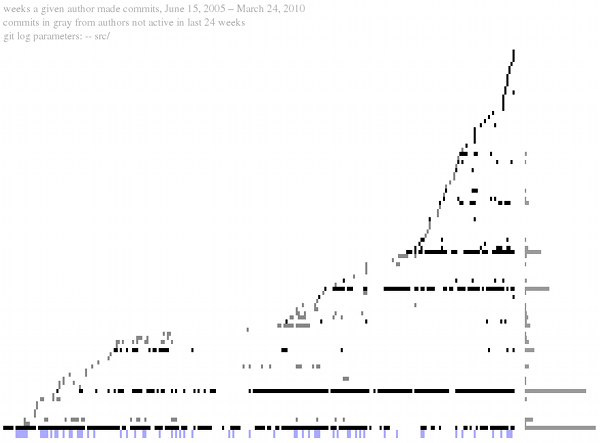
This is a scaled screenshot of the rendered HTML output, which I encourage you to click through to since it has tooltips and is zoomable in your browser. The script is available, and barring bugs should work on any git repo.
Evolution 2.30 released!!
This is one of the memorable releases of evolution considering the amount of work which has gone into this release. We could consider this as a preview for GNOME 3.0. To provide a snapshot of the major changes in this release,
- Diligent UI re-architecture to give farewell to bonobo.
- Improved imap implementation with live view updates, non-blocking operations and IDLE support, IMAPX.
- DBus transport replacing bonobo for address-book and calendar.
- GNOME 3.0 cleanup tasks. Gets rid of LibGnome, LibGnomeUi, LibArtLgpl, LibGLade.
- Evolution-mapi with push mail support and reduced memory footprint.
- Contacts map plugin.
Getting rid of bonobo from evolution was not only a cleanup work, but it enables evolution to shed off lot of weight to get flying. This has provided a lot of positive side-effects, one of the best which needs to be quoted is the startup speed of preference dialog. Evolution is now sleak and fast. If one has used the previous versions of evolution, no one needs to explain for appreciating the work. All credits goes to Matthew Barnes who has done an extra-ordinary job here.
We also have the new imap implementation IMAPX, which provides substantial performance improvements over the old imap provider making all the operations non-blocking in nature.
Credits to Ross Burton for replacing bonobo with dbus transport in EDS. This would pave way for us to fix some out-standing issues which had been put aside waiting for this change to dbus. There is also some work-in-progress for making this extremely stable in threaded environment.
We have listed the probable tasks which would be taken up for the future releases at http://live.gnome.org/Evolution/PlanningFuture. We would be picking up some tasks from there for Evolution 3.0 depending on the effort available. If you have suggestions feel free to get in touch with us to get it added..
Thanks to Akhil Laddha (bug master), Milan Crha (patch master), Johnny Jacob, Bharath Acharya and all others (many to list everyone here.. ) who have made significant contributions for making this release successful. Thanks to all the contributors, translators, distributors and users!!
Banshee 1.6!
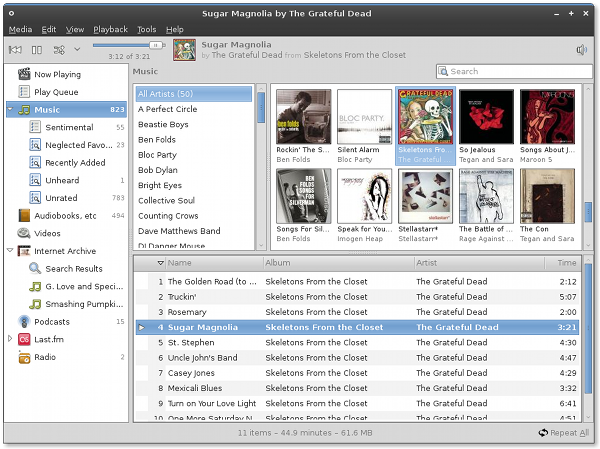
As scheduled, we just released Banshee 1.6.0! This release has been a long time coming, and we're really proud of it.
A more detailed backstory
We originally intended to release 1.6 last fall, but we got caught short on time, and ended up calling 1.5.1 a stable release so distros would feel comfortable picking it up, but of course the weird versioning has caused quite some confusion.
We continued the 1.5 series with 1.5.2 though 1.5.7 betas, leading up to this release: 1.6.0. The process really started 14 months ago when we branched off 1.4, and master became the workplace for 1.5. It wasn't even until after we branched that Alexander Kojevnikov, now one our most prolific contributors and a maintainer of the project, got involved!
Beautiful numbers53 programmers contributed to Banshee 1.6 just since 1.5.1, and over Banshee's full history, 142 programmers have contributed. I think these are astounding numbers. And these don't include Banshee Community Extensions, which started two months ago today and already includes 15 extensions and 19 maintainers.
We fixed 265 bugs since 1.5.1 as well (over 500 since 1.4), added dozens of new features and enhancements, and had over 2,000 beta users opt-in to report anonymous usage data that we will use to make Banshee better.
Banshee 1.6Here are some of the new features in Banshee 1.6. Read the Release Notes for more detail, screenshots, and enhancements not listed here.
- Play Queue Auto DJ
- Sync Device From Playlist
- Grid View
- Type-ahead Find in Track, Artist, and Album Lists
- Automatic Scoring
- New Shuffle Modes
- Audiobooks Library
- Library-folder Watcher
- eMusic Importer/Downloader
- Internet Archive Extension
- YouTube Extension
- Improved Metadata Handling
Thanks to everybody who has helped make Banshee such a success! Tremendous thanks go to Bertrand Lortentz and Alexander Kojevnikov, who over the last year in particular have contributed countless hours writing their own patches and reviewing others', triaging bugzilla, being active on IRC and the list, and generally being great maintainers of the project. They have invested in Banshee, and the effect on Banshee's quality and the community's growth is evident.
You can tap into the Banshee community and energy in many ways – read Planet Banshee, follow us on Twitter, lurk in the #banshee chat room, subscribe to banshee-list, monitor bug activity, and keep up with the latest code. We're a friendly, productive bunch, so stop by if you have a question or idea, if you want to contribute or you just want to learn how you can make your own project better.