
Install Multiple Kernel Versions using the YaST Qt Package Manager
You might want to install multiple kernel versions on your system.
The YaST Qt Package Selector provides a nice user interface that allows to manage multiple package versions now.
yast2-qt-pkg 2.18.19 or later supports this feature. You can find packages in my Build Service repository.
First of all you need to tell libzypp that your kernel is a package which is multiversion-enabled by adding this line to your /etc/zypp/zypp.conf:
multiversion = provides:multiversion(kernel)
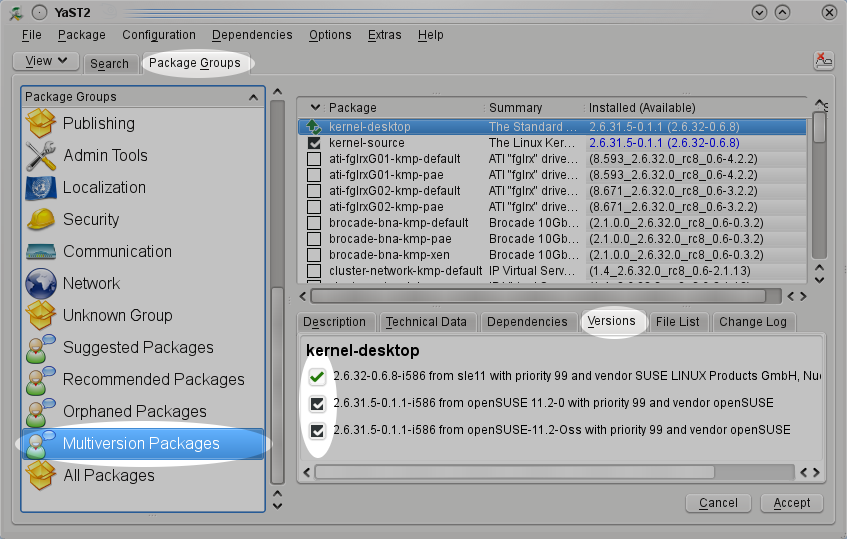
Start your YaST Software Management. The versions tab shows check boxes for multiversion packages instead of radio buttons.
This enables you to install multiple versions of the same package.
There is also a package group of multiversion packages that list all packages that can be installed in multiple versions.
ATI for n-th time
The most recent development is that even radeon driver is no more good for Radeon Xpress 200 built in my laptop. Not that it doesn't work at all, but you have to use strange methods to boot the laptop to the GUI. To be honest, not strange to me, I used startx very often long time ago, but I can imagine what would happen if openSUSE was just installed to try it out. It would be removed from the box faster then it was installed. With so many options out there it would take time to see that visitor coming back.

 Member
QJson code moves to gitorious
Just a quick note: I have just moved QJson source code to this git repository hosted by gitorious.
I’ll keep the code on KDE’s svn synchronized with the git repository.
QJson: from QObject to JSON and vice-versa
Some days ago I introduced the possibility to serialize a QObject instance to JSON. Today I’m going to show you the opposite operation: initializing a QObject using a JSON object.
I refactored a bit my latest changes: I created a new class called QObjectHelper that provides the methods required to convert a QObject instance to a QVariantMap and vice-versa.
This class can be used in conjunction with the Serializer and Parser classes to serialize and deserialize QObject instances to and from JSON.
Let me show a quick example, suppose the declaration of Person class looks like this:
{% codeblock [class definition] [lang:cpp ] %} class Person : public QObject { Q_OBJECT Q_PROPERTY(QString name READ name WRITE setName) Q_PROPERTY(int phoneNumber READ phoneNumber WRITE setPhoneNumber) Q_PROPERTY(Gender gender READ gender WRITE setGender) Q_PROPERTY(QDate dob READ dob WRITE setDob) Q_ENUMS(Gender)
public: Person(QObject* parent = 0); ~Person(); QString name() const; void setName(const QString& name); int phoneNumber() const; void setPhoneNumber(const int phoneNumber); enum Gender {Male, Female}; void setGender(Gender gender); Gender gender() const; QDate dob() const; void setDob(const QDate& dob); private: QString m_name; int m_phoneNumber; Gender m_gender; QDate m_dob; }; {% endcodeblock %}
From QObject to JSON
The following code will serialize an instance of Person to JSON :
{% codeblock [From QObject to JSON] [lang:cpp ] %} Person person; person.setName(“Flavio”); person.setPhoneNumber(123456); person.setGender(Person::Male); person.setDob(QDate(1982, 7, 12)); QVariantMap variant = QObjectHelper::qobject2qvariant(&person;); Serializer serializer; qDebug() << serializer.serialize( variant); {% endcodeblock %}
The generated output will be:
{% codeblock [JSON data] [lang:json ] %} { “dob” : “1982-07-12”, “gender” : 0, “name” : “Flavio”, “phoneNumber” : 123456 } {% endcodeblock %}
From JSON to QObject
Suppose you have the following JSON data stored into a QString:
{% codeblock [JSON data] [lang:json ] %} { “dob” : “1982-07-12”, “gender” : 0, “name” : “Flavio”, “phoneNumber” : 123456 } {% endcodeblock %}
The following code will initialize an already allocated instance of Person using the JSON values:
{% codeblock [From JSON to QObject] [lang:cpp ] %}
Parser parser;
QVariant variant = parser.parse(json);
Person person;
QObjectHelper::qvariant2qobject(variant.toMap(), &person;);
{% endcodeblock %}
A new release
These changes have been included inside the new release of QJson: 0.7.0.
Packages for openSUSE are building right now.
Kolab cyrus-imapd inherits from openSUSE base cyrus-imapd
This week kolab became one small step closer to realize feature request 307846: include Kolab in openSUSE. Although it will take lots and lots of more work to achieve this goal at all. The one step closer was realized in cooperation with the openSUSE cyrus-imapd maintainer R. The openSUSE cyrus-imapd spec file in the repository server:mail spec file has been extended with information about kolab, but the actual execution of the information has been switched off. With the Build Service link functionality the package server:mail/cyrus-imapd has been linked to the package server:kolab:UNSTABLE/cyrus-imapd-kolab, where the kolab functionality gets built. This is achieved by activating the variable with_kolab in the project related configuration file:
# osc meta prjconf server:Kolab:UNSTABLE

%define with_kolab 1

Macros:

%with_kolab 1
See the Build_Service prjconf page in the openSUSE wiki for more information about this awesome functionality. This way the cyrus-imapd-kolab package inherits everything from the openSUSE base cyrus-imapd package.
One drawback for kolab administrators, you have to manually correct the currently installed kolab packages. Start with downgrading cyrus-imapd-kolab (it only downgrades the Build service version and not cyrus-imapd itself):
# zyp in cyrus-imapd-kolab
This will install the dependent package perl-Cyrus-IMAP-kolab instead of perl-Cyrus-IMAP and perl-Cyrus-SIEVE-managesieve-kolab instead of perl-Cyrus-SIEVE-managesieve and it might remove kolab and perl-kolab.
Now reinstall kolab with:
# zyp in kolab
that should be sufficient to be in sync with the repository again. Don’t forget to restart the services, with:
# rckolab restart
This week also showed the power of the build service, as I could install kolab within only some minutes after installing openSUSE-11.2 in Virtualbox, while I never installed openSUSE-11.2 before.
The kolab installation in openSUS-11.2 made some problems visible in kolabconf -n. The latter has been fixed, it was a general problem in kolabconf and did not have anything to do with openSUSE-11.2.
The kolabconf problem however required some debugging, with a resulted spin off that the spamassassin daemon spamd is no longer activated via the startup scripts, but as a library of amavisd instead. That is the way amavisd and spamd have been configured in kolab, but what was not honored in the kolab setup on openSUSE.
Due to the change in the amavisd and spamd deamons, the script kolabsrv has been extended, and can now show a list with services required by kolab and what their current status is (see screenshot):
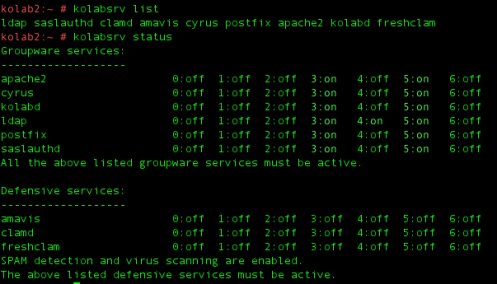
kolabsrv list and status output
The main task of kolabsrv is to convert the openpkg service names to the distribution dependent names.
The kolab project is heading towards a new release 2.2.3 with a planned release date in December 2009.
Sascha released a nice Brain Dump of the Week, giving a nice insight in the possible future of Kolab.
In one of the replies of Sasha’s brain dump, a references was made to project-builder, a project similar to the openSUSE build service. Although the OBS and project-builder may be similar, some people are wondering what the differences (1) and (2) are.
That’s quite a lot of information, but lots of things happened since my last blog entry about Kolab.
PS: many thanks that M. from Novell, who made my Lizards blog account working again. For the most part of this week, I’ve not been able to login to my blog account. After logging in with the correct credentials, I was referred back to the Lizards entry page. M. knows the details, so if this happens to you contact M. from Novell 
Mono devroom @ FOSDEM 2010
 Mono got a room at FOSDEM2010 in Brussels, so we won't have to do that in the hallway this year !
Want to speak about something fun you did with mono ? Propose a talk. Using mono on your servers saved your company from bankrupt in 200[89] ? Talk about it too. You are a passionate mono hacker and want to spread the word about what we'll got in the upcoming version ? You know the link.
And for everyone else, eager to learn about it, to discuss it, join on Sunday Feb 7. You're all welcome.
Note: be quick, the deadline for the cfp is around Dec 20.
Encrypted directory
I have notebook which contain private data and I don’t want anyone to read it even if my notebook will be stolen. Encrypted whole home partition is too much as my home directory contains also svn or git repositories which could anybody read. So I create encrypted directory in home directory which contain all private data and rest is normal accessible. So how to do it?
At first install user space crypted filesystem encfs. Then create two directories. First one for encrypted data and second one for accessible data. It is up to you how it is named e.g. encrypted and .encrypted or .Xcache and data (if your government feel that you must give him your data, so encrypted data is not so visible). Then create filesystem for it:
mkdir .encrypted encrypted

encfs /home/jreidinger/.encrypted /home/jreidinger/encrypted
Easy, not? Then encrypted directory contain your data. you can unmount it by fusermount -u encrypted.
After reboot you must attach it again. Maybe it is possible to do it easier, but I need that data only if I work from home, so I mount it manually. It is same as if you create encfs /home/jreidinger/.encrypted /home/jreidinger/encrypted

 wstephenson
openSUSE 11.2 KDE KNetworkManager online update: please test!
If you've been paying attention at the back there, you'll know that openSUSE started using a new community-driven online update administration process for 11.2. As well as Novell employees, community people are taking care of the workflow of examining and approving online updates to buggy packages. Now I have a favour to ask of you - the online updates that are ready to go out need testing to make sure they don't inflict gross mischief on users' systems.
KNetworkManager has an online update sitting in this queue awaiting testing. As anyone who has read http://bugzilla.novell.com/show_bug.cgi?id=553908 knows, I forgot to initialise 2 bools added to KNetworkManager just before 11.2 shipped, causing the settings that control whether DNS and routing settings from DHCP to be applied to be set randomly, so the update team wants someone more reliable's opinion on whether my fix for that is any good.
If you want to test it out and take part, add the 11.2 update test repo (or manually browse this URL and install all the NetworkManager-kde4 packages yourself) - http://download.opensuse.org/update/11.2-test . NB that due to a process bug the release number is the same so you will have to --force the install. If it works for you, please comment on bnc#553908 to that effect.
QJson: easier serialization of QObject instances to JSON
I have just committed into trunk a couple of changes that make easier to serialize a QObject instance to JSON.
This solution relies on the awesome Qt’s property system.
Suppose the declaration of Person class looks like this:
{% codeblock [class definition] [lang:cpp ] %}
class Person : public QObject
{
Q_OBJECT
Q_PROPERTY(QString name READ name WRITE setName)
Q_PROPERTY(int phoneNumber READ phoneNumber WRITE setPhoneNumber)
Q_PROPERTY(Gender gender READ gender WRITE setGender)
Q_PROPERTY(QDate dob READ dob WRITE setDob)
Q_ENUMS(Gender)
public:
Person(QObject* parent = 0);
~Person();
QString name() const;
void setName(const QString& name);
int phoneNumber() const;
void setPhoneNumber(const int phoneNumber);
enum Gender {Male, Female};
void setGender(Gender gender);
Gender gender() const;
QDate dob() const;
void setDob(const QDate& dob);
private:
QString m_name;
int m_phoneNumber;
Gender m_gender;
QDate m_dob;
};
{% endcodeblock %}
The following code will serialize an instance of Person to JSON:
{% codeblock [Serialize to JSON] [lang:cpp ] %}
Person person;
person.setName(“Flavio”);
person.setPhoneNumber(123456);
person.setGender(Person::Male);
person.setDob(QDate(1982, 7, 12));
Serializer serializer;
qDebug() << serializer.serialize( &person;);
{% endcodeblock %}
The generated output will be: {% codeblock [JSON data] [lang:json ] %} { “dob” : “1982-07-12”, “gender” : 0, “name” : “Flavio”, “phoneNumber” : 123456 } {% endcodeblock %}
I hope you will find this new feature useful. I’m also considering to create a similar method inside the Parser class.
As usual suggestions are welcome.
Dublin..

A bumpy flight into Dublin. Quite some rain and clouds and occasional sun rays. A long night out in a pub that challenged me by hiding. Needed to clear my head the day after. Went on a long walk in Dublin bay. Luckily this part of Ireland wasn't affected by the flood. Rushed to meet up for a coffee in heavy rainfalls. The ticket machine refused to serve me. Had to face the Dublin traffic and the rain. Went to a friend's home and finally also met their little one. Have never seen a kid smiling that much. Extremely charming. An early start the next day. A very friendly taxi driver. Got deep-freezed at the gate and almost blown off my feet when entering the plane. Were held on the ground for an hour due to the gusts. Then the familiar culture shock at Nuremberg train station. Anyway, back home. Almost forgot: Hope to go back for the gorilla advertisement. Here are some pics of the short trip:


