
 Member
 Beineri
New KDE Four Live-CDs
KDE Project:
New KDE Four Live CDs with KDE 4.2.1, KOffice 2.0 Beta 7 and much more are up.
They were built within openSUSE Build Service's KDE:Medias project in which also automatically Live-CDs with KDE trunk snapshot packages (currently 4.2.65) from KDE:KDE4:UNSTABLE repositories are built. The ISOs appear (without prior testing by anyone) here.
Context Menus in YaST Partitioner
We received some complains that the redesigned partitioner on openSUSE 11.1 is
tedious to use. To remedy these shortcomings I’m adding context menus to the
tables so that it is no longer required to select the correct view using the
navigation tree to perform some operation. Almost all operation should be
available via context menus in the main view listing all devices.
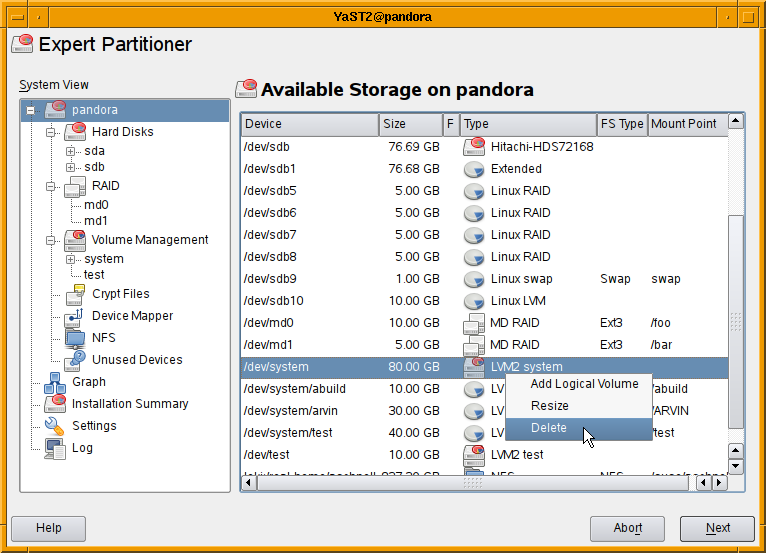
As usual comments are welcome.
Colors for Terminal Apps
#include <unistd.h>
#include <stdlib.h>
#include <string.h>

bool has_colors()
{
  if (::isatty(STDOUT_FILENO))
  {
    char *term = ::getenv("TERM");
    if (term && ::strcmp(term, "dumb"))
      return true;
  }
  return false;
}
This (translated to a C/C++ hybrid) is all that git (and now also zypper :O) does to detect the color capability of the
stdout. stout must be a terminal, and the TERM environment variable must not be "dumb". The idea is that most color-capable terminals understand the ISO 6429 (former ANSI) color control sequences, and if the above check fails for your terminal, you can configure git (and soon zypper :O) to never or always use colors (or set the TERM to "dumb").Regarding terminfo, i found it hard to learn and an overkill for just printing colored text (of course, once learned it can be used in other ways, too, e.g. to move the cursor, turn off input echoing when writing passwords, etc.). Maybe some other time.
On the other hand, ncurses are nothing for an existing terminal application which already does lots of output the usual way - you would have to rewrite all the output handling using ncurses. With ncurses it is that you write your app either with or without it from the start. But you cannot switch to it later, nor mix it with standard C I/O (
printf() or C++ streams (cout <<). At least that's my impression from what i've learned...So, zypper is now (since 1.1.0) a bit less boring, with colors :O) The idea is to print normal messages and progress in darker color, highlight important messages like results, warnings, errors, and color some special stuff, e.g. in install summary, default options in prompts, and so on. And it should be configurable, so that anybody can adapt it to his or her terminal background and text color. I'll write more about that once it's done.
python-TurboGears2 alive and kickin’ on the build service

Screenshot of TurboGears 2
It’s been quite a while since I last posted an update on the state of python-turbogears in the openSUSE build service. The TurboGears project currently has three branches open (which seems to cause more confusion that actually help people) – the 1.0 branch, the 1.1 branch and the 2.0 branch. Whereas newcomers are advised to install from the 1.0 branch and to develop web applications based on that branch, the truth is that most of the active development goes on in the 2.0 branch. TurboGears 2.0 is at beta7 stage right now – features are frozen and a release data is in sight for the big 2.0.
Without getting into the major differences between 1.0 and 2.0, many people on the TurboGears Google Group have expressed the opinion that the 2.0 branch, despite its beta suffix, is exceptionally stable and well suited to production deployment. One of the major obstacles facing people was how to actually install it. Because it requires some cutting edge packages which might not be standard fare for many distributions, it is recommended to install TurboGears2 (beta) in a virtual python environment using the virtualenv package. Once the new virtual environment is ready and activated, a simple easy_install will automatically install the TurboGears2 package and its requirements. This is well documented.
I got a bit fed up with the virtual environment setup – it worked fairly well, but I was constantly having to set up completely new virtual environments just to install another TurboGears web application. There is an option when using virtualenv, to make the entire virtual environment “mobile” (meaning that you can pack virtual environment plus web app off to another computer easily), but it wasn’t working for me.
Enter python-TurboGears2 on the openSUSE build service. It took me a couple of days to get all the dependencies in the correct versions and installing properly, but it looks as if it works now. As TurboGears2 will be in a more or less constant state of flux until the final 2.0 release, there will probably be quite a lot of work to do to keep the packages up to date, but it’s worth it for the simple zypper in python-TurboGears2  What I want to do now is to try creating a SUSE Studio based virtual appliance – that way practically any web app could be created and setup easily – and with a bit of elbow grease you could probably use apparmor etc to make it rock solid.
PS: it would be well cool if people would test the package
YaST Qt UI with Context Menus
Context menus are supported by almost all UI frameworks and most people got used to them. Therefore it’s high time to provide context menus in the YaST Qt UI as well. yast2-qt-2.18.6 offers this feature, packages are available in my build service repository.
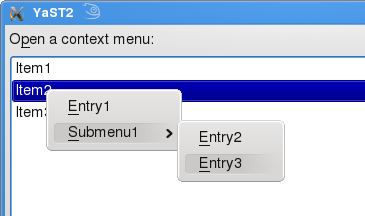
In four simple steps YCP programmers can benefit from this new feature:
Step 1:
Create a widget and tell via `opt(`contextMenu) that a ContextMenuActivated Event should be emitted when the user right clicks the widget:
`SelectionBox( `id(`sport), `opt(`notify,`immediate, `contextMenu),

                "Open a context menu:",

                [

                    "Item1",

                    "Item2",

                    "Item3"

                ] );
Step 2:
Wait and analyze events:
event = UI::WaitForEvent( ... );

...

if ( event["EventReason"]:"" == "ContextMenuActivated" )

...
Step 3:
Open a context menu. The argument of OpenContextMenu() describes the menu structure:
UI::OpenContextMenu( `menu(

[ `item(`id(`folder), "&Folder"  ),

`menu( "&Document",

[ `item(`id(`text),

"&Text File" ),

`item(`id(`image),

"&Image"     ) ]) ]  ));
Step 4:
Analyze the returned `id and trigger an action. An example called ContextMenu.ycp is included in the package yast2-ycp-ui-bindings.
Usability
A Context menu provides shortcuts to actions for a certain widget or item. This features improves usability when it’s used properly. Application programmers should avoid making certain features only using context menus because users might not find them.
Please keep in mind that YaST ncurses doesn’t provide context menus. Each operation that is only available via a context menu is useless in YaST ncurses because the user cannot select it.
Android Reloaded

On Monday night I got home from the pub, and my phone announced that there was an update available, and would I be so kind as to allow it to update itself. I said, 'Yes, that would be lovely', and my G1 proceeded to show me a nice updating screen while it changed all its software around.
There's not much to see for it. The Android Market now tells you when anything you've installed has an update available, which is nice. Google Maps is now version 3, but I can't tell the difference. The biggest changes though, have to be memory usage and power consumption. Previously, after using my phone on and off during the day at work, the battery level would generally be down around 40% when I came home. However, the last two days have seen it around 60% instead, which is a great improvement. The other change is that before the update, my /data partition had around 10Mb free on it, while after the update it has around 30Mb free. I don't know how they've done that. Perhaps shifted some space from the /cache partition? I never bothered noting the free space on anything other than /data before.
Augeas for libzypp and zypper?
Augeas enables you to read and edit your config files in a way which preserves comments and formatting details, allowing humans and programs coexist peacefully when it comes to editing configuration files. More than that, you can map some special structures of the file to special parts of the augeas tree, rather than using the generic INI file parser. See the zypp.conf for example (zypper.conf will have the same structure):
[main]
## Option description.
## Default: etc.
##
# disabledoption = value

## Another option description
##

another.option = value
With Augeas you can write a lens (the file contents description) which will map such file into a tree like this:
/files/etc/zypp/zypp.conf/main/1
/files/etc/zypp/zypp.conf/main/1/description[1] = "Option description."
/files/etc/zypp/zypp.conf/main/1/description[2] = "Default: etc."
/files/etc/zypp/zypp.conf/main/1/description[3]
/files/etc/zypp/zypp.conf/main/1/commented
/files/etc/zypp/zypp.conf/main/1/disabledoption = "value"
/files/etc/zypp/zypp.conf/main/2
/files/etc/zypp/zypp.conf/main/2/description[1] = "Another option description."
/files/etc/zypp/zypp.conf/main/2/description[2]
/files/etc/zypp/zypp.conf/main/2/another.option = "value"
Note the commented node. Augeas has an API for looking for the nodes, getting values from them, setting the values, and finally saving the tree back to the config file.
What does this mean for zypper? Implementing
zypper conf --list is a piece of cake, as well as zypper conf --set another.option value. Commenting or uncommenting the option is a matter of adding or removing the commented node. Getting the option description for zypper conf --help some.option is easy (and maybe it is possible to map the multi-line ## description to a single 'description' node!).Here is a draft of lens for zypper (it will need comments and further improvements). To try it out you can crete a /etc/zypp/zypper.conf file with contents like the above example, and use the
augtool like this:$ augtool -I /the/dir/with/the/zypper.aug/file
augtool> print /files/etc/zypp/zypper.conf/
/files/etc/zypp/zypper.conf
/files/etc/zypp/zypper.conf/anon
/files/etc/zypp/zypper.conf/anon/description[1] = "Configuration file for zypper"
/files/etc/zypp/zypper.conf/anon/description[2]
/files/etc/zypp/zypper.conf/anon/description[3] = "Boolean values are 0 1 yes no on off true false"
/files/etc/zypp/zypper.conf/main
/files/etc/zypp/zypper.conf/main/1
/files/etc/zypp/zypper.conf/main/1/description[1] = "Whether to use colors"
/files/etc/zypp/zypper.conf/main/1/description[2]
/files/etc/zypp/zypper.conf/main/1/description[3] = "Default value: autodetected"
/files/etc/zypp/zypper.conf/main/1/description[4]
/files/etc/zypp/zypper.conf/main/1/description[5]
/files/etc/zypp/zypper.conf/main/1/colors = "yes"
augtool>
Type
help for other commands, use TAB key for completion, and check also the Augeas home page for more info.What does this mean for libzypp? Basically the above, with respect to libzypp's files. Currently, you either edit your repos.d/*.repo, locks, credentials, and other files by hand or you leave it to libzypp's frontends, or you at least take care not to write comments in those files, because they will all get removed upon the next change done by libzypp (what we do there is to rewrite the entire files from in-memory data upon saving). This can be easily avoided using Augeas and we can add an editing API for zypp.conf. Plus the bonuses described above.
The library package (libaugeas0) would add 300 kiB of installed size to libzypp's/zypper's dependencies, (which is not little), plus an optional 200 kiB of the official lenses (augeas-lenses), if we decide to use them.
todo: Look at Augeas' error reporting. The user can of course break the structure of the file in a way that the lens can't map it to the tree anymore. If parsing of the file will fail, we need to report why, so that the user can fix it.

OSF Status Report #3
Let me present you the openSUSE forums statistics for February 2009.
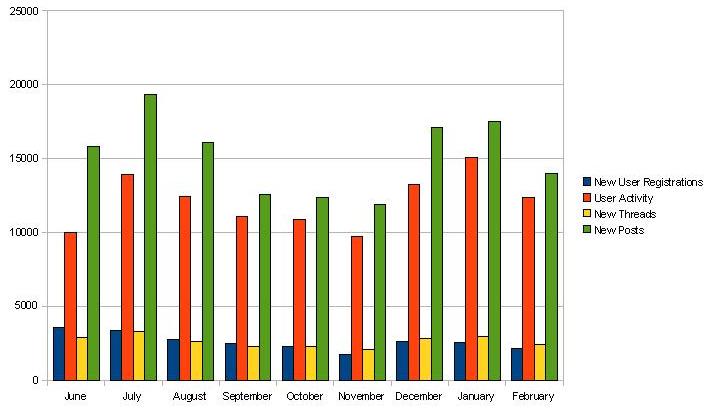
Up to the 28th of February 2009, we achieved a membership of 23.464 (+2.142) members, 23.463 (+2.390) threads and 136.684 (+13.989) posts. The number in brackets shows the increase of the corresponding measurement compared to the last snapshot taken on the 31st of January 2009. The user activity, i.e. the number of individual visits to the openSUSE forums, was 12.382 for the observed period. Most users ever online still was 7.771 on the 2nd of December 2008.
The following diagram shows the monthly development of new user registrations, user activity, new threads and new posts since the launch in June 2008.
Kudos to our Top5 posters during February 2009
- oldcpu – 566
- caf4926 – 560
- ken_yap – 362
- mingus725 – 254
- Malcolm – 223
Thanks as usual for making the openSUSE forums a worthwhile place to be.
If you haven’t signed up for the openSUSE forums yet, please consider doing so. It’s a great way to contribute to the openSUSE community in a non-developing capacity.
Any contribution to the recently announced “experts approach” collaboration between the openSUSE forums and the openSUSE Weekly Newsletter is much appreciated. If you’re interested to participate, please don’t hesitate to contact me for further information. Any comments and suggestions of the community about the OSF status reports is much appreciated by the openSUSE forums team. We’re certainly interested to know what the community would like to be covered in coming issues.
Remove Beagle on OpenSUSE 11.1
Beagle is a desktop search software, but I don’t use this kind of
"application". If you want to remove it from your system here is how to
do it:
Remove all related package:
sudo zypper remove *beagle*
Lock all this packages using zypper addlock
sudo zypper addlock *beagle*
Now, live without Beagle. :)
VMWare Workstation 6.5.1 on OpenSUSE 11.1
Finally, I received my new hdd (the previos one died) so I decided to install OpenSUSE 11.1. VMWare refused to work. I tried to install VMware-server-1.0.8 but without any success, and in the case of VMware-server-2.0.0 I don't like the new management interface (they didn't keep the old vmware-console, you will need to manage your virtual machines using firefox) so, finally I said ok, let's try workstation. And here is what I did:
ionut@vaio:~> uname -a
Linux vaio 2.6.27.19-3.2-default #1 SMP 2009-02-25 15:40:44 +0100 x86_64 x86_64 x86_64 GNU/Linux
ionut@vaio:~> cat /etc/SuSE-release
openSUSE 11.1 (x86_64)
VERSION = 11.1
ionut@vaio:~>


:::bash
ionut@vaio:~> chmod 755 VMware-Workstation-6.5.1-126130.x86_64.bundle
ionut@vaio:~> sudo ./VMware-Workstation-6.5.1-126130.x86_64.bundle
Extracting VMware Installer...done.
You must accept the EULA to continue.  Press enter to proceed.
.....[skip]....
Path to Eclipse directory for use with Integrated Virtual Debugger
(optional):

The product is ready to be installed.  Press enter to begin
installation or Ctrl-C to cancel.

Installing VMware Workstation 6.5.1
    Configuring...
[######################################################################] 100%
Installation was successful
Let's see if it is working:
ionut@vaio:~> vmware
Logging to /tmp/vmware-ionut/setup-13622.log
modinfo: could not find module vmmon
modinfo: could not find module vmnet
modinfo: could not find module vmblock
modinfo: could not find module vmci
modinfo: could not find module vsock
modinfo: could not find module vmmon
modinfo: could not find module vmnet
modinfo: could not find module vmblock
modinfo: could not find module vmci
modinfo: could not find module vsock
/usr/bin/vmware: line 31: 13622 Segmentation fault      "$BINDIR"/vmware-modconfig --appname="VMware Workstation" --    icon="vmware-workstation"
ionut@vaio:~>
TO FIX IT:
sudo mv /usr/lib/vmware/modules/binary /usr/lib/vmware/modules/binary_old
and now run vmware as root and it will build the modules again and everything will work fine.
If after reboot vmware will not start, then check if vmware service is running:
sudo /etc/init.d/vmware status
sudo /etc/init.d/vmware restart
Enjoy