Planning a short stay in Boston
This is going to be an interesting end of year.
BTW, I'm currently looking for a small apartment (or big room) to rent, ideally around Cambridge. Unfortunately I'm not having much success, since apartments I found are either too expensive, or not available for those two months. So if you know about some good place, information will he highly appreciated! (mail lluis at novell dot com).
 Member
 _Marcus_
Google Chrome on openSUSE
As I guess everyone notice, Google has released their own Browser called Chrome. Based on Webkit (based on KHTML of KDE fame) it is a small, fast and foremost secure webbrowser. And if you are reading this, you likely know that it does not work on Linux, but only on Windows.
But wait … we have the Windows Emulator Wine and I am one of its developers…
This also explains the first comment from a colleague on Wednesday morning was: “Why don’t you have fixed Wine to run it yet?!?” We tried together to get the online installer to run, but not successful.
Over night however some other folks found out how to do it by using the offline installer.
So how to install Chrome:
1. Get the Wine 1.1.3 from the openSUSE buildservice Emulators:Wine repository.
Its available via the Community Repositories Module in YAST2 on openSUSE 10.3 and 11.0,
after adding this repository upgrade the wine package.
This piece of code run as root will do it on openSUSE 11.0:
zypper sa http://download.opensuse.org/repositories/Emulators:/Wine/openSUSE_11.0/ Wine

   zypper in wine
All other steps are done as desktop user from a regular shell.
2. Download the Chrome Offline Installer
wget http://gpdl.google.com/chrome/install/149.27/chrome_installer.exe
3. Install richedit native libraries.
While Wine contains richedit libraries they are not yet up to the task to help Chrome yet.
(This is likely to be fixed soon.)
To install them run:
winetricks riched20 riched30
3. Run Chrome Installer
wine chrome_installer.exe
This will popup a dialog where you can press return until Chrome itself starts.
Since we need to supply Chrome with some Options to make it work with current Wine, you need
to close it again. Click anyway any crash messageboxes.
4. Run Chrome itself
We need to supply Chrome with some additional commandline options to make it run with Wine,
so we need to do start it by hand (instead of clicking on the convenient Desktop Icon already there).
cd ~/.wine/drive_c/windows/profiles/*/*/*/Google/Chrome/Application

   wine chrome.exe --new-http --in-process-plugins
5. Surf!
And of course the obligatory screenshot: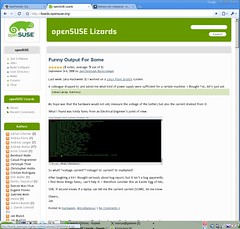
Most of the funny workarounds above will actually vanish in the next Wine releases, now that the Wine developers can actively debug it.
The WineHQ Application database entry has the ongoing discussion of getting it to work and links to the Wine bugzilla entries.
Convenient setters in C++?
RepoInfo & reference to the modified object. This pattern is common in higher OO languages like Java and is convenient as it saves typing when setting serveral properties at once (i'm not sure how it is performance-wise).
RepoInfo repo;

// you write
repo
  .setAlias("foo")
  .setName("Foo Project Repository")
  .setEnabled(true).setAutorefresh(false);

// instead of
repo.setAlias("foo");
repo.setName("Foo Project Repository");
repo.setEnabled(true);
repo.setAutorefresh(false);
Unless the class is part of a class hierarchy, everything's OK. But after splitting RepoInfo to RepoInfoBase and a derived RepoInfo the dark side of C++ has shown up.
RepoInfo repo;
repo
  .setAlias("foo")   // RepoInfoBase setter
  .setEnabled(true)  // RepoInfoBase setter
  .setPriority(50);  // RepoInfo setter - this won't compile becase setEnabled() returned
                     // a RepoInfoBase &, and C++ does not bother with figuring out that the
                     // object is also a RepoInfo.
In order to make this work in this setup, you have to redefine each setter from the base class in the derived class and make it return the reference to the derived class:
class RepoInfoBase
{
  RepoInfoBase & setAlias( ... ) { _pimpl->alias = ...; return *this; }
}

class RepoInfo : public RepoInfoBase
{
  RepoInfo & setAlias( ... )
  { RepoInfoBase::setAlias(...); return *this; }
}
but by doing this the RepoInfo class looses some of the advantages of being derived from RepoInfoBase.
So, is it best to stick with setters returning void, or is there a better way to do this?
Funny Output For Some
Last week (aka Hackweek 3) I worked on a Linux From Scratch system.
A colleague dropped by and asked me what kind of power supply were sufficient for a certain machine. I thought “ok, let’s just ask lshal|grep battery
My hope was that the hardware would not only measure the voltage of the battery but also the current drained from it.
What I found was kinda funny from an Electrical Engineer’s point of view:
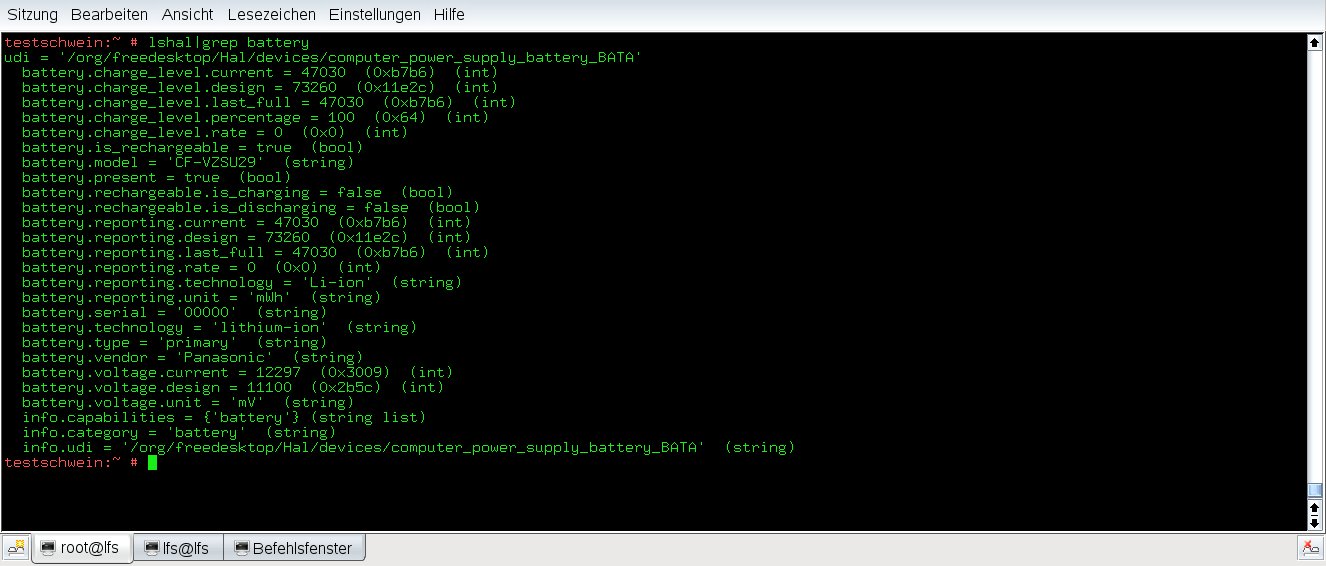
So what? “voltage.current”? Voltage? Or current? Or multiplied?
After laughing a bit I thought seriously about bug report, but it isn’t a bug apparently.
I find those things funny, can’t help it. I therefore consider this an Easter Egg of HAL.
Still, if anyone knows if a laptop can tell me the current current (SCNR), let me know.
Cheers,
Jan
Unifying Progress During Installation – Continued…
So, my code from the hackweek is now in the YaST Subversion and the packages submitted for build.
Now the fun part begins, as some YaST developers noticed very quickly. There are several parts of YaST that got broken – e.g. YaST Partitioner on the running system spotted by Arvin, or sw_single not really adapted spotted by Bubli, …
Thanks to those I’m working with Kobliha to fix the issues as they come. So, if there is a progress in YaST (typically related to package installation) that does not behave as expected, it is certainly worth a bug report.
Quick configuration for Munin
From project website:
"Munin the monitoring tool surveys all your computers and remembers what it saw. It presents all the information in graphs through a web interface. Its emphasis is on plug and play capabilities. After completing a installation a high number of monitoring plugins will be playing with no more effort.
Using Munin you can easily monitor the performance of your computers, networks, SANs, applications, weather measurements and whatever comes to mind. It makes it easy to determine "what's different today" when a performance problem crops up. It makes it easy to see how you're doing capacity-wise on any resources."
The configuration file is:
/etc/munin/munin.conf
The minimal configuration file for server:
# Configfile for Munin master
dbdir       /var/lib/munin/
htmldir     /var/www/munin/
logdir      /var/log/munin
rundir      /var/run/munin/

[mynode.mydomain.com]
address 192.168.1.105
In the configuration file for server I specified only one single node: mynode.mydomain.com
Next step is to configure the node but the default configuration is fine, only let the server to acces Munin port 4949:
allow ^192\.168\.1\.1$
where 192.168.1.1 is the ip number for server.
The final step si to check their website to read the documentation/faq for more configuration options.
That's all
Hackweek Day 3: cross-build with OBS Part 2
This is the second part of my article series about the Hackweek Project “cross-build in the OBS”. The first part can be found here.
Before I come back to our Hackweek project, some information about the qemu emulator. As a preparation to Hackweek, I talked with Uli Hecht and Jan Kiszka. Uli Hecht is the Novell/SUSE Maintainer of the qemu packages in openSUSE:Factory/qemu and maintainer of the OBS project Emulators, where every emulator you can imagine is maintained for a couple of linux distributions. Also I consulted Jan Kiszka, one of the reviewers and maintainers of the qemu upstream project about the status of the qemu in general, “User Mode” and status of important architectures specifily.
We also discussed in our OBS meeting at Hackweek on thursday what performance requirements cross-build has to fullfil in order to get the normal openSUSE:Factory beeing built with cross-build for architectures like arm, sh4 and others used in embedded space. The consensus was that the qemu architectures to start with in the cross-build project are qemu-kvm, including x86 support, and Arm and PowerPC, specifically in the “User Mode”. Ludwig Nussel had already implemented some weeks ago the possibility to use qemu-kvm and uml in addition to Xen inside the OBS workers/local build, and unified the code for the three emulators. The code for all the mentioned features except cross-build itself is already inside the OBS subversion repository in the trunk.
Results of the discussions were:
So much for the theory. Now, I show you how to run build jobs for Debian:Etch/Arm, using normal unmodified Debian type packages. I have prepared for you inside build.opensuse.org/openSUSE:Tools:Unstable and openSUSE:Tools:Devel the required packages for installation. To keep modifications small, and to make sure cross-build can be used also with the official OBS on build.opensuse.org, we decided to first implement cross-build for use with “osc build” local build.
If you are running a local OBS, you should already be familiar with the installation instructions for it, and I assume you had already successfully installed a local OBS in the past, and also migrated from version to version.
Update your local OBS for cross-build
This can be skipped, should Adrian provide Debian:Etch packages for Arm in the official OBS. You need to be root to install the packages. I assume you have ca. 55 GB harddisk space free, and you need to download ca. 36 GB via the internet. The example is for a openSUSE 11.0 machine with an x86_64 processor.
# mkdir -p /tmp/obs-packages && cd /tmp/obs-packages
# wget -q -c http://download.opensuse.org/repositories/openSUSE:/Tools:/Unstable/openSUSE_11.0/x86_64/obs-api-1.1.0.4791M-2.1.x86_64.rpm
# wget -q -c http://download.opensuse.org/repositories/openSUSE:/Tools:/Unstable/openSUSE_11.0/x86_64/obs-server-1.1.0.4791M-2.1.x86_64.rpm
# wget -q -c http://download.opensuse.org/repositories/openSUSE:/Tools:/Unstable/openSUSE_11.0/x86_64/obs-worker-1.1.0.4791M-2.1.x86_64.rpm
Now, first save your old /etc/sysconfig/obs-server
# mv /etc/sysconfig/obs-server /etc/sysconfig/obs-server.old
Then install the new OBS Packages:
# rpm -Uhv {obs-api,obs-server,obs-worker}*4791M*.rpm
Now, edit the new /etc/sysconfig/obs-server file, and comment in the line with arm inside. You have some possibilities. Normally, you would also run the OBS scheduler for x86_64 and i586, so you choose the line with armv4l inside in addition:
## Path:        Applications/OBS
## Description: define for which architectures the packages should get build
## Type:        stringlist
## Default:     "i586"
## Config:      OBS
#
# This needs to be a space seperated list of all supported architectures
OBS_SCHEDULER_ARCHITECTURES="i586 x86_64 armv4l"
Now your OBS is ready to be started again. Start everything except the scheduler.
Now depending on you local OBS setup, you either modify or add a new project with the name Debian:Etch. Once done, add an updated architecture record to it, with the new architecture armv4l added:
# osc -A api.opensuse.org meta prj Debian:Etch >de.xml
Now edit file “de.xml” with you favorite editor of you choice and add change the architecture block:
...
  <repository name="standard">
    <arch>i586</arch>
    <arch>x86_64</arch>
    <arch>armv4l</arch>
  </repository>
...
Now save the changed file in your local OBS.
Next copy the meta prjconf from the api.opensuse.org to you local OBS:
# osc -A api.opensuse.org meta prjconf Debian:Etch >de.conf
# osc -A <your local ip> meta prjconf -F de.conf Debian:Etch
To complete the installation, you now finally install the x86_64, i586 as a copy from the official OBS (downloads ca. 22 GB and takes a while):
# obs_mirror_project Debian:Etch standard i586
# obs_mirror_project Debian:Etch standard x86_64
After this, the appropriate directories “/srv/obs/build/Debian:Etch/standard/i586/:full” and “/srv/obs/build/Debian:Etch/standard/x86_64/:full” should have been created and filled with lots of .deb files.
Then you also need the Debian:Etch binaries for Arm, found on 3 full DVDs. Download them (another ca. 13 GB):
# wget -c -q ftp://ftp.tu-chemnitz.de/pub/linux/debian/debian-cd/4.0_r4a/arm/iso-dvd/MD5SUMS
# wget -c -q ftp://ftp.tu-chemnitz.de/pub/linux/debian/debian-cd/4.0_r4a/arm/iso-dvd/debian-40r4a-arm-DVD-1.iso
# wget -c -q ftp://ftp.tu-chemnitz.de/pub/linux/debian/debian-cd/4.0_r4a/arm/iso-dvd/debian-40r4a-arm-DVD-2.iso
# wget -c -q ftp://ftp.tu-chemnitz.de/pub/linux/debian/debian-cd/4.0_r4a/arm/iso-dvd/debian-40r4a-arm-DVD-3.iso
Then check that the MD5SUMS so the downloads were all ok. Mount the images with:
# mkdir ./mnt
# mount -o,ro -t iso9660 ./debian-40r4a-arm-DVD-1.iso ./mnt -o loop=/dev/loop3
Then copy all files with name “*.deb” inside all the 3 DVDs to “/srv/obs/build/Debian:Etch/standard/armv4l/:full”. Finally, chown all correctly to the obsrun user:
# chown -R obsrun.obsrun /srv/obs/build/Debian:Etch/standard
Now youre done on the server and can start the scheduler again. It should show up with a line: “armv4l: running for about …” on the OBS monitor webpage, indicating all is done correctly on your local OBS server. The scheduler now needs a while to start up and rescan the new binaries.
Updates for “qemu”, “build” and “osc” for cross-build
First, download and install a specifically fixed qemu on your local machine where you want to run “osc build” local build:
# wget -q -c http://download.opensuse.org/repositories/openSUSE:/Tools:/Unstable/openSUSE_11.0/x86_64/qemu-0.9.2svn20080824.5081-12.1.x86_64.rpm
# rpm -Uhv qemu-0.9.2svn20080824*.rpm
# sh /usr/sbin/qemu-binfmt-conf.sh
# wget -q -c http://download.opensuse.org/repositories/openSUSE:/Tools:/Devel/openSUSE_11.0/noarch/build-cross-2008.08.31.4831M-1.1.noarch.rpm
# wget -q -c http://download.opensuse.org/repositories/openSUSE:/Tools:/Devel/openSUSE_11.0/x86_64/osc-cross-0.108.4831M-2.1.x86_64.rpm
# rpm -Uhv {osc-cross,build-cross}*4831M*.rpm
Now we are ready to run the first “osc build” command for cross-build. To do that, you need a package able to build for Debian:Etch targets. I suggest you to copy e.g. openSUSE:Tools/lzma to your local OBS. Then switch off building for armv4l targets for it inside the meta prj data, and switch on a arm target for the package lzma inside:
.....
  <build>
<disable arch='armv4l'/>
  </build>
  <publish>
<disable arch='armv4l'/>
  </publish>
.....
  <repository name="Debian_Etch">
    <path repository="Debian_Etch" project="openSUSE:Tools"/>
    <arch>i586<arch>
    <arch>x86_64<arch>
    <arch>armv4l<arch>
  </repository>
.....
Now, checkout the package and try your first cross-build:
$ cd <goto some local dir>
$ osc -A <local obs ip> co openSUSE:Tools/lzma
$ cd  openSUSE:Tools/lzma
$ osc -A <local obs ip> build --userootforbuild --clean Debian_Etch armv4l lzma.dsc
Building lzma.dsc for Debian_Etch/armv4l
Getting buildinfo from server
Updating cache of required packages
Writing build configuration
Getting buildconfig from server
Running build
  sudo /usr/bin/build --root=/var/tmp/oscbuild-root/martin/Debian_Etch/armv4l --rpmlist=/tmp/rpmlist.gpIne8 --dist=/tmp/buildconfig.8xD3vp lzma.dsc --clean
--changelog --arch=armv4l
logging output to /var/tmp/oscbuild-root/martin/Debian_Etch/armv4l/.build.log...
Memory limit set to 5418004KB
Using BUILD_ROOT=/var/tmp/oscbuild-root/martin/Debian_Etch/armv4l
Using BUILD_ARCH=armv4l


jupiter started "build lzma.dsc" at Mon Sep  1 01:42:01 CEST 2008.


processing specfile /tmp/obs-update/tmp/openSUSE:Tools/lzma/lzma.dsc...
running changelog2spec --target debian --file /tmp/obs-update/tmp/openSUSE:Tools/lzma/lzma.dsc

...............cut off in the middle.................

dh_compress
dh_fixperms
dh_installdeb
dh_shlibdeps
dh_gencontrol
dpkg-gencontrol: warning: unknown substitution variable ${misc:Depends}
dh_md5sums
dh_builddeb
dpkg-deb: building package `lzma' in `../lzma_4.32-6_arm.deb'.
 dpkg-genchanges
dpkg-genchanges: including full source code in upload
dpkg-buildpackage: full upload; Debian-native package (full source is included)


/var/tmp/oscbuild-root/martin/Debian_Etch/armv4l/usr/src/packages/DEBS/lzma_4.32-6_arm.deb
And cheers, you got it.
You can experiment with the resulting chroot environment inside the buildroot:
$ sudo chroot /var/tmp/oscbuild-root/martin/Debian_Etch/armv4l/
root's password:
# uname -a
Linux jupiter 2.6.25.11-0.1-default #1 SMP 2008-07-13 20:48:28 +0200 armv5tel GNU/Linux
# file /bin/bash
/bin/bash: ELF 32-bit LSB executable, ARM, version 1 (ARM), for GNU/Linux 2.4.1, dynamically linked (uses shared libs), for GNU/Linux 2.4.1, stripped
# ldd /bin/bash
        libncurses.so.5 => /lib/libncurses.so.5 (0x42084000)
        libdl.so.2 => /lib/libdl.so.2 (0x420cf000)
        libc.so.6 => /lib/libc.so.6 (0x420db000)
        /lib/ld-linux.so.2 (0x40081000)
We have a nice new toy now to play with! Keep happy hacking.
This finishes the current part of the article series. The next part will be about the next steps in the development, a roadmap, what can we do with it and “when will it be inside build.opensuse.org”.
Enlightenment
Glad to announce the release of Enlightenment LiveCD based on OpenSUSE-11.0.
Download page
‘Welcome’ notes (PDF)
Direct link to the .iso image
Login details:
User: linux
Pass: soad
User: root
Pass: soad
A lot of people helped me to manage this. THANK YOU VERY MUCH! My deepest apologizes that I can’t mention all of you by name. But I’ll try to make it ‘in general’:
Enlightenment Development Team and Enlightenment Community
OpenSUSE Build Service Team
OpenSUSE KIWI Team (schaefi, cyberorg, pzb, cgoncalves – THANKS!)
Stalwart, thanks for the hosting!
Packman Team
Novell
Dear engineers and developers, THANKS! Using SuSE since 8.2 (Pro) Decided to contribute not so long ago…
It’s the result of my modest efforts. Hope you like it.
Regards,
sda
Button Order in YaST: Trying to Make Peace with Both Worlds
KDE and GNOME have different button orders. Like many desktop-related issues, this has been a subject of heated debates time and time again.
Where KDE uses something like this:
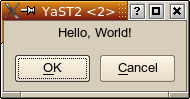
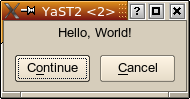
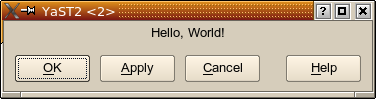
GNOME would use something like this:
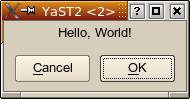
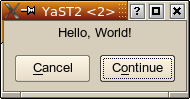
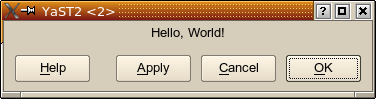
Which one is right? Which one is wrong? There is no real answer to that; it will always be more a religious debate rather than an objective discussion.
YaST Button Order
So, which button order to choose for YaST?
For historical reasons, we used the KDE button order. But this has repeatedly started the same heated discussions as for KDE vs. GNOME, with the same results — which is, no tangible result, only something along the lines of “because we says so” (and didn’t you always hate it as a kid when mom or dad said that?).
YaST should not favour one of the major desktops over another. YaST should work well for all users. So, YaST should adapt to the environment it runs in.
YaST comes in different flavours. There is the graphical version: The YaST Qt UI (user interface) engine (Side note: The YaST Qt UI is not in any way KDE specific; Qt just happens to be a great toolkit for making graphical user interfaces, and KDE happens to use it, too. There is not one single line of KDE-specific code in the YaST Qt UI.).
There is also the text-based version, the YaST NCurses UI.
As an alternative graphical UI, there is also the YaST Gtk UI which uses the same widget toolkit (Gtk) as GNOME. That brings YaST closer to the GNOME crowd. At least, that’s the theory. Yet, that alone didn’t improve the situation in any way for this button order issue:
YaST dialogs are specified in a subset of the YaST-specific YCP scripting language. Those dialog descriptions include input fields, list boxes, headings, etc. as well as the logical arrangement of all those user interface elements (widgets, even though that term has seen a lot of misuse recently). And buttons, too, of course.
So, the arrangement of buttons was still fixed. The YaST Gtk UI couldn’t really do anything about changing that button order so it looked more GNOMEish.
This is now different. We introduced a new widget ButtonBox that abstracts exactly that. A YaST module developer now only specifies “there is a ButtonBox, this is where I put my buttons, and the ButtonBox will arrange them as appropriate”.
…for users…
So now it is possible for the first time to use the proper button order for each environment: GNOME button order for the Gtk UI, KDE button order for the Qt UI.
But there is more.
…for power users…
The Qt UI can now demonstrate the fact that it’s not KDE specific. It checks what environment it runs in and uses the appropriate button order: GNOME button order when running in GNOME and KDE button order for KDE (or other window managers).
It checks the $DESKTOP_SESSION and $WINDOWMANAGER environment variables to figure that out. But of course power users can still override that and set the $Y2_BUTTON_ORDER environment variable to “KDE” or “GNOME”.
…for YaST developers…
Of course, such a change doesn’t come over night. There is a very large amount of YaST code. I counted 69 .desktop files in my /usr/share/applications/YaST2 directory; that corresponds to 69 YaST modules. On my machine I have 432000+ lines of YCP code below /usr/share/YaST2 . Now try to figure out how many YaST dialogs that might be, and how many of them need to be converted to use that new ButtonBox mechanism.
Obviously, it’s a lot of stuff to change. So the change should not hurt the people doing the change more than it absolutely has to. Don’t forget, it’s not just working hours that have to be paid; it’s also working hours that can’t be spent on implementing other features or on fixing bugs. And any change (even more so changing code at so many places) means a possibility to introduce new bugs.
…trying to be smart…
So this ButtonBox mechanism was made to be smart, to re-use existing information (things that are already there in the code), to make good use of existing conventions.
In principle, using something like the ButtonBox means having to tell it which logical role each button has so it can be arranged according to the current button order’s conventions: Which button is the positive confirmation of a dialog (it might be “OK” or “Continue” or “Yes”, but it might also be someting like “Save” or “Print”), which one is the “safe escape” (“Cancel”, but sometimes also “No”), which one is the “Apply” button or the “Help” button, and which ones are just “other” buttons. Remember, YaST is being translated into some dozen languages, so just hard-coding the English button labels won’t do.
But we already have a mechanism that maps (translated!) button labels to function keys, and that mechanism does something similar: There is a list of commonly used button labels and what function key is to be used (in the NCurses UI) for them. For example, “OK”, “Continue”, “Yes”, “Next” all map to the F10 key, “Cancel” to F9, “Help” to F1.
Extending that thought some more, it makes sense to assume an “okButton” role for buttons that are otherwise assigned the F10 key, “cancelButton” for buttons that get the F9 key, etc.
Buttons in YCP each are assigned a widget ID. That ID is the “handle” by which a button is being referenced; this is what the YCP application receives when it is informed that the user clicked that key. When specifiying a layout with buttons, this looks (slightly simplified) like this:
UI::OpenDialog(
    `VBox(
         `InputField(`id(`name  ), "Name" ),
         `InputField(`id(`street), "Street" ),
         ...
         `HBox(
               `PushButton(`id(`ok    ), "OK" ),
               `PushButton(`id(`apply ), "Apply" ),
               `PushButton(`id(`cancel), "Cancel" )
               )
         )
);
As shown in this example, a button with the “OK” role typically has an ID like `id(`ok), a “Cancel” button has `id(`cancel), an “Apply” button has `id(`apply). So this information is used, too, to figure out what role a button has.
Of course, there are still situations where the system needs to be explicitly told what button has which role: It’s hard to figure out in a generic way that a “Print” button or a “Save” button has the “okButton” role in a dialog. In that case, the YCP developer has to change the code to look like this:
`PushButton(`id(`print), `opt(`okButton), "Print" )
…the normal case…
But in many cases, the migration is as simple as replacing the `HBox() (the horizontal layout box) holding the buttons with `ButtonBox():
UI::OpenDialog(
    `VBox(
         `InputField(`id(`name  ), "Name" ),
         `InputField(`id(`street), "Street" ),
         ...
         `ButtonBox(        // This is the only line that changed
               `PushButton(`id(`ok    ), "OK" ),
               `PushButton(`id(`apply ), "Apply" ),
               `PushButton(`id(`cancel), "Cancel" )
               )
         )
);
…taming the masses…
Just imagine doing only this little change in 432000+ lines of code – of course, only where such a `HBox() contains `PushButtons, not just blindly replacing all `HBoxes. And just changing it is not all there is to it; each dialog has to be tested, too. And that alone is not so trivial: A dialog might easily only be shown in very exotic cases, so the developers doing the test have to recreate each of those exotic cases just to see the dialog.
You see, masses of code are a dimension of complexity all of their own. Little things that look trivial to do gain a whole new meaning. Everybody can do this change in one or two places, but try to do it in someting as big as YaST — without introducing new bugs that would wreck other people’s system.
Yet, we do those kinds of changes, typically unnoticed by the user community. And those little things are what, if added up, make or break a system’s quality.
We don’t take such decisions lightly. But we felt that in this specific case (the button order) the gain would be worth the pain: Users should feel at home in the tools we provide. And having the buttons where you are used to is part of this feeling at home.
Further Reading
Unifying Progress During Installation
This might not be that useful, but it’s fun.
If you look at the openSUSE installer during the time it’s busy, you can see at least 4 types of progress bars shown:
- Disk preparation
- Image deployment
- Additional package installation
- Writing final configuration before reboot
My goal for this hackweek is to unify them as much as possible. So, now I have something to show. The prototype works on openSUSE 11.0 Alpha2 and unifies steps 1-3. Here is a screenshot: