
Workflow Run Easy Filtering And Others

Tumbleweed Monthly Update - June 2024
Welcome to the monthly update for openSUSE Tumbleweed for June 2024. This month was busy with events like the Community Summit in Berlin and the openSUSE Conference, but a number of snapshots continued to roll out to users. Developers, system administrators and users receive updates designed to enhance your experience and ensure high levels of security and performance.
Should readers desire a more frequent amount of information about snapshot updates, readers are encouraged to subscribe to the openSUSE Factory mailing list.
Let’s go!
New Features and Enhancements
-
Linux Kernel 6.9.7: This kernel introduces several important fixes and enhancements across various subsystems. Key updates include addressing undefined references in netfilter when
CONFIG_SYSCTLis disabled, correcting TCP Fast Open handling, and resolving a conflicting quirk in Advanced Linux Sound Architecture for Realtek devices. Improvements in file system writeback operations, multi-threaded path handling and memory management for Hisilicon crypto drivers enhance stability. Networking updates include fixes for race conditions in netpoll, enhancements for specific SFP modules, and improvements in WiFi drivers such as RTW89, Ath9k, Ath12k, and MT76. Additional platform-specific updates address issues in ACPI, ARM64 configurations, HID device handling, and Bluetooth driver fixes. - PipeWire 1.2.0 and WirePlumber 0.5.4: PipeWire 1.2.0 introduces asynchronous processing, node.sync-group for synchronized scheduling, and improved config parsing error reporting. It also adds mandatory metadata support for buffer parameters, multiple data-loops with CPU affinity, and dynamic log level adjustments. Key fixes include RTP-SAP module enhancements, ROC 0.3 support, and improved Bluetooth BAP broadcast code parsing. WirePlumber 0.5.4 refines the role-based linking policy, allowing role-based sinks alongside standard audio operations and enabling regular filters to act as best targets. It addresses startup crashes due to empty config files, improves Bluetooth profile auto-switching, and fixes issues with DSP filters and infinite loop scenarios in autoswitching scripts. Together, these updates enhance the flexibility, reliability, and overall performance of audio management in Linux environments. Both also received updates in snapshot 20240627
-
Mesa and Mesa-drivers 24.1.2: Both packages underwent a specfile cleanup, involving the relocation of Rust crate sources into subprojects folders and updates to
baselibs.conf. Due to the maintenance burden associated with Rust crates as system dependencies, these crates are now downloaded as vendored dependencies, as detailed in the README-suse-maintenance.md. The update adds support for building libvulkan_nouveau, including necessary Rust crates such as paste-1.0.14, proc-macro2-1.0.70, quote-1.0.33, syn-2.0.39, and unicode-ident-1.0.12. However, building libvulkan_nouveau on Leap is not possible due to the requirement for rust-cbindgen >= 0.25. For more details, refer to the release notes at https://docs.mesa3d.org/relnotes/24.1.2. - KDE Plasma 6.1.1: Discover improves UI elements and Packagekit support, while Dr Konqi corrects the Sentry dbus interface usage. Plasma Addons addresses reference issues in Effects/cube, and krdp ensures version compatibility and resolves session controller bugs. Kscreenlocker improves greeter functionality, and KWin introduces multiple fixes for shaders, tiling, and input panels. Libkscreen and libplasma update protocol versions and fix plugin loading issues. Plasma Desktop enhances task icon sizing, panel opacity and file dragging across screens. Plasma Audio Volume Control removes unnecessary symlinks, and Plasma Systemmonitor correctly positions loading overlays. Powerdevil improves battery protection UI and limits backlighthelper calls.
-
Python-setuptools 70.0: Key features in this new major version include emitting warnings for ignored [tools.setuptools] entries in
pyproject.toml, improved error messaging forpkg_resources.EntryPoint.requireand handlingNonelocation distributions more gracefully. The update also refreshes unpinned vendored dependencies, supports PEP 625 by standardizing package name and version in filenames and ensures encoding consistency for.pthfiles. Obsolete Python < 3.8 code has been removed, andpkg_resourcesnow usesstdlibimportlib.machinery. Bug fixes address race conditions in the install command, improve handling of nested namespaces withpackage_dirand correct variouspkg_resourcesmethod behaviors. The patch for reproducibility has also been refreshed. - Xen 4.18.2_06: This version resolves intermittent system hangs when Power Control Mode is set to Minimum Power. Patches also improve CPU mask handling and interrupt movement in various scenarios. Upstream bug fixes include improvements in scheduler resource data management and include fixes for building with GNU Compiler Collection 14.
Key Package Updates
-
NetworkManager 1.48.2: This package updates support for matching OVS system interfaces by MAC address and fixes port reactivation and VPN secrets handling for 2-factor authentication. It saves connection timestamps during shutdown for proper autoactivation after restart. Key changes in 1.48.0 deprecate autotools building, add support for changing OpenSSL ciphers for 802.1X authentication, and set unmanaged device reasons in the
StateReasonproperty visible in nmcli. Additionally, it replaces themac-address-blacklistproperty withmac-address-denylist, improves WiFi 6 GHz band detection and optimizes performance to avoid high CPU usage during route updates. Previous version 1.46 adds brought dynamic SSID-based stable IDs, randomized MAC addresses and several enhancements for handling IPv6, D-Bus and cloud setup. -
ibus-table 1.17.6: This update drops Python2 support, transitioning all scripts to Python3 using pyupgrade. It now allows the use of keys with Unicode keysyms in keybindings, enhancing customization and flexibility. Additionally, the
frames_per_buffer=chunk_sizeoption is now utilized inself._paudio.open()for improved audio handling. The update also includes translation enhancements from Weblate, with Czech translations reaching 36.6 percent, Japanese at 45.3 percent, and Chinese (Simplified) at 92.0 percent. -
btrfsprogs 6.9: The
mkfsutility now halts if the mount status cannot be determined when using the--forceoption and corrects the minimum size calculation for zoned devices. The check command removes the--clear-ino-cacheoption, shifting its functionality to therescuecommand group, and adds detection and repair for incorrect file extent itemram_bytesvalues. The qgroup commands now sync the filesystem before searching for stale entries, handle uncleaned subvolumes andsquotaenabled scenarios, and display the cleaning status of subvolumes. Thereceivecommand fixes stream parsing for strict alignment hosts, andtune change-csumanddump-treecommands include updates for handlingdev-replacestatus items. Theconvertcommand improves extent iteration for preallocated/unwritten extents. The build process now ensures compatibility with e2fsprogs 1.47.1 and improves header file dependency tracking. Documentation was also updated. - GNU’s Emacs 29.4: An emergency bugfix took place in this release. In this update, arbitrary shell commands are no longer executed when enabling Org mode, significantly enhancing security by preventing the execution of potentially malicious commands.
Bug Fixes
- Python-dnspython 2.6.1:
- CVE-2023-29483 - Eventlet before 0.35.2 in dnspython allows remote “TuDoor” DNS attack interference.
-
php8 8.3.8:
- CVE-2012-1823 involved a vulnerability where attackers could inject arguments into PHP-CGI, leading to potential security issues. The new vulnerability, CVE-2024-4577, was discovered to bypass this original fix, allowing the same or similar types of argument injection attacks. The update ensures that this bypass is no longer possible, reinforcing the security measures originally put in place for CVE-2012-1823.
- Similarly, the bypass of CVE-2024-1874 was made with the fix to CVE-2024-5585.
- kernel-firmware-nvidia-gspx-G06 (NVIDIA GPU driver)
- CVE-2024-0090 was a vulnerability where a user can cause an out-of-bounds write.
- CVE-2024-0091 was a vulnerability where a user can cause an untrusted pointer dereference. A successful exploit of this vulnerability might lead to denial of service.
- CVE-2024-0092 was an improper check or improper handling of exception conditions might lead to denial of service.
- XZ 5.6.2:
- CVE-2024-3094 Through a series of complex obfuscations, the liblzma build process extracts a prebuilt object file from a disguised test file existing in the source code, which is then used to modify specific functions in the liblzma code. This results in a modified liblzma library that can be used by any software linked against this library, intercepting and modifying the data interaction with this library. More details in snapshot 20240605
- cJSON v1.7.17:
- CVE-2024-31755 - A segmentation violation, which can trigger through the second parameter.
Conclusion
The month of June 2024 saw a range of significant updates, security fixes and enhancements. The Linux Kernel 6.9.7 update improved stability and performance. Mesa and Mesa-drivers 24.1.2 introduced Rust crate dependencies and improved Vulkan support. KDE Plasma 6.1.1 brought UI improvements and a major version of Python-setuptools 70.0 arrived for rolling release users. A few critical security vulnerabilities were taken care of and fixes related to the XZ backdoor continued, so that Tumbleweed remains secure, efficient and feature-rich for all users.
For those Tumbleweed users who want to contribute or want to engage with detailed technological discussions, subscribe to the openSUSE Factory mailing list . The openSUSE team encourages users to continue participating through bug reports, feature suggestions and discussions.
Contributing to openSUSE Tumbleweed
Your contributions and feedback make openSUSE Tumbleweed better with every update. Whether reporting bugs, suggesting features, or participating in community discussions, your involvement is highly valued.
(Image made with DALL-E)
Slowroll Set for a Quarter of Updates
Slowroll, which has a more modest update cadence than Tumbleweed, is gaining acceptance as a balance between the rapid updates of Tumbleweed’s rolling releases and the traditional Leap release.
Slowroll is nearly ready for full deployment and the development team has been working diligently to prepare the next version bump, with planned updates scheduled for July 9, August 9 and Sept. 9. These updates are expected to maintain a consistent monthly cadence to ensure users have timely and stable updates.
One of the critical updates pulled in will include the latest OpenSSH CVE fixes, which have already been made available in Tumbleweed. This fix enhances the security of Slowroll & ensure that it remains a robust and reliable distribution for users.
Highlighted Features of Slowroll
Balanced Update Cadence: Slowroll offers a monthly rolling update cycle that provides users with the latest features and security updates while ensuring stability through extensive testing and validation.
Beta Phase: Slowroll is now in the Beta phase, indicating its near readiness for full deployment. Users can expect a reliable experience with continuous improvements.
Continuous Improvement: The distribution integrates big updates approximately every month, alongside continuous bug fixes and security patches, ensuring a secure and up-to-date system.
Statistics and Status
According to the latest statistics available on the Slowroll Stats page:
- Tumbleweed had 2813 updated packages since the last version bump
- Slowroll received 1316 updates from 871 different packages and only 339 updated rpms are Slowroll-specific builds
Origins and Purpose
Slowroll, introduced in 2023, was designed as an experimental distribution. Its primary goal is to offer a slower rolling release compared to Tumbleweed, thus enhancing stability without compromising on access to new features. The distribution continuously evolves with big updates integrated approximately every month, supported by regular bug fixes and security updates.
It’s crucial to understand that Slowroll is not intended to replace Leap. Instead, it provides an alternative for users who desire more up-to-date software at a slower pace than Tumbleweed but faster than Leap.
If you try Slowroll, have a lot of fun - rolling… slowly!
(Image made with DALL-E)

More Rampaging
More Rampaging
So, Dirk Muller mentioned that I probably had a lot of orphaned packages, and he told me how to check for that:
> sudo zypper packages --orphaned
[sudo] password for root:
Loading repository data...
Reading installed packages...
S  | Repository | Name                                        | Version                | Arch
---+------------+---------------------------------------------+------------------------+-------
i+ | @System    | libavif13                                   | 0.9.3-150400.3.3.1     | x86_64
i+ | @System    | libcamel-1_2-63                             | 3.42.5-150400.3.7.2    | x86_64
i+ | @System    | libcpupower0                                | 5.14-150500.9.3.1      | x86_64
i+ | @System    | libdleyna-core-1_0-5                        | 0.7.0-150400.1.6       | x86_64
i+ | @System    | libebackend-1_2-10                          | 3.42.5-150400.3.7.2    | x86_64
i+ | @System    | libebook-1_2-20                             | 3.42.5-150400.3.7.2    | x86_64
i+ | @System    | libebook-contacts-1_2-3                     | 3.42.5-150400.3.7.2    | x86_64
i+ | @System    | libecal-2_0-1                               | 3.42.5-150400.3.7.2    | x86_64
i+ | @System    | libedata-book-1_2-26                        | 3.42.5-150400.3.7.2    | x86_64
i+ | @System    | libedata-cal-2_0-1                          | 3.42.5-150400.3.7.2    | x86_64
i+ | @System    | libedataserver-1_2-26                       | 3.42.5-150400.3.7.2    | x86_64
i+ | @System    | libedataserverui-1_2-3                      | 3.42.5-150400.3.7.2    | x86_64
i+ | @System    | libgupnp-1_2-1                              | 1.4.3-150400.1.6       | x86_64
i+ | @System    | libgupnp-av-1_0-2                           | 0.12.11-1.56           | x86_64
i+ | @System    | libgupnp-igd-1_0-4                          | 1.2.0-150400.1.10      | x86_64
i+ | @System    | libmalcontent-ui-0-0                        | 0.10.3-150400.1.9      | x86_64
i+ | @System    | libpoppler126                               | 23.01.0-150500.3.8.1   | x86_64
i+ | @System    | libportal0                                  | 0.4-150400.1.9         | x86_64
i+ | @System    | libprocps7                                  | 3.3.15-150000.7.34.1   | x86_64
i+ | @System    | librav1e0                                   | 0.5.1+0-150400.1.10    | x86_64
i+ | @System    | libsrt1                                     | 1.3.4-1.45             | x86_64
i+ | @System    | libwireplumber-0_4-0                        | 0.4.13-150500.3.2.1    | x86_64
i+ | @System    | lifecycle-data-sle-module-development-tools | 1-150200.3.27.1        | noarch
i+ | @System    | python2-cairo                               | 1.15.1-150000.3.6.1    | x86_64
i+ | @System    | slack                                       | 4.35.131-0.1.el8       | x86_64
i+ | @System    | zoom
Naturally I understood why slack and zoom were there (though I do intent to switch to using Flatpaks for those (more on that later)). But the others, I had no idea where they came from.
Dirk told me that there are tools to help with this, specifically "weakremover." And that a zypper du should remove all "weakobsoletes." Well, I tried, and it didn't work. It turns out that there is a 15.6 specific bug related to weakremover, so that's why it didn't work.
Meanwhile, he said that I could check each package and see if it has dependencies with rpm -e --test {package_name}. That snake cased "package_name" is foreshadowing about what came next.
I ended up write a Python script that ran these commands for me, and if there were no dependencies, it would go ahead and call zypper remove {package_name}. When I first ran a test script, the script found that many packaged DID have dependencies. But when I ran the script with actually removing the packages, they all got removed! I can only hope that the script encountered the dependent packages and removed them first, and I haven't deleted something important in my system.
For now everything still seems to work, but I also haven't done a reboot yet :)
Anyway, no more unaccounted for orphans:
> sudo zypper packages --orphaned
Loading repository data...
Reading installed packages...
S  | Repository | Name  | Version                | Arch
---+------------+-------+------------------------+-------
i+ | @System    | slack | 4.35.131-0.1.el8       | x86_64
i+ | @System | zoom | 5.17.1.1840_openSUSE-1 | x86_64My Upgrading LEAP Experience
My Upgrading LEAP Experience
SUSE recently released Service Pack 6 very recently, which means LEAP 15.6 became available.
Of course I wanted to update to it, but I was traveling quite a bit and wasn't finding the time. I was told that it is super easy, a few simple commands, etc...
Well was it? I would say "yes and no."
Migration
First, I figured I would use the zypper migration command I heard so much about. When I started, I got some errors that were caused by invalid repositories. So I went through and deleted any repos that were invalid or even inactive, with sudo zypper rr <repository_name>. Then I refreshed and updated.
But it didn't work because it turns out that migration is for SLES. I guess I should uninstall the zypper migration plugin at some point.
$releaseserver
Ok, no problem, I just set the releaseserver envar and then kick off zypper refresh right? Well, no. For some reason, all the repository versions were hard coded. Running grep baseurl /etc/zypp/repos.d/*.repo resulted in a serious mess of .repo files. I think it's from installing random things from OBS, but I'm not quite sure. In any case, running sudo zypper --releasever=15.6 refresh did absolutely nothing because there were no baseurls defined with that environment variable.
repo deletion madness
So I went on a rampage of delete .repo files. Anything that looked earlier than 15.5 I nuked. I accepted in my heart that I was going to nuke something that I shouldn't, but I was on a rampage (Archer Reference).
sed to the rescue
I never really got expert at programming with sed, but I have used it often. It is one of those programs that is so old that it is small, lightening fast, and always does what you tell it (even if you tell it to do the wrong thing).
So, ok, with my cleaned up repo, a couple of sed commands:
  sudo sed -i 's/15.5/${releasever}/g' /etc/zypp/repos.d/*.repo
  sudo sed -i 's/SLE-15-SP5/SLE-15-SP6/g' /etc/zypp/repos.d/*.repo
Basically, use the environment variable where you can, otherwise, use the SLE SP6 repos.
update away
So by this point, I had cleaned my repos, refreshed, and updated everything. So, I just needed to tell zypper to do the updates:
  sudo zypper --releasever=15.6 refresh
  sudo zypper --releasever=15.6 dup --download-in-advance
I assume that the refresh was necessary, because it needed to load into the package database from the new repos. Then I download all the packages and do the distribution update.
Here's the thing ... by this point ... it worked, and worked very well. First, it was insanely fast. I was expecting to go for a walk while it was downloading, but it managed to download all of the new packages and apply them before I had a chance.
Secondly, it worked. I mean, it rebooted, and everything just works!
Anyway, that's my LEAP update saga. I am traveling for another month with just my LEAP laptop, my $65 Tumbleweed is waiting for me at home :)

 Member
 foursixnine
Save your Tumbleweed installation
How to save your very old openSUSE Tumbleweed installation?
Say you’re in need of recovering a very old system?, I got you:
Make sure you have a container engine, if you like to live your life dangerously:
nerdctl run -it -v /:/mnt -v /dev:/dev -v /sys:/sys -v /boot:/boot \
    --name hacky_tw --rm registry.opensuse.org/opensuse/tumbleweed:latest bash
zypper --root /mnt dup -D --allow-vendor-change
You should be able to reboot your machine and go on with your life.
Down the rabbit hole
Now, if you want to do weirder things, or for instance, want to check what have you changed i.e vs an default installation, you can do the following:
rpm --root /mnt -V -ac  --nodeps --nomtime | \
 # this will match i.e: files that have been modified, and have different changes
 # from what originally was when the package was installed
 # S.5......  c /etc/mail/spamassassin/local.cf backup
 awk '/^..5/ {
    if (system("test -f /mnt"$3".rpmnew") == 0)
        must="diff";
    else
        must="backup";

# the format will be:
# backup   /etc/fonts/conf.d/58-family-prefer-local.conf
# add $1, before "must" if you want to "debug"
print must, "\t", $3

}'

My Experience at the openSUSE Conference 2024

Attending the openSUSE Conference 2024 in Nuremberg, June 27-29, was once again an incredibly rewarding experience. From the moment I arrived, I was immersed in an atmosphere of enthusiasm. This year's conference was not just about technology and software, it was about reconnecting with old friends and making new ones, all while sharing our collective passion for open source.

My fav Presentations
The conference featured a range of insightful presentations from prominent figures in the openSUSE community. Here's a brief overview of some of the standout sessions for my preference:The XZ Backdoor - Report from Our Side, Retrospection, and Looking Forward by Marcus Meissner
Marcus Meissner provided a detailed report on the XZ backdoor, reflecting on past incidents and discussing future security measures. His insights emphasized the importance of vigilance and proactive measures in maintaining system integrity.Working Together in One Place with Nextcloud by Jos Poortvliet
Jos Poortvliet's presentation on Nextcloud highlighted its capabilities in facilitating seamless collaboration. He showcased how Nextcloud integrates various tools to enhance productivity and teamwork, making it an essential platform for remote and hybrid work environments. Can't wait to see more at Nextcloud Conference 2024.What is openSUSE? And How Does It Help SUSE and Its Partners? by Simon Lees
Simon Lees provided an in-depth overview of openSUSE, explaining its role and benefits for SUSE and its partners. His presentation underscored the strategic importance of openSUSE in the broader SUSE ecosystem.The Future of Agama and openSUSE by Josef Reidinger and Ancor González Sosa
Josef Reidinger and Ancor González Sosa discussed the future directions for Agama and openSUSE. Their session was forward-looking, focusing on upcoming features and enhancements that will drive the project's growth and adoption.We're All Grown Up: openSUSE is Not SUSE by Richard Brown and Robert Sirchia
Richard Brown and Robert Sirchia proposed a rebranding of the openSUSE distributions and the project itself. Their talk emphasized the maturity and distinct identity of openSUSE, separate from SUSE, highlighting its unique community and contributions. That talk sparked significant debate within the community.Linux at Volkswagen by Jan-Michael Brummer
Jan-Michael Brummer's presentation on Linux at Volkswagen was particularly fascinating. He detailed how Volkswagen leverages Linux for various applications, demonstrating the versatility and robustness of Linux in the automotive industry.Sweetening Heterogeneous Linux Deployments in the Cloud with KIWI by Neal Gompa and David Duncan
Neal Gompa and David Duncan discussed KIWI's role in simplifying heterogeneous Linux deployments in the cloud. Their session provided practical insights and solutions (SUSE documentation) for managing diverse environments efficiently.Moderation and Code of Conduct Are Vital for a Community by Gertjan Lettink
Gertjan Lettink's talk on the importance of moderation and a code of conduct was a vital reminder of the foundational principles that sustain a healthy and inclusive community. His emphasis on respect and constructive interaction resonated deeply with attendees.Challenges in Making Slowroll by Bernhard M. Wiedemann
Bernhard M. Wiedemann outlined the challenges faced in developing Slowroll, a new initiative within the openSUSE project. His candid discussion of the hurdles and solutions provided valuable lessons for developers and contributors.If We Build It, Will They Come: Contribution Beyond Coding by Robert Sirchia
One of my favorite sessions was Robert Sirchia's presentation on contribution beyond coding. He highlighted the various ways individuals can contribute to open source projects, emphasizing the value of diverse skills and perspectives in building a vibrant community.Community and Celebration
The BBQ/Release Party was a blast, offering a perfect blend of relaxation and celebration. It provided an excellent opportunity for attendees to unwind, enjoy good food, and celebrate the successes of the openSUSE community. The informal setting fostered deeper connections and meaningful conversations, rounding off the conference on a high note.
Conclusion
In conclusion, the openSUSE Conference 2024 was a remarkable experience that reinforced the strength and vitality of the openSUSE community. The presentations were informative and inspiring, the social events were enjoyable, and the sense of shared purpose was palpable. I'm already looking forward to next year's conference!Acknowledgement
I would like to extend my heartfelt gratitude to openSUSE for sponsoring my trip to attend this year's openSUSE Conference. Their support made it possible for me to engage with the community, gain valuable insights, and contribute to the ongoing discussions.Presentation videos
The presentations are available here: https://streaming.media.ccc.de/osc24/relive
Der Fünfzehner
Über KI allgemein und vor allem auch ChatGPT wird ja zur Zeit allerorten geredet. Zum Teil wird die sogenannte KI als ein weiterer riesen Schritt in der digitalen Welt gesehen, und oft auch als Anfang des Ende des kultivierten Lebens dargestellt.
Das soll hier garnicht vertieft werden. Statt dessen wird hier ein konkretes Beispiel gezeigt für das, was mit ChatGPT jetzt einfach machbar ist, und welche Wirkung das auf uns haben könnte.
Dazu betrachte man zuerst diesen (noch fiktiven) Wikipedia-Artikel mit dem Namen „Der Fünfzehner“:
Fünfzehner
Der Fünfzehner bezeichnet eine Kurzpause von 15 Minuten, die traditionell im Handwerk, insbesondere im norddeutschen Raum, praktiziert wird. Diese Pause dient als fester Bestandteil des Arbeitsalltags und spiegelt eine historisch gewachsene Praxis wider, die sich als Reaktion auf die Industrialisierung und die damit einhergehende Verdichtung der Arbeitszeiten in der Industrie entwickelte.
Ursprung und Entwicklung
Die Einführung des Fünfzehners kann als direkte Reaktion auf die zunehmende Strukturierung und Reglementierung der Arbeitszeiten während der Industrialisierung im 19. Jahrhundert verstanden werden. Während in Fabriken strenge Zeitvorgaben und Schichten eingeführt wurden, suchte das Handwerk Wege, um die Autonomie und Flexibilität der Arbeitsgestaltung zu bewahren. Die Pause von 15 Minuten bot eine Möglichkeit, die Arbeitsintensität zu regulieren und dabei den Arbeitern eine kurze Erholung zu ermöglichen.
Kulturelle Bedeutung
In vielen Handwerksbetrieben ist der Fünfzehner mehr als nur eine Pause; er ist ein Ausdruck von Tradition und gemeinschaftlicher Praxis. Diese Pausen werden oft genutzt, um soziale Kontakte zu pflegen, Wissen auszutauschen und die Gemeinschaft innerhalb des Betriebs zu stärken. In einigen Regionen wird die Pause zudem genutzt, um gemeinsam Kaffee zu trinken oder kleine Snacks zu essen.
Gegenwärtige Praxis
Auch heute ist der Fünfzehner in vielen Handwerksbetrieben fest etabliert. Trotz der fortschreitenden Modernisierung und dem Einfluss industrieller Arbeitsweisen hat die Pause ihre Bedeutung behalten. Sie dient nicht nur der Erholung, sondern auch der Pflege des sozialen Miteinanders und der Aufrechterhaltung einer Arbeitskultur, die stark von persönlichen Beziehungen und gegenseitigem Respekt geprägt ist.
Zusammenfassung
Der Fünfzehner stellt somit ein bedeutendes kulturelles Erbe dar, das die Werte und Traditionen des Handwerks reflektiert. Er zeigt, wie historische Arbeitspraktiken sich an neue ökonomische und soziale Bedingungen anpassen können, ohne ihre essentiellen Charakteristika zu verlieren.
Sicher werden Sie denken: „Oh ja, ein informativer Artikel, der auf geschichtlichen Fakten basiert und von einer forschenden Person zusammengetragen wurde, die die Arbeiterbewegung und ihre Kuturgeschichte zu kennen scheint. Er ist sprachlich auf einem ordentlichen Niveau und sicherlich eine Bereicherung der Wikipedia. Bestimmt war es ein bisschen aufwändig, diesen Artikel zu schreiben. Vielleicht zollen Sie der Autorin etwas Anerkennung im Stillen.
Nach der Lektüre besteht kein Zweifel mehr daran, was „ein Fünfzehner“ ist, und dass wir ihn vielleicht auch öfter in unser Leben integrieren sollten, um stabile, gesunde und erfüllende Arbeitsverhältnisse zu pflegen.
Die Geschichte hinter diesem Artikel stellt sich jedoch anders dar.
Die einzige Person, die ich je von einem „Fünfzehner“ habe sprechen hören, war meine liebe Mutter. Sie machte gern mal einen Fünfzehner, in dem sie dann eine angemessene Menge Kaffee und HBs konsumierte, bevor sie nach mehr oder weniger genau fünfzehn Minuten wieder ihrer Tätigkeit nachging.
Als ich dann einen Kollegen zu einem ebensolchen Fünfzehner aufforderte, musste ich ihm diese Geschichte erzählen, denn er hatte noch nie vom Fünfzehner gehört. Dazu kamen einige weitere Fakten wie dass Muttern einem handwerklich bürgerlichen Milieu Hamburgs enstammte und einige Jahre in einem großen Handwerksbetrieb im Büro gearbeitet hatte.
Der Kollege, immer interessiert an den Möglichkeiten, die ChatGPT eröffnet, hat daraufhin den oben gezeigten Artikel mit ChatGPT zusammen erstellt. Seiner Aussage nach hat das nicht länger als eine Minute gedauert und erforderte keine weitere menschliche Überarbeitung.
Diese einfache Beispiel zeigt, was mit dieser Technologie möglich ist. Ob intelligent oder nicht, dieses sprachgewandte Helferlein ermöglicht es uns, mit einigen wenigen Interaktionen solche elaborierte Texte zu vielen Themen zu erstellen. Dabei sind die Texte weder schlecht recherchiert, noch offensichtlich falsch oder wirken komplett synthetisch.
Trotzdem muss die Idee zu einem Text immer noch von einem Menschen kommen und zusammen mit einigen eingrenzenden Fakten an den Algorithmus übergeben werden. Es ist also weiterhin ein Mensch, der hier weitgehend bestimmt was geschrieben wird.
Aber es wird einfacher, halbwegs ordentliche Texte zu erstellen mit dieser Technologie, und was einfach ist, wird schnell als Standard erwartet. Übertragen auf das Thema dieses Blogs würde das vielleicht heissen, dass die Qualität von Texten in Angeboten besser werden muss, weil das die Erwartung der Kunden wird. Es lohnt sich also, sich jetzt mit dieser Technologie auseinanderzusetzen und zu lernen, wo sie einem persönlich nützen kann. Ob das nun mit ChatGPT oder einer anderen, KI gestützten Technologie passiert, ist erstmal zweitrangig.
Andererseits heisst das natürlich auch, dass die Menge an Informationen aller Arten schnell weiter zunehmen wird. Die schiere Menge macht es komplizierter, Sinnhaftigkeit oder gar Wahrheit zu beurteilen. Was massenhaft verfügbar ist, wird auch weniger wert.
Ob wir wollen oder nicht, wir müssen uns mit diesen Wirkmechanismen alle auseinandersetzen.
Ach ja, und wenn Sie den Ausdruck „einen Fünfzehner machen“ ebenfalls kennen, lassen Sie es mich bitte wissen 

Solving DNS Name Resolution Issues on OPNsense

Releasing version 9
Agama 8 was a massive release. It took almost five months of work and, as a result, Agama got a new HTTP API and a more powerful user interface for setting up storage devices. Not that bad, uh?
After such a big release, our UX expert came with a completely new prototype for the web user interface and we thought it would be cool to get it on time for the openSUSE Conference. So here we are: presenting Agama 9 and the new user interface during the conference. If you missed the first talk, you can enjoy the recording.
However, that's not the only remarkable change in this release. As usual, let's have a look at the most relevant changes.
A new web user interface
The most noticeable feature in this release is the debut of the new web user interface. Agama was born as a simplified installer that allowed the user to deploy the system with just a few clicks. However, as new features were introduced, we discovered that the user interface would not scale.
The new interface uses a more classic approach, with a sidebar that makes navigation easier. Moreover, all the sections received significant updates, with special mention of the networking area.
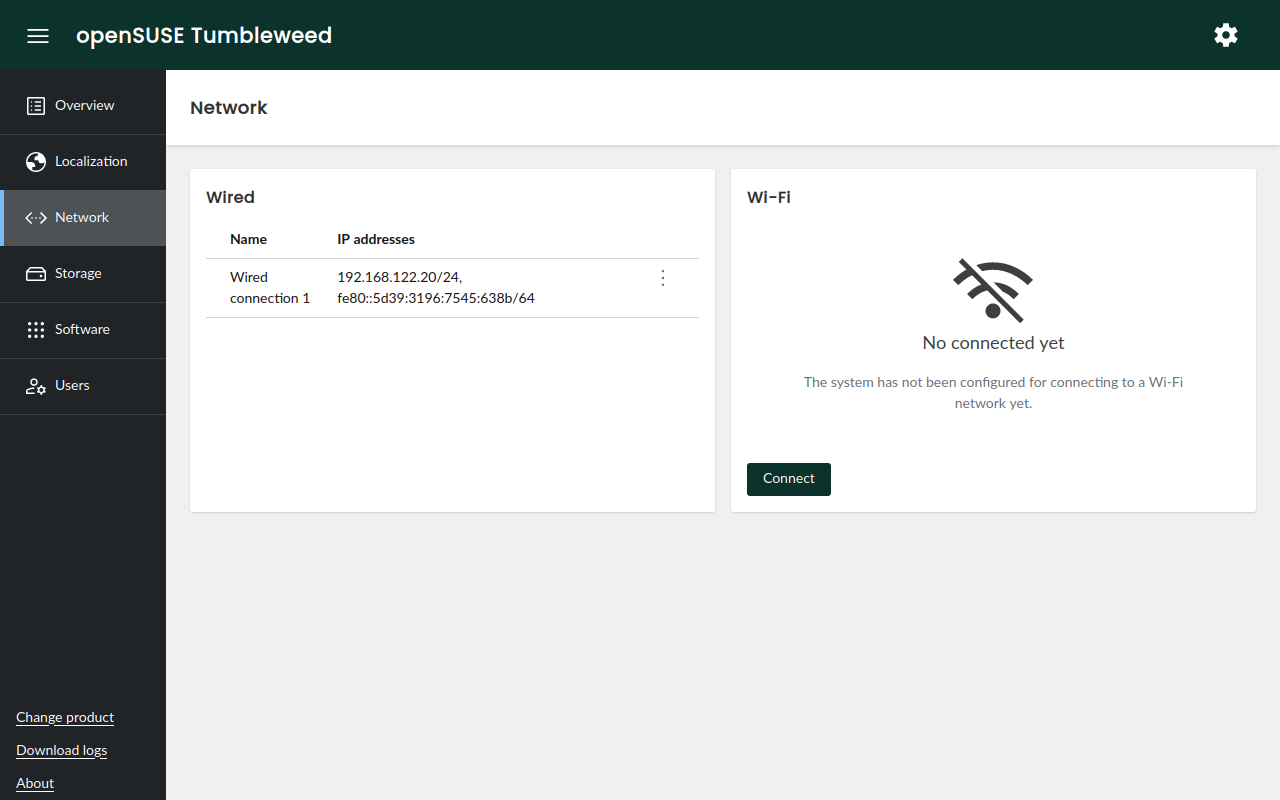
Despite all these changes, we still consider the new interface a work in progress and expect it to evolve significantly in the upcoming weeks. Stay tuned!
AutoYaST compatibility
Many (open)SUSE users rely on AutoYaST for their automated deployments. So the question is obvious: what happens with those AutoYaST profiles they have been crafting for years? We have good news: at least partially, you can use them in Agama.
Agama and YaST are different beasts and will not implement the same features. For that reason, there
might be many AutoYaST elements that will not be supported in Agama. However, don't panic! We plan
to support the most relevant sections, like partitioning, networking, software, scripts,
etc.
As a first step, Agama 9 introduces support for importing an AutoYaST profile and automatically converting it to something it can understand. Moreover, Rules/Classes, Embedded Ruby and pre-scripts are fully supported.
Automated installation
Support for automated installations using Agama has been greatly improved in this release too. The most noticeable changes are:
- Agama provides more hardware information during Jsonnet profiles evaluation. You can find an example in the repository.
- A new
legacy-autoyast-storagesection makes it possible to use an AutoYaST<partitioning />section in Agama. - The command-line interface has received a significant update, including a handy
agama config editthat allows you to change and apply the configuration from the comfort of your favorite editor.

A better installation media
The Agama Live ISO includes many security-related improvements. Until now, you could connect to a
system running the ISO by simply using linux as the root password. It was OK at the beginning of
the development process, but for security reasons it's not acceptable anymore.
Now you can set your own password or, if you prefer, let Agama Live ISO generate a random one. You can find the password in the local console which, additionally, includes the fingerprints for the SSH host keys and the web server SSL certificate.
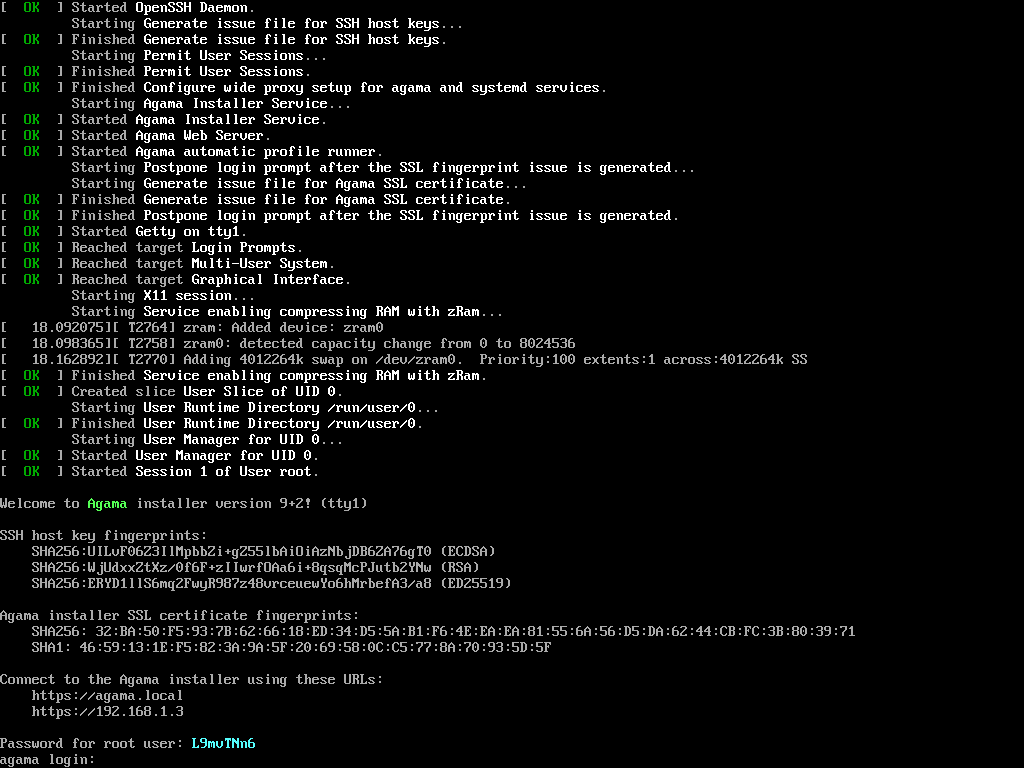
Another exciting addition is installing your own packages in the running Live system. In previous versions, Agama locked the packages database, but that's not the case anymore. It enables you to update Agama, add your own modifications, fixes, etc. And it makes development a little bit easier.
See it in action
Do you want to give it a try to the new user interface? Or are you an "automate all the things" kind of person? In any case, you can grab the Agama Live ISO testing images and boot it on a virtual or bare-metal machine.
If you find any bug, please, do not hesitate to report it through our issues tracker
See you soon
As we anticipated the last week, part of the team is present at the
openSUSE Conference 2024 and we would love to hear
from you. But even if you are not visiting the conference, you can always reach us at the
YaST Development mailing list,
our #yast channel at Libera.chat or the
Agama project at GitHub.
Have a lot of fun!