
 Member
 Bubli
BubliYaST is falling, make a wish
OK, this won't work. What about something realistic, such as "I will add some nice features to YaST's Qt control centre"? That's sort of better. So - I promise I will, but let's do it like this: it is you, this blog readers and openSUSE users, who will make a wish. But please don't be too fast and make one wish each :) Here are some ideas that accumulated over the time:
- Introduce "not yet installed modules" feature (this is originally Kobliha's idea). That is, have CC display (along with already installed YaST modules) also those that do exist in our repositories, but are not installed on the system yet. The user would see right away whether a YaST module e.g. for a service s/he needs to configure exists and if it does, s/he could install it. To distinguish those modules from "regular" YaST modules, their icons could be e.g. greyed out ( they're not greyed out yet on the following pic, it's just to get the idea):
- Show additional info on selected YaST module. Think of it as viewing "properties" of the module without actually launching the module itself- a short textual summary showing what is already configured here and how. This is Duncan's idea and he already prepared some infrastructure for it in the CC code. I just failed to integrate it to the final openSUSE 11.2 version as I couldn't think of suitable way of presenting the data (the amount of the text seemed to me too much for a simple tooltip as you can see on the following pic).
- Show something like history ("Recently used modules") and/or allow user to select his/her favourite ones and have them as a separate category (no pic for this, sorry)
Improving the navigation?
I've designed Qt4 port of YaST CC to be similar to Gnome's one when it comes to navigation, but obviously I've made some users unhappy with it. The ideas how to improve/change the navigation I got as a feedback from the users fall into two categories:
- Revert back to old style of navigation. That is - click on a module group shows only modules in that particular group. See bug 561135 reported by Maciej.
- Get even closer to Gnome and highlight all the icons in a group on selecting it, as Ra100 requests it in bug 538384
So, my beloved openSUSErs, comment the above ideas or add your own ones and if you feel you really can't live without particular feature being implemented for openSUSE 11.3 (or 12), enter it to openFaTE. Happy new year!

The Wiki!
There was a lot of work done, but the pile that is waiting is much bigger.
The list of articles that have to be checked is huge and that is one of tasks that has to be accomplished before we actually can start with transition.
There is few new tools that we selected to help us sorting information and keep new wiki instance in a good shape and also a new MediaWiki software version 1.15.1 that has a lot more to offer then old 1.5. That means, we will have a lot of fun in next months testing what we can achieve with all new options.
Do we need help?
Sure we do.
We can be found on opensuse-wiki@opensuse.org mail list, or any other communication medium mentioned on a team page http://en.opensuse.org/Wiki_team . Note that you have to be subscribed in order to post to mail list, so please read instructions first.
X-mas
openSUSE Build Service 1.7 Beta 1
The openSUSE Build Service (OBS) team just announced the Beta 1 version of the upcomming 1.7 release. Most of the features are already accessable in the Build Service instance which is used by the opensuse.org project.
Please find a more detailed announcement here.
The final release is planed early next year.
Quick tip: Novell Bugzilla and Klipper
Klipper from KDE has a set of predefined actions triggered by content of the clipboard. So when you have it enabled, it show up the popup menu with all available browsers when you copy the URL. In my job I open many bugs and the bug numbers have the well defined format bnc#number. So why don’t define automatic action triggered by this regular expression?
Because Klipper expects only oneliner as an action, I wrote the short bash script obug.sh which expects one argument with a bugzilla string.
#!/bin/bash

[ -z "${1}" ] && {
  echo "bug number required"
  exit 1
}

regex='^(bnc|bug)?#[0-9]+$'
[[ "${1}" =~ ${regex} ]] || {
  echo "${1} did not match ${regex}"
  exit 2
}

firefox https://bugzilla.novell.com/show_bug.cgi?id=${1#*#}
It’s obvious how it works – it checks if the argument exists and if matches the pattern and then opens a firefox (it’d be a xdg-open, but I use firefox for Novell Bugzilla). There should be only one strange expression – ${1#*#}. It is a Shell Parameter Expansion. This expression removes all characters from the beginning of the string including first #, so it convert bnc#1234 to 1234.
Then I defined a new action in Klipper triggered by ^(bnc|bug)?#[0-9]+$, which calls obug.sh %s, where %s is the content of clipboard.
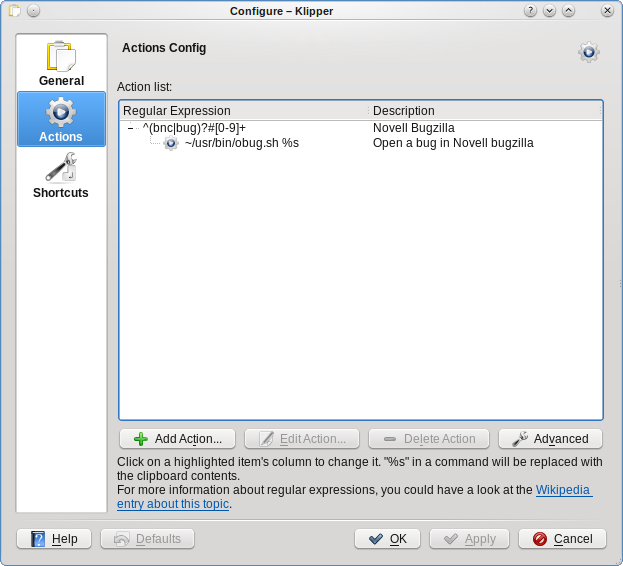
And after that all I selected the bnc#1234 by mouse and then the following popup appeared.
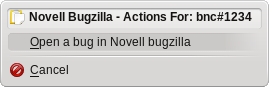
One disadvantage of this method is that Klipper opens popup window only near its status icon in systemtray. It would be more useful to show it near current mouse position.
WebYaST Status Module
After releasing WebYaST 1.0 last week we have had a look to the status module again and have come to the conclusion that we can do it better. 
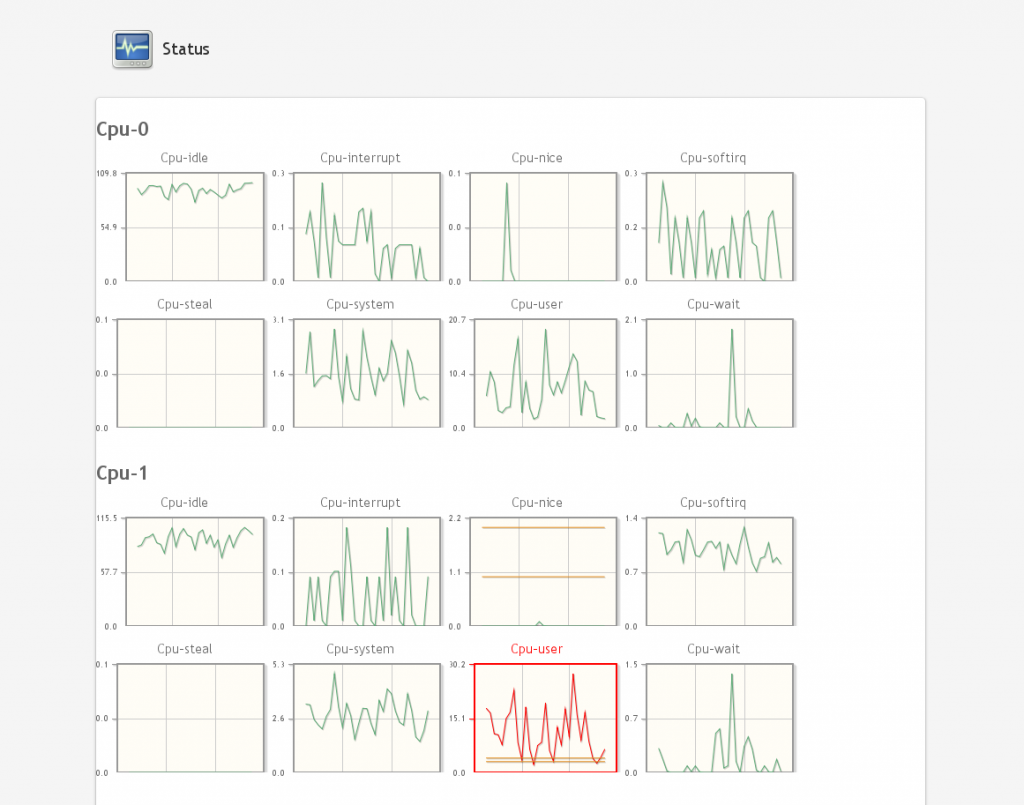
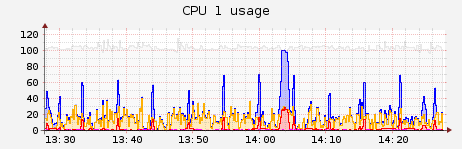
The current version looks more like a medical monitoring system that no one understand:
Technical background
The system data will be collected by a service called collectd (www.collectd.org). This data will be stored in a rrd-database which is located in
/var/lib/collectd/<system-name>/[cpu-0|cpu-1|df|interface|load|memory|….]
An own file/database will for each value will be generated.
The upper screen shot shows that an own graphic will be shown for each value. This is not really user friendly. We would like to show only values which provides “really” interesting information for the sysadmin or user. These values should also be grouped in order to reduce the amount of graphs.
Another lack of information is the labeling of the graphs. There is no description what the values mean and in which period they have been evaluated.
The aim
would be to give the user a nice overview about the system status. Additional, there should be an alarm system available if system values are exceeded. E.g. there should be sent an email to the system administrator if no disk space is available anymore.
The Administrator should also be able to configure “his” needed system values in a nice way.
Suggestion for configuration
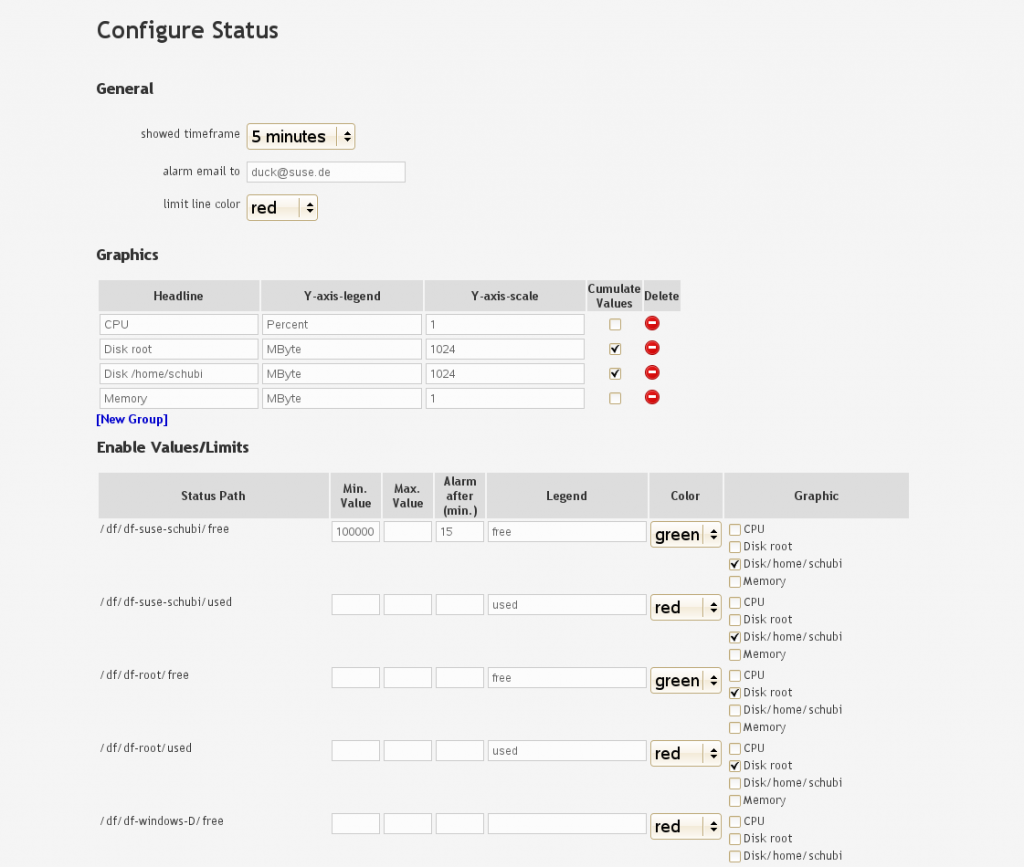
There are three parts:
- General
General setting like period time of shown data, email address in the case of occurred errors and the color of displayed limits. - Graphics
Defining graphs with- labels
- scales
- flag for cumulate values
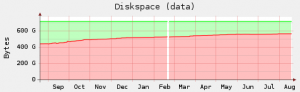
This means that the values in the graph are added. E.g. the component df of collectd returns two values of a partition (free, used). These values will be cumulated in the graph like this:
- Enable Values/Limits
- Defining which data of collectd will be shown in the graphics described above. This enable us to group data in one graph, defining color and label of each collectd value:
- Defining limits and send an email if the value is overstepped longer than the defined period (Alarm after (min.))
- Defining which data of collectd will be shown in the graphics described above. This enable us to group data in one graph, defining color and label of each collectd value:
The Result
should be an amount of view graphs which include interesting data only. These values are checked periodically and an email will be sent if they exceed a defined limit.
I am asking for
your opinion about:
- Do you know a much more fancy way for displaying system status data ?
- Which kind of Data would be interesting for you (CPU, memory, disk-space,….)?
- When and for which kind of data would you like to get an email if limits have been exceeded?
So, before changing this module we would like to ask you what you would like to see.
Thanks in advance.
Python...
В данном примере разберем обращение из python к библиотекам языка C.
Например, создадим скрипт для доступа к printf из библиотеки libc.dylib (MacOS). Для организации данного доступа необходимо воспользоваться модулем python ctypes, который позволяет обращаться к функциям из c-библиотек.
from ctypes import *
Загрузим библиотеку через CDLL:
libc=CDLL("libc.dylib")
Вызовем функцию printf и закончим первый пример:
message="Hello, world"
i=libc.printf("First program: %s\n",message)

Cloning openSUSE VirtualBox Machines
A guess many people have figured this out by now, but i still know a lot who have not, so here it goes.
There are a few caveats in cloning openSUSE or SLE VirtualBox machines. One is that openSUSE uses device ID in /etc/fstab and grub's menu.lst to reference your hard disk partitions. This is cool for physical machines, since no matter what the usual device name of your hard disk is (/dev/sda, sdb, hda, ...), the device ID always stays the same. When cloning the VirtualBox hard disk image, however, the device ID changes. This consequently causes a problem when booting your new machine with cloned image.
Another one concerns the network card's udev rules, which affect the device names. These are set to use MAC address to identify the card, which also changes when creating new virtual machine (new random MAC address is generated). After booting the cloned machine with this new network card, the original one becomes eth1, and the new one is not configured; you need to configure it, e.g. using YaST. Thanx to Mišo Žugec for this tip.
To avoid these problems, after installing a fresh openSUSE or SLE which i want to use for cloning, i change its /etc/fstab and /boot/grub/menu.lst to use the usual device files, and change the network card's udev rules from MAC to BusID. So, in nutshell, the cloning process looks like this:
- Boot the virtual machine you want to use as base for cloning.
-
Replace the
/dev/disk/by-id/...-partYwith/dev/sdXYin /etc/fstab and /boot/grub/menu.lst. - In YaST Network module, click Edit to edit the network card, open the Hardware tab, click Change in the Udev rules frame and select BusID instead of MAC address.
- Shut the machine down (from within the machine itself, not using VirtualBox's power off).
- Find the machine's .vdi hard disk file (usually under ~/.VirtualBox/ dir) and use VBoxManage clonevdi command to clone it, for example:
(~/.VirtualBox/HardDisks)$ VBoxManage clonevdi my-perfect-oS11.2-base.vdi oS11.2-some-experiment.vdi - Create new machine in VirtualBox GUI and attach the cloned disk image to it when asked. You can also copy an existing machine's .xml configuration file and change the hard disk UUID, or create a script that will do this for you.
For more info see:
http://srackham.wordpress.com/cloning-and-copying-virtualbox-virtual-machines/
http://forgeftp.novell.com/lfl/.html/virtualbox.html
How to activate Flash Plugin for Google Chrome on openSUSE 11.2
A couple of days ago, Google release a Beta version of Google Chrome for Mac and Linux. After installing the RPM I has been notice that the flash player doesn’t work. For make it work do the following as root:
cd /opt/google/chrome
ln -s /usr/lib/browser-plugins/ plugins
Restart Chrome and you are ready to watch some videos on youtube

openSUSE celebrates X-mas in Nürnberg
The openSUSE team in Nürnberg invites everybody interested in Linux and in particular in openSUSE to join our Christmas party on Wednesday December 16 in the basement of our office building in Nürnberg. We’ll give some presentation about openSUSE 11.2 in action, GIMP and how to participate at our project. Beside of the presentations we have some machines where especially openSUSE Education and the openSUSE Build Service will be shown but openSUSE 11.2 is available too, of course. More information
We hope to reach out to many local people in the Nürnberg area.