
 Member
 CzP
CzPMusic of the week: Rhapsody in Blue
This week, I reorganized the speakers in my room and wanted to test the change by listening to a wide variety of music. The first piece that came to my mind was “Rhapsody in Blue” by Gershwin https://en.wikipedia.org/wiki/Rhapsody_in_Blue, as I have a fantastic recording of it made by the Pittsburgh Symphony Orchestra. That said, I know that I’m not a music maniac enough, as I do not have it on vinyl, but rather as a digital download from HDTracks: https://www.hdtracks.com/#/album/5de7b4c75935a842dd765e23. Rhapsody in Blue already sounded great with the original setup, but placing the speakers farther away from each other and turning up the volume made wonders. Even in a middle-sized room, it suddenly sounded as if I was in a huge concert hall.
TIDAL: https://listen.tidal.com/album/79240363
Once the album was over, I wanted to experiment further. That’s when I realized that I have a few more recordings of Rhapsody in Blue. Well, not the original, but various adaptations. The next one I listened to had a completely different style: progressive metal. It is on the third album of Liquid Tension Experiment. This was the only time when the new setup did not improve the sound. I mean, it wasn’t bad at all, but a bit more bass would have helped :-) I listened to this music from a Blu-ray disk.
TIDAL: https://listen.tidal.com/album/168567035
The third song featuring the melodies of Rhapsody in Blue was recorded by Hiromi, a jazz pianist from Japan. I have this album as a CD from Japan, but I also have it in high resolution FLAC files from HDTracks: https://www.hdtracks.com/#/album/5dfb7dc30a58de3182f046f0. I know the sound of the piano pretty well, as there was at least one piano in my home most of my life. Turning up the volume a bit and listening to a good recording made wonders: it was a lot more lifelike than usual.
TIDAL: https://listen.tidal.com/album/119047940/
The new speaker arrangement gives a nicer, more realistic sound. However, it also needs to be louder, as I’m farther away from the speakers. So, for now, I just note the position of the speakers and move back everything as it was previously…
I am looking for even more Rhapsody in Blue recordings. Do you have any recommendations, either for the original or for other arrangements?

Novedades en la personalización de Plasma 6.3
Ha pasado más de dos semana desde el lanzamiento de Plasma 6.3 y ya estoy mostrando lo que ofrece para seguir siendo considerado el escritorio más vanguardista. En esta ocasión sigo la serie con las novedades en la personalización de Plasma 6.3 con lo que adaptar nuestro entorno de trabajo a nuestros gustos y necesidades.
Novedades en la personalización de Plasma 6.3
El pasado 4 de febrero fue lanzado Plasma 6.3, una actualización mayor del entorno de trabajo más moderno, funcional y llenos de posibilidades que te puedes instalar en tu PC, y a un precio ridículo: 0 €. Solo requiere que inviertas tiempo para aprender a hacerlo.
Esta versión consolida su gran paso de tecnologías QT5/KF5 a QT6/KF6 en tiempo récord, abriendo un abanico de posibilidades nunca antes vistas, como se puede ver en las novedades en la personalización de Plasma 6.3 con lo que adaptar nuestro entorno de trabajo a nuestros gustos y necesidades.

En palabras de sus desarrolladores:
Finalmente, ¿qué sería de Plasma si no se pudiera personalizar? Para empezar, los paneles se pueden clonar. También puede usar guiones para cambiar los niveles de opacidad de los paneles y la pantalla en la que aparecen.
En Plasma 6.2, introdujimos iconos simbólicos en la barra lateral de categorías de Kickoff. A algunas personas no les gustó la idea, por lo que en 6.3 se puede deshacer el cambio: hemos modificado la implementación para obtener los iconos de la fuente de datos estándar, lo que permite configurarlos como se quiera usando la aplicación del Editor del menú.
Y hablando de la aplicación del Editor del menú, al editar los archivos de escritorio para las aplicaciones con la opción «Editar aplicación…» del menú Kickoff (y de otros menús lanzadores) se abre la aplicación en el editor, en lugar de mostrarle las propiedades del archivo. Esto permite editar con facilidad la totalidad de la lista de aplicaciones.
Si alguna vez ha perdido un widget durante la personalización del sistema, le encantará esta nueva función: en Plasma 6.3, el Explorador de elementos gráficos le proporciona la posibilidad de eliminar cada instancia de un widget, incluidas las que se han perdido o las que solo están presentes en pantallas desconectadas.
Más información: KDE
Las novedades generales de Plasma 6.3
Aprovecho para realizar un listado de las novedades generales de Plasma 6.3 novedades extraídas de 9to5linux.
- Posibilidad de clonar un panel.
- Posibilidad de establecer atajos de teclado para mover ventanas entre zonas de mosaicos de Custom Tiling en función de la direccionalidad.
- Soporte para recordar el escritorio virtual activo por actividad.
- Página renovada de la tableta gráfica en la configuración del sistema.
- Opción de preferir la precisión del color de la pantalla en KWin.
- Notificaciones de batería baja para auriculares inalámbricos que expongan adecuadamente la información de la batería.
- Nueva configuración el touchpad para que se desactive automáticamente al conectar un ratón.
- Mejor escalado fraccional para todos.
- Los widgets colocados en el escritorio sean ligeramente translúcidos.
- Asignación una contraseña aleatoria por defecto al punto de acceso a la red.
- Nuevo servicio para detectar y avisar a los usuarios con una notificación explicando lo que ocurre cuando el sistema se queda sin memoria y el kernel termina una aplicación.
- Plasma Discover ha sido actualizado para mostrar a los usuarios cuando las aplicaciones han sido empaquetadas directamente por su desarrollador o verificadas por un tercero de confianza.
- Mayor precisión el progreso de la instalación.

- Posibilidad de desactivar temporalmente las reglas de ventana de KWin en lugar de eliminarlas.
- Indicador de agrupación en el widget Administrador de tareas ahora sigue el color de acento actual.
- Los iconos simbólicos apropiados ahora serán sustituidos automáticamente por iconos de aplicaciones en el área de la bandeja del sistema.
- La aplicación Centro de información ahora mostrará todas tus GPUs y el recuento de ciclos de la batería de tu portátil.
- Posibilidad de intercambiar las funciones de los botones del lápiz de la tableta de dibujo.
- Se podrá mostrar la cola de impresión de cada impresora en línea y un spinner ocupado para cualquier impresora que esté imprimiendo en ese momento en el widget Impresoras.
- Se notificará a los usuarios en la pantalla de cierre de sesión cuando reinicien su sistema en el menú del gestor de arranque.
- Eliminado la categoría de menú «Configuración» del lanzador de aplicaciones Kickoff y todo su contenido se ha trasladado a la categoría «Sistema».
La entrada Novedades en la personalización de Plasma 6.3 se publicó primero en KDE Blog.
Episodio 41 de KDE Express: el fediverso es divertido
Me congratula presentaros el episodio 41 de KDE Express, titulado «El fediverso es divertido» donde David Marzal sigue llevando en solitario estas más que interesantes píldoras. Un hurra por él.
Episodio 41 de KDE Express: el fediverso es divertido
Comenté hace ya bastante tiempo que había nacido KDE Express, un audio con noticias y la actualidad de la Comunidad KDE y del Software Libre con un formato breve (menos de 30 minutos) que complementan los que ya generaba la Comunidad de KDE España, aunque ahora estamos tomándonos un tiempo de respiro por diversos motivos, con sus ya veteranos Vídeo-Podcast que todavía podéis encontrar en Archive.org, Youtube, Ivoox, Spotify y Apple Podcast.
De esta forma, a lo largo de estos 41 episodios, promovidos principalmente por David Marzal, nos han contado un poco de todo: noticias, proyectos, eventos, etc., convirtiéndose (al menos para mi) uno de los podcast favoritos que me suelo encontrar en mi reproductor audio.
En palabras de David el nuevo episodio de KDE Express toca los siguientes temas:

Episodio especial sobre el Fediverso y el camapaña #VamonosJuntas.
Hoy solo hay un enlace, pero que dentro tiene mucha información otros muchos enlaces.
https://marzal.gitlab.io/mundolibre/blog/2025/01/27/el-fediverso-es-divertido
Anímate a pasarte por el Fediverso y de paso coméntanos algo.
Artículo original en https://kdeexpress.gitlab.io/41/
Transcripción disponibles en steno.fm por si vuestra Podcatcher no los implementa, como estas.Y transcripción completa al pinchar aquí
- Agradecimientos:
- Jorge Lama por su asistencia, consejo, apoyo y edición de audio en este episodio.
- Adrian Marzal por el logo del podcast y ser un gran hermano.
Este podcast tiene licencia Reconocimiento-CompartirIgual 4.0 Internacional (CC BY-SA 4.0).
Y, como siempre, os dejo aquí el listado de los episodios. ¡Disfrutad!
Por cierto, también podéis encontrarlos en Telegram: https://t.me/KDEexpress
La entrada Episodio 41 de KDE Express: el fediverso es divertido se publicó primero en KDE Blog.
Conversaciones con blogueros. Mi entrevista para Tecnolocuras
Desde la web Tecnolocuras me enviaron un formulario con preguntas sobre mi faceta de bloguero ¿quieres saber qué contesté?

Hace ya muchos años de la explosión del blogueo en internet. Después de aquella vorágine, pocos son los blogs que se mantienen creando contenido de manera casi artesanal, lejos del posicionamiento, lejos de la monetización, lejos de la tan manida IA.
Y siempre es un placer que a uno lo «encasillen» en esa marginalidad del bloguero que lo es «por amor al arte» y poder explicar un poco el motivo de esa pasión por contar.
Desde la web Tecnolocuras están haciendo una labor similar a la que realiza Manuel Morale en su blog en la que realiza una serie de entrevistas a blogueros que lo son por el placer de crear contenido propio y escribir lo que les apetezca.
La serie de entrevistas realizadas a blogueros a la hora de escribir este artículo alcanza ya las 79 entrevistas, en las que encuentras material interesante e inspirador, comprobando cómo con temáticas distintas muchas personas encuentran en el blogueo personal un placer alejado del consumo de material rápido y creado para ser consumido y olvidado.
La serie de la web Tecnolocuras sigue ese espíritu de encontrar a blogueros en español que escriban o mantengan un blog personal y hacerles las mismas preguntas para ver cuales son las similitudes y diferencias.
No se entra al tema sobre el qué se escribe, simplemente las preguntas están dirigidas al proceso de escribir y mantener un blog en estos tiempos de internet tan alejados de aquella explosión de blogs de la que hablaba al principio.
Por eso, el motivo no es solo difundir mi entrevista en dicha web (gracias por haberme tenido en cuenta) si no también animaros a leer todas las entrevistas realizadas donde descubriréis sin duda cosas interesantes y puede que terminen de hacerte dar el paso a abrir un blog (eso es fácil) y mantenerlo en el tiempo con pasión (esa es la parte difícil).
En fín, os dejo con los enlaces tanto a la serie de entrevistas de blogueros como a la mía propia, disfrutad de la lectura relajada:


Libro «La filosofía es La Polla» del escritor Tomás García Azkonobieta
¿Un libro que emparenta filosóficamente a dos punks transgresores como Diógenes y Evaristo el cantante del grupo La Polla Records?

Por internet corre la broma de que todo lo que sucede en nuestra sociedad y en concreto en EE.UU. de alguna manera ya lo predijeron Los Simpson en algún capítulo: Trump como presidente, el espionaje de la NSA o el ataque a las torres gemelas.
Pero quedándonos en el estado español, si alguien ha sido «visionario» y «profeta» (términos sobre los que escupiría su rabia) sin duda sean las letras de Evaristo Páramos el cantante del grupo punk La Polla Records (sí, para mí siempre se llamarán así). ¿Filosofía y Punk? Sí, dos tábanos como Sócrates y Evaristo.
LPR, sacó su primer disco allá a mediados de los años 80 del siglo pasado y llegó a mis oidos de mano de una cassette con pésima calidad de mi hermana, en la que se podía escuchar ese primer disco y el segundo. Letras y mensajes grabados a fuego en mi joven mente que hoy sigo pudiendo cantar.
Y hoy 40 años más tarde podremos escuchar aquel primer disco llamado Salve y constatar que las letras siguen siendo actuales, que aquellos mismos motivos de los que desconfiaban y sobre los que escupían su rabia punk de pueblo los de Salavatierra, siguen siendo motivos para seguir desconfiando y escupiendo rabia.
Lo malo de este cuento, es que esos motivos ya han permeado en muchas conciencias y no despiertan recelo ni rabia y tampoco están grupos como La Polla Records para difundir el mensaje a ritmo de pogo y cerveza.
Las canciones de Evaristo al frente de La Polla Records hablan de muchas cosas: de la corona, de los desmanes de la banca, de la hipocresía de cuello blanco, de la iglesia y su alianza con el poder más conservador, del amor, de la rabia, del maltrato a los mayores o el ninguneo a las mujeres, de política. ¿Son gamberros o sí, es política? como dicen en una canción.
Y el autor del libro emparenta esas letras de La Polla Records con diferentes ideas del pensamiento y enseñanzas filosóficas que recorren desde los presocráticos de la grecia clásica hasta bien entrado el siglo XX y podemos ver lo bien que maridan sus letras con esas ideas filosóficas y cómo Evaristo tiene una canción apropiada para cada idea punk filosófica.
Un repaso a las filosofías expresadas por Sócrates, Diógenes, Platon, Aristóteles, Locke, Hobbes, Rousseau, Hume, Marx, Bakunin, Emma Goldman, Marcuse o Adorno, a ritmo trepidante y voz intensa de La Polla Records. Y comprobamos cómo aquello tiene coherencia.
Abstenerse de quienes vengan buscando en el libro una historia del grupo de La Polla Records, en el libro no encontraremos una serie de anécdotas del grupo, sino un repaso filosófico y de cómo esta ha influido en las diferentes épocas de nuestra civilización occidental.
En 10 capítulos con títulos de sendas canciones de La Polla Records, haremos ese repaso extenso de la filosofía y con una mirada final hacia el futuro en el que por desgracia tanto la filosofía como el punk ambos con espíritu rabioso y contestatario se van disipando en aras de un cambio poblado de simpleza, falta de análisis y sonidos y contenidos vacuos.
El autor de La filosofía es La Polla, Tomás García Azkonobieta, es profesor y escribe de una manera muy directa e instructiva lo que hace que a profanos (aunque interesados) en la filosofía como yo, sea interesante seguir leyendo y leas el libro con interés. Eso sí, reconozco que algún capítulo tuve que releer y el del capitalismo se me hizo especialmente intenso. Una vez leído el libro, lo tengo en espera y pretendo volver a retomarlo en un tiempo para hacer una segunda lectura.
Lo recomiendo si te interesa la filosofía o si tienes curiosidad por ver que efectivamente el espíritu punk de La Polla Records sigue siendo actual, cosa que algunas teorías filosóficas no pueden decir.
El libro ha sido editado a finales de diciembre de 2024 por Pepitas de Calabaza una editorial de Logroño que como ellos mismos dicen tienen «menos proyección que un cinexin», pero que editan libros muy interesantes de temáticas minoritarias pero muy recomendables. Y el libro, que fue un regalo (gracias A.) vino de la librería Cerezo en la calle Portales de la propia capital riojana.

Por cierto, el autor hizo una lista de reproducción con los temas del grupo que utiliza en el libro para ir engarzando con las teorías filosóficas que en cada momento se van desgranando. Yo me he permitido hacerla en YouTube por si queréis descargarla.
La filosofía es La Polla de Tomás García Azkonobieta
¿Un libro que emparenta filosóficamente a dos punks transgresores como Diógenes y Evaristo el cantante del grupo La Polla Records?
Por internet corre la broma de que todo lo que sucede en nuestra sociedad y en concreto en EE.UU. de alguna manera ya lo predijeron Los Simpson en algún capítulo: Trump como presidente, el espionaje de la NSA o el ataque a las torres gemelas.
Pero quedándonos en el estado español, si alguien ha sido «visionario» y «profeta» (términos sobre los que escupiría su rabia) sin duda sean las letras de Evaristo Páramos el cantante del grupo punk La Polla Records (sí, para mí siempre se llamarán así). ¿Filosofía y Punk? Sí, dos tábanos como Sócrates y Evaristo.
LPR, sacó su primer disco allá a mediados de los años 80 del siglo pasado y llegó a mis oidos de mano de una cassette con pésima calidad de mi hermana, en la que se podía escuchar ese primer disco y el segundo. Letras y mensajes grabados a fuego en mi joven mente que hoy sigo pudiendo cantar.
Y hoy 40 años más tarde podremos escuchar aquel primer disco llamado Salve y constatar que las letras siguen siendo actuales, que aquellos mismos motivos de los que desconfiaban y sobre los que escupían su rabia punk de pueblo los de Salavatierra, siguen siendo motivos para seguir desconfiando y escupiendo rabia.
Lo malo de este cuento, es que esos motivos ya han permeado en muchas conciencias y no despiertan recelo ni rabia y tampoco están grupos como La Polla Records para difundir el mensaje a ritmo de pogo y cerveza.
Las canciones de Evaristo al frente de La Polla Records hablan de muchas cosas: de la corona, de los desmanes de la banca, de la hipocresía de cuello blanco, de la iglesia y su alianza con el poder más conservador, del amor, de la rabia, del maltrato a los mayores o el ninguneo a las mujeres, de política. ¿Son gamberros o sí, es política? como dicen en una canción.
Y el autor del libro emparenta esas letras de La Polla Records con diferentes ideas del pensamiento y enseñanzas filosóficas que recorren desde los presocráticos de la grecia clásica hasta bien entrado el siglo XX y podemos ver lo bien que maridan sus letras con esas ideas filosóficas y cómo Evaristo tiene una canción apropiada para cada idea punk filosófica.
Un repaso a las filosofías expresadas por Sócrates, Diógenes, Platon, Aristóteles, Locke, Hobbes, Rousseau, Hume, Marx, Bakunin, Emma Goldman, Marcuse o Adorno, a ritmo trepidante y voz intensa de La Polla Records. Y comprobamos cómo aquello tiene coherencia.
Abstenerse de quienes vengan buscando en el libro una historia del grupo de La Polla Records, en el libro no encontraremos una serie de anécdotas del grupo, sino un repaso filosófico y de cómo esta ha influido en las diferentes épocas de nuestra civilización occidental.
En 10 capítulos con títulos de sendas canciones de La Polla Records, haremos ese repaso extenso de la filosofía y con una mirada final hacia el futuro en el que por desgracia tanto la filosofía como el punk ambos con espíritu rabioso y contestatario se van disipando en aras de un cambio poblado de simpleza, falta de análisis y sonidos y contenidos vacuos.
El autor de La filosofía es La Polla, Tomás García Azkonobieta, es profesor y escribe de una manera muy directa e instructiva lo que hace que a profanos (aunque interesados) en la filosofía como yo, sea interesante seguir leyendo y leas el libro con interés. Eso sí, reconozco que algún capítulo tuve que releer y el del capitalismo se me hizo especialmente intenso. Una vez leído el libro, lo tengo en espera y pretendo volver a retomarlo en un tiempo para hacer una segunda lectura.
Lo recomiendo si te interesa la filosofía o si tienes curiosidad por ver que efectivamente el espíritu punk de La Polla Records sigue siendo actual, cosa que algunas teorías filosóficas no pueden decir.
El libro ha sido editado a finales de diciembre de 2024 por Pepitas de Calabaza una editorial de Logroño que como ellos mismos dicen tienen «menos proyección que un cinexin», pero que editan libros muy interesantes de temáticas minoritarias pero muy recomendables. Y el libro, que fue un regalo (gracias A.) vino de la librería Cerezo en la calle Portales de la propia capital riojana.
Por cierto, el autor hizo una lista de reproducción con los temas del grupo que utiliza en el libro para ir engarzando con las teorías filosóficas que en cada momento se van desgranando. Yo me he permitido hacerla en YouTube por si queréis descargarla.
Conectando KDE Plasma con Home Assistant a través de kiot
Como muchos de vosotros sabréis KDE Blog es un blog personal. No es una decisión que yo haya tomado y que sea inamovible, sino que por circunstancias no he conseguido tener colaboradores que se sumen al proyecto de forma constante. En cierto modo lo comprendo: llevar un blog no está de moda y requiere cierta disciplina. No obstante, siempre encuentro algunos colaboradores puntuales como Rubén Gómez o Edith Gómez. En esta ocasión os presento “Conectando KDE Plasma con Home Assistant a través de kiot” de Ivan Gregori, uno de los nuevos socios de KDE España que está en plena forma a la hora de promocionar el Software Libre.
Conectando KDE Plasma con Home Assistant a través de kiot
Hoy vamos a hablar de kiot, un software aún en una fase muuuy primitiva, que pretende (por fin), transformar nuestro KDE Plasma en un «elemento inteligente» más de nuestra casa. Esencialmente, funciona comunicándose con Home Assistant para ofrecer a ésta plataforma múltiples sensores y actuadores.
Home Assistant: una obra maestra del software libre 🏠
Para aquellos que no lo conozcan, Home Assistant es hoy en día el proyecto más grande para hacer tu casa inteligente que existe, y de lejos. Por cierto, por supuesto, es software libre.
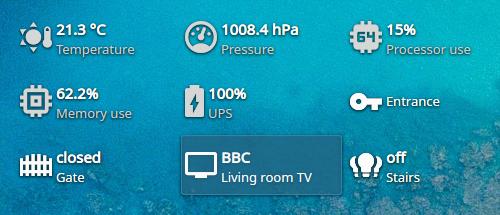
Se trata de una plataforma que es capaz de centralizar dentro de tu casa, y de forma completamente privada, la comunicación con muchísimos dispositivos diferentes y con tecnologías diversas, y permite leer y actuar sobre estos dispositivos de forma muy fácil e intuitiva; pudiendo hacer que las cosas ocurran automáticamente, o a través de una interfaz en tu móvil, comandos de voz…
Por cierto, no es que no tenga nada que envidiar a las opciones privativas de Google, Amazon, Apple… es que se las come con patatas. Estas empresas tomaron una decisión muy equivocada: crear entornos cerrados, donde sean las empresas las que tengan que adaptar sus productos a ellos, y por lo tanto tengan que destinar su dinero a esos múltiples protocolos. En Home Assistant, cualquiera puede crear una integración para lo que sea. Tú suelta una API en GitHub, y mañana hay 7 proyectos comunitarios de Home Assistant que la integran. Ese es el poder del software libre. Democracia y sostenibilidad.
Simple por defecto, potente cuando lo necesitas ⚙️
Si hay algo que hace brillar a Home Assistant, en mi opinión, es que hay mucho mucho trabajo puesto en hacer que sea fácil. Casi todo lo básico (incluso más) se puede hacer con un par de clics.
Sin embargo, e idénticamente a la filosofía de KDE, también es muy fácil poder ir más allá y que no sientas que la herramienta te limita en posibilidades. Home Assistant es realmente muy flexible, y permite que puedas ir poco a poco creciendo con él y llevándolo aún más lejos de lo que podías concebir.
¿Y si tu ordenador se pudiera sumar a la fiesta? 💻
Al poco tiempo de estar usando Home Assistant, y montarme mis propios scripts para controlar una baratísima luz RGB a través de infrarrojos, pensé en lo brutalísimo que sería si pudiera hacer cosas como:
- sincronizar la luz con el color de acento de mi Plasma
- poner la luz en rojo parpadeante para avisar de que estoy en una videollamada
- apagar o suspender el ordenador con un comando de voz desde la cama de «buenas noches»
- mandarme una notificación al móvil si es hora de trabajar y aún no tengo el ordenador encendido
- …
Las posibilidades son literalmente infinitas. Como la personalización de Plasma, vaya.
Aquí entra kiot 🙌
Pues resulta que, obviamente, no soy el único que pensó en ello, y David Edmundson, un conocido desarrollador en KDE, ha puesto los primeros cimientos de una herramienta que ha llamado kiot (KDE Internet Of Things), mezclando la clásica K con el concepto del IoT.

No es fácil de instalar ahora mismo. Con muy muy poquita idea de C++ y los cmake y problemas de dependencias, la verdad es que me costó un buen rato poder hacerlo funcionar. La documentación es más bien escasa (por ahora). ¡Pero funciona!
Características de kiot 📋
kiot, al menos a día de hoy, aunque dice ser una «integración» de Home Assistant, realmente utiliza la integración de MQTT de Home Assistant. Es decir, no existe una «integración de Plasma» que instalar en Home Assistant; sino que debes instalar la integración de MQTT.
Lo que hace kiot es comunicar a través de MQTT la existencia y estado de unos sensores y actuadores, además de recibir, por supuesto, las acciones pedidas desde Home Assistant. Esta es la pinta que tiene desde la configuración del dispositivo en Home Assistant:
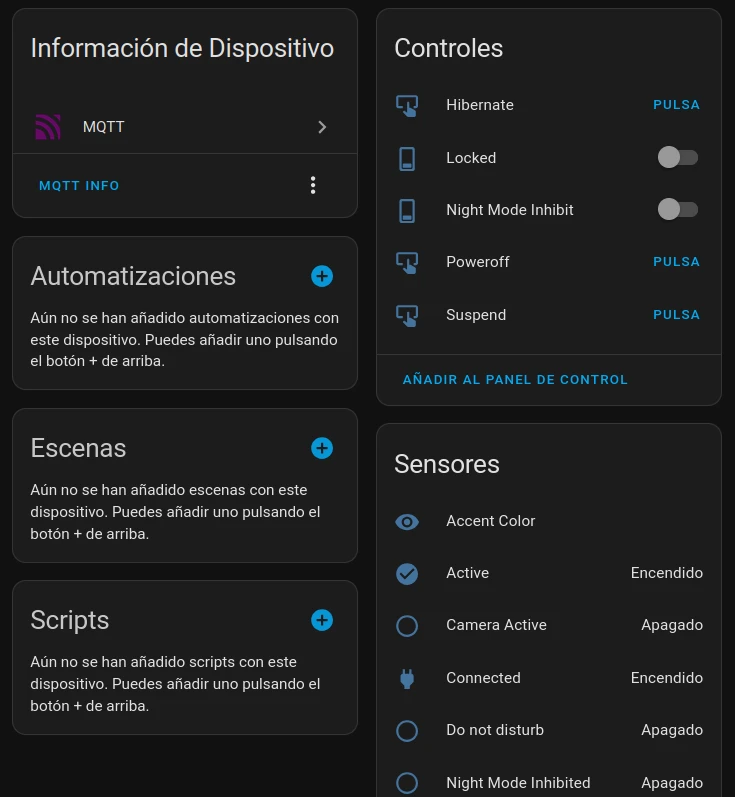
Podría cambiarle los nombres, no te preocupes, pero siendo que estoy probando esto en una fase aún primitiva, prefiero dejar los nombres originales para que no nos perdamos al preguntar dudas, o generar reportes de bugs.
Scripts customizados ✏️
Cómo no, siguiendo la filosofía de Home Assistant y KDE, en kiot es bastante fácil añadir «botones» para ejecutar scripts particulares en nuestro ordenador. Muy parecido, por no decir, de idéntica manera a como podemos hacer también en KDE Connect. Eso sí, con una diferencia fundamental, en Home Assistant podrías hacer que se ejecutara… por ejemplo… si sale el día lluvioso, 😅
Aún así, queda mucho camino por delante 🚧
Ya no es solamente porque estamos en una alpha, que casi está más cerca de ser una prueba de concepto que otra cosa… La realidad es que, apenas hemos rozado el inicio de una integración.
Por ejemplo, el cliente de Home Assistant para Android no solo permite a Home Assistant leer y actuar sobre un montón (literalmente cientos) de sensores y actuadores, como por ejemplo:
- nombre de la red Wi-Fi a la que estás conectado,
- activar/desactivar rotación y bloqueo de pantalla,
- coordenadas GPS,
- activar modo vibración/silencio/sonido,
- saber qué aplicación tienes abierta en este momento,
- cambio de duración del tiempo de pantalla encendida,
- …
Sino que además, - proporciona una interfaz para poder controlar el resto de tu casa inteligente,
- permite crear botones y widgets en el launcher, o en la sección de notificaciones (barra de controles),
- puedes establecer un «asistente de voz» para controlar Home Assistant
- e incluso recibir notificaciones interactivas de Home Assistant, por ejemplo, para apagar una luz que lleva demasiado rato encendida.
Y por supuesto, puedes elegir si exponer o no cada sensor y actuador, para evitar posibles problemas.
Ese es mi sueño para Plasma. Que mi ordenador funcione como parte de un organismo aún más grande. La primera piedra está puesta, pero falta mucho por recorrer. ¿Te unes?
La entrada Conectando KDE Plasma con Home Assistant a través de kiot se publicó primero en KDE Blog.
Seua Weather, visor meteorológico completo – Plasmoides para Plasma 6 (15)
Tras un parón debido al salto de Qt5/KF5 a Qt6/KF6 que realizó la Comunidad KDE hace ya más de seis meses decidí retomar esta sección aunque renombrándola ya que en ella solo hablaré de Plasmoides para Plasma 6. Así que hoy os presento Seua Weather, el plasmoide número 15 de esta nueva serie que nos permite tener un visor meteorológico completo con reloj y calendario.
Seua Weather, visor meteorológico completo – Plasmoides para Plasma 6 (15)
Como he comentado en otras ocasiones, de plasmoides tenemos de todo tipo funcionales, de configuración, de comportamiento, de decoración o, como no podía ser de otra forma, de información sobre nuestro sistema como puede ser el uso de disco duro, o de memoria RAM, la temperatura o la carga de uso de nuestras CPUs.
Así que espero que le deis la bienvenida a Seua Weather, el plasmoide número 15 de esta nueva serie que nos permite tener un visor meteorológico completo con reloj y calendario otra creación del incombustible zayronXIO.
Concretamente este plasmoide muestra el día de la semana, el mes, el día del mes y el tiempo actual mediante la API open-Meteo y tiene interesantes funcionalidades:
- Puede utilizar Celsius o Fahrenheit
- no requiere una clave API
- establece la ubicación basándose en su IP, pero también puede proporcionar las coordenadas usted mismo si lo prefiere.
- tamaño personalizable
- Tiene soporte para varios idiomas populares en la comunidad

Y como siempre digo, si os gusta el plasmoide podéis «pagarlo» de muchas formas en la página de KDE Store, que estoy seguro que el desarrollador lo agradecerá: puntúale positivamente, hazle un comentario en la página o realiza una donación. Ayudar al desarrollo del Software Libre también se hace simplemente dando las gracias, ayuda mucho más de lo que os podéis imaginar, recordad la campaña I love Free Software Day de la Free Software Foundation donde se nos recordaba esta forma tan sencilla de colaborar con el gran proyecto del Software Libre y que en el blog dedicamos un artículo.
Más información: KDE Store
¿Qué son los plasmoides?
Para los no iniciados en el blog, quizás la palabra plasmoide le suene un poco rara pero no es mas que el nombre que reciben los widgets para el escritorio Plasma de KDE.
En otras palabras, los plasmoides no son más que pequeñas aplicaciones que puestas sobre el escritorio o sobre una de las barras de tareas del mismo aumentan las funcionalidades del mismo o simplemente lo decoran.
La entrada Seua Weather, visor meteorológico completo – Plasmoides para Plasma 6 (15) se publicó primero en KDE Blog.
#openSUSE Tumbleweed revisión de la semana 9 de 2025
Tumbleweed es una distribución de GNU/Linux «Rolling Release» o de actualización contínua. Aquí puedes estar al tanto de las últimas novedades.

openSUSE Tumbleweed es la versión «rolling release» o de actualización continua de la distribución de GNU/Linux openSUSE.
Hagamos un repaso a las novedades que han llegado hasta los repositorios esta semana.
Y recuerda que puedes estar al tanto de las nuevas publicaciones de snapshots en esta web:
El anuncio original lo puedes leer en el blog de Dominique Leuenberger, publicado bajo licencia CC-by-sa, en este este enlace:
Esta semana se han publicado 7 nuevas snapshots (0220…0226).
Las actualizaciones más destacadas de estas semanas:
- KDE Plasma 6.3.1
- GPG 2.5.4
- MariaDB 11.7.2
- Poppler 25.02.0
- LibXML 2.13.6
- PostgreSQL 17.4
- Mesa 25.0.0
- Linux kernel 6.13.4
- Boost 1.87.0
- ZStd 1.5.7
Pero hay mucho más que se está preparando
- KDE Plasma 6.3.2
- Linux kernel 6.13.5
- GCC 15: Ejecutaremos el enfoque de 2 fases bien probado de años anteriores: primero, cambiar las bibliotecas usadas a las generadas por gcc15 (la fase en la que estamos trabajando actualmente), luego cambiar a GCC 15 que es el compilador.
- glibc 2.41
- Python 3.13 como intérprete predeterminado
Si quieres estar a la última con software actualizado y probado utiliza openSUSE Tumbleweed la opción rolling release de la distribución de GNU/Linux openSUSE.
Mantente actualizado y ya sabes: Have a lot of fun!!
Enlaces de interés
- ¿Por qué deberías utilizar openSUSE Tumbleweed?
- zypper dup en Tumbleweed hace todo el trabajo al actualizar
- ¿Cual es el mejor comando para actualizar Tumbleweed?
- ¿Qué es el test openQA?
- http://download.opensuse.org/tumbleweed/iso/
- https://es.opensuse.org/Portal:Tumbleweed
——————————–