
Android Reloaded

On Monday night I got home from the pub, and my phone announced that there was an update available, and would I be so kind as to allow it to update itself. I said, 'Yes, that would be lovely', and my G1 proceeded to show me a nice updating screen while it changed all its software around.
There's not much to see for it. The Android Market now tells you when anything you've installed has an update available, which is nice. Google Maps is now version 3, but I can't tell the difference. The biggest changes though, have to be memory usage and power consumption. Previously, after using my phone on and off during the day at work, the battery level would generally be down around 40% when I came home. However, the last two days have seen it around 60% instead, which is a great improvement. The other change is that before the update, my /data partition had around 10Mb free on it, while after the update it has around 30Mb free. I don't know how they've done that. Perhaps shifted some space from the /cache partition? I never bothered noting the free space on anything other than /data before.
 Member
 jniq
jniqAugeas for libzypp and zypper?
Augeas enables you to read and edit your config files in a way which preserves comments and formatting details, allowing humans and programs coexist peacefully when it comes to editing configuration files. More than that, you can map some special structures of the file to special parts of the augeas tree, rather than using the generic INI file parser. See the zypp.conf for example (zypper.conf will have the same structure):
[main]
## Option description.
## Default: etc.
##
# disabledoption = value

## Another option description
##

another.option = value
With Augeas you can write a lens (the file contents description) which will map such file into a tree like this:
/files/etc/zypp/zypp.conf/main/1
/files/etc/zypp/zypp.conf/main/1/description[1] = "Option description."
/files/etc/zypp/zypp.conf/main/1/description[2] = "Default: etc."
/files/etc/zypp/zypp.conf/main/1/description[3]
/files/etc/zypp/zypp.conf/main/1/commented
/files/etc/zypp/zypp.conf/main/1/disabledoption = "value"
/files/etc/zypp/zypp.conf/main/2
/files/etc/zypp/zypp.conf/main/2/description[1] = "Another option description."
/files/etc/zypp/zypp.conf/main/2/description[2]
/files/etc/zypp/zypp.conf/main/2/another.option = "value"
Note the commented node. Augeas has an API for looking for the nodes, getting values from them, setting the values, and finally saving the tree back to the config file.
What does this mean for zypper? Implementing
zypper conf --list is a piece of cake, as well as zypper conf --set another.option value. Commenting or uncommenting the option is a matter of adding or removing the commented node. Getting the option description for zypper conf --help some.option is easy (and maybe it is possible to map the multi-line ## description to a single 'description' node!).Here is a draft of lens for zypper (it will need comments and further improvements). To try it out you can crete a /etc/zypp/zypper.conf file with contents like the above example, and use the
augtool like this:$ augtool -I /the/dir/with/the/zypper.aug/file
augtool> print /files/etc/zypp/zypper.conf/
/files/etc/zypp/zypper.conf
/files/etc/zypp/zypper.conf/anon
/files/etc/zypp/zypper.conf/anon/description[1] = "Configuration file for zypper"
/files/etc/zypp/zypper.conf/anon/description[2]
/files/etc/zypp/zypper.conf/anon/description[3] = "Boolean values are 0 1 yes no on off true false"
/files/etc/zypp/zypper.conf/main
/files/etc/zypp/zypper.conf/main/1
/files/etc/zypp/zypper.conf/main/1/description[1] = "Whether to use colors"
/files/etc/zypp/zypper.conf/main/1/description[2]
/files/etc/zypp/zypper.conf/main/1/description[3] = "Default value: autodetected"
/files/etc/zypp/zypper.conf/main/1/description[4]
/files/etc/zypp/zypper.conf/main/1/description[5]
/files/etc/zypp/zypper.conf/main/1/colors = "yes"
augtool>
Type
help for other commands, use TAB key for completion, and check also the Augeas home page for more info.What does this mean for libzypp? Basically the above, with respect to libzypp's files. Currently, you either edit your repos.d/*.repo, locks, credentials, and other files by hand or you leave it to libzypp's frontends, or you at least take care not to write comments in those files, because they will all get removed upon the next change done by libzypp (what we do there is to rewrite the entire files from in-memory data upon saving). This can be easily avoided using Augeas and we can add an editing API for zypp.conf. Plus the bonuses described above.
The library package (libaugeas0) would add 300 kiB of installed size to libzypp's/zypper's dependencies, (which is not little), plus an optional 200 kiB of the official lenses (augeas-lenses), if we decide to use them.
todo: Look at Augeas' error reporting. The user can of course break the structure of the file in a way that the lens can't map it to the tree anymore. If parsing of the file will fail, we need to report why, so that the user can fix it.

OSF Status Report #3
Let me present you the openSUSE forums statistics for February 2009.
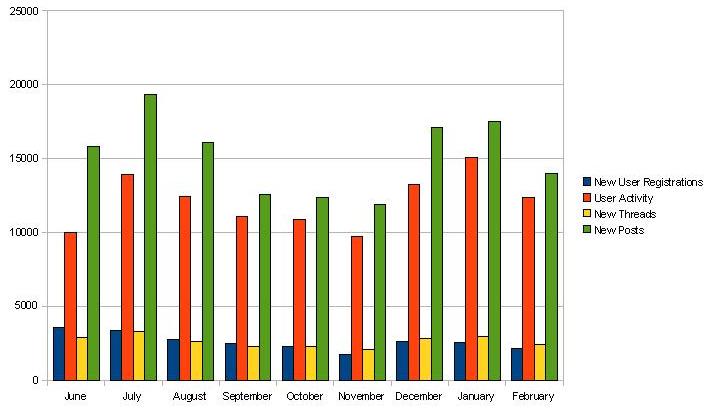
Up to the 28th of February 2009, we achieved a membership of 23.464 (+2.142) members, 23.463 (+2.390) threads and 136.684 (+13.989) posts. The number in brackets shows the increase of the corresponding measurement compared to the last snapshot taken on the 31st of January 2009. The user activity, i.e. the number of individual visits to the openSUSE forums, was 12.382 for the observed period. Most users ever online still was 7.771 on the 2nd of December 2008.
The following diagram shows the monthly development of new user registrations, user activity, new threads and new posts since the launch in June 2008.
Kudos to our Top5 posters during February 2009
- oldcpu – 566
- caf4926 – 560
- ken_yap – 362
- mingus725 – 254
- Malcolm – 223
Thanks as usual for making the openSUSE forums a worthwhile place to be.
If you haven’t signed up for the openSUSE forums yet, please consider doing so. It’s a great way to contribute to the openSUSE community in a non-developing capacity.
Any contribution to the recently announced “experts approach” collaboration between the openSUSE forums and the openSUSE Weekly Newsletter is much appreciated. If you’re interested to participate, please don’t hesitate to contact me for further information. Any comments and suggestions of the community about the OSF status reports is much appreciated by the openSUSE forums team. We’re certainly interested to know what the community would like to be covered in coming issues.
Remove Beagle on OpenSUSE 11.1
Beagle is a desktop search software, but I don’t use this kind of
"application". If you want to remove it from your system here is how to
do it:
Remove all related package:
sudo zypper remove *beagle*
Lock all this packages using zypper addlock
sudo zypper addlock *beagle*
Now, live without Beagle. :)
VMWare Workstation 6.5.1 on OpenSUSE 11.1
Finally, I received my new hdd (the previos one died) so I decided to install OpenSUSE 11.1. VMWare refused to work. I tried to install VMware-server-1.0.8 but without any success, and in the case of VMware-server-2.0.0 I don't like the new management interface (they didn't keep the old vmware-console, you will need to manage your virtual machines using firefox) so, finally I said ok, let's try workstation. And here is what I did:
ionut@vaio:~> uname -a
Linux vaio 2.6.27.19-3.2-default #1 SMP 2009-02-25 15:40:44 +0100 x86_64 x86_64 x86_64 GNU/Linux
ionut@vaio:~> cat /etc/SuSE-release
openSUSE 11.1 (x86_64)
VERSION = 11.1
ionut@vaio:~>


:::bash
ionut@vaio:~> chmod 755 VMware-Workstation-6.5.1-126130.x86_64.bundle
ionut@vaio:~> sudo ./VMware-Workstation-6.5.1-126130.x86_64.bundle
Extracting VMware Installer...done.
You must accept the EULA to continue.  Press enter to proceed.
.....[skip]....
Path to Eclipse directory for use with Integrated Virtual Debugger
(optional):

The product is ready to be installed.  Press enter to begin
installation or Ctrl-C to cancel.

Installing VMware Workstation 6.5.1
    Configuring...
[######################################################################] 100%
Installation was successful
Let's see if it is working:
ionut@vaio:~> vmware
Logging to /tmp/vmware-ionut/setup-13622.log
modinfo: could not find module vmmon
modinfo: could not find module vmnet
modinfo: could not find module vmblock
modinfo: could not find module vmci
modinfo: could not find module vsock
modinfo: could not find module vmmon
modinfo: could not find module vmnet
modinfo: could not find module vmblock
modinfo: could not find module vmci
modinfo: could not find module vsock
/usr/bin/vmware: line 31: 13622 Segmentation fault      "$BINDIR"/vmware-modconfig --appname="VMware Workstation" --    icon="vmware-workstation"
ionut@vaio:~>
TO FIX IT:
sudo mv /usr/lib/vmware/modules/binary /usr/lib/vmware/modules/binary_old
and now run vmware as root and it will build the modules again and everything will work fine.
If after reboot vmware will not start, then check if vmware service is running:
sudo /etc/init.d/vmware status
sudo /etc/init.d/vmware restart
Enjoy
Low bandwith for openSUSE-Education
Since July 2008, there’s a known problem with the sponsored server hosting the frozen openSUSE-Education repositories: our provider limits the bandwith for up- and downloads if more than 1 TB data is transfered per month. …and this is the case around the 25th of each month since this time.
People using HTTP requests to download packages are sadly very affected by this limitation at the end of each month, and I apologise for the trouble caused. Thanks to the FTP-Server Admins of openSUSE, we’ve already a place to host our ISO-Images, containing the same files as the frozen repositories. We’ve also a FTP (ftp://ftp.opensuse-education.org/) and a RSync-Server up and running (rsync rsync.opensuse-education.org::download/) – which should make it a bit easier until we’ve the final decision from the new openSUSE-Board, if they can provide some space for us.
Until then, feel free to offer additional space for our repositories. We’ve already an offer from Peter Poeml to help us configuring a “Mirrorbrain” setup.
G1 Power Usage
The one on the left is the device's power usage last night, when I wasn't using the phone at all since I was asleep, but the phone was still checking my email and twitter regularly.
The one on the right was this afternoon, when I was watching the rugby at my parents', but also using my G1 a far amount for twittering, checking emails, texting, and looking up things like the words of 'God Save the Queen' and what a drop goal is.
As you can see, the standby life is pretty good, and you can probably get a good eight hours of reasonably intensive use out of the battery. Which is pretty poor, but I can live with it, since I don't usually use the phone that intensively.

Should I Buy A G1?
If you want a phone with good battery life, this is definitely not the phone for you. If you have GPS and Wifi and 3G and all the bells and whistles turned on and you're using the phone constantly, you'll probably only get four or five hours of use out of it. I turn GPS and Wifi off and turn the screen brightness down (because even when it's turned right down it's pretty bright), and don't use it non-stop, just a fair bit of twittering and the odd bit of internet browsing and some texts and phone calls. And usually it's down to around 40% battery by the end of the day. Of course, it depends completely on how you use it. I usually plug the phone in at night so that it's fully charged in the morning. Last night I forgot to switch the charger on, and when I checked in the morning it had used less than 5% of the battery, so it's standby use is pretty good.
If you want a phone which was take videos, this isn't (yet) the phone for you. There are rumours of software upgrades on the way which will add this capability, but it isn't there yet.
If you want a phone with an on-screen keyboard, this also isn't (yet) the phone for you. It's apparently on the way though. An I don't understand why anyone would rather use an on-screen keyboard when you can use the G1's fantastic real keyboard. I didn't think I'd like using the keyboard much, but it works brilliantly, at least for my hands. The 'chin' on the phone gets only very slightly in the way. And my phone is a black one - I've heard the letters are hard to see on the white and bronze versions.
If you want a phone which doesn't force you to have a Google account, this isn't the phone for you. The first thing you have to do when you set up your phone is either enter your Google account details, or sign up for a new account. The phone is very tied into the Google way of doing things. This isn't that much of a problem for me - I'm not Googlephobic. Nor am I a Googlephile. Most of my email still goes through my own server, and there is software for the G1 which lets me read that email just fine. And I was starting to use Google calendar just before I got the G1, so it's quite nice that it is now synched up with the phone. Some people will find the Googleness of the phone to be a hindrance, but I find it works really smoothly, and is around three million times better than my previous Nokia when it comes to synchronization.
If you want something which is thin and stylish, this probably isn't the phone for you. It isn't huge, but it's certainly no iphone. It's not ugly either - personally I think it's really well designed and good looking. Again, it's up to the beholder and their eye.
If you want a phone with an incredibly flexible operating system, this is the phone for you. The Android OS is very well designed, and the way it operates is mostly very intuitive. And unlike Nokia phones, where it seems that once you have the phone, you won't get any new features until you buy a new phone, the T-Mobile say that the G1 will be actively updated with new versions of software.
If you want to write software for your phone (in Java), this is the phone for you. Writing Android software is very easy, and Linux is a first class operating system when it comes to their development tools. Some parts of the SDK aren't quite finished, but that's because Google hadn't got them 100% stable before releasing the phone, and thought it'd be better to release a stable incomplete SDK that a buggy complete SDK, and I think that's a good way for things to be.
If you want a phone which is exceptionally useful, this is the phone for you. There is already a huge amount of software available for it, and although there's a fair amount of rubbish, there's also loads of very useful stuff, and I'm finding the phone more and more indispensable.
If you want to be in on the ground floor with the mobile operating system of the future, this is the phone for you. I genuinely believe that Android is the way to go with mobile phones, and have no regrets about getting this phone. And I purposefully got a twelve month contract rather than anything longer, because I'm pretty sure that by this time next year there'll be Android phones out there which are ten times better than this one!
The phone's main negatives for me: poor battery life; not enough internal memory; sometimes a little sluggish going back to the home screen (I think it's probably garbage collecting); a few minor niggles with some of the core software (but at least I can branch the code and write a better version if I want to).
The phone's main positives for me: bright, high contrast, high definition screen; real keyboard; sensitive (capacitive) touch screen; well designed operating system; mostly well designed software; easy syncing with Google; infinite possibilities; easy to use; fun to write software for it.
RTFM!
Everybody knows. It's written in all programming languages textbooks (I hope). Always check function return values. As you learn more and more, you learn that there are two types of functions: those that need to be checked (I'll refer to them as important functions) and other functions.
Even though it is sometimes discutable (and depending of lazyness and carelessness of specific developer) which group a function belongs to, there are many functions where no such discussion is needed.
One example of important function is EVP_VerifyFinal() which is part of openSSL library. The function is used as part of signature verification, so (hopefully) only complete idiot would dare not to check the return value.
Since return values are described clearly in the documentation, I'm surprised that the return values are not (correctly) checked. The only reason I can think about so far is that the author did not read the documentation. Since the function is really important (it's part of secure connection initialization!), author should use it in a proper way. Which means - according to documentation...
Conclusion: RTFM!

Barriers, barriers, barriers!
The shaders allow for optimization to run multiple so-called clauses in parallel. There are ALU clauses, fetch clauses, and special single instructions e.g. for exporting data that are considered clauses as well. Thing is, if you do not explicitly tell the engine to stall for the results of a clause (by BARRIER(1)), it will happily run this clause concurrently to the last one. On all but the most basic ASICs (read: RV610 and M72 didn't show any issues).
Now this can create really weird side effect. Just imagine the following trivial vertex shader (some strange symbolic notation here):
CF_INST_VTX fetch clause: buffer id0 FLOAT_32_32 -> GPR0
EXPORT_POS export insn: GPR0 -> vertex position
It basically should just fetch the vertices and pass them unchanged.
However, if you forget the barrier at the EXPORT_POS statement, the chip will concurrently fetch a vertex position into GPR0 and export the current contents of GPR0 to the rasterizer. Which means that the rasterizer can get arbitrary input. In my very case I couldn't believe my eyes - each time I ran the test program I got a rendering with the vertices of the test 4 to 12 calls ago, depending on the actual chip! Turns out that the chip assigns the 128 (or whatever is configured) vertex shaders in a round-robin scheme to the individual vertices and keeps the contents of the registers per shader unit. After 5 or so turns I got - by accident! - a correct set of coordinates through to the rasterizer, only it was pretty old by then.,,
Set the barrier, and all this is of no issue.
Alex has seen similar things in the ALU clauses, in his case it was forgetting to set the LAST() bit as an end-of-vector-unit flag. On r6xx it worked fine, on r7xx it barfed.
