
 metalgod
Merry xmas!
I'm spending my xmas night with my parents and then (when they fall sleep) i will be with my friends eating, drinking and drinking until the sun rises. It's a tradition here. I'm feeling very happy for this day i hope the best for everyone!
PS: I got a gift from my parents, a Emporio Armani Code perfume, my favorite.
PS2: Cleaning some bugs at GNOME bugzilla and submiting new 2.25 packages for opensuse.
Happy xmas!
Enlightenment LiveCD
Ladies and Gents!
Glad to announce the third release of unofficial Enlightenment LiveCD based on our brand new OpenSUSE-11.1.
Download page
‘Welcome’ notes (PDF)
Please visit the download page to see the details and try the mirror provided by Yandex.ru. Read the Welcome.pdf before you pop the disk into the PC/Qemu/etc.
Along with this “release” we made another ‘iso’ which has less software but carry the proprietary ATI/NVIDIA drivers and all components to build and install them for your PC. Instruction is here:
‘Development’ release
Disk has a kernel sources, gcc, make and other ‘user unfriendly’ packages – thet’s why it’s a ‘development’ one.
The brief changelog comparing to the old ‘release’:
- all EFL applications now use the default themes. This allowed to save some valuable spase and provide additional software (like the latest ‘linuxdcpp’ with multithreading download capability)
- ‘SCIM‘ is included and ready to support the wide spectrum of international locales (added upon request from our Japanese colleagues)
- operations with any external and internal volumes/storages under ‘User’ via hal+dbus+udev. You’re welcome to explore the amazing E17’s module ‘places‘ which allow an ordinary user to control and monitor all volumes on-the-fly
- EFL/Enlightenment is build in OBS from svn revision 38164 (dated 20081215)
- ~/bin folder has some nice scripts inside and we hope to provide much more useful tiny utilities next time
- ‘Wicd‘ is set as a default network configuration utility (instead of ‘Exalt‘ which is now in a heavy development). If you’re not happy with it – just use the default ‘NetworkManager’.
- ‘jwm‘ is added as an example of a WM which could be configured in and out (man jwm). It’s very good for an old PC’s (along with ‘E16‘). We tested the disk with a 128 RAM – works…
- and the most interesting feature – is a ‘0install‘ technology, which allow you to build your own ROX-Desktop from scratch (internet connection is required). The result is very close to ‘GoboLinux’ – just click on ‘ROX-Filer‘ menu entry (Applications -> System -> File Manager -> ROX-Filer)
Some new applications added like ‘Tracker‘, ‘Edje_viewer‘, etc., init routine adjusted and several other tricks performed to prepare yet another general-purpose Linux LiveCD. Below is a link to the small gallery of a screenshots:
Exactly what you get by default. Unfortunately they can’t express the feel of E, which is “…like people say, amazing.” Mirror is updating right now and the new version soon will be there (hope so).
As usual we’re glad to receive your feedback.
Acknowledgments:
Enlightenment Development Team and Enlightenment Community
OpenSUSE Build Service Team
OpenSUSE KIWI Team (schaefi, cyberorg, pzb, cgoncalves – THANKS!)
Stalwart, thanks for the hosting!
Packman Team
Novell
Jan Engelhardt
and all the others, who helped to make it (Engineers, Developers, Users, Maintainers…)
Thanks!
Regards,
SOAD team

Import von Amarok 1.4-MySQL-Datenbank in Amarok 2
Der Import meiner in MySQL abgelegten Amarok 1.4-Datenbank in Amarok 2 wollte zunächst nicht klappen. Ich scheiterte immer mit QMYSQL: Verbindungsaufbau nicht möglich. Zum Glück war vorher schon jemand über den Fehler gestolpert und hat eine Lösung gefunden, nämlich anstatt des Hostnamens die IP des Servers anzugeben. Nachlesen kann man dies alles unter KDE Bug 174269. Kaum war die Voreinstellung localhost in 127.0.0.1 geändert schon rödelte die Kiste los.
YaST Qt4 Stylesheet Editor
YaST uses style.qss located in /usr/share/YaST2/theme/current/wizard by
default. If you want YaST to use a different style sheet (e.g. the style shown
while installation) you can set the $Y2STYLE environment variable:
Y2STYLE=installation.qss /sbin/yast2 disk
I’ve added a new hotkey to YaST which allows to modify the style sheet on
runtime. Pressing [Ctrl] + [Shift] + [Alt] + [S] in a YaST module opens the Stylesheet Editor. Now you can load a style sheet and modify its style rules.
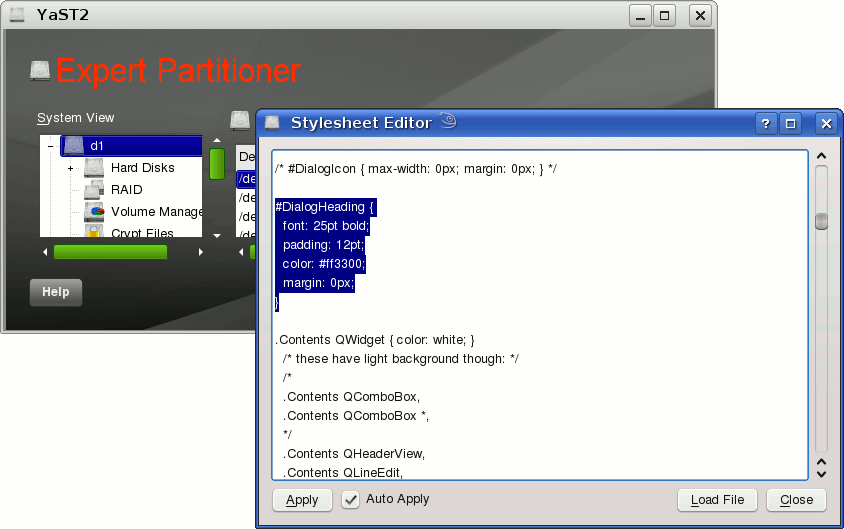
The Stylesheet Editor can be very usefull when you want to design your own style for the YaST Qt4 UI.
This feature will be available in openSUSE 11.2. If you want to use it now all you need is yast2-qt version 2.18.2. You can find the latest version here:
http://download.opensuse.org/repositories/home:/tgoettlicher/openSUSE_Factory/
 Member
Gettext Variables
Well, it turned out that i forgot about one more variable, the LANGUAGE. This defines a language preference list and takes higher priority that LANG, or LC_* variables. Mine was set to en_US (i don't know why, though) :O(
So the fix for me was either to unset the LANGUAGE variable, or include sk in its value. Read more about this variable here.


openSUSE 11.1 has been released!

openSUSE 11.1 just got released a few seconds ago!
The openSUSE Project is proud to announce the release of openSUSE 11.1. The openSUSE 11.1 release includes more than 230 new features, improvements to YaST, major updates to GNOME, KDE, OpenOffice.org, and more freedom with a brand new license, Liberation fonts, and openJDK. This is also the first release built entirely in the openSUSE Build Service.Get a copy of it by downloading via http://software.opensuse.org, or if you want an original copy order the openSUSE 11.1 Retail Box for only 59.95 EUR/USD. With the supported version of openSUSE you not only get a complete end-user documentation, installable media for x86 and x86 64-bit systems, plus 90 days of end-user installation support, but you also will be contributing by giving some money to the openSUSE project itself!
Read the full announcement: openSUSE 11.1 Released!
Digg it: http://digg.com/linux_unix/openSUSE_11_1_Released
Best Way to Download openSUSE
For most people, downloading traditionally looks like this:
- looking at a traditional, more or less static mirror list, and picking a mirror

- trying the mirror and see that it is too slow, outdated, or not reachable
- looking at the mirror list again, and picking another mirror
- downloading with a web browser or FTP program
- restarting a failed download, after loosing network connection for some reason
- ditching the download because it never finishes, starting from scratch from another mirror
- finally having a completed download, but for some reason it doesn’t install…
- finding the MD5 sum and manually verifing the download
- finding it broken and don’t know whether to start from scratch, repair the download with rsync, …
- scratching head… and be frustrated

Manually proceeding like pictured above is no longer needed, nowadays. At least not with openSUSE.
All you need is a Metalink client. This is a wonderful technology that fixes all the above issues, and makes downloading “just work”. A Wikipedia article explains how that is achieved.
The openSUSE download server fully supports this technology, by using MirrorBrain. Mirrorbrain is a download redirector and metalink generator which is open source and supports all advanced Metalink features. Features as embedding of Torrent links, verification hashes, cryptographical signatures and transparent negotiation, so that no separate links are needed on our web sites. Most of these features were added during the course of 2008.
There is a number of Metalink client programs out there. There is a FireFox extension called DownThemAll which works in FireFox on all platforms. There is aria2, a commandline program which is the most powerful of all of them. Our wiki has a list with more clients. I tend to recommend aria2, because it is the most powerful one. It is very simple to use, nevertheless.
aria2 deserves special notice, because it has the full support for all goodies that one might think of. These include:
- downloading from several mirrors at the same time (so it also makes you faster)

- automatically noticing mirror problems, and resuming from other mirrors
- simultaneously downloading via Peer-to-Peer (BitTorrent)
- error checking for transferred data is not only done in the end – but already during downloading. Each part of the file which has arrived is already checked, and if it’s found to be broken, it is scheduled to be refetched from another mirror.
- creating a local *.asc file which contains the cryptographical signature which can be used to verify the authenticity of the file
- automatically noticing if a server supports metalinks (if not, it will just act as “normal” download client)
- being robust against all sorts of network failures
- avoiding head-scratching of its user

Both aria2 and MirrorBrain are “location aware”, and work together to select mirrors that are as close to you as possible. In addition, mirrors known to be more powerful are assigned more users.
What else do you need to know? Not much. The command that you run to download an image is as simple as:
aria2c http://download.opensuse.org/distribution/11.1/iso/openSUSE-11.1-DVD-i586.iso
(For some other clients, you need to append “.metalink” to the URL.)
Note, aria2 tries to maximize utilization of your Internet connection for download bandwidth. This is wanted for most people, but it may be unwanted if you want to use the connection for other work, or if you are in a company with shared Internet access. In that case, use acia2’s -C command line option to limit the number of simultaneous servers being used.
Special note for Torrent users: you don’t need to bother downloading Torrent files. Aria2 does this automatically… since the Torrent link is embedded in the Metalink!
If you want to see what the magic behind all this is, look at http://download.opensuse.org/distribution/11.1/iso/openSUSE-11.1-DVD-i586.iso.metalink with an editor. You’ll see an XML file containing everything that the Metalink client needs. This file transfers the knowledge of the download server (and mirror database) to the client. With this knowledge, the client is enabled to work its way to a successful download even under adverse circumstances. In contrast, a traditional HTTP redirect to a mirror does convey only extremely minimal information – one link to one server, and there is no provision in the HTTP protocol to handle failures, or to add checksums that make problems detectable. An Internet Draft documents the Metalinks.
Many thanks to Tatsuhiro Tsujikawa for aria2!
This technology would be even easier to use, when web browsers would implement native support for it. Let’s hope that we will see that in the future. The technical challenges are solved and the way is paved. Ask your favourite browser vendor for it today…!
And since this is so powerful, we intend to employ it for other downloads as well — those done by the openSUSE package management tool, YaST respectively zypper. A prototype for this is available in openSUSE 11.1. Please test it – it is enabled by installing aria2 and setting ZYPP_ARIA2C=1 in the environment.
Christmas cards already
Next day I met my other friend who dragged me to a posh cafe. At some point we started talking about knitting. That might be a sign of us getting old or let's say mature. Somehow it worries me.
The first Christmas card arrived in my letter box. Now I'm panicky. Besides not having bought all Christmas cards yet I couldn't find the current addresses of my friends. When this is sorted out town is awaiting me with a million people in every shop where I have to find some presents. Christmas time should be quiet and soothing. It is nerve-racking instead. At least there's no time to indulge into the winter depression.
Evolution MAPI : Debut tarball release & RPM Repos are online
We have started the tarball releases for evolution-mapi. It’ll be in sync with GNOME release schedule. evolution-mapi-0.25.3 is available for download [0].
Thanks to Suman [1], openSUSE repositories [2] are back online.
Matthew has repositories for Fedora [3] [4]
—-
[0] http://ftp.gnome.org/pub/GNOME/sources/evolution-mapi/0.25/
[1] http://mail.gnome.org/archives/evolution-list/2008-December/msg00097.html
[2] http://download.opensuse.org/repositories/GNOME://Evolution://mapi/
[3] http://mbarnes.fedorapeople.org/mapi/
[4] http://mail.gnome.org/archives/evolution-list/2008-December/msg00086.html