
 Member
PageRank 6 for Indonesian openSUSE Community Website
 Today, I have a good news for Indonesian (and for all off) openSUSE community, our community website have PageRank 6 (PR 6). It would be not an important news for all of us, but it’s a good news for me because I know how difficult to get PR 6 with my personal blog
Indonesian openSUSE community website built on July 23, 2007 and serve as the first place for discussion, finding tutorial and supporting openSUSE fans.
Google PageRank trend is consistent with the increase in the number of users of openSUSE (user who install openSUSE in their PC or laptop) in Indonesia and in tune with the increasing number of forums and mailing lists user. It’s also consistent with the frequency of users who accessing the page tutorial on website.
Hopefully PR 6 can be the extra spirit to continue the improvement of the openSUSE community in Indonesia. We hope to provide best support for users of openSUSE and it’s variants distro.
Our next project is increasing tutorial page and encourage the member to create their personal blog within openSUSE blogger community. We hope to see more and more openSUSE related articles, with English or Indonesian or another language.
openSUSE Board Elections : Campaign for Pascal Bleser
openSUSE Board Elections phase 1 will be finally over at 1200 UTC on 09 October 2008. I’m quite silent with the elections discussion on openSUSE mailing list (marketing, project and another mailing list) due to my job, my project in Indonesian openSUSE community and due to Happy Eid Mubarak holiday here in Indonesia, but as openSUSE lovely user, I will vote for somebody who will be stand for openSUSE board, as our (or me as openSUSE user) gateway between community and Novell.
I’m really appreciated for everyone who take the opportunity as openSUSE board candidate. It should be a great job. All of openSUSE board candidate have technical or supporting background, active in the community and show their great effort and participation in the past.
One of openSUSE board candidate is Pascal Bleser (well known as yaloki on IRC). I have a nice discussion by IRC and by mail with him and get a good response. He is an incumbent of openSUSE board, means that he was currently openSUSE board member with AJ, Coolo, Federico and Francis.
 I know he has good technically background (describing zypper stuff for about 1 hour ), active on FOSDEM, good dad for his baby (look at the photos
  ) and don’t forget, he has been actively on merging and joining Packman repositories for openSUSE.
I don’t see any reason why I could not choose him as openSUSE member for next period. With his experience as first openSUSE board member; his technically background; his connection to another person in various open source project; and his good position to understand relation between Novell and the community, he would be the best choice for next openSUSE member.
Vote and campaign for Pascal Bleser as openSUSE Board member !
Geeko’s Scary Movie!
Poor Geeko can’t stand in front of such terrible picture and seeks shelter under Tux’s right wing.
Click on “More…” to see the picture…
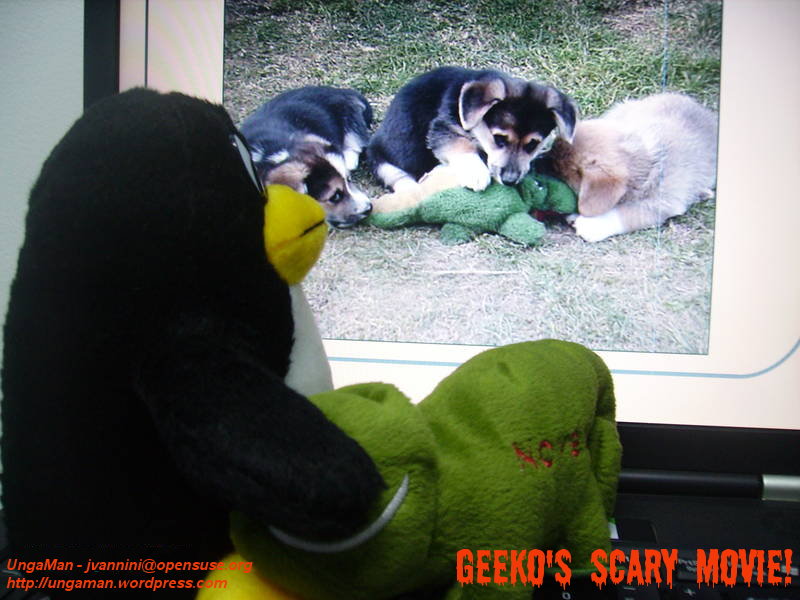
Click on the picture to enlarge it. 
Parralel processing in zypper
I have been on leave for a couple of days and today when I booted my laptop the openSUSE updater notified me of 4 security updates. While I was watching zypper updating the system (I prefer the command line client) I wondered if it would be possible for zypper to download and install patches/programs/etc asynchronously. To explain better: instead of downloading a patch and then installing it, why can’t zypper download the patch and then start a process/tread to install it while it immediately starts to download the next file ? I have no knowledge of the internals of zypper or yast, so I don’t know it it even feasible, but it would decrease the time needed to patch the system.
openSUSE Buildservice: cross-build
There is some good news for you: in cooperation with Marcus Hüwe the download on demand feature is now working seamlessly with cross-build, making it a combined “super feature”.
Also, I have put together a “condensed” cross-build in OBS document in the OBS Wiki Concepts collection.
New OBS cross-build installation packages will be provided inside openSUSE:Tools:Devel soon.
Have fun.
 IonutVan
Personal bibliographic management software
Handling references and bibliographic information is an essential part of all research. If you are writing just one article or just your diploma thesis maybe you don't need to use this kind of software because you will not have a lot of references. BUT, if you are writing A LOT of articles, reports, master/diploma/phd thesis then you definitevely will need a good software to manage your bibliographic database.
Here is how a bibliographic manager works. An author creates a document and cites his document with entries form a bibliographic database created earlier. After the author completed writing the paper he passes the document and the database through some application and the application incorporates all the references cited in the document from the database. This produces a final version of the document containing the text, graphics, etc. the author created along with the references he cited in a specific format.
I will not try here a comparison of free and non-free software available, just I would like to point some interesting links which I found when I started to use bibliographic management software. So here are the links:
- Reference management software from Wikipedia
- A comparison of management software
- Comparison of free bibliographic managers
- Finding the right bibliographic/reference tool
- Bibliography Management Software with a Detailed Analysis of Some Packages
- Evaluation of Reference Management Software (comparing Papyrus with ProCite, Reference Manager, Endnote, Citation, GetARef, Biblioscape, Library Master, Bibliographica, Scribe, Refs
I hope that the above links will be useful.
What do I prefer? I am using LaTeX for everything (presentations, posters, reports, letters, ... ) and BibTeX, so I need something which can use plain bibtex file. I am searching and download references from ISI Web of Knowledge. The naming convention for citation key (for the bib-keywords) which I am using (thanks to my supervisor for the suggestion) is the following:
- One author: First four letters AND last two digits of publication year (Prot08)
- Two authors: First two letters of both authors AND last two digits of publication year (TePr05)
- Three or four authors: First letter of each author AND last two digits of publication year (TRPS07)
- More than four authors: First four letters of first author AND last two digits of publication year
- If a key already exists: the next entries get a small letter behind the publication year, starting with b. (RoTe07b, RoTe07c)
I've been using KBibTex and KBib for a while now since I use linux. For me it's quite useful because it has a simple, no bloat GUI that does one thing - let's you add and maintain references. The minor point here is that they are available just for linux/bsd. Now, I played in the last weeks with Jabref (it is writen in Java and it can run on every platform: bsd/linux/mac/win). I still didn't find how to use it in order to search in ISI Web of Knowledge, but I thing I will change to it anyway, to have the same software on all platforms.
That's all and good luck in managing your bibliographic database.
Animations in PDF using LaTeX
I am using LaTeX (started with LaTeX 2.09, followed by LaTeX 3e) for everything technical and scientific (reports, articles, master/diploma thesis, presentations - yes, I am preparing my presentation with it, posters, letters, ..). In the last year I changed to pdfTeX in order to obtain directly pdf file output without intermediate steps like dvi and ps, and to replace eps files from my computer with pdf files. For Windows I am using MiKTeX with TeXnicCenter which is a great editor.
Of course that I need to include animations in my presentations (for example some simulations movies). I use all the time .avi files so here are just two methods to include them in pdf.
I saw that a lot of people included as well swf, mpeg, wmv, mpg, but in my case doesn't work with the second method, avi worked in both cases. Adobe Acrobat Reader (version 8.1.0) doesn't want to play this kind of movies (file unsuported). I couldn't include gif file. So, here are the methods:
- using "movie15" package:
    %include the package
    \usepackage{movie15}
    ....
    ....
    Click bellow to start the movie:\
    % we can use also: mpeg wmv mpg swf
    \includemovie[poster]{5cm}{5cm}{movie.avi}
- using "multimedia" package:
    %include the packages
    \usepackage{multimedia}
    \usepackage{hyperref}
    ....
    ....
    Click bellow to start the movie:\
    \movie[height=5cm,width=5cm,loop]{}{movie.avi}
If you know how to include gif in pdf files and to work in Acroread on Linux, then, please let me know.

Ruby downloader for Jamendo
Also this year I’ll attend the Linux day (a day dedicated to Gnu/Linux and FLOSS that occurs every year in Italy) organized by my LUG. Guess what I’ll be talking about… ;)
While organizing the event somebody proposed to setup a local server with some music released under CC license. He suggested to download some albums from Jamendo (due to network issues we won’t be able to provide direct access to the website).
Since nobody wanted to download the albums by hand, last night I wrote a small ruby program that does the dirty job.
Requirements:
Ruby and json gem have to be installed on you machine.
Usage:
Help:[](http://www.flavio.castelli.name/wp- content/uploads/2008/10/jamendo_downloader.rb)
./jamendo_downloader.rb –help
Download the top 10 rock albums:
./jamendo_downloader.rb -g rock -t 10
Have fun
I think there’s nothing more to say… enjoy it!
{% gist 2437530 jamendo_downloader.rb %}
Wineconf 2008
So I traveled there on Friday, spending 24 hours of total awake time due to some rerouting,
arriving at 23:00 in the hotel. Now the first government body has all my fingerprints, and
its not Germany. :/
Conference was on Saturday and Sunday, starting with the keynote from Alexandre as only fixed
agenda item, and then went on with all-hands introduction, and other sessions collected ad-hoc.
Our group photo with names is on the wineconf wikipage.
I took some more pictures now uploaded to my gallery.
All in all it was nice seeing all the developers again, and having some fun inbetween.
Traveled back on Monday, arriving at 10am in Nuernberg on Tuesday.

Touching Banshee, Porting Tasque
I've written on a patch to make the artist and album text in the Banshee track info display interactive. 95% of the time I am listening to my library on shuffle, and sometimes I hear a song and decide I want to hear more from that artist or album. Well, with my patch, you can click on either to perform a search on your library.

You can also right-click and add the album or all tracks by the artist right to the play queue, which is my favorite Banshee trick now. Have you ever used the Banshee Play Queue? It's really cool...if you're listening on shuffle and you add a bunch of stuff to the play queue, it will play those items in order and then go back to shuffling through your library (or whatever you were listening to before you shoved stuff into the queue).
Click to see low-quality demo on YouTube.
So why is this still just a patch and not in Banshee SVN? Well, really, it's kind of ugly, don't you think? Here's this pretty Banshee UI with some gross hyperlink-looking text in the middle of it. What do you folks think I should do?
- Use a different color, like "Selected"?
- Only change the text color on hover?
- Both?
The only thing I like right now about having it colored all the time is that it makes the feature more discoverable. But is it worth it? Any thoughts on the appearance or behavior of this feature? If you build Banshee from SVN, give it a try and see what you think!
I'm busy lately so if somebody else wants to mess with this bug, be my guest. It won't get into SVN until after Banshee 1.4 is released, anyway. ;-)
Tasque Goes Cross-Platform
I couldn't sleep Thursday night, so I yanked some of my code from tomboy-portable2 and got Tasque going on Windows. Then I decided Tasque is simple enough to play with that I'd better get it going on Mac OS X, too. This weekend I even put together I nice little disk image for Mac users. Big thanks to Eoin Hennessy for creating Mono bindings to Immendio's Mac/GTK+ integration library. The next Tasque release will be equally supported on Linux, Windows, and Mac, so feel free to start filing bugs.


Really this is just an excuse to try stuff out for Tomboy.