
Tomboy Preview for Windows and Mac
At the end of August, I told you about my little project to bring Tomboy to Windows users. Well, last week I finally merged that code into trunk. And then Friday, the excellent Mono team released a Mono 2.0 installer for OS X, and I found that my Windows build of Tomboy finally worked pretty well on the Mac, too. Of course, some platform integration there would be nice...


Click for full-screen shots. Notice that I added a menu for tracking open note windows, and attached the classic recent notes menu to the dock icon. This is not the most elegant solution, but I wanted Mac users to play around with it and share their own opinions. I'm very open to changes here. :-)
I didn't have any plans this weekend, so I present to you "preview builds" of Tomboy 0.13.0 for Windows and Mac OS X. I'm distributing them with the disclaimer that they are not widely tested, though in my own testing I have found no bugs that would make me worry about loss of data. Just consider yourself warned, and please back up your notes.
If you find any bugs, or have ideas for better platform integration, or find issues with install, please please PLEASE file bugs!
Click to file a bug for Tomboy on Windows!
Click to file a bug for Tomboy on Mac OS X!
Mac Instructions
- Install Mono 2.0 for Mac OS X.
- Download and mount the Tomboy disk image.
- Drag Tomboy to Applications, run!
- (optional) Copy your notes to ~/.config/tomboy
Mac Known Issues
- Shortcut keys all use Control instead of Command.
- The Bugzilla add-in doesn't work.
- In the note window toolbar, notebook names can be ellipsized oddly.
- Hand cursor doesn't show when hovering over links, but they're still clickable.
- No keybindings support.
- No i18n support.
Windows Instructions
- Install Medsphere's GTK# SDK installer (the runtime installer should work, but in my testing it did not install a particular registry key needed for Tomboy to recognize its presence).
- If you are running Windows Vista, you may need to follow additional instructions to work around an installer bug.
- Restart your computer.
- Download the Tomboy installer.
- Double-click to install!
- (optional) Copy your notes to %appdata%\tomboy
Windows Known Issues
- Menu rendering issues.
- Two console windows appear briefly when Tomboy starts (fixed in Mono.Addins SVN).
- No drag and drop from other apps into Tomboy (appears to be unimplemented in GTK+ for Windows).
- If you try to run Tomboy twice, it should show the Search window instead of launching again, but sometimes it will not show the Search window until you have interacted with Tomboy in some other way (by hovering over a window or clicking the tray icon, for example).
- No i18n support.
Big Thanks
This was actually a pretty easy job, thanks to these folks:
- Eoin Hennessey, who pioneered a lot of this work in his banshee-osx git branch, which he and Aaron are merging into Banshee trunk this week. Among other things, he created Mono bindings for Imendio's excellent ige-mac-integration library, and scripts for building app bundles.
- Andrew Jorgensen, Thomas Wiest, Marc Christensen, and Geoff Norton of the Mono team. These guys have been rocking hard on Mono's Mac story, and it shows. Thanks especially for getting me a build of MonoDevelop in time for my Saturday hack fest!
- Aaron Bockover, who keeps threatening to do a Mac release before me.
- Brad Taylor and his old Medsphere cronies, who whipped gtk-sharp on Windows into shape.
- All GTK+ developers and porters, especially those at Imendio!
- The entire Tomboy community, especially Dmitry Kostenko, Doug Johnston, and Samuel Vandamme for their patches to help make Tomboy on Windows a reality. You guys are awesome!

 notlocalhorst
10 Things …
Some people asked me to compile a 10 bullet list what every user should know if new to openSUSE. It’s not intended to be useful for the hardcore user, it’s for beginners. It’s not only openSUSE 11.0 focused, most of the stuff can be also used with older versions. This is my list, totally biased and based of what i found are the most asked questions on events.
1. Make Installation Easy!
Don’t be too smart. I really like that the second part of the installation is now optional. Many users had trouble because they tried to configure the system in the second stage (after the reboot), my recommendation was always: skip it, just press next, you can configure everything later in the running system.
So skip it, leave the default on “automatic configuration”. You can argue about the “same root password as user” thing — but for a single user system it’s in my opinion perfectly OK. If you don’t like it, select a separate root password at the user configuration screen.
2. Be root, but not always
Sometimes you need to do things as root user. Some people don’t want to enter the password everytime
so the they login as user root. Don’t do that. This could be a security problem and you are much more likely to screw things up. You have options to start even graphical programs as root when running the X Server as user. If you open a terminal like konsole or xterm, you can change the user with
su - Pre openSUSE 10.3 have to use sux – otherwise graphical programs will not work. Without any further option it will switch to the root user and you can do everything without having everything as root running. You can also use su – to start programs as other users, su – username. This helps sometimes if you are not sure if your configuration is screwed. I always have a second use on my system with the default configuration.
You can also use sudo to make this easier, look at the wiki page. And don’t forget: with great power comes great responsibility (qoute from sudo and spiderman  )
)
3. Install packages much faster with zypper
YaST Package management is very good, but sometimes you don’t need to use the graphical interface, because you know what you want. It’s as simple as opening a terminal (as user root) and run:
zypper in kdirstat That command will install the kdirstat package with all dependencies.
zypper se gcc The se option searches all enabled repositories and the rpm database on the system for gcc. A new option is “dup”, for a distribution update. More information can be found, as usual, using man zypper,zypper –help or at the wiki page.
4. Beagle
Beagle has its up- and downsides. With Beagle you can search all your documents with amazing speed, at the cost that it’s slowing down the system sometimes as its indexing your files. It is in theory nice, but sometimes it’s slowing down the system to much when you don’t want it.
To be honest, Beagle’s performance is much better since 10.3 iirc, so it’s not halting the system completely anymore. :-). I do always a default installation on my systems, with Beagle. I thought it might be handy to search through my email and stuff. But I realized that I never used it. I can find my stuff also without it, maybe I will rethink about it when my brain is getting worse …. :-). If you want to deinstall it, just use this commnad as root:
zypper rm beagle This will deinstall Beagle and all dependencies. One major painpoint I have is that Beagle is especially annoying on a laptop, because of the slow 2,5″ hard drives. On a desktop system you will probably not recognize it running.
5. simple-cssm
You want an awesome desktop with state of the art 3D effects? You want Compiz.
In former versions you have to call a couple of commands, restart the
X-Server to get it. Not very userfriendly. Now it’s so simple, just use:
simple-ccsm to enable it. Some flashing of the screen, and it’s on! You can also configure the most used options for Compiz right in this nice program. Of course you need a graphic card with enabled 3D acceleration. If you want more options, you can use ccsm. More information about it: compiz fusion.
6. Using Gestures
Not really something new in openSUSE 11.0, but a feature I really love. It started, as far as I know, with opera and only because of that it was my favorite browser for a long time. So what is a gesture? You are on a Web page and want to go back, what are you doing? Here are the usual options:
* alt cursor left
* right click, select back
* click on the left arrow in the browser
or just hold the right button and move to left. Simple. Close a page is right button, down, right (like an L). Gestures work in Firefox with a plugin, Opera, and the whole KDE desktop. Right, the whole desktop! And you can even configure it for every application differently. Some examples I use:
right click, down, left – closes tab (konqueror or Firefox)
right click, down, right – closes window
right click, up – scroll to beginning
right click, down – scroll to end
right click, down, right, up – show source code of a webpage
right click, down, up – reload
The gesture setting in KDE 3.x are a little bit hidden, Regional/Input actions. And they also work now in KDE4, one more reason to switch.
7. Need Software?
The openSUSE build service (obs) have a lot of software which is not included in the distribution, or some newer versions of it. You want to have the latest KDE? You will find it in the obs. Just go to software.opensuse.org/search and enter what you want. Becaus of the nice 1-Click installation feature you can install it right away from the browser.
So if you need additional packages you should always go to the obs first, there is a lot of stuff, build for openSUSE, for your version, for your architecture. No dependency hell, no mismatching libraries.
8. Webcam Support
Most new Laptops have a webcam integrated and there are even users who want to use them. :-). The good news is that the support for webcams is much better with openSUSE 11.0 and chances are quite high that your cam is supported.
Unfortunately, the right drivers are maybe not installed by default, so you probably have to install them manually. Many cams are supported by 2 drivers, uvc, which is a new standard for webcams, or the gspca driver which supports
a lot of cams. Just search for the drivers in the YaST software module and install both. Connect the cam after the installation of the drivers so hotplug can load the needed modules.
While you are in YaST you should also install a program to view the pictures: my favorite is Cheese. If you use KDE you can also use also kopete for a quick test. If your cam is still not running: we are working in the build service on a eebcam driver project, there you can find additional drivers and newer versions. You will find them at:
http://download.opensuse.org/repositories/drivers:/webcam/
The tricky thing might be to find out which driver you need. As i said before, gspca and uvc cover most of the cams, if yours is still not working, here is a short workflow:
Open a terminal, enter lsusb. This shows all devices which are connected via usb. Yes, even the webcam is build in, it’s very likely that it is connected to the usb bus. Search for something like “cam”, “web” or “video”, it should be not that hard to figure out which device the webcam is. You will see in the output of lsusb after ID something like this: 174f:a311, the vendor and device id. Head over to Linux USB and enter the second part of the hex number, so in this case a311. Sometime you will find more than one entry for the id, but it’s quite easy to figure out which is the right one. Select the right one and click on show. The second line shows the used Driver, if there is one, like stk11xx. You can now use zypper or YaST to search for it, maybe it’s already included. If not, you have the option to use the software search, or go directly to the buildservice project. After the installation you have to replug the webcam.
If you search for a very easy way to broadcast yourself, try out yahoo’s live service.
9. KDE4.1 … or better!
The version of KDE4 we have in openSUSE 11.0 is quite OK, and was at the release for sure the best, but you deserve better. It’s a awesome difference if you install the latest packages from the build service. You have more options, it’s more stable and you have icons back on the desktop :-). If you are like me not really convinced that KDE4 is the way to go, check it out … the difference is really awesome. Just head over to http://en.opensuse.org/KDE4 and use the 1-Click install option.
10. Enable external software repos
Because of some laws we can’t put some stuff such as codecs for video on the images or our repositories. But thanks to the community, you can easily install these missing packages with the 1-Click install feature. Just head over to opensuse-community and select your distribution and used desktop to get the full multimedia package.
11. There is only one option to do xyz
Wrong, there are nearly always several options. For example you can configure your system with YaST or with an editor manually. You have to decide what’s better for you. If you talk with an openSUSE newbie keep in mind that YaST is most of the times easier, even it’s sometimes more hard to explain. And if you did something yourself don’t be afraid that it is wrong just because you found another howto which described it different. Of course it makes sense to read the documentation, especially if you are doing security related things.
12. This list is not 10 bullets long!
Right, and if you have a recommendation you give always to users: feel free to add it as a comment.
New Hardware for the OBS
Today we got new hardware for the Build Service!
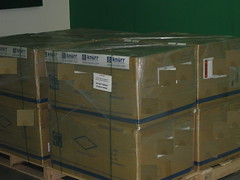


Thanks to AMD who sponsored the hardware, we will have soon a lot more buildpower resulting in less waiting time. We got 8 machines, each a 16 core system with 16GB ram. It will take some time to build all into the rack and have them up and running, so in the meantime we have some pictures for you


 Member
Remastering openSUSE : How to Build your Own openSUSE Based Distro

I’m writing an article series about : “Remastering openSUSE : How to Build your own openSUSE Based Distro” as part of my presentation at Indonesian openSUSE Community monthly meeting [0] last week. The article based on my experience while making openSUSE 11.0 KDE 3.5+Multimedia Support LiveDVD (beware with it’s restricted media if you want to rebuild this. I make it as part of my presentation tutorial).
I’ve posted 2 article for now, “Kiwi as imaging system and how to install it on openSUSE”[1] and “How to build openSUSE Minimal System LiveCD” [2] and currently writing the third article “How to make openSUSE 11.0 KDE 3.5 LiveCD”
[0] : http://vavai.net/2008/10/09/indonesian-opensuse-community-monthly-meeting-10/
[1] : http://vavai.net/2008/10/15/remastering-opensuse-how-to-build-your-own-opensuse-based-distro/
[2] : http://vavai.net/2008/10/15/how-to-build-opensuse-minimal-system-livecd/
It was not a completed tutorial but I hope it could helped you for making openSUSE with your own specification. Sorry for any inconvenience.
Note : The term “Remastering” would not correct either, because I simply described how to make openSUSE with our specified configuration and application without change any openSUSE branding, splash screen or another openSUSE trademark.
Is Mathematics Beautiful? Second part: Fractals
"Mathematics, rightly viewed, possesses not only truth, but supreme beauty -- a beauty cold and austere, like that of sculpture, without appeal to any part of our weaker nature, without the gorgeous trappings of painting or music, yet sublimely pure, and capable of a stern perfection such as only the greatest art can show." - Bertrand Russell (1872-1970), The Study of Mathematics
A few days ago I posted some nice surfaces, a beauty of mathematics. Here I would like to post some interesting fractals.
Is Mathematics Beautiful? First part: Surfaces
"Mathematics, as much as music or any other art, is one of the means by which we rise to a complete self-consciousness. The significance of Mathematics resides precisely in the fact that it is an art; by informing us of the nature of our own minds it informs us of much that depends on our minds" - J.W.N.Sullivan (1886-1937), Aspects of Science, 1925.
Just some interesting surfaces. The software used is Python and MayaVi. I used the scripting facilities provided by this great visualization tool, called MayaVi.
Zimbra Mail Server : How to Make an Archive for Every Incoming & Outgoing Mail
 I’m running Zimbra Mail Server on openSUSE since last 2 years. I’m quite satisfied with the great features on Zimbra but I lost one nice feature as included on my old MDaemon Mail Server while still using Windows on 2003-2005. It was an Archival Feature.
One of the important features that are needed on a mail server is archiving, the backup copy of all incoming and outgoing mail.
Although we can do the backup process periodically for every account, archiving more better and efficient because we have all of copy email which 100% similar with the original.
I’m writing a simple tutorial and it’s impact in my personal blog. Click here to go to the article.
LaTeX useful Tips/Tricks
In my previous post I discussed a "small" but, I would say "complet" template to start your document. If you want to include also movies in your pdf documents, then this post can help you. If you need a good program for bibliographic management check this post.
Below I will post a lot of tips, tricks and useful stuff which helps me when I am using LaTeX, for details check the documentation of coresponding package name, or Google .
Customize your header and footer
\pagestyle{fancy}
\lhead{}
% \chead{}
\rhead{\leftmark}
% \lfoot{}
% \cfoot{}
% \rfoot{}
More packages
\usepackage{latexsym} % use \Box, \Join
\usepackage{setspace}
\usepackage{subfigure} % include subfigures
\usepackage{amsmath} % equation
% table of contents, list of figures
\usepackage[titles,subfigure]{tocloft}
\usepackage{lastpage} % total page count
\usepackage{makeidx} % create index
Old Makefile which I used, you can modify it for your needs
dvi: poster.tex
    latex poster.tex
bib:
    bibtex poster
view:
    kdvi poster.dvi
ps:
    dvips poster.dvi -o poster.ps
pdf:
    ps2pdf poster.ps poster.pdf
mp:
    psnup -9 -l -d2 poster.ps multpage.ps
a4:
    psresize -H118.9cm -W91.4cm -pa4 poster.ps a4.ps
    ps2pdf a4.ps poster_a4.pdf
.PHONY: clean
clean:
    @echo Cleaning...
    $(RM) *.log *.aux *.dvi *.bbl *.blg *~
    @echo Cleaning... done
Indexes and Glossaries
% first include the makeidx command in the preamble
\usepackage{makeidx}
\makeindex
To index something, use the command:
\index{Index Entry}
When the document has been processed through LaTeX, it will create a .idx file. You will then need to run the .idx file through the makeindex program:
makeindex filename
No file extension for the name. The program will look for the .idx file and will output a .ind file. This file is used by the command:
\printindex
Glossaries simply use the commands:
\makeglossary (used in the preamble, like the \makeindex command)
\glossary (used for the particular entries, like the \index command)
Include/Rotate/Reflect images
\includegraphics{image.png}
\includegraphics[angle=45]{image.png}
\includegraphics*[viewport=30 30 120 120]{image.png}
\includegraphics[scale=0.25]{image.png}
\includegraphics[width=5in,height=1in]{image.png}
% no explicit size for image
\includegraphics[width=0.88\hsize]{image.png}
% horizontally reflect a image
\reflectbox{\includegraphics{myimage.png}}
% strange text behaviour
\scalebox{2}{\rotatebox{60}{\reflectbox{Check this text!}}}
Complet environment with two images left-right
\begin{figure}[htbp]
\centering
\includegraphics[width=0.8\hsize]{image}\
\includegraphics[width=0.8\hsize]{image}
\caption{image caption}
\label{fig:mylabel}
\end{figure}


:::latex
\begin{figure*}[t]
\centerline{\includegraphics[width=0.8\textwidth]{figures/image}}
\caption{Caption title. {\it Caption text.}}
\label{fig:image}
\end{figure*}
Labeling sections in the document
\section{Introduction}
\label{sec:intro}
.....
% reference to section
\ref{sec:intro}
Adding external files to the document
\section{Introduction}
\label{sec:intro}
\input{sections/intro}
Math
\[...\] % produces an unnumbered formula
\(...\)
$...$
\begin{math} ... \end{math}
Type properties
\bf % bold
\sf % sans serif
\sc % small caps
\tt % typewriter
\tiny
\normalsize
\large
\Large
\LARGE
Lists
\begin{enumerate}
   \item First item
   \item Second item
\end{enumerate}
%
\begin{itemize}
   \item First item
   \item Second item
\end{itemize}
%
\begin{description}
   \item[first] A definition for the first item.
   \item[second] A definition for the second item.
\end{description}
Columns
\begin{tabbing}
text \= some text \
  \> text  \= text,
   \>       \> text; \
  \> text  \> text. \
endif
\end{tabbing}
%
\begin{tabular}{|l|c|c|}
   \hline
   {Row 1,Col1} & {Row1,Col2} & {Row1,Col3} \
  \hline
   {Row 2,Col1} & {Row2,Col2} & {Row2,Col3} \
  \cline{2-3}
   {Row 3,Col1} & {Row3,Col2} & {Row3,Col3} \
  \hline
\end{tabular}
%
\begin{tabular}{|l|c|c|}
   \hline
   {Row 1,Col1} & {Row1,Col2} & {Row1,Col3} \
  \hline
   {Row 2,Col1} & \multicolumn{2}{c}{Row2,Col2-3} \
  \cline{2-3}
   {Row 3,Col1} & {Row3,Col2} & {Row3,Col3} \
  \hline
\end{tabular}
Tables
{\protect
   \begin{table}[t]
      % Table body
      \caption{Caption title. {\it The caption text.}}
      \label{tab:schema}
   \end{table}
}
%
{\protect
   \begin{table}[t]
      \centering
      \footnotesize
      \begin{tabular}{|l|c|c|}
         \hline
         {Row 1,Col1} & {Row1,Col2} & {Row1,Col3} \
        \hline
         {Row 2,Col1} & {Row2,Col2} & {Row2,Col3} \
        \cline{2-3}
         {Row 3,Col1} & {Row3,Col2} & {Row3,Col3} \
        \hline
      \end{tabular}
      \caption{Caption title. {\it The caption text.}}
      \label{tab:schema}
   \end{table}
}
References:
- LaTeX Project WebSite
- LaTeX on Wikipedia
- Latex Makefile by Google
- Makefile: Rubber
- The TeX Catalogue Online has a very comprehensive list of all the LaTeX packages out there
- Latex Tutorial
- Header and Footer in LaTeX - Explained
- Latex Explained
- Installing and Using LaTeX Packages
- Noeckel: Computer Notes (LaTeX and useful stuff)
Starting with LaTeX/PdfTeX, a small template
Just a short template with some packages included:
\documentclass[a4paper,12pt]{article}

% let's use some nice packages
\usepackage{times}
\usepackage{amssymb}
\usepackage{amsmath}
% set all margins to 2.5 cm
\usepackage[margin=2.5cm]{geometry}
% for fancy and easy modification of header and footer
\usepackage{fancyhdr}
% include hyperlinks in pdf file
\usepackage{hyperref}
% decide if run PdfTeX or LaTeX
\ifx\pdfoutput\undefined
% we are running LaTeX, not pdflatex
\usepackage{graphicx}
\else
% we are running pdflatex, so convert .eps files to .pdf
\usepackage[pdftex]{graphicx}
\usepackage{epstopdf}
\fi

% also include colors
\usepackage{color}
% define bottom line of paper, for DRAFT option
\usepackage{prelim2e}\usepackage[none,bottom]{draftcopy}
\draftcopyName{preprint / }{1.2}
\renewcommand{\PrelimWords}{Draft%
 -- contact: user@mail.yoursite.com -- www.yoursite.com}

% define a path for your images
\graphicspath{{.},{../blog/images/},,{../../blog/images/}{../../anotherdir/}}

% define a new command
\newcommand{\mylab}[1]{\label{#1}}

\title{Your Title}
\author{Your Name}
\date{\today}

\begin{document}
% show the title, author and date
\maketitle

% article's abstract
\begin{abstract}
body of abstract
\end{abstract}

\section{Section Name}
\subsection{Subsection Name}

% include the bibliography but using bibtex
\bibliographystyle{plain}
\bibliography{bibfile1,bibfile2,bibfile3}

\end{document}
Next step is to look at this nice book. That's all. Bye!
Installing Enthought Tool Suite (ETS) on OpenSUSE 11
Today, I tried to install Enthought Tool Suite on OpenSUSE 11, with the help of my old post. For the moment there are no packages for OpenSUSE. I had to checkout their repository and build the eggs, in order to install the suite. The mentioned tutorial worked but of course that I had some minor problems. Now, the last version is ETS_3.0.3 and during the build of Enable_3.0.2 a small surprise on the screen:
` kage caller_level = caller_level + 1) File "/usr/lib64/python2.5/site-packages/numpy/distutils/misc_util.py", line 781, in _get_configuration_from_setup_py config = setup_module.configuration(*args) File "enthought/kiva/agg/setup.py", line 146, in configuration if int(gcc_version_head[2][0]) < 4: ValueError: invalid literal for int() with base 10: 'L'`
The solution was:
vim Enable_3.0.2/enthought/kiva/agg/setup.py
comment the line 146 and 147, Run the build again and everything went smoothly.