
Enlightenment
Glad to announce the release of Enlightenment LiveCD based on OpenSUSE-11.0.
Download page
‘Welcome’ notes (PDF)
Direct link to the .iso image
Login details:
User: linux
Pass: soad
User: root
Pass: soad
A lot of people helped me to manage this. THANK YOU VERY MUCH! My deepest apologizes that I can’t mention all of you by name. But I’ll try to make it ‘in general’:
Enlightenment Development Team and Enlightenment Community
OpenSUSE Build Service Team
OpenSUSE KIWI Team (schaefi, cyberorg, pzb, cgoncalves – THANKS!)
Stalwart, thanks for the hosting!
Packman Team
Novell
Dear engineers and developers, THANKS! Using SuSE since 8.2 (Pro) Decided to contribute not so long ago…
It’s the result of my modest efforts. Hope you like it.
Regards,
sda
Button Order in YaST: Trying to Make Peace with Both Worlds
KDE and GNOME have different button orders. Like many desktop-related issues, this has been a subject of heated debates time and time again.
Where KDE uses something like this:
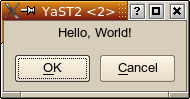
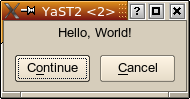
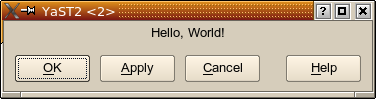
GNOME would use something like this:
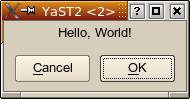
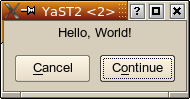
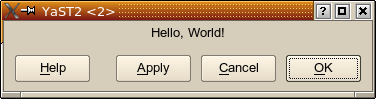
Which one is right? Which one is wrong? There is no real answer to that; it will always be more a religious debate rather than an objective discussion.
YaST Button Order
So, which button order to choose for YaST?
For historical reasons, we used the KDE button order. But this has repeatedly started the same heated discussions as for KDE vs. GNOME, with the same results — which is, no tangible result, only something along the lines of “because we says so” (and didn’t you always hate it as a kid when mom or dad said that?).
YaST should not favour one of the major desktops over another. YaST should work well for all users. So, YaST should adapt to the environment it runs in.
YaST comes in different flavours. There is the graphical version: The YaST Qt UI (user interface) engine (Side note: The YaST Qt UI is not in any way KDE specific; Qt just happens to be a great toolkit for making graphical user interfaces, and KDE happens to use it, too. There is not one single line of KDE-specific code in the YaST Qt UI.).
There is also the text-based version, the YaST NCurses UI.
As an alternative graphical UI, there is also the YaST Gtk UI which uses the same widget toolkit (Gtk) as GNOME. That brings YaST closer to the GNOME crowd. At least, that’s the theory. Yet, that alone didn’t improve the situation in any way for this button order issue:
YaST dialogs are specified in a subset of the YaST-specific YCP scripting language. Those dialog descriptions include input fields, list boxes, headings, etc. as well as the logical arrangement of all those user interface elements (widgets, even though that term has seen a lot of misuse recently). And buttons, too, of course.
So, the arrangement of buttons was still fixed. The YaST Gtk UI couldn’t really do anything about changing that button order so it looked more GNOMEish.
This is now different. We introduced a new widget ButtonBox that abstracts exactly that. A YaST module developer now only specifies “there is a ButtonBox, this is where I put my buttons, and the ButtonBox will arrange them as appropriate”.
…for users…
So now it is possible for the first time to use the proper button order for each environment: GNOME button order for the Gtk UI, KDE button order for the Qt UI.
But there is more.
…for power users…
The Qt UI can now demonstrate the fact that it’s not KDE specific. It checks what environment it runs in and uses the appropriate button order: GNOME button order when running in GNOME and KDE button order for KDE (or other window managers).
It checks the $DESKTOP_SESSION and $WINDOWMANAGER environment variables to figure that out. But of course power users can still override that and set the $Y2_BUTTON_ORDER environment variable to “KDE” or “GNOME”.
…for YaST developers…
Of course, such a change doesn’t come over night. There is a very large amount of YaST code. I counted 69 .desktop files in my /usr/share/applications/YaST2 directory; that corresponds to 69 YaST modules. On my machine I have 432000+ lines of YCP code below /usr/share/YaST2 . Now try to figure out how many YaST dialogs that might be, and how many of them need to be converted to use that new ButtonBox mechanism.
Obviously, it’s a lot of stuff to change. So the change should not hurt the people doing the change more than it absolutely has to. Don’t forget, it’s not just working hours that have to be paid; it’s also working hours that can’t be spent on implementing other features or on fixing bugs. And any change (even more so changing code at so many places) means a possibility to introduce new bugs.
…trying to be smart…
So this ButtonBox mechanism was made to be smart, to re-use existing information (things that are already there in the code), to make good use of existing conventions.
In principle, using something like the ButtonBox means having to tell it which logical role each button has so it can be arranged according to the current button order’s conventions: Which button is the positive confirmation of a dialog (it might be “OK” or “Continue” or “Yes”, but it might also be someting like “Save” or “Print”), which one is the “safe escape” (“Cancel”, but sometimes also “No”), which one is the “Apply” button or the “Help” button, and which ones are just “other” buttons. Remember, YaST is being translated into some dozen languages, so just hard-coding the English button labels won’t do.
But we already have a mechanism that maps (translated!) button labels to function keys, and that mechanism does something similar: There is a list of commonly used button labels and what function key is to be used (in the NCurses UI) for them. For example, “OK”, “Continue”, “Yes”, “Next” all map to the F10 key, “Cancel” to F9, “Help” to F1.
Extending that thought some more, it makes sense to assume an “okButton” role for buttons that are otherwise assigned the F10 key, “cancelButton” for buttons that get the F9 key, etc.
Buttons in YCP each are assigned a widget ID. That ID is the “handle” by which a button is being referenced; this is what the YCP application receives when it is informed that the user clicked that key. When specifiying a layout with buttons, this looks (slightly simplified) like this:
UI::OpenDialog(
    `VBox(
         `InputField(`id(`name  ), "Name" ),
         `InputField(`id(`street), "Street" ),
         ...
         `HBox(
               `PushButton(`id(`ok    ), "OK" ),
               `PushButton(`id(`apply ), "Apply" ),
               `PushButton(`id(`cancel), "Cancel" )
               )
         )
);
As shown in this example, a button with the “OK” role typically has an ID like `id(`ok), a “Cancel” button has `id(`cancel), an “Apply” button has `id(`apply). So this information is used, too, to figure out what role a button has.
Of course, there are still situations where the system needs to be explicitly told what button has which role: It’s hard to figure out in a generic way that a “Print” button or a “Save” button has the “okButton” role in a dialog. In that case, the YCP developer has to change the code to look like this:
`PushButton(`id(`print), `opt(`okButton), "Print" )
…the normal case…
But in many cases, the migration is as simple as replacing the `HBox() (the horizontal layout box) holding the buttons with `ButtonBox():
UI::OpenDialog(
    `VBox(
         `InputField(`id(`name  ), "Name" ),
         `InputField(`id(`street), "Street" ),
         ...
         `ButtonBox(        // This is the only line that changed
               `PushButton(`id(`ok    ), "OK" ),
               `PushButton(`id(`apply ), "Apply" ),
               `PushButton(`id(`cancel), "Cancel" )
               )
         )
);
…taming the masses…
Just imagine doing only this little change in 432000+ lines of code – of course, only where such a `HBox() contains `PushButtons, not just blindly replacing all `HBoxes. And just changing it is not all there is to it; each dialog has to be tested, too. And that alone is not so trivial: A dialog might easily only be shown in very exotic cases, so the developers doing the test have to recreate each of those exotic cases just to see the dialog.
You see, masses of code are a dimension of complexity all of their own. Little things that look trivial to do gain a whole new meaning. Everybody can do this change in one or two places, but try to do it in someting as big as YaST — without introducing new bugs that would wreck other people’s system.
Yet, we do those kinds of changes, typically unnoticed by the user community. And those little things are what, if added up, make or break a system’s quality.
We don’t take such decisions lightly. But we felt that in this specific case (the button order) the gain would be worth the pain: Users should feel at home in the tools we provide. And having the buttons where you are used to is part of this feeling at home.
Further Reading
 Member
 visnov
Unifying Progress During Installation
This might not be that useful, but it’s fun.
If you look at the openSUSE installer during the time it’s busy, you can see at least 4 types of progress bars shown:
- Disk preparation
- Image deployment
- Additional package installation
- Writing final configuration before reboot
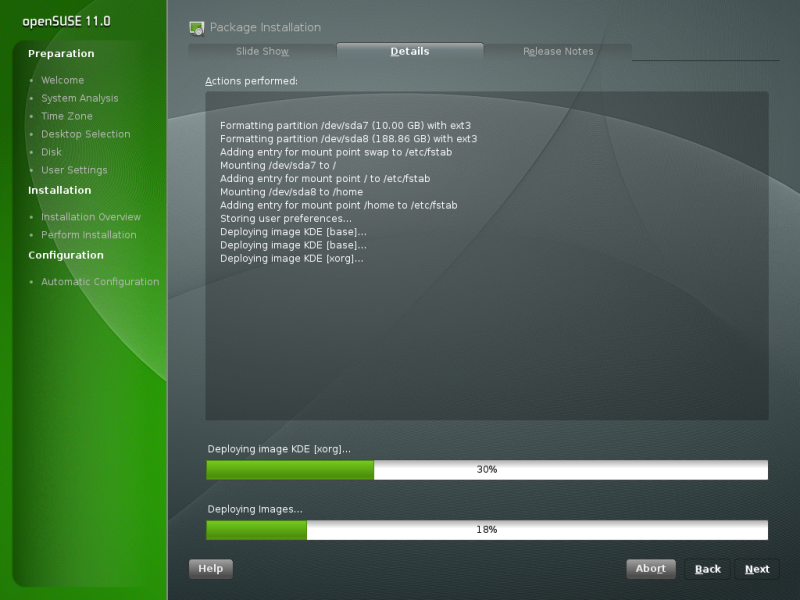
My goal for this hackweek is to unify them as much as possible. So, now I have something to show. The prototype works on openSUSE 11.0 Alpha2 and unifies steps 1-3. Here is a screenshot:

Slashdot looking for open proxies?
I saw the following somewhat-strange line in my web server logs today:
216.34.181.45 - - [25/Aug/2008:10:23:51 -0500] "GET http://tech.slashdot.org/ok.txt HTTP/1.0" 401 523 "-" "libwww-perl/5.812"
That web server is running on the IP of my home router. The requesting IP appears to be a Slashdot machine. My guess is that they are trying to find out who accesses their site through an open proxy. But why? Is there another reason they might send a request like that? Do they ban proxies if they find one?
UPDATE: Apparently, they do in fact ban open proxies (according to this). Supposedly a lot of comment spam comes from them. I wonder if it would help blogs at all to do something similar?
novell-bugzilla.user.js updates
I’ve updated the Novell Bugzilla Autologin greasemonkey script again. Just click here to upgrade your current version or install it for the first time. You of course need greasemonkey installed.
I’ve removed the “go to login page” step. It now just logs in directly via AJAX and refreshes your current page. It has also been rewritten to use jQuery (and jQuery.blockUI) which cleaned things up a bit and gives a nicer “please wait” message :)

Doppelt angezeigte Aktualisierungen im openSUSE-Updater
Seit meinem Update auf openSUSE 11.0 zeigte das openSUSE-Updater-Applet (opensuseupdater-kde) mir alle Aktualisierungen doppelt an. Grund war, dass ich versehentlich zwei Update-Repositories eingebunden hatte. Das Entfernen eines der beiden Repositories löste das Problem.
 Im Bild ist zu sehen, dass die Updates für Java 5 und Java 6 doppelt vorhanden sind. Da das Applet nur eine graphische Schnittstelle für zypper ist lag es nahe zu schauen, ob dieses das gleiche Verhalten aufweist.
marix@eddie:~> zypper lu
Die Daten des Repositorys 'Lokale RPMs' sind veraltet. Sie können 'zypper refresh' als Root ausführen, um die Daten zu aktualisieren.
Lese installierte Pakete...
Patches
Repository                    | Name           | Version | Kategorie | Status
------------------------------+----------------+---------+-----------+---------
openSUSE-11.0-FTP-UPDATE 11.0 | java-1_5_0-sun | 96      | security  | Benötigt
openSUSE-11.0-Updates         | java-1_5_0-sun | 96      | security  | Benötigt
openSUSE-11.0-FTP-UPDATE 11.0 | java-1_6_0-sun | 97      | security  | Benötigt
openSUSE-11.0-Updates         | java-1_6_0-sun | 97      | security  | Benötigt
Auch zypper zeigt jedes Update doppelt. Doch auch die Ursache des Problems ist zu sehen. Jede Aktualisierung ist aus zwei verschiedenen Repositories zu beziehen. Das erklärt sowohl wieso es die Updates doppelt gibt, als auch, wieso trotzdem immer korrekt aktualisiert wurde. Denn zypper hat immer nur das Update aus der ersten Quelle wirklich installiert, ähnlich wie bei Paketen die aus mehreren Quellen zu holen sind.
marix@eddie:~> zypper lr
#  | Alias                         | Name                              | Aktiviert | Auffrischen
---+-------------------------------+-----------------------------------+-----------+------------
1  | Lokale_RPMs                   | Lokale RPMs                       | Ja        | Ja
2  | suse_1                        | openSUSE-11.0-FTP-SRC-NonOSS 11.0 | Ja        | Ja
3  | Marix'_Home_Repository_1      | Marix' Home Repository            | Ja        | Ja
4  | NVIDIA_Repository             | NVIDIA Repository                 | Ja        | Ja
5  | KDE:KDE4:Factory:Desktop      | KDE:KDE4:Factory:Desktop          | Ja        | Ja
6  | openSUSE-11.0-FTP_11.0        | openSUSE-11.0-FTP 11.0            | Ja        | Ja
7  | home:thindil_1                | home:thindil                      | Ja        | Ja
8  | VideoLan_Repository           | VideoLan Repository               | Ja        | Ja
9  | 11.0                          | openSUSE-11.0-FTP-UPDATE 11.0     | Ja        | Ja
10 | openSUSE-11.0-FTP-DEBUG_11.0  | openSUSE-11.0-FTP-DEBUG 11.0      | Ja        | Ja
11 | Marix'_Sane_Repository        | Marix' Sane Repository            | Nein      | Ja
12 | openSUSE-11.0-Updates         | openSUSE-11.0-Updates             | Ja        | Ja
13 | Security_and_Privacy_1        | Security and Privacy              | Ja        | Ja
14 | home:dstoecker                | home:dstoecker                    | Nein      | Ja
15 | Packman_Repository            | Packman Repository                | Ja        | Ja
16 | openSUSE-11.0-FTP-NonOSS_11.0 | openSUSE-11.0-FTP-NonOSS 11.0     | Ja        | Ja
17 | openSUSE-DVD 11.0             | openSUSE-DVD 11.0                 | Nein      | Nein
18 | suse                          | openSUSE-11.0-FTP-SRC 11.0        | Ja        | Ja
In der Auflistung aller Quellen sieht man an Position 9 und 12 die beiden Update-Repositories. Zum Glück kann man mit zypper die Repositories auch über ihre Nummer identifizieren, so ist das entfernen nur wenig Tipparbeit.
marix@eddie:~> sudo zypper rr 9
Entferne Repository 'openSUSE-11.0-FTP-UPDATE 11.0' [fertig]
Repository 'openSUSE-11.0-FTP-UPDATE 11.0' wurde entfernt.
Eine anschließende Überprüfung der verfügbaren Updates zeigt, dass das Problem erfolgreich behoben wurde.
marix@eddie:~> sudo zypper refresh
Lade Metadaten von Repository 'Lokale RPMs' herunter [fertig]
Repository 'openSUSE-11.0-FTP-SRC-NonOSS 11.0' ist aktuell.
Repository 'Marix' Home Repository' ist aktuell.
Repository 'NVIDIA Repository' ist aktuell.
Repository 'KDE:KDE4:Factory:Desktop' ist aktuell.
Repository 'openSUSE-11.0-FTP 11.0' ist aktuell.
Repository 'home:thindil' ist aktuell.
Repository 'VideoLan Repository' ist aktuell.
Repository 'openSUSE-11.0-FTP-DEBUG 11.0' ist aktuell.
Repository 'openSUSE-11.0-Updates' ist aktuell.
Repository 'Security and Privacy' ist aktuell.
Repository 'Packman Repository' ist aktuell.
Repository 'openSUSE-11.0-FTP-NonOSS 11.0' ist aktuell.
Repository 'openSUSE-11.0-FTP-SRC 11.0' ist aktuell.
Alle Repositories wurden aufgefrischt.
marix@eddie:~> zypper lu
Lese installierte Pakete...
Patches
Repository            | Name           | Version | Kategorie | Status
----------------------+----------------+---------+-----------+---------
openSUSE-11.0-Updates | java-1_5_0-sun | 96      | security  | Benötigt
openSUSE-11.0-Updates | java-1_6_0-sun | 97      | security  | Benötigt
Ist man sowieso schon auf der Konsole unterwegs kann man die Updates auch gleich von dort einspielen.
marix@eddie:~> sudo zypper up
Lese installierte Pakete...
Die folgenden Pakete werden aktualisiert:
  java-1_6_0-sun java-1_6_0-sun-devel java-1_6_0-sun-alsa java-1_6_0-sun-jdbc
java-1_5_0-sun-plugin java-1_5_0-sun
Die folgenden NEUEN Patches werden installiert:
  java-1_6_0-sun java-1_5_0-sun
Gesamtgröße des Herunterladens: 55,5 M. Nach der Operation werden zusätzlich 21,1 M genutzt.
Fortfahren? [JA/nein]:
Herunterladen von Paket java-1_6_0-sun-1.6.0.u7-1.1.x86_64 (1/8), 21,9 M (79,6 M installiert)
Lade Delta herunter: ./rpm/x86_64/java-1_6_0-sun-1.6.0.u6_1.6.0.u7-8.1_1.1.x86_64.delta.rpm, 437,3 K
Lade herunter: java-1_6_0-sun-1.6.0.u6_1.6.0.u7-8.1_1.1.x86_64.delta.rpm [fertig (127,1 K/s)]
Wende Delta an: ./java-1_6_0-sun-1.6.0.u6_1.6.0.u7-8.1_1.1.x86_64.delta.rpm [fertig]
Installiere: java-1_6_0-sun-1.6.0.u7-1.1 [fertig]
Herunterladen von Paket java-1_5_0-sun-1.5.0_update16-1.1.i586 (2/8), 20,1 M (74,4 M installiert)
Lade herunter: java-1_5_0-sun-1.5.0_update16-1.1.i586.rpm [fertig (195,7 K/s)]
Installiere: java-1_5_0-sun-1.5.0_update16-1.1 [fertig]
Herunterladen von Paket java-1_6_0-sun-devel-1.6.0.u7-1.1.x86_64 (3/8), 13,0 M (51,9 M installiert)
Lade Delta herunter: ./rpm/x86_64/java-1_6_0-sun-devel-1.6.0.u6_1.6.0.u7-8.1_1.1.x86_64.delta.rpm, 6,2 M
Lade herunter: java-1_6_0-sun-devel-1.6.0.u6_1.6.0.u7-8.1_1.1.x86_64.delta.rpm [fertig (130,2 K/s)]
Wende Delta an: ./java-1_6_0-sun-devel-1.6.0.u6_1.6.0.u7-8.1_1.1.x86_64.delta.rpm [fertig]
Installiere: java-1_6_0-sun-devel-1.6.0.u7-1.1 [fertig]
Herunterladen von Paket java-1_6_0-sun-alsa-1.6.0.u7-1.1.x86_64 (4/8), 40,0 K (88,0 K installiert)
Lade Delta herunter: ./rpm/x86_64/java-1_6_0-sun-alsa-1.6.0.u6_1.6.0.u7-8.1_1.1.x86_64.delta.rpm, 16,5 K
Lade herunter: java-1_6_0-sun-alsa-1.6.0.u6_1.6.0.u7-8.1_1.1.x86_64.delta.rpm [fertig]
Wende Delta an: ./java-1_6_0-sun-alsa-1.6.0.u6_1.6.0.u7-8.1_1.1.x86_64.delta.rpm [fertig]
Installiere: java-1_6_0-sun-alsa-1.6.0.u7-1.1 [fertig]
Herunterladen von Paket java-1_6_0-sun-jdbc-1.6.0.u7-1.1.x86_64 (5/8), 32,0 K (88,0 K installiert)
Lade Delta herunter: ./rpm/x86_64/java-1_6_0-sun-jdbc-1.6.0.u6_1.6.0.u7-8.1_1.1.x86_64.delta.rpm, 16,2 K
Lade herunter: java-1_6_0-sun-jdbc-1.6.0.u6_1.6.0.u7-8.1_1.1.x86_64.delta.rpm [fertig]
Wende Delta an: ./java-1_6_0-sun-jdbc-1.6.0.u6_1.6.0.u7-8.1_1.1.x86_64.delta.rpm [fertig]
Installiere: java-1_6_0-sun-jdbc-1.6.0.u7-1.1 [fertig]
Herunterladen von Paket java-1_5_0-sun-plugin-1.5.0_update16-1.1.i586 (6/8), 469,0 K (1,7 M installiert)
Lade Delta herunter: ./rpm/i586/java-1_5_0-sun-plugin-1.5.0_update15_1.5.0_update16-12.1_1.1.i586.delta.rpm, 60,7 K
Lade herunter: java-1_5_0-sun-plugin-1.5.0_update15_1.5.0_update16-12.1_1.1.i586.delta.rpm [fertig]
Wende Delta an: ./java-1_5_0-sun-plugin-1.5.0_update15_1.5.0_update16-12.1_1.1.i586.delta.rpm [fertig]
Installiere: java-1_5_0-sun-plugin-1.5.0_update16-1.1 [fertig]
Linux Distribution Popularity Across the Globe

Royal Pingdom has issued an article about “Linux Distribution Popularity Across the Globe”. They have included eight common Linux distributions in their survey: Ubuntu, OpenSUSE, Fedora, Debian, Red Hat, Mandriva, Slackware and Gentoo and used Google Insights for Search, for determining the results.
Below is the summary from their results :
- Ubuntu is most popular in Italy and Cuba.
- OpenSUSE is most popular in Russia and the Czech Republic.
- Red Hat is most popular in Bangladesh and Nepal.
- Debian is most popular in Cuba.
- Cuba is in the top five (interest-wise) of three of the eight distributions in this survey.
- Indonesia is in the top five of four of the distributions.
- Russia and the Czech Republic are in the top five of five of the distributions.
- The United States is not in the top five of any of the distributions.
There is an interesting result, Rusia, Czech and Moldova beating Germany about openSUSE popularity  . Oh, of course this is not complete survey, and it is not the weakness of openSUSE itself. In the other side, the survey show us that openSUSE gained much popularity in outside Germany.
Another interesting result, congratulation for Indonesian openSUSE Community, Indonesia is in top five (number #5 of 5) of openSUSE popularity in the world and Indonesian openSUSE Community contributed in the survey results to make Indonesia as top five of four of the distributions.
Please navigate to the survey results for another interesting results and detail statictics.

ENOS 2008: news and changes
- Oxygen chief artist Nuno Pinheiro will attend ENOS 2008 and give a talk entitled - "Oxygen, um pilar do KDE 4"
- Agenda has been rescheduled
- Meeting point is auditorium H2, ISEP, Porto.
- Maps added
- openSUSE Install Party

openSUSE Build service: layering, linking, patching and aggregating
Today I used some of the coolest openSUSE Build Service features: project layering, patches against linked packages and aggregates. I want to write about them.
I needed to test a feature in PackageKit. I am using openSUSE 11.0. However upstream PackageKit does not play nice with 11.0. Stefan Haas fixed this, taking our PackageKit sources, adding some patches, and building them in his home project, which results in a repository here.
My feature involved a patch against PackageKit and then testing it from a client application (to adapt it), so what I wanted to achieve was to use Stefan’s PackageKit plus my patch, packaged in a rpm.
I could just copy Stefan’s sources and patches to my home project, and add my patch, but that would be duplication. Any change Stefan does later would require to copy it again.
Luckily the build service has a feature call linking, so I can link Stefan’s package to my home project. You can do that from osc or from the web user interface (Link package from another project), and that would result in a new package called PackageKit in my project (I created a subproject home:dmacvicar:packagekit for this purpose) with a single file called _link.
This version of PackageKit only builds with Factory’s libzypp, so here we have various options:
- build on top of zypp:svn/openSUSE_11.0 which is ZYpp svn built on openSUSE_11.0
- link all zypp:svn packages to my project (too inefficient, Adrian would kill me if I start to rebuild ZYpp in every project :-) )
- aggregate all ZYpp openSUSE_11.0 packages from zypp:svn in my project (aggregate explained later)
Because I already have the repo zypp:svn in my repo list, I chose building on top of zypp:svn. (This will mean that in order to use this modified PackageKit repo, you need to add zypp:svn as well).
So now, I can add my patch next to the _link file. However, How to make this patch appear in Stefan’s specfile? Do we need to patch the spec file too? No. The build service does it for you. Just edit the _link file which looks like this:
So it looks like:
<link project='zypp:svn' package='PackageKit'>
  <patches>
    <apply name="patch" />
  </patches>
</link>
This will insert the patch in the spec file when building. That is real magic.
Sadly, this bleeding edge PackageKit version requires some libtar-devel not available in 11.0. Stefan had a backport to 11.0 in his home project too. Do we need to link the package to our project too? No. Linking here is unnecessary because we don’t really need to rebuild a copy of this package, we only need to make it available in our repository for people installing PackageKit from our project, who don’t have Stefan’s project added in their repository list, that will get libtar grabbed via dependencies, but we don’t care if the metadata grabs the final rpm from Stefan’s project.
That is called “aggregate”. To aggregate a package from another project, we create a new package (called libtar) and add to it a file called _aggregate (the web interface does not help you here). Edit that file so it looks like:
<aggregatelist>
  <aggregate project="home:haas">
    <package>libtar</package>
    <package>libtar-devel</package>
  </aggregate>
</aggregatelist>
This will map home:haass repositories 1:1 to our repositories. So if we build our project against openSUSE_11.0, it will aggregate our package with home:haass/openSUSE_11.0 too. If you don’t have a 1:1 mapping, look the Build Service Tips and Tricks to do more complex aggregates.
Then I am ready to install my new PackageKit:
$ sudo zypper in -r home_dmacvicar_packagekit PackageKit PackageKit-devel
Reading installed packages...

The following NEW packages are going to be installed:
PackageKit-devel PackageKit

Overall download size: 1.1 M. After the operation, additional 5.1 M will
be used.
Continue? [YES/no]: y

10 inches in one year!
KDE Project:
Tomorrow is the last power-of-two day in the year and this happens to be Felix's birthday (if you remember 2^4*2^3=2^007 - a year has passed). I just finished burning a DVD with the movies we recorded and a slideshow of the best pictures and it's a strange feeling seeing him grow up in 5 1/2 minutes.
But this date is more important than that: Maren returns into her job on monday and I'll stay home with him for two months. In this time I will still be part of the KDE and the openSUSE community, but won't have a lot of time for either.
So it will be an adventure for myself and I guess I'll return into official duties with a different view on life :)
