
Michal Marek
posted in
English
at
 Member
 mmarek
Accessing the Build Service from Eclipse
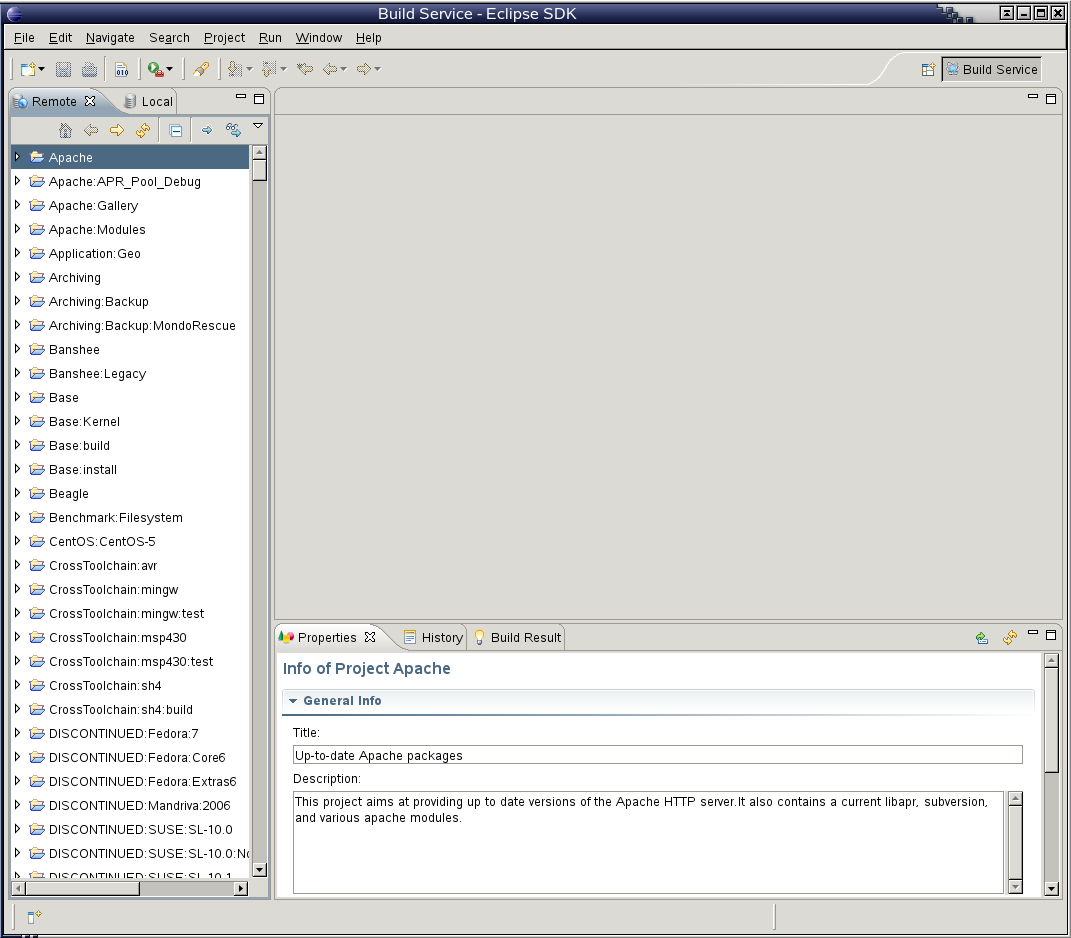
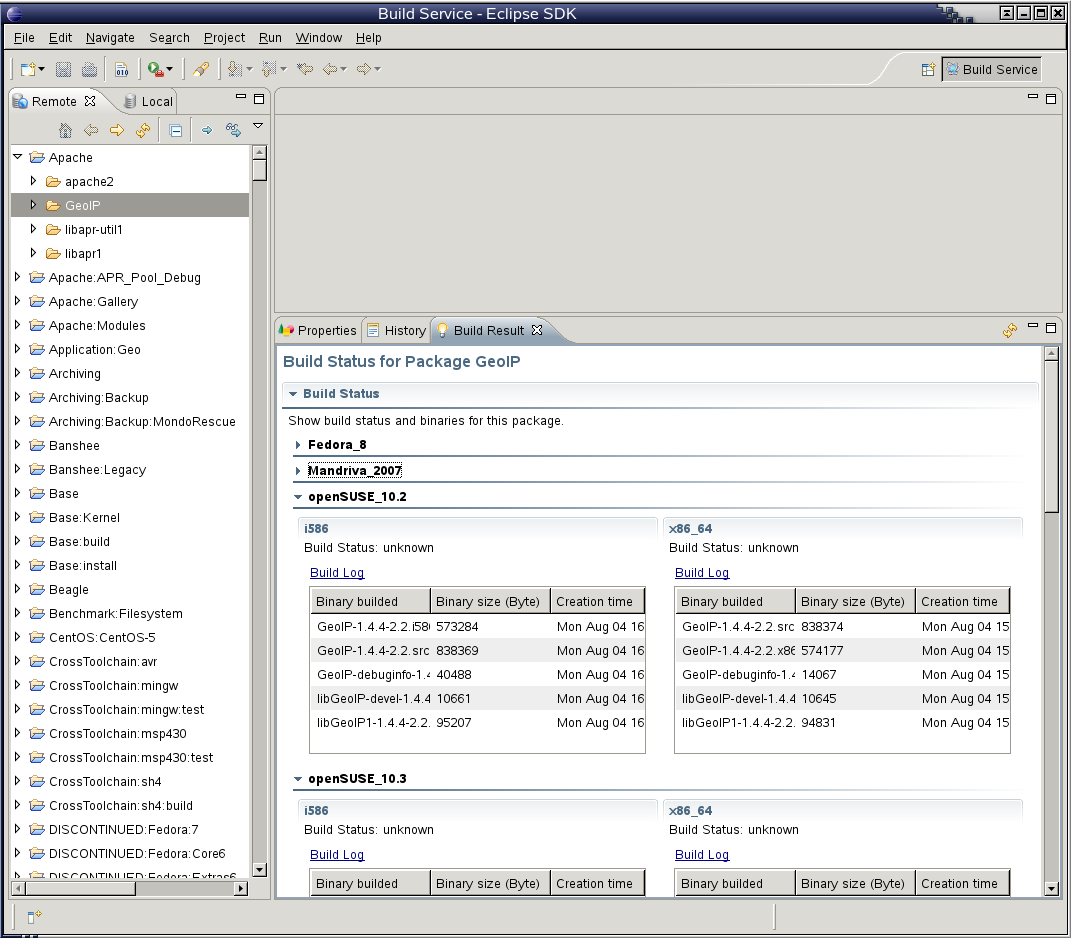
One of this year’s Google Summer of Code projects is a an Eclipse plugin to access the Build Service, developed by Long Hong from Beijing. If you are interested, read on.
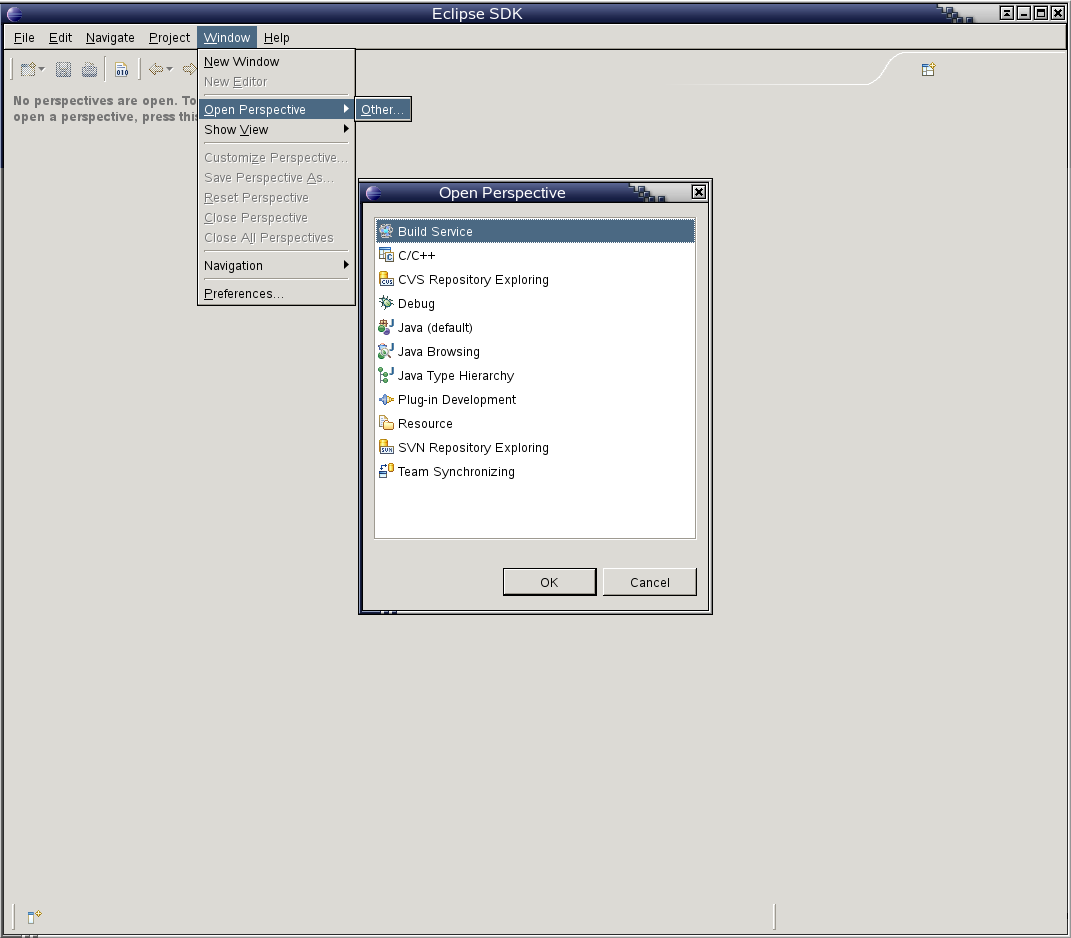
While there are still issues to be solved, I think it’s in a state that everybody can try it out. Grab a package from my home project, launch eclipse and open the Build Service perspective. Please note that the package itself is a bit experimental and was only tested to work on openSUSE 11.0. Enjoy! 

Michal Zugec
posted in
English
at
New YaST2 printer configuration module
Today I submitted new version of yast2-printer (2.17.2). This version contains big (major) changes. It uses Johannes Meixner's code from Build service, based on some ideas to improve current status.

Please anybody interested in improving current status of printing configuration - test it and give me (any) feedback.
Thank you,
Michal

Please anybody interested in improving current status of printing configuration - test it and give me (any) feedback.
Thank you,
Michal

Carlos Gonçalves
posted in
English
at
Encontro Nacional de openSUSE 2008

The acronym ENOS stands for 'Encontro Nacional de openSUSE', a Portuguese expression which can be translated to 'National openSUSE Meeting', an event meant to unite the Portuguese openSUSE users.
The purpose of ENOS is to give an opportunity to the Portuguese openSUSE users to be together, as well as provide the participants an insight view on the latest developments on the openSUSE project and stimulate them to take an active part on the community itself.
ENOS 2008 is the second yearly edition (read about ENOS 2007 here) of the event and will be held in Instituto Superior de Engenharia do Porto (ISEP), Porto, Portugal on September 6th.
This year we will have special guests giving some talks:
- Ricardo Cruz (YaST-GTK maintainer) will introduce us YaST and how easily is to create a module for it. PackageKit and libzypp will be be introduced.
- Andreia Gaita (Mono developer) presenting Mono open source project, sponsored by Novell.
- Rui Capela (Linux Audio hacker) will talk about his audio applications, focusing on Qtractor, an Audio/MIDI multi-track sequencer application.

As in last year, attendees will have the opportunity to do the LPI Certification Exams at the event with a 50% discount off by LPI Master Affiliate DRI. Email eventos@opensusept.org to sign in.
Anyone interested in attend should sign in or email eventos@opensusept.org so we can have a better idea of how many people we should expect (tip: you will not leave the event without some openSUSE goodies!).
Big thanks to Porto Linux, ISEP, and Novell for the support!
Michal Zugec
posted in
English
at
Installation via wireless network
I fixed some issues in yast2-network-2.17.16 and did some tests and the result is : it works fine!
1 - Boot into any already installed linux, download kernel & initrd, create /boot/grub/menu.lst entry - some documentation here, also possible to use miniISO
2 - Into bootloader pass install=$custom_or_public_NETWORK_repository option
3 - Unplug your wired card
4 - With this setup will Linuxrc try to use your wireless network card to connect network repository. There are some dialogs to specify ESSID, WEP/WPA and sharedkey
5 - In case of connection succeed, do installation as usual (via wireless ;-))
6 - Before first reboot this network setup will be saved as persistent (into /etc/sysconfig/network/ifcfg-wlan0)
7 - During next boot (2nd stage of installation) wireless network is automatically up and you can finish installation
1 - Boot into any already installed linux, download kernel & initrd, create /boot/grub/menu.lst entry - some documentation here, also possible to use miniISO
2 - Into bootloader pass install=$custom_or_public_NETWORK_repository option
3 - Unplug your wired card
4 - With this setup will Linuxrc try to use your wireless network card to connect network repository. There are some dialogs to specify ESSID, WEP/WPA and sharedkey
5 - In case of connection succeed, do installation as usual (via wireless ;-))
6 - Before first reboot this network setup will be saved as persistent (into /etc/sysconfig/network/ifcfg-wlan0)
7 - During next boot (2nd stage of installation) wireless network is automatically up and you can finish installation
Michal Zugec
posted in
English
at
YaST network and Tunnels
From version yast2-network-2.17.14 YaST has support for creating tunnels. This is good for virtual networking, VPN and virtualization.
But theory you can read on many places (including wikipedia), so here is practical example of configuration:
My previous "usual" configuration

In YaST, remove configuration from eth0 (because this configuration belongs to bridge - see later)

Create new TAP device, click Next

Leave default "Persistent Tunnel" and set owner and/or group to access this device from user account

Configuration overview

Create new network interface type bridge

Put eth0 and tap0 into bridge and configure bridge with DHCP (as eth0 before)

Configuration overview

Using TAP device with VirtualBox.

Virtualized machine through tunnel connected into bridge is accessible from outside network!
But theory you can read on many places (including wikipedia), so here is practical example of configuration:
My previous "usual" configuration
urchin:/home/mzugec/svn/trunk/network # ip a
1: lo: <loopback,up,lower_up> mtu 16436 qdisc noqueue
   link/loopback 00:00:00:00:00:00 brd 00:00:00:00:00:00
   inet 127.0.0.1/8 brd 127.255.255.255 scope host lo
   inet 127.0.0.2/8 brd 127.255.255.255 scope host secondary lo
2: eth0: <broadcast,multicast,promisc,up,lower_up> mtu 1500 qdisc pfifo_fast qlen 1000
   link/ether 00:11:d8:39:4e:d0 brd ff:ff:ff:ff:ff:ff
   inet 10.20.1.28/21 brd 10.20.7.255 scope global eth0
3: eth1: <broadcast,multicast> mtu 1500 qdisc pfifo_fast qlen 1000
   link/ether 00:11:d8:39:5c:e4 brd ff:ff:ff:ff:ff:ff

In YaST, remove configuration from eth0 (because this configuration belongs to bridge - see later)

Create new TAP device, click Next

Leave default "Persistent Tunnel" and set owner and/or group to access this device from user account

Configuration overview

Create new network interface type bridge

Put eth0 and tap0 into bridge and configure bridge with DHCP (as eth0 before)

Configuration overview

urchin:/home/mzugec/svn/trunk/network/src # ip a
1: lo: <loopback,up,lower_up> mtu 16436 qdisc noqueue
   link/loopback 00:00:00:00:00:00 brd 00:00:00:00:00:00
   inet 127.0.0.1/8 brd 127.255.255.255 scope host lo
   inet 127.0.0.2/8 brd 127.255.255.255 scope host secondary lo
2: eth0: <broadcast,multicast,promisc,up,lower_up> mtu 1500 qdisc pfifo_fast qlen 1000
   link/ether 00:11:d8:39:4e:d0 brd ff:ff:ff:ff:ff:ff
3: eth1: <broadcast,multicast> mtu 1500 qdisc pfifo_fast qlen 1000
   link/ether 00:11:d8:39:5c:e4 brd ff:ff:ff:ff:ff:ff
24: tap0: <broadcast,multicast,up,lower_up> mtu 1500 qdisc pfifo_fast qlen 500
   link/ether 00:ff:1c:00:23:8b brd ff:ff:ff:ff:ff:ff
25: br0: <broadcast,multicast,up,lower_up> mtu 1500 qdisc noqueue
   link/ether 00:11:d8:39:4e:d0 brd ff:ff:ff:ff:ff:ff
   inet 10.20.1.28/21 brd 10.20.7.255 scope global br0

urchin:/home/mzugec/svn/trunk/network/src # brctl show
bridge name     bridge id               STP enabled     interfaces
br0             8000.0011d8394ed0       no              eth0
                                                        tap0
Using TAP device with VirtualBox.

Virtualized machine through tunnel connected into bridge is accessible from outside network!
Carlos Gonçalves
posted in
English
at
openSUSE 11.0 KDE3 Live CDst
I have been reading since openSUSE 11.0 GM release a lot of comments posted in many forums and blogs about the "lake" of KDE3 CDs. This big noise around got my attention specially because I was one of the KDE users that shared people's preferences of using a very stable KDE version - KDE 3.5 - for daily use instead of the bleeding edge KDE 4.0.
The process of installing KDE3 on openSUSE no matter what desktop environment users were using was quite simple to follow:
or if you just want a clean KDE 3 base:
or even by selecting "KDE3 Base System" pattern on YaST. Easy, isn't it?
Well, for those lazy people who don't want to install openSUSE with KDE4, GNOME, XFCE or any other and then install KDE3 I have a gorgeous news: openSUSE 11.0 KDE3 Live CDs are now available!
These Live CDs are also installable CDs and were creating using the openSUSE KIWI Image System. They contain the latest official updates as also the latest packages from KDE:KDE3, KDE:Backports, KDE:KDE4:Factory:Desktop, and KDE:KDE4:Factory:Extra-Apps repositories as of this time of writing.
Big thanks to the KDE Team and Kiwi Team that supported me since the beginning encouraging and helping me in this adventure ;-)
Note: these ISOs are not officially supported by openSUSE nor Novell. If you want to report any bug found use Novell's Bugzilla for better tracking. Feedback or for any other purpose please contact me via email (cgoncalves [at] opensuse [dot] org).
The process of installing KDE3 on openSUSE no matter what desktop environment users were using was quite simple to follow:
# zypper install -t pattern kde3or if you just want a clean KDE 3 base:
# zypper install --no-recommends -t pattern kde3or even by selecting "KDE3 Base System" pattern on YaST. Easy, isn't it?
Well, for those lazy people who don't want to install openSUSE with KDE4, GNOME, XFCE or any other and then install KDE3 I have a gorgeous news: openSUSE 11.0 KDE3 Live CDs are now available!
- openSUSE 11.0 KDE3 LiveCD (i686)
- openSUSE 11.0 KDE3 LiveCD (x86_64)
- MD5SUM and SHA1UM
- Kiwi config (32bit) and Kiwi config (64bit)
These Live CDs are also installable CDs and were creating using the openSUSE KIWI Image System. They contain the latest official updates as also the latest packages from KDE:KDE3, KDE:Backports, KDE:KDE4:Factory:Desktop, and KDE:KDE4:Factory:Extra-Apps repositories as of this time of writing.
Big thanks to the KDE Team and Kiwi Team that supported me since the beginning encouraging and helping me in this adventure ;-)
Note: these ISOs are not officially supported by openSUSE nor Novell. If you want to report any bug found use Novell's Bugzilla for better tracking. Feedback or for any other purpose please contact me via email (cgoncalves [at] opensuse [dot] org).
Carlos Gonçalves
posted in
English
at
Re: openSUSE adopts Canonical's strategy to promote the project
Replying to "OpenSuse adopta estratégia da Canonical para promover o projecto" (aka "openSUSE adopts Canonical's strategy to promote the project") posted by Bruno Miguel:
The openSUSE project does this for quite long, even maybe before Ubuntu exists.
The news here is that now we have a specific page to users request them easily instead of emailing.
Just to clarify to avoid wrong conclusions about openSUSE/Novell... :-)
The openSUSE project does this for quite long, even maybe before Ubuntu exists.
The news here is that now we have a specific page to users request them easily instead of emailing.
Just to clarify to avoid wrong conclusions about openSUSE/Novell... :-)
Michael Wolf
posted in
English
at
well, that went by fast
I arrived in Mexico City, to live, four years ago to the day. These four years have been a lot better than the preceding four were, and, the occasional grumble notwithstanding, I would be lying if I said that this place hasn't treated me pretty well overall.
Dionata Martins
posted in
Português
at
MP3 no Linux: Normalização
O texto presente tratará sobre a normalização do volume dos arquivos MP3 e espera-se que depois de aplicadas as orientações aqui descritas, que o leitor não tenha mais que ficar aumentando ou diminuindo o volume do áudio para ouvir determinada música.Algumas vezes, ao copiarmos um arquivo MP3 de alguém, ou ao baixarmos da Internet, ocorre das músicas estarem com um volume muito alto ou muito
Dionata Martins
posted in
Português
at
MP3 no Linux: Ripagem
O verbo Ripar é um neologismo derivado do verbo da língua inglesa Rip, que significa, literalmente, dilacerar. No meio da computação, o processo de extração dos dados de um CD ou DVD para um disco rígido é conhecido como ripagem (ripping em inglês). Para realizar o trabalho de ripagem é necessário um software específico, conhecido como ripador (ripper - cabe lembrar que as pessoas que executam