
 KevinYo
11.0 Installation Walk-Throughs Mostly Done!
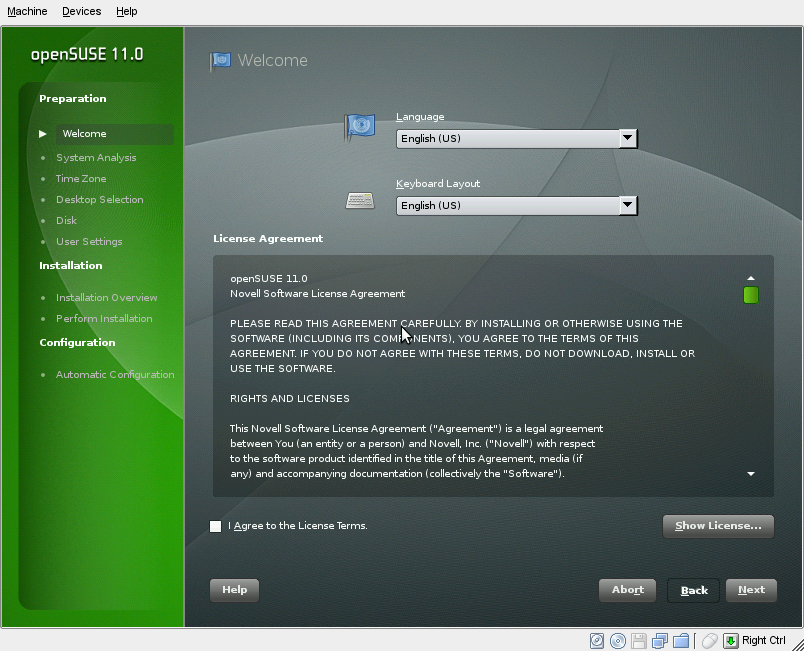 I’ve got the openSUSE 11.0 installation walk-throughs mostly done! I say mostly, I did get the DVD installation tutorial completely done and published, but since we have a little over two weeks, if anyone has anything to add or correct to it, there’s plenty of time to do so. I also mostly finished a walk-through of the Live CD installation, but I’ve still got a few screenshots to add and corrections to make, so if you’ve got time take a look at both and help out, help us make them awesome easy to follow by release day!
I thought about just copying the instructions from the 10.3 Installation tutoral and adjusting them to 11.0, but since there were so many changes in the installation it would be more trouble than it would be worth.
So let’s raise a toast to the YaST developers for making the new installers really nice and spiffy! And thanks to Jonathon Arnold, hieronymus on Twitter, for providing me with the screenshots for the DVD installation!
Also, since I think this is my first post on Planet SUSE, hey everybody! I’ll just link to my bio.
Home again …
Today, well actually yesterday, was the last day of Linuxtag in Berlin. I was a little bit worried because i had to make sure the openSUSE day and the booth running smooth. So sorry if i had kind of bad temper in the morning … Thanks to everbody who helped at the booth, when i went down from the conference room to look at it it ran perfectly!
We had again a mixed count at the talks … I’m not sure which talk was visited the most, probably the Laptop 2.0 talk from Timo, Holger and Helmut (yes, i got your papers …), or the Talk from Marcus about Wine. Very close follower was Henne with his Freevo talk. I taped all the talks, but to be honest i’m not sure if the recordings are that good … quite hard for me to tune the picture on a tiny display. We will see it on Monday …
At the booth we gave away approx. 1700 openSUSE 10.3 PromoDVDs if i counted correctly, there was just one box with 60 DVDs left, because it was hidden somewhere. We also gave away a lot of our new openSUSE Laptop stickers. The kind you can put over the one with the four color window/flag 
So thanks again to all who helped: Moenk and his friends from Linux-club.de, Christian, Jan-Simon, the SUSE and Novell guys who helped also at the booth and of course the Linuxtag team! (sorry if i forgot somebody, i need sleep).
There will be more verbose mail on opensuse-project next week, stay tuned …
btw: no new photos today, my cam died … i managed somehow to break the display in my pocket. If you made photos at the Linuxtag, please add a link in the comments, thanks!
btw2: i hope everbody who drove home by train is home now. We heard there was a big problem with the trains in germany.
Wow
For the last year or so, since I had my nice new work laptop, I've been running openSUSE on an external USB hard drive (which surprisingly, benchmarked faster than using the internal drive), and I've been using KDE 4.0. I know my last post on this blog said I'd reverted to 3.5, but I tried 4.0.1 when it came out (or possible 4.0.2?), and discovered the actual show stoppers had been fixed, and the irritations were small enough I could live with them.
Anyway, onto the 'wow'. Since my old laptop had a clean install of openSUSE 10.3 on it and I didn't mind about messing it up with an unstable version of KDE, I put the unstable KDE snapshot version on instead of 4.0. And I think the word which best sums it up is 'Wow'. It's really, really good.
There are some bits in particular that I liked: being able to resize the panel; the panel for icons on the desktop; the beautiful highlight for icons; the alt-f2 thingy (I can never remember its proper name) which is brilliant, and looks and works so well I keep pressing alt-f2 and typing stuff in even though I don't need to run any programmes; the way you can style plasma easily; the way plasma styles work so much better than before; the pim programmes being KDE4ified; the sounds; the plus/minus symbols for selecting/deselecting icons (brilliant idea); everything seems more responsive (even on this old laptop); things looking good even without compositing switched on...
So, great job everyone. This beta is fantastic.
 Member
SAGE: Open Source Math Software
"Sage is a huge distribution of free open source mathematical software:
- Algebra and calculus: Maxima, SymPy
- High precision arithmetic: GMP, MPFR, MPFI, quaddouble, Givaro
- Commutative algebra: Singular
- Number theory: PARI, NTL, mwrank, ECM, FLINTQS, GMP-ECM
- Exact linear algebra: LinBox, IML
- Group theory: GAP
- Scientific computation: GSL, SciPy, NumPy, cvxopt
- Statistical computation: R
- Graphics (2d and 3d): Matplotlib, Tachyon3d, Jmol
Sage has a highly developed unified collection of pseudo-tty based interfaces that make it is possible to make extensive use of Maple, Mathematica, Magma, Matlab, GAP, Maxima, Singular, PARI, and many other systems from anywhere within a single Sage program." It is available for Linux, Mac OS X and Windows or you can download the source code.
Check here for a short overview or check Sage webpage for more.
It builds!
Out of total insanity I promised Adrian a couple of weeks ago to test local installation of the OBS build service and interconnect it with the build.opensuse.org instance. Last night I couldn’t sleep due to the heat, so I finally did. Half an hour later, everything was installed and set up correctly according to the README.SETUP instructions in the obs-server package. I’ve fixed a couple of small issues in the README while doing so.
This morning, Michael Schroeder fixed the remaining bugs in the scheduler so that it actually runs. And now it builds
Source and binary interconnects work fine, so I can e.g. branch a package that is somewhere in the openSUSE buildservice (some KDE:KDE4: package or even openSUSE:Factory) and modify it locally in a test project, and watch the resulting build failures. There are some smaller issues with “osc linkpac” and “osc branch”, but editing the _link files directly works.This way one can do experimental changes to packaging without actually breaking the repository for all other users, or slow down the build power ressources for everybody else due to unnecessary rebuilds.
As a test case, I’ve imported KDE 4.0.5 packages into a local branch of KDE:KDE4:STABLE:Desktop for testing. More seems possible, like for example doing a daily rebuild of the KDE 4.
Really cool stuff. Buildservice guys, keep rocking!
Parallel scientific code development
If you are interested in a short overview about what is Scientific Programming and which are the tools used in general, here is a short but very nice article: A case study on large-scale parallel scientific code development. Just a short summary:
"All codes use the message passing interface (MPI) library to achieve parallelism. In addition, each code uses external libraries for features such as
- I/O (HDF, NetCDF, CGNS, or Panda);
- mesh operations, including adaptive mesh refinement (ParaMesh, Mesquite, Metis, MeshSim, or SAMRAI);
- computational geometry (CGAL);
- linear algebra (BLAS, LAPACK), and tools for solving sparse linear systems and systems modeled by partial differential equations (PETSc, Hypre, or Clawpack).
While these codes use parallel libraries that sit atop MPI, developers still had to write raw MPI code to achieve desired functionality."

Still coding
Yes, long time has passed since my last post (really strange, isn’t it :D ). It has been a busy period, full of work, dog training and… coding (fortunately!).
During this time I’ve been working on XesamQLib creation. This is a Qt based library for accessing Xesam services. Its API is going to be similar to Xesam-glib one and it will make life easier for developers who want to interact with programs exposing Xesam service (who talked about Strigi? :D )
Right now I’m finishing to clean the code, in order to publish a first version of XesamQLib on KDE repository. I’ll keep you updated.
virtual kidnapping
"Dad?"
"Who is this?" [I don't have any children, so I assumed it was just another wrong number. I get lots of those.]
"Dad? [crying] Two men kidnapped me. [crying] Dad?"
Realizing that it was a scam, I hung up.
Fake calls like these are common in Mexico, although I'd never received one until today. My wife's uncle received one a few months ago; unfortunately he was taken in.
Quite chilling, even though nothing happened—to me. I hope the people with the adjacent phone numbers weren't duped.
Research of possibility: running YaST anywhere
One week ago I installed Fedora Core 9 distribution. But (experienced from openSUSE) there was something I missed : YaST and zypper. So I decide to port them to Fedora (and maybe to other distributons later).
I did something similar a long time ago (it was FC5) but now it seems much easier. Our developers makes UI part independent from ycp language. So I just compile libyui, libyui-bindings, qt, ncurses and was able to run example code in both frontends. With GTK there is still problem that is not cleaned from libzypp dependency.
Then I compiled libzypp and zypper. Then I add installation source - local CD-rom:
zypper ar cd:///?devices=/dev/sr0 CD
And it works perfectly!
Compared to yum is zypper much, much faster. Just for an example (I turn autorefresh on, by default is autorefresh disabled):
[root@dhcp24 ~]# time zypper se rpmlint
Reading installed packages...

S | Name    | Summary                                         | Type
--+---------+-------------------------------------------------+--------
| rpmlint | Tool for checking common errors in RPM packages | package

real    0m0.958s
user    0m0.308s
sys     0m0.482s
[root@dhcp24 ~]# time yum search rpmlint
Loaded plugins: refresh-packagekit
======================================== Matched: rpmlint =========================================
rpmlint.noarch : Tool for checking common errors in RPM packages

real    0m2.765s
user    0m1.826s
sys     0m0.788s
With autorefresh disabled search time is even better:
[root@dhcp24 ~]# time zypper se rpmlint
Reading installed packages...

S | Name    | Summary                                         | Type
--+---------+-------------------------------------------------+--------
| rpmlint | Tool for checking common errors in RPM packages | package

real    0m0.717s
user    0m0.289s
sys     0m0.362s
Note: I don't wan't to say which tool is better (everybody knows ;-)). Just that you can use zypper on the same installation source like yum. There are some requests on that porting from RH/Fedora users. And also some other people are thinking about this.
Ok, after that I compiled yast2-core, yast2-devtools, yast2-testsuite, yast2-perl-bindings, yast2-ycp-ui-bindings, yast2, yast2-pkg-bindings (maybe I forgot something, sorry). Finally mine package yast2-iscsi-client. Some patch because of distribution differences ... and the result is:

It works! ;-)
So we definitely can run YaST and its configuration modules on Fedora Core 9!
Ok, some work is needed to be done: create Build Service project and as a first step some distribution based patches. After that we should find some system how to use different backends for different distributions (like NetworkManager does). But this is something for another post ...
Good night,
Michal
learning ruby…
Recently, I wanted to show how the buildservice makes packaging easier by creating a specfile template for you (just click the “Create RPM SPEC file templat” checkbox when creating a new package). Unfortunatelly, the template it creates is not really useful for someone not skilled in writing spec files. Also, it’s just a static template, so you have to write the summary and description even though you have just entered both in the web form. Definitely nothing to show off to newbies ;-). But knowing that the buildservice developers have more important stuff to do, and wanting to learn something new, I decided give it a try and fix it myself.
My idea is: The buildservice api asks a set of questions, which are presented by the client (webclient, osc, …) to the user, and creates a specfile based on these questions. Also, the api tries to suggest good defaults where possible. After spending some time learning ruby, rails and the api code, I have an ugly 200 line patch to the api that generates a working specfile for GNU hello ;-).

The user interface part is not yet done, but should be easy. What’s more chalenging is adding heuristics to “do the right thing”: detecting the build system (autotools, cmake, Makefile.PL, etc), detecting build dependencies, and so on. Right now, it only extracts the version number from the tar name.