
Open-Source Licensing Gets AI Upgrade
Developers of the openSUSE community continue their commitment toward improving legal compliance and software transparency with the release of the Cavil Legal Text dataset on Hugging Face.
This dataset is designed to enhance automated legal text classification, which reduces manual review efforts and improves accuracy in identifying legal snippets within software projects.
“Open sourcing the dataset is cooler than just open sourcing the weights to a model fine-tuned by us because everyone can use it to make their own versions based on whatever open weight model they want,” said Sebastian Riedel, one of the developers behind the project.
The Cavil Legal Text dataset supports Cavil, which is a system built to automate the extraction and classification of potential legal texts in software packages. By leveraging AI, Cavil minimizes false positives when detecting license information, copyright statements and compliance-related content; this ensures that legal experts can focus on critical cases rather than sorting through large amounts of irrelevant data.
With 150,000 labeled samples, the dataset is instrumental in training AI models to distinguish between legal and non-legal text with a high degree of accuracy. It enables legal review workflows by improving text classifications, pattern matching and reduces the dependency of human intervention.
Cavil consists of three key parts: a user-friendly web application with a REST API, a job queue for handling background tasks like pattern matching and analysis, and an AI-powered text classification server that continually improves its ability to recognize legal texts. All these components interact seamlessly through PostgreSQL and HTTP; this allows human experts and lawyers to efficiently validate software licenses at scale.
Currently, Cavil employs a Character-level Convolutional Neural Network (CNN) model in production due to its efficiency and compatibility with existing infrastructure. However, an alternative approach using fine-tuned LLMs is under exploration. The LLM-lawyer experiment suggests that large language models could provide more adaptable and context-aware classifications with less frequent retraining.
The dataset is licensed under GPL-2.0-or-later and is freely available on Hugging Face for researchers, developers, and compliance teams to explore and contribute. Open-source contributors can refine AI classification models, propose new legal text patterns, and support the ongoing improvement of automated legal compliance in software projects.
Those interested can explore the dataset on Hugging Face, read the Cavil documentation, experiment with Llama-3 through the Llama-Lawyer repository, and contribute to openSUSE’s compliance efforts through GitHub.

 Member
 baltolkien
Episodio 40 de KDE Express: 40 episodios y no paran las noticias
Me congratula presentaros el episodio 40 de KDE Express, titulado «40 episodios y no paran las noticias» donde David Marzal sigue llevando en solitario estas más que interesantes píldoras. Un hurra por él.
Episodio 40 de KDE Express: 40 episodios y no paran las noticias
Comenté hace ya bastante tiempo que había nacido KDE Express, un audio con noticias y la actualidad de la Comunidad KDE y del Software Libre con un formato breve (menos de 30 minutos) que complementan los que ya generaba la Comunidad de KDE España, aunque ahora estamos tomándonos un tiempo de respiro por diversos motivos, con sus ya veteranos Vídeo-Podcast que todavía podéis encontrar en Archive.org, Youtube, Ivoox, Spotify y Apple Podcast.
De esta forma, a lo largo de estos 40 episodios, promovidos principalmente por David Marzal, nos han contado un poco de todo: noticias, proyectos, eventos, etc., convirtiéndose (al menos para mi) uno de los podcast favoritos que me suelo encontrar en mi reproductor audio.
En palabras de David el nuevo episodio de KDE Express toca los siguientes temas:

KDE Express llega a la cuarentena con energia, no suficiente para fiestas, pero si para noticias y una promo de un podcast amigo.
- Mujeres con Historia: Feed – @Mujeresconhistoria@mas.to en Mastodon – PodcastIndex
Artículo original con todos los enlaces en https://kdeexpress.gitlab.io/40/ Si no ves nada despues de esta linea en tu aplicación de podcast, es que no sabe leer bien el feed RSS, prueba otra 😉
- Loas
- El escritorio + popular en MuyLinux
- Y el favorito en ArchLinux con un 43% de votos.
- ¿Por qué KDE Plasma sigue liderando como la mejor opción de escritorio?
- Plasma 6.3
- Al llegar notificaciones con el «No molestar activado» cuando se vuelva al modo normal habrá una única notificación el número, en vez de una cascada de notificaciones
- Los iconos que sean de enlaces simbólicos ahora tendrán la opción en el menu contextual de ver a donde apuntan.
- Podrás elegir en el menu de inicio si quieres iconos simbólicos o volver a iconos normales los cuales puedes seleccionar en el editor del menu.
- Gears 25.04
- Dolphin: Recortará el nombre por en medio en vez del final si es demasiado largo.
- Skrooge: Administrador de finanzas personal, ha sido actualizado a Qt6
- Fuera de Gears pero siguiendo con Apps:
- Lanzado Gcompris 25 con 5 nuevas actividades, una de dibujo libre, calcular con complemento a diez, suma vertical y dos variantes de resta vertical.
- Flatpak lanza mayor-version tras dos años
- F-droid
- Peertube ya disponible
- KDE Connect 1.32.10 con arreglos
- FLOSS en general
- Wine llega a 10 con muchas mejoras, sobre todo en Wayland
- Thunderbird 134 llega con arreglos y notificaciones de escritorio en tiempo real.
Y, como siempre, os dejo aquí el listado de los episodios. ¡Disfrutad!
Por cierto, también podéis encontrarlos en Telegram: https://t.me/KDEexpress
La entrada Episodio 40 de KDE Express: 40 episodios y no paran las noticias se publicó primero en KDE Blog.

Bytedance cria Goku, uma avançada IA de Vídeo.
A Bytedance, empresa por trás do TikTok, está mais uma vez quebrando barreiras tecnológicas com a apresentação do Goku, um modelo avançado de inteligência artificial (IA) projetado para a criação de vídeos de alta qualidade. Usando a poderosa combinação de síntese de texto para vídeo e imagem para vídeo, o Goku está transformando a maneira como o conteúdo orientado por IA é produzido, expandindo os limites da criatividade digital.
Como o Goku Funciona
O Goku opera como um modelo de geração de vídeo baseado em fluxo, alimentado pelo inovador Rectified Flow Transformer (RFT). Essa abordagem visa melhorar a qualidade e a eficiência da produção de vídeos, refinando imagens e quadros de vídeo de forma progressiva. O principal objetivo do modelo é garantir transições de movimento suaves e uma fidelidade visual impressionante.
O processo começa com a entrada de dados, que podem ser texto ou imagens. O Goku converte essas entradas em representações estruturadas, utilizando um mecanismo de fluxo retificado para otimizar a interpolação de quadros. O resultado é a redução de ruídos visuais e a garantia de continuidade nas transições de cena. Por fim, o modelo sintetiza sequências de vídeo coerentes com transições perfeitas, criando um produto final de alta qualidade.
As Tecnologias por Trás do Goku
O Goku é impulsionado por um conjunto de tecnologias de IA de última geração, com destaque para o Rectified Flow Transformer (RFT). Esse componente crucial minimiza a sobrecarga computacional, permitindo que o modelo opere de forma eficiente sem sacrificar a qualidade da imagem. A renderização neural é outro aspecto importante, garantindo que os movimentos nos vídeos sejam realistas e as transições entre quadros sejam fluídas.
Além disso, o Goku conta com uma arquitetura baseada em transformers, um tipo de rede neural altamente eficaz no processamento de dados sequenciais. Isso permite ao Goku modelar dependências temporais dentro das sequências de vídeo, capturando nuances de movimento e criando vídeos coerentes. O modelo também se destaca por suas capacidades multimodais, permitindo a síntese perfeita de texto para vídeo e imagem para vídeo, oferecendo uma flexibilidade sem precedentes na criação de conteúdo.
Executando o Goku em Máquinas GPU
Para garantir o desempenho ideal, o Goku exige GPUs de alto desempenho. A execução do modelo em instâncias de GPU da Akamai oferece o poder computacional necessário para lidar com grandes volumes de dados e cargas de trabalho de aprendizado profundo com eficiência. Essa infraestrutura escalável permite que o Goku seja dimensionado para atender às demandas de geração de vídeo em larga escala, otimizando a inferência, reduzindo a latência e melhorando o rendimento.
A implementação do Goku em instâncias de GPU envolve o provisionamento de máquinas habilitadas para CUDA, a instalação das dependências do PyTorch e CUDA, e a execução das tarefas de inferência. Para melhorar ainda mais o desempenho, a utilização de treinamento de precisão mista pode acelerar os processos de geração de vídeo sem comprometer a qualidade.
Mais informações: https://saiyan-world.github.io/goku/
Lanzado Plasma 6.3: una experiencia de escritorio inigualable
Ha pasado ya un año (¡cómo pasa el tiempo!) desde la mega actualización del ecosistema de aplicaciones KDE. Fue justo un 28 de febrero cuando se dio el salto a KF6/Qt6 para todos los entorno de trabajo y aplicaciones de la Comunidad KDE. En estos meses, se ha trabajado duro para pulir el sistema al máximo y dar pinceladas de lo que está por venir. De esta forma me complace anunciar hoy 11 de febrero, que ha sido lanzado Plasma 6.3, una versión que nos ofrrece una experiencia de escritorio inigualable.
Lanzado Plasma 6.3: una experiencia de escritorio inigualable
La Comunidad KDE ha publicado hoy Plasma 6.3, una versión que supone otro paso firme en la evolución positiva que está siendo la rama 6.3. Prueba de ello es que en sus tres primeras versiones (6.0, 6.1 y 6.2) han sido escritorios 100% funcionales y que ya nadie se plantea si el salto a la nueva tecnología tiene riesgo.
Esta nueva iteración tiene como objetivos convertir a Plasma en un entorno más amigable, más accesible y más inteligente. En palabras de sus desarrolladores:
Un año después, y una vez superados los problemas iniciales que inevitablemente trae consigo un nuevo lanzamiento importante, los desarrolladores de Plasma han trabajado para afinar, eliminar errores y añadir funcionalidad a Plasma 6, ¡convirtiéndolo en el mejor entorno de escritorio para todos!
Continúe leyendo para descubrir todos los nuevos y emocionantes cambios que llegarán en esta versión…
Más información: KDE
Las novedades de Plasma 6.3
Hoy es un día de descarga y actualizaciones, y mientras espero que esté disponible para mi KDE Neon, os comento algunas de sus novedades extraídas de 9to5linux.
- Posibilidad de clonar un panel.
- Posibilidad de establecer atajos de teclado para mover ventanas entre zonas de mosaicos de Custom Tiling en función de la direccionalidad.
- Soporte para recordar el escritorio virtual activo por actividad.
- Página renovada de la tableta gráfica en la configuración del sistema.
- Opción de preferir la precisión del color de la pantalla en KWin.
- Notificaciones de batería baja para auriculares inalámbricos que expongan adecuadamente la información de la batería.
- Nueva configuración el touchpad para que se desactive automáticamente al conectar un ratón.
- Mejor escalado fraccional para todos.
- Los widgets colocados en el escritorio sean ligeramente translúcidos.
- Asignación una contraseña aleatoria por defecto al punto de acceso a la red.
- Nuevo servicio para detectar y avisar a los usuarios con una notificación explicando lo que ocurre cuando el sistema se queda sin memoria y el kernel termina una aplicación.
- Plasma Discover ha sido actualizado para mostrar a los usuarios cuando las aplicaciones han sido empaquetadas directamente por su desarrollador o verificadas por un tercero de confianza.
- Mayor precisión el progreso de la instalación.

- Indicador de agrupación en el widget Administrador de tareas ahora sigue el color de acento actual.
- Los iconos simbólicos apropiados ahora serán sustituidos automáticamente por iconos de aplicaciones en el área de la bandeja del sistema.
- La aplicación Centro de información ahora mostrará todas tus GPUs y el recuento de ciclos de la batería de tu portátil.
- Posibilidad de intercambiar las funciones de los botones del lápiz de la tableta de dibujo.
- Se podrá mostrar la cola de impresión de cada impresora en línea y un spinner ocupado para cualquier impresora que esté imprimiendo en ese momento en el widget Impresoras.
- Se notificará a los usuarios en la pantalla de cierre de sesión cuando reinicien su sistema en el menú del gestor de arranque.
- Eliminado la categoría de menú «Configuración» del lanzador de aplicaciones Kickoff y todo su contenido se ha trasladado a la categoría «Sistema».
- Posibilidad de desactivar temporalmente las reglas de ventana de KWin en lugar de eliminarlas.
En los próximas entradas más detalles.
La entrada Lanzado Plasma 6.3: una experiencia de escritorio inigualable se publicó primero en KDE Blog.
openSUSE Tumbleweed KDE Plasma: post instalación, consejos y recomendaciones
El amigo Yoyo Fernández comparte sus consejos y recomendaciones después de instalar openSUSE Tumbleweed con el escritorio Plasma de KDE

Desde que utilizo la rolling release o de actualización contínua openSUSE Tumbleweed hace ya mucho que no instalo openSUSE, mi distribución de GNU/Linux de cabecera que llevo utilizando desde hace más de una década.
Pero hoy quisiera compartir un vídeo del amigo Yoyo Fernández, en el que comparte su experiencia después de instalar openSUSE Tumbleweed con Plasma de KDE.
El amigo Yoyo, editor de tantos blogs y que ahora hace tiempo fiel a Salmorejo Geek, aunque enfrascado en varios podcasts, proyectos de vídeo y streaming, ha sido un distrohopper de la vieja escuela que en sus tiempos pletórico ha llegado a instalar varias distribuciones en un mismo día, pero desde hace un tiempo ha encontrado la paz que da una distribución rolling release como es Arch y a ese equipo le ha instalado también openSUSE Tumbleweed, otra rolling release.
Yoyo con su sentido del humor y su estilo personal, distendido, coloquial y cercano nos comparte qué ha hecho él después de instalar openSUSE Tumbleweed con Plasma. Trucos y consejos sobre de qué manera ha añadido software multimedia, ha añadido iconos y los ha cambiado para darle su toque personal al sistema, etc.
Un vídeo de 40 minutos en los que va compartiendo sus conocimientos sobre GNU/Linux a la hora de dejar pulida una distribución como openSUSE Tumbleweed.
Quería compartirlo por aquí para aquellas personas que utilizan o quieren utilizar openSUSE Tumbleweed para que vean las experiencias de primera mano de un usuario corriente como siempre dice que es Yoyo, usando Ext4 como sistema de archivos (también yo utilizo ese) y Wayland como servidor gráfico, en un equipo con gráfica Intel.
Seguro que después de ver el vídeo también a ti te entran ganas de descargar openSUSE Tumbleweed y probar la potencia de un sistema GNU/Linux siempre actualizado pero estable en tu equipo.
Le reto a Yoyo a que haga otro vídeo probando Myrlyn el nuevo gestor de software basado en Qt como reemplazo a YaST y sus módulos de software y de gestión de repositorios, para dar a conocer esta nueva herramienta.
Enlaces de interés
Presenta tu charla para Linux App Summit 2025
Como comenté hace poco, este año Linux App Summit 2025 se celebrará en Tirana, Albania en abril, volviendo al viejo continente. De esta forma, si estás cerca esta es tu oportunidad: presenta tu charla para Linux App Summit 2025 y demuestra a la Comunidad lo que puedes ofrecer..
Presenta tu charla para Linux App Summit 2025
Como ya he dicho en otros artículos aunque este blog siempre ha sido de KDE (el nombre del mismo da alguna pista) nunca ha sido anti-gnome. Creo que la colaboración, aunque sea entre proyectos paralelos, es beneficiosa para la Comunidad GNU/Linux.
Justo eso es el objetivo del evento Linux App Summit, que lleva celebrándose hace unos años, que va cogiendo cada vez más impulso y que se ha convertido en un clásico en el blog y que reúne bajo un mismo techo, aunque sea virtual, a los desarrolladores de los entornos de trabajo KDE y Gnome para que compartan ideas, código y conocimiento.
El Linux App Summit (LAS) reúne a la comunidad global de Linux para aprender, colaborar y ayudar a crecer el ecosistema de aplicaciones de Linux. A través de charlas, paneles y sesiones de preguntas y respuestas, animamos a los asistentes a compartir ideas, hacer conexiones y unirse a nuestro objetivo de construir un ecosistema de aplicaciones común.

De este modo hace poco compartí con vosotros que Linux App Summit 2025 se celebraría en Tirana, Albania el 25 y 26 de abril con una modalidad híbrida, que combinará sesiones presenciales y a distancia, incluyendo charlas, paneles y preguntas. Además, los vídeos de LAS se transmitirán en directo en su canal de YouTube.
Y hoy es el momento de recordar que el «Call for Papers» ya está abierto y se cerrará el 15 de febrero y solo se aceptan conferencias presenciales. Para más información visitad la página oficial.
Por cierto, desde la organización invitan a los asistentes a unirse al canal de Telegram de LAS y a seguir a LAS en Twitter @linuxappsummit, y a utilizar el hashtag: #LAS2023.
La entrada Presenta tu charla para Linux App Summit 2025 se publicó primero en KDE Blog.
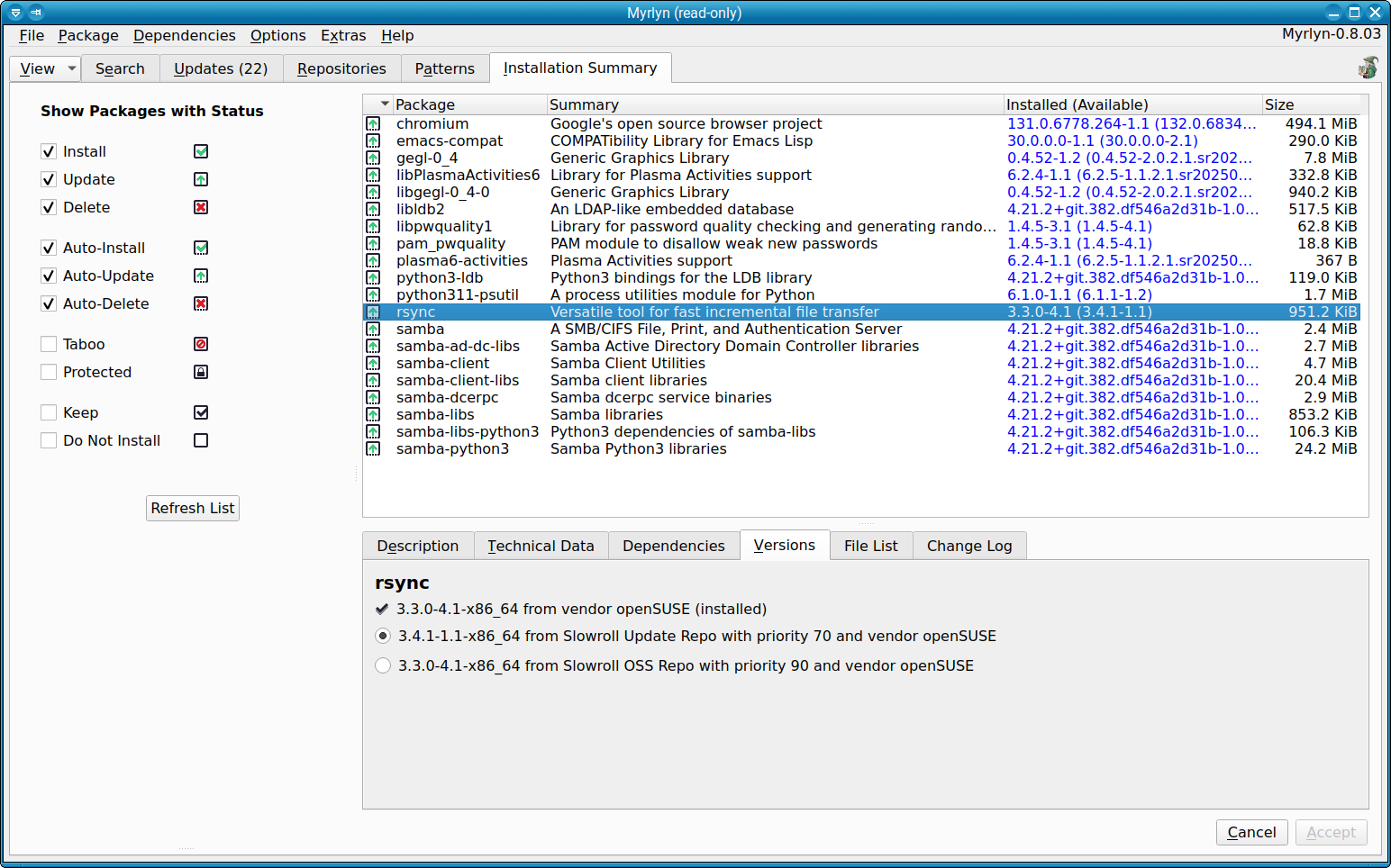
Yqpkg ahora es Myrlyn la herramienta para gestionar tu software en #openSUSE
Myrlyn es la nueva herramienta que se ofrece en la distribución openSUSE para realizar la gestión de los repositorios y software de manera gráfica como reemplazo a YaST

A finales de 2024 escribí un artículo sobre una herramienta reciente para la gestión de software y repositorios para la distribución GNU/Linux openSUSE, que podría ser un reemplazo para la herramienta YaST a la hora de realizar esas tareas:
En aquella entrada comentaba que el nombre era provisional hasta que se encontrara uno mejor. Eso ha ocurrido y Yqpkg ahora ha pasado a llamarse Myrlyn y trae muchas novedades que en aquel primer software se echaban de menos.
Myrlyn es un administrador gráfico de paquetes para seleccionar paquetes de software y patrones para su instalación, actualización y eliminación. Utiliza libzypp como backend y Qt para crear la interfaz gráfica de la herramienta.
La historia de este software comenzó en la Hack Week que organizó SUSE el pasado 2024 para hacer que el selector de paquetes Qt de SUSE YaST se pudiera utilizar como un programa Qt independiente sin ninguna dependencia de YaST, pero ha ido más allá desde entonces.
Desde ese primer intento de herramienta, muchas nuevas funcionalidades se han ido añadiendo, aunque sigue siendo un programa Beta. De momento Myrlyr ya es tiene funcionalidades como:
- Los repositorios se actualizan automáticamente al inicio del programa con algunos comentarios visuales sobre lo que está sucediendo.
- Permite la búsqueda de paquetes, por nombre, descripción…
- Ofrece una vista detallada de los paquetes de software: descripción, versión, detalles técnicos, etc
- Se puede instalar, actualizar y eliminar paquetes
- Escoger una versión de paquete específica para la instalación o actualización
- Instalar y eliminar patrones
- Instalar y eliminar parches
- Examinar y seleccionar paquetes por repositorio
- Examinar y seleccionar paquetes específicos de idioma/configuración regional por idioma/configuración regional
- Buscar y seleccionar paquetes por clasificación
Y a nivel de los repositorios:
- Enumerar los repositorios con nombres, prioridad, estado habilitado, estado de actualización automática, servicio de software (si está configurado), URL
- Cambiar la prioridad, el estado habilitado, el estado de actualización automática del elemento de la tabla seleccionado directamente debajo de la tabla
- Muestra la URL con y sin variables libzypp del elemento de tabla seleccionado como $releasever, $arch $basearch debajo de la tabla
- Agregar un repositorio con cualquier nombre y URL personalizados
- Añadir un repositorio de la comunidad como Packman, Open H.264, LibDvdCss, nVidia con URL conocidas, utilizando la URL específica para la distribución / producto instalado actualmente (Leap 15.x, Tumbleweed, Slowroll, SLE-15 SPx)
- Editar el nombre y la URL de un repositorio
- Eliminar un repositorio
- Modo de solo lectura para ver los repositorios como un usuario no root (no disponible en YaST)
Además de todo esto se han ido corrigiendo problemas encontrados, por lo que lo hace una herramienta muy interesante para gestionar el software en nuestro equipo sin añorar al ilustre YaST.
Aunque todavía no es un paquete oficial de openSUSE, se puede probar esta nueva interfaz para la gestión del software instalando el paquete RPM correspondiente. Tienes paquetes RPM para instalarlo en tu openSUSE:

Enlaces de interés
Myrlyn Now Handles Community Repos
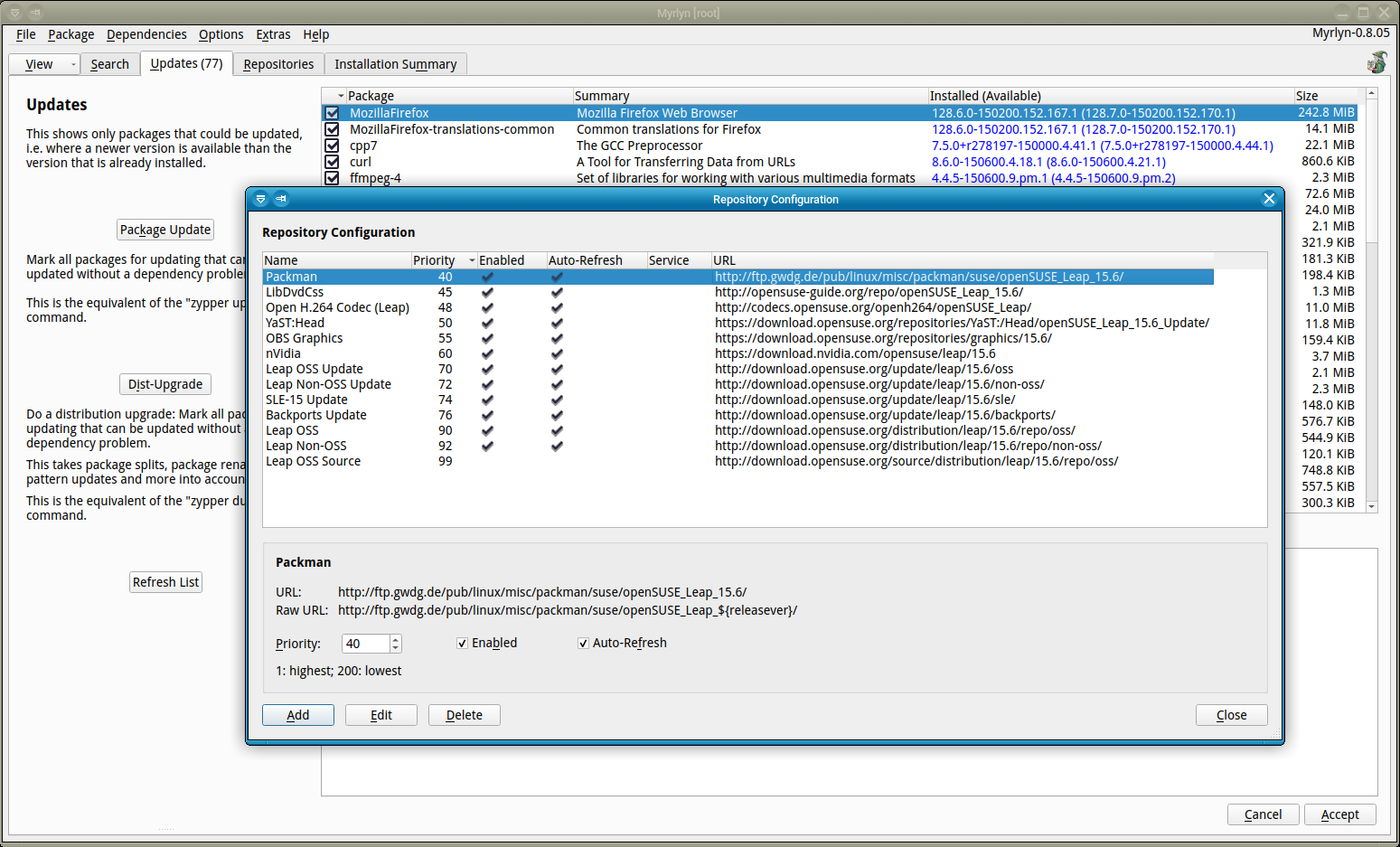
The promising new package management tool Myrlyn now includes a much-requested feature: repository configuration. Users can now easily manage their repos, adjust priorities, enable auto-refresh, and even add well-known community repositories like packman, openh264, libdvdcss, and NVIDIA; all with Myrlyn’s streamlined UI!
Key Features:
- View repo details, including priority, auto-refresh status, and URL.
- Modify repo settings directly from the interface.
- Add custom repos with libzypp variables like $releasever.
- Select community repos automatically tailored for Leap, Tumbleweed or Slowroll.
- Enable read-only mode for non-privileged users.
Some users have been exclusively managing their systems with Myrlyn, which showcases its reliability. Myrlyn was developed during Hack Week 24 and is a standalone Qt-based package manager, free from YaST dependencies.
Ready to configure your repos? Head to Extras → Configure Repositories (Ctrl+Shift+O) and give it a spin!
Subtitle Composer, aplicación KDE para añadir subtítulos
Las aplicacions KDE son quasi-infinitas. Tras tantos años editando el blog, sigo descubriendo programas que vale la pena promocionar. Os presento Subtitle Composer, una aplicación KDE para añadir subtítulos a tu vídeos y hacerlos más accesibles, algo que afortunadamente es más frecuente en nuestra sociedad.
Subtitle Composer, aplicación KDE para añadir subtítulos
La definición básica de Subtitle Composer es que se trata de un editor de subtítulos de código abierto basado en texto que permite operaciones de edición básicas y avanzadas,en otras palabras, que permite poner subtítulos a un vídeo de forma sencilla y visual.
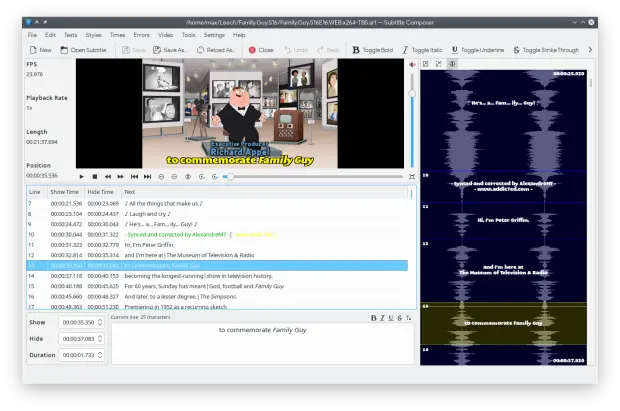
Entre sus funcionalidades más importantes se encuentran:
- Abrir y guardar formatos de subtítulos de texto: SubRip/SRT, MicroDVD, SSA/ASS, MPlayer, TMPlayer y subtítulos de YouTube
- Abrir y OCR de formatos de subtítulos gráficos: VobSub (.idx/.sub/.rar), BluRay/PGS (*.sup), formatos permitidos por ffmpeg (DVD/Vob, DVB, XSUB, HDMV-PGS)
- Demultiplexar emisiones de subtítulos gráficos y de texto de archivos de vídeo: SRT, SSA/ASS, texto MOV, MicroDVD, DVD/Vob, DVB, XSUB, HDMV-PGS
- Reconocimiento de habla de archivos de sonido y de vídeo mediante el uso de PocketSphinx
- Detección inteligente de codificación** de idioma y de texto
- Vista previa instantánea de subtítulos en reproductores de vídeo integrados con selección de la fuente de sonido
- Vista previa y edición de subtítulos en formas de ondas gráficas con selección de la fuente de sonido
- Sincronización mediante el arrastre de diversos anclajes o puntos gráficos y ajuste de la línea de tiempos
- Desplazamiento de tiempos y escalado, cálculo automático de la duración de las líneas, conversión de tasa de fotogramas, etc.
- Fusión y división de archivos de subtítulos
- Traducciones de subtítulos lado a lado
- Estilos de texto (cursiva, negrita, subrayado, tachado, color)
- Comprobación ortográfica
- Detección de errores de desfase de tiempo en subtítulos
- Guiones (JavaScript, Python, Ruby y otros lenguajes permitidos por Kross).
Más información: Subtitle Composer
La entrada Subtitle Composer, aplicación KDE para añadir subtítulos se publicó primero en KDE Blog.
¿Yo soy aquel?
¿Soy quien fui? ¿Queda algo de aquel yo lejano en el yo actual?

El título del artículo parafrasea la mítica canción que el histriónico Raphael llevó a Eurovisión en 1966 representando a España. Pero que esperen un poco aquellas personas que sean admiradoras del cantante y que no salgan huyendo aquellas personas que lo odien. Este desvarío nada tiene que ver que esa canción, ni ese artista.
Pero antes de empezar un par de notas sobre la canción, que con estrofas como estas:
Yo soy aquel
Que cada noche te persigue[…]
El que quisiera
Ser tu dueño de tu amor, de tu amor[..]
Yo soy aquel
Que por tenerte da la vida
La verdad es que denota un cierto toque obsesivo que más que ser algo tierno, en mi visión tiene algo de turbio e inquietante. El amor es intenso, pero ese «perseguir» ese querer ser «dueño», no da mucha confianza. Pero dejemos al de Linares con sus cosas y vayamos nosotros a las nuestras.
Como alguien muy indeciso, he añadido unas interrogantes al título de la canción, lo que lo hace totalmente distinto dándole otro significado que ahora requiere una meditación y una respuesta.
El meollo de la cuestión vino a mi cabeza pensando en qué hay en nuestro yo actual de aquel yo de hace años. ¿Yo soy aquel? O nada tengo que ver con quien alguna vez fui.
Decía Heráclito ese aforismo que más o menos viene a decir:
En los mismos ríos entramos y no entramos, [pues] somos y no somos [los mismos].
Como metáfora del cambio contínuo que todo sufre. Ni el río, ni tu seréis los mismos que la primera vez. Quizás se mantenga el cauce (que terminará siendo «víctima» de esa fuerza del cambio ineludible antes o después), que recorrerá un agua distinta. Quizás sea tu mismo cuerpo quien se meta a probar esas aguas de nuevo, pero tu también serás distinto.
Entonces vuelvo a preguntar ¿yo soy aquel? Igual que el cauce del río es el mismo, nosotros lo somos, pero hasta cierto punto, he dedarle la razón a Heráclito (aunque me temo que le trae sin cuidado). Igual que ese cauce se modifica con el paso del agua y los sedimentos que arrastra. Así la vida con sus experiencias nos moldea. Igual que si nos fijamos bien el río es distinto, nosotros también lo somos.
Adquirimos ese poso y se van modificandos nuestros meandros igual que los del cauce. Queda un batiburrillo de aquello que hemos sido en cada presente. Queda una sensación que nos moldea según ha discurrido cada situación en nuestra vida a la que nos hemos enfrentado. No somos los mismos. Creo que cabría decir que nos hemos desplazado emocionalmente y mentalmente en otro lugar.
Las pérdidas, los encuentros, las relaciones que se afianzan o quizás que se rompen. La ira que en cada momento alguien nos causó, Las alegrías, las tristezas y las que ahora vislumbramos desde este punto de nuestro presente nos harán ser alguien distinto.
Seremos distintos y deberemos ser responsables de cada presente que hemos pasado, pero ¿debemos ser rehénes de aquellos yo pasados? ¿Les debemos un crédito que tenemos que estar pagando toda la vida?
Si en una de esas veces que nos metimos en el río hace años hicimos daño a alguien de manera consciente o inconsciente ¿debemos seguir pagando esa deuda si volvemos a meternos en el rio en el presente? ¿Quien lo realiza debe seguir martirizándose en cada momento de su vida por aquello y quién lo recibió debe seguir reclamando cuentas años después?
No debemos tergiversar el aforismo
No es posible bañarse dos veces en el mismo río
Como carta blanca para hacer borrón y cuenta nueva cada vez que nos sea favorable y no tener que responder a aquello que hicimos mal. Pero siendo honestos ¿cuánto hay que estar rindiendo esas cuentas? ¿cuándo prescriben? Pero me centro mucho en el sentimiento de culpa por un daño causado, pero no por nada especial, el sentimiento de deuda puede venir causado por otros parámetros y sensaciones.
Defendimos una posición política y ahora desencantados nos decantamos por la contraria o por ninguna. Escuchamos mucho aquel tipo de música y hoy nos damos cuenta que ha desaparecido de nuestros hábitos de escucha. Cambió el río nosotros con él.
¿Perdonaríamos a quién nos hizo daño? Si en este presente sigue sin arrepentirse de lo que hizo, igual no le condenamos por lo que hizo, si no porque sigue justificando su acción.
¿Renegamos o nos avergonzamos de aquel yo? ¿Existe algo inamovible, perdurable? Todo es eterno… durante un tiempo.
No tengo respuestas, solo más preguntas que vuelven a hacer que me pregunte más cosas (desconfía de quien está seguro de todo).
Pero si empecé con una canción, quiero acabar con otra, esta sí de mis preferidas e interpretada por una grande que habla sobre este tema del cambio. Me refiero a la canción Todo cambia del chileno Julio Numhauser interpretada como nadie por la gran voz de Mercedes Sosa.
En la canción se enumeran diferentes escenas de cambio, como ejemplo ese título y teoría de que Todo cambia, menos según el autor el recuerdo de su pueblo y su gente que sufrían el terror militar de Pinochet en el Chile golpista. Incluso aquella pesadilla cambió…
Cambia lo superficial
Cambia también lo profundo
Cambia el modo de pensar
Cambia todo en este mundoCambia el clima con los años
Cambia el pastor su rebaño
Y así como todo cambia
Que yo cambie no es extraño
Heráclito también decía que todo es fuego que es una idea de que se mueve y se transfora, crea y destruye, esto es una metafora para representar la lucha de contrarios. Ardamos.
