
 Member
 Futureboy
Sleep States and the Advanced Configuration and Power Interface (ACPI) | Blathering

Janus Pro AI da DeepSeek supera rivais.

A DeepSeek, uma startup chinesa, anunciou que seu novo modelo de IA de código aberto, o Janus-Pro-7B, superou o DALL-E 3 da OpenAI e o Stable Diffusion da Stability AI em benchmarks de geração de imagens a partir de texto, conforme detalhado em um relatório técnico divulgado na segunda-feira. Este modelo é uma evolução do Janus, lançado no ano passado, e chega após o sucesso do novo assistente baseado no DeepSeek-V3, que rapidamente se tornou o aplicativo gratuito mais popular na App Store dos Estados Unidos.
Segundo a empresa, o Janus-Pro-7B aprimora o modelo anterior ao melhorar os processos de treinamento, a qualidade dos dados e o tamanho do modelo, o que resulta em maior estabilidade e riqueza de detalhes nas imagens. Além disso, ao incorporar 72 milhões de novas imagens sintéticas de alta qualidade e equilibrá-las com dados reais, o modelo conseguiu produzir resultados visuais mais atraentes e estáveis.
O relatório também destacou que a nova versão do modelo, com até 7 bilhões de parâmetros, oferece melhorias na velocidade de treinamento e na precisão da conversão de texto em imagem e compreensão de tarefas.
Fontes: https://huggingface.co/deepseek-ai/Janus-Pro-7B



Behold, My First RPM
Behold, My First RPM
I've written tons and tons of software, but was never much for packaging it. If I did any packaging, it was typically sticking a server into a container.
Yesterday morning I realized it has been something like 25 or 30 years since I wrote any functional C code, so I decided to do a refreshing, with the help of some AI. After reviewing the syntax and pointers, I wrote a CLI version of a Python app that I wrote a while back.
Python GUI Version
The problem is that I travel for work, but when I do, openSUSE doesn't seem to pick up on my new timezone, and it was a complex set of commands that I could not remember easily to set the new timezone. So I wrote a little GUI tool.

CLI C Version
So I basically did the same thing, but for the CLI, and in C. I made sure that I understood all of the code as I wrote, that I have to admit, I sort of glossed over the code for iterating through the directories and files.
This version does basically the same thing, but doesn't require the GUI.

Packaging
But wait! There is more. With some more AI assistance, I was able to put up a package that I can install on my machines.
Conclusion
I fully get that there are "official" ways of setting the timezone. The point is that I was able to go from not having written any C code in decades, to having a package in less than 2 hours! I also think my tool is a bit sweeter than timedatectl, etc...


Python 2

In 2020, the Python foundation declared Python 2 as not maintained anymore.
Python 2 is really old, not maintained and should not be used by anyone in any modern environment, but software is complex and python2 still exists in some modern Linux distributions like Tumbleweed.
The past week the request to delete Python 2 from Tumbleweed was created and is going through the staging process.
The main package keeping Python 2 around for Tumbleweed was Gimp 2, that doesn't depends directly on Python 2, but some of the plugins depends on it. Now that we've Gimp 3 in Tumbleweed, we are able to finally remove it.
Python 2
The first version of Python 2 was released around 2000, so it's now 25 years old. That's not true, because software is a living creature, so as you may know, Python 2 grew during the following years with patch and minor releases until 2020 that was the final release 2.7.18.
But even when it was maintained until 2020, it was deprecated for a long time so everyone "should" have time to migrate to python 3.
Py3K
I started to write python code around the year 2006. I was bored during a summer internship at my third year of computer science, and I decided to learn something new. In the following months / years I heard a lot about the futurist Python 3000, but I didn't worry too much until it was officially released and the migration started to be a thing.
If you have ever write python2 code you will know about some of the main differences with python3:
- print vs print()
- raw_input() vs input()
- unicode() vs str
- ...
Some tools appeared to make it easier to migrate from python2 to
python3, and even it was possible to have code compatible with both
versions at the same time using the __future__ module.
You should have heard about the six package, 2 * 3 = 6. Maybe the name should be five instead of six, because it was a Python "2 and 3" compatibility library.
Python in Linux command line
When python3 started to be the main python, there were some discussion about how to handle that in different Linux distributions. The /usr/bin/python binary was present and everyone expect that to be python2, so almost everyone decided to keep that relation forever and distribute python3 as /usr/bin/python3, so you can have both installed without conflicts and there's no confusion.
But python is an interpreted language, and if you have python code,
you can't tell if it's python2 or python3. The shebang line in the
executable python scripts should point to the correct interpreter and
that should be enough like #!/usr/bin/python3 will use the python3
interpreter and #!/usr/bin/python will use python2.
But this is not always true, some distributions uses python3 in
/usr/bin/python like Archlinux or if you create a virtualenv with
python3, the python binary points to the python3 interpreter, so a
shebang like #!/usr/bin/python could be something valid for a
python3 script.
In any case, the recommended and safest way is to always use python3
binary because that way it'll work correctly "everywhere".
Goodbye
It's time to say goodbye to python2, at least we can remove it now
from Tumbleweed. It'll be around for some more time in Leap, but it's
the time to let it go.

Vigesimoprimer audio de Podcast Linux – «GNU/Linux en la Universidad» (Podcast Linux #21)
Aunque el proyecto Podcast Linux está parado esto no significa que no tenga cabida en el blog y, mientras pueda, seguiré promocionándolo con la esperanza de que reviva, como cierto pájaro mitológico. Y he pensado hacerlo de una forma sencilla para mi y creo que benificiosa para todos, creando poco a poco un índice de todas sus emisiones, de forma que podamos encontrar en este blog una alternativa a su magnífica obra. Así que bienvenidos al vigesimoprimer audio de Podcast Linux – «GNU/Linux en la Universidad» (Podcast Linux #21) que sigue con su primer serie hablando de la simbiosis del mundo educativo y GNU/Linux.
Vigesimoprimer audio de Podcast Linux – «GNU/Linux en la Universidad» (Podcast Linux #21)

Como los lectores del blog sabrán hace un tiempo Podcast Linux cerró sus emisiones por motivos que solo incumben a su creador. Desde el blog no quiero dejar que su recuerdo se desvanezca así que seguiré publicitando sus audios ya que su calidad no debe caer en el olvido.
Hace un tiempo decidí empezar por el principio, mostrando su primer audio, el cual no promocioné en su día. Lo mismo ocurría con los siguientes, y, si las búsquedas no me engañan no fue hasta los episodios 19, 20, 21 y 22 cuando empecé a hacerlo. Hace poco llegué al primero de ellos y hoy comparto el tercero, por mantener una coherencia por si alguien quiere rememorar este gran podcast.
De esta forma continuo con su vigesimoprimer audio de esta serie presentado en el blog, que en palabras de Juan:
Muy buenas Linuxero. Bienvenido a una nueva entrega de Podcast Linux.
Mi nombre es Juan Febles y quincenalmente me cuelo en tu reproductor favorito para hablar del sistema operativo de escritorio que nos une: GNU/Linux.En el Núcleo Kernel seguiremos la serie de episodios relacionados con la educación hablando de GNU/Linux en la Universidad.
http://www.portalprogramas.com/software-libre/ranking-universidades/En el Gestor de Paquetes te hablaré de Scratch, un lenguaje visual de programación para facilitarte la entrada a este fantástico mundo.
https://scratch.mit.edu/
https://es.wikipedia.org/wiki/Scratch_(lenguaje_de_programaci%C3%B3n)En Comunidad Linux quiero compartir contigo el proyecto con el que conocí GNU/Linux; la Oficina de Software Libre de la Universidad de La Laguna.
https://osl.ull.es/Por último, en Área de Notificaciones, le daré un repaso a algunos de los mensajes recibidos en los últimos episodios.
Podcasts comentados:
Compliando Podcast: https://www.ivoox.com/podcast-compilando-podcast_sq_f1388684_1.html
Café con Podcast: https://www.ivoox.com/cafe-podcast_sq_f1358805_1.html
Ugeek Podcast: https://www.ivoox.com/ugeek_sq_f1383493_1.html
Polux Crivillé: https://www.ivoox.com/perfil-apoluxcriville_aj_6523379_1.html
Toda la música utilizada en este episodio se distribuye bajo la licencia libre Creative Commons:
LukHash – The Other Side
Más información: Podcast Linux
Sigue a Podcast Linux
Aprovecho para animaros a seguir Podcast Linux en algunos de los canales de comunicación que tiene:
- Twitter: https://twitter.com/podcastlinux
- Mastodon: https://mastodon.social/@podcastlinux/
- Correo: podcastlinux@disroot.org
- Web: https://podcastlinux.com/
- Telegram: https://t.me/podcastlinux
- Telegram Juan Febles: https://t.me/juanfebles
- Youtube: https://www.youtube.com/PodcastLinux
- Feed Podcast Linux: https://podcastlinux.com/feed
- Feed Linux Express (Audios Telegram): https://podcastlinux.com/Linux-Express/feed
La entrada Vigesimoprimer audio de Podcast Linux – «GNU/Linux en la Universidad» (Podcast Linux #21) se publicó primero en KDE Blog.
showkey | Examine Keyboard Codes
Comunal en lo digital. Individual en la vida real
No lo niego, estuve buscando un título que rimara y que expresara lo que quiero escribir en este post.

Post que creció en mi cabeza andando por mi ciudad y viendo una pequeña plaza con unos asientos de cemento rotos, un pequeño parterre de mobiliario urbano baldío y un contenedor de basura con bolsas a su alrededor o con una copando la boca por la que se deberían meter las bolsas.
En el aspecto digital de mi vida, formo parte de pequeñas comunidades que se auto organizan para un fin común. Como ejemplo citaré a KDE, pero hay muchas otras comunidades a las que nombrar como ejemplos igual de válidos.
En la comunidad de KDE se participa de una u otra forma para crear las distintas piezas de software que componen su extenso catálogo de software libre. Foros que se regulan y moderan. Comunidades que aportan el tiempo y/o dinero de aquellas personas que la forman para ponerse en marcha, gestionarse y mantenerse,
Las personas que forman parte de esas comunidades ponen al servicio de ese bien común sus mejores aptitudes, emplean su tiempo en tareas que se han auto impuesto o si no disponen de esos bienes, quizás aportan dinero para que se emplee en ese bien común.
Cosas que de una u otra manera redunda en el bien no solo de aquellas personas que participan, si no también de aquellas personas que no contribuyen de ninguna manera. Pero además, ese bien común sobre el que trabaja la comunidad no es exclusivo, si no que se ofrece de manera libre, gratuita y libre de compromiso.
A eso me refiero con la parte del título «comunal en lo digital». ¿Y qué pasa con lo de individual en la vida real?
Con esa segunda parte me refiero a que aunque haya ejemplos de personas que hacen cosas por un bien común en la vida real (no lo niego y quizás hacen una labor callada), falta (en mi opinión) mucho de ese espíritu comunal en nuestro día a día y en nuestro andar por la calle. Esa mentalidad de trabajar por un bien común de manera desinteresada que sucede en la vida digital de las muchas comunidades que existen, lo echo en falta como digo a pie de calle.
Pongo el ejemplo de los casos en los que me fijé andando por mi ciudad y que cito al principio. Si el ayuntamiento de la ciudad o si nadie hace nada ¿no estaría bien que un vecino que tenga conocimientos, arreglara ese banco de cemento de alguna manera? No creo que requiera mucha inversión de tiempo o dinero el arreglar parte de tu calle para que no tenga un aspecto desolado.
De igual manera ese pequeño parterre que acumula basura y hojas secas ¿nadie se decide a picar esa tierra inerte, y plantar algunas semillas de unas flores que alegren la vista al pasar, más que ese rincón de tierra olvidado? Quizás a alguien le guste la jardinería y decida arrancar malas hierbas, plantar algo y regarlo cada día. Igual ese acto anima a otras personas a ayudar o recuperar otras zonas.
También tengo unas palabras para quienes van al contenedor y al ver que la bolsa de basura les pesa mucho la deján al pie del mismo (o igual es alguien mayor que no puede introducirla en el contenedor).
Mal quien hizo la obra si fue por dejadez y ¿Por qué nadie se anima a coger la bolsa y tirarla. Es tu barrio y no me digas que no prefieres que no haya basura almacenada por cualquier lado.
Están también aquellas personas que estando el contenedor vacío van a tirar su basura y al meterla por el agujero si no entra, allí la dejan, atorada su bolsa taponando al resto de personas que vayan al contenedor, para que el siguiente que vaya se las componga como mejor le plazca y pueda…
Un sentimiento egoista nos invade y podemos pensar varias salidas: «No voy yo a recoger la mierda de otras personas», «ya hay personas que les pagan para recoger la basura del suelo», y otras del estilo…
Necesitamos un gran cambio de mentalidad y pensar que el bien común es más interesante que el egoismo personal. Y esa no es la línea de pensamiento más popular y conocida.
Parques creados por y para los vecinos, líneas de autobús para y por los vecinos, y muchos otros ejemplos nos recuerdan que al margen de nuestro sistema social y las autoridades pertinentes que gestionarán mejor o peor, la auto organización a pequeña escala funciona y debería ser una primera línea de juego.
Los ejemplos comunitarios en lo digital nos deberían servir de ejemplo a nuestra vida real. A menos que nos mantengamos al margen y desconozcamos esos casos de éxito y solo conozcamos los triunfos más sonados de las multinacionales digitales que con todo su dinero y poder no buscan el bien común, si no su propio beneficio ¿Acaso en la vida real pase lo mismo?

Actualización de enero_25 del mapa de usuarios KDE
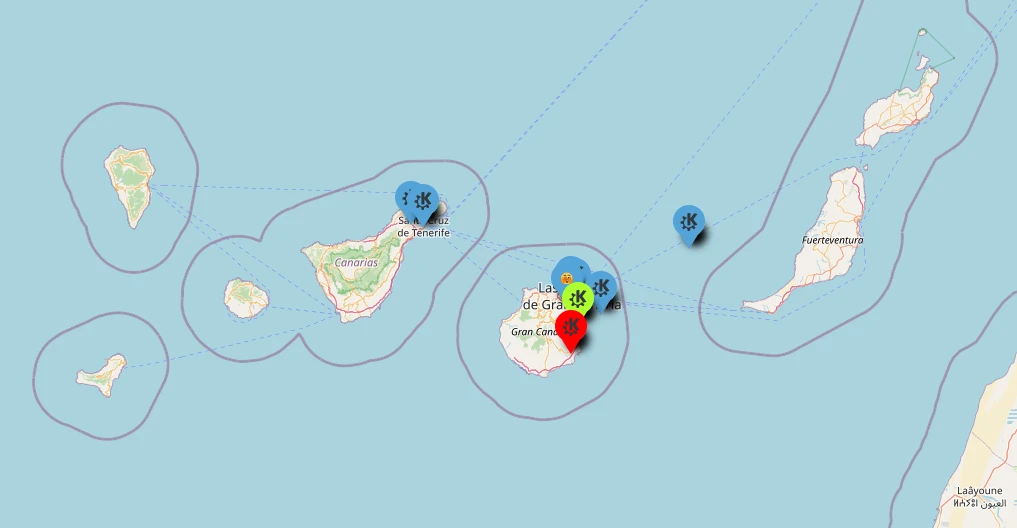
Hace mucho tiempo publiqué el mapa generado en Google de los usuarios de KDE. Ese mapa era colaborativo y voluntario pero generado sobre Software Privativo. En varias ocasiones pedí que alguien lo cambiara a OpenStreetMap y mis súplicas fueron escuchadas. Ya casi había olvidado este proyecto pero este agosto lo recuperé, publicitándolo en el grupo de Telegram KDE – Cañas y Bravas y parece que el proyecto ha tomado impulso, así que he decidido seguir publicitándolo durante unos meses. Así que os doy la bienvenida a la actualización de enero_25 del mapa de usuarios KDE que, como vais a ver, se ha sigue llenando pero todavía no seguimos sin tener a nadie en Cáceres, Lleida, Cuenca, Salamanca o Huesca, por poner algunas capitales de provincia. ¿No podemos solucionar este vacío? ¿Conoces a alguien de alguna de esas capitales? Si es así dile que se apunte.
Actualización de enero_25 del mapa de usuarios KDE
Si vais a ver el mapa de la Comunidad KDE de España marzo 2018, podréis ver una imagen estática de los usuarios que se habían puesto voluntariamente , y digo estática, porque alguien borró (queriendo o sin querer) los «pines» del mapa.
Ese incidente fue comentado en el grupo de Telegram KDE – Cañas y Bravas, y un usuario dijo que trabajaría en ello aprovechando que se debía empezar de nuevo el mapa.
Este compañero de grupo era @wakutiteo y creó, utilizando los servicios de uMap sobre OpenStreetMap el nuevo mapa de la usuarios KDE en España en el que podemos empezar a registrarnos.
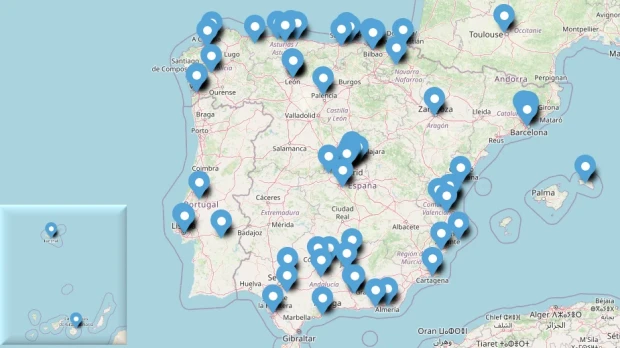
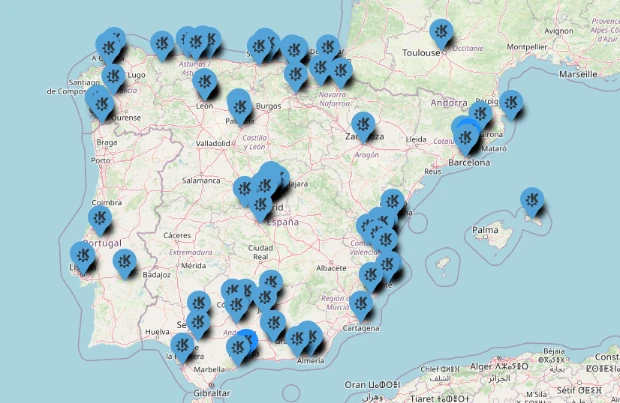
En un principio había poca poca gente apuntada (mirad la entrada de junio de 2018) pero poco a poco se ha ido llenando, a pesar de la poca promoción que ha tenido. A ver si a partir de ahora voy dándole más cancha y el mapa crece . De momento pongo la captura de pantalla de este mes de agosto, la del mes de septiembre y la de este octubre del 2024 para que veamos la evolución, lenta pero constante.
2025
Enero 2025
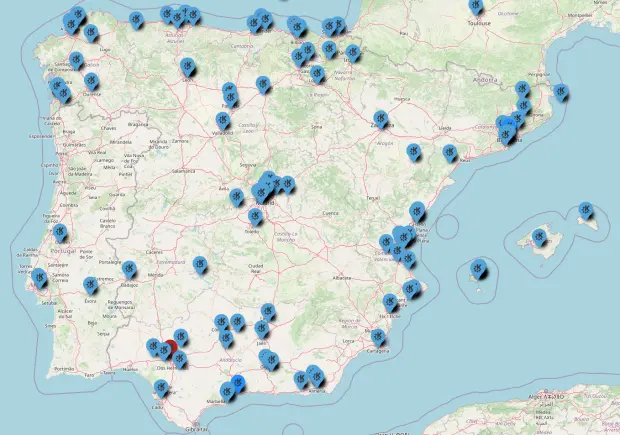
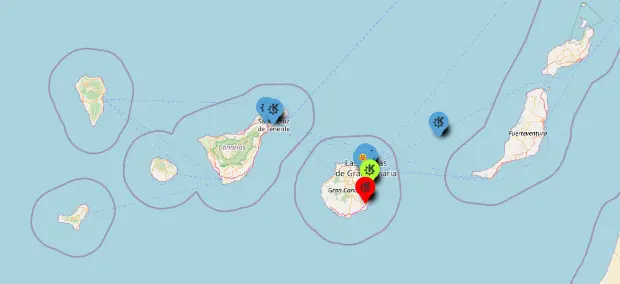
Este mes no tenemos mucha variación, y además me he dado cuenta que debo hacer las comparaciones con la misma pantalla ya que cambia según la resolución de pantalla, no obstante seguimos sin usuarios en capitales de provincia como Cáceres, Lleida, Cuenca, Salamanca, Huelva, Ciudad Real, Albacete, Zamora, Lugo, Soria, Teruel, Segovia, Tarragona, Girona, Alicante, Guadalajara, Santiago de Compostela, Pontevedra o Ávila, si no he mirado mal (que es posible).
Pincha en este enlace para ver el mapa interactivo.
Evidentemente, es voluntario y apuntaros es bajo vuestra propia responsabilidad. Os dejo también el mapa incrustado que se irá actualizando poco a poco.
2024
Para facilitar el seguimiento he decidido crear la sección del año separándolo del mes conrrespondiente.
Agosto 2024
Septiembre 2024
Octubre 2024


Diciembre 2024


Y también os dejo un vídeo de cómo editar el mapa para poder apuntaros.
¿Qué es Umap?
Básicamente, con uMap puedes crear mapas con capas de OpenStreetMap en un minuto e incrustarlo en tu página web, de código libre. Con uMap puedes realizar las siguientes acciones:
- Elegir las capas de tu mapa
- Añadir PDIs: marcadores, líneas, polígonos…
- Elegir los colores y los iconos de los PDIs
- Gestionar opciones del mapa: mostrar un minimapa, localizar al usuario al cargar…
- Importar por lotes datos geoestructurados (geojson, gpx, kml, osm…)
- Elegir la licencia de tus datos
- Embeber y compartir tu mapa
La entrada Actualización de enero_25 del mapa de usuarios KDE se publicó primero en KDE Blog.
Azure Dark iconos para tu PC coloridos y volumétricos
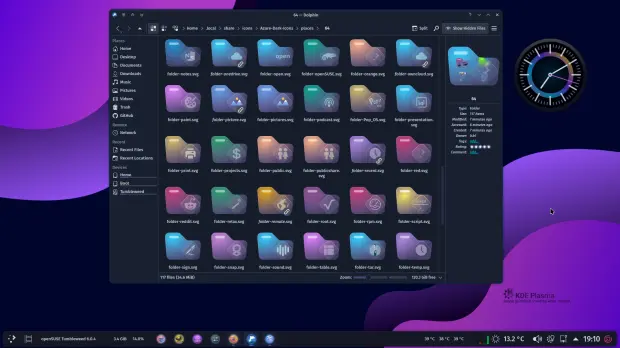
Hago una descanso en la difusión de las novedades para traeros una entrada ligera. Os presento el tema de iconos Azure Dark, un pack de iconos coloridos y volumétricos, una creación de l4k1 que quedan fabulosos en entornos oscuros.
Azure Dark iconos para tu PC coloridos y volumétricos
Como he dicho muchas veces, me fascina la variedad que tenemos a nuestra disposición tanto de forma, estilo o colores. Tenemos iconos clásicos, minimalistas, lineales, 3D, que simulan otros sistemas operativos, imaginativos, que recuerdan a objetos cotidianeos, etc.
Hoy os presento un pack de iconos creados por l4k1 que ha nombrado como Hatter. Se trata de unos iconos nada minimalistas ya que son redondeados, con uns aspecto 3D muy acentuado y que utiliza una gama de colores bastante variada.
Y como siempre digo, si os gusta el pack de iconos podéis pagarlo de muchas formas en la página en continua evolución de KDE Store, que estoy seguro que el desarrollador lo agradecer: puntúale positivamente, hazle un comentario en la página o realiza una donación. Ayudar al desarrollo del Software Libre también se hace simplemente dando las gracias, ayuda mucho más de lo que os podéis imaginar, recordad la campaña I love Free Software Day 2017 de la Free Software Foundation donde se nos recordaba esta forma tan sencilla de colaborar con el gran proyecto del Software Libre y que en el blog dedicamos un artículo.
Más información: KDE Store
La entrada Azure Dark iconos para tu PC coloridos y volumétricos se publicó primero en KDE Blog.
Releasing version 11
The first beta versions of SUSE Linux Enterprise Server 16 are almost around the corner and openSUSE Leap 16 is already at alpha phase. So the YaST Team (or should we already say the Agama Team?) has focused during the last couple of weeks on providing a better installation experience for both families of distributions. Agama 11 is the result, so let's see what's new on this release.
Bear in mind that some minor revisions of Agama 11 could be released in the following days to correct issues detected during the testing of SLES 16 Beta and openSUSE Leap 16 Alpha. We will update this blog post if any of those changes affect significantly any of the features listed below.
Agama can install Slowroll now
Let's start welcoming a new member to the family of operating systems Agama can install. Thanks to WesFun now it is possible to select openSUSE Slowroll when using the Agama testing iso for openSUSE.

Keep the contributions coming!
Changes in the web interface
Agama 11 also comes with a small reorganization of the workflow of the web interface. In previous versions, it was always necessary to visit the "Users" section to configure the root authentication and then go back to the "Overview" page in order to proceed with the installation. That happened because authentication is the only aspect of the system configuration for which Agama cannot infer any reasonable setup. You surely don't want Agama to choose a root password for you!
Starting with Agama 11, a screen to configure the root authentication is presented to the user right away after selecting the operating system to install.

After configuring the root password the user lands in the main Agama screen, where the general layout has been reorganized to ensure the "install" button is always accessible from all sections of the interface.

Additionally, the new install button can show a exclamation mark if there are issues preventing the installation and provides a summary of those issues pointing to the corresponding section that can be used to solve the situation.

The changes in the web interface go far beyond the new location of the install button. We encourage you to explore yourself to find all the small improvements!
Product registration
As you all know, one of the main goals of Agama is to become the official installer for SUSE Linux Enterprise Server 16. The development of that operating system, and its sibling product SLES for SAP Application, is progressing nicely with some preliminary versions being already available to SUSE Partners.
Installing those systems requires the user to register in order to gain access to the repositories. Agama can detect whether registration is necessary and then offer a convenient user interface for the process, as seen below.

Of course, this feature is irrelevant for openSUSE users since the openSUSE repositories are fully public and they will always be.
License agreement
Another difference between openSUSE and a corporate distribution like SLES is that users needs to explicitly accept a license agreement to use the latter. In the case of the Agama web interface, that means presenting the license as soon as possible in the process. Thus, the corresponding EULA must be accepted already when selecting any of the products that require to do so.

Of course, the screenshot above belongs to a SLES installation media and openSUSE users will not notice this new feature.
Allow remote usage of the command-line interface
As convenient as an interactive installation with the web interface can be, you know that the command-line interface and the unattended installation process are also first-class citizen for Agama. Thus, they also received some love on this release.
Agama's CLI (command-line interface) offers an alternative way to control the installation process
useful in various situations like installing in machines that cannot serve the web interface (eg.
due to limited resources), using scripts and other automation techniques or simply when the user
prefers good old terminal over graphical interfaces. Now Agama's CLI offers a new global parameter
--api that allows to run the tool (and any script based on it) on a different machine from that
being effectively installed. Bear in mind the new argument is still not honored by all Agama
subcommands. Support for it will be extended on subsequent releases.
Scripting support in unattended installation
Years of AutoYaST experience has taught us that, no matter how flexible an installer is, users of unattended installations always want to go further. And embedding scripting capabilities into the installer configuration has turned to be an awesome tool for that. So, similar to AutoYaST profiles, Agama configuration files now offer a "scripts" section. It makes possible to run scripts both before and after the installation process and also on the first boot of the new system.
Below you can see a Jsonnet configuration file for Agama including scripts. Note it would also work with plain JSON but, since that format does not support multi-line strings, each script would need to be provided as a long string with "\n" marking the end of each line (not so nice for a blog post 😉).
{
  scripts: {
    pre: [
      {
        name: "activate-multipath",
        body: |||
          #!/usr/bin/bash
          systemctl start multipathd.socket multipathd.service
        |||
      }
    ],
    post: [
      {
        name: "enable-sshd",
        chroot: true,
        body: |||
          #!/usr/bin/bash
          systemctl enable sshd.service
        |||
      }
    ],
    init: [
      {
        name: "run-ansible",
        url: "https://192.168.1.1/provisioning.sh"
      }
    ]
  }
}
For more details see the scripts section of the Agama documentation site.
Storage management for unattended installation
The Agama configuration format offers a very convenient and powerful approach to configure the
storage setup of the new system, way more consistent and concise that the corresponding
<partitioning> section of the AutoYaST profile (which is still fully supported for migration
purposes).
Agama 11 adds the possibility to define the physical volumes of an LVM volume group by simply specifying the disk (or disks) that will be used as a base for the LVM. Agama will take care of creating all the needed partitions, honoring any other aspect of the configuration in the process. Find a more detailed explanation with examples at the corresponding section of the Agama documentation.
On the other hand, now it is possible to specify TPM-based unlocking of the encrypted devices as part of the Agama storage configuration. Thus, users of unattended installation can also deploy fully encrypted systems based on TPMv2.
Automatic generation of documentation and shell completion
A comprehensive and up-to-date documentation is key for a project like Agama, especially for users of the command-line interface and the HTTP API. And the best way to ensure the documentation is always in sync with the current version of Agama is to generate it automagically from the source code.
In the case of the CLI, the manual pages, its Markdown variant and also the files needed for shell completion are all generated from sources. You can see the always current result of the Markdown version at the corresponding section of the Agama web page.
The HTTP API is also automatically documented via an OpenAPI specification. This will help anyone interested in integrating Agama into any solution or infrastructure or even in creating its own client application for Agama, especially taking into account that the Agama HTTP is still not stable and changes on every release.
More changes under the hood
As you can imagine, the above list of features is far for representing everything that has changed from Agama 10. As usual, the new version also includes many bug fixes and small improvements. And we took the opportunity to update to the latest version of the three programming languages used in Agama, including all used libraries.
We also gave some love to the Agama Live ISO. On the one hand, we revisited the list of included drivers, resulting in a smaller image that actually supports more hardware setups. On the other hand we tried to switch the graphical stack from X11 to Wayland. Although we didn't succeed due to technical problems related to Firefox's kiosk mode, we will keep trying (of course, any help is welcome).
Other Agama change that may not be obvious to all users is the introduction of some changes to ease the creation of automated integration test. That helps the openSUSE and SUSE QA teams in their invaluable effort to ensure a smoother experience to all users.
Just another step
We are already working on the next version of Agama and your feedback may be useful to decide in
which aspects we should focus. So do not hesitate to give Agama a try using our latest Live ISO
images
and to report bugs through Bugzilla. You can also contact us at the Agama project at
GitHub. Of course, if you prefer to chat, you can find us
as always at our #yast channel at Libera.chat.
And don't forget to have a lot of fun!