
 Member
 Victorhck
Cómo hacer que Thunderbird muestre el diálogo de archivos de Plasma de KDE
Thunderbird en el escritorio Plasma de KDE usa el diálogo de archivos GNOME a la hora de añadir un adjunto o guardar un archivo. Veamos cómo modificar eso.

Desde hace años utilizo el cliente de correo Thunderbird en mi openSUSE Tumbleweed con escritorio Plasma de la comunidad KDE.
Y algo que me molestaba, aunque no era un impedimento, es que al querer añadir un archivo o guardar algo en mi equipo desde Thunderbird, se mostraba el diálogo de archivos de GNOME y no el nativo del escritorio Plasma de KDE.
Buscando ví la sencilla solución a este pequeño contratiempo. Así que veamos de qué manera más sencilla podemos cambiar este comportamiento.
Tendremos que cambiar un valor en el editor de configuración del propio Thunderbird, para eso:
- Pinchamos en el menú de hamburgesa de la parte superior derecha de Thunderbird (≡)
- Seleccionamos la opción de Ajustes
- En la parte izquierda seleccionamos la sección General
- Y en esa sección, en la parte derecha nos desplazamos hasta el botón de Editor de configuración
- En la nueva pantalla, en la parte superior buscamos la opción
widget.use-xdg-desktop-portal.file-picker - En mi caso valía 2, y lo cambié por un 1 y ya estaría.
- Ahora al querer subir un archivo o descargarlo desde un adjunto de un correo, me muestra el gestor de archivos propio de Plasma de KDE por lo que Thunderbird queda más integrado con mi entorno de escritorio.
Enlaces de interés
Publicados los vídeos de las charlas de Akademy-es 2025 de Málaga OpenSouthCode edition II #akademyes
Me complace anunciar que ya están disponibles los vídeos de las charlas de Akademy-es 2025 de Málaga OpenSouthCode edition II , una forma de recordar lo que vivimos esos días y mostrar a los que no vinieron algunas de las cosas de las que se hablaron. En esta ocasión os comento que ya están publicados en el canal de Kockatoo Tube de KDE España y que en cuento pueda estarán enlazadas en la página de las ponencias del 2025.
Publicados los vídeos de las charlas de Akademy-es 2025 de Málaga OpenSouthCode edition II #akademyes
El año pasado me tocó arreglar la página de charlas del programa de Akademy-es 2024 de València esLibre edition. Lo cierto es que me quedó muy bien, experimentando con el editor de texto de WordPress e instalando un pequeño plugin para poder insertar un efecto acordeón.
Este año, todavía no lo he hecho. Demasiado calor en verano y pocas ganas de estar delante del ordenador.
Pero eso no ha sido obstáculo para que mis compañeros hayan realizado su trabajo, con lo que me enorgullece comentar que han sido publicados los vídeos de las charlas de Akademy-es 2025 de Málaga OpenSouthCode edition II #akademyes en nuestro canal de Kockatoo Tube.

Es el momento de repasar lo que hablamos en forma de ponencia en el gran evento comunitario de la Comunidad KDE.
Más información: Canal de Kockatoo Tube de KDE España
¿Qué es Akademy-es?
Akademy-es (#akademyes, que es la etiqueta para las redes sociales) es evento más importante para los desarrolladores y simpatizantes de KDE, que se ha ido celebrando desde el 2006 con éxito creciente.
En general, las Akademy-es son el lugar adecuado para conocer a los desarrolladores, diseñadores, traductores, usuarios y empresas que mueven este gran proyecto.
En ellas se realizan ponencias, se presentan programas, se hace un poco de caja para los proyectos libres (camisetas, chapas, etc) pero sobre todo se conoce a gente muy interesante y se cargan baterías para el futuro.
Podéis repasar las anteriores ediciones en estas entradas del blog:
- Camino Akademy-es 2013: Las anteriores ediciones (I): 2006 – 2008
- Camino Akademy-es 2013: Las anteriores ediciones (II): 2009-2010
- Camino Akademy-es 2013: Las anteriores ediciones (III): 2011-2012
- Anteriores ediciones de Akademy-es (IV): 2013 y 2014
La entrada Publicados los vídeos de las charlas de Akademy-es 2025 de Málaga OpenSouthCode edition II #akademyes se publicó primero en KDE Blog.
A pair of no-name speakers for (almost) everything
Those who follow my blog are already aware that I love and listen to “Made in Hungary” high-end audio gear: https://peter.czanik.hu/posts/zsolt-audio-turns-40-this-year/. This weekend I visited Zsolt Audio again. He showed us his latest creation, a pair of speakers, which he called “no-name” and “anti-marketing”.

The Zsolt Audio listening room
However, when I arrived at today’s event, music was still playing on another pair of loudspeakers. Last time I wrote about a pair of classical floor-standing speakers, a reincarnation of the StandArt line of loudspeakers. It is now turned into a proper product and should be available soon. No more beautiful code names, instead it’s called C35, where C refers to classical design, and 35 to the years of his experience in loudspeaker production.
After a few songs Zsolt changed to the main attraction: a completely boring looking, bookshelf loudspeaker. A slightly larger 12 liter brick. Spoiler alert: “No-name” and “anti-marketing” only describes the look, not the sound…

The new No-name speaker
Someone recommended him to check out Wavecor speakers. He built a loudspeaker around the sample pair of speakers he received from the manufacturer, and was impressed about the result. We had a chance to listen to the design which is considered to be final, and as far as I could tell, everyone in the room was impressed about the no-name loudspeakers as well. :-)
Once upon a time I became a Zsolt Audio fan, because I heard the Enigma 5 loudspeakers at an event. They are non-directional speakers, and I love the spatial sound they create. These “no-name” loudspeakers are directional, at least by the look. Of course they cannot match the Enigma 5, but these boring looking loudspeakers do a really good job playing back any acoustic music, be it jazz, classical or contemporary recordings, in a spatial way. Voices and instruments are not just right and left, as with most speakers, but a bit also up and down, close and far away, which is usually Enigma territory. Somewhere between the C35 and the Enigma 5.
The above list of genres of course also means that something is missing. (Prog)rock and metal, where it’s not just the ear, but the whole body is sensing the sound, are a kind of weak point on these loudspeakers. Except when you double them. Note: Do not try this at home! :-) Zsolt connected a second pair of “no-name” loudspeakers to the amplifier, and we listened to some Rammstein. The result was considered as perfect also by the rockers in the room!

Double
I just realized recently that Zsolt also has loudspeakers, which combine directional and non-directional sound. This event was of course not about these, I’m not even sure if they are still produced. But I hope that one day I can listen to the Envoy:

Envoy
Elementos guardados en el portapapeles y anillos táctiles de la tableta – Esta semana en Plasma
Es increíble el trabajo de promoción que está realizando Nate en su blog, dese hace más del tiempo que puedo recordar. Cada semana hace un resumen de las novedades más destacadas, pero no en forma de telegrama, sino de artículo completo. Su cita semanal no falla y voy a intentar hacer algo que es simple pero requiere constancia. Traducir sus artículos al castellano utilizando los magníficos traductores lo cual hará que: la gente que no domine el inglés esté al día y que yo me entere bien de todo. Bienvenidos pues a «¡Configuración inicial del sistema de KDE – Esta semana en Plasma». Espero que os guste y, sobre todo, que pueda mantener el ritmo de publicación de Nate Graham.
Elementos guardados en el portapapeles y anillos táctiles de la tableta – Esta semana en Plasma
Nota: artículo original en Blogs KDE. Traducción realizada utilizando deepl.com. Esta entrada está llena de novedades de la Comunidad KDE. Mis comentarios están entre corchetes.
¡Bienvenido a un nuevo número de «Esta semana en Plasma»! Cada semana cubrimos lo más destacado de lo que está sucediendo en el mundo de KDE Plasma y sus aplicaciones asociadas como Discover, System Monitor, y más.
Esta semana se han introducido importantes mejoras en el portapapeles de Plasma, KRunner y la compatibilidad con tabletas gráficas, por no mencionar una serie de mejoras en la interfaz de usuario de Discover, ¡y muchas cosas más! Así que, sin más preámbulos…
Novedades destacadas
Plasma 6.5
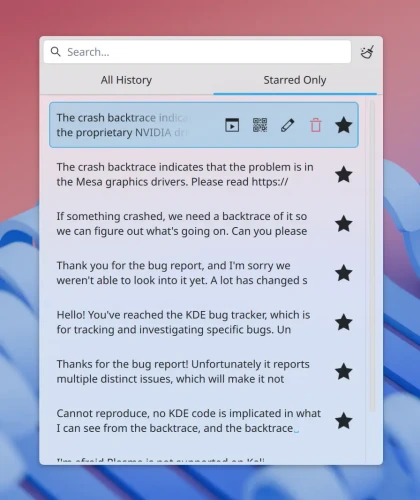
El portapapeles de Plasma ahora te permite marcar entradas como favoritas, y se guardarán de forma permanente para que siempre puedas acceder a ellas fácilmente. Esto es muy útil cuando te encuentras pegando los mismos fragmentos de texto comunes todo el tiempo. La solicitud de esta función tenía 22 años; ¡esto puede ser un nuevo récord para la solicitud más antigua jamás implementada en KDE! (Kendrick Ha, enlace) [Cuando pensaba que no se podía mejorar el portapapeles… zasca!].
¡Plasma ahora te permite configurar anillos táctiles en tu tableta gráfica! (Joshua Goins, enlace) [No sé si la traducción es correcta del todo pero prefiero eso a dejar «Touch Rings»].
¡Discover ahora te permite instalar controladores de hardware que se ofrecen en los repositorios de paquetes de tu sistema operativo! (Evan Maddock, enlace)
¡KRunner y las búsquedas impulsadas por KRunner ahora pueden encontrar atajos globales! (Fushan Wen, enlace)
Mejoras en la interfaz de usuario
Plasma 6.5.0
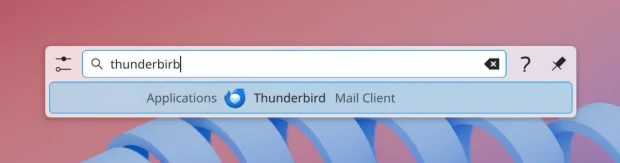
KRunner y las búsquedas basadas en KRunner ahora utilizan la coincidencia aproximada para las aplicaciones. (Harald Sitter, enlace) [Eso está bien para los que somos patosos].
Se ha mejorado la forma en que Discover presenta los mensajes de error para que sean un poco más fáciles de usar y cumplan con las directrices de interfaz humana de KDE. (Oliver Beard y Nate Graham, enlace 1 y enlace 2)
Discover ahora permite escribir reseñas de aplicaciones que aún no tienen ninguna reseña. (Nate Graham, enlace) [Interesante funcionalidad].
En los sistemas operativos que utilizan RPM-OSTree (como Fedora Kinoite), ya no aparece el incómodo icono rojo en la barra lateral y otros lugares en los que cabría esperar iconos negros o blancos. (Justin Zobel, enlace)
KDE Gear 25.12.0
Al abrir un disco en KDE Partition Manager desde su entrada en el widget Discos y dispositivos de Plasma, ya no se monta el disco, lo cual es molesto, ya que entonces hay que desmontarlo en la aplicación antes de poder hacer nada con él. (Joshua Goins, enlace 1 y enlace 2) [Tengo mis dudas si esto podría ser una molestia para algunos usuarios que quieren automatización].
Corrección de errores importantes
Plasma 6.4.5
Se ha corregido un problema crítico que podía provocar la pérdida permanente del texto de una nota adhesiva en un panel si dicho panel se clonaba y posteriormente se eliminaba. Este trabajo también cambia el manejo de los archivos de datos subyacentes de las notas eliminadas: ahora se mueven a la papelera, en lugar de eliminarse inmediatamente. ¡Ahora debería ser mucho más seguro! (Niccolò Venerandi, enlace 1 y enlace 2)
Se ha corregido un fallo muy común de KWin al cambiar la configuración de la pantalla que se introdujo accidentalmente hace poco. (David Edmundson, enlace)
Se han hecho traducibles algunas cadenas de las notificaciones de progreso de las tareas. (Victor Ryzhykh, enlace)
Se ha corregido un problema que podía hacer que los botones con texto largo se desbordaran del cuadro de diálogo del eliminador de procesos del Monitor del sistema cuando la ventana era muy pequeña. (Nate Graham, enlace)
Se ha corregido un problema en el mapa del selector de zona horaria que impedía que se ampliara la ubicación correcta al cambiar la zona horaria utilizando uno de los cuadros combinados. (Kai Uwe Broulik, enlace)
Las advertencias que muestra la página Fuentes de la configuración del sistema en respuesta a diversas condiciones ahora se mostrarán cuando se ajusten todas las fuentes a la vez, no solo cuando se ajusten de una en una. (Nate Graham, enlace)
Plasma 6.5
Se ha corregido un caso en el que Plasma podía bloquearse mientras se configuraba el widget del tiempo. (Bogdan Onofriichuk, enlace)
Se ha corregido un problema que podía provocar el bloqueo de la configuración del sistema al salir cuando se tenían abiertas determinadas páginas. (David Redondo, enlace)
Ahora Plasma recuerda mejor si se desea activar o desactivar el Bluetooth al iniciar sesión. (Nicolas Fella, enlace) [La mejora con los dispositivos Bluetooth ha sido notable]
Los paneles en los modos Ocultar automáticamente, Esquivar ventanas y Ventanas abajo ahora respetarán la configuración de opacidad. (Niccolò Venerandi, enlace)
KDE Frameworks 6.18
Se ha corregido un problema que provocaba el bloqueo de Plasma al arrastrar archivos desde Dolphin al escritorio o viceversa cuando el sistema estaba configurado con determinados tipos de montajes. (David Edmundson, enlace)
Otra información de errores destacables:
- 4 bugs Plasma de muy alta prioridad (uno menos que la semana pasada). Lista actual de errores
- 26 fallos de Plasma de 15 minutos (uno menos que la semana pasada). Lista actual de fallos
Mejoras de rendimiento y aspectos técnicos
Plasma 6.5
Se ha implementado la compatibilidad con «planos superpuestos» en configuraciones de salida única, lo que puede reducir significativamente el uso de la GPU y el consumo de energía en aplicaciones compatibles que muestran contenido a pantalla completa. Tenga en cuenta que las GPU NVIDIA están actualmente excluidas debido a problemas sin resolver con los controladores. (Xaver Hugl, enlace)
Se ha implementado la compatibilidad con la función de arrastrar y soltar desde y hacia ventanas emergentes creadas por extensiones de Firefox y, presumiblemente, también otras ventanas emergentes implementadas con el mismo sistema xdg_popup. (Vlad Zahorodnii, enlace)
Se ha corregido un problema que provocaba que V-Sync se desactivara de forma inadecuada en determinados juegos que utilizaban la biblioteca SDL. (Xaver Hugl, enlace)
Fecha de lanzamiento indeterminada
La función de anotación de Spectacle se ha extraído a una biblioteca reutilizable para que también se pueda utilizar en otras aplicaciones en el futuro. Dicha integración aún está en curso (al igual que la elaboración de un calendario de lanzamiento para el repositorio git en el que se encuentra ahora la biblioteca), pero se informará al respecto una vez que esté lista. (Noah Davis y Carl Schwan, enlace)
Cómo puedes ayudar
KDE se ha convertido en algo importante en el mundo, y tu tiempo y contribuciones nos han ayudado a conseguirlo. A medida que crecemos, necesitamos su apoyo para mantener KDE sostenible.
Puedes ayudar a KDE convirtiéndote en un miembro activo de la comunidad e involucrándote de alguna manera. Cada colaborador marca una gran diferencia en KDE – ¡no eres un número o un engranaje en una máquina!
Tampoco tienes que ser programador. Existen muchas otras oportunidades:
- Clasificar y confirmar informes de errores, tal vez incluso identificar su causa raíz.
- Contribuir al diseño de fondos de pantalla, iconos e interfaces de aplicaciones.
- Diseñar y mantener sitios web
- Traducir elementos de texto de la interfaz de usuario a su propio idioma.
- Promover KDE en su comunidad local
- …¡Y un montón de cosas más!
¡También puedes ayudarnos haciendo una donación! Cualquier contribución monetaria – por pequeña que sea – nos ayudará a cubrir los costes operativos, salarios, gastos de viaje de los colaboradores, y en general a mantener KDE llevando el Software Libre al mundo.
Para obtener una nueva característica de Plasma o una corrección de errores mencionada aquí, siéntase libre de enviar un commit a la solicitud de fusión correspondiente en invent.kde.org.
La entrada Elementos guardados en el portapapeles y anillos táctiles de la tableta – Esta semana en Plasma se publicó primero en KDE Blog.

Gridfinity Large Screw Driver Rack
Actualización de agosto de 2025 del mapa de usuarios KDE
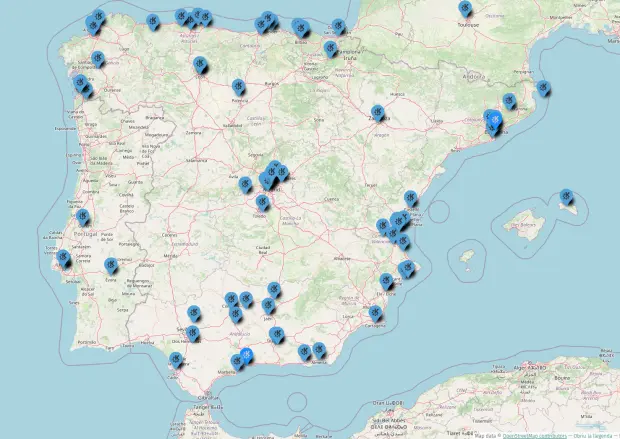
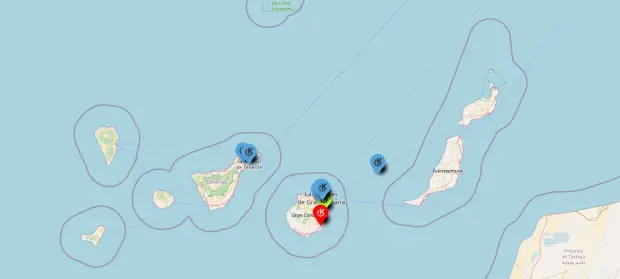
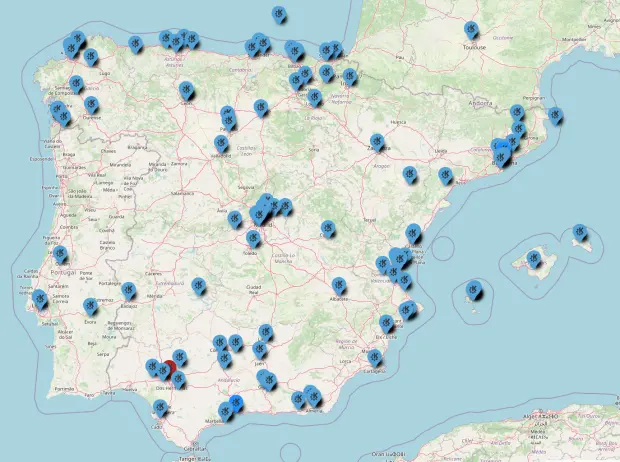
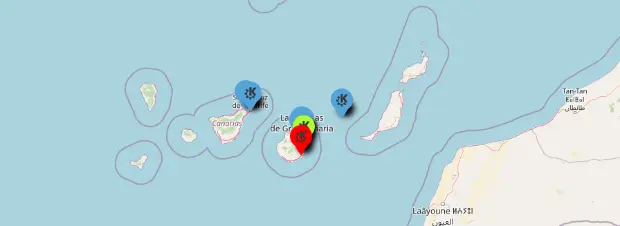
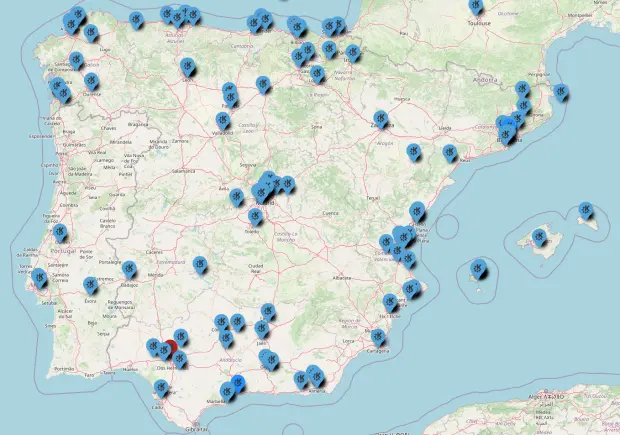
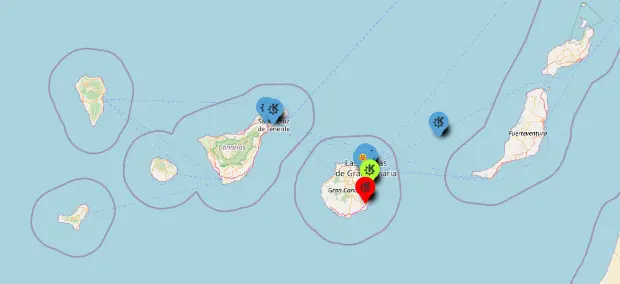
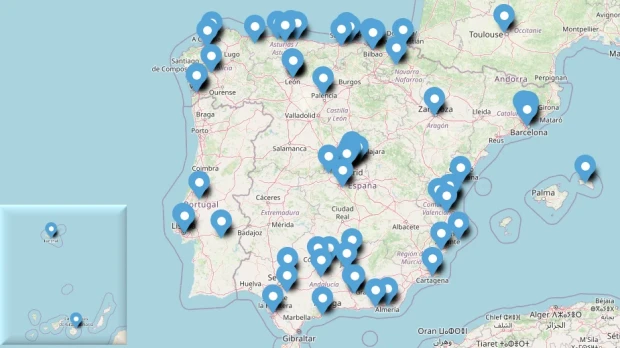
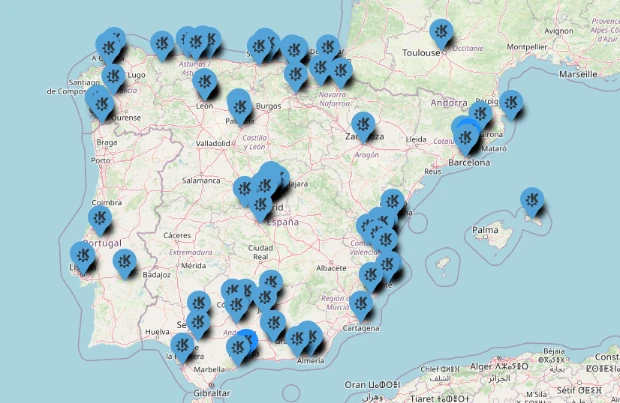
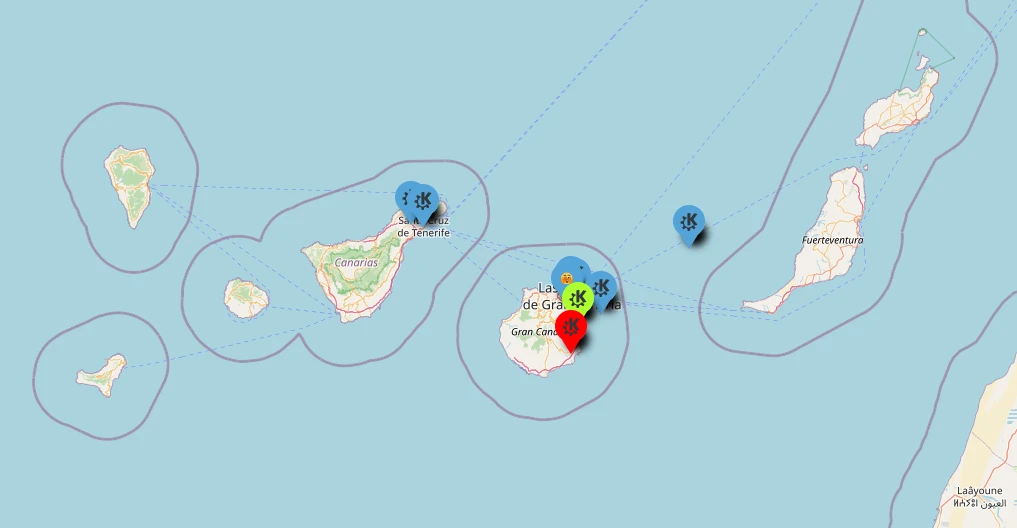
Hace mucho tiempo publiqué el mapa generado en Google de los usuarios de KDE. Ese mapa era colaborativo y voluntario pero generado sobre Software Privativo. En varias ocasiones pedí que alguien lo cambiara a OpenStreetMap y mis súplicas fueron escuchadas. Ya casi había olvidado este proyecto pero este agosto lo recuperé, publicitándolo en el grupo de Telegram KDE – Cañas y Bravas y parece que el proyecto ha tomado impulso, así que he decidido seguir publicitándolo durante unos meses. Así que os doy la bienvenida a la actualización de agosto de 2025 del mapa de usuarios KDE que empieza a ser complicado de seguir ya que al parecer se actualiza pero en zonas donde ya hay usuarios, así que estoy intentando sacar un listado en formato hoja de cálculo para poder observar los cambios, que los hay. No obstante, seguimos sin tener a nadie en Cáceres, Lleida, Salamanca o Huesca, por poner algunas capitales de provincia. ¿No podemos solucionar este vacío? ¿Conoces a alguien de alguna de esas capitales? Si es así convéncele que se apunte.
Actualización de julio de 2025 dActualización de agosto de 2025 del mapa de usuarios KDEel mapa de usuarios KDE
Si vais a ver el mapa de la Comunidad KDE de España marzo 2018, podréis ver una imagen estática de los usuarios que se habían puesto voluntariamente , y digo estática, porque alguien borró (queriendo o sin querer) los «pines» del mapa.
Ese incidente fue comentado en el grupo de Telegram KDE – Cañas y Bravas, y un usuario dijo que trabajaría en ello aprovechando que se debía empezar de nuevo el mapa.
Este compañero de grupo era @wakutiteo y creó, utilizando los servicios de uMap sobre OpenStreetMap el nuevo mapa de la usuarios KDE en España en el que podemos empezar a registrarnos.
En un principio había poca poca gente apuntada (mirad la entrada de junio de 2018) pero poco a poco se ha ido llenando, a pesar de la poca promoción que ha tenido. A ver si a partir de ahora voy dándole más cancha y el mapa crece .
2025
Agosto 2025
Cada vez es más complicado seguir la evolución de este mapa. Aunque no tenemos usuarios en capitales de provincia parece que en los lugares donde ya había usuarios siguen aumentando su densidad, lo cual no se puede apreciar en la imagen a menos que sean creativos y en vez de pines pinga cactus. Parece que el hecho de tener algún compañero/a por la zona anima al resto.
Os recuerdo que necesitamos llenar capitales de provincia como Lleida, Salamanca, Huelva, Zamora, Lugo, Soria, Teruel, Segovia, Tarragona, Girona (aunque ya hay alguien cerca), Alicante (pero si Elche, y dos), Santiago de Compostela, Pontevedra o Ávila, si no he mirado mal (que es posible).
Una vez realizada esta proeza creo que lo siguiente sería pensar en local y empezar a hacer una entrada pero centrándome en provincias. ¿Qué os parece? Puede que así veamos el crecimiento de forma más detallada.
Julio 2025


Junio 2025


Abril 2025


Pincha en este enlace para ver el mapa interactivo.
Evidentemente, es voluntario y apuntaros es bajo vuestra propia responsabilidad. Os dejo también el mapa incrustado que se irá actualizando poco a poco.
Marzo 2025


Febrero 2025
Enero 2025
2024
Para facilitar el seguimiento he decidido crear la sección del año separándolo del mes conrrespondiente.
Agosto 2024
Septiembre 2024
Octubre 2024


Diciembre 2024


Y también os dejo un vídeo de cómo editar el mapa para poder apuntaros.
¿Qué es Umap?
Básicamente, con uMap puedes crear mapas con capas de OpenStreetMap en un minuto e incrustarlo en tu página web, de código libre. Con uMap puedes realizar las siguientes acciones:
- Elegir las capas de tu mapa
- Añadir PDIs: marcadores, líneas, polígonos…
- Elegir los colores y los iconos de los PDIs
- Gestionar opciones del mapa: mostrar un minimapa, localizar al usuario al cargar…
- Importar por lotes datos geoestructurados (geojson, gpx, kml, osm…)
- Elegir la licencia de tus datos
- Embeber y compartir tu mapa
La entrada Actualización de agosto de 2025 del mapa de usuarios KDE se publicó primero en KDE Blog.
#openSUSE Tumbleweed revisión de la semana 35 de 2025
Tumbleweed es una distribución de GNU/Linux «Rolling Release» o de actualización contínua. Aquí puedes estar al tanto de las últimas novedades.

openSUSE Tumbleweed es la versión «rolling release» o de actualización continua de la distribución de GNU/Linux openSUSE.
Hagamos un repaso a las novedades que han llegado hasta los repositorios esta semana.
Y recuerda que puedes estar al tanto de las nuevas publicaciones de snapshots en esta web:
El anuncio original lo puedes leer en el blog de Dominique Leuenberger, publicado bajo licencia CC-by-sa, en este este enlace:
Estas dos semanas se han publicado un total de 4 snapshots 0822, 0825, 0826, y 0827.
Las actualizaciones más destacadas de esta semana:
- GNU Gettext 0.26
- ImageMagick 7.1.2.1 & 7.1.2.2
- bind 9.20.12
- nftables 1.1.4
- Python 3.13.7
- kdump 2.1.6
- colord 1.4.8 / colord-gtk 0.3.1
- GStreamer 1.26.5
- Linux kernel 6.16.3
- mozjs 128.14.0
Y para próximas snapshots, ya se están preparando las siguientes actualizaciones:
- Migrate to use ffmpeg-8 by default
- Qt 6.9.2
- Linux kernel 6.16.4
- GCC 15.2
- Mozilla Firefox 142
Si quieres estar a la última con software actualizado y probado utiliza openSUSE Tumbleweed la opción rolling release de la distribución de GNU/Linux openSUSE.
Mantente actualizado y ya sabes: Have a lot of fun!!
Enlaces de interés
- ¿Por qué deberías utilizar openSUSE Tumbleweed?
- zypper dup en Tumbleweed hace todo el trabajo al actualizar
- ¿Cual es el mejor comando para actualizar Tumbleweed?
- ¿Qué es el test openQA?
- http://download.opensuse.org/tumbleweed/iso/
- https://es.opensuse.org/Portal:Tumbleweed
——————————–
Tumbleweed – Review of the week 2025/35
Dear Tumbleweed users and hackers,
Week 35 felt a little calmer. Our packagers delivered high-quality submissions that required little intervention from release engineering once staged. When things just work, they tend to go unnoticed. We published four snapshots this week, namely 0822, 0825, 0826, and 0827.
The most noteworthy changes in these snapshots were:
- GNU Gettext 0.26
- ImageMagick 7.1.2.1 & 7.1.2.2
- bind 9.20.12
- nftables 1.1.4
- Python 3.13.7
- kdump 2.1.6
- colord 1.4.8 / colord-gtk 0.3.1
- GStreamer 1.26.5
- Linux kernel 6.16.3
- mozjs 128.14.0
- system-users: all system users are now configured to be ‘fully locked’ (as per man sysusers.d). This means not only is an invalid password set, but any login method is denied for these users
Staging projects and QA are currently busy on these updates:
- Migrate to use ffmpeg-8 by default
- Qt 6.9.2
- Linux kernel 6.16.4
- GCC 15.2
- Mozilla Firefox 142: mozilla-nss 3.115.1 breaks the build of certmonger
Mi escritorio Plasma de agosto 2025 #viernesdeescritorio
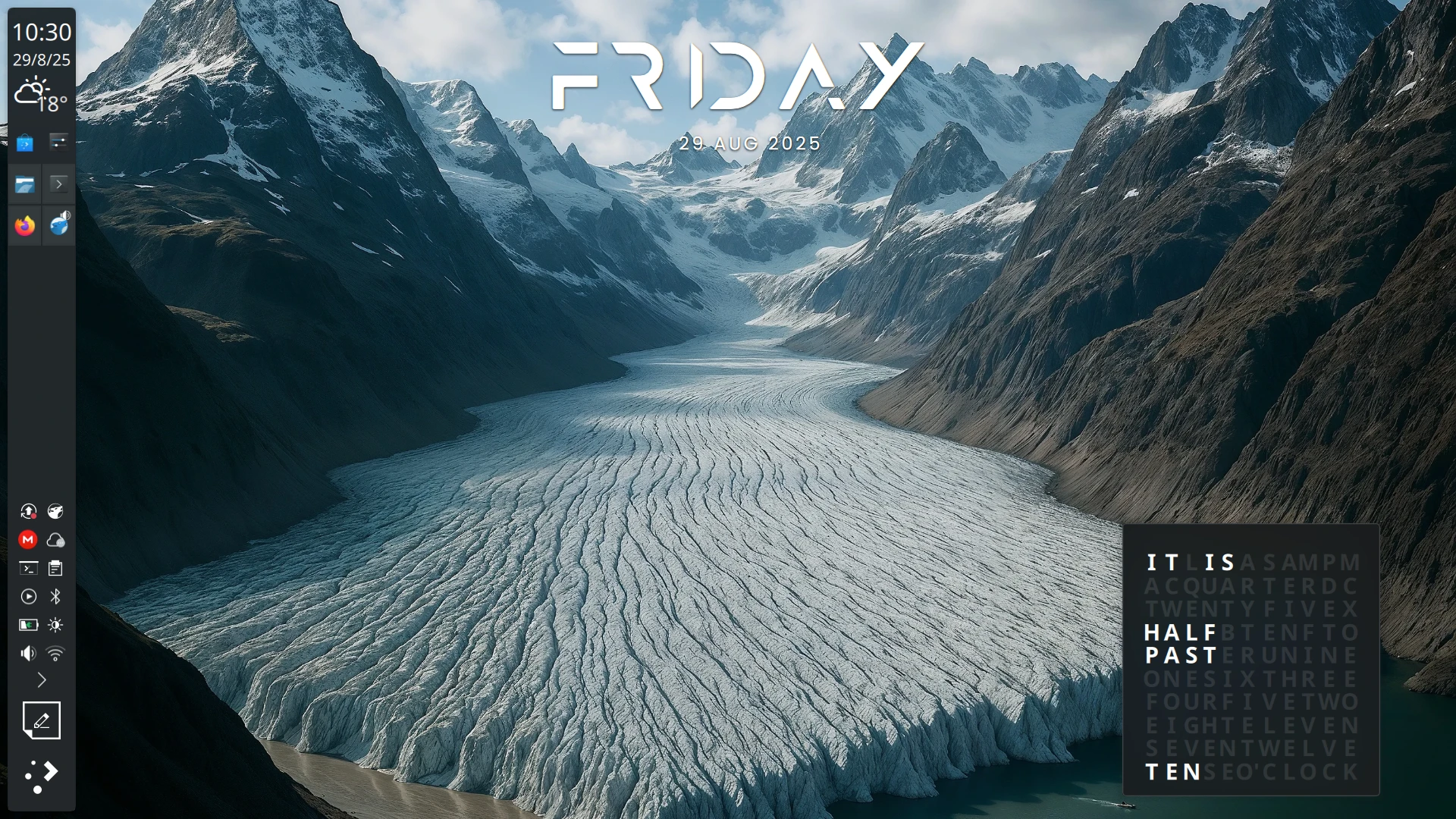
Sigo con la octava entrada de este año de la iniciativa #viernesdeescritorio. Bienvenidos a mi escritorio Plasma de agosto 2025, realizado sobre ordenador portátil, un Slimbook Pro, con el que llegamos a las 63 entregas compartiendo «Mi escritorio» de forma mensual.
Mi escritorio Plasma de agosto 2025 #viernesdeescritorio
Esta va a ser la sexagésimatercera (63 para los que nos cuesta leer esto) vez que muestro mi escritorio Plasma 6 en público, lo cual es número nada desdeñable de entradas que sigue creciendo de forma constante.
De nuevo lo realizo de nuevo sobre mi Slimbook Pro, el cual tiene instalado un KDE Neon con Plasma 6.4.4, sobre una versión de KDE Frameworks 6.17.0 y una versión de Qt 6.9.1. El servidor gráfico es Wayland y el Kernel es 6.14.0-27-generic (64 bits).
En este equipo sigo utilizando un aspecto bastante muy oscuro, con el tema global básico Brisa Oscuro e iconos estándar (Brisa Oscuro). La barra de tareas a la izquierda se ha quedado para siempre. En ella he puesto un plasmoide llamado Weather Widget Plus, bajo del reloj de la barra de tareas, que me indica la temperatura del exterior de mi casa y me hace la previsión para unos días. Por último, antes del lanzador de aplicaciones, he puesto un pequeño bloc de notas para acceder de forma rápida a esas cosas que pasan por mi mente y necesito apuntar para recordar después.
Para el fondo tengo mantengo la novedad del mes pasado: he puesto un widget llamado Random AI Wallpaper que me pone un fondo aleatorio, generados por alguien gracias a la IA y de calidad (la IA puede genera fondos pero que sean de calidad es decisión de una persona, y aquí radica el buen uso de esta herramienta), y que se guardan en un Gitlab. Ya publiqué la entrada de este magnífico complemento.
Y para finalizar, he cambiado mi reloj de escritorio por otro creado por una desarrollador de Plasma que me indica la hora aproximada, que queda estupendo en temas oscuros. Una maravilla y, además, es exclusivo.
El resultado de mi escritorio Plasma de agosto de 2025 es un entorno de trabajo oscuro y, como siempre, funcional que podéis ver en la imagen inferior (pinchad sobre ella para verlo un poco más grande).
La entrada Mi escritorio Plasma de agosto 2025 #viernesdeescritorio se publicó primero en KDE Blog.

Back in Action on Plasma (Mobile)
After I took a longer break from KDE development, I’ve been back in action for a few months now. It’s really nice to be back among friends, hacking on what I like most: Plasma. My focus has been on Plasma Mobile with some work naturally bleeding over into other areas.
Plasma on more Devices
I’d like to share some bits and pieces that I’ve worked on in the past months. Most of my efforts have revolved around making Plasma Mobile suitable for a wider range of devices and use-cases. The purpose of this work is that I want to make Plasma Mobile a more viable base for all kinds of products, not just mobile phones. We have a really mature software stack and great tools and applications which make it relatively easy for companies to create amazing products without having to hire large teams and many years to get the product ready for their market. This is I think a very interesting and worthwhile niche for Plasma to get into and I’m sure that Valve is not the only company that understands this.
Convergence Improvements
Convergence, or rather being able to support and switch between formfactors and usage patterns has always been a pet-peeve of mine and still is.
One area was improving using the available screen real estate use landscape displays (Plasma Mobile has quite naturally been rather “portrait-focused”, though a few smaller patches go a long way.)

I also improve usability with different pixel densities in the mobile shell by making the size of the top panel configurable. Also, when plugging in a second monitor, Plasma Mobile now switches from “all apps are maximized” to normal window management. (I’m currently working on KWin supporting more fine-grained window management. Currently, we just maximize all windows which has problems especially with modal dialogs.)
One changeset I worked on earlier this year makes it possible to ship multiple user interfaces for settings modules (“kcms”). An example is the “remote desktop” kcm which now shows a mobile-focused UI in Plasma Mobile. What happens here is that we load a main_phone.qml file in Plasma Mobile (where “phone” is picked from a list of form factors set in the environment of the session, so basically the “main” QML file gets picked based on the device. This mechanism allows us to share components quite easily, reducing the delta between different device UIs.

This actually builds on top of work that I’ve done ten years ago which added support for form factors to our plugin metadata system.
I’ve also made the “Display & Monitor” kcm usable on mobile, this is a pretty important thing to have working when you want to be able to plug in an external monitor into your device. I have a mobile version of the keyboard KCM in the pipeline, too, but this will need a bit more work before it’s ready for prime-time.
More Features
There’s a new page in the mobile Wi-fi settings module, showing connection details and tranfer speeds. The code for this was amazingly simple since I could lift most of the functionality from the desktop panel widget. A shared code-base across devices really speeds up development.

Adding useful features here and there, such as having the list of available bluetooth devices now filtered by default and only showing devices which actually make sense to pair (with an option to “Show all devices” in good Plasma manner). This feature isn’t mobile-specific, so desktop and laptop users will benefit.
Welcome to Okular Mobile
Not all my work goes into infrastructural and “shell” bits. The mobile okular version has now kind of caught up with the desktop version since it got a nice welcome screen when opened. This allows the user to easily open a document either from the “Documents” directory on disk (this is actually configurable) or one of the recent files viewed.

Going to Akademy ’25
After having missed our yearly world conference for a number of years, this year I will be at Akademy again. I’m really looking forward to seeing everybody in person again!

See you in Berlin!