
Improvements On the Redesigned Request Page

 Member
 baltolkien
Novedades de KDE Edu en KDE Gear 24.02
Plasma 6 no vino solo. Junto al escritorio también apareció KDE Gear 24.02, KDE Frameworks 6 y Plasma Mobile 6, todo un desembarco de novedades que todavía no han tenido tiempo de aparecer en el blog. Es hora de enmendar este error. Ya hice un resumen básico de las cosas nuevas que nos ofrecían y es el momento de hablar de las novedades de KDE Edu en KDE Gear 24.02, la colección de programas para el mundo educativo de la Comunidad KDE
Novedades de KDE Edu en KDE Gear 24.02
La calidad y cantidad de aplicaciones del ecosistema KDE es asombrosa, creciente y realmente competente. Solo hay que ver la página oficial para ver el catálogo completo de ellas.
En el salto tecnológico del pasado 28 de febrero, KDE Gear 24.02 nos trajo muchas aplicaciones ya migradas a Qt 6 y con un aspecto con menos marcos en su interfaz, con el objetivo de hacerlos más consistentes con Brisa y que tengan un aspecto más moderno.
Y, además de todo eso, muchas aplicaciones han ganado nuevas funcionalidades como la suite de aplicaciones educativas KDE (que recibe el intuitivo nombre de KDE Edu), que nos ofrece en esta nueva versión algunas novedades como las siguientes:
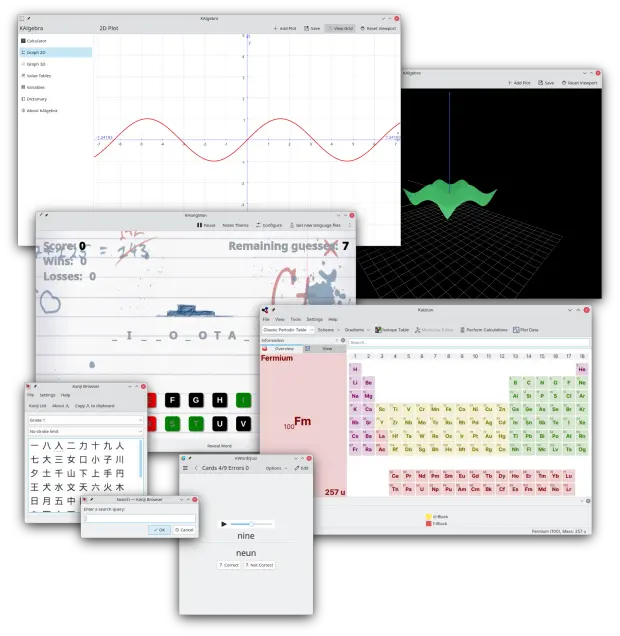
- KHangMan, una adaptación del juego del ahorcado, se ha portado a Kirigami.
- Kiten, una aplicación para aprender japonés, dispone ahora de un diálogo de búsqueda en el explorador de kanjis.
- KWordQuiz, una aplicación de tarjetas de aprendizaje, incluye controles de audio para los archivos de sonido.
- Kalzium ha dejado de usar gradientes de color, por lo que el color de los elementos de la tabla periódica ofrece un mejor contraste con el esquema de color del sistema.
En próximas entradas nos seguiremos con detalles específicos de otras aplicaciones. ¡¿No es asombroso para algo realizado por voluntarios?!
Más información: KDE
La entrada Novedades de KDE Edu en KDE Gear 24.02 se publicó primero en KDE Blog.
Novedades de Itinerary en KDE Gear 24.04
Plasma 6 no vino solo. Junto al escritorio también apareció KDE Gear 24.02, KDE Frameworks 6 y Plasma Mobile 6, todo un desembarco de novedades que todavía no han tenido tiempo de aparecer en el blog. Es hora de enmendar este error. Ya hice un resumen básico de las cosas nuevas que nos ofrecían y es el momento de hablar de las novedades de Itinerary KDE Gear 24.02, la aplicación para gestionar tu viajes.
Novedades de Itinerary en KDE Gear 24.04
La calidad y cantidad de aplicaciones del ecosistema KDE es asombrosa, creciente y realmente competente. Solo hay que ver la página oficial para ver el catálogo completo de ellas.
En el salto tecnológico del pasado 28 de febrero, KDE Gear 24.02 nos trajo muchas aplicaciones ya migradas a Qt 6 y con un aspecto con menos marcos en su interfaz, con el objetivo de hacerlos más consistentes con Brisa y que tengan un aspecto más moderno.
Y, además de todo eso, muchas aplicaciones han ganado nuevas funcionalidades como el paquete ofimático Kontact relacionadas con la seguridad y con la privacidad.
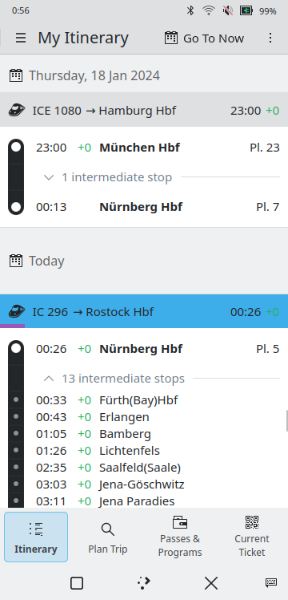
De esta forma Itinerary es el aistente de viajes de KDE ha su usabilidad en teléfonos integrando las acciones comunes en una barra de navegación inferior, lo que facilita el cambio entre los pases y el viaje actual.
También se ha rediseñado la línea de tiempo principal y ahora permite expandir sus elementos para que muestren las paradas intermedias y los retrasos e interrupciones en curso. En cuanto a los eventos, ahora se pueden añadir y editar entradas manualmente, así como compartir viajes completos o reservas individuales con el teléfono mediante KDE Connect.
El mapa interior de Itinerary enumera ahora todos los servicios del edificio o del área examinada. Esto nos ayudará a encontrar cosas como un lugar para tomar un café en una gran estación de tren o buscar un lugar para comer en las cercanías del hotel. Esta función se basa en OpenStreetMap, no requiere estar conectado a internet y no permite que lo que haya buscado se escape nunca de nuestro dispositivo.
Al ver los detalles de un viaje, además de poder consultar la lista de paradas, también permite mostrar un mapa del viaje.
Y esto es justo eso, una pequeña pincelada de todo lo que nos ofrece la Comunidad KDE. En próximas entradas nos seguiremos con detalles específicos de otras aplicaciones. ¡¿No es asombroso para algo realizado por voluntarios?!
Más información: KDE
La entrada Novedades de Itinerary en KDE Gear 24.04 se publicó primero en KDE Blog.
Novedades de Itinerary en KDE Gear 24.02
Plasma 6 no vino solo. Junto al escritorio también apareció KDE Gear 24.02, KDE Frameworks 6 y Plasma Mobile 6, todo un desembarco de novedades que todavía no han tenido tiempo de aparecer en el blog. Es hora de enmendar este error. Ya hice un resumen básico de las cosas nuevas que nos ofrecían y es el momento de hablar de las novedades de Itinerary KDE Gear 24.02, la aplicación para gestionar tu viajes.
Novedades de Itinerary en KDE Gear 24.04
La calidad y cantidad de aplicaciones del ecosistema KDE es asombrosa, creciente y realmente competente. Solo hay que ver la página oficial para ver el catálogo completo de ellas.
En el salto tecnológico del pasado 28 de febrero, KDE Gear 24.02 nos trajo muchas aplicaciones ya migradas a Qt 6 y con un aspecto con menos marcos en su interfaz, con el objetivo de hacerlos más consistentes con Brisa y que tengan un aspecto más moderno.
Y, además de todo eso, muchas aplicaciones han ganado nuevas funcionalidades como el paquete ofimático Kontact relacionadas con la seguridad y con la privacidad.
De esta forma Itinerary es el aistente de viajes de KDE ha su usabilidad en teléfonos integrando las acciones comunes en una barra de navegación inferior, lo que facilita el cambio entre los pases y el viaje actual.
También se ha rediseñado la línea de tiempo principal y ahora permite expandir sus elementos para que muestren las paradas intermedias y los retrasos e interrupciones en curso. En cuanto a los eventos, ahora se pueden añadir y editar entradas manualmente, así como compartir viajes completos o reservas individuales con el teléfono mediante KDE Connect.
El mapa interior de Itinerary enumera ahora todos los servicios del edificio o del área examinada. Esto nos ayudará a encontrar cosas como un lugar para tomar un café en una gran estación de tren o buscar un lugar para comer en las cercanías del hotel. Esta función se basa en OpenStreetMap, no requiere estar conectado a internet y no permite que lo que haya buscado se escape nunca de nuestro dispositivo.
Al ver los detalles de un viaje, además de poder consultar la lista de paradas, también permite mostrar un mapa del viaje.
Y esto es justo eso, una pequeña pincelada de todo lo que nos ofrece la Comunidad KDE. En próximas entradas nos seguiremos con detalles específicos de otras aplicaciones. ¡¿No es asombroso para algo realizado por voluntarios?!
Más información: KDE
La entrada Novedades de Itinerary en KDE Gear 24.02 se publicó primero en KDE Blog.

Nearly Seamless Integration | openSUSE in a Microsoft Office 365 Environment
Novedades de Kontact en KDE Gear 24.04
Plasma 6 no vino solo. Junto al escritorio también apareció KDE Gear 24.02, KDE Frameworks 6 y Plasma Mobile 6, todo un desembarco de novedades que todavía no han tenido tiempo de aparecer en el blog. Es hora de enmendar este error. Ya hice un resumen básico de las cosas nuevas que nos ofrecían y es el momento de hablar de las novedades de Kontact KDE Gear 24.02, suite de información personal que viene cargada de ellas.
Novedades de Kontact en KDE Gear 24.04
La calidad y cantidad de aplicaciones del ecosistema KDE es asombrosa, creciente y realmente competente. Solo hay que ver la página oficial para ver el catálogo completo de ellas.
En el salto tecnológico del pasado 28 de febrero, KDE Gear 24.02 nos trajo muchas aplicaciones ya migradas a Qt 6 y con un aspecto con menos marcos en su interfaz, con el objetivo de hacerlos más consistentes con Brisa y que tengan un aspecto más moderno.
Y, además de todo eso, muchas aplicaciones han ganado nuevas funcionalidades como el paquete ofimático Kontact relacionadas con la seguridad y con la privacidad.
De esta forma el visor de mensajes de KMail elimina la publicidad y el código de rastreo de los mensajes usando un bloqueador de publicidad más potente escrito en Rust.
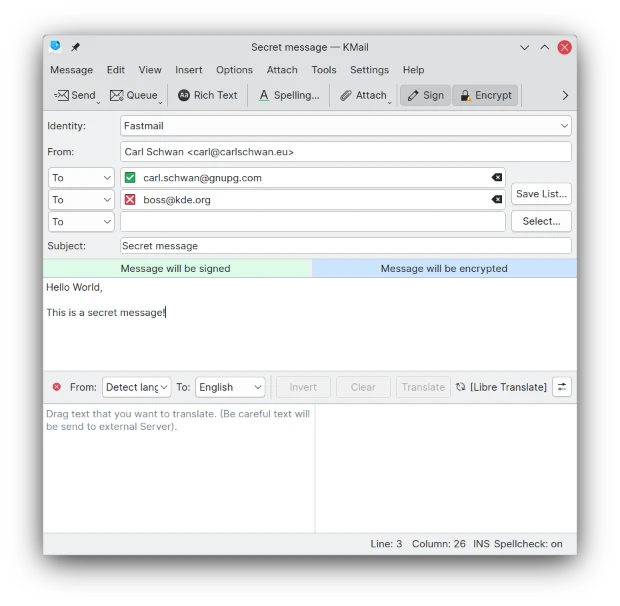
Por otra parte, el editor de mensajes muestra directamente la validez y el nivel de confianza de las claves OpenPGP de los destinatarios y muestra una advertencia cuando alguna de las claves ha expirado o está a punto de hacerlo.
Cambiando de aplicación, Korganizer permite ahora enviar invitaciones de correo electrónico cifradas y firmadas (algo importante cuando se trabaja en un entorno de confidencialidad).
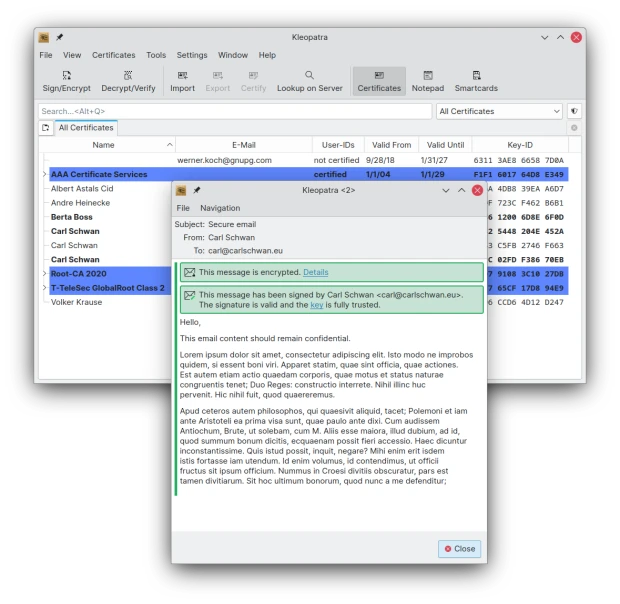
Además, Kleopatra, la interfaz de GnuPG, le permite ahora ver mensajes cifrados descargados de clientes web, como Gmail, que no permitan usar OpenPGP. Esto también beneficia a los numerosos usuarios de Gpg4win en Windows, ya que Kleopatra es una parte importante de dicho conjunto de herramientas de seguridad.
También KMail, sdemás de una variedad de servicios en línea ya existentes, permite usar ahora unas cuantas funciones de IA de código abierto y sin conexión. Se pueden configurar las traducciones para que usen el modelo de traducción Bergamot, que también usa Firefox. También puede usar el motor vosk-api para convertir voz a texto.
Es importante remarcar que de forma predeterminada, todas estas funciones de IA están desactivadas y que tendrá que activarlas explícitamente en las preferencias de KMail.
Y esto es justo eso, una pequeña pincelada de todo lo que nos ofrece la Comunidad KDE. En próximas entradas nos adentraremos más en los detalles específicos de las aplicaciones. ¡¿No es asombroso para algo realizado por voluntarios?!
Más información: KDE
La entrada Novedades de Kontact en KDE Gear 24.04 se publicó primero en KDE Blog.
Novedades de Kontact en KDE Gear 24.02
Plasma 6 no vino solo. Junto al escritorio también apareció KDE Gear 24.02, KDE Frameworks 6 y Plasma Mobile 6, todo un desembarco de novedades que todavía no han tenido tiempo de aparecer en el blog. Es hora de enmendar este error. Ya hice un resumen básico de las cosas nuevas que nos ofrecían y es el momento de hablar de las novedades de Kontact KDE Gear 24.02, suite de información personal que viene cargada de ellas.
Novedades de Kontact en KDE Gear 24.02
La calidad y cantidad de aplicaciones del ecosistema KDE es asombrosa, creciente y realmente competente. Solo hay que ver la página oficial para ver el catálogo completo de ellas.
En el salto tecnológico del pasado 28 de febrero, KDE Gear 24.02 nos trajo muchas aplicaciones ya migradas a Qt 6 y con un aspecto con menos marcos en su interfaz, con el objetivo de hacerlos más consistentes con Brisa y que tengan un aspecto más moderno.
Y, además de todo eso, muchas aplicaciones han ganado nuevas funcionalidades como el paquete ofimático Kontact relacionadas con la seguridad y con la privacidad.
De esta forma el visor de mensajes de KMail elimina la publicidad y el código de rastreo de los mensajes usando un bloqueador de publicidad más potente escrito en Rust.
Por otra parte, el editor de mensajes muestra directamente la validez y el nivel de confianza de las claves OpenPGP de los destinatarios y muestra una advertencia cuando alguna de las claves ha expirado o está a punto de hacerlo.
Cambiando de aplicación, Korganizer permite ahora enviar invitaciones de correo electrónico cifradas y firmadas (algo importante cuando se trabaja en un entorno de confidencialidad).
Además, Kleopatra, la interfaz de GnuPG, le permite ahora ver mensajes cifrados descargados de clientes web, como Gmail, que no permitan usar OpenPGP. Esto también beneficia a los numerosos usuarios de Gpg4win en Windows, ya que Kleopatra es una parte importante de dicho conjunto de herramientas de seguridad.
También KMail, sdemás de una variedad de servicios en línea ya existentes, permite usar ahora unas cuantas funciones de IA de código abierto y sin conexión. Se pueden configurar las traducciones para que usen el modelo de traducción Bergamot, que también usa Firefox. También puede usar el motor vosk-api para convertir voz a texto.
Es importante remarcar que de forma predeterminada, todas estas funciones de IA están desactivadas y que tendrá que activarlas explícitamente en las preferencias de KMail.
Y esto es justo eso, una pequeña pincelada de todo lo que nos ofrece la Comunidad KDE. En próximas entradas nos adentraremos más en los detalles específicos de las aplicaciones. ¡¿No es asombroso para algo realizado por voluntarios?!
Más información: KDE
La entrada Novedades de Kontact en KDE Gear 24.02 se publicó primero en KDE Blog.
Amarok 3.0 quizás en verano de 2024
Amarok, el mítico reproductor de música de KDE quizás muy pronto pueda disfrutar de una importante actualización a la versión 3.0

Amarok fue para muchas de las personas que empezamos a usar KDE hace años, el reproductor de música utilizado y del que guardamos muchos y buenos recuerdos, como es mi caso.
Hace años era el reproductor de música que «venía de serie» en KDE y disponía de muy buenos motivos para serlo. Era muy completo, e incluía algunas características novedosas que no habíamos visto antes y con una bonita interfaz.
Con el tiempo, su desarrollo fue cayendo en el olvido y yo mismo cambié su uso por otras opciones. Pero desde hace unos meses volví a utilizarlo y volví a disfrutar de su uso y me preguntaba por qué lo habría abandonado. Quizás las ganas de probar otras cosas, reproductores para la terminal más livianos y por definición con menos funcionalidades…
Hace unos años (sobre 2021) hubo un intento de recuperar su desarrollo, corregir las partes obsoletas y errores y darle una nueva vida. Hubo ciertos avances y se corrigieron muchas cosas y se adaptó código, pero otra vez volvió a estancarse su desarrollo. Hasta ahora…
El desarrollador Tuomas Nurmi ha enviado unos correos a la lista de correos de KDE en la que ha expresado su intención de devolver el lustre perdido a Amarok y traer su código al presente, para adaptarlo a las nuevas tecnologías de KDE y Plasma 6.
La versión actual 2.9.71 data de 2021 en el intento de volver a descubrir la música y Amarok. En ese tiempo sí que ha habido actualizaciones, pero estas tardaban mucho en aplicarse, lo que acaba con el interés de la persona que las hace.
De hecho hay unos 643 errores abiertos para esta aplicación y ahora tratarán de filtrar, priorizar y corregir lo que puedan para seguir manteniendo operativa la aplicación. Y tratar de publicar las versión 2.9.76 para abril de este año 2024.
Pero tienen también en mente la publicación de una versión mayor 3.0. El enfoque en el camino hacia esa versión 3.0 según dicen, «probablemente debería estar en corregir errores y tratar de asegurarse de que todo siga funcionando con las versiones recientes de los requisitos de las bibliotecas.»
Y aunque aventurarse a dar una fecha es arriesgado, sí que mencionan que esa versión Amarok 3.0 pudiera publicarse para este verano de 2024.
Después de más de dos décadas de vida, me alegra ver que Amarok sigue creciendo, mejorando y ofreciéndonos a quienes lo usamos la oportunidad de disfrutar de nuestra música una manera de hacerlo muy gratificante y basada en software libre, como bien sabe hacerlo la comunidad de KDE.
Desde el blog te animo a que si te interesa el tema y quieres participar en un gran proyecto de software libre como es KDE, te pongas manos a la obra en este proyecto.
Esta nueva fase de Amarok necesitará de personas que reporten errores, que ayuden a clasificarlos o testearlos, de echar una mano en el código o aportar ideas interesantes. Actualizar la documentación, darle un nuevo aspecto a su página oficial, traducir, diseñar…
¿Te animas a dejar de ser un especttador y empezar a ser parte activa del cambio? No te preguntes qué puede hacer KDE por tí. Pregúntate qué puedes hacer tú por KDE. Y aquí tienes una oportunidad para empezar a involucrarte, aprender y compartir. Da un primer paso…
Enlaces de interés
- https://mail.kde.org/pipermail/amarok-devel/2024-March/014749.html
- https://amarok.kde.org/
- https://invent.kde.org/multimedia/amarok/-/issues/4
- https://bugs.kde.org/describecomponents.cgi?product=amarok

Evento esLibre 2024 en Mancomún Podcast
Me complace promocionar un nuevo audio de Mancomún Podcast que trata de dar visibilidad a uno de las reuniones más importantes de las Comunidades del Software Libre de España. De esta forma os presento el evento esLibre en Mancomún Podcast, otro episodio con presentado por Jorge Lama y con la presencia de Paula de la Hoz, Alejandro López y David Marzal.
Evento esLibre 2024 en Mancomún Podcast
Uno de los podcast que más me gustan y que suelen durar poco tiempo en mi lista de reproducción es Mancomún Podcast. Sus audios presentados habitualmente por Jorge Lama y Brais Arias (miembro de KDE España) suelen ir directos y al grano, con lo que casi nunca superan la hora de duración: ideal para conocer nuevos proyectos, iniciativa y personas.

Y el episodio publicado el pasado 4 de enero, En palabras de Jorge:
Ya está en marcha la próxima edición de esLibre 2024, queen esta ocasión tiene a como anfitriona la comunidad GNU/Linux València.
Estas jornadas de conocimiento libre tendrán lugar los días 24 y 25 de mayo en Las Naves, el centro de innovación social de la ciudad de València, y en Lana Mutant, el espacio de artes vivas. Hoy contamos con Paula de lana Hoz, Alejandro López y David Marzal, parte de la organización, para conocer un poco más sobre la esLibre de este año.
Además, este año, como los lectores habituales del blog sabrán , Akademy-es 2024 también se celebrará allí. Atentos que pronto tendremos programa.
Aprovecho para poner enlaces generales del proyecto de Mancomún.
Repositorio de la nueva temporada de Mancomún: https://archive.org/details/mancomun-podcast-101
Si os queréis subscribir este es el feed: http://feeds.feedburner.com/MancomunPodcast
Más información: Mancomún Podcast
La entrada Evento esLibre 2024 en Mancomún Podcast se publicó primero en KDE Blog.
Marknote el bloc de notas en formato Markdown de #KDE
Marknote es una aplicación de la comunidad KDE para tomar notas rápidas en formato Markdown

Marknote es una aplicación de reciente creación dentro del ecosistema de la comunidad de software libre de KDE que facilita y aligera la tarea de tomar diferentes notas separadas en diferentes proyectos en formato Markdown y con una interfaz gráfica muy sencilla.
Me he decidido a instalarla y probarla en mi distribución GNU/Linux openSUSE Tumbleweed.
Lo primero aclararte un concepto sobre Marknote que no había entendido bien. No es una aplicación para editar archivos en formato Markdown. Si tienes un archivo en Markdown, no puedes editarlo con Marknote.
Marknote sirve para crear diferentes blocs de notas diferenciados por temáticas y dentro de esos blocs poder crear rápidamente nuevas notas. Una especie de sistema de recordatorio rápido de cosas que has leído o se te ocurren, que las apuntas para después echarles un vistazo.
Pongo el ejemplo que quizás eres un profesor (sí Baltasar, te estoy mirando a ti). Puedes crear diferentes blocs de notas dependiendo de las cursos a los que des clases, o por materias. Y dentro de esos blocs dividir las notas por días o por temáticas, etc. De cosas que se vayan planteando el en aula y que después tengas que revisar.
Bueno, eso es lo que se me ha ocurrido, pero sin duda las posibilidades que se le pueden sacar o los usos que le puedes dar son muchos.
Los blocs y las notas que creamos con Marknote se guardan en texto plano en la carpeta de Documentos/Note en nuesto /home. Por lo que podemos exportarlas, a otro equipo y editarlas con otro editor y seguirán siendo válidas y accesibles.
A la hora de publicar este artículo, se ha publicado la versión Marknote 1.1.0, que incluye algunas mejoras. Pero es justo decir que es una aplicación muy joven y todavía adolece de muchas cosas que están ya pensadas para mejorar.
Pero en esta nueva versión ya permite exportar las notas a formatos HTML, PDF u ODT. Y se ha agregado la posibilidad de añadir imágenes y listas de tareas.
Sin duda tiene mucho recorrido de mejora y seguro que será así, ¿te animas a participar en el proyecto? Pero a pesar de esos detalles que poco a poco se irán solventando es ya usable y funcional 100%.
He instalado Marknote y lo primero que hace es pedirte que crees un bloc, para ya dentro del bloc empezar a crear notas en formato Markdown. El renderizado del formato Markdown no es inmediato. Al abrirlo otra vez, ya verías el texto renderizado.
Podemos utilizar el consabido y sencillo lenguaje de marcado Markdown para dar formato al texto o podemos utilizar una sencilla barra de herramientas inferior para darle formato.
Las notas y blocs se guardan automáticamente, por lo que no veremos iconos para guardarlas en nuestro disco, etc. Simplemente escribimos lo que queramos en Marknote y cuando hayamos terminado cerramos la aplicación y todo quedará guardado. Pero si en algo nos equivocamos, si está vigente el salvador Ctrl+z para deshacer las acciones realizadas de una en una.
Puede ser una aplicación muy interesante para quienes necesiten guardar notas rápidas sobre varios temas con una interfaz sencilla. ¿Te animas a probarla o participar en su desarrollo?
Enlaces de interés
- https://apps.kde.org/es/marknote/
- https://carlschwan.eu/2024/04/01/marknote-1.1.0/
- https://invent.kde.org/office/marknote/-/issues/27