
 cabelo
Feliz dia da toalha e do Orgulho NERD!

O Dia do Orgulho Nerd, ou Dia do Orgulho Geek é uma iniciativa que advoga o direito de toda pessoa ser um nerd ou um geek. Teve origem na Espanha (“dia del orgullo friki”, em espanhol).[1]
O dia do orgulho nerd é celebrado em 25 de maio desde 2006, comemorando a première do primeiro filme da série Star Wars, em 1977. O dia 25 de maio também é o Dia da Toalha, em homenagem ao escritor Douglas Adams.
Origens
Em 2006, este dia foi celebrado pela primeira vez em toda a Espanha e na internet, graças à publicidade dada por alguns meios, como:
- Salas, Javier. “Comecocos y mangas toman la calle: la revancha de los frikis“, Telecinco, 2006-5-26. Página visitada em 2006-05-26.
- Perez, Javier. “Orgullo friki“, El Mundo, 2006-5-26. Página visitada em 2005-05-26.
- Ramos, David. “25 de mayo: Día del Orgullo Friki“, 20minutos, 2006-5-25. Página visitada em 2005-05-25.
A maior concentração aconteceu em Madri, onde 300 Nerds demonstraram seu orgulho com um pacman humano.
Comemorações de 2007
Em 2007 a celebração contou com mais ajuda de instituições oficiais (como o Circo Price, de Madri) e teve comemoração mais ampla por toda a Espanha. Atividades oficiais foram anunciadas no Pilar de la Horadada, Cádiz, Huesca, Calaf, Huelva, e Valência. Houve uma campanha Doação de Sangue Nerd. Entre outros atos, foi exibido o filme Gritos no corredor.
2008: O dia do Orgulho Nerd chega à América
Em 2008, o Dia do Orgulho Nerd atravessou o Atlântico e foi comemorado oficialmente na América, onde foi divulgado por numerosos bloggers, unidos pelo lançamento do site GeekPrideDay. O matemático e autor John Derbyshire, vencedor do Prêmio Livro de Euler e blogger geek, anunciou[2] que apareceria na parada da Quinta Avenida, vestido de número 57, na ala dos números primos – o que fez alguns bloggers dizerem que iriam procurá-lo.
Direitos e deveres dos nerds
Foi criado um manifesto para celebrar o primeiro Dia do Orgulho Nerd, que incluía a seguinte lista de direitos e deveres dos nerds:[3]Direitos
- O direito de ser nerd.[3]
- O direito de não ter que sair de casa.[3]
- O direito a não ter um par e ser virgem.[3]
- O direito de não gostar de futebol ou de qualquer outro esporte.[3]
- O direito de se associar com outros nerds.[3]
- O direito de ter poucos (ou nenhum) amigo.[3]
- O direito de ter o tanto de amigos nerds que quiser.[3]
- O direito de não ter que estar “na moda”.[3]
- O direito ao sobrepeso (ou subpeso) e de ter problemas de visão.[3]
- O direito de expressar sua nerdice.[3]
- O direito de dominar o mundo.[3]
Deveres
- Ser nerd, não importa o quê.[3]
- Tentar ser mais nerd do que qualquer um.[3]
- Se há uma discussão sobre um assunto nerd, poder dar sua opinião.[3]
- Guardar todo e qualquer objeto nerd que tiver.[3]
- Fazer todo o possível para exibir seus objetos nerds como se fosse um “museu da nerdice”.[3]
- Não ser um nerd generalizado. Você deve se especializar em algo.[3]
- Assistir a qualquer filme nerd na noite de estréia e comprar qualquer livro nerd antes de todo mundo.[3]
- Esperar na fila em toda noite de estreia. Se puder ir fantasiado, ou pelo menos com uma camisa relacionada ao tema, melhor ainda.[3]
- Não perder seu tempo em nada que não seja relacionado à nerdice.[3]
- Tentar dominar o mundo.[3]

 Member
Kalendar en Google Summer of Code 2023
Hoy quiero comenzar una serie de artćulos para comentar las participación de KDE en Google Summer of Code 2023 (GSoC). Este año son varias las aplicaciones o procesos que van a ser trabajados por los mentores y estudiantes. De esta forma, empiezo este repaso con Kalendar en Google Summer of Code 2023, una aplicacion que una gran potencial.
Kalendar en Google Summer of Code 2023
El equipo de KDE es uno de las Comunidades que siempre intentan colaborador con los proyectos sobre Software Libre que suele organizar cualquier compañía, y Google no es ninguna excepción

Empiezo el repaso a los proyectos que participan con Kalendar, el gestror de calendarios independiente de Kontact que es una gran actualizacioón del mítico Kalendar. Estos meses, estudaintes y mentores van a trabajar en los siguientes aspectos:
- Mejorar la Integración de Correo en Kalendar – Aakarsh MJ trabajará en la integración de correo en Kalendar. Esto hará posible el uso de Kalendar como un cliente de correo completo integrado con el calendario ya existente y las características de la libreta de direcciones.
- Implementar la disponibilidad del calendario – Anant Verma trabajará en la disponibilidad del calendario en Kalendar. Esto te permitirá especificar tus horas de trabajo en las que estás disponible y puedes ser invitado a reuniones y eventos.
- Sopotte de Invitaciones de calendario – Vansh K trabajará en añadir soporte para invitaciones de calendario a Kalendar, permitiéndote enviar invitaciones a eventos y también manejar invitaciones entrantes.

¿Qué es GSoC?

Vía Somos Libres he encontrado esta magnífica descripción del programa GSoC:
Google Summer of Code (GSoC) es un evento organizado por Google, cuyo objetivo es hacer participar a varios estudiantes en el desarrollo de determinados proyectos Open Source elegidos por Google. Cada grupo debe cumplir con una lista de tareas específicas que deben realizar y elegidas por el representante del proyecto, también conocido como mentor.
Los objetivos del GSoC son:
- Crear y liberar código Open Source para el beneficio de todos.
- Inspirar a los jóvenes desarrolladores a participar en el desarrollo de aplicaciones Open Source.
- Ayudar a los proyectos Open Source a identificar a nuevos y posibles desarrolladores.
- Dar a los estudiantes la oportunidad de trabajar en algo relacionado a sus estudios. Dar a los estudiantes una mayor exposición a situaciones del mundo real de desarrollo de software.
En definitiva, una excelente iniciativa que beneficia a todo el mundo.
La entrada Kalendar en Google Summer of Code 2023 se publicó primero en KDE Blog.
IA treinada na dark web chamada DarkBERT
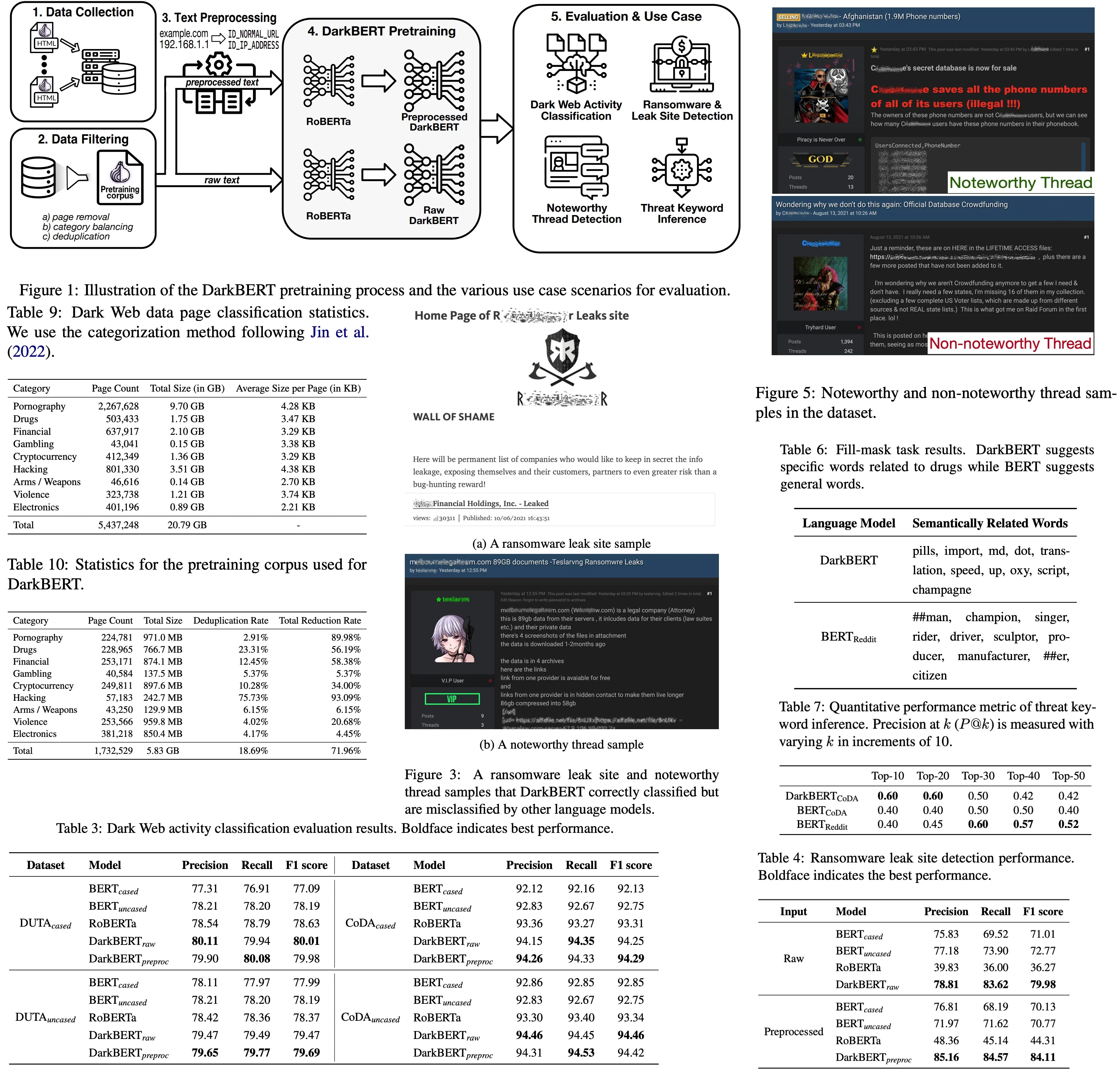
https://arxiv.org/abs/2305.08596
Desenvolvido por uma equipe sul-coreana, este modelo de inteligência artificial é treinado com dados extraídos da Dark Web. É incontestável que entramos a era das inteligências artificiais, especialmente após o surgimento de modelos equipados com LLM, ou “Large Language Model”, como o ChatGPT, desenvolvido pela OpenAI.
Isso é possível porque essas IA’s têm acesso a vastos repositórios de dados interconectados por redes neurais artificiais e são treinadas para se comunicarem da forma mais eficiente possível. Contudo, o progresso das inteligências artificiais tem gerado apreensões por parte de empresários e autoridades globais, que temem que as habilidades desses robôs possam ser exploradas para fins maliciosos.
Nesse contexto, foi recentemente lançado o DarkBERT, um chatbot similar ao ChatGPT, mas treinado com dados obtidos das partes mais profundas da internet, a dark web. Segundo seus criadores sul-coreanos, o DarkBERT é fundamentado em uma estrutura de dados conhecida como RoBERTa, que realiza um trabalho bastante similar às suas contrapartes mais famosas.
Para conceber o novo chatbot, os pesquisadores acessaram as redes de dados da dark web para coletar informações que poderiam ser ensinadas ao DarkBERT. Assim, agora o DarkBERT possui seu próprio acervo de dados sobre informações circuladas na Dark Web.
É importante ressaltar que a dark web é um ambiente frequentado por criminosos para, predominantemente, comercializarem itens ilegais, como relíquias furtadas, mercadorias de contrabando e até órgãos humanos. Além disso, na dark web também é possível monitorar a atividade de grupos extremistas e a propagação de discursos de ódio e ideias prejudiciais à manutenção da sociedade como a conhecemos.
Como foi desenvolvido? Os pesquisadores treinaram o modelo RoBERTa ao vasculhar a Dark Web através da rede conhecida como Tor. A partir daí, aplicaram técnicas de filtragem de dados, como pré-processamento de dados, e construíram um banco de dados com informações da Dark Web.
Em outras palavras, o DarkBERT nasceu da utilização do Large Language Model (LLM) RoBERTa, alimentado com as informações obtidas por esse banco de dados. Desta forma, o software é capaz de analisar dados de sites e conteúdos da internet profunda, mesmo escritos em linguagens específicas, para depois utilizá-los de maneira útil.
Como pode ser utilizado? O modelo criado pode ser empregado por forças policiais de cibersegurança, pois pode penetrar nas camadas profundas da web, onde transações ilegais ocorrem em grande escala. O DarkBERT pode continuar se aperfeiçoando e sendo aplicado em áreas ainda inexploradas.
Conforme seus desenvolvedores, o DarkBERT ainda pode ser aprimorado e atualizado, assim como outros chatbots altamente inteligentes. Para isso, a equipe continuará atualizando o seu banco de dados.

openSUSE Aeon. En que me vi envuelto y como me desenvolví: VS Code
MicroOS Desktop. En que me vi envuelto y como me desenvolví: VS Code
Resumen de Ujilliurex 2023, edición «Proyecto Lliurex de la GVA. Centrándonos en Lliurex.»
Como dije hace unos días, KDE estuvo presente en Ujilliurex 2023, edición «Lliurex de la GVA. Centrándonos en Lliurex.» un evento que celebra de nuevo en busca de difundir más el Software Libre entre la Comunidad Docente. Hoy quiero hacer un resumen de Ujilliurex 2023 ya que fue plenamente positiva en todos los aspectos quedando en el aire solo un detalle… pero no adelantemos acontecimientos.
Resumen de Ujilliurex 2023, edición «Proyecto Lliurex de la GVA. Centrándonos en Lliurex.»
Antes de entrar en detalles sería bueno repasar mi experiencia previa con este evento. A lo largo de muchos años fui un espectador lejano de este evento, sabía que se celebraba pero al ser presencial y entre semana me resultaba complicado ni siquiera asistir.
Tuvo que llegar una pandemia para que participara activamente en él, ya que los eventos presenciales se conviritieron en virtuales y Ujilliurex no fue una excepción. De esta forma participé desde casa en las ediciónes de 2020 y del 2021.
El año pasado mi vida se volvió loca y, aunque tenía previsto asistir presencialmente a Ujilliurex 2022 con una ponencia sobre Asker, tema que tengo pendiente en el blog, y al final la realizó el desarrollador del proyecto, un gran favor que todavía no está suficientemente pagado.

Este año, al fin, podría participar de forma activa ya que gracias mi nueva situación laboral, no solo podía presentar una nueva charla de forma presencial sino que también estar toda la jornada: desde el inicio hasta la clausura oficial.
De esta forma a las 9.30 de la mañana ya estaba en la sala del evento pero me redirigieron a la cafetería, dispuesto conocer gente del mundo Lliurex… y tuve la suerte de encontrarme con casi todos los desarrolladores de este gran proyecto/distribución. Dado que no puedo decir intimidades simplemente decir que me parecieron gente muy comprometida con su trabajo y que dan todo lo que pueden para realizar un producto que satisfaza a los usuarios y a los que dictan las líneas generales del mismo.
Tras tomarme un café con ellos nos dirigimos de nuevo a la sala Magna, donde se realizarían todas las ponencias, y tras las presentaciones protocolarias de de rigor, empezó el evento propiamente dicho. Tal y como estaba previsto, uno a uno, los desarrolladores presentes de Lliurex fueron pasando al estrado comentando diversos aspectos del presente y del futuro del proyecto, herramientas para educadores (casi todas de KDE), nuevas métodos de autentificación de Lliurex, los cambios debidos a la implementación de redes Wifi, etc.
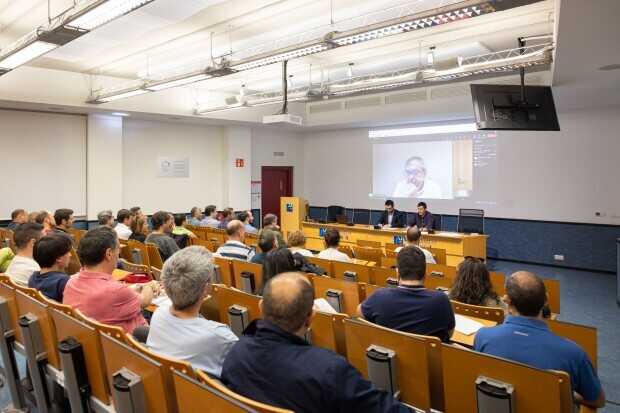
Yo, por mi parte, además de atender las ponencia, me dediqué a retransmitir buena parte del evento por twitter. De hecho podéis seguir la jornada si buscáis la etiqueta #ujillirex.
Así transcurre la mañana hasta la hora de comer, donde la organización tiene el detalle de invitarme. Tras la ingesta necesaria para recuperar energías volvemos con las tres útlimas charlas:
La IA y la educación: ¿Una combinación ganadora o una receta para el desastre? por Jesús Miguel Donoso Arévalo, «Más secretos de Lliurex, cosas que no sabes que puedes hacer y te ahorran mucho tiempo» por Baltasar Ortega (un servidor) y Aplicacions LliureX per treure profit amb panells tàctils por Tàfol Nebot Gómez,
Todas interesantes (¿qué voy a decir de la mía) por distintos motivos: la primera porque es una reflexión interesante, la segunda porque los Service Menu molan y la tercera porque nunca está de más conocer aplicaciones libres útiles para el mundo educativo.
Me he tomado la molestia de subir mi presentación para que la podáis disfrutar.
Sobre las 19 horas, un poco antes de lo previsto, finalizaron las charlas. Momento de la despedida y de la alegría ya que para los organizadores es importante que todo salga bien, y en esta ocasión (como creo que en todas las anteriores) así fue con Ujilliurex 2023.
Como podéis haber leido, toda la jornada fue en éxito tanto por la calidad de las intervenciones como por el público asistente, que aún siendo un miércoles era mayor del que yo esperaba. La retrolamientación del mismo fue increible y conocer de primera mano lo bueno que ofrece LLiurex y los problemas a los que se enfrenta es fundamental para entender su funcionamiento.
La gran pega de este evento es que solo se realiza una vez al año y solo en la Universidad Jaume I de Castellón, cuando Liurex está implementado en toda la Comunidad Valenciana y es extremadamente positivo conocer un proyecto para, no solo comprenderlo, sino para poder aportar algo para mejorarlo. Así que espero que otras personas, además del gran Julio Pacheco, salgan de sus cuevas y empiecen a ayudar visualizar un proyecto que aporta tantos beneficios a toda la Comunidad Educativa.
¿Qué es Ujilliurex?
Se trata de un evento que tiene bastante solera en la provincia de Castellón en el que teniendo como protagonista la distribución de la Generalitat Valenciana Lliurex se presentan novedades sobre ésta y sobre otros proyectos libres.
Concretamente sus objetivos fundamentales son:
- Difundir el uso y manejo de las TIC en la distribución LliureX entre la comunidad educativa universitaria
- Promover la coordinación, el intercambio y la discusión de conocimientos y experiencias entre profesores universitarios, especialmente de los departamentos con una mayor implicación tanto en la parte educativa de los futuros docentes (Depto. Educación), como posibles usuarios de Lliurex como herramienta en su especialidad (Depto. de Traducción e Interpretación y Depto. de Estudios Ingleses), con docentes de centros educativos de la comunidad valenciana, especialmente de los departamentos de idiomas y Coordinadores de Tecnologías de la Información (Coordinadores TIC).
- Compartir conocimiento y debatir sobre el contenido de la distribución y la utilización de diversas aplicaciones de la distribución
- Iniciar una serie de contactos entre las entidades organizadoras de la jornada y los asistentes de los diferentes centros y departamentos.
La entrada Resumen de Ujilliurex 2023, edición «Proyecto Lliurex de la GVA. Centrándonos en Lliurex.» se publicó primero en KDE Blog.
Resumen de Ujilliurex 2023, edición «Digitalización y enseñanza presencial»
Como dije hace unos días, KDE estuvo presente en Ujilliurex 2023, edición «Digitalización y enseñanza presencial» un evento que celebra de nuevo en busca de difundir más el Software Libre entre la Comunidad Docente. Hoy quiero hacer un resumen de Ujilliurex 2023 ya que fue plenamente positiva en todos los aspectos quedando en el aire solo un detalle… pero no adelantemos acontecimientos.
Resumen de Ujilliurex 2023, edición «Digitalización y enseñanza presencial»
Antes de entrar en detalles sería bueno repasar mi experiencia previa con este evento. A lo largo de muchos años fui un espectador lejano de este evento, sabía que se celebraba pero al ser presencial y entre semana me resultaba complicado ni siquiera asistir.
Tuvo que llegar una pandemia para que participara activamente en él, ya que los eventos presenciales se conviritieron en virtuales y Ujilliurex no fue una excepción. De esta forma participé desde casa en las ediciónes de 2020 y del 2021.
El año pasado mi vida se volvió loca y, aunque tenía previsto asistir presencialmente a Ujilliurex 2022 con una ponencia sobre Asker, tema que tengo pendiente en el blog, y al final la realizó el desarrollador del proyecto, un gran favor que todavía no está suficientemente pagado.
Este año, al fin, podría participar de forma activa ya que gracias mi nueva situación laboral, no solo podía presentar una nueva charla de forma presencial sino que también estar toda la jornada: desde el inicio hasta la clausura oficial.
De esta forma a las 9.30 de la mañana ya estaba en la sala del evento pero me redirigieron a la cafetería, dispuesto conocer gente del mundo Lliurex… y tuve la suerte de encontrarme con casi todos los desarrolladores de este gran proyecto/distribución. Dado que no puedo decir intimidades simplemente decir que me parecieron gente muy comprometida con su trabajo y que dan todo lo que pueden para realizar un producto que satisfaza a los usuarios y a los que dictan las líneas generales del mismo.
Tras tomarme un café con ellos nos dirigimos de nuevo a la sala Magna, donde se realizarían todas las ponencias, y tras las presentaciones protocolarias de de rigor, empezó el evento propiamente dicho. Tal y como estaba previsto, uno a uno, los desarrolladores presentes de Lliurex fueron pasando al estrado comentando diversos aspectos del presente y del futuro del proyecto, herramientas para educadores (casi todas de KDE), nuevas métodos de autentificación de Lliurex, los cambios debidos a la implementación de redes Wifi, etc.
Yo, por mi parte, además de atender las ponencia, me dediqué a retransmitir buena parte del evento por twitter. De hecho podéis seguir la jornada si buscáis la etiqueta #ujillirex.
Así transcurre la mañana hasta la hora de comer, donde la organización tiene el detalle de invitarme. Tras la ingesta necesaria para recuperar energías volvemos con las tres útlimas charlas:
La IA y la educación: ¿Una combinación ganadora o una receta para el desastre? por Jesús Miguel Donoso Arévalo, «Más secretos de Lliurex, cosas que no sabes que puedes hacer y te ahorran mucho tiempo» por Baltasar Ortega (un servidor) y Aplicacions LliureX per treure profit amb panells tàctils por Tàfol Nebot Gómez,
Todas interesantes (¿qué voy a decir de la mía) por distintos motivos: la primera porque es una reflexión interesante, la segunda porque los Service Menu molan y la tercera porque nunca está de más conocer aplicaciones libres útiles para el mundo educativo.
Me he tomado la molestia de subir mi presentación para que la podáis disfrutar.
Sobre las 19 horas, un poco antes de lo previsto, finalizaron las charlas. Momento de la despedida y de la alegría ya que para los organizadores es importante que todo salga bien, y en esta ocasión (como creo que en todas las anteriores) así fue con Ujilliurex 2023.
Como podéis haber leido, toda la jornada fue en éxito tanto por la calidad de las intervenciones como por el público asistente, que aún siendo un miércoles era mayor del que yo esperaba. La retrolamientación del mismo fue increible y conocer de primera mano lo bueno que ofrece LLiurex y los problemas a los que se enfrenta es fundamental para entender su funcionamiento.
La gran pega de este evento es que solo se realiza una vez al año y solo en la Universidad Jaume I de Castellón, cuando Liurex está implementado en toda la Comunidad Valenciana y es extremadamente positivo conocer un proyecto para, no solo comprenderlo, sino para poder aportar algo para mejorarlo. Así que espero que otras personas, además del gran Julio Pacheco, salgan de sus cuevas y empiecen a ayudar visualizar un proyecto que aporta tantos beneficios a toda la Comunidad Educativa.
¿Qué es Ujilliurex?
Se trata de un evento que tiene bastante solera en la provincia de Castellón en el que teniendo como protagonista la distribución de la Generalitat Valenciana Lliurex se presentan novedades sobre ésta y sobre otros proyectos libres.
Concretamente sus objetivos fundamentales son:
- Difundir el uso y manejo de las TIC en la distribución LliureX entre la comunidad educativa universitaria
- Promover la coordinación, el intercambio y la discusión de conocimientos y experiencias entre profesores universitarios, especialmente de los departamentos con una mayor implicación tanto en la parte educativa de los futuros docentes (Depto. Educación), como posibles usuarios de Lliurex como herramienta en su especialidad (Depto. de Traducción e Interpretación y Depto. de Estudios Ingleses), con docentes de centros educativos de la comunidad valenciana, especialmente de los departamentos de idiomas y Coordinadores de Tecnologías de la Información (Coordinadores TIC).
- Compartir conocimiento y debatir sobre el contenido de la distribución y la utilización de diversas aplicaciones de la distribución
- Iniciar una serie de contactos entre las entidades organizadoras de la jornada y los asistentes de los diferentes centros y departamentos.
La entrada Resumen de Ujilliurex 2023, edición «Digitalización y enseñanza presencial» se publicó primero en KDE Blog.

Project’s Community Conference to Begin Friday
This year’s openSUSE Conference starts in about 72 hours and open-source enthusiasts, contributors and supporters are making their way to Nuremberg, Germany, for a collaborative community event.
Talks begin on May 26 at 9:30 a.m. Central European Time and the event will be streamed by c3voc; the stream link will be posted on events.opensuse.org before the event begins. The schedule lists plenty of talks ranging from an introduction to the Geeko Foundation to an introduction of the service-based Linux installer Agama.
Talks will take place in two presentation rooms at the event and are labeled on the schedule as Saal and Galerie. Stream viewers can ask questions to the presenters during the event via two Telegram channels that correspond with the room where the presentation is being held. Questions for talks in Saal should be asked in the https://t.me/oscsaal Telegram channel and questions for talks in Galerie should be asked in the https://t.me/oscgalerie Telegram channel. Questions may be presented to the speakers as time allows.
There are other online event interactions as well. From a Fedora Hatch event to a Kubernetes workshop, attendees are being reminded to incorporate events with people attending the conference virtually. Like the Telegram channels for talks, those giving workshops are encouraged to incorporate a Jitsi room corresponding to where their workshop is taking place. Workshops on the schedule listed in Seminar Raum 1 will have a dedicated virtual room https://meet.opensuse.org/Seminarraum1 and Seminar Raum 2 will have a dedicated virtual room https://meet.opensuse.org/Seminarraum2.
Members of the community are also looking for help during and after the conference. The video team needs help during the conference. The team at the physical location really needs help as the video recording, editing, and streaming can be demanding if not enough people are willing to help. The video team will be meeting at 9:00 a.m. in Saal on May 26, so please join and help the team with our online viewership and recorded videos.
There are also several other areas the openSUSE community can use help with. A list of those items can be found at https://etherpad.opensuse.org/p/help. Consider helping out as the project can use some help in quite a few areas.
The openSUSE Project’s annual openSUSE community event brings people from around the world together to meet, collaborate and learn. With organized talks, workshops and meetup sessions, openSUSE Conference 2023 provides a framework for communities to enhance and improve open-source technologies and shared projects.
The project thanks our sponsors for the great support. This year’s sponsors are SUSE, arm, The Geeko Foundation, Fedora, Linux Pro Magazine and FOSSLife.
Modificado el programa de charlas de Akademy-es 2023 de Málaga Opensouthcode Edition #akademyes
Como ya sabréis este año se celebra Akademy-es 2023 se celebrará en de forma presencial en Málaga, junto la Opensoutcode del 9 al 10 de junio, viernes y sábado. Ayer, por problemas logísticocs, fue modificado el programa de charlas de Akademy-es 2023. Léelo y seguro que encuentras más de una razón para acompañarnos.
Modificado el programa de charlas de Akademy-es 2023 de Málaga Opensouthcode Edition #akademyes
El 9 y 10 de junio se va a celebrar Akademy-es 2023 de Málaga que se celebrará organizado por KDE España y de forma paralela a otro gran evento como es Opensouthcode.
Este año se volvemos a tener un gran programa de ponencias, que van desde lo último en Plasma y en proyectos KDE pasando por temas de hardware, programación, ciberseguridad y privacidad. Ayer domingo fue modificado el mismo, dejándo a un humilde servidor como cierre de la jornada del viernes, todo un honor.
Esta es la nueva planificación.
Viernes 9 de junio
- 10:00 – 10:15 Ceremonia de apertura de Akademy-es
- 10:15 – 10:55 Cómo se gestionan las traducciones del proyecto KDE – Albert Astals Cid, Coordinador de traduciones de KDE
- 11:00 – 11:45 Python y Qt – José Millán Soto, KDE España
- 12:00 – 12:45 Cuando llegue el año del escritorio – Aleix Pol i González, Presidente de KDE eV – En remoto
- 13:00 – 13:45 Las dificultades de las asociaciones ante las obligaciones documentales y fiscales – GNU/Linux Valencia – En remoto
Descanso - 16:00 – 16:45 Software libre y educación: El papel de KDE en los centros educativos de bajos recursos – Carlos Chan – En remoto
- 17:00 – 17:45 Audiofilia en Linux – Antonio Larrosa, desarrollador KDE
- 18:00 – 18:25 Charlas relámpago
- 18:30 – 18:50 KDE España – Adrián Chaves, presidente KDE España
- 19:00 – 19:45 Más secretos de Plasma y KDE – Baltasar Ortega, Editor de kdeblog
Sábado 10 de junio

- 10:00 – 10:45 KDE y Qt 6 – Albert Astals Cid, desarrollador de KDE
- 11:00 – 11:45 Commons el almacén multimedia de Wikimedia y otros proyectos relacionados – Pedro Pacheco, Wikimedia España
- 12:00 – 12:45 Empaquetando el software de KDE en Arch – Antonio Rojas, empaquetador de KDE y software matemático en Arch Linux
- 13:00 – 13:45 Encaminamiento en el Centro de Datos con software Open Source – Eduardo Collado
Descanso - 16:00 – 16:45 Hola soy un usuario de KDE y llevo mas de 20 años siéndolo – José Jiménez, formador y usuario de KDE y Fedora
- 17:00 – 17:45 Sostenibilidad y software/hardware libre – Paula de la Hoz, analista de ciberseguridad
- 17:50 – 18:00 Ceremonia de clausura
Nota: Las charlas y horarios pueden sufrir ligeras modificaciones dependiendo de la disponibilidad de los ponentes
Vía: KDE España
La entrada Modificado el programa de charlas de Akademy-es 2023 de Málaga Opensouthcode Edition #akademyes se publicó primero en KDE Blog.
openSUSE.Asia Summit 2023 Announcement
Chongqing, China, Selected for openSUSE.Asia Summit 2023
Chongqing has been accepted to host the openSUSE.Asia Summit 2023 and the openSUSE.Asia Summit will return to China for the second time, Chongqing is one of the four directly-administered municipalities of the PRC, located in southwest China, bordered by Sichuan, Yunnan and other areas, is one of the second batch of national historical and cultural city announced by the State Council of China.The world map hanging in the halls of the United Nations, marked only the names of four cities in China, one of which is Chongqing.PRC
The openSUSE.Asia Summit is a highly anticipated event for supporters of openSUSE in China and Free/Libre Open Source Software (FLOSS) in general. This activity will bring together experts, contributors, end-users and technology enthusiasts.will gather to share experiences about the development of openSUSE and other things related to FLOSS and have a lot of fun.The venue for the openSUSE.Asia Summit was chosen by vote of openSUSE.Asia committee . Finally, the Asian committee decided Chongqing as the host of openSUSE.Asia Summit 2023 from October 21, 2023 to October 23, 2023, at Chongqing University of Posts and Telecommunications.
Some of the goals to be achieved at the openSUSE.Asia Summit 2023 in Chongqing will be to
- Promotion of openSUSE in China.
- Attraction of new openSUSE contributors from China and other Asian countries.
- To provide an alternative for the wider community to see that FLOSS can be a powerful tool for them to use in their day-to-day work.
- Provide a platform for the exchange of experiences between users and developers, where such discussions would normally only take place online.
Finally, we are proud to present Chongqing as one of the best locations for openSUSE.Asia.
Pre-announcement
openSUSE.Asia Summit 2023 will open a call for papers for potential speakers. and the openSUSE.Asia Summit 2023 logo competition will also be opened. The logo competition would be an opportunity for designers in Asia to compete with each other to showcase their skills and be a part of this activity. More details about the above information will be announced in the near future via news.opensuse.org.
See you in Chongqing!