
 Member
 jimmac
Flathub Brand Refresh
While Flatpak itself is an architecturally decentralized way to distribute apps, Flathub embraces the convenience for people to come to one place to install apps. There’s some fairly big changes coming to Flathub that I’m extremely excited about, that will make sure the new wave of Linux apps doesn’t fizzle out and we’ll maintain a sustainable application ecosystem.
Thus there is no better time to refresh what has become a little dated, Flathub’s visual identity. It centers around the core of what Flathub is — the apps themselves. The identity isn’t very loud and shouty. The flashy colors and emphasis remains on the apps themselves, Flathub is the neutral platform for the apps to shine.

Take a peek at the brand guidelines to learn more about the new Flathub brand or download the logos in scalable format. The download buttons for app websites are also available.


Building a brand on neutral greys isn’t quite an easy sell, but precisely targets the main point of the Flathub brand. It creates the stage for apps to shine. Flathub isn’t flashy by itself. It allows the apps to be at the center of your attention.
If you’ve read until this point, you deserve a treat! Here’s some eye candy from the early stages of the process. Wallpapers derived from the elemental shapes of the logomark. Clearly off limits now, but can’t just throw them away, can I?


Big shoutout to razze for his ongoing work on the website and implementing the brand so quickly. Many thank yous to Tobias Bernard for significant involvment in this during the Berlin Mini GUADEC and Václav Vančura for sensible feedback.

Awareness Sessions About Projects Available for GSoC Applicants
Mentors and administrators of openSUSE are excited to be accepted as a mentorship organization for this year’s Google Summer of Code and will be available for potential mentee to discuss the projects that are listed on 101.opensuse.org.
There will be 15 minute sessions prior to all openSUSE community meetings where mentees can join our Jitsi meeting room to get in touch with members of the openSUSE community who can help them navigate the projects available during this year’s GSoC.
Community meetings are every Tuesday and Thursday and the times vary. The Tuesday session for mentee applicants starts at 15:15 UTC and the Thursday session begins at 19:45 UTC. Meeting times begin at 15:30 UTC and 20:00 UTC respectively.
Potential mentee applicants can view a list of projects on 101.opensuse.org and communicate directly with mentors leading the project through commenting on the GitHub issue listing the project of interest. Not all mentors are available during the time slotted for the awareness sessions, but those who are available will help the best they can with the information they have available about a project.
Sessions will be available from Feb. 23 - April 4. There are 15 projects listed this year. Some of the projects listed involve topics related to devops, artificial intelligence, security, cryptography, Kubernetes, containers and quality assurance. Many of the projects’ languages include Python, Rust, Perl, ReactJS, JavaScript, Ruby and more.
Versión 2023.01.27 de digiKam recipes, libro de trucos
Creo que es hora de volver a recordar la existencia del manual de trucos para este magnífico software de gestión de fotografías. Y la razón es anunciar que ya está disponible la nueva versión 2023.10.27 de digiKam recipes un excelente libro que nos puede ayudar a utilizar esta magnífica aplicación de forma más eficiente.
Versión 2023.01.27 de digiKam recipes, libro de trucos
El pasado 27 de enero de 2023 fue lanzado una nueva versión de digiKam Recipes, concretamente la versión 23.01.27, lo que significa un nuevo avance en el desarrollo de este manual.
En palabras de sus desarrolladores:
Nuevo año, nuevo libro de recetas digiKam. La nueva versión incluye el capítulo completamente reescrito Caras de etiquetas con la función de reconocimiento facial y una sección de flujo de trabajo de ejemplo totalmente nueva en el capítulo Procesamiento por lotes de fotos y archivos RAW. Se han revisado y mejorado varios capítulos, como Editar etiquetas con Tag Manager, Gestión del color en digiKam y Mover la biblioteca y las bases de datos de digiKam. También se han renovado todas las capturas de pantalla. Como siempre, la nueva revisión incluye un montón de ajustes y correcciones.

Hay que recordar que este libro que no es un manual de instrucciones clásico que explica paso a paso las funciones de digiKam, sino que explica trucos que podremos realizar con nuestra fotografía.
Más información: Digikam
5 razones para comprarte digiKam recipes
En realidad habrán muchos más que descubrirás al ir aplicando sus trucos, pero estos son 5 puntos importantes que hacen recomendable adquirir este libro para los amantes de la fotografía.
- Es el primero y el único libro, de momento, sobre digiKam.
- El libro ha estado escrito con colaboración estrechamente desarrolladores de digiKam.
- 50% del precio de venta irá para el proyecto digiKam.
- El libro está libre de DRM, así que puedes utilizar cualquier lector de ebook que soporte los formatos EPUB o MOBI.
- Recibirás todas las futuras ediciones sin cargo alguno (esto parece una teletienda)
El libro, cuyo precio vía PayPal es de 9,99$, está lanzado bajo licencia Creative Commons Attribution-NonCommercial-ShareAlike 3.0 Unported, así que una vez adquirido puedes compartir el libro y modificarlo siempre que compartas las mismas.
Puedes adquirir el libro vía PayPal, Amazon Kindle Store, Gumroad, y GitBook.io.
¿Qué es digiKam?
La mejor forma de definirlo es buscar como se describe esta aplicación de userbase.kde.org y realizar una pequeña síntesis:
DigiKam es una aplicación que te permite la importación de fotografías desde cámaras o cualquier dispositivo, creando álbumes, etiquetando con fechas y lugares, temas y otras propiedades, y utilidades de búsqueda excelentes y de reconocimiento facial.
En otras palabras, con digiKam podrás ver, administrar, editar, mejorar, organizar, etiquetar y compartir fotos de una forma profesional.
La entrada Versión 2023.01.27 de digiKam recipes, libro de trucos se publicó primero en KDE Blog.
Installing a syslog-ng 4 development snapshot on FreeBSD
Unless there is a serious problem, FreeBSD ports usually contains the latest stable syslog-ng release. However, sometimes people want to compile a git snapshot to test a new feature or bugfix. To do that, one way is to generate a syslog-ng release tgz on FreeBSD and edit the syslog-ng port files yourself. However, this needs some practice. As such, an easier solution is to use my weekly development snapshots.
Learn how from my latest blog at: https://www.syslog-ng.com/community/b/blog/posts/installing-a-syslog-ng-4-development-snapshot-on-freebsd

syslog-ng logo
Fondo de pantalla para Plasma 5.27: Mountain
Hay gente que detesta los wallpapers de la Comunidad KDE que a mi me solían gustar (sobre todo cuando los veo en pantallas grandes de televisores). Estos fondos destacaban por tener formas geométricas, principalmente triángulos, con combinaciones de colores cada vez más atrevidos. Pues bien para este nuevo fondo de pantalla para Plasma 5.27 los desarrolladores nos han sorprendido con un completamente diferente. Se trata de una creación de Andy Betts que ha titulado Mountain y que queda, en mi humilde opinión, espectacular.
Fondo de pantalla para Plasma 5.27: Mountain
Una de las características de los lanzamientos del escritorio Plasma, lo que alguno entienden como KDE pero que no) es que cada ciertos lanzamiento actualizan también su fondo de pantalla. De hecho, hay una entrada recurrente en el blog sobre la evolución del mismo que se ha quedado en la versión Plasma 5.20.
En esta ocasión, y mientras espero poder anunciar la primer actualización de Plasma 5.27 os presento su fondo de pantalla lleva el nombre “Mountain”, una creación de Andy Betts que nos muestra un sistema montañoso que, aunque no lo parezca a primera vista) sigue estando formado por figuras geométricas de colores azulados. Como es habitual, lo podéis ver a continuación y si pincháis en él lo podéis ampliar.
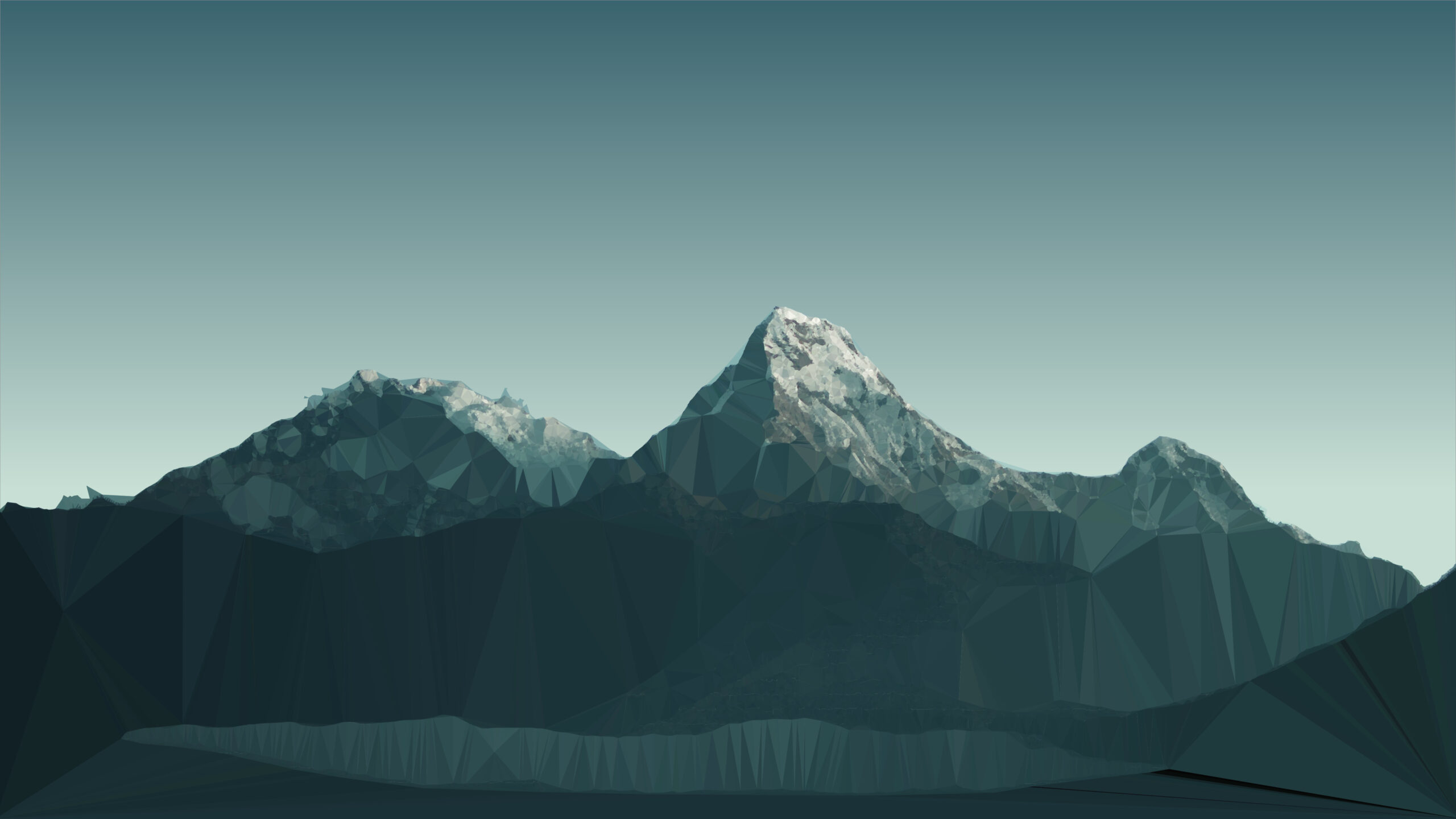
Creo que al igual que «Opal» de Plasma 5.11, el fondo de pantalla de la edición 25 aniversario del proyecto KDE o Wavy McWallpaperface el fondo de 5.24, este será un fondo que se verá de forma espectacular en pantallas grandes y luminosas como comprobé cuando realicé una charla en Vilanet en el 2017 y pude ver ese fondo en un gran televisor, o en Linux Center en Noviembre.
¿Qué os parece? ¿Lo pondréis en vuestro escritorio? Yo ya lo he hecho… y se va a quedar un buen tiempo.
La entrada Fondo de pantalla para Plasma 5.27: Mountain se publicó primero en KDE Blog.
Auto Mount Folder Share
Bismillah,
Untuk lebih memahami dari apa yang saya tulis, saya mempunyai sebuah server yang berfungsi sebagai file server. Kemudian saya mempunyai sebuah komputer (dengan sistem operasi Linux tentunya), menginginkan agar folder atau file yang dishare otomatis akan ter-mounting ketika komputer dinyalakan. Jadi kalau kita mengingat di sistem operasi Windows, biasanya kita menggunakan fitur Map network drive.
Sebenarnya langkah yang paling sederhana ialah kita bisa memanfaatkan fitur shortcut. Misalkan pada file manager Dolphin, pertama kita akses folder pada file server dengan mengetik smb://(address ip server). Kemudian pada menu File pilih Add to Places, maka akan muncul folder shortcut pada side bar. Akan tetapi ada beberapa kelemahannya seperti keterbatasan pada read and write, dan lain – lain. Oleh karena itu, untuk mengatasi hal tersebut, maka kita bisa melakukan mounting folder yang di-share tersebut. Berikut langkah-langkahnya.
- Pastikan alamat file server beserta path dari folder yang akan dimount sudah diketahui.
- Buka aplikasi terminal.
- Ketik id, untuk mengetahui id user dan group.
- Buat folder di /mnt, misal sudo mkdir folder_shared.
- kemudian edit file fstab pada folder /etc, misalkan saya menggunakan text editor nano maka ketik di teminal sudo nano /etc/fstab.
- Tambahkan baris berikut,
//<ip server>/path_folder /mnt/folder_shared cifs defaults,nofail,x-systemd.automount,x-systemd.requires=network-online.target,uid=1000,gid=100,guest 0 0 - Kemudian mount folder tersebut, dengan mengetik sudo mount -a
- Jika berhasil, maka pada sidebar di path Remote akan tampil folder yang telah dimount tersebut.

- Agar bisa di-rename maka kita bisa menggunakan fasilitas shortcut sebagaimana telah di jelaskan sebelumnya.
- Jika telah dibuat shortcut maka folder yang dimount pada section Remote bisa dihide dengan cara klik kanan kemudian checklist Hide. Berikut hasilnya,


Saya menggunakan desktop KDE Plasma dengan Dolphin sebagai aplikasi file managernya. Kemungkinan akan sedikit berbeda dengan aplikasi file manager yang lain. Semoga bermanfaat.
Disponible la versión Beta de openSUSE Leap 15.5
Ya se puede descargar y probar la versión Beta de la que será la versión 15.5 de openSUSE Leap

La distribución de GNU/Linux openSUSE, anunció que su distribución de publicaciones periódicas, la que es openSUSE Leap ya tiene una versión Beta para probar su próxima versión Leap 15.5. Ya puedes descargarla y probarla en tu equipo.
Esta versión Beta se publica, para que la comunidad la pruebe en sus equipos y puedan reportar los posibles errores encontrados para que se solucionen antes de la publicación definitiva que se espera que sea para principios de junio de este año 2023.
Este nuevo «service pack» o 5ª actualización de la serie 15 de openSUSE Leap ofrecerá algunas actualizaciones de sus paquetes, aunque en esta versión no esperéis grandes cambios, si no mantener la estabilidad y mejoras en seguridad.
Habrá disponible un nuevo paquete de Mesa y el repositorio de controladores OpenH264 estará habilitado de manera predeterminada para todas las nuevas instalaciones de Leap 15.
Python 3.10 con todos los módulos más importantes estarán disponibles para los usuarios al finalizar el periodo Beta.
Para todas las personas que usen KDE como entorno de escritorio, encontrarán que estará disponible Plasma 5.27, en Leap 15.5, que es la versión más reciente del escritorio de KDE y que es la nueva versión LTS o de soporte extendido.
Linux Kernel 5.14.21 seguirá siendo la versión del kernel incluida, al igual que en Leap 15.4.
A nivel estético, se cambiará el fondo de escritorio oficial, incluso tu mismo puedes participar en el nuevo fondo de escritorio si estás interesado o interesada en compartir tus diseños. Asegúrate de que siguen las guías de diseño.
Esta versión 15.5 será la última publicación de la serie Leap 15 que su primera versión fue publicada en mayo de 2018.
Podrás probar Leap 15.5 en equipos de arquitecturas x86_64, aarch64, PowerPC y s390x.
Si tienes tiempo, puedes probar Leap 15.5 en tus equipos y así probarlo en muchos tipos de hardware distintos, equipos con diferentes características, distintos hardware y compartir tus experiencias en esta hoja de cálculo (en Google doc). También se podrá probar openSUSE Leap 15.5 en Windows Subsystem for Linux eso sí, contactando en la lista de correo de factory.
Los errores encontrados deberán reportarse en bugzilla para que se puedan ir solucionando. Se publicará en la wiki una lista de los errores más molestos para Leap 15.5 beta.
La hoja de ruta muestra que openSUSE Leap 15.5 alcanzará su fase Release Candidate a finales de abril y se espera que Gold Master se publique a finales de mayo, que luego hará la transición a la versión final. El fin del plazo de documentación y traducciones está previsto para el 14 de mayo.

Syslog-ng 101, part 8: Macros and templates
This is the eighth part of my syslog-ng tutorial. Last time, we learned about network logging. Today, we learn about syslog-ng macros and templates. At the end of the session, we will know how to do a simple log rotation using macros.
You can watch the video on YouTube:
and the complete playlist at https://www.youtube.com/playlist?list=PLoBNbOHNb0i5Pags2JY6-6wH2noLaSiTb
Or you can read the rest the tutorial as a blog at: https://www.syslog-ng.com/community/b/blog/posts/syslog-ng-101-part-8-macros-and-templates
syslog-ng logo
Leap 15.5 Reaches Beta Phase
The release manager for openSUSE Leap Luboš Kocman is expected to announce the Beta release phase of Leap 15.5 soon. The first Beta release is syncing on mirrors globally for people to download it and test it out.
Users can begin testing the beta versions to find bugs before the general release, which is scheduled for official release at the beginning of June, according to the roadmap.
The version will offer some newer software versions, but the release is not a feature release. Packages like a newer Mesa and having the OpenH264 repository enabled by default for all new Leap 15.5 installations is planned. Another new element for Leap 15.5 is a migration option. A new single-click migration streamlines a migration process that took three steps in previous openSUSE Leap releases. The users that want to migrate from previous releases or 15.5 Alpha can install openSUSE-repos-Leap, which comes with the repo definition and it utilizes zypp services for repo management; although this feature is not enabled by default. However, a zypper-migration-plugin implementation as the main request on the Graphical User Interface has been fulfilled into a separate element related to SUSE Linux Enterprise 15 Service Pack 5.
Python 3.10 with its relevant modules will be made available to users in a later part of the Beta phase, which will provide users a fully capable alternative to the default system of Python 3.6. A utility for managing Linux software RAID arrays was taken care of with an mdadm 4.2 upgrade. An update for KDE users will happen with the Desktop Environment for Leap 15.5 set to have Plasma 5.27, Plasma 5.27 is a Long Term Support version until the next LTS rolls around in 2024. It provides excellent stability along with bug fixes. A known issue for Leap 15.5 is the installation of util-linux-lang on ppc64le fails and is recorded with boo #1208196.
Linux Kernel 5.14.21 version will remain the same as that of Leap 15.4. Despite identical base kernel version number, the kernel adds number of latest upstream backports which amount to some individual 19,000 patches. The biggest changes are in the area of GPU drivers, networking drivers and storage drivers. The last extends to device mapper and io_uring updates. This continues with updated drivers: bluetooth, ACPI, Intel QAT and xHCI. A large effort also went to updating BPF code to recent upstream.
The wallpaper is expected to change as seen in the image above, but there is an option for designing a new wallpaper for anyone interested in providing a design contribution. There are some guidelines to help those willing to contribute.
The 15.5 version is expected to be the last of the Leap 15 series releases, which was first released in May of 2018.
Architectures available for testing include x86_64, aarch64, PowerPC and s390x.
Testers are encouraged to try out Leap 15.5 on multiple laptops, workstations and other hardware devices. People testing it are encouraged to record their Leap Beta testing efforts on this spreadsheet. Those interested in beta testing images for openSUSE Leap 15.5 Windows Subsystem for Linux can contact Kocman or the factory mailing list.
Bugs should be reported on openSUSE’s bugzilla. Bugs for packages inherited from SUSE Linux Enterprise should be reported against PUBLIC SUSE Linux Enterprise SP5, server and High Availability. The policy for setting priorities on these public products listed above have been updated. A list of the Most Annoying Bugs for the Leap 15.5 beta will be posted on the wiki.
The roadmap shows openSUSE Leap 15.5 will reach its Release Candidate phase in late April and the Gold Master is expected toward the end of May, which will then transition the release to a maintenance phase. The documentation and translations deadline is scheduled for May 14.
To celebrate, have an install party and test the openSUSE Leap 15.5 Beta. A new openSUSE user may show up! If you are unsure of how to do it, read this. You can even drop in the openSUSE Bar to discuss the beta.
Download the Beta…
The Leap 15.5 Beta is available on get.opensuse.org. Pick an image fitting your purposes. Install it on a VM like virtualbox, GNOME Boxes or install it on your own hardware.
