
 cabelo
GPT-4V – O chatGPT agora enxerga imagens.
No dia 25 de setembro de 2023, a OpenAI revelou a introdução de dois recursos inovadores que expandem as maneiras com as quais as pessoas podem interagir com seu modelo mais avançado e recente, o GPT-4: a capacidade de questionar sobre imagens e de usar a voz como entrada para uma consulta.
Neste Post, as primeiras impressões do pessoal da Roboflow com o recurso de entrada de imagem do GPT-4V. Foi conduzido uma série de experimentos para averiguar as funcionalidades do GPT-4V, demonstrando os pontos onde o modelo se sai bem e onde enfrenta obstáculos.
O que é GPT-4V?
GPT-4V(ision) (GPT-4V) é um modelo multimodal criado pela OpenAI. Ele permite que os usuários façam o upload de uma imagem e realizem perguntas sobre ela, uma tarefa denominada como resposta a perguntas visuais (VQA).
O lançamento do GPT-4V começou em 24 de setembro e ele estára acessível tanto no aplicativo OpenAI ChatGPT para iOS quanto na plataforma web.
Foram diversos testes por parte da equipe Roboflow, mas o que mais me impressionou foram as habilidades do GPT-4V em responder perguntas ao questionarmos sobre um local específico. Foi Submetido uma foto de São Francisco juntamente com a pergunta “Onde é isso?”.

O GPT-4V reconheceu acertadamente o local como São Francisco e destacou que a Pirâmide Transamerica, presente na foto enviada, é um marco icônico da cidade.
Outro teste impressionante foi a capacidade de OCR do GPT-4V: OCR em uma imagem com texto em um pneu de carro. A intenção era construir um entendimento de como o GPT-4V se comporta em OCR em cenários reais, onde o texto pode ter menos contraste e estar em um ângulo não perpendicular.

O GPT-4V não conseguiu identificar corretamente o número de série em uma imagem de um pneu. Alguns números estavam corretos, mas houve vários erros no resultado fornecido pelo modelo.
OCR Matemático é uma versão especializada de OCR destinada especificamente a equações matemáticas. Ele é muitas vezes considerado uma disciplina própria, dado que a sintaxe que o modelo de OCR necessita reconhecer abrange uma ampla variedade de símbolos.
Submetemos uma questão de matemática ao GPT-4V. Esta pergunta estava contida em uma captura de tela de um documento. A pergunta refere-se ao cálculo do comprimento de um fio de tirolesa, dados dois ângulos. Apresentamos a imagem com a instrução “Resolva isso.”
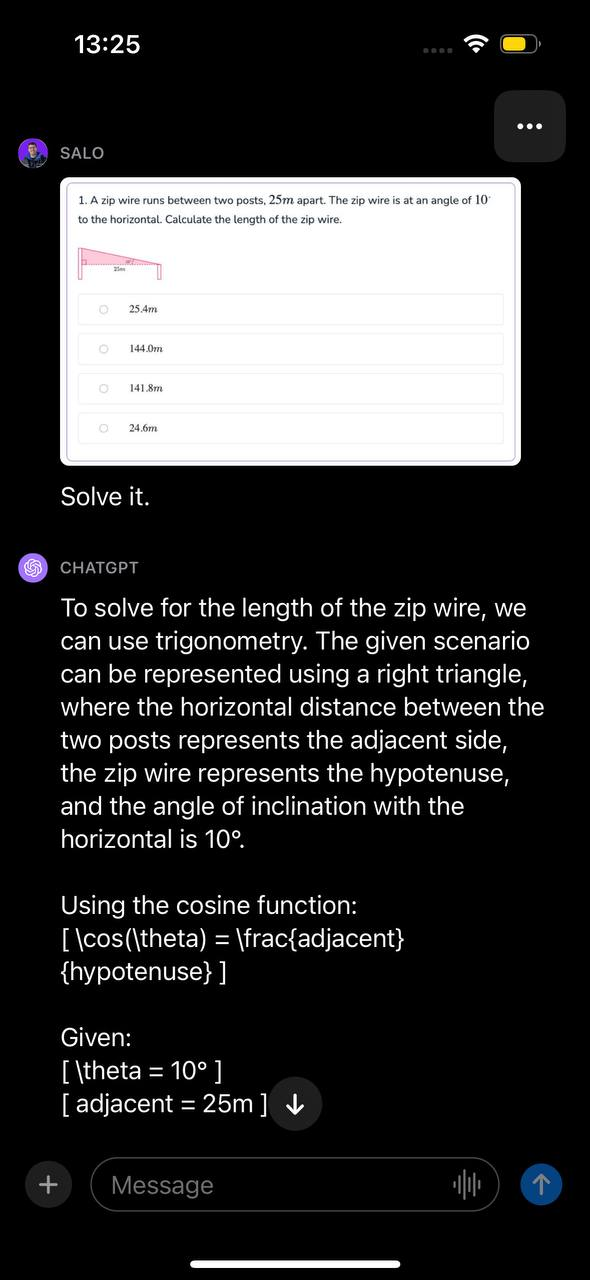

O modelo reconheceu que o problema poderia ser solucionado através de trigonometria, determinou a função apropriada a ser utilizada e demonstrou, passo a passo, como solucionar o problema. Em seguida, o GPT-4V apresentou a resposta correta para a questão.
GPT-4V em Visão Computacional e Mais
O GPT-4V representa um avanço significativo no campo da aprendizagem de máquinas e processamento de linguagem natural. Com ele, é possível fazer perguntas sobre uma imagem – e suas respectivas perguntas de seguimento – de maneira natural, e o modelo tentará fornecer uma resposta.
O GPT-4V demonstrou bom desempenho em diversas perguntas genéricas sobre imagens e mostrou ter consciência de contexto em alguns dos casos que testamos. Por exemplo, conseguiu responder corretamente a perguntas sobre um filme retratado em uma imagem sem que lhe fosse dito textualmente qual era o filme.
O GPT-4V é promissor para responder perguntas gerais. Modelos anteriores, destinados a este propósito, frequentemente apresentavam respostas menos fluentes. O GPT-4V, por outro lado, é capaz de responder a perguntas e suas respectivas de seguimento sobre uma imagem com profundidade.
Com o GPT-4V, perguntas sobre uma imagem podem ser feitas sem necessidade de um processo em duas etapas (isto é, classificação e, em seguida, usar os resultados para questionar um modelo de linguagem como o GPT). É provável que existam limitações no que o GPT-4V pode compreender, assim, testar um caso de uso para entender o desempenho do modelo é fundamental.
Com isso dito, o GPT-4V possui suas limitações. O modelo “alucinou”, fornecendo informações incorretas. Isso representa um risco ao utilizar modelos de linguagem para responder perguntas. Ademais, o modelo não conseguiu delimitar objetos com precisão para detecção, indicando que, atualmente, não é adequado para este caso de uso.
Também notamos que o GPT-4V não responde perguntas sobre pessoas. Quando apresentado com uma foto de Taylor Swift e questionado sobre quem estava na imagem, o modelo optou por não responder. A OpenAI considera isso um comportamento previsto, conforme descrito no cartão de sistema publicado.

Mountpoint for Amazon S3 with openSUSE Leap 15.5 小記

Mountpoint for Amazon S3 with openSUSE Leap 15.5 小記
OS: openSUSE Leap 15.5 on GCP
今天要來實作 Mountpoint for Amazon S3 安裝與掛載於 openSUSE Leap 15.5
Mountpoint for Amazon S3 今年已經 GA, 大家可以看 Blog 文章 https://aws.amazon.com/cn/blogs/china/mountpoint-for-amazon-s3-generally-available-and-ready-for-production-workloads/
我想這個也是受到 AI 相關影響, 如果想要知道 Mountpoing for Amazon S3 介紹與 EFS 相關差異, 也可以聽這集AWS官方的 Podcast https://open.spotify.com/episode/2L1lqIGlRQr6idCy3RVuD6?si=00b222cf31504e95&nd=1
這次的 OS 我使用 openSUSE Leap 15.5 on GCP
Mountpoint for Amazon S3 套件安裝的部份, 可以參考官方文件
https://docs.aws.amazon.com/zh_tw/AmazonS3/latest/userguide/mountpoint-installation.html
RPM 的部份支援的是 Amazon Linux / Fedora / CentOS / RHEL
DEB 的部份支援 Debian / Ubuntu
另外還支援其他 Linux 發行版本方式
可以顯見的是, openSUSE Leap Linux 沒有在 RPM 支援的 linux 清單內, 如果用上述的 RPM 來進行安裝, 可能會遇到下列的錯誤訊息
Problem: nothing provides 'fuse-libs' needed by the to be installed mount-s3-1.0.1-1.x86_64
Solution 1: do not install mount-s3-1.0.1-1.x86_64
Solution 2: break mount-s3-1.0.1-1.x86_64 by ignoring some of its dependencies
但是不要擔心 openSUSE Leap 15.5 使用 Other Linux distributions 方法 - 安裝OK
下載相關檔案
# wget https://s3.amazonaws.com/mountpoint-s3-release/latest/x86_64/mount-s3.tar.gz
建立相關目錄
# mkdir -p /opt/aws/mountpoint-s3
解壓縮到剛剛建立的目錄
# tar -C /opt/aws/mountpoint-s3 -xzf ./mount-s3.tar.gz
因為是實驗的關係, 先用 export 將這個路徑放到指令的路徑變數
# export PATH=$PATH:/opt/aws/mountpoint-s3/bin
測試指令並檢查版本
# mount-s3 --version
mount-s3 1.0.2
驗證的部份與 AWS CLI 相關設定一樣
下載與安裝 AWS CLI
# curl "https://awscli.amazonaws.com/awscli-exe-linux-x86_64.zip" -o "awscliv2.zip"
# unzip awscliv2.zip
# ./aws/install
You can now run: /usr/local/bin/aws --version
進行相關設定
# /usr/local/bin/aws configure --profile default
AWS Access Key ID [None]: YOUR_KEY_ID
AWS Secret Access Key [None]: YOUR_ACCESS_KEY
Default region name [None]: YOUR_WORK_REGION
Default output format [None]:
這邊請填入該帳號的 AKSK, 然後選常用的 Region
會在 ~/.aws/credentials 與 ~/.aws/config 建立相關設定
測試相關指令
使用剛剛裝的 aws cli 列出目前 S3 的目錄
# /usr/local/bin/aws s3 ls --profile default
2022-11-08 01:45:58 sakana-cloudtrail-logs-20210714
建立掛載目錄
# mkdir /mnt/s3-mount-test
沒有掛載前先觀察資訊
# ls /mnt/s3-mount-test/
使用 mount-s3 指令進行掛載 AWS S3
# mount-s3 sakana-cloudtrail-logs-20210714 /mnt/s3-mount-test/ --profile default --allow-delete
bucket sakana-cloudtrail-logs-20210714 is mounted at /mnt/s3-mount-test/
加上 --allow-delete 之後才可以刪除檔案
觀察相關資訊
# ls /mnt/s3-mount-test/
AWSLogs
# mount
mountpoint-s3 on /mnt/s3-mount-test type fuse (rw,nosuid,nodev,noatime,user_id=0,group_id=0,default_permissions)
進行相關測試
# mkdir /mnt/s3-mount-test/sakanatest
# ls /mnt/s3-mount-test/
AWSLogs sakanatest
我仿照 Blog 上面的作法, 到高速公路局的網站截了一些路況圖
透過 cp 指令把他複製到我們掛載的目錄
# cp /home/sakanamax/2023-09-29\ 10-5* /mnt/s3-mount-test/sakanatest/
觀察資訊
# ls /mnt/s3-mount-test/sakanatest
2023-09-29 10-51-29 的螢幕擷圖.png 2023-09-29 10-52-06 的螢幕擷圖.png 2023-09-29 10-52-41 的螢幕擷圖.png
2023-09-29 10-51-48 的螢幕擷圖.png 2023-09-29 10-52-21 的螢幕擷圖.png
觀察 AWS S3 console

果然有同步
# cd /mnt/s3-mount-test/sakanatest/
# ffmpeg -framerate 10 -pattern_type glob -i "*.png" sakana.gif
ffmpeg 指令可以透過 #zypper install ffmpeg 安裝
以下是我得到的結果 :)

最後來解決重開機掛載的問題, 解法就是用 Service 的方式來做
# vi /etc/systemd/system/mount.service
[Unit]
Description=Mountpoint for Amazon S3 mount
Wants=network.target
AssertPathIsDirectory=/mnt/s3-mount-test
[Service]
Type=forking
User=root
Group=root
ExecStart=/opt/aws/mountpoint-s3/bin/mount-s3 sakana-cloudtrail-logs-20210714 /mnt/s3-mount-test --profile default --allow-delete
ExecStop=/usr/bin/fusermount -u /mnt/s3-mount-test
[Install]
WantedBy=default.target
這邊要注意掛載路徑
然後安裝方法不同 mount-s3 的路徑也會不同
user / group 要找時間 Lab
進行測試
# umount /mnt/s3-mount-test
起動服務
# systemctl start mount.service
觀察資訊
# systemctl status mount.service
● mount.service - Mountpoint for Amazon S3 mount
Loaded: loaded (/etc/systemd/system/mount.service; disabled; vendor preset: disabled)
Active: active (running) since Fri 2023-09-29 03:15:42 UTC; 9s ago
接下來設定開機啟動服務即可
# systemctl enable mount.service
Created symlink /etc/systemd/system/default.target.wants/mount.service → /etc/systemd/system/mount.service.
# systemctl is-enabled mount.service
enabled
又多學一招
~ enjoy it
Reference:
強大的同事
https://open.spotify.com/episode/2L1lqIGlRQr6idCy3RVuD6?si=00b222cf31504e95&nd=1
https://github.com/awslabs/mountpoint-s3/blob/main/doc/CONFIGURATION.md#aws-credentials
https://docs.aws.amazon.com/zh_tw/AmazonS3/latest/userguide/mountpoint-installation.html

 Member
Why is a feature not available in the syslog-ng package?
You can read about many interesting syslog-ng features in my blogs. However, it can happen that when you want to try them at home, you fail because the feature is missing. How can you solve such problems? In this blog, I discuss some of the possible solutions from installing sub-packages through using unofficial repositories, to upgrading your OS.
This blog focuses on RPM packages for openSUSE / SLES, Fedora / RHEL, and FreeBSD, because these are the packages I know – I am their maintainer. However, these problems and their solutions also apply to Debian / Ubuntu, and other Linux distributions.

syslog-ng logo
Episodio de septiembre de 2023 los podcast de GNU/Linux València
Me complace compartir con vosotros el episodios de septiembre de 2023 de GNU/Linux València en el que hablan un poco de todo como la utilización de un sextante de rayos cósmicos como alternativa al GPS o que Linux pasa a MacOS en Steam:.
Episodio de septiembre de 2023 los podcast de GNU/Linux València
Tras bastante tiempo en silencio, básicamente porque no tenían forma de cuadrar agendas, han vuelto con mucha fuerza los podcast de GNU/Linux València. Unos podcast que suelen ser de tipo tertulia muy amena y destinada a todo el mundo.
Este es el podcast de la Asociación GNU/Linux Valencia. Un punto de encuentro en torno al que nos reunimos para hablar sosegadamente sobre el software libre y acontecimientos relacionados. ¿Y por qué? Pues porque sin software libre no hay democracia.
Aquest és el podcast de l’Associació GNU/Linux València. Un punt de trobada entorn del qual ens reunim per a parlar assossegadament sobre el programari lliure i esdeveniments relacionats. I per què? Doncs perquè sense programari lliure no hi ha democràcia.
Podcast del 27 de septiembre
El primer podcast después de vacaciones ya está aquí. Grabado el 3 de septiembre y lleva por título «Steam, freeBSD y más». Una serie de noticias que destacan porque al final todo acaba en que Linux está en todos los sitios menos en los ordenadores de sobremesa o portátiles de los usuarios. En fin.

Más información: Podcast 27 de septiembnre de GNU/Linux València
Muchas gracias por tu atenta escucha. Si quieres participar en la tertulia o hacernos llegar algún aporte puedes ponerte en contacto con la asociación. En gnulinuxvalencia.org/contactar tienes todas las formas de hacerlo Te esperamos en el próximo episodio. ¡Hasta entonces!
Moltes gràcies per la teva atenta escolta. Si vols participar en la tertúlia o fer-nos arribar alguna aportació pots posar-te en contacte amb l’associació. En gnulinuxvalencia.org/contactar tens totes les maneres de fer-ho T’esperem en el pròxim episodi. Fins llavors!
¡Únete a GNU/Linux València!
Aprovecho para recordar que desde hace unos meses, los chicos de GNU/Linux Valencia ya tienen su menú propio en el blog, con lo que seguir sus eventos en esta humilde bitácora será más fácil que nunca, y así podréis comprobar su alto nivel de actividades que realizan que destacan por su variedad.
Y que además, GNU/Linux València creció y se ha convertió en asociación. Así que si buscas una forma de colaborar con el Software Libre, esta asociación puede ser tu sitio. ¡Te esperamos!
La entrada Episodio de septiembre de 2023 los podcast de GNU/Linux València se publicó primero en KDE Blog.
Campaña de recaudación de fondos para Plasma 6
En pocos meses vamos a tener un nuevo lanzamiento de un escritorio de la Comunidad KDE. No será un lanzamiento menor, sino todo un lavado de cara del entorno de trabajo que da el salto a la tecnologías que ofrece Qt 6. Es por ello que se ha decidio empezar una campaña de recaudación de fondos para Plasma 6 que dote de músculo económico a la Comunidad para afrontar el gran reto que supone una actualización de este tipo. Vienen meses de trabajo, reuniones, eventos y sprints para dejarlo pulido.
Campaña de recaudación de fondos para Plasma 6
Donar a proyectos abiertos es una de las formas de colaborar más sencillas en el desarrollo de estas iniciativas. Y es que debemos tener claro que gran parte del Software Libre es gratuito pero implica unos gastos básicos, por ejemplo, en cuanto a servidores. Además, si queremos calidad y que se tenga garantías de desarrollo los usuarios, o gran parte de estos, deben colaborar de alguna forma en su desarrollo. Creo que es un buen momento para invitaros a leer este artículo ya algo viejo que publiqué en su día en este humilde blog.
De esta forma se inicia una campaña de recaudación de fondos para KDE para que la Comunidad KDE siga creciendo y tenga los recursos necesarios para afrontar los posibles retos que seguro aparecen. Además, de esta forma se comprometen a serguir ofreciendo más y más software de calidad de forma gratuita, tanto de forma monetaria como en forma de datos personales.

El espiritu con el que se inicia esta campaña es el siguiente:
¡Noticias emocionantes en el horizonte! En febrero de 2024, Plasma 6 hará su gran debut. Pero necesitamos tu ayuda para garantizar el éxito de su lanzamiento.
Y es que la Comunidad KDE necesita dinera para optimizar actividades como:
- Sprints para desarrolladores: Ayudarás a financiar las reuniones presenciales que mantienen a nuestros desarrolladores con energía y centrados en hacer KDE aún mejor.
- Gastos de viaje a eventos: Apoyarás la presencia de nuestro equipo en reuniones y conferencias importantes, como FOSDEM, FOSSAsia y LinuxCons.
- Evento Akademy: Garantizará el éxito del evento anual de la comunidad KDE para todos los miembros, y fomentará la colaboración y el crecimiento.
- Funcionamiento de KDE: Mantendrás las luces encendidas en la sede de KDE y nuestro hogar digital funcionando sin problemas.
- Pagar al personal de apoyo: Te asegurarás de que KDE tenga a mano los expertos que necesitamos para ayudar a nuestros colaboradores y usuarios.
En palabras de los desarrolladores, la razón principal por la que deberías donar es:
Porque la generosidad está en el corazón de KDE y mantiene vivos nuestros proyectos.
Es lo que motiva a nuestros voluntarios a compartir su tiempo y conocimientos para seguir construyendo nuevas características y mantener el software de KDE actualizado y seguro.
La generosidad también impulsa a quienes nos apoyan. Sus contribuciones y patrocinios hacen que los engranajes de KDE sigan girando y garantizan que nuestros desarrolladores puedan continuar con su fantástico trabajo.

Además tu donación te ofrece un reconocimiento ya que, a esperas de alguna que otra sorpresa que se uniará a los siguientes ítems:
- Tu nombre aparecerá en nuestra página de donaciones, reconociendo su contribución.
- Tu nombre aparecerá en el propio Plasma 6.
Si no quieres nada de lo anterior, también está bien, por supuesto. Recuerda marcar la casilla «[✔️] Hacer donación anónima» en el proceso de donación anterior.
Y si eres un desarrollador, puedes beneficiarte de las herramientas y marcos de trabajo de KDE. Las bibliotecas de KDE hacen que sea rápido y fácil construir aplicaciones sofisticadas para todas las plataformas.
Más información: KDE
La entrada Campaña de recaudación de fondos para Plasma 6 se publicó primero en KDE Blog.

Leap Micro 5.5 reaches Beta, Leap Micro 5.3 soon to be EOL
A new version of the modern lightweight host operating system Leap Micro 5.5 just entered the Beta of its development.
A quick transition to a Release Candidate (RC) expected and the General Availability (GA) slated for the first half of October.
One of the standout features of Leap Micro 5.5 is its SELinux enhancements. Security-Enhanced Linux (SELinux) has received a significant boost; It brings podman-docker and hyper-v support for AArch64 for a more robust and secure computing experience for users.
In tandem with this exciting update, it’s important to note that Leap Micro 5.3 is nearing its End of Life (EOL). As soon as Leap Micro 5.5 makes its official debut, Leap Micro 5.3 will be retired. Users of Leap Micro 5.3 are strongly advised to consider upgrading to either Leap Micro 5.4 or the upcoming 5.5 release. This ensures access to the latest features, security enhancements, and ongoing support.
40 aniversario del proyecto GNU
Este 27 de septiembre de 2023 se cumplen 40 años el anuncio inicial del proyecto GNU realizado por Richard Stallman

Richard Stallman anunció un 27 de septiembre de 1983 que empezaría a trabajar en un sistema operativo llamado GNU similar a Unix pero con la principal diferencia que sería completamente libre para usarlo, estudiarlo o modificarlo y distribuir esas modificaciones.
Puede determinarse este el inicio del movimiento del software libre, que en 40 años ha permeado en multitud de personas y proyectos.
Cuando se celebraron los 30 años del proyecto GNU escribí un artículo en el blog, que bien podría servir para conmemorar este nuevo aniversario. Muchas cosas han ocurrido en estos 10 años en el mundo del software libre y muchos cambios han ocurrido.
Pero en este caso, no quería hablar solo de fechas, o poner enlaces. Aunque sí enlazaré a la web oficial donde se detalla el evento que tendrá lugar en Suiza con charlas, entre ellas de Richard Stallman o Luis Falcón de GNU Health y otras charlas relacionadas con el software libre.
Pero en esta ocasión quiero hablar específicamente sobre mi visión del software libre.

Lo he dicho en varias ocasiones y sigo creyendo que es cierto. El software libre es algo más que simples bits o licencias que permitan que el software pueda ser usado, estudiado o modificado por otras personas.
Creo en el componente ético que subyace debajo de las funciones y líneas de código de cualquier programa que cumpla las 4 libertades del software libre.
En estos 40 años de existencia el software libre ha hecho posible y ha dado sustento legal y moral a muchos proyectos hoy en día indispensables. El software libre ha dado las herramientas y el pretexto para que multitud de mentes se pudieran unir y pusieran en marcha un proyecto nuevo, continuaran alguno ya acabado o dieran una alternativa a software con una licencia privativa que ata.
Así pues podemos encontrar desde pequeños proyectos específicos hasta grandes proyectos más generales y de un público más amplio que se imbuyen de ese espíritu del software libre que hace que se aglutinen personas de todo el mundo entorno al proyecto, ya sea aportando código, traduciendo, probando en distintas plataformas, etc.
El software privativo planteó su modelo de negocio en el código. Se vendía el código. Después vieron que teniendo atadas a las personas que utilizaban su código era una buena idea explotar los datos y metadatos que generaba el uso de ese código cerrado.
Una de las constantes dentro del software libre es el respeto a la persona que lo utiliza. El tener expuesto el código que se crea, hace imposible crear código malicioso que espíe o sea intrusivo con la privacidad. Siempre habrá alguien que se lea el código fuente y exponga, si lo hubiera, esa funcionalidad no deseada.
En estos 40 años, el software libre ha crecido y se ha expandido en muchos aspectos y proyectos. Las empresas han visto ese potencial y han “desvirtualizado» ese software libre por un término más “suave» que no implique radicalidad y ha aparecido el “open source» o código abierto.
Sin duda que el código sea abierto es una de las premisas del software libre, pero por eso solo no basta. Y además sigo pensando que sigue siendo muy necesario ese componente ético que aporta el software libre.
El tema de las licencias también se ha complicado. Las licencias de software libre implican que quien use ese software para crear algo nuevo, deba publicarlo a su vez bajo una licencia de software libre.
No han sido pocas las ocasiones en las que empresas utilizan licencias permisivas, pero no software libre y después han cerrado esa licencia. Eso con licencias de software libre no pasa.
Seguiré llamándolo como tal software libre, frente a “open source» o similar. Seguiré apoyando las opciones de software libre. No soy perfecto (alguien lo es) e incurriré en incoherencias, pero trataré de que sean las mínimas o de aprender de quien me señale el error.
Felicitar a Stallman como pionero de este proyecto del software libre y hacer extensiva esa felicitación a todas las personas que de una u otra manera crean y fomentan software libre, ya sea de manera profesional en su trabajo diario o de manera altruista contribuyendo con diferentes proyectos.
Empecé en GNU/Linux sin tener ni idea de qué era eso del software libre y poco a poco, leyendo y aprendiendo lo fui conociendo. Hoy reclamo ese derecho a poder utilizar software libre en la medida de lo posible en mis dispositivos. Y eso lo hacen posible un montón de gente en todo el mundo.
Happy hacking!

Survey to Explore openSUSE's Use Cases, More
A recently published openSUSE survey is asking IT professionals and users about their views on open-source technologies and the ever-evolving Linux ecosystem.
The Use Case Survey aims to gather insights on what will shape the future of Linux and its role in various industries. The survey has four groups with the potential of answering up to 30 questions based on the response of the first and only mandatory question. The survey can take less than 10 minutes depending on how in depth of details a surveyee would like to provide. The overarching themes and ideas of the survey are the following:
Understanding User Needs and Satisfaction
The survey kicks off by categorizing respondents based on their use of IT: work/business, home/hobby, or both. This segmentation helps tailor the approach to better serve the needs of the surveyee.
For those in the work/business category, the survey delves into IT services satisfaction. Those not satisfied have options to suggest improvement, and it explores the idea of future growth prospects for Linux.
Home and Hobby Enthusiasts
For those using Linux at home or for hobbies, the survey asks about their preferences among openSUSE’s offerings like Tumbleweed, Leap, MicroOS, and SlowRoll, and why these distributions appeal to users and developers.
Contributions and Open Source Involvement
As an open-source project, it makes sense to inquire about contributions to open-source projects and to openSUSE. This helps to recognize not only the use of open-source software and projects, but how much users are contributing to it.
General Insights and Future Trends
This section asks all respondents about broader use of Linux beyond primary use cases. The aim is to help to understand the benefits respondents experience and the challenges they encounter. Respondents are encouraged to share their preferences for specific Linux distributions and their thoughts on emerging IT trends and technologies. The community members who came up with the survey are keen to understand if Linux is well-positioned to meet the market’s evolving needs with medium to long-term strategies.
The openSUSE’s Use Case Survey is not just a set of questions; it’s a collective effort to ensure that Linux continues to evolve to meet the diverse needs of its users and to make a brighter future for open-source technologies. Stay tuned for more updates and analysis from the results of the survey, which will run until Oct. 31.
Releasing version 4
After publishing Agama 3 a month ago, it is time for a new release. Among other things, this new version fixes several issues in the startup process, allows the use of a network proxy, adds (partial) support for IPv6, includes a few improvements in the web UI and features a new tool to extract Agama-related logs.
But as important as those changes, we did some internal work that will serve as the base for other features, like proper i18n support and more flexible storage management. Some of those features will land sooner than later, but meanwhile, let's focus on what Agama 4 brings.
Agama startup issues
Our QA team is testing Agama through several scenarios and in different architectures. Those tests helped identify some issues with Agama's startup process: D-Bus activation errors, time-outs and even potential crashes.
Working closely with QA, we have identified and (hopefully) fixed most of those problems. In a nutshell, you should not see the "Cannot connect to D-Bus" error message anymore. And if that's not the case, please open a bug report attaching the logs 😉
If you are interested in the technical details, there is a bunch of fixes you might want to check: #729, #732, #747, #749, #753.
Installing through a proxy
Many users and customers are used to deploy their systems with no direct access to Internet, just
using a proxy. So it did not come as a surprise that it was one of the most requested features.
Agama 4 includes support for specifying a proxy
at boot time using the option proxy= when the installation requires to use a HTTP(S) or FTP
source. The supported proxy URL format is: protocol://[user[:password]@]host[:port].
Of course, the proxy configuration is copied to the target system at the end of the installation.
The nitty-gritty details are available in #696 and #711.
IPv6 support in the automated installation
In Agama 4 it is possible to specify the IPv6 configuration when using the automated installation. To accommodate this feature, we decided to introduce some changes in the profile definition. Here is an example that sets up IPv4 and IPv6 addresses.
  "network": {


    "connections": [


      {


        "id": "Ethernet network device 1",


        "method4": "manual",


        "method6": "manual",


        "addresses": [


          "192.168.122.100/24",


          "::ffff:c0a8:7ac7/64"


        ],


        "gateway4": "192.168.122.1",


        "gateway6": "::ffff:c0a8:7a01",


        "nameservers": [


          "192.168.122.1",


          "2001:4860:4860::8888"


        ]


      }


    ]


  }
Matching specific network devices
In previous versions of Agama, it was not possible specify which interface to use for a given network connection when using the auto-installation mechanism: Agama just delegated on NetworkManager to decide. Now you can associate a network connection with an specific interface by using its name or more complex conditions. See #723 for further details.
  "network": {


    "connections": [


      {


        "id": "Ethernet network device 1",


        "method4": "auto",


        "interface": "enp1s0"


      }


    ]


  }
Agama specific storage settings
Agama reads the information about the products offered for installation from a configuration
(/etc/agama.yaml). Such a file contains a storage section which indicates the options (whether
to use LVM, encryption, etc.) and the volumes (file systems) to create in the target system.
Since both Agama and YaST use the same mechanism to calculate the storage layout (known as the Guided Setup in YaST), the configuration for Agama was a direct translation of the YaST settings. But although the internal components and algorithms are the same, Agama's approach for tweaking their behavior is actually different in several aspects from YaST. For that reason, Agama now implements its own storage settings, making the product configuration more straightforward and less error-prone.
This change has a direct impact in Agama's auto-installation profiles.
storage: {


  bootDevice: "/dev/vda",


  lvm: true,


  encryptionPassword: "123456"


}
Interested in the implementation? Feel free to check: #721, #738 and #748.
Better logging support
As the project evolves and more people try Agama, we need to make the debugging process easier.
Recently, we introduced a new command that gathers all the information we need to debug the problems
you face when using Agama (similar to the venerable save_y2logs for YaST). Typing
agama logs store creates a tarball you can attach to your bug reports.
This first version (#757) is rather basic but we are already working on additional features to have a pleasant debugging process 🐛.
Polishing the web user interface
Balsa Asanovic has become a regular contributor of Agama. For example, he implemented the "show password" feature (#750) and improved the error reporting in the iSCSI form (#699). But not only that, he is actively involved in our discussions in GitHub. Thank you, Balsa!
Moreover, a bug that prevented to download YaST2 logs through the web UI has been fixed (#746).
i18n support is coming to Agama
If you follow the project closely enough, you might already know that we are working on i18n support. Many of the pieces are already in place but we did not make it for this version. However, we trust that our next major version will feature a translated web interface. Actually, our translators are already working on that.
Trying Agama 4
The easiest way to try Agama is to download one of the two variants (ALP or openSUSE) of the Agama Live devel ISO. This image is built in the systemsmanagement:Agama:Devel OBS project and is updated each time we release a new version.
If you are interested in the bleeding edge, try the ISO in the systemsmanagement:Agama:Staging OBS project. It is built automatically and contains the code from Agama's Git repository, so it might get broken occassionally.
What to expect
We expect to be able to ship a translated Agama interface and better handling of the storage settings in the next release. But, meanwhile, we are already working on other important features like software patterns selection or support for the SUSE Customer Center.
Of course, we appreciate opinions and feedback. As usual, feel free to contact the YaST team at the
YaST Development mailing list,
our #yast channel at Libera.chat or even the
Agama project at GitHub.
Stay tuned!

Announcing Agama 4
After publishing Agama 3 a month ago, it is time for a new release. Among other things, this new version fixes several issues in the startup process, allows the use of a network proxy, adds (partial) support for IPv6, includes a few improvements in the web UI and features a new tool to extract Agama-related logs.
But as important as those changes, we did some internal work that will serve as the base for other features, like proper i18n support and more flexible storage management. Some of those features will land sooner than later, but meanwhile, let’s focus on what Agama 4 brings.
Agama startup issues
Our QA team is testing Agama through several scenarios and in different architectures. Those tests helped identify some issues with Agama’s startup process: D-Bus activation errors, time-outs and even potential crashes.
Working closely with QA, we have identified and (hopefully) fixed most of those problems. In a nutshell, you should not see the “Cannot connect to D-Bus” error message anymore. And if that’s not the case, please open a bug report attaching the logs :wink:
If you are interested in the technical details, there is a bunch of fixes you might want to check: #729, #732, #747, #749, #753.
Installing through a proxy
Many users and customers are used to deploy their systems with no direct access to Internet, just
using a proxy. So it did not come as a surprise that it was one of the most requested features.
Agama 4 includes support for specifying a proxy at
boot time using the option proxy= when the installation requires to use a HTTP(S) or FTP source.
The supported proxy URL format is: protocol://[user[:password]@]host[:port].
Of course, the proxy configuration is copied to the target system at the end of the installation.
The nitty-gritty details are available in #696 and #711.
IPv6 support in the automated installation
In Agama 4 it is possible to specify the IPv6 configuration when using the automated installation. To accommodate this feature, we decided to introduce some changes in the profile definition. Here is an example that sets up IPv4 and IPv6 addresses.
  "network": {
    "connections": [
      {
        "id": "Ethernet network device 1",
        "method4": "manual",
        "method6": "manual",
        "addresses": [
          "192.168.122.100/24",
          "::ffff:c0a8:7ac7/64"
        ],
        "gateway4": "192.168.122.1",
        "gateway6": "::ffff:c0a8:7a01",
        "nameservers": [
          "192.168.122.1",
          "2001:4860:4860::8888"
        ]
      }
    ]
  }
Matching specific network devices
In previous versions of Agama, it was not possible specify which interface to use for a given network connection when using the auto-installation mechanism: Agama just delegated on NetworkManager to decide. Now you can associate a network connection with an specific interface by using its name or more complex conditions. See #723 for further details.
  "network": {
    "connections": [
      {
        "id": "Ethernet network device 1",
        "method4": "auto",
        "interface": "enp1s0"
      }
    ]
  }
Agama specific storage settings
Agama reads the information about the products offered for installation from a configuration
(/etc/agama.yaml). Such a file contains a storage section which indicates the options
(whether to use LVM, encryption, etc.) and the volumes (file systems) to create in the target
system.
Since both Agama and YaST use the same mechanism to calculate the storage layout (known as the Guided Setup in YaST), the configuration for Agama was a direct translation of the YaST settings. But although the internal components and algorithms are the same, Agama’s approach for tweaking their behavior is actually different in several aspects from YaST. For that reason, Agama now implements its own storage settings, making the product configuration more straightforward and less error-prone.
This change has a direct impact in Agama’s auto-installation profiles.
storage: {
  bootDevice: "/dev/vda",
  lvm: true,
  encryptionPassword: "123456"
}
Interested in the implementation? Feel free to check: #721, #738 and #748.
Better logging support
As the project evolves and more people try Agama, we need to make the debugging process easier.
Recently, we introduced a new command that gathers all the information we need to debug the problems
you face when using Agama (similar to the venerable save_y2logs for YaST). Typing agama logs
store creates a tarball you can attach to your bug reports.
This first version (#757) is rather basic but we are already working on additional features to have a pleasant debugging process :bug:.
Polishing the web user interface
Balsa Asanovic has become a regular contributor of Agama. For example, he implemented the “show password” feature (#750) and improved the error reporting in the iSCSI form (#699). But not only that, he is actively involved in our discussions in GitHub. Thank you, Balsa!
Moreover, a bug that prevented to download YaST2 logs through the web UI has been fixed (#746).
i18n support is coming to Agama
If you follow the project closely enough, you might already know that we are working on i18n support. Many of the pieces are already in place but we did not make it for this version. However, we trust that our next major version will feature a translated web interface. Actually, our translators are already working on that.
Trying Agama 4
The easiest way to try Agama is to download one of the two variants (ALP or openSUSE) of the Agama Live devel ISO. This image is built in the systemsmanagement:Agama:Devel OBS project and is updated each time we release a new version.
If you are interested in the bleeding edge, try the ISO in the systemsmanagement:Agama:Staging OBS project. It is built automatically and contains the code from Agama’s Git repository, so it might get broken occassionally.
What to expect
We expect to be able to ship a translated Agama interface and better handling of the storage settings in the next release. But, meanwhile, we are already working on other important features like software patterns selection or support for the SUSE Customer Center.
Of course, we appreciate opinions and feedback. As usual, feel free to contact the YaST team at the
YaST Development mailing
list, our #yast channel
at Libera.chat or even the Agama project at
GitHub.
Stay tuned!