
 Member
 jimmac
Colorful HIG
The refresh of the Human Interface Guidelines in both the content and presentation is something to be proud of, but there were a couple of areas that weren’t great. Where we don’t quite shine in the area of blueprint illustration style is the contrast for the dark mode. While in many cases a single graphic can work in the two contexts just fine, in other it struggles. And while we tried to address it in the HIG, it became clear we do need to do better.

Inline SVG Stylesheet
there’s a little trick I learned from razze while working Flathub — a single favicon working in both dark and light mode can be achieved using a single SVG. The SVG doesn’t have inline defined fills, but instead has a simple embedded <style> that defines the g,path,rect,circle and whatnot element styles and sets the fill there. For the dark mode it gets overriden with the @media (prefers-color-scheme: dark){} rule. While generally favicons are a single color stencil, it can work for fullcolor graphics (and more complex rules):
<style>
  rect.fg { fill: #5e5c64; }
  path.bg { fill: #fff; }
  @media (prefers-color-scheme: dark) {
    rect.fg { fill: #fff; }
    path.bg { fill: #5e5c64; }
  }
</style>
This made me think of a similar approach working for inline images as well. Sadly there’s two obstacles. While the support for inline stylesheets in SVGs seems to be quite wide among browsers, Epiphany only seems to respect prefers-color-scheme when using the image directly (or the favicon case), but didn’t seem to work when emebded inside and html page as <img>.
The more severe issue is that producing such SVGs is a little cumbersome as you have to clean up the document generated by Inkscape, which likes to use fill attribute or inline css in style. While it generally doesn’t remove markup, it will reformat your markup and you will be fighting with it every time you need to edit the SVG visually rather than inside a text editor.
HTML5 Picture
For inline images, the approach that seems more straight forward and I’ve taken on many occasions is using the HTML5 <picture> element. It works great for providing dark mode variants using source with a media attribute as well as a neat accessibility feature of showing non-animated image variant for people who opt out:
<picture>
    <source srcset="static.png"
        media="(prefers-reduced-motion: reduce)" />
    <img src="animated.gif" />
</picture>

Sphinx/RST
GNOME Human Interface Guidelines are written in restructured text/Sphinx, however. Escaping to html for images/pictures would be quite cumbersome, but luckily dark mode is supported in the furo theme (and derivates) using the only-light and only-dark classes. The markup gets a little chatty, but still quite legible. There’s some iterations to be made, but in terms of legibility it’s finally a bit more accessible.


Publicada la versión 5 del nuevo instalados Agama para #openSUSE
Agama es el nuevo instalador en el que están trabajando desarrolladores de SUSE y la comunidad de openSUSE y acaba de publicar la versión de desarrollo 5 para probar.

Agama 5 incluye algunos cambios en los que se ha estado trabajando desde la versión anterior, como una interfaz web traducida o un selector de patrones de software.
Además, introduce un cambio en el área de almacenamiento para no reutilizar particiones de intercambio preexistentes. Y por último, pero no menos importante, ahora puedes iniciar Agama Live a través de PXE.
Veamos todo esto más en detalle.
Nueva interfaz web traducida
El manejo de Agama se realiza mediante una interfaz web y hasta ahora, la interfaz web de Agama sólo estaba disponible en inglés.
Sin embargo, esta nueva versión le permite seleccionar un idioma diferente y ahora está disponible en otros cuatro idiomas: holandés, japonés, español (que realizé yo mismo) y sueco.
Hay que tener en cuenta que seleccionar un idioma diferente no afecta el sistema que está instalando. De hecho, han comenzado a trabajar en una mejor página de “Localización” que permitirá seleccionar un idioma, una distribución de teclado y una zona horaria para instalar el sistema.
Selección de patrones
Una característica importante que se ha estado posponiendo durante algún tiempo es la personalización de la selección de software. No quieren recuperar conceptos complejos y específicos, como los roles del sistema, por lo que han decidio comenzar con un prototipo que muestra la lista de patrones de software disponibles.
Agama 5 incluye un nuevo selector de patrones de software, aunque todavía es un trabajo en progreso. Sin embargo, es aún más importante la discusión que se ha abierto sobre este tema en la lista de correo de openSUSE Factory.
No reutilizar particiones de intercambio preexistentes
Al proponer un diseño de almacenamiento, Agama reutiliza particiones de intercambio preexistentes. Este comportamiento se introdujo en YaST solo por compatibilidad con versiones anteriores y fue heredado por Agama.
Sin embargo, se ha decidido que Agama debería dejar de hacer esto porque resulta confuso. Ahora, las particiones de intercambio preexistentes no se reutilizan.
Arranque a través de PXE
Desde las versiones anteriores de Agama Live, quedó claro que se necesitaba una forma de iniciar el instalador usando PXE.
Recientemente, han comenzado a crear las imágenes que se necesitan para realizar eso. El paquete agama-live contiene algunas notas sobre cómo obtener esas imágenes desde openSUSE Build Service.
Esta característica se basa en Kiwi, por lo que puede ser utilizada por cualquiera que se comprometa a crear un medio de instalación real basado en Agama en el futuro. Después de todo, Agama Live se creó con fines de demostración.
Probar Agama 5
La mejor manera de probar Agama es descargando una de las dos variantes (ALP u openSUSE) de la ISO de desarrollo de Agama Live. Esta imagen se actualiza con cada nueva versión publicada.
Pero si quieres probar lo más reciente, puedes probar las ISO del proyecto en systemsmanagement:Agama:Staging que se actualizan automáticamente con cada cambio realizado en el repositorio Git de Agama.
¿En qué están trabajando para Agama 6?
Agama 6 ya está en desarrollo y se espera tener otra versión lista para finales de noviembre. Para ese lanzamiento, habrá más cambios en el área de internacionalización, soporte para el Centro de Clientes de SUSE y la posibilidad de seleccionar cómo hacer espacio para su nuevo sistema. Además, se está trabajando para facilitar la modificación de la configuración de Agama.
Más información sobre el desarrollo y medios de contacto en el anuncio oficial:

Creación de texturas para Krita, vídeo de Ramón Miranda
Hoy os traigo una nueva obra de Ramón Miranda que lleva por título «Creación de texturas para Krita» donde nos explica las funciones avanzadas de Krita necesarias si quieres dominar la creación de texturas. Y para hacerlo nada mejor que hacerlo mediante un vídeo donde nos explica todas las opciones.
Creación de texturas para Krita, vídeo de Ramón Miranda

Estas entradas ya son un clásico del blog los vídeos de Ramón Miranda y el fabuloso Krita. Ya han aparecido en esta bitácora 10 trucos para Krita, pintando con Krita el «Tajo de Ronda», perspectiva con Krita y cómo grabar con Krita así que no es de extrañar que esta serie siga creciendo, como es el caso de hoy en el que os presento hoy.
En sus propias palabras:
Si quieres dominar la creación de texturas necesitas saber lo que realmente puedes hacer con las funciones avanzadas de Krita.
El vídeo tiene subtítulos en inglés para la gente con discapacidad auditiva y está separado en partes ya que los tiempos están en la descripción de Youtube. No obstante, para el que solo quiera ver el vídeo lo pongo abajo
Recuerdo bien a Ramón Miranda, al cual tuve el gusto de conocer en la Akademy y Akademy-es de 2013 de Bilbao, y que sigue promocionando Krita con su maravilloso trabajo.
Más información: Krita
¿Qué es Krita?
Para los que no lo sepan, Krita es el software de pintura digital e ilustración basado en las librerías de la plataforma KDE que antes estaba incluido en Calligra Suite.
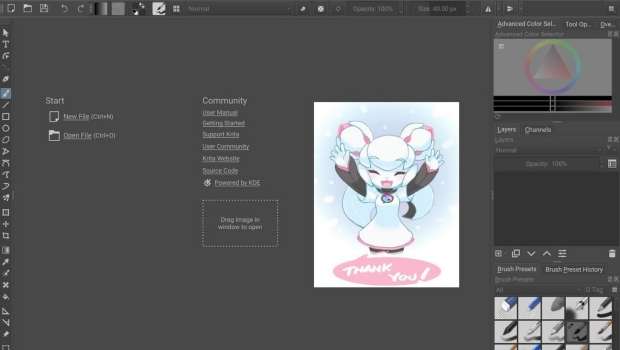
A diferencia de otras aplicaciones gráficas, se diseño hace énfasis en la creación de imágenes desde cero, es decir, está especialmente orientado para los artistas gráficos como ilustradores, dibujantes de cómics, etc.
Krita es software libre distribuido bajo la licencia GNU GPL y fue lanzado por primera vez como parte de la versión 1.4.0 de KOffice, el 21 de junio de 2005. (Vía: Wikipedia)
Para ver el funcionamiento de esta aplicación nada mejor que ver un vídeo de Odysseas Stamoglou en la que nos muestra como dibujar una chica futurística con Krita.
La entrada Creación de texturas para Krita, vídeo de Ramón Miranda se publicó primero en KDE Blog.
Diseña el nuevo logo para #openSUSE
Si te gusta el diseño, ahora tienes la posibilidad de participar en el concurso para el nuevo logotipo de openSUSE y de otros proyectos de la comunidad

¿Tienes aptitudes para el diseño? ¿Lo tuyo es imaginar y plasmarlo en un dibujo? Ahora tienes la posibilidad de participar con tus dotes artísticas en el concurso que celebra el proyecto openSUSE.
La comunidad de openSUSE se complace en anunciar de manera oficial, el concurso para diseñar un nuevo logotipo para openSUSE y también para las cuatro distribuciones de GNU/Linux que desarrolla el proyecto: Tumbleweed, Leap, Slowroll and Kalpa.
Sí, has leido correctamente, la comunidad de openSUSE está considerando renovar el diseño de marca con un nuevo logotipo para que represente el proyecto, basado en el diseño actual del camaleón.
Este nuevo logo debería complementar la identidad de marca del proyecto openSUSE y de las distribuciones de GNU/Linux que desarrolla. El color verde (#73ba25) está reservado como el color principal para el proyecto, pero se agradecerá las sugerencias de otros colores para las diferentes distribuciones y sus logos.
Ha habido ya discusiones al respecto desde hace muchos años, pero entonces no era el momento adecuado, hasta ahora. Como el logo actual del camaleón de openSUSE es similar al antiguo logo de SUSE y el proyecto está en medio de un periodo de transición, ahora parece un momento más idóneo para lanzar esta competición junto con los nuevos logos para las distribuciones.
La forma ancha y las líneas delgadas del logotipo actual de Tumbleweed han causado problemas de visibilidad y reconocimiento, que se pretende evitar con un nuevo logotipo de Tumbleweed. El logotipo de Leap no tiene los mismos problemas, pero los miembros de la comunidad han pensado que debería estar disponible la opción de enviar un nuevo logotipo para Leap.
La intención del concurso es que los diseños del logotipo visualicen una marca unificada. Los logotipos de openSUSE para las distintas distribuciones recientemente añadidos están diseñados con formas y líneas simples para brindar singularidad e interés, generalmente como contornos vacíos, aunque no se excluye la posibilidad de usar relleno.
El concurso para aportar diseños empieza el próximo 1 de noviembre y terminará el 22 de noviembre de 2023.
Tienes todas las reglas y los requisitos que deben cumplir los diseños, y los datos de contacto para enviar tus diseños en el anuncio oficial, en este enlace:
Tu diseño será la marca distintiva del proyecto, tanto de openSUSE como de las distintas distribuciones (Leap, Tumbleweed, Slowroll, Kalpa, Aeon).
Anímate a participar y exponer tus mejores diseños en el concurso. (yo echaré de menos al actual Geecko)


Best wget options to fully mirror a site
Lately I needed to mirror a website as fully as possible, and ended up researching a bit more than my previous times I’ve done so. Here I’m just dropping a note that I ended up doing the following:
wget -mkxp --adjust-extension -e robots=off https://myurl.com/
Here -m is:
-r -N -l inf --no-remove-listing
or in long form:
--recursive --timestamping --level inf --no-remove-listing
and the rest ie -kxp are, in the same order
--convert-links --force-directories --page-requisites
Releasing version 5
We are aware that the time between Agama releases is usually too long. Recently, we committed to increase the frequency, although it means having smaller releases. You know, "release early, release often".
Agama 5 includes some changes we have been working on for some time, like a translated web interface or a software patterns selector. Additionally, it introduces a change in the storage area to not reuse pre-existing swap partitions. And last but not least, now you can boot Agama Live via PXE.
Translated web interface
Until now, Agama web interface was only available in English. However, this new release allows you to select a different language and it is now available in another four languages: Dutch, Japanese, Spanish and Swedish. Kudos to Natasha Ament, Yasuhiko Kamata, Victor hck and Luna Jernberg for this first round of translations. Much appreciated!
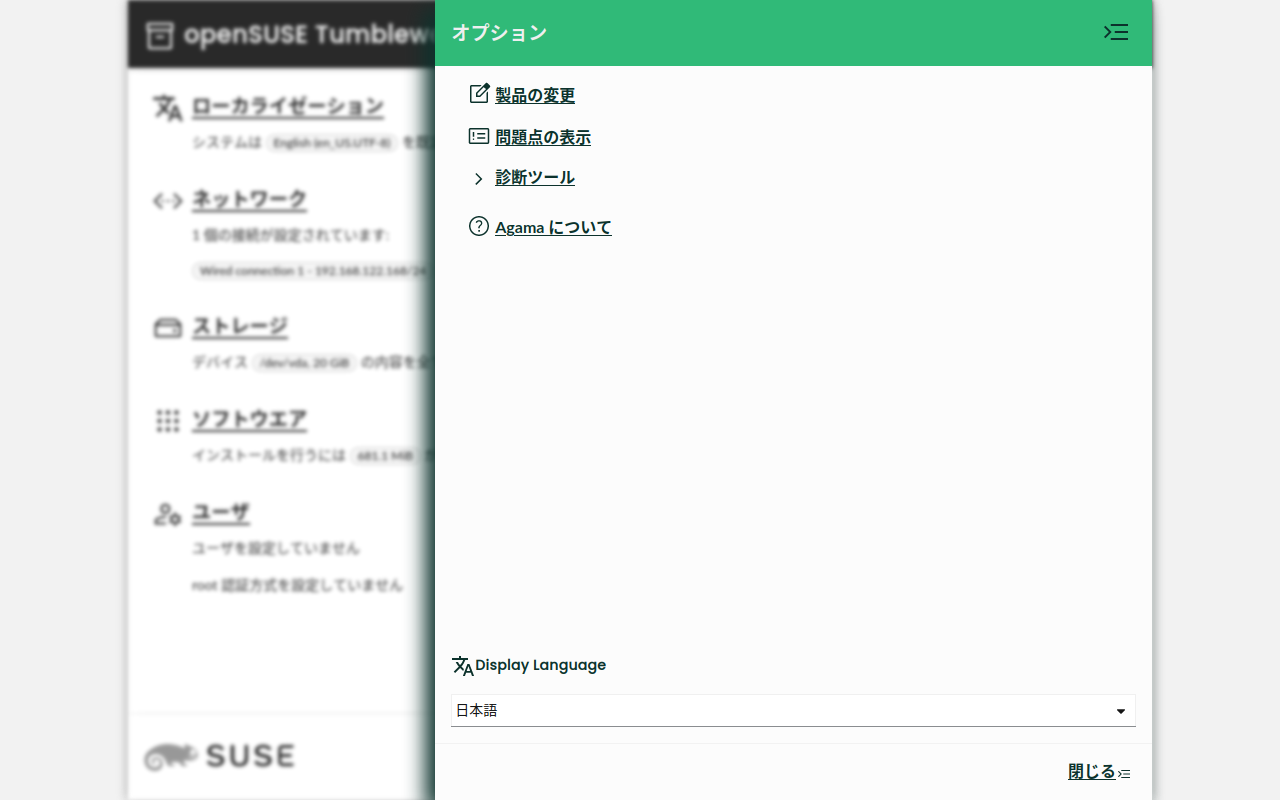
If you are interested, please, consider helping with the translations. The openSUSE localization guide might be a good starting point. 😉
You can check the pull request #796 if you are interested in the technical details.
Bear in mind that selecting a different language does not affect the system you are installing. For that matter, we have started to work on a better "Localization" page that will allow selecting a language, a keyboard layout and a timezone for the system to install.
Patterns selection
An important feature that we have been postponing for some time is customizing the software selection. We do not want to bring back complex and specific concepts, like system roles, so we decided to start with a prototype that shows the list of available software patterns.
Agama 5 ships a new software patterns selector, as shown in the screenshot below, although it is still a work in progress. However, it is even more important the discussion we have opened about this topic in the openSUSE Factory mailing list. Please do not hesitate to join if you have anything to say.
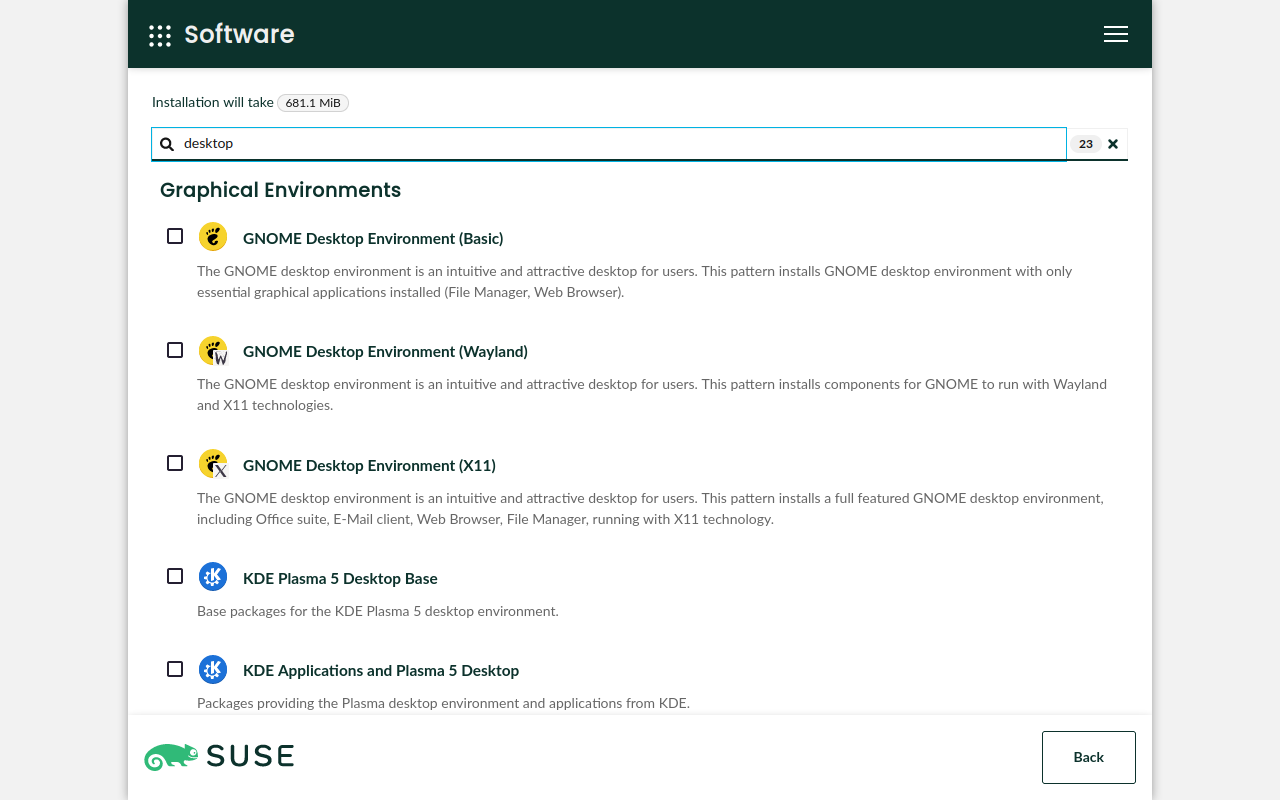
Technical details? You can find them in #792, #762, #770 and #772.
Do not reuse pre-existing swap partitions
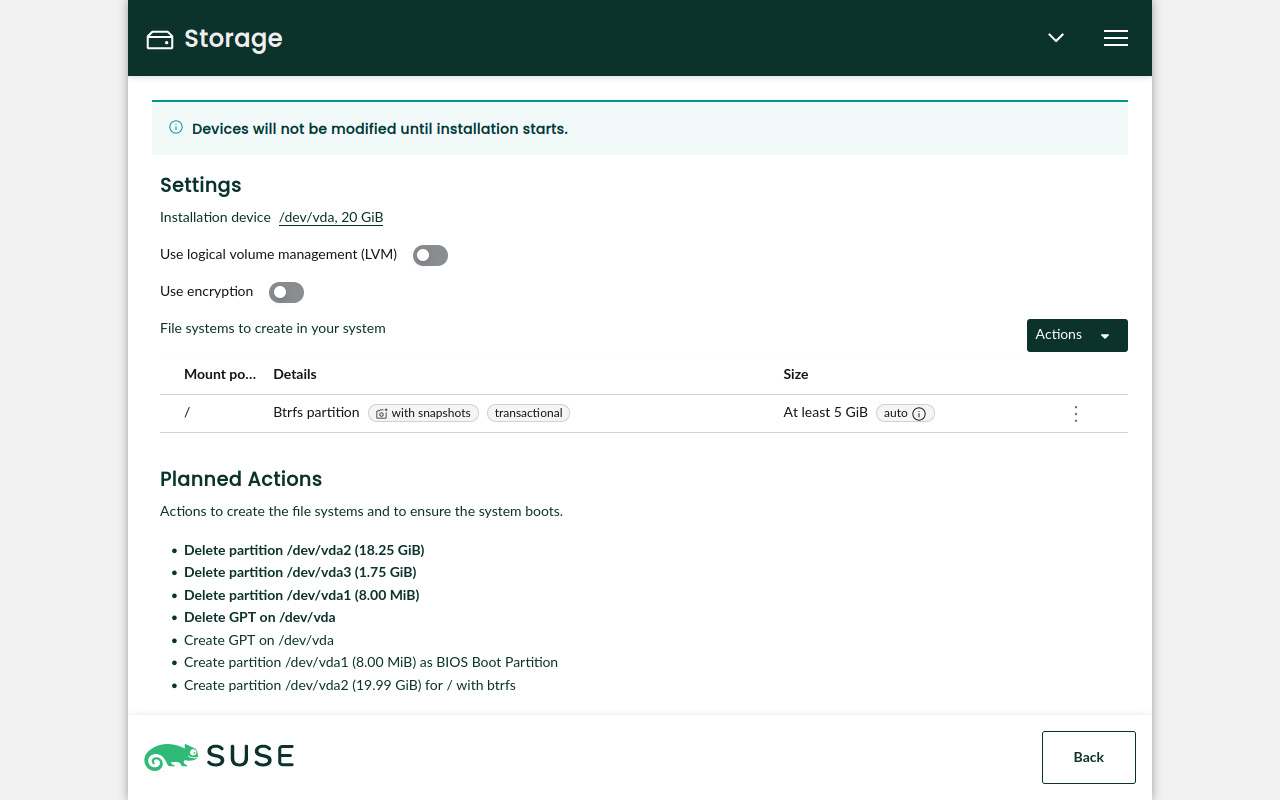
When proposing a storage layout, Agama reuses pre-existing swap partitions. This behavior was introduced in YaST just for backward compatibility with old versions and was inherited by Agama. However, we decided that Agama should stop doing this because it is confusing. Now, pre-existing swap partitions are not reused.
Check #806 for further details and screenshots.
Booting via PXE
Since the earlier releases of Agama Live, it became clear that we needed a way to boot the installer
using PXE. Recently, we started to build the images you need for that. The agama-live package
contains
some notes
about how to grab them from openSUSE Build Service.
This feature relies on Kiwi, so it can be used by anyone who commits to create a real installation media based on Agama in the future. After all, Agama Live was built for demonstration purposes.
Other changes
- Add a label in the storage section to indicate whether a Btrfs system will be transactional (#789).
- Set more restrictive permissions to the archive generated by the
agama logs storecommand (#812). - Update to Patternfly 5.1 (#800).
Trying Agama 5
The best way to try Agama is to download one of the two variants (ALP or openSUSE) of the Agama Live devel ISO. This image is built in the systemsmanagement:Agama:Devel OBS project and is updated each time we release a new version.
Are you interested in the bleeding edge? The ISO in the systemsmanagement:Agama:Staging OBS project is for you because it is built automatically from the code on Agama's Git repository.
What's next
Agama 6 is already under development and we expect to have another version ready by the end of November. For that release, we expect more changes in the internationalization area, support for the SUSE Customer Center and the possibility of selecting how to make space for your new system. Additionally, we are working on making it easier to tweak Agama's configuration.
We appreciate opinions and feedback. Feel free to contact the YaST team at the
YaST Development mailing list,
our #yast channel at Libera.chat or even the
Agama project at GitHub.
Stay tunned!

Announcing Agama 5
We are aware that the time between Agama releases is usually too long. Recently, we committed to increase the frequency, although it means having smaller releases. You know, “release early, release often”.
Agama 5 includes some changes we have been working on for some time, like a translated web interface or a software patterns selector. Additionally, it introduces a change in the storage area to not reuse pre-existing swap partitions. And last but not least, now you can boot Agama Live via PXE.
Translated web interface
Until now, Agama web interface was only available in English. However, this new release allows you to select a different language and it is now available in another four languages: Dutch, Japanese, Spanish and Swedish. Kudos to Natasha Ament, Yasuhiko Kamata, Victor hck and Luna Jernberg for this first round of translations. Much appreciated!

If you are interested, please, consider helping with the translations. The openSUSE localization guide might be a good starting point. :wink:
You can check the pull request #796 if you are interested in the technical details.
Bear in mind that selecting a different language does not affect the system you are installing. For that matter, we have started to work on a better “Localization” page that will allow selecting a language, a keyboard layout and a timezone for the system to install.
Patterns selection
An important feature that we have been postponing for some time is customizing the software selection. We do not want to bring back complex and specific concepts, like system roles, so we decided to start with a prototype that shows the list of available software patterns.
Agama 5 ships a new software patterns selector, as shown in the screenshot below, although it is still a work in progress. However, it is even more important the discussion we have opened about this topic in the openSUSE Factory mailing list. Please do not hesitate to join if you have anything to say.

Technical details? You can find them in #792, #762, #770 and #772.
Do not reuse pre-existing swap partitions
When proposing a storage layout, Agama reuses pre-existing swap partitions. This behavior was introduced in YaST just for backward compatibility with old versions and was inherited by Agama. However, we decided that Agama should stop doing this because it is confusing. Now, pre-existing swap partitions are not reused.
Check #806 for further details and screenshots.
Booting via PXE
Since the earlier releases of Agama Live, it became clear that we needed a way to boot the installer
using PXE. Recently, we started to build the images you need for that. The agama-live package
contains some
notes
about how to grab them from openSUSE Build Service.
This feature relies on Kiwi, so it can be used by anyone who commits to create a real installation media based on Agama in the future. After all, Agama Live was built for demonstration purposes.
Other changes
- Add a label in the storage section to indicate whether a Btrfs system will be transactional (#789).
- Set more restrictive permissions to the archive generated by the
agama logs storecommand (#812). - Update to Patternfly 5.1 (#800).

Trying Agama 5
The best way to try Agama is to download one of the two variants (ALP or openSUSE) of the Agama Live devel ISO. This image is built in the systemsmanagement:Agama:Devel OBS project and is updated each time we release a new version.
Are you interested in the bleeding edge? The ISO in the systemsmanagement:Agama:Staging OBS project is for you because it is built automatically from the code on Agama’s Git repository.
What’s next
Agama 6 is already under development and we expect to have another version ready by the end of November. For that release, we expect more changes in the internationalization area, support for the SUSE Customer Center and the possibility of selecting how to make space for your new system. Additionally, we are working on making it easier to tweak Agama’s configuration.
We appreciate opinions and feedback. Feel free to contact the YaST team at the YaST Development
mailing list, our #yast
channel at Libera.chat or even the Agama project at
GitHub.
Stay tunned!

openSUSE to have Logos Competition
The openSUSE Community is pleased to announce a logo competition for a new openSUSE logo as well as four openSUSE distributions; Tumbleweed, Leap, Slowroll and Kalpa.
You read that correctly; the openSUSE Community is considering a new, distinct openSUSE logo to represent the project; essentially, a new chameleon-inspired design. This new logo should complement the brand identity of the openSUSE Project with its distributions. The color green (#73ba25) is reserved as the primary logo color for the project, but color suggestions for distribution logos are welcome.
There have been discussions of a new openSUSE logo over the years, but the timing to transition to a new logo wasn’t ideal, until now. As openSUSE’s logo is similar to SUSE’s old logo and the project is experiencing a transitional period, now seems like a logical time to have the competition along with the four distribution logos. This should provide an opportunity to strengthen the visual identity of the openSUSE brand and make it discernible and cohesive with its other logos.
The current Tumbleweed logo’s wide shape and thin lines have caused visibility and recognition issues, which we aim to avoid with a new Tumbleweed logo. The Leap logo doesn’t have the same issues, but members of the community felt the option should be available to submit a new logo for Leap.
The intent of the competition is to have the logo designs visualize a unified brand. Newly added openSUSE Distribution logos are designed with simple shapes and lines for uniqueness and interest, typically as empty outlines, although the possibility of using fill is not excluded. The logos use a 16u square canvas with a 1u stroke width, maintaining a relatively square aspect ratio.
openSUSE is a community-driven Linux project that develops, builds and maintains many software packages, tools and infrastructure for its distributions.
Tumbleweed is a pure rolling-release Linux distribution with tested versions of the newest stable software.
Leap is a reliable open-source Linux distribution with a focus on stability for desktops and servers.
Slowroll is an experimental distribution based on Tumbleweed, but has a slower release pace. Big updates come every one or two months, and continous bug fixes and security fixes gradually come in moving toward the big updates. The Slowroll logo should not directly mimic the Tumbleweed logo to maintain differentiation among the distributions from the same source.
Kalpa is the KDE Plasma MicroOS Desktop distribution that is gradually advancing from its Alpha state, and receives updates as a subset of Tumbleweed. While Kalpa has a close relationship with Aeon, their logos should be distinct. Gears and the letter K motifs are acceptable for Kalpa, but it cannot directly use KDE trademarks.
An element of the competition, as stated above, is the desire for submitted logo designs to be similar and integrate well with the newer project logos like Aeon (a GNOME MicroOS Desktop distribution), MicroOS and Leap Micro. There is a desire for all the logos together to show a cohesive brand identity for openSUSE and its distributions.
The logos will be selected for the marketing material at events, on its websites as well as on clothing. All the logos submitted will be voted on using survey.opensuse.org.
To establish the official logo for the Project and distribution going forward, current logos of openSUSE, Tumbleweed, and Leap, must be submitted just like the others. The rules of the contest can be found at https://en.opensuse.org/Logocontest.
The competition starts on Nov. 1.
The winners will receive a “Geeko Mystery Box” as a reward for their creative designs.
The deadline is Nov. 22.
The Rules of the Contest are as follows:
- The logo should be licensed under CC-BY-SA 4.0 and allow everyone to use the logo without attribution (BY) if your work is used as a logo for the openSUSE Project. Note that the attribution is going to be shown on the project’s websites.
- Design must be original and should not include any third party materials.
- Both monochromes and color formats are essential for submission.
- Submissions must be in SVG format.
- Design should reflect the openSUSE communities.
-
The logo should avoid the following things:
-
Brand names or trademarks of any kind.
-
Illustrations that may consider inappropriate, offensive, hateful, tortuous, defamatory, slanderous or libelous.
-
Sexually explicit or provocative images.
-
Violence or weapons.
-
Alcohol, tobacco, or drug use imagery.
-
Discrimination based on race, gender, religion, nationality, disability, sexual orientation or age.
-
Bigotry, racism, hatred or harm against groups or individuals.
-
Religious, political, or nationalist imagery.
-
- The branding guidelines will be helpful to design your logo (optional) https://opensuse.github.io/branding-guidelines/
Please submit your design by doing the following:
- Email: ddemaio@opensuse.org
- Subject: openSUSE/Tumbleweed/Leap/Kalpa/Slowroll – [your name]
- Your name and mail address to contact
- Vector file of the design with SVG format ONLY.
- Post a PNG of the design under the openSUSE, Tumbleweed, Leap Slowroll, or Kalpa headings on https://en.opensuse.org/Logocontest
- File size less than 512 KB.
- Text about philosophy of the design
The designs that are submitted will be added to a survey where the community can vote on the submitted logo designs. The final decision will be made at an openSUSE Community meeting and it may not be the highest scored design.
We recommend the artist to use Inkscape, a powerful, free and open source vector graphics tool for all kinds of design.
Join others on openSUSE’s Marketing Telegram Channel if you want to chat with people about the designs.
Los archivos de configuración en NeoMutt
Veamos cómo tener varios archivos de configuración para ajustar los diferentes aspectos del cliente de correo para la terminal NeoMutt

NeoMutt es un cliente de correo electrónico para la línea de comandos. Lo que implica que no tiene una interfaz gráfica con un menú de ajustes o configuración en la que entrar y de una manera gráfica seleccionar esta o aquella configuración.
Para ello, como vimos en el artículo anterior donde configuramos nuestra cuenta de correo, utiliza el archivo de configuración neomuttrc o muttrc en alguna de las ubicaciones predeterminadas donde el programa busca dicho archivo (en mi caso está en ~/.config/mutt/muttrc.
Veamos en este caso cómo podemos dividir el archivo de configuración único en diferentes archivos. Pudiendo usarlos para en cada uno configurar un aspecto de NeoMutt.
Si todo lo que queremos configurar lo podemos tener en un único archivo de configuración (muttrc o neomuttrc) ¿Por qué dividirlo en varios archivos?
La explicación es: organización. Sí, en un único archivo, podemos establecer diferentes apartados, organizados con un encabezado. Pero al usar diferentes archivos, nos permite poder «jugar» con diferentes configuraciones de una manera más flexible, poder hacer pruebas, etc.
Por ejemplo, tengo un archivo llamado «colores» donde tengo configurado el esquema de colores que utiliza NeoMutt. Si quiero probar otro esquema de colores que encuentro, simplemente al archivo existente le renombro y copio la nueva configuración en un archivo llamado colores y ya puedo probarlo.
Si eso no me gusta, tan sencillo como borrar el archivo actual y el renombrado anteriormente volverle a llamar colores y ya estaría listo, todo como antes.
Para que el archivo principal de configuración (mutt o neomuttrc) llame a esos diferentes archivos de configuración hay que añadirle el comando source ruta/al/archivo
En mi caso personal tengo tres archivos de configuración. Uno para la configuración de la cuenta de correo (lo que vimos en un artículo anterior) otro para diferentes ajustes de la interfaz de NeoMutt, otro para el esquema de colores y otro para los atajos de teclado que tengo configurados.
Por tanto al inicio de mi archivo de configuración ~/.config/muttrc tengo las siguientes líneas:
source ~/.config/mutt/cuenta_correo
source ~/.config/mutt/ajustes
source ~/.config/mutt/colors
source ~/.config/mutt/atajos
Si por ejemplo, no quiero usar los atajos que tengo configurados, añado un # al inicio del source del archivo atajos y ya no cargaría mis configuraciones, trabajando con las predeterminadas del la aplicación.
Creo que es una buena manera de configurar así nuestro NeoMutt y que facilita la tarea de configurar NeoMutt.
Por cierto, comparto por aquí el contenido de los archivos en cuestión que configuran mi NeoMutt, por si quieres copiar algo de ello, o probarlos. Están recopilados de varias fuentes que he encontrado por la red.
En artículos posteriores podremos añadir nuevas cosas o explicar en detalle algunas de las que aparecen por estos archivos.
Archivo de esquema de colores de NeoMutt
# for background in 16 color terminal, valid background colors include:
# base03, bg, black, any of the non brights

# style notes:
# when bg=235, that's a highlighted message
# normal bg=233

# basic colors ---------------------------------------------------------
# color normal        brightyellow    default
color error         color196        color235                        # message line error text
color tilde         color81         color233                        # vi-like tildes marking blank lines
color message       color82         color235
color markers       brightcolor232  color222                        # wrapped-line /^\+/ markers
color attachment    brightcolor165  color235                        # attachment headers
color search        color232        color154                        # search patterns in pager
color status        brightcolor232  color39
color indicator     brightcolor232  color154                        # selected email in index
color tree          brightcolor165  color233                        # arrow in threads (`-->')

# basic monochrome screen
mono bold           bold
mono underline      underline
mono indicator      reverse
mono error          bold
mono header         bold                            "^(From|Subject|Date|To|Cc|Bcc):"
mono quoted         bold

# index ----------------------------------------------------------------

color index         color160        color233        "~A"            # all messages
color index         color166        color233        "~E"            # expired messages
color index         brightcolor154  color233        "~N"            # new messages
color index         color154        color233        "~O"            # old messages
color index         color244        color233        "~R"            # read messages
color index         brightcolor39   color233        "~Q"            # messages that have been replied to
color index         brightcolor154  color233        "~U"            # unread messages
color index         brightcolor154  color233        "~U~$"          # unread, unreferenced messages
color index         color222        color233        "~v"            # messages part of a collapsed thread
color index         color222        color233        "~P"            # messages from me
#color index         color39         color233        "~p!~F"        # messages to me
#color index         color39         color233        "~N~p!~F"      # new messages to me
#color index         color39         color233        "~U~p!~F"      # unread messages to me
#color index         color244        color233        "~R~p!~F"      # messages to me
color index         brightcolor165  color233        "~F"            # flagged messages
color index         brightcolor165  color233        "~F~p"          # flagged messages to me
color index         brightcolor165  color233        "~N~F"          # new flagged messages
color index         brightcolor165  color233        "~N~F~p"        # new flagged messages to me
color index         brightcolor165  color233        "~U~F~p"        # new flagged messages to me
color index         color232        color196        "!~N ~D"        # deleted messages
color index         color232        color196        "~N ~D"         # deleted new messages
color index         color244        color233        "~v~(!~N)"      # collapsed thread with no unread
color index         color81         color233        "~v~(~N)"       # collapsed thread with some unread
color index         color81         color233        "~N~v~(~N)"     # collapsed thread with unread parent
# statusbg used to indicated flagged when foreground color shows other status
# for collapsed thread
color index         color160        color233        "~v~(~F)!~N"    # collapsed thread with flagged, no unread
color index         color81         color233        "~v~(~F~N)"     # collapsed thread with some unread & flagged
color index         color81         color233        "~N~v~(~F~N)"   # collapsed thread with unread parent & flagged
color index         color81         color233        "~N~v~(~F)"     # collapsed thread with unread parent, no unread inside, but some flagged
color index         color39         color233        "~v~(~p)"       # collapsed thread with unread parent, no unread inside, some to me directly
color index         color81         color160        "~v~(~D)"       # thread with deleted (doesn't differentiate between all or partial)
color index         color222        color233        "~T"            # tagged messages
color index         brightcolor222  color233        "~T~F"          # tagged, flagged messages
color index         brightcolor222  color233        "~T~N"          # tagged, new messages
color index         brightcolor222  color233        "~T~U"          # tagged, unread messages

# color index         red             default         "~D(!~p|~p)"               # deleted
# color index         black           default         ~F                         # flagged
# color index         brightred       default         ~=                         # duplicate messages
# color index         brightgreen     default         "~A!~N!~T!~p!~Q!~F!~D!~P"  # the rest
# color index         brightgreen               default         "~A~N!~T!~p!~Q!~F!~D"      # the rest, new
color index         black           red             "~D"                        # deleted messages
color index         yellow          default         "~(~N)"                    # messages in threads with some unread
color index         green           default         "~S"                       # superseded messages
color index         yellow          default         "~T"                       # tagged messages
color index         brightred       red             "~="                       # duplicated messages

# message headers ------------------------------------------------------

color hdrdefault    brightcolor222  color235
color header        brightcolor39   color235        "^(From|To|Cc|Bcc)"
color header        brightcolor165  color235        "^(Subject|Date)"

# body -----------------------------------------------------------------

color quoted        color39         color235
color quoted1       color165        color235
color quoted2       color39         color235
color quoted3       color222        color235
color quoted4       color166        color235
color signature     color81         color235                        # everything below /^--\s*$/

color bold          color255        color233
color underline     color233        color244
color normal        color244        color233

## pgp

color body          color160        color233        "(BAD signature)"
color body          color39         color233        "(Good signature)"
color body          color235        color233        "^gpg: Good signature .*"
color body          color241        color233        "^gpg: "
color body          color241        color160        "^gpg: BAD signature from.*"
mono  body          bold                            "^gpg: Good signature"
mono  body          bold                            "^gpg: BAD signature from.*"

# yes, an insane URL regex
color body          brightcolor39   color233        "([a-z][a-z0-9+-]*://(((([a-z0-9_.!~*'();:&=+$,-]|%[0-9a-f][0-9a-f])*@)?((([a-z0-9]([a-z0-9-]*[a-z0-9])?)\\.)*([a-z]([a-z0-9-]*[a-z0-9])?)\\.?|[0-9]+\\.[0-9]+\\.[0-9]+\\.[0-9]+)(:[0-9]+)?)|([a-z0-9_.!~*'()$,;:@&=+-]|%[0-9a-f][0-9a-f])+)(/([a-z0-9_.!~*'():@&=+$,-]|%[0-9a-f][0-9a-f])*(;([a-z0-9_.!~*'():@&=+$,-]|%[0-9a-f][0-9a-f])*)*(/([a-z0-9_.!~*'():@&=+$,-]|%[0-9a-f][0-9a-f])*(;([a-z0-9_.!~*'():@&=+$,-]|%[0-9a-f][0-9a-f])*)*)*)?(\\?([a-z0-9_.!~*'();/?:@&=+$,-]|%[0-9a-f][0-9a-f])*)?(#([a-z0-9_.!~*'();/?:@&=+$,-]|%[0-9a-f][0-9a-f])*)?|(www|ftp)\\.(([a-z0-9]([a-z0-9-]*[a-z0-9])?)\\.)*([a-z]([a-z0-9-]*[a-z0-9])?)\\.?(:[0-9]+)?(/([-a-z0-9_.!~*'():@&=+$,]|%[0-9a-f][0-9a-f])*(;([-a-z0-9_.!~*'():@&=+$,]|%[0-9a-f][0-9a-f])*)*(/([-a-z0-9_.!~*'():@&=+$,]|%[0-9a-f][0-9a-f])*(;([-a-z0-9_.!~*'():@&=+$,]|%[0-9a-f][0-9a-f])*)*)*)?(\\?([-a-z0-9_.!~*'();/?:@&=+$,]|%[0-9a-f][0-9a-f])*)?(#([-a-z0-9_.!~*'();/?:@&=+$,]|%[0-9a-f][0-9a-f])*)?)[^].,:;!)? \t\r\n<>\"]"
# and a heavy handed email regex
color body          brightcolor39   color233        "((@(([0-9a-z-]+\\.)*[0-9a-z-]+\\.?|#[0-9]+|\\[[0-9]?[0-9]?[0-9]\\.[0-9]?[0-9]?[0-9]\\.[0-9]?[0-9]?[0-9]\\.[0-9]?[0-9]?[0-9]\\]),)*@(([0-9a-z-]+\\.)*[0-9a-z-]+\\.?|#[0-9]+|\\[[0-9]?[0-9]?[0-9]\\.[0-9]?[0-9]?[0-9]\\.[0-9]?[0-9]?[0-9]\\.[0-9]?[0-9]?[0-9]\\]):)?[0-9a-z_.+%$-]+@(([0-9a-z-]+\\.)*[0-9a-z-]+\\.?|#[0-9]+|\\[[0-2]?[0-9]?[0-9]\\.[0-2]?[0-9]?[0-9]\\.[0-2]?[0-9]?[0-9]\\.[0-2]?[0-9]?[0-9]\\])"

# simplified regex for URL & email
#color body             magenta         default "(ftp|https?|gopher|news|telnet|finger)://[^ \"\t\r\n]+"
#color body             magenta         default "[-a-z_0-9.]+@[-a-z_0-9.]+"

# _underline_
color body          blue            default         "(^|[[:space:][:punct:]])_[^_]+_([[:space:][:punct:]]|$)"
mono  body          underline                       "(^|[[:space:][:punct:]])_[^_]+_([[:space:][:punct:]]|$)"
# /italic/  (Sometimes gets directory names)
color body         blue            default         "(^|[[:space:][:punct:]])/[^/]+/([[:space:][:punct:]]|$)"
mono body          underline                       "(^|[[:space:][:punct:]])/[^/]+/([[:space:][:punct:]]|$)"

# Color de carpeta con correos sin leer
color sidebar_unread color136 default
Archivo de atajos personalizados de NeoMutt
# Barra lateral
bind index,pager \Ck sidebar-prev
bind index,pager \Cj sidebar-next
bind index,pager \Co sidebar-open
bind index,pager B sidebar-toggle-visible

bind pager g top
bind pager G bottom
bind pager j next-line
bind pager k previous-line
- Con
Ctrl+jyCtrl+ksubo y majo en las carpetas abiertas en el panel lateral. Para abrir la carpeta lo hago conCtrl+o - Con
Ctrl+Bhago aparecer o desaparecer el panel lateral donde se muestran las carpetas. - Con
gsubo el cursor a la inicio de la lista de correo en dentro de un correo y conGmuevo el cursor a la parta de abajo. - Con
jyksubo y bajo desplazándome por la lista de correos o dentro de un correo.
Archivo de configuraciones de NeoMutt
Este archivo puede ir variando con el tiempo, quitando o añadiendo cosas. Este es el que tengo a día de hoy:
# main options

set imap_check_subscribed    # Muestra las carpetas
set mail_check_stats
set envelope_from
set edit_headers                     # show headers when composing
set fast_reply                       # skip to compose when replying
set askcc                            # ask for CC:
set fcc_attach                       # save attachments with the body
set forward_format = "Fwd: %s"       # format of subject when forwarding
set forward_decode                   # decode when forwarding
set attribution = "El %d, %n escribió:" # format of quoting header
set reply_to                         # reply to Reply to: field
set reverse_name                     # reply as whomever it was to
set include                          # inclir mensajes en las respuestas
set forward_quote                    # include message in forwards
set text_flowed
unset sig_dashes                     # sin -- antes de la firma
unset mime_forward                   # forward attachments as part of body
set index_format = "%4C %Z %{%b %d} %-20.20L (%<l?%4l&%4c>) %s"

#unset help                           # Para no mostrar la barra de ayuda superior
#set tmpdir = ~/.config/mutt/temp # para guardar temporales

unset confirmappend      # don't ask, just do!
set quit                 # don't ask, just do!!
unset mark_old           # read/new is good enough for me
set beep_new             # bell on new mails
set pipe_decode          # strip headers and eval mimes when piping
set thorough_search      # strip headers and eval mimes before searching
set timeout = 0

# status bar, date format, finding stuff etc.
set status_chars = " *%A"
set status_format = "[ Carpeta: %f ] [%r%m mensajes%?n? (%n nuevos)?%?d? (%d para borrar)?%?t? (%t tagged)? ]%>─%?p?( %p postponed )?"
set date_format = "%d.%m.%Y %H:%M"   # formato dia.mes.año hora:minuto"
set sort = threads
set uncollapse_jump
set sort_re
set reply_regexp = "^(([Rr][Ee]?(\[[0-9]+\])?: *)?(\[[^]]+\] *)?)*"
set quote_regexp = "^( {0,4}[>|:#%]| {0,4}[a-z0-9]+[>|]+)+"
set send_charset = "utf-8:iso-8859-1:us-ascii"
set charset = "utf-8"
set arrow_cursor = "no" # Change `color indicator` depending


set sidebar_visible    # Muestra el panel lateral
set sidebar_format = "%B%<F? [%F]>%* %<N?%N/>%S"
set sidebar_short_path  ## No muestra toda la ruta
set sidebar_sort_method = 'alpha'    # orden alfabético
set sidebar_non_empty_mailbox_only    # no muestra carpetas vacías

# Opciones del visro
set pager_index_lines = 10  # Muestra 10 líneas
set pager_context = 3
set pager_stop
set menu_scroll
unset markers  # Quita los símbolos ~ al final de un texto de un correo
Espero que esto os sea de ayuda y un primer paso para tener NeoMutt funcionado sin problemas… Podremos ir añadiendo o quitando configuraciones en este archivo con el tiempo…

Problema con el sonido en Asus Zenbook 13 – Solución
Hoy os traigo un artículo del tipo cómo, concretamente cómo solucionar el problema con el sonido en Asus Zenbook 13, un ultrabook precioso, ligero y potente, pero que tiene todavía un pequeño problema de compatibilidad con sistemas GNU/Linu basados en Ubuntu y cuy solución es muy sencilla ya que solo requiere escribir una línea de comandos en la consola.
Problema con el sonido en Asus Zenbook 13 – Solución
ASUS es una marca de portátiles conocida por su hardware de alta calidad y rendimiento, y es parcialemtne compatible con varios sistemas operativos GNU/Linux. Hace unos años ayudé a un amigo a instalar KDE Neon, sistema basado en Ubuntu, en ese equipo recien adquirido, concretamente un UX325E y, recientemente, me ha tocado volver a hacer, pudiendo comprobar lo que suele ocurrir siempre: los errores se van solucionando.
De esta forma, tanto en la primera como en la segunda instalación, el resultado fue satisfactorio auque con una diferencia relacionado con problemas de hardware.
En la primera instalación apareció un problema grave: el brillo de su pantalla LED era incontrolable y no se podía reducir mediante los controles basicos: ni mediante teclado físico ni mediante el widget de la batería. Recuerdo que solucionamos ese problema añadiendo una aplicación extra pero debo confesar que no recuerdo exacatemente la aplicación, podría ser Brightness controller. En la segunda instalación este problema se ha solucionado solo, supongo que los controladores para la pantalla OLED se habrán integrado en el Kernel.

No obsstante todo no ha sido de color de rosas. Tanto en la primera como en la segunda instalación el sistema operativo no detectaba ninguna tarjeta de sonido en el portátil con lo que el plasmoide del atavoz no mostraba absolutamente nada. Recuerdo que le di muchas vueltas y que la red me decía que debía tener intalado el paquete sof-firmware o sof-firmware-signed, cosa que creo recordar estaban en el sistema, al menos en la segunda no he tenido que instalarlo. Así y todo no funcionaba hasta que he hecho lo siguiente:
He abierto una consola (aquí tenéis como se hace para los más novatos).
He escrito la siguiente línea, la cual sirve para a agregar un nuevo archivo de configuración llamado «sof-fix.conf» al directorio «/etc/modprobe.d/» y así hacer accesible el audio al equipo.
sudo tee /etc/modprobe.d/sof-fix.conf <<<'options snd-intel-dspcfg dsp_driver=1'
Y tras esta operación reiniciar el equipo para que cargue desde inicio los controladores. Espero que os sea de utilidad.
La entrada Problema con el sonido en Asus Zenbook 13 – Solución se publicó primero en KDE Blog.