
 Member
 baltolkien
Los Inmutables de «Tux Ness» en Compilando Podcast
Demasiado tiempo ha pasado desde el último Compilando Podcast que presenté en el blog. Y la razón no ha sido otra que el parón en la emisión de esta gran producción sonora ya que, como todos los proyectos personales, tienen periodos de imposibles. Es por ello que me congratula compartir con vosotros el episodio 56 de Compilando Podcast que lleva por título «Los Inmutables de «Tux Ness»» y que esperemos que sea el «Retorno del Rey» de los podcast linuxeros (permitidme esta licencia tanto cinematográfica como de lidererazgo del mundo de los audios linuxeros… espero que Juan, Yoyo o la gentede GNU/Linux València me perdonen).
Los Inmutables de «Tux Ness» en Compilando Podcast
Hemos esperado más de dos años en encontrar otro episodio de Compilando Podcast en el blog… y quiero pensar que una de las razones de su retorno radica en la visita que realizó Paco Estrada a Opensouthcode y a Akademy-es 2023 de Málaga. Como he dicho, en estos eventos se cargan las pilas. Sea como sea, volvemos a disfrutar de su tremenda voz y su buen hacer radiofónico.

En palabras del gran Paco Estrada que sirven de introducción del episodio 56 de Compilando Podcast:
Permítaseme la licencia cinematográfica en el título, pero la creciente adopción de los escritorios inmutables en Linux es un fenómeno a seguir de cerca en el mundo de la tecnología. Aunque algunos lo tildan de moda pasajera, otros ven en ello una tendencia al alza que promete ofrecer una experiencia de usuario más segura, estable y sencilla.
Los escritorios inmutables en Linux representan una tendencia en auge que podría tener un impacto profundo en la forma en que interactuamos con nuestros sistemas operativos. Aunque todavía hay desafíos y limitaciones a superar, la creciente adopción de estos sistemas por parte de las principales distribuciones de Linux sugiere que quizás estemos en el umbral de una revolución en la experiencia del usuario. A medida que continuamos navegando por esta nueva frontera, será fascinante ver cómo evoluciona esta tendencia y cómo se adapta la comunidad Linux a ella.
Este podcast lo podéis encontrar, en formato texto, en Compilando Artículos, una sección de la web de Compilando Podcast que se encuentra en : https://articulos.compilando.audio/
Como siempre os invito a escuchar el podcast completo y compartirlo con vuestro entorno cercano y en vuestras redes sociales. 71666561
Más información: Compilando Podcast
¿Qué es Compilando Podcast?
Dentro del mundo de los audios de Software Libre, que los hay muchos y de calidad, destaca uno por la profesionalidad de la voz que lo lleva, el gran Paco Estrada, y por el mimo con el que está hecho. No es por nada que ganó el Open Awards’18 al mejor medio, un reconocimiento al trabajo realizado por la promoción .
A modo de resumen, Compilando Podcast es un proyecto personal de su locutor Paco Estrada que aúna sus pasiones y que además, nos ofrece una voz prodigiosa y una dicción perfecta.
La entrada Los Inmutables de «Tux Ness» en Compilando Podcast se publicó primero en KDE Blog.

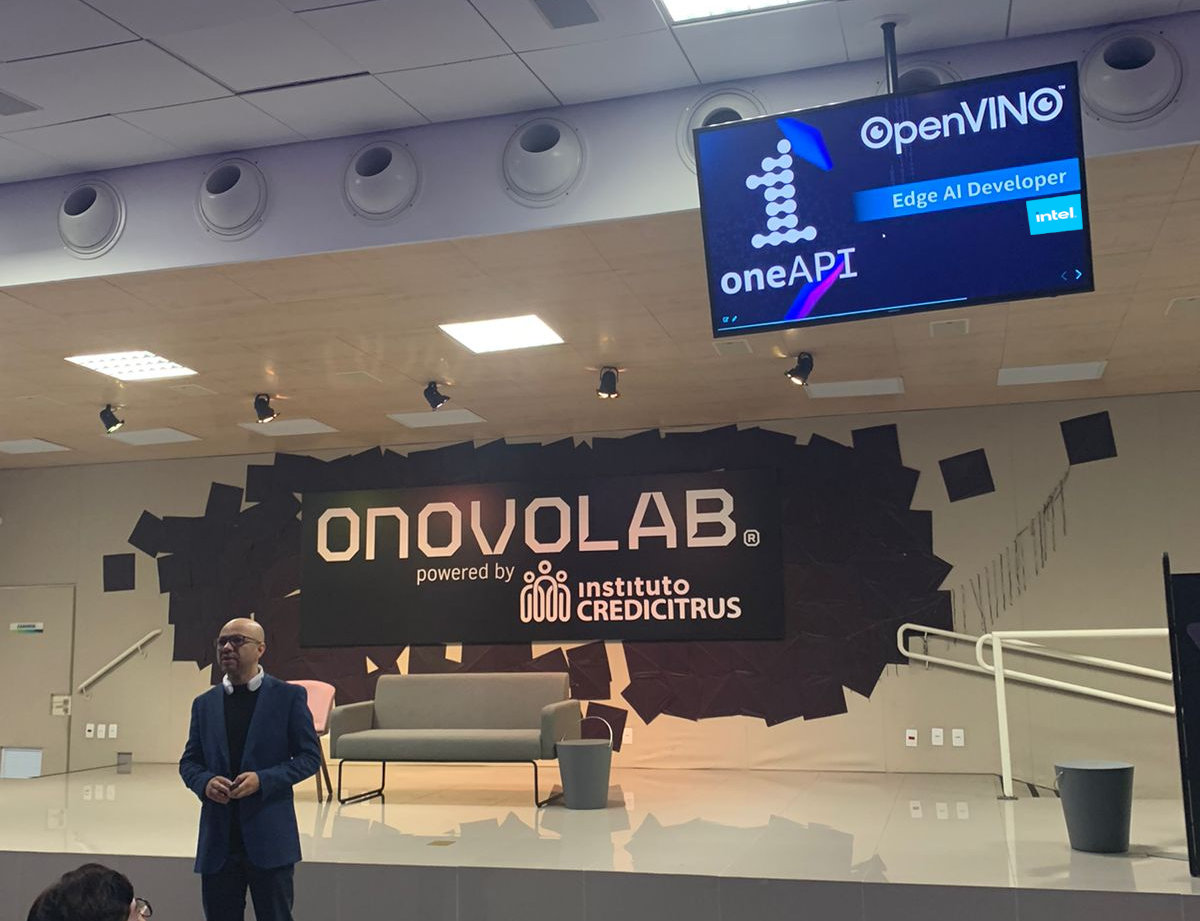
Intel® e Instituto Credicitrus: Nova parceria no ONOVOLAB DE RIBEIRÃO PRETO/SP.
O Instituto Credicitrus e o Credicitrus Innovation Hub acabam de firmar parceria com a renomada empresa de tecnologia INTEL®. A colaboração estratégica resultante desse acordo ocorrerá no Onovolab Powered by Instituto Credicitrus em Ribeirão Preto, SP, e abrirá novos horizontes para a comunidade de empreendedores e desenvolvedores, proporcionando-lhes acesso privilegiado a tecnologias de ponta, como DevCloud, OpenVino e oneAPI. Essas iniciativas serão conduzidas por meio do Intel Innovator, que tem sido certificado com o selo oneAPI desde 2020, e do Intel Insider Council.
Com isto em breve estarei proporcionando para Ribeirão Preto e toda Região do interior de SP, palestras, materiais e informações sobre tecnologias emergentes que envolve Visão Computacional, Inteligencia Artificial e otimização com processadores Intel como programação multi nuclear e primitivas de performance integradas dos processadores.
Mais informações AQUI!


Submitting Talks, Attending Conferences Embody Open Source, Power of Sharing
Staying up-to-date with the latest trends, tools and industry knowledge is crucial for open-source developers and IT professionals like system administrators.
Online resources provide valuable information, but there is no substitute for the immersive and collaborative experience of attending conferences.
As the openSUSE Conference ended about a month ago and the openSUSE.Asia Summit is accepting talk proposals until August 20, we will explore the benefits and reasons why people should not only attend conferences but actively contribute by submitting talks.
The sharing of expertise and insights is perhaps the most fundamental of reasons to attend conferences as it provides an opportunity to share knowledge, expertise, and unique insights with a diverse audience. By submitting talks, people showcase their experiences, best practices, and innovative approaches to commonly shared challenges; they actively contribute to the growth and development of IT and open-source communities. These contributions can inspire others, spark new ideas and foster collaboration among attendees. Sharing expertise not only contributes to the collective knowledge but it helps to establish thought leaders and field experts.
Submitting talks and presenting it at conferences presents opportunities for personal and professional growth. It challenges people to refine their communication skills, overcome stage fright, and think critically about a topic. The experience of preparing and delivering a talk enhances people’s ability to articulate complex concepts clearly and concisely.
Attending sessions where speakers articulate a topic offers a unique opportunity to gain fresh perspectives, learn about emerging technologies, and stay ahead of the curve. The openSUSE and openSUSE.Asia Summit curate sessions with experts in open-source software and Linux, which provides valuable insights for attendees.
Many conferences like openSUSE and openSUSE.Asia Summit organize hands-on workshops where attendees gain practical experience and sharpen their skills. These interactive sessions allow IT professionals and developers to dive deep into specific technologies, frameworks, or tools. Attendees enhance their proficiency and return to their IT department with practical knowledge that can be immediately applied to their work.
Networking at conferences provides an invaluable chance to connect, exchange ideas, and establish meaningful relationships with industry peers and fellow community members. This helps to build a robust professional network that can lead to future collaborations, job opportunities, and mentorship possibilities.
Conferences like ours and others throughout the world foster a sense of community among attendees who share a common passion for technology and open-source. Engaging with fellow professionals and developers can lead to fruitful collaborations, collaborative projects, and contributions to open-source initiatives. The openSUSE and openSUSE.Asia Summit offer a vibrant community atmosphere and provide a platform for connecting with open-source enthusiasts from around the world.
For those managers and IT leaders that have not yet explored sending an employee to a conference, know that attending conferences provides immense value, but actively participating as a speaker takes the experience to new heights.
Get started today by submitting a talk, especially to the openSUSE.Asis Summit; it will take place at Chongqing University of Posts and Telecommunications in Chongqing, China, from Oct. 21 to 23.
10 razones para migrar de CentOS a openSUSE
Los cambios recientes en el proyecto CentOS han dejado a muchos usuarios buscando alternativas. Veamos diez razones convincentes por las que migrar de CentOS a openSUSE podría ser una decisión inteligente

Los recientes cambios de RedHat y derivadas como CentOS, provocan un montón de incertidumbres a corto y medio plazo sobre la continuidad de CentOS y qué sistema operativo escoger a la hora de hacer funcionar nuestro servidor (o nuestro equipo personal).
En un artículo en inglés escrito por Juan Herrera Utande para el blog de SUSE, comparte 10 razones para migrar los sistemas de nuestros servidores de CentOS a openSUSE. Esta es una traducción que he realizado de ese artículo.
Estable y Confiable
openSUSE ofrece un sólido sistema operativo de nivel empresarial conocido por su estabilidad. La versión openSUSE Leap, basada en SUSE Linux Enterprise (SLE), proporciona una base estable con soporte a largo plazo. Esta confiabilidad es crucial para las cargas de trabajo que requieren un funcionamiento ininterrumpido.
¿Estás satisfecho con openSUSE Leap y estás considerando una transición a SLE para soporte empresarial? Simplemente instala un paquete y tu entorno openSUSE Leap se convertirá a SUSE Linux Enterprise Server.
¿Siempre buscando lo último y lo mejor? Si prefieres un modelo de lanzamiento continuo, puedes cambiar a openSUSE Tumbleweed sin tener que volver a instalarlo.
Valor agregado de SUSE para openSUSE
La migración a openSUSE aprovecha las ventajas de SUSE en varias áreas clave:
- Garantía de calidad: además del amplio conjunto de automatización de pruebas de openQA, openSUSE hereda el riguroso control de calidad artesanal de SUSE, lo que garantiza la confiabilidad y el rendimiento.
- Certificación EAL4+: la excelencia en seguridad EAL4+ de SUSE se refleja en openSUSE, logrando los más altos estándares de seguridad en una distribución Linux comunitaria.
- Compatibilidad de hardware: las amplias certificaciones de hardware de SUSE garantizan una amplia compatibilidad y optimización de hardware en openSUSE.
- Integración en la nube: las afiliaciones de SUSE con los principales proveedores de la nube, como AWS, Azure y GCP, facilitan la implementación perfecta de openSUSE en la nube.
Servicio de compilación abierto (OBS)
Open Build Service de openSUSE permite a los usuarios crear y empaquetar software para varias distribuciones. Con OBS, puede personalizar y crear fácilmente paquetes adaptados a sus requisitos específicos. Esta flexibilidad facilita el mantenimiento y la implementación de software en todas sus cargas de trabajo.
OBS no se limita solo a paquetes de software; también se puede emplear para crear versiones personalizadas de openSUSE Leap. Esto es especialmente útil para aquellos que necesitan distribuciones personalizadas dirigidas a una amplia gama de arquitecturas y plataformas.
Centro de control de YaST
El Centro de control de YaST de openSUSE es una herramienta de administración de sistemas potente y fácil de usar que existe desde 1996. Proporciona una interfaz gráfica intuitiva para administrar la configuración del sistema, las configuraciones de red, las instalaciones de software y más. YaST simplifica la administración de las cargas de trabajo, ahorrando tiempo y esfuerzo.
Sistema de archivos Btrfs
openSUSE es compatible con el sistema de archivos Btrfs y ofrece funciones avanzadas como instantáneas, subvolúmenes y compatibilidad con RAID. Estas capacidades mejoran la integridad de los datos, simplifican la copia de seguridad y la recuperación y mejoran el rendimiento general del sistema.
Btrfs, combinado con Snapper, permite reversiones completas del sistema y ofrece potentes funciones similares a las de una máquina del tiempo.
Compatibilidad con sistemas operativos transaccionales
openSUSE Leap también se puede configurar para operar en un modelo transaccional mediante el uso de la función del sistema Servidor transaccional durante la instalación. La función de servidor transaccional está diseñada para entornos en los que el sistema requiere actualizaciones y administración remotas.
Esto es especialmente útil en escenarios en los que desea minimizar la ventana de mantenimiento y garantizar una alta disponibilidad.
Soporte de contenedores y virtualización
openSUSE destaca por su amplio soporte para contenedores y virtualización. Ya sea que use Docker, o Podman para la creación de contenedores, o KVM y Xen para la virtualización, openSUSE garantiza un manejo optimizado y eficiente de tus cargas de trabajo.
Además, openSUSE MicroOS, optimizado para contenedores e integrando Kubernetes, presenta una opción especializada para la orquestación de contenedores. Este amplio soporte hace que openSUSE Leap y sus derivados sean adaptables y versátiles para diversas estrategias de implementación.
Repositorio de paquetes enriquecidos
openSUSE cuenta con un amplio repositorio de paquetes con miles de paquetes de software prediseñados. Ya sea que necesite herramientas de desarrollo, bases de datos o software especializado, es probable que el repositorio de openSUSE tenga lo que necesita.
Esta extensa colección simplifica la instalación de software y la gestión de dependencias a la hora de instalar software ya sea mediante la interfaz gráfica YaST o el gestor de paquetes desde la terminal Zypper.
Flexibilidad y personalización
Además de la gran cantidad de paquetes incluidos, openSUSE ofrece un alto grado de flexibilidad y opciones de personalización. Puedes elegir entre varios entornos de escritorio, como KDE Plasma, GNOME, Xfce, o incluso sin entorno gráfico, lo que permite adaptar la experiencia del usuario a tus preferencias.
Además, openSUSE proporciona un control detallado sobre las configuraciones del sistema, lo que le permite optimizar tus cargas de trabajo.
También openSUSE es compatible con Ansible y Salt, lo que le permite automatizar tus configuraciones con facilidad.
Comunidad Activa
Y por último, pero no menos importante, openSUSE tiene una comunidad vibrante y solidaria de usuarios y colaboradores repartida por todo el mundo. La comunidad ofrece foros, listas de correo y otras plataformas para compartir conocimientos y buscar ayuda.
Al unirte a esta comunidad te permite aprovechar un amplio grupo de experiencia y colaborar con personas de ideas afines.
Migrar de CentOS a openSUSE brinda numerosos beneficios, incluida la estabilidad, el soporte de SUSE para la comunidad, potentes herramientas de administración del sistema, funciones de distribución avanzadas y acceso a un rico repositorio de paquetes.
La comunidad activa de openSUSE y las sencillas herramientas de migración mejoran aún más el proceso de transición. Si estás buscando una distribución de Linux robusta y confiable para sus cargas de trabajo, deberías considerar openSUSE.

10 Reasons to Migrate from CentOS to openSUSE
When it comes to choosing a reliable and powerful Linux distribution for your workloads, CentOS and openSUSE are both popular options. However, recent changes in the CentOS project have left many users seeking alternatives. In this blog post, we will explore ten compelling reasons why migrating from CentOS to openSUSE might be a smart move. […]
The post 10 Reasons to Migrate from CentOS to openSUSE appeared first on SUSE Communities.
OpenCV 4.8.0 Lançada!

A biblioteca OpenCV lançou sua versão 4.8.0. Esta ferramenta, globalmente reconhecida e aplicada em diversos setores, foi originalmente apresentada ao mundo pela Intel no ano 2000. Hoje, conta com uma comunidade de mais de 47 mil contribuidores. E fiquei muito feliz de encontrar meu nome na lista de contribuidores deste release.
Destaques da versão
Melhorias no módulo dnn:
– Suporte introduzido para modelos TFLite
– Permitido construção sem dependência de protobuf
– Backend Vulcan refatorado para melhor desempenho e robustez
-Suporte moderno ao OpenVINO (também no módulo gapi)
Detecção de objetos:
– FaceDetectorYN atualizado para v2 com melhor desempenho e suporte a landmarks
– Novo algoritmo de detecção de QR code baseado no ArUco
– Módulo de código de barras foi movido de opencv_contrib para o módulo objdetect
– Suporte ao tabuleiro Charuco adicionado ao script do gerador de padrões
Codecs de imagem e vídeo:
– Suporte AVIF adicionado através do libavif
– Câmeras Orbbec Femto Mega suportadas
– Corrigida a captura da câmera virtual OBS
Nova função cv::hasNonZero e novo modo REDUCE_SUM2 para cv::reduce
Suporte RISC-V RVV atualizado para compatibilidade com LLVM 16 e GCC 13
Arquivo stub de digitação Python gerado permite que ferramentas e IDEs obtenham assinaturas de funções e tipos, habilitando auto-completar e verificação de tipo estática
Mais detalhes podem ser encontrados no Changelog.
Slimbook cumple 8 años ¡Muchas felicidades!
No oculto mi predilección por la marca de ensambladores de dispositivos Slimbook. Desde que los conocí, verano del 2015, no he tenido más que colaboraciones fructíferas con ellos con el doble objetivo de hacer mi vida más sencilla y ayudar a las Comunidades del Software Libre. Es por ello que no dudo en anunciar que Slimbook cumple 8 años y que es motivo de celebración por parte de todos.
Slimbook cumple 8 años ¡Muchas felicidades!
El famoso «año del escritorio» nunca llega a las comunidades libres… y eso no es así. De hecho desde hace unos años los linuxeros lo tenemos fácil para disponer de un ordenador con un entorno de trabajo libre de fábrica, y una de las empresas que ha hecho esto posible ha sido Slimbbok.
Es más, si queremos que ese de nuevo famoso «año del escritorio» llegue a todo el mundo solo tenemos una vía: hacer que los dispositivos que se adquieran tengan un sistema GNU/Linux preinstalado. Esto es así ya que la mayoría de los usuarios no se preocupan de si tienen un sistema operativo u otro, simplemente quieren que funcione. Es por ello que Google lo tuvo fácil para conquistar el mundo de los smartphones… y Windows al final tuvo que rendirse incluso comprando a Nokia.
Todo esta entradilla es para reivindicar un año más el papel de Slimbook en la universalización de los entornos libres para todo el mundo ya que cumple un año más, y ya son 8, ofreciendo dispositivos 100% compatibles con GNU/Linux a un precio razonable con el servicio adicional que ofrecen. Y es que no conozco a nadie que no hable maravillas de su servicio técnico. Sí, estoy seguro que se pueden adquirir portátiles similares a menor precio pero es que con estos además pagas proximidad y mimo por sus productos, como así se ha demostrado en algún que otro test de rendimiento.
Además, tal y como relaté en el artículo de su séptimo aniversario que publiqué el año pasado (y que os aconsejo leer), la marca valenciana no solo vende ordenadores, sino que cuida todo lo que puede su relación con la comunidad a base de patrocinios de eventos y proyectos (como lo es de KDE), comunicación (a base de foros y presencia en grupos comunitarios de KDE como Cañas y Bravas), participación en podcast, creando y liberando aplicaciones, etc.

No hay que olvidar que fruto de esta relación es nacimiento de los KDE Slimbook un ultrabook que es un símbolo de la característica principal de la marca: mejora constante en cada lanzamiento a la vez que ayuda al proyecto de la Comunidad con una donación económica por la venta de cada portátil.

Y, por último, y no menos importante, están decididos a promocionar al máximo proyectos gracias a su centro de reuniones, Linux Center, que cada mes aproximadamente realiza un encuentro donde se hablan de aplicaciones o metodologías libres.
Por todo lo anterior se merecen que desde KDE Blog os digamos:
¡Muchas Felicidades Slimbook!
Y para completar la entrada, os invitamos a participar en los eventos para celebrar su aniversario con sorteos incluídos:
Hace 8 años se lanzó este proyecto, con un único modelo de portátil.
— SLIMBOOK (@slimbook) July 2, 2023
Teníamos claro, que una marca de ordenadores con #Linux, tenía que contribuir y mejorar el ecosistema, aportando código, tiempo y dinero, a comunidades,escritorios y distribuciones.https://t.co/Hm4fQaAMCi


PD: Quisiera recordar una cosa que he dicho ya en varias ocasiones. No penséis que hago toda esta publicidad porque reciba una compensación económica… la publicidad del margen fue iniciativa mía, y por tanto, no recibo un euro de ello. El banner está porque creo firmemente en este proyecto, igual que el de Freewear. A Google si le cobro (pero me da tan poquito que solo sirve para chuches)
La entrada Slimbook cumple 8 años ¡Muchas felicidades! se publicó primero en KDE Blog.
Taller de edición de vídeo con Kdenlive
La Free Software Foundation organizará un taller para aprender a editar vídeo con Kdenlive. Pero hay otros recursos para aprender a tu ritmo

Desde hace tiempo, a la hora de editar vídeo utilizando software libre, Kdenlive se ha vuelto la herramienta imprescindible. Kdenlive es un editor de vídeo no lineal, desarrollado por la comunidad KDE, disponible principalmente para GNU/Linux y BSD y se está portando para otros sistemas privativos.
Si conoces esta herramienta y quieres llegar a dominarla, o si no la conoces pero te interesa pasarte a una herramienta de software libre a la hora de editar tus vídeos, aquí tienes una oportunidad de hacerlo.
Taller de la FSF
La Free Software Foundation (FSF) realizará un taller de 90 minutos que se desarrollará en inglés y al que se podrá asistir de manera remota.
Seth Kenlon será quien imparta el taller y te muestrará los conceptos básicos que necesitas para comenzar, además de algunos trucos avanzados para llegar a conocer esta herramienta. Te podrás registar si quieres asistir, o ver la retransmisión e interactuar mediante IRC.
Más información en la página de la FSF:
Curso en vídeo de Podcast Linux
Pero si el inglés no es lo tuyo, y quieres algo en capítulos para ir a tu ritmo, entonces te recomiendo el curso que realizó Juan Febles de Podcast Linux.
Un gran curso en el que en 21 capítulos, Juan (como buen docente), nos hace un repaso de esta gran herramienta de forma detallada, didáctica y accesible. Y comprende los siguientes temas:
- 0: Presentación del curso Tema
- 1: Descarga, instalación y documentación
- 2: Organización, áreas y preferencias
- 3: Proyectos y clips
- 4: Línea de tiempo
- 5: Exportar vídeo
- 6: Atajos de teclado
- 7: Transiciones
- 8: Efectos vídeo
- 9: Efectos audio
- 10: Corrección de color
- 11: Fotogramas clave
- 12: Añadir títulos
- 13: Extra: Crear intro
- 14: Extra: Vídeo de fotos
- 15: Extra: Voz en off
- 16: Extra: Sincronizar sonido
- 17: Efecto croma
- 18: Sincronizar audios
- 19: Vista multipista
- 20: Pixelar caras y objetos en movimiento
En este curso aborda desde lo básico y fundamental para ira dentrándonos poco a poco en trucos para sacarle toda la potencia a Kdenlive y editar tus vídeos de manera profesional. Te dejo enlaces al curso para que accedas mediante YouTube o Invidious:
- https://www.youtube.com/watch?v=Np8CP66G2Pg&list=PLdt4gHTaH61GaI-WZ2Fr81sqBfyh09n-S
- https://inv.makerlab.tech/playlist?list=PLdt4gHTaH61GaI-WZ2Fr81sqBfyh09n-S
Si te apetece asistir al curso de la FSF no dudes en inscribirte. Y si lo que prefieres es aprender a tu ritmo, echa un vistazo a los tutoriales creados por Juan Febles.
Kdenlive y muchas otras herramientas están desarrolladas por la comunidad de KDE. Una comunidad que crea software libre, que respeta tu libertad y no te rastrea. Software creado por y para personas no por empresas.

Especial 7º Aniversario Podcast Linux #185
Bienvenidos a un nuevo audio de Podcast Linux, concretamente el episodio 185 que viene a conmemorar una efeméride. Se trata del Especial 7º Aniversario del programa de Juan Febles donde hace un repaso del pasado, presente y futuro de este impresionante proyecto.
Especial 7º Aniversario Podcast Linux #185
Cada cierto tiempo me gusta promocionar los audios de Podcast Linux, un programa de Juan Febles que hace con mucho cariño y que siempre tienen cosas interesantes que descubrir.
De esta forma, desde el pasado verano he promocionado su especial 6º aniversario, su Linux Connexión con Jorge Lama, la Academia Automatización del Hogar con Luis del Valle y Germán Martín, la reciente charla con Eduardo Moreno y su Adam Image , su proyecto «PC Reciclado de la Audiencia» o «Linux Connexion Distros no Debianitas».
En esta ocasión Juan Febles se mira el ombligo y analiza su proyecto más personal y que tanto ha aportado a la Comunidad del Software Libre ya que nos has descubierto decenas de proyectos, personas e iniciativas, abriéndonos los horizontes de este fabuloso mundo. Desde este humilde blog solo le deseamos que sean estos solo los 7 primeros años de una serie infinita de séptimos aniversarios.
¡Muchas felicidades y muchas gracias por tu inmeso trabajo!
En palabras de Juan:
¡¡¡Muy buenas amante del Software Libre!!! Bienvenido a otro episodio de Podcast Linux, el número 185. Un saludo muy fuerte de quien te habla, Juan Febles. Estamos de aniversario, Podcast Linux cumple 7 años.
Hoy quiero compartir contigo los cambios que se han realizado en esta temporada, revisando los mejores episodios y qué tengo preparado para el futuro, especialmente el episodio 200.
Ya estés en trayecto, haciendo deporte o tareas del hogar, paseando o en tu casa, te doy la bienvenida al episodio 185, Especial 7º Aniversario.
Así que os invito a escuchar este mesa redonda donde se explican las interioridades de este gran y constante proyecto.
Más información: Podcast Linux
Sigue a Podcast Linux
Aprovecho para animaros a seguir Podcast Linux en algunos de los canales de comunicación que tiene:
- Twitter: https://twitter.com/podcastlinux
- Mastodon: https://mastodon.social/@podcastlinux/
- Correo: podcastlinux@disroot.org
- Web: https://podcastlinux.com/
- Telegram: https://t.me/podcastlinux
- Telegram Juan Febles: https://t.me/juanfebles
- Youtube: https://www.youtube.com/PodcastLinux
- Feed Podcast Linux: https://podcastlinux.com/feed
- Feed Linux Express (Audios Telegram): https://podcastlinux.com/Linux-Express/feed
La entrada Especial 7º Aniversario Podcast Linux #185 se publicó primero en KDE Blog.
Especial programa 100 de Mancomún Podcast
Me complace promocionar un nuevo audio de Mancomún Podcast, uno que tenía pendiente desde hace bastante tiempo y es hora de desempolvar. Este episodio especial programa 100 de Mancomún Podcast en el que diversos participantes hicimos un repaso a este magnífico podcast hablando de temas diversos como qué episodio destacaríamos o qué nos gustaría escuchar.
Especial programa 100 de Mancomún Podcast
Uno de los podcast que más me gustan y que suelen durar poco tiempo en mi lista de reproducción es Mancomún Podcast. Sus audios presentados habitualmente por Jorge Lama y Brais Arias (miembro de KDE España) suelen ir directos y al grano, con lo que casi nunca superan la hora de duración: ideal para conocer nuevos proyectos, iniciativa y personas.

En palabras de su presentador:
Hoy tenemos un programa muy especial, en el que celebramos llegar al programa número 100 de Mancomún Podcast. Y deseamos celebrarlo, como no, acompañados de varios de nuestros colaboradores habituales en Mancomún Podcast.
Algunos enlaces de interés son los siguientes:
Las músicas utilizadas en este programa:
– Canción “Street dancing” do grupo Timecrawler, CC BY
– Efectos sonoros de Freesound (https://freesound.org/)
Feed de subscripción: http://feeds.feedburner.com/MancomunPodcast
Más información: Mancomún Podcast
La entrada Especial programa 100 de Mancomún Podcast se publicó primero en KDE Blog.