
 Member
 Victorhck
Arianna el lector de ePub basado en Qt y Kirigami para KDE
Se ha publicado la versión 1.0 del lector de ePub Arianna creado con tecnologías Qt y Kirigami para la comunidad KDE

La verdad es que no soy muy fan de leer en el ordenador en formato digital, sigo prefiriendo los libros a los lectores de ePub. Hasta ahora conocía Calibre, pero ahora ha surgido un pequeño lector de ePub llamado Arianna, creado con Qt y Kirigami por Niccolo Venerandi y Carl Schwan para la comunidad KDE.
De manera interna Arianna utiliza el indexador Baloo para encontrar los archivos en formato ePub de tu dispositivo y categorizarlos. Se mostrarán las portadas y también se agruparán por autor o editorial.
La vista de la biblioteca hará un seguimiento de tu progreso de lectura y encontrará nuevos libros tan pronto como los descargues.
Si tienes una biblioteca de libros particularmente grande, puedes usar la función de búsqueda interna o buscar en las distintas categorías y encontrar libros agrupados por género, editorial o autor.
La aplicación está en una fase muy temprana de desarrollo y aunque es completamente funcional y utilizable, el lector real es bastante básico ya que su única función es mostrar el contenido del libro.
Aunque sí tiene funcionalidades como como una barra de progreso para realizar un seguimiento de tu progreso de lectura y también te permite navegar dentro del libro. También puedes buscar por una palabra clave dentro del libro.
El lector de ePub Arianna está disponible en Flathub, aunque yo no utilizo eso, por lo que en mi openSUSE Tumbleweed lo busqué en los repositorios y lo instalé desde allí.
Una vez instalado, me daba un error:
"QQmlApplicationEngine failed to load component
qrc:/content/ui/main.qml:10:1: module "org.kde.kirigamiaddons.labs.components" is not installed"
Después de preguntar en la lista de correo de openSUSE, me dijeron que debía instalar el paquete kirigami-addons y que este paquete debería ser una dependencia necesaria al instalar Arianna.
(En el momento de publicar este artículo, veo que eso ya se ha solucionado y ahora es una dependencia necesaria.)
Instalado el paquete, de kirigami después instalé arianna-lang para ofrecer la aplicación en español o el idioma que prefieras, ya que está disponible en: Euskera, inglés británico, catalán, checo, holandés, finlandés, francés, alemán, georgiano, húngaro, interlingua, mandarín, portugués, eslovaco, español, turco, ucraniano y valenciano.
Pruébalo y cuéntame qué te parece. No olvides colaborar de alguna manera, donar o si quieres formar parte del equipo de desarrollo, o simplemente disfrutar del software libre.
Enlaces de interés

Lanzado digiKam 8.0, con mejoras en la documentación y más formatos soportados
Que una aplicación sea excepcional no significa que su desarrollo haya finalizado. El mejor gestor de imágenes de la Comunidad KDE (y una de las mejores del mercado tanto libre como privado) sigue su desarrollo. De esta forma ha sido lanzado digiKam 8, una nueva versión que incluye muchas novedades en el algoritmo de reconocimiento de caras.
Lanzado digiKam 8.0, con mejoras en la documentación y más formatos soportados

El pasado 16 de abril, es decir, ayer fue lanzado digiKam 8.0, la nueva versión de uno de los gestores de imágenes más completo que puedes encontrar en el mundo GNU/Linux, e incluso en el mundo privativo.
Este nuevo digiKam ha recibido un intenso trabajo en muchas de sus facetas, no en vano han pasado más de dos años de desarrollo donde se han ido puliendo aspectos que estaban descuidados, que simplemente se habían quedado obsoletos o que deben adaptarse a los tiempos en los que vivimos.

Y es que, en el mundo del Software, y en cualquier otro mundo también, si no se evoluciona te extingues. De esta forma, una pincelada de las novedades que nos ofrece su octava versión estable son las siguientes:
- Nueva documentación en línea.
- Mayor compatibilidad con formatos de archivo
- Nueva herramienta OCR, corrector ortográfico y ajustes de localización
- Mejoras en Metadatos y ExifTool
- Mejoras en eñ motor de renombrado de elementos y mejoras de usabilidad.
- Mejoras en las opciones de motor de búsqueda, base de datos y colecciones
- Mejoras del clasificador de calidad de imagen con un motor de red neuronal
- Integración mejorada con G’MIC-Qt 3.2.2
- Soporte de Qt6 en código fuente
Más información: digiKam
¿Qué es digiKam?
La mejor forma de definir digiKam es buscar como se describe esta aplicación de userbase.kde.org y realizar una pequeña síntesis:
«DigiKam es una aplicación que te permite la importación de fotografías desde cámaras, creación de álbumes, etiquetado con fechas, temas y otras propiedades, utilidades de búsqueda excelentes y modificación de imágenes en masa.»
La entrada Lanzado digiKam 8.0, con mejoras en la documentación y más formatos soportados se publicó primero en KDE Blog.

ViT: Talvez o próximo destaque sobre IA na mídia.

Quero começar este post, mencionando que não usei o Chat-GPT e sim minha esposa Gisele que corrige 90% dos meus textos. Logo os 10% publicados na internet com erros, foram os que ela não corrigiu! Mas voltando ao ponto focal, eu acreditava que a Visão Neuromórfica seria o futuro da Visão Computacional. E aparentemente eu estava enganado, pois a arquitetura Transformers está derivando em tecnologia que será capaz de ler nossos lábios durante conversar nas ruas das imagens em câmeras públicas de monitoramento.
Esta minha afirmação, deve-se que em 2017, foi publicado um paper chamado “Attention Is All You Need” [1], que apresentava um novo modelo de rede neural focado no processamento de Linguagem Natural. Hoje conhecido como Transformers que deu origem ao ChatGPT da openAI(seq2seq).

Hoje estamos com uma avalanche informacional no setor de redes neurais. O assunto da moda chamada Transformers é a primeira revolução de mais dois assuntos que merecem atenção e ficarão para os próximos posts. Este novo modelo foi focado em NLP (Processamento de Linguagem Natural). Em 2020 terminei os testes com o GPT-3 e postei aqui no assunto nerd.O que mais chamou a minha atenção nesta tecnologia foi o Mecanismo de Atenção. Esta técnica mudou tudo, até minha maneira de ver os meus trabalhos técnicos. O conceito foca na informação de dados ruidosos, assim resolvendo o gargalo representativo baseado no score de atenção.
Não vou perder tempo com o Chat GPT, pois a mídia já fez isto muito bem. Então, podemos dizer que o esforço cognitivo do GPT-3 ou 4 é a maneira diferenciada de processar / interpretar o contexto.
Em 2021 outro paper [2] surgiu com uma nova proposta de rede neural. Focada em melhorar como as máquinas enxergam. A Vision Transformer ou ViT, é uma arquitetura muito semelhante ao modelo Transformers proposto em 2017. Com pequenas alterações para processar imagens em vez de textos.
Até aqui, as redes neurais convolucionais foi o estado da arte em visão computacional. O seu processamento é baseado nos kernels convolucionais para reconhecer as características dos objetos. É uma saga treinar um CNN. O ViT tem a proposta de não imitar o conceito do Transformes, pois o conceito de Mecanismo de Atenção para cada pixel seria inviável em termos de custo computacional. Ai veio a genialidade do paper, o modelo divide a imagem em unidades quadradas (denominada tokens). O padrão é 16×16. Assim aplicando o Self-Attention em cada parte da imagem. Com isto a velocidade é impressionante, pois o ViT varre a imagem com 90% de precisão.
Nos testes de processamento de imagem em 14/03, uma versão do ViT assumiu o primeiro lugar, o segundo lugar foi para um modelo que combinou CNN com Transformers. Para entenderem o contexto, as melhores CNNs de longa data, não chegaram perto desta nova abordagem. Agora em 16/04/2023 modelos Transformes+CNN atingiram o primeiro lugar.
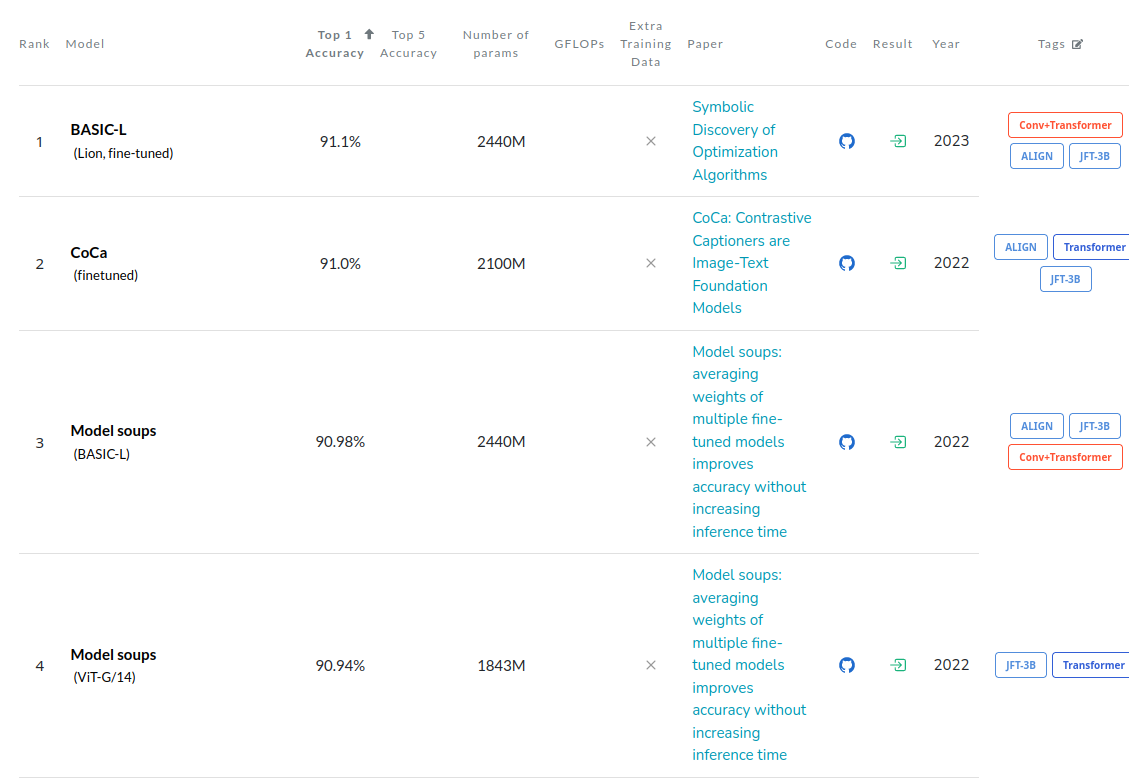
Estou empolgado, pois aplicar o mecanismo de atenção na entrada (encoders) pode ser um grande passo na arquitetura de redes neurais, assim resultando uma nova abordagem no setor de visão computacional.
Os Transformers estão sendo explorados em arquiteturas de aprendizado de máquina multimodais, que são habilitadas para processar diversos tipos de dados, como áudio, vídeo e imagens. Um paper [3] faz uma abordagem onde redes multimodais podem ser usadas para criar sistemas que compreendem a fala e leem os lábios de uma pessoa simultaneamente.
Problema: “não tem almoço grátis”, a arquitetura Transformers tem um alto custo de processamento na fase de pré-treinamento para superar a precisão dos modelos concorrentes. Treinar imagem é uma saga enorme. Mas para terminar, existem estudos sobre diminuir este custo computacional, como Transformes com filtro que podem ser implementados em CNNs. Então teremos muitas novidades disruptivas no setor de IA.
Referencias científicas:
[1] Vaswani, Ashish; Shazeer, Noam; Parmar, Niki; Uszkoreit, Jakob; Jones, Llion; Gomez, Aidan N; Kaiser, Lukasz; Polosukhin, Illia. (2017). “Attention Is All You Need”. arXiv:1706.03762 [cs]. arXiv.org, http://arxiv.org/abs/1706.03762.
[2] Dosovitskiy, Alexey, et al. (2021). “An Image is Worth 16×16 Words: Transformers for Image Recognition at Scale”. arXiv:2010.11929 [cs]. arXiv.org, http://arxiv.org/abs/2010.11929.
[3] Akbari, Hassan; Yuan, Liangzhe; Qian, Rui; Chuang, Wei-Hong; Chang, Shih-Fu; Cui, Yin; Gong, Boqing. (2021). “VATT: Transformers for Multimodal Self-Supervised Learning from Raw Video, Audio and Text”. arXiv:2104.11178 [cs, eess]. arXiv.org, http://arxiv.org/abs/2104.11178.
Último día para presentar charlas para Akademy-es 2023 de Málaga Opensouthcode edition #akademyes
Siguiendo la estela de Akademy-es 2022, el próximo encuentro de la Comunidad española de KDE se celebrará de forma presencial en Málaga el 9 y 10 de junio junto con Opensouthcode. Estamos ya a menos de dos meses y se empiezan a cerrar flecos. Así que si quieres participar de forma activa date prisa ya que hoy es el último día para presentar tu charlas para Akademy-es 2023. Así que ya lo sabes, ven e Málaga y muestra al mundo tu proyecto.
Último día para presentar charlas para Akademy-es 2023 de Málaga Opensouthcode edition #akademyes
Hace unos días compartí con vosotros que este año Akademy-es 2023 se va a realizar en Málaga el 9 y 10 de junio, en otra edición muy especial ya que se va a celebrar de forma paralela con la Opensouthcode en La Térmica.
Siguiendo el esquema habitual cuando coincide con una Akademy, las charlas se celebrarán el jueves y el viernes, para dejar libre el fin de semana para las ponencias el evento Internacional.
Dado la realización de esta Akademy-es con la Opensouthcode, las charlas se celebrarán el viernes y el sábado, dejando el domingo para alguna actividad social, si es posible.
Si crees que tienes algo importante que presentar, por favor házselo saber a la organización. Y si crees que alguien debería presentar su ponencia, no dejes de animarlo para que lo haga. Todas las contribuciones son útiles.
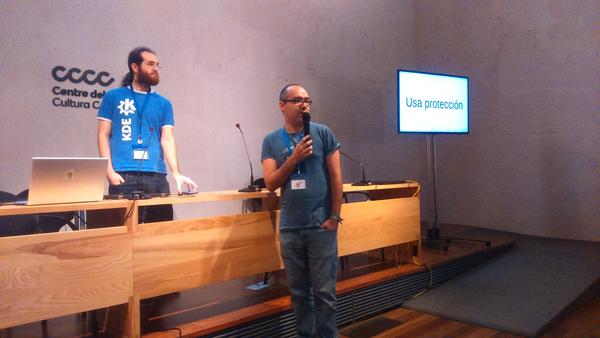
Para más detalles, mira las líneas generales del Call for Papers. Tienes de plazo para enviar tu propuesta hasta el domingo 2 16 de abril 23:59:59 CEST al correo akademy-es-org@kde-espana.org.
Es importante tener en cuenta las siguientes consideraciones:
- Se puede elegir entre dos formatos de charlas:
- Charlas de 45 minutos.
- Charlas relámpago (Lightning talk) de 10 minutos.
- Si la duración de las charlas propuestas no se ajusta a ninguno de estos dos esquemas (por ejemplo, si se necesita más tiempo), esto debe indicarse claramente en la comunicación.
- Se permitirá a KDE España la distribución bajo una licencia libre de todo el material utilizado para la realización de la actividad, así como de la grabación de la misma.
- La charla puede ser tanto a nivel de usuario como de nivel técnico.
¿Qué es Akademy-es?
Akademy-es (#akademyes, que es la etiqueta para las redes sociales) es evento más importante para los desarrolladores y simpatizantes de KDE, que se ha ido celebrando desde el 2006 con éxito creciente.
En general, las Akademy-es son el lugar adecuado para conocer a los desarrolladores, diseñadores, traductores, usuarios y empresas que mueven este gran proyecto.
En ellas se realizan ponencias, se presentan programas, se hace un poco de caja para los proyectos libres (camisetas, chapas, etc) pero sobre todo se conoce a gente muy interesante y se cargan baterías para el futuro.
Podéis repasar las anteriores ediciones en estas entradas del blog:
- Camino Akademy-es 2013: Las anteriores ediciones (I): 2006 – 2008
- Camino Akademy-es 2013: Las anteriores ediciones (II): 2009-2010
- Camino Akademy-es 2013: Las anteriores ediciones (III): 2011-2012
- Anteriores ediciones de Akademy-es (IV): 2013 y 2014
La entrada Último día para presentar charlas para Akademy-es 2023 de Málaga Opensouthcode edition #akademyes se publicó primero en KDE Blog.
Abierto el registro para Akademy-es 2023 de Málaga #akademyes
Estamos cerca ya de un nuevo evento organizado por la Asociación KDE España y prueba de ello es que ha sido abierto el registro para Akademy-es 2023 de Málaga, una edición que se celebra junto a la Opensouthcode el 9 y 10 de junio. No te lo pienses y ven con nosotros.
Abierto el registro para Akademy-es 2023 de Málaga #akademyes
Hace unos meses compartí con vosotros que este año Akademy-es 2023 se va a realizar de forma conjunta con la Opensouthcode en Málaga, el 9 y 10 de junio, en una edición muy especial ya que volveremos a encontrarnos de forma física pero que seguirá siendo accesible para todo el mundo utilizando tecnologías de telecomunicación libres.
En esta ocasión, también se rompe la tradicional forma de hacer las Akademy-es y solo será de dos días, viernes y sábado, para acomodarnos a las condiciones de la Opensouthcode.
Se está preparando el programa, de hecho todavía estás a tiempo de presentar tu charla hasta mañana domingo, pero se espera tener charlas de todo tipo de temas: divulgativos, técnicos, éticos, etc.
En otras palabras, el evento se acerca y es por ello que ya se ha abierto el registro para Akademy-es 2023 de Málaga, un registro que se realiza para tener un poco de control sobre el número de asistente y así poder tener una previsión de aforo y de otros detalles como refrescos, café o algo de comidad para las pausas para el café.
Este año registrarse es algo diferente, simplemente debéis indicar cuando realicéis el registro a la Opensouthcode que vuestro tema de interés es Akademy-es… aunque evidentemente el registro es válido para los dos eventos.
Más información y registro: Opensouthcode
¿Qué es Akademy-es?
Akademy-es (#akademyes, que es la etiqueta para las redes sociales) es evento más importante para los desarrolladores y simpatizantes de KDE, que se ha ido celebrando desde el 2006 con éxito creciente.
En general, las Akademy-es son el lugar adecuado para conocer a los desarrolladores, diseñadores, traductores, usuarios y empresas que mueven este gran proyecto.
En ellas se realizan ponencias, se presentan programas, se hace un poco de caja para los proyectos libres (camisetas, chapas, etc) pero sobre todo se conoce a gente muy interesante y se cargan baterías para el futuro.
Podéis repasar las anteriores ediciones en estas entradas del blog:
- Camino Akademy-es 2013: Las anteriores ediciones (I): 2006 – 2008
- Camino Akademy-es 2013: Las anteriores ediciones (II): 2009-2010
- Camino Akademy-es 2013: Las anteriores ediciones (III): 2011-2012
- Anteriores ediciones de Akademy-es (IV): 2013 y 2014
La entrada Abierto el registro para Akademy-es 2023 de Málaga #akademyes se publicó primero en KDE Blog.
#openSUSE Tumbleweed revisión de la semana 15 de 2023
Tumbleweed es una distribución de GNU/Linux «Rolling Release» o de actualización contínua. Aquí puedes estar al tanto de las últimas novedades.

openSUSE Tumbleweed es la versión «rolling release» o de actualización continua de la distribución de GNU/Linux openSUSE.
Hagamos un repaso a las novedades que han llegado hasta los repositorios esta semana.
El anuncio original lo puedes leer en el blog de Dominique Leuenberger, publicado bajo licencia CC-by-sa, en este este enlace:
Las 8 snapshots publicadas esta semana y que se resumen aquí son las 0406…0413 y contienen entre otros muchos, estos cambios:
- Poppler 23.04.0
- Libvirt 9.2.0
- Apache 2.4.57
- mutter 44.0 git snapshot
- systemd 253.3
- LLVM 16.0.1
- KDE Frameworks 5.105.0
- Pipewire 0.3.68
- 389-ds 2.3.2
- gnutls 3.8.0
- Mozilla Firefox 112.0
- Linux kernel 6.2.10
Y se están trabajando en estas actualizaciones para publicarlas en próximos snapshots:
- GStreamer 1.22.2
- openSSL 3.1
- Zypper 1.14.60 / libzypp 17.31.9
- Wayland 1.22.0: falla con Firefox (https://bugzilla.mozilla.org/show_bug.cgi?id=1826583, y se soluciona con Firefox 113)
Si quieres estar a la última con software actualizado y probado utiliza openSUSE Tumbleweed la opción rolling release de la distribución de GNU/Linux openSUSE.
Mantente actualizado y ya sabes: Have a lot of fun!!
Enlaces de interés
- ¿Por qué deberías utilizar openSUSE Tumbleweed?
- zypper dup en Tumbleweed hace todo el trabajo al actualizar
- ¿Cual es el mejor comando para actualizar Tumbleweed?
- ¿Qué es el test openQA?
- http://download.opensuse.org/tumbleweed/iso/
- https://es.opensuse.org/Portal:Tumbleweed

——————————–
Charlas de FLISOL 2023 de València del 29 de abril
En unas semana estaremos inmersos en el FLISOL y un año más la Asociación GNU/Linux València no faltará a su cita. Me complace compartirque han sido publicadas las charlas de FLISOL 2023 de València. Veamos que nos han preparado de nuevo los chicos y chicas de la Asociación GNU/Linux València. Una nueva oportunidad de iniciarse en el mundo del Software Libre y conocer esa maravillosa Comunidad.
Charlas de FLISOL 2022 de València del 30 de abril

Desde 2008, el cuarto sábado de abril se organizan unas jornadas de difusión de Software Libre de forma simultánea en multitud de lugares del planeta. Este evento recibe el nombre de FLISOL y como principal objetivo es promover el uso del software libre mediante charlas y eventos.
Un año más vamos a poder disfrutar de una edición de FLISOL en la Comunidad Valenciana, concretamente el 29 de abril de 2023 en València. Y un año más está organizado por la Asociación GNU/Linux València cuyo objetivo es la difusión de GNU/Linux, y dar a conocer la facilidad de uso y funcionamiento de cualquier distribución de GNU/Linux.
Como decía hace unos días, para esta edición ha preparado varias charlas que se resume en la siguiente tabla de actividades:
| Horario | Título | Ponente | Descripción |
| 10:00 | Bienvenida | Puesta en marcha | |
| 10:15 | ¿Por qué las licencias libres protegen a los usuarios? | Alex Climent Pérez. Defensor del software libre y, en especial de GNU/Linux. | Durante los últimos años ha convocado múltiples charlas e install partys en las que ha introducido a numerosas personas al software libre. Fundó en 2021 junto a otros compañeros el colectivo «Emancipació Comunitària», con la misión de promover herramientas que nos liberen de toda entidad que tenga un poder injusto sobre la comunidad. |
| 11:15 | Sostenibilidad en los movimientos asociativo | David Marzal Cánovas. Graduado en Ingeniería Informática, | En la charla nos hablará sobre Software Libre, medioambiente, economía e interseccionalidad, dando un breve repaso a los retos y consejos para mantener una asociación con medios propios. |
| 12:15 | Descanso | ||
| 12:30 | 20 años de experiencia como editor de cdlibre.org | Bartolomé Sintes Marco. Profesor de Informática de Secundaria (Formación Profesional). Mantiene desde hace veinte años la web cdlibre.org, | En esta charla nos hablará de su experiencia con esta web, relacionándola con la evolución del software libre en estos últimos años y sus perspectivas de futuro. También es editor mclibre.org donde figuran actividades relacionadas con su trabajo de profesor de informática. |
| 13:30 | Nos vamos a comer | El que quiera | ¡Venirse a comer a un restaurante próximo, que dispone de menú vegano!. Quien desee asistir debe de enviar un correo a correo -arroba- gnulinuxvalencia.org indicando su nombre y cuantas personas acudirán. |
| 15:45 | . «Install Party/ Fiesta de instalación» | Asistentes y socios | Nuestros socios y otros voluntarios instalarán un sistema operativo GNU/Linux y los programas compatibles más habituales en los equipos que traigáis. Es importante que tengáis copia de todos vuestros datos ya que presumiblemente formatearemos vuestro disco. |
| 19:54 | Cierre del evento | Los que queden | Esperamos que lo disfrutéis |
Y lo datos para poder asistir son los siguientes (el registro no es obligatorio pero si óptimo para contar asistentes de forma más fiable):
LAS NAVES
Carrer de Joan Verdeguer, 16-24
46024 Valencia
España +34 963 910 477 hola@lasnaves.com
Más información: FLISOL 2023 de València | Flisol
¿Qué es Flisol?
Para los que todavía no conozcan Flisol, se trata de un evento «… de difusión de Software Libre más grande en Latinoamérica y está dirigido a todo tipo de público: estudiantes, académicos, empresarios, trabajadores, funcionarios públicos, entusiastas y aun personas que no poseen mucho conocimiento informático…»
La asistencia es gratuita y su principal objetivo es promover el uso del software libre, dando a conocer al público en general su filosofía, alcances, avances y desarrollo.
Tenemos un canal de telegram donde los asistentes al evento recibirán información actualizada GRUPO DE TELEGRAM PARA ASISTENTES.
La entrada Charlas de FLISOL 2023 de València del 29 de abril se publicó primero en KDE Blog.
openSUSE Tumbleweed – Review of the week 2023/15
Dear Tumbleweed users and hackers,
This week we have seen quite a low number of submit requests coming to Tumbleweed, which resulted in the snapshots being built and tested rather quickly and us thus managing to release 8 snapshots in the day (usually the Thursday snapshot is only published later on Friday evening, this week it was all built and tested before lunch). So the 8 snapshots are not something really special. The versioning for snapshots limits us to one snapshot per day after all (and I doubt anybody would ask for more than that).
The snapshots covered in this review are 0406…0413 and contain these changes:
- Poppler 23.04.0
- Libvirt 9.2.0
- Apache 2.4.57
- mutter 44.0 git snapshot (44 commits after 44.0: avoid some crashes on gnome-shell)
- systemd 253.3
- LLVM 16.0.1
- KDE Frameworks 5.105.0
- Pipewire 0.3.68
- 389-ds 2.3.2
- gnutls 3.8.0
- Mozilla Firefox 112.0
- Linux kernel 6.2.10
Staging projects are not overwhelmed at the moment, so if you have anything that you want to be integrated into Tumbleweed, now is a good time (as ever): we will; find staging space for your needs. The current updates being tested include the following:
- GStreamer 1.22.2
- openSSL 3.1
- Zypper 1.14.60 / libzypp 17.31.9: support for x86-64-vN sub-architectures
- Wayland 1.22.0: crashes Firefox (https://bugzilla.mozilla.org/show_bug.cgi?id=1826583, fixed for FF 113)
And that’s already all the interesting things I could find in staging…

Frameworks, Shotwell, systemd update in Tumbleweed
Six openSUSE Tumbleweed snapshots have been released since last Friday updating some GNOME applications, KDE’s Frameworks, the LLVM compiler and several other packages.
The rolling release updated several new and some older software packages.
GNOME webcam application cheese updated from version 43.0 to 44.0 in snapshot 20230412. The photo and video program updates translations and avoids creating duplicate camera devices, which was related to GStreamer emitting a call. GNOME’s widow manager Mutter 44 had some changes to make it more resilient and avoid a type of crash on gnome-shell. An update of the development library SDL2 2.26.5 fixed a crash on Linux Kernel if dbus can’t be initialized. It also added mapping for the DualSense Edge Wireless Controller on Linux. An update of apache2 2.4.57 and its subpackages fixed regressions introduced in the previous version. An updated version of yast2-storage-ng 4.6.5 adjusted detection of Dell BOSS devices. AV1 encoder rav1e 0.6.4+0 had the most changes of all the packages that arrived in the snapshot. The package enables AVX2 12-bit Inverse Transform x86 assembly as well as a new SSE4.1 HBD Inverse Transform x86 assembly.
An update of hxtools and Japanese Dictionary edict each had a matching 20230411 version, which also matched the 20230411 snapshot. While hxtools removed an option and changed an option behavior, edict had no changelog recorded. The lightweight directory access protocol 389-ds updated to a 2.3.2 version update. The package added tests for WebUI, fixed a memory leak and applied upstream fix for setuptools. An update of user-level packet capture package libpcap 1.10.4 fixed the name of the launch daemon service. An update of gnutls 3.8.0 took care of CVE-2023-0361. The vulnerability for the Transport Layer Security library could have allowed for a side-channel to be sufficient enough to recover the key encrypted RSA ciphertext. There was also an update of the keyring with https://gnutls.org/gnutls-release-keyring.gpg. Seven translation were updated with a newer version of yast2-trans and dracut removed a mkinitrd wrapper.
The 20230410 snapshot updated just two packages. GNOME personal photo manager application shotwell updated to version 0.31.90. The new version fixed issues with images that continuously shifted by a time zone offset and it fixed issues with unset exposure times. The photo manager also enabled face recognition. The other package to update was the video driver package xf86-video-savage; the 2.4.0 version had a small change that improves support for building with Xorg 1.19 and later.
KDE Frameworks 5.105.0 updated in snapshot 20230409. The 5.105.0 version that has addon libraries to Qt had some minor indentation fixes for the text editor KTextEditor. The Breeze Icons added some missing semi-transparency and a new breeze-dark representation for Redshift icons. Kirigami, which is used for computers, phones, TVs and other devices, fixed a header with invisible content that was taking up space and adjusted the default page categorized settings. An update of the audio- and video-handling package pipewire 0.3.68 adds a new Real-Time Transport Protocol session module and adds a new runtime debug property for streams and nodes to trigger a save of raw samples to a wav file. Music player amarok had a small adjustment and several translations were made with the manpages-l10n 4.18.0 update.
The compiler and toolchain package llvm16 had its first minor release of the version in snapshot 20230408. The 16.0.1 added a rebase patch and some bug fixes for the major release. An update of libreoffice 7.5.2.2 fixed seven bugs. One of those returned the heading style label that vanished in the Chinese, Japanese and Korean interfaces. Another heading navigator that caused Writer to crash was fixed. Other packages to update in the snapshot were ibus-table 1.17.0, yast2-packager 4.6.1 and yast2-ruby-bindings 4.6.2.
The snapshot from last Friday, 20230407, was small, but it updated systemd to version 253.3. Fixes that are not part of the stable release were merged for this snapshot release like a github workflow concerning release tags. The updated version also merged tag ‘v253.3’ into SUSE/v253 and had a continuous integration action related to mkosi dependencies. An update of libstorage-ng 4.5.95 disabled some NVMe detection and added a GitHub action using Fedora. GNU Compiler Collection 13 had some small enablements and added cross-bpf packages.
KDE Connect se prepara para recibir unas mejoras sustanciales
El desarrollador inicial y principal de KDE Connect trabajará a tiempo completo para implementar ciertas mejoras a este software imprescindible que conecta nuestro dispositivo Android con nuestro escritorio Plasma

Como resumen, KDE Connect es una aplicación de Android y un programa para nuestro escritorio KDE que lo que hace es interconectar ambos dispositivos, así recibiremos notificaciones de uno en el otro, compartiremos portapapeles, podremos manejar nuestro escritorio Plasma mediante el dispositivo Android y mucho más.
KDE Connect se convirtió rápidamente en una aplicación imprescindible dentro de la comunidad KDE y una aplicación deseada (y envidiada) en otras plataformas privativas.
Albert Vaca es el desarrollador de la comunidad de KDE que hace ya 10 años creo la aplicación de software libre KDE Connect y que ahora se dispone a preparar el camino para un KDE Connect mejorado.
En un artículo en su blog personal, Albert Vaca nos relata cuales son los motivos por los que puede dedicar más tiempo a mejorar KDE Connect y cuales serán las mejoras sobre las que trabaje.
KDE Connect tuvo que lidiar en sus inicios con protocolos técnicamente limitados con los que trabajaba Android hace 10 años.
Durante este año, Albert Vaca trabajará en un proyecto llamado “KDE Connect discovery and transport protocol improvements” que qrecibió fondos de NLnet foundation como parte de NGI Assure. Gracias a esa donación de fondos le permitirá trabajar a tiempo completo en KDE Connect, con el objetivo de actualizar el protocolo y el software y adaptarlo a los estándares más actuales.
Trabajará principalmente en KDE Connect en estas tres áreas para conseguir un KDE Connect 2.0. Y algunas mejoras irán llegando poco a poco, pero pronto.
Fiabilidad
Lo mejor de KDE Connect frente a otras opciones privativas que existen, es que is that KDE Connect únicamente utiliza tu red local para comunicar los dispositivos y no es necesario utilizar «la nube» (es decir, equipos de empress que poseerán tus datos) de servicios intermedios.
Debido a esto, es necesario que ambos equipos se descubran en la red antes de poder comunicarse entre sí.
Para poder descubrirse actualmente es posible por utilizar el protocolo UDP broadcasts, pero actualmente es más seguro utilizar multicast DNS (mDNS). Se intentó adoptar mDNS hace tiempo, pero necesitaba más dedicación de lo que podía darle.
Pero gracias a que ahora trabajará en exclusiva sobre ello. se implementará un backend de mDNS para KDE Connect en todas las plataformas (Linux, Windows, MacOS, Android e iOS). Es una gran tarea ¡Esperemos que lo consiga!
Seguridad
Antes de Android 5, solo se podía usar TLSv1 y un juego limitado de conjuntos de cifrado. Siempre intentaron ser compatibles con los dispositivos antiguos y luchar contra la obsolescencia programada que afecta a la tecnología moderna, pero eso significaba mantener el protocolo KDE Connect compatible con los protocolos de cifrado inseguros.
Comenzando con KDE Connect v1.22 para Android, ahora se requiere Android 5 o posterior para poder eliminar la compatibilidad con el cifrado inseguro en todas las implementaciones de KDE Connect (y no solo en Android). Además de eso, se está revisando y actualizando las dependencias que se agruparon como parte de la aplicación para asegurarse de tener los últimos parches de seguridad.
A finales de este 2023 y gracias a NLnet, se podrá auditar en materia de seguridad KDE Connect y lo realizará Radically Open Security. Será la segunda vez que KDE Connect sea auditada, ya lo realizó el equipo de seguridad de openSUSE en 2020.
Accesibilidad
Recientemente se adoptó en KDE Connect Material 3 en la aplicación de Android (Dmitry Yudin realizó la mayor parte del trabajo) y KDE en su conjunto se está preparando para migrar las aplicaciones de escritorio a Qt6.
Gracias a esto, es una gran oportunidad para revisar la accesibilidad de las interfaces de usuario, y para eso, NLnet está ayudando a obtener una auditoría de accesibilidad por parte de la Universidad HAN también a finales de este año 2023.
Sin duda se plantean muchos retos para una aplicación que nació como un pequeño proyecto y que se ha convertido en imprescindible y crecido en funcionalidades y mejoras.
Estaremos atentos a lo que Albert Vaca y los colaboradores vayan publicando y las versiones de KDE Connect que se vayan lanzando, para ver y disfrutar de las mejoras.
Enlaces de interés
- https://albertvaka.wordpress.com/2023/04/11/the-road-to-kde-connect-2-0/
- https://kdeconnect.kde.org/
