
 hpj
hpjBalance of Power: A rematch served cold
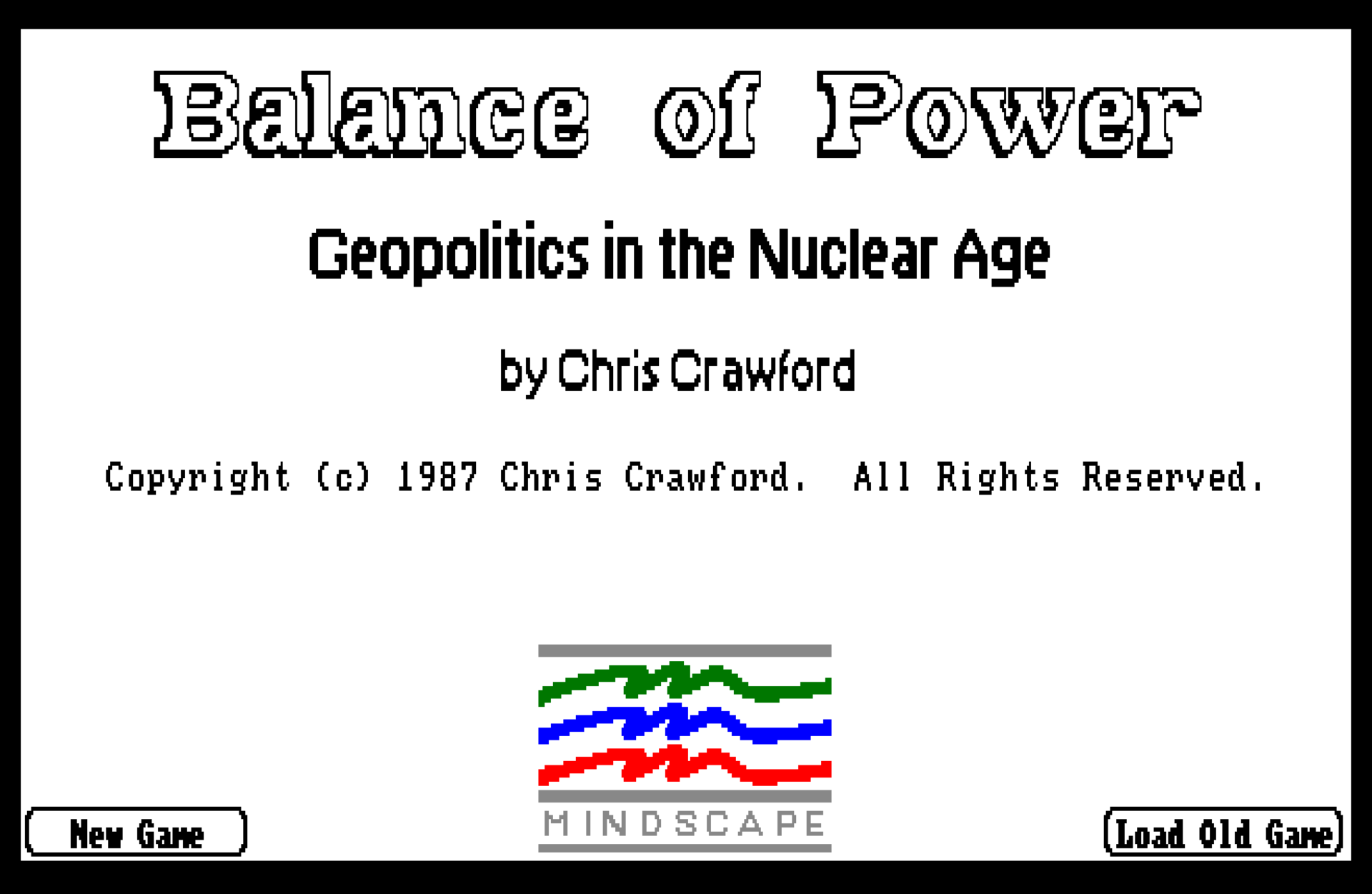
There's an old video game the memory of which recently escalated itself to my attention: Chris Crawford's Balance of Power, a geopolitics simulator first released for the Macintosh in 1985. According to Wikipedia it sold about a quarter million units, which was a lot at the time, and I must've been somewhere in the impressionable age range of 10 to 12 years old when my father bought Incredible Technologies' port for the Commodore Amiga.
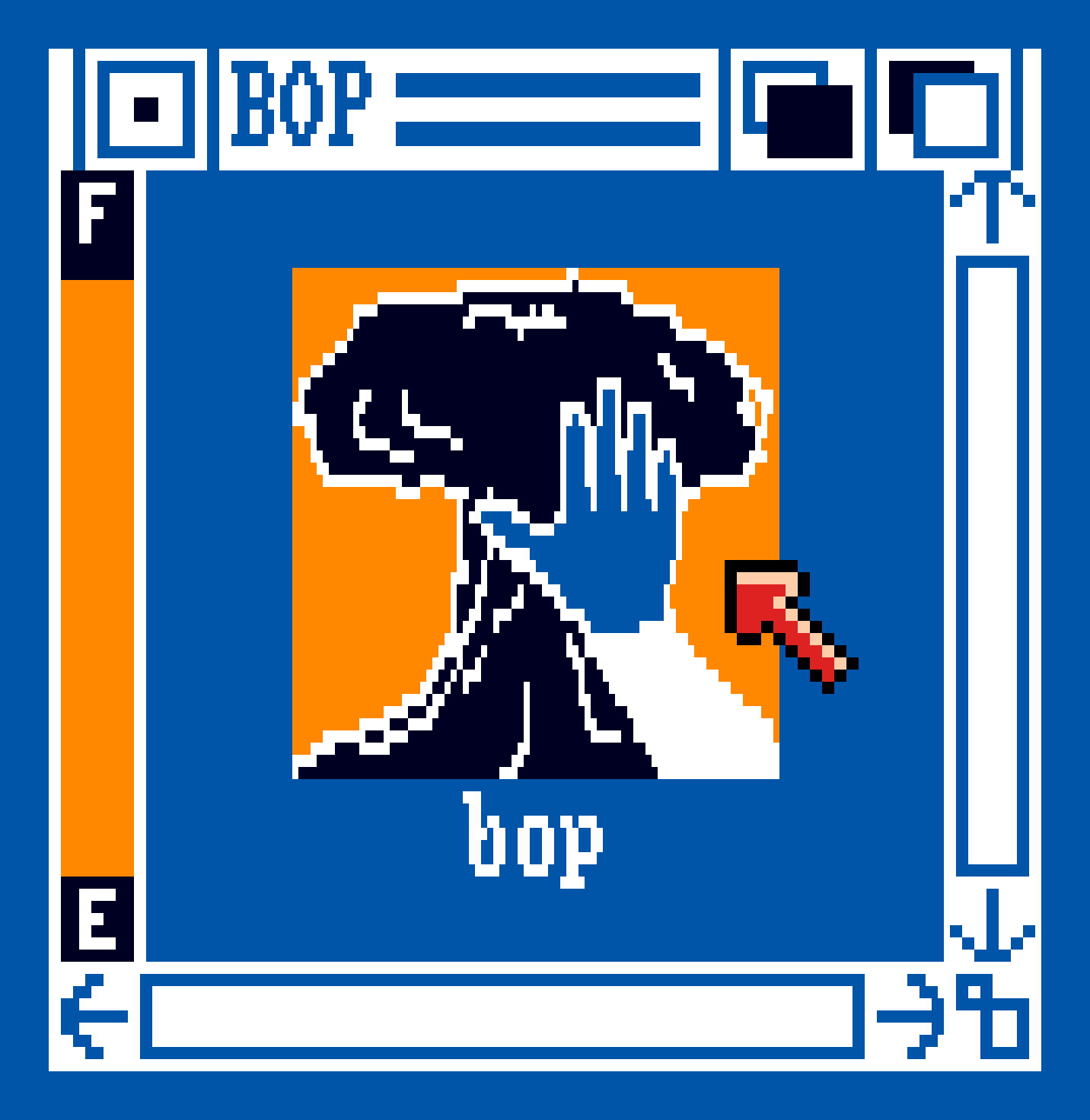
Its Workbench icon featured a mushroom cloud with a hand over it in the universal that's-not-what-I-ordered gesture (though possibly gently petting it — or simply shielding the observer's eyes?), but the game itself had a minimalist, academic look, and beyond a simple dissolve effect on the title screen it featured no explosions or indeed animations of any kind. This was unusual on the Amiga, a platform known for its ability to make the rubble bounce in Technicolor.
Crawford's maze
Although I had an idea of what was going on in the world — I'd observed the cultural touchstones at friends' birthday parties, caught glimpses of something less watchable but much more memorable, and seen the inside of a bomb shelter — I didn't have the toolbox for nuclear brinkmanship, let alone internalizing what I now recognize to be a beautiful 87-page manual with a hardcover sleeve and an extensive bibliography. In the end, for all the sneaking into my dad's office to play this in the dead of night, I couldn't really figure it out.
So. Since Halloween seems like a good occasion to indulge in a little psychological horror (no other reason), I decided to do a rematch of sorts — this time with the help of fs-uae.
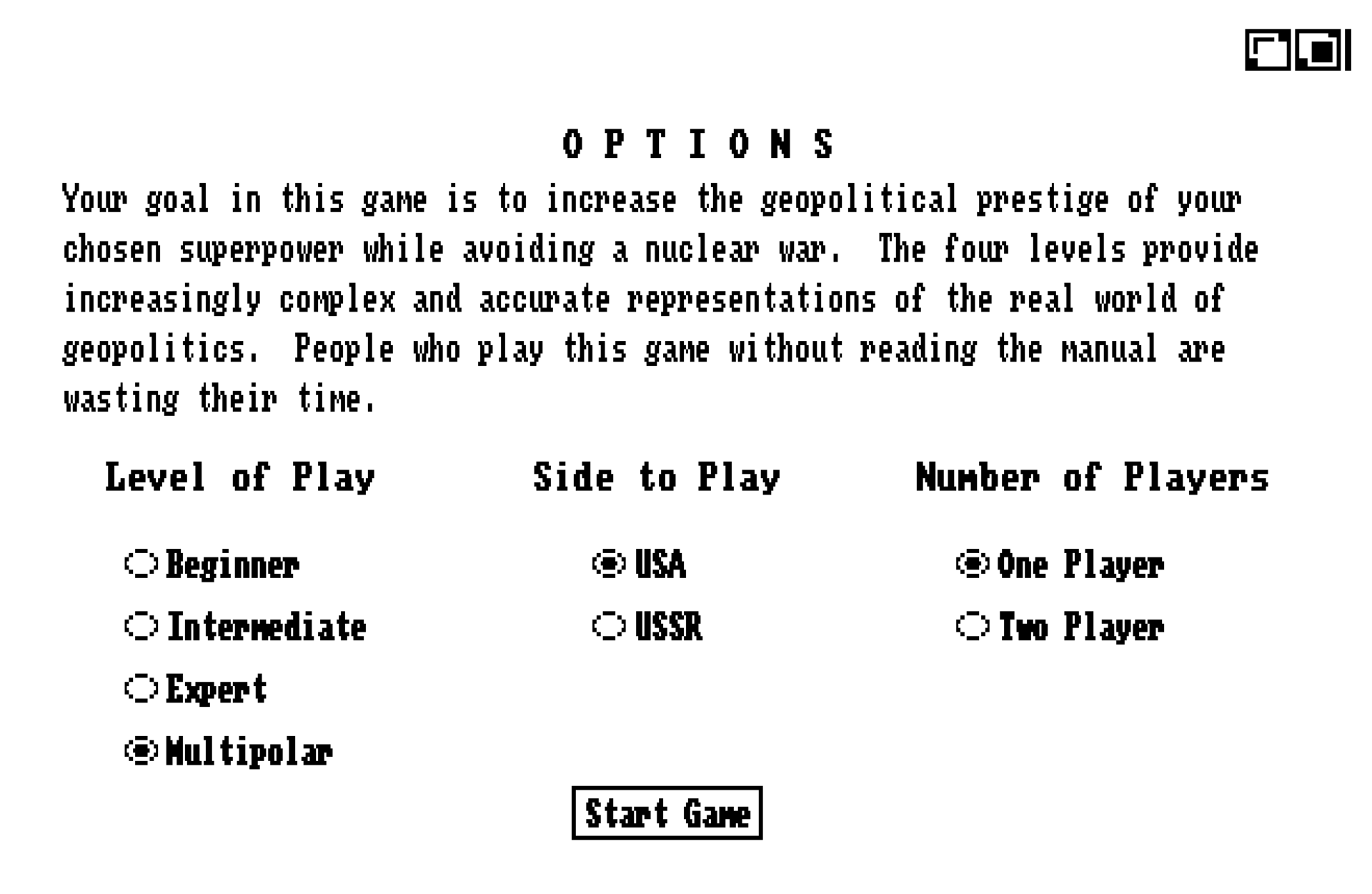
Crawford released an updated game in 1989 (simply called the 1990 edition), with the Amiga port credited to Elaine Ditton. It introduced the multipolar mode, which had been left out of the 1985 release:
Unfortunately, this multipolar view of the world is just too cerebral for most game players. It has something to do with our expectations of games; a mature, otherwise sophisticated adult will sit down with this game and ask, "How do I nuke the Commies?" Games, like stories, must have conflict, but people have been so inundated with the brutal, violent conflict standard in computer games that they are unable to grasp the subtle, indirect conflict arising from a multipolar world. This was a very painful discovery, and it forced a shift in the game from a multipolar view toward a more bipolar view. Minor countries had been able to pursue their own foreign policies; now they are passive pawns. Neutralist policies were entirely feasible; now minor countries choose up sides along left-wing/right-wing lines. The result is less realistic but more suited to the needs of the game-playing audience. Perhaps someday a more sophisticated game will be possible.
BOP manual, p. 74
Ok, so it's 2022 now, and we're all sophisticated down here. We want the multipolar. Furthermore, although the game didn't anticipate certain pivotal events of 1991, we'll play as the USA just to be on the safe side.
Here in the future, we also come armed with source code courtesy of the man himself: In this case, it's written in Pascal with a tiny morsel of assembler, of which the latter mostly exists to calculate square roots. BOP doesn't really have any spoilers apart from the obvious one, and a peek here and there should be interesting.
For the RAND analyst in you
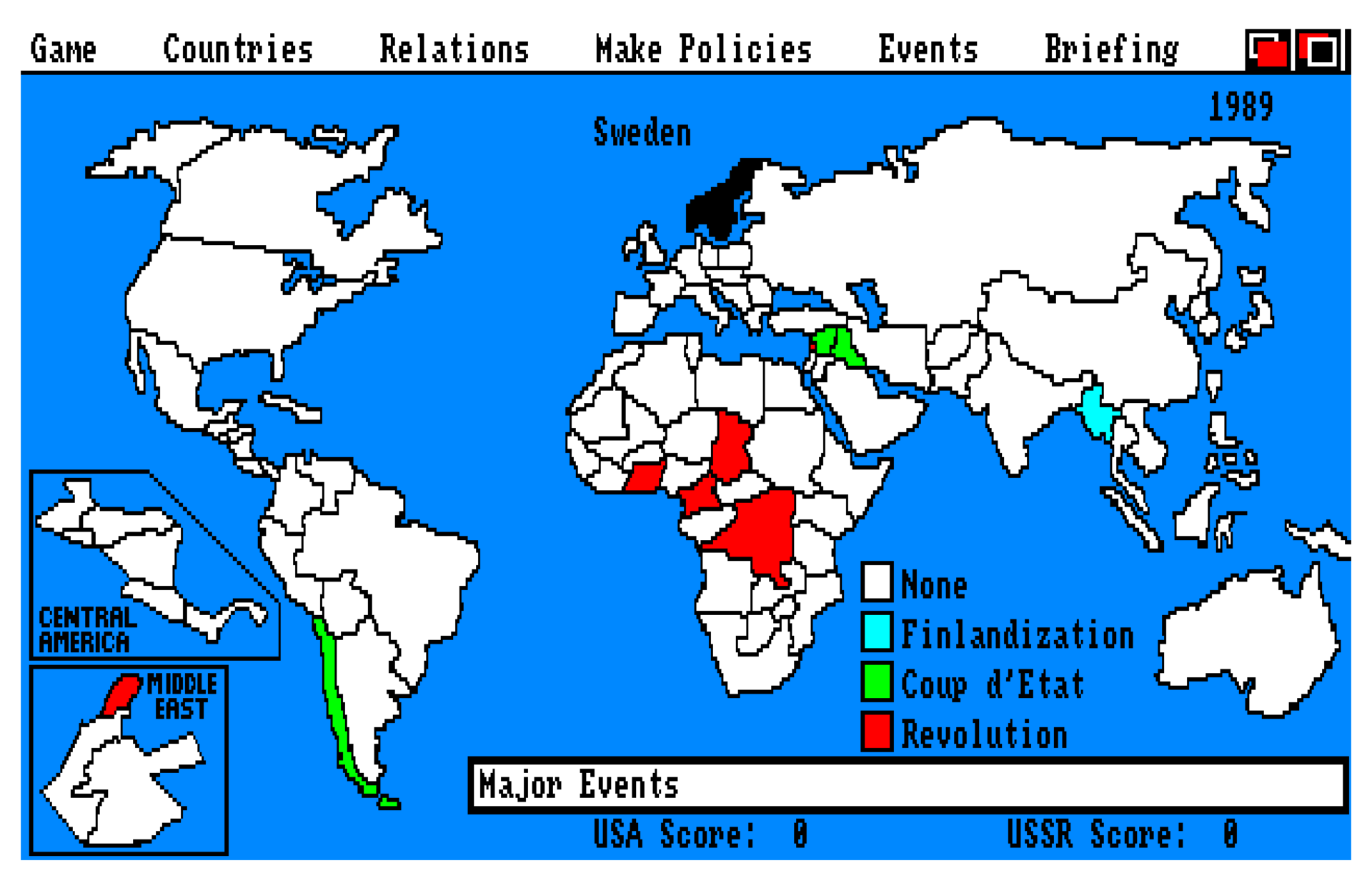
The centerpiece of the game is, logically enough, the world map. It reflects some of the assumptions and technical limitations of the time: Many countries were removed because they'd make too small click targets or were thought to be strategically redundant. For instance, my own little corner of the world has been unceremoniously rolled into Sweden, which is fine (I, for one, welcome the Kalmar Union redux).
Next up, "Finlandization" is represented in the game, but Finland is not. This seems unfair to the Finnish. Of course, there's the unfairness of the entire, uh — (gesturing vaguely at the map) — to consider. It's very much not a game about curing the world's ills. But we'll live. Probably.
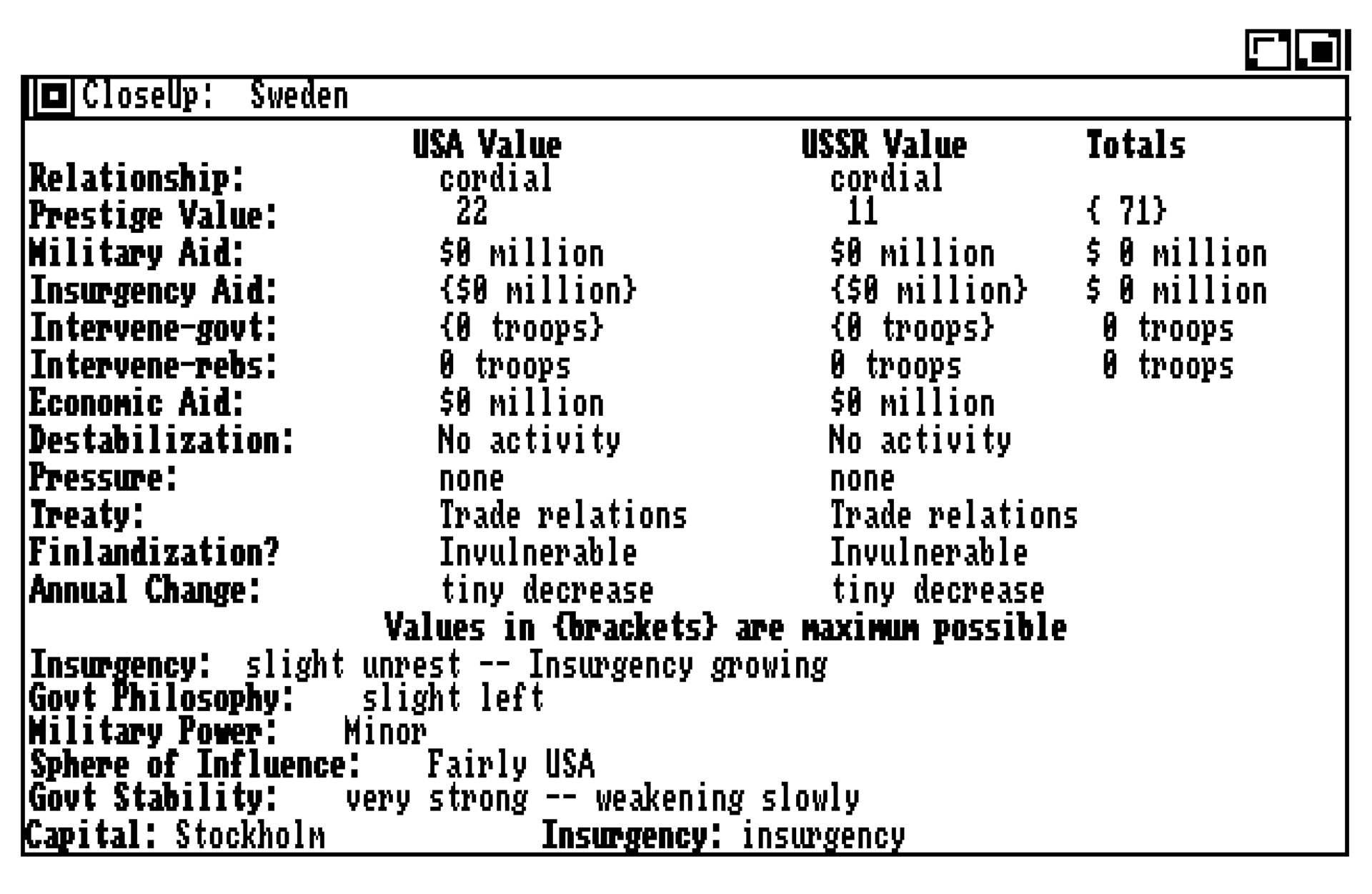
Each country has a large number of variables attached. Some are directly manipulable, contingent on the limitations of physics and diplomacy. For instance, you could send military aid to the Swedish government but not the rebels, since there aren't any in Sweden to speak of. However, you could still intervene on behalf of these "rebels" and bootstrap an insurgency on some flimsy pretext. There are also subtle ways to change the existing government's mind and eventually sign a treaty that would let you station troops with them.
The important variables, such as government stability, security, affiliation and power, are only indirectly manipulable. Some of them are hidden, and most of them are obfuscated by natural language. There's no way you can break out your calculator to predict exactly what'll happen on the next turn, no big "Democracy" button to slam for a +2 bonus to semiconductors or whatever. You're forced to read reports and think in terms of… well, not exactly the real world, but at least a facet of it.
The game plays out over eight turns representing the passage of calendar years. On each turn, countries make their policy moves and optionally dispute each other's moves, and then the simulation ticks. The last part is where the magic happens. As an example, here's how country i's desire to Finlandize to superpower j is calculated:
y:=MilPowr[i]-InsgPowr[i];
FOR j:=1 TO 2 DO
  BEGIN
    x:=InsgIMax(j,i);
    ProjPowr[j]:=(IntvConv(x)*ord4(MilPowr[j])) div MilMen[j];
    x:=Treaty[3-j,i];
    x:=(Should(x)*ord4(MilPowr[3-j])) div 128;
    SelfPowr[j]:=y+(x*ord4(Integrty[3-j])) div 128;
    IF SelfPowr[j]<1 THEN SelfPowr[j]:=1;
    temp:=((ord4(Adventur[j]-DipAff^^[j,i])*ProjPowr[j]*(Pressure[j,i]+4))
           div SelfPowr[j]);
    IF temp<0 THEN temp:=0;
    IF temp>2048 THEN temp:=2048;
    FinlProb[j,i]:=temp div 8;
  END;
This is an interesting function with a couple of variables in play:
- The government's military strength relative to insurgents' (
MilPowr[i]-InsgPowr[i]). - The threatening superpower's military spending (
MilPowr[j]/MilMen[j]) and ability to intervene in the area.InsgIMax(j,i)considers troops stationed in countries geographically adjacent toi. - The supporting superpower's military strength, treaty level and history of honoring its commitments (
Integrty[3-j]). - The level of any diplomatic pressure campaign — harsh words, basically — aimed at the country (
Pressure[j,i]). There's a small constant added to it, so the multiplier can never be zero; posting lots of soldiers next door can be quite menacing even if it's done quietly. - The adventurism factor (
Adventur[j]), proportional to the demonstrated combativeness (Pugnacty[j]) of the threatening superpower relative to that of the other's plus the overall political tension in the world (Nastiness). This goes up if the situation seems dangerous and uncertain. - The diplomatic relationship between the threatening superpower and country
i. This is a signed integer with0being neutral. Effectively, being on good terms neutralizes the threat posed by soldiers, but not that of general craziness.
Another delightful wrinkle is what happens if the superpowers put boots on the ground on opposing sides of a conflict, meaning the US and USSR are in a shooting war:
IF ((IntvGovt^^[1,i]>0) AND (IntvRebl^^[2,i]>0)) OR
   ((IntvGovt^^[2,i]>0) AND (IntvRebl^^[1,i]>0)) THEN
  BEGIN	{USA fights with USSR}
    DipAff^^[1,2]:=-127;
    DipAff^^[2,1]:=-127;
    Nastiness:=127;
    Pugnacty[1]:=127;
    Pugnacty[2]:=127;
  END;
BOP treats this as an extremely serious situation and cranks up the Nastiness and Pugnacty factors, causing worldwide ripple effects (conflicts may erupt or worsen, weak governments may collapse, etc).
There's a lot more to it, but you get the idea: It's an interconnected world with gradual change, tipping points and cascading effects. I think few games pull this off — or dare attempt it — because it can leave a very narrow road between the extremes of boring (too stable) and incomprehensible (too chaotic). Throw in expectations of realism, and it's a tall order.
BOP manages fine, in part due to carefully chosen initial conditions and constraints on what it deems "minor" (non-superpower) countries. Here's Canada:
InitCountry(14,'Canada',2040,228,441,-10,-125,10000,0,36,20,9,56,255,77,99,12);
  InitCont(14,1);
  MinorSph^^[14,17]:=TRUE;
  MinorSph^^[14,18]:=TRUE;
  MinorSph^^[14,20]:=TRUE;
FiniCntry(14);
Defined as being contiguous with the USA (country #1), it adds Britain, France and West Germany to its sphere of influence, so when the AI hammers out its foreign policy, it will only consider these four counterparts. Britain for its part has 15, and France is up there with 12, but Sweden has only the one on its eastern border.
Frank exchange of opinions
FUNCTION Crisis;
{Returns a value of TRUE if the missiles fly}
Of course, countries don't get to undermine and invade each other willy-nilly. There are checks on this activity, such as the local neighborhood superpower getting on the phone and politely telling them to knock it off. When this happens to a minor country, it will pull back and just quietly stew for a bit, souring diplomatic relations, but with superpowers on both ends, things get exciting: It turns into a game of chicken. The superpowers take turns escalating, starting with a zero-stakes back-channel discussion, through diplomatic and military crises, until either one of them backs down or a nuclear war starts. The prestige penalty for backing down increases as the crisis escalates.
This can be frustrating, since it's easy to misjudge the computer's commitment (though it drops hints in its diplomatic missives, e.g. when it "categorically refuses" you may be about to have a bad day). The 1990 edition added advisors, in theory making it easier to get a read on the situation.
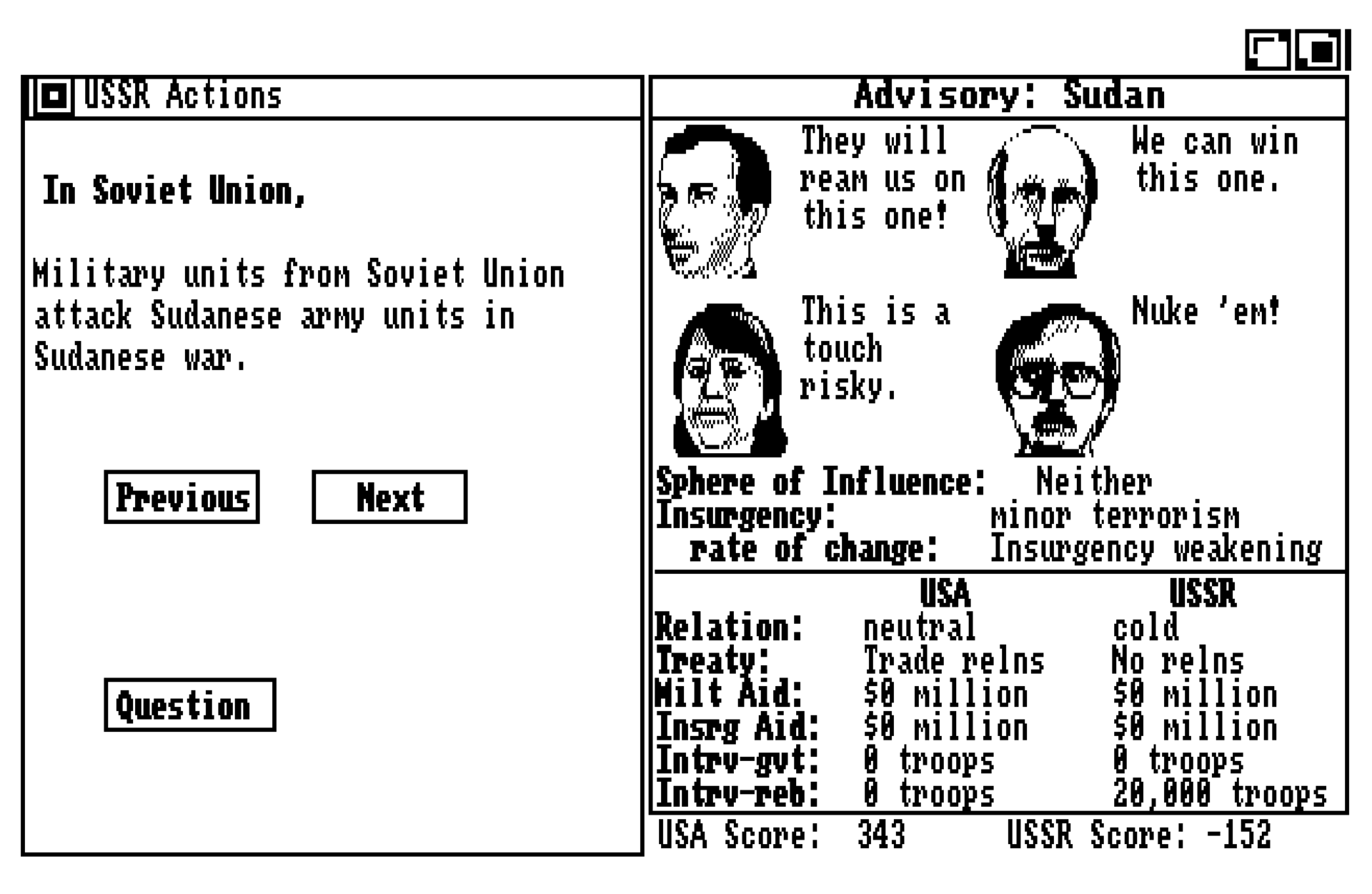
You can usually sort of interpolate their various opinions, but it's harder when they disagree wildly on an issue — like the above, where the Soviets just dispatched 20,000 soldiers to topple the government of Sudan. It sounds like a mean thing to do, and — more importantly — it would strengthen Soviet influence in the region and weaken ours. I don't think they're serious about this, so let's put our chips on advisor number four, the one with the mustache. I like his attitude.
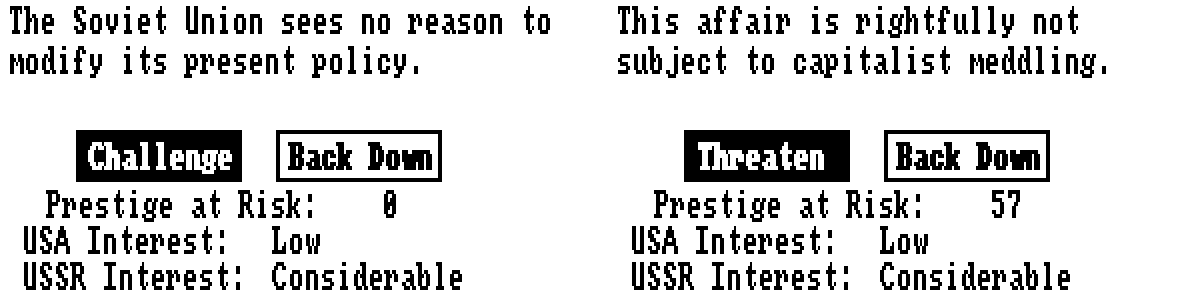
Mr. Gorbachev turns a deaf ear, so we go public with a diplomatic challenge. Still no. The world is watching now, and since there's an uncomfortable amount of prestige at risk, we press the issue and threaten a military response.
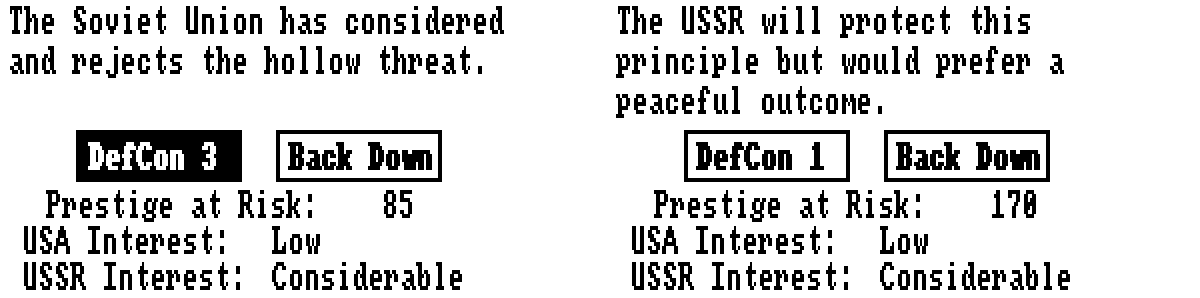
They escalate to DEFCON 4, we go to DEFCON 3, and they respond by escalating again. That's DEFCON 2, with bombers in the air and humanity collectively holding its breath. We're left with two choices: either let rip (and end the game) or back down and suffer crushing humiliation. This is bad. The prestige hit will affect our diplomatic relations, hamstringing us and effectively cutting our lead in half. Good thing we can absorb the loss without falling hopelessly behind. Otherwise, well…
Anyway. How could advisor #4 lead us astray? The answer lies in this excerpt from the GImpt() function:
x:=DipAff^^[i,Obj] div 4;
y:=(Should(Treaty[i,Obj]) div 4)+1;
z:=(ord4(DontMess[Obj])*1280) div SumDMess;
t:=Adventur[i] div 2;

CASE Bias OF
  0: BEGIN END;
  1: BEGIN x:=x*MySqrt(Abs(x)); y:=MySqrt(y); END;
  2: BEGIN y:=y*MySqrt(y); z:=MySqrt(z); END;
  3: BEGIN z:=z*MySqrt(z); t:=MySqrt(t); END;
  4: BEGIN t:=t*MySqrt(t);
       IF x>0 THEN x:=MySqrt(x) ELSE x:=-MySqrt(Abs(x));
     END;
END;
The enum values 1-4 correspond to the different advisors. Looking at the fourth one, our guy is giving more consideration to Adventur[i] — the adventurism factor again, which frankly must've been pretty high at this point in the game — and less to our relations with Sudan. Our belligerence emboldened him, and we got some bad advice in return.
Again there's a lot more going on under the hood, and a lesson for budding diplomats:
This system produces some behaviors that may surprise you. For example, suppose that you as an American player gave economic aid to Nigeria. The Soviets take objection to this and start a crisis. You escalate, they escalate, and a nuclear war starts. The question on your lips is, why would those idiots annihilate the world over economic aid to Nigeria? The answer is, because you were willing to annihilate the world over Nigeria. Remember, it takes two to make a crisis. The computer figured that this just wasn't an important issue for you, and that, while trivial, it was still a more important issue for itself. It therefore stuck to its guns. […]
This raises a very important point about geopolitics. You could protest loudly, "But I do care about Nigeria! The computer can't assume what I'm really thinking!" You are absolutely right. Real-world diplomats don't know what's really going on in the minds of their interlocutors. They know perfectly well that today's words are only an expression of today's exigencies. The only thing they can rely on are the substantial events of the past. If you have built up a record of close relations with Nigeria, your behavior in a crisis will have to be taken seriously. If your record is of weak relations, then your behavior will not be taken seriously. The computer treats it that way. If you want to convince people that you're serious, you've got to lay the groundwork.
BOP manual, p. 77-78
Enough of that. Are ya winning, son?
Yeah, about that rematch. This isn't tic-tac-toe, so you can play it and win. Sort of.
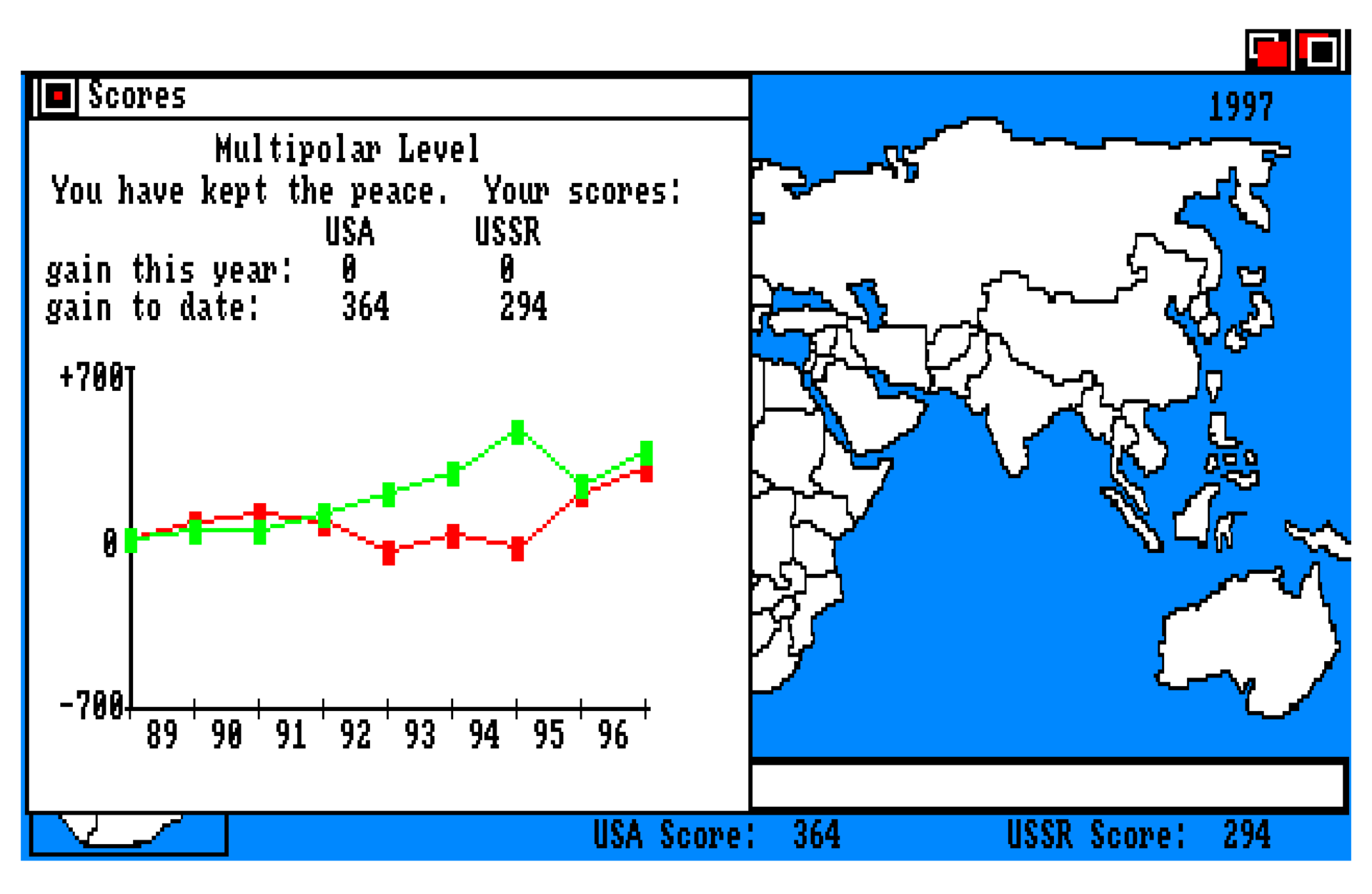
The main difficulty lies in us and humanity getting to this screen — although "kept the peace" tends to belie some dismal stuff unleashed along the way — after which we can relax and judge the result for ourselves.
As you can see, mistakes were made in 1995. Lest you judge me, the (now former) government of Mexico forced my hand! What followed made a lot of people unhappy, and then the French admin collapsed amidst the general chaos.
I did keep the green line up, though, so we'll call it the good ending. It took a few tries.
Unforeseen consequences
resource 'STR ' (705, purgeable) {
	"2* response* reply* answer* reaction*"
};

resource 'STR ' (706, purgeable) {
	"2* is coming* is being sent* is on its way* will arrive*"
};

resource 'STR ' (707, purgeable) {
	"2* via the North Pole.* over your northern border.* by ICBM.* by m"
	"issile courier.*"
};
It's not an easy game. You could know the rules like the back of your hand, and it still wouldn't eliminate the risks.
The crisis dialogue has one final surprise in store for us. As you click through the DEFCONs, there's a random factor that becomes increasingly relevant. It represents the likelihood of an oopsie:
x:=0;
CASE CrisisLevel OF
  2: x:=16;
  3: x:=8;
  4: x:=2;
END;
IF DipAff^^[1,2]>0 THEN x:=0 ELSE x:=(x*(-DipAff^^[1,2])) div 64;
y:=Random div 128;
IF x>(Abs(y)) THEN BEGIN CrisisLevel:=1; ANWFlag:=TRUE; END;
Watch out for that ANWFlag! The risk is at its highest when going to DEFCON 2 with superpower relations bottomed out (as they'd be in a shooting war): (16 * 127 / 64) / 128 = 0.248, or roughly a 25% chance of unintended fireworks.
In most cases, the probability will be much lower. If your relations are merely kind of bad at -32, and you go to DEFCON 4, the risk is 1/128, or 0.8%. In the real world that's not so low, but for the purposes of BOP it's a low probability/high impact risk you'll be taking again and again.
Good thing, then, that we only have to make it through eight years. The risks add up over time, and even if you play quite carefully, you will come to fear a certain arresting memo:
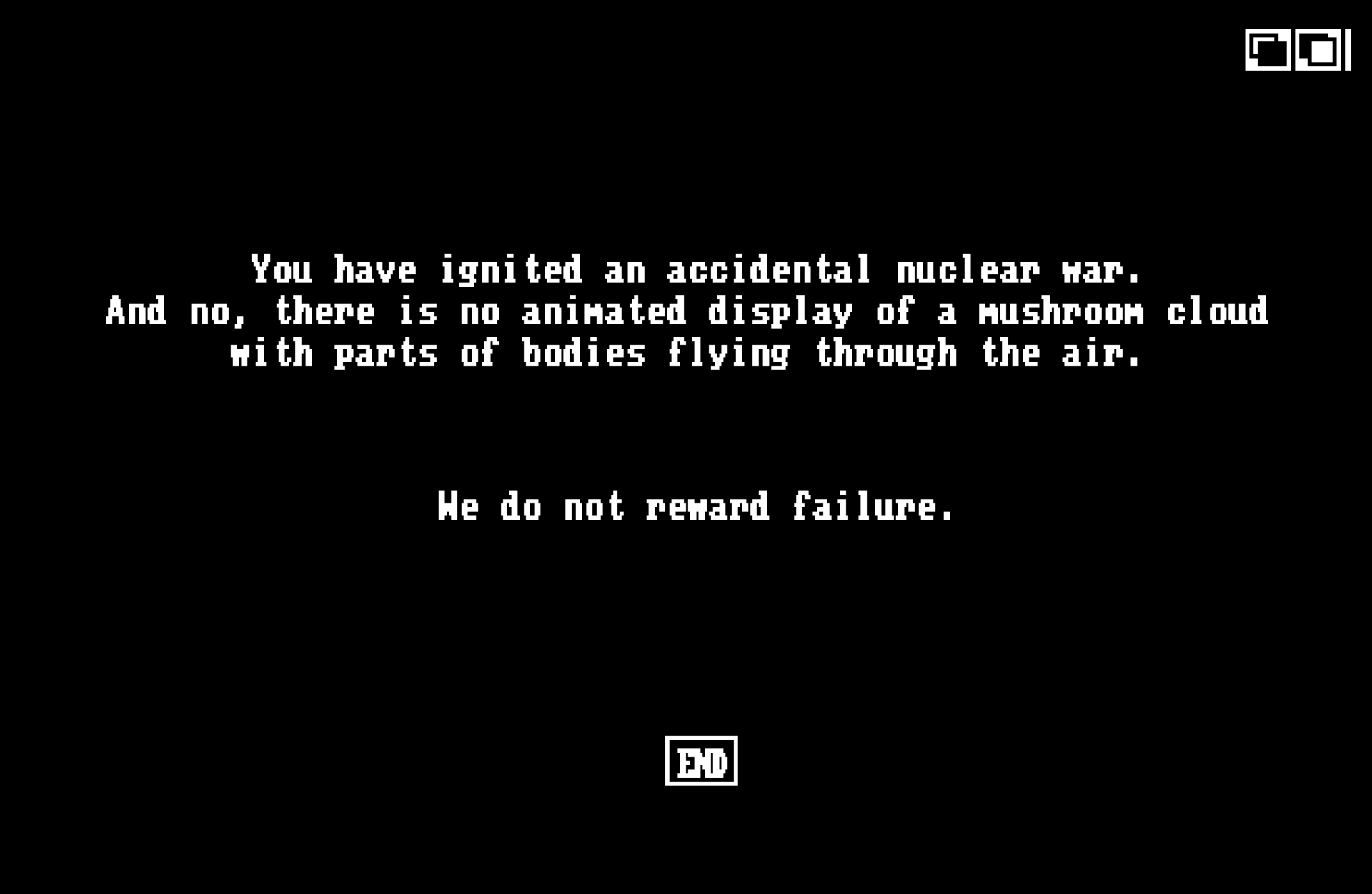
The "END" button drops you back to the desktop. In order to succeed at this game you need patience, a cool head and plenty of luck.

 Member
Petani, Sawah dan Padi
Namanya pak Agus, tapi saya dan adik saya Qchen membahasakan namanya “Bang Agus”
Bang Agus adalah kawan pak Amoy dan tinggal di Batujaya Karawang. Pak Amoy biasa mengurus rumah kabin Zeze Zahra dan lingkungan sekitarnya.
Bang Agus diminta tolong untuk mengurus sawah di dekat rumah kabin Zeze Zahra. Ada 4 petak sawah seluas setengah hektar (5000 m2) yang dikelola oleh bang Agus.
Pak Amoy dan keluarga juga masih mengelola sawah namun lokasinya terpisah. Sebagian ada didekat rumah pak Amoy dan sebagian ada di dekat rumah kabin Zeze Zahra.
Sebelum merawat dan mengurus sawah di dekat rumah kabin Zeze Zahra, bang Agus bekerja serabutan. Kadang membantu mengurus sawah orang lain atau menjadi petani penggarap musiman. Jumlahnya juga tidak banyak sehingga penghasilannya jadi tidak menentu.
Karena berteman dengan pak Amoy dan keluarga, akhirnya bang Agus kenal dengan saya dan Qchen. Awalnya bang Agus sering membantu jika ada pekerjaan di rumah kabin Zeze Zahra, sampai kemudian lama-lama dipercayakan untuk mengurus sawah.
Orangnya telaten. Saat sawah di tempat lain kurang bagus hasilnya, sawah yang diurus bang Agus hasilnya lebih baik.
Kemarin saya diajak melihat sawah yang ia kelola. Saya awalnya menggunakan sandal namun akhirnya nyeker dan sandalnya saya tinggal di pematang sawah. Lebih mudah berjalan tanpa alas kaki di pematang sawah. Apalagi telapak kaki saya juga telapak kaki kasar, bukan telapak kaki yang sering perawatan di salon, hehehe…


Bang Agus menunjukkan gubuk sederhana tempat ia menjaga sawah yang hendak panen dari serangan hama burung pipit. Kadang malam menginap di rumah kabin, pagi sampai siang di gubuk tersebut kemudian pulang dan sore kembali lagi.
Saya lihat kualitas padi disawah yang dikelola bang Agus memang bagus. Jarak antar blok (di sawah biasanya ada satu larikan kemudian diberi jarak untuk penyemprotan hama atau penyiangan gulma) yang hampir tertutup padi yang mulai menguning. Airnya juga sudah mulai kering dan itu bagus karena saat dipanen, sawah memang sebaiknya dikeringkan.
Kesempatan kemarin sekalian jadi kesempatan ngobrol soal keseharian, soal keluarga dan juga soal relasi Zeze Zahra dan bang Agus termasuk dengan semua yang membantu pengelolaan sawah, rumah kabin, hewan ternak dan kebun Zeze Zahra.
Banyak kawan-kawan yang punya sawah jauh dari tempat tinggal dan hasilnya sukar diharapkan karena petani penggarapnya katanya susah dipercaya. Kadang bilang panen kena hama dan kadang juga bilang panen gagal. Ahamdulillah hal tersebut tidak terjadi di Zeze Zahra
Saya pernah wawancara pak Amoy soal saling percaya ini di video berikut : Wawancara dengan Petani Veteran #1 : Tips Pengelolaan Sawah & Asset Lainnya
https://youtu.be/YMhX0UM3S8U
Saya senang melihat ke sawah. Jalan-jalan ke sawah. Dulu waktu masih kecil, baba (bapak) pernah mengajak saya ke sawah. Saat itu baba punya sawah gadai, jadi pemilikan sawahnya temporer. Itupun sudah membuat saya senang, karena saat baba mengurus sawah, saya mencari ikan dan keong dan main lumpur.
Saat enyak (ibu) saya merenovasi rumah dan membuat garasi, enyak bilang garasi tidak usah diisi mobil. Isi saja dengan padi dan enyak akan senang sekali. Mungkin hal ini kepikiran oleh enyak karena masa kecilnya adaah masa sulit dan punya padi adalah keistimewaan.
Saya masih mengalami masa-masa ngelajo (penglajo) yaitu penggarap musiman yang membantu panen sawah dan hasilnya dibagi dengan pembagian 1:5 atau 1:6. Dapatnya sedikit sekali padahal capek. Namanya juga membantu panen, hasilnya tidak seberapa. Hasil yang tidak seberapa itu sangat dihargai karena pekerjaannya melelahkan.
Hasil sedikit dari ngelajo itu dikumpulkan sampai bisa dapat setengah karung atau sekarung padi. Padi itu disimpan oleh enyak dan baba sebagai cadangan masa paceklik.
Sampai saat ini hasil panen padi di Karawang jarang sekali dijual. Saya masih ingat pesan enyak dan baba dan mencadangkan sebagian besar padi sebagai cadangan di masa sulit. Padi hanya dijual atau dikeluarkan jika ada penggantinya. Kadang ada juga yang dijual karena kualitas padinya kurang bagus, misalnya terendam atau rebah saat hendak dipanen. Kalau padi terendam atau rebah, biasanya kualitas padi kurang bagus. Kadang berasnya jadi agak kuning atau hitam dan kadang pecah jadi menir saat digiling jadi beras.
Saat masa sulit pandemi covid atau jaga-jaga kemungkinan resesi, biasanya sebagian padi dicadangkan untuk yayasan Ultima Insani Madania agar bisa membantu keluarga, saudara atau tetangga yang situasinya kurang beruntung.
Semoga hasil panennya bagus dan berkah buat semua pihak yang terlibat.
Akademy Award 2022, los premios de la Comunidad KDE
Este año hemos vuelto a tener una edición más tradicional de Akademy, la cual no ha estado exenta de los Akademy Award 2022, es decir, los premios de la Comunidad KDE. Se trata de un reconocimiento a aquellas personas que han destacado en el desarrollo del Proyecto KDE. Rindámosles un pequeño homenaje.
Akademy Award 2022, los premios de la Comunidad KDE
Tradicionalmente, las ponencias, charlas y las minireuniones de pasillo del fin de semana de cualquier Akademy finalizan con el anuncio de los Akademy Award, es decir, los premios que se otorgan a los miembros de la Comunidad KDE a aquellos integrantes que destacan por una u otra razón.
Tras dos ediciones especiales de Akademy (2020 y 2021) que son recordadas por ser realizadas en línea este año, concretamente a principios de octubre, disfrutamos de un edición presencial en Barcelona, aunque todo el evento ha podido seguirse en línea.
Y, por supuesto, a cualquier edición de Akademy no puede faltar los Akademy Award, unos premios que tienen un curiosa forma de ser otorgados, ya que son elegidos por los ganadores de la anterior edición. De esta forma se consigue diversificar los ganadores a lo largo de los años, tal y como se puede apreciar en el listado de premiados.

De esta forma Alexander Semke, Paul Brown y Adriaan de Groot ganadores del 2021 han fallado otorgar los premios Akademy Award 2022 a:
- Premio a la mejor aplicación para Jasem Mutlaq , por su trabajo en KStars.
- Premio a la mejor no-aplicación para Harald Sitter por su trabajo de depuración y mejora del código de KDE en general.
- Premio del jurado para Aniqa Khokhar por su labor de creación de KDE Network, para el coodinar el trabajo de comunicación entre todo el mundo.
Así que las lista de gente cuyo trabajo es reconocido por la Comunidad KDE sigue creciendo a medida que pasan los años, aunque en mi humilde opinión se debería aumentar el número de reconocidos por año porque hay decenas de personas que se merecerían este galardón.
¡Muchas felicidades a todos ellos!
Más información: KDE.News
La entrada Akademy Award 2022, los premios de la Comunidad KDE se publicó primero en KDE Blog.

Learnings from Building an AppImage
For some time I am offering an AppImage of Kraft to make installations for users as easy as possible. Unfortunately real linux packages are big effort for the variety of distributions, and having one way to rule them all seems very appealing.
My first AppImage versions were pretty faulty when looking into details. So I spent some time to improve it recently, with the great help of the friendly people from AppImage community.
Here is my little report about what I have learned. If there is something I can do better, please let me know (unless it is use $OTHERTOOL).
How to build an AppImage?
At first, it makes sense to build the AppImage automatically via Github Actions. GH Actions are powerful, and well integrated. I also looked into using the openSUSE Buildserver for that, which works, but Github Actions seemed easier.
I got convinced by @TheAssasin to use AppImageCraft to build the image. That simplifies the process significantly by hiding a lot of auto generating things under the hood. While that leads to very clean and short config files for the AppImage build, it is harder to deal with issues that might come up because things are covered.
If I would not have had help from the dev that I know personally, I probably would not have survived the process. Yet, AppImageCraft is an awesome utility, yet a bit better documentation would help a lot.
Python Components
Kraft has a few Python components that are called from Kraft to do specialized tasks that I did not want to reimplement in C++. For example, it uses the awesome tool weasyprint to generate PDF from html.
While the AppImage can call a weasyprint installation that is installed on the host system that is not a good solution as there is no way to control if the required tool is really installed. So bundled Python is needed with all the dependencies for the external deps.
To achieve that, there is a very useful linuxdeploy-plugin called conda that uses conda to install Python. It installs the required python libs via pip and make them available in the bundle. Very convenient.
Pathes
To be a good citizen in the AppImage world, the app needs to be careful with pathes. When running in the AppImage, it is advisable to not use for example classes like QStandardPath directly or even worse hardcode paths that do any loading of files the app needs. Since the file tree of the AppImage is just mounted somewhere in the host system, the app needs to consider that it is not installed in standard locations.
A good rule of thumb when locating a file to load is to always check relative to the binary path first (ie. ../share/kraft/data/), and if that does not exist, continue to check the standard paths of the host system.
In Kraft there were already utility methods to adjust paths which I could simply extend to work fine in the AppImage. Still, that is kind of fiddly as there are more places to consider than one expects.
Locate translation files
Also a result of the challenge described before is that the app did not find the translation files to load in the filesystem of the AppImage. The translation system (KLocalizedString in Kraft) does obviously not check the correct path inside the AppImage mount.
Setting an additional relative path to look up translations at runtime fixes that problem.
Icons
Another issue that required quite some work were icons. Kraft used icons from the system theme quite a lot. As long these are installed, because the user has the same fitting desktop environment, that is not an issue, and icons are found.
However, if the icon theme is not installed, the app just lacks icons which make it bad looking or even hard to use.
That can be solved by using own icons as fallback in the app. For simplicity and consistency I switched to a complete set of own icons that are now coming with Kraft. They are bundled to the app with the Qt resource system now.
Dependencies to the Outside
Last but not least: When preparing an app for AppImage it needs to be checked if the app has binary dependencies that can (or should) not be packaged into the AppImage for efficiency reasons. Kraft for example uses Akonadi for contacts. With that users can use KAddressbook to manage addresses and Kraft uses the address lists via Akonadi. Life is too short for reinvention of an Addressbook.
Of course one could think of bundling the entire Akonadi and KAddressbook into the AppImage of Kraft. But that seems overkill, as that would mean bundling a lot of stuff, and would bring KDE users two instances of KAddressbook (the one from their desktop installation and the one from the AppImage). Seems not a good idea.
So this seems to be the only downside of the new Kraft AppImage now: It can not use the Akonadi based address management. To fix that, there needs to be a non binary dependant way. There could for example be a way to sync contacts to a local file system and let Kraft pick them up from there. That way, users could use the address management they want (also for example google) and Kraft could still pick addresses from there. That needs more thoughts.
The good news on this that Kraft is still fully functional as the Akonadi integration is great, but optional.
Summary
An AppImage seems to be a great way of distributing desktop applications, because there is only one build to run on all distributions. Well, fingers crossed…
However, building an AppImage that really works flawlessly is not a simple task, as this blog hopefully illustrates a bit.
One thing would have helped me: A simple option to understand when the app loads things from the host system, rather than from within the AppImage, for example as commnd line switch when running the AppImage. That would have eased the path adjustment development described above.
What is next in that area: User friendly updating of the AppImage and a solution to the address management problem.
All changes were merged in Kraft master today, the resulting AppImages can be found here.
Cabang Primer Sekunder Tersier Tanaman Anggur
Saat mulai belajar menanam anggur dan melihat tutorial di Youtube, membaca tulisan di website atau blog atau saat mendengar teman yang berpengalaman menanam anggur memberikan saran, sedikit banyak pasti pernah mendengar istilah cabang primer, cabang sekunder dan cabang tersier.
Bagaimana membedakan cabang primer, sekunder dan tersier? Apa sih keuntungannya kita mengetahui percabangan primer, sekunder dan tersier? Silakan simak pada video berikut ini :
Labplot, software de visualización y análisis de datos de KDE
Sigo presentando aplicaciones de la Comunidad KDE que nunca han sido protagonistas del blog. En esta ocasión le ha tocado a Labplot, un software de visualización y análisis de datos de la Comunidad KDE libre y gratuito multsistema que tienes decenas de funcionalidades de gran calidad.
Labplot, software de visualización y análisis de datos de KDE
Si eres un profesional o un amante de los datos necesitas alguna herramienta digital que te ayude a poder trabajar con ellos y sacar las conclusiones que necesites.
Este es el cometido de Labplot, un software de visualización y análisis de datos de la Comunidad KDE libre y gratuito multsistema accesible para todo el mundo, ya que cumple la norma de las aplicaciones KDE: simples por defecto, potentes cuando se necesita.
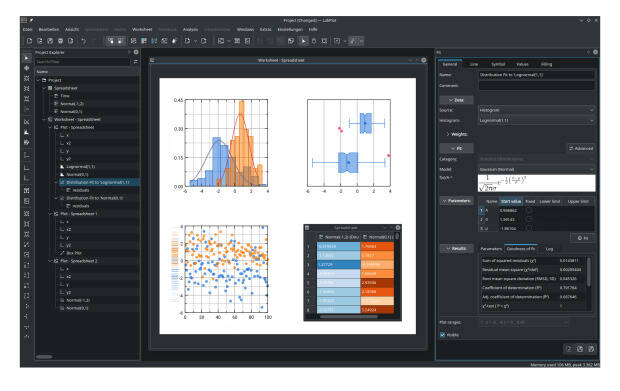
Sus principales caracteristicas son las siguientes:
- Visualización y trazado de datos de alta calidad con pocos clics.
- Análisis de datos y estadísticas fiables y sencillos, sin necesidad de codificación.
- Informática intuitiva y rápida con cuadernos interactivos.
- Extracción de datos de imágenes sin esfuerzo.
- Importación y exportación de datos desde y hacia múltiples formatos sin problemas.
- Disponible para Linux, Windows, macOS, y FreeBSD
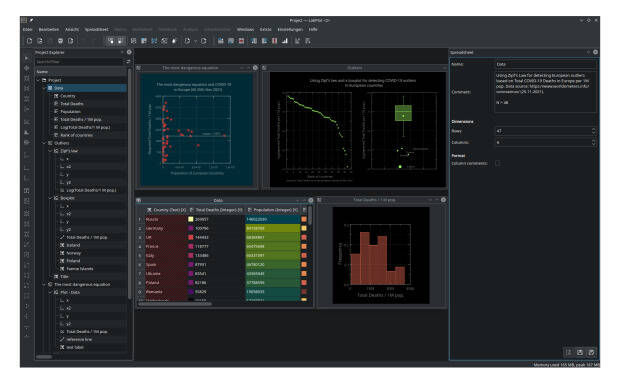
En la actualidad ya se encuentra en su versión 2.9 que fue lanzada el pasado 25 de junio y que nos ofrece las siguientes novedades:
- Nuevo tipo de visualización, el diagrama de caja que proporciona un resumen rápido de las propiedades estadísticas básicas del conjunto de datos,
- Colección de múltiples mapas de color.
- Nueva función que permite el formato condicional de los datos en la hoja de cálculo nos permiten obtener información sobre la estructura de sus datos y sus propiedades estadísticas directamente en la hoja de cálculo.
- Añadida la transformada de Hilbert al conjunto de funciones de análisis.
- Posibilidad para importar y exportar más formatos, habiendo añadido MATLAB, SAS, Stata y SPSS a la lista.
Y para muestra un botón, un pequeño vídeo de menos de 5 minutos que nos enseña como dibujar funciones en Labplot.
Más información; Labplot
La entrada Labplot, software de visualización y análisis de datos de KDE se publicó primero en KDE Blog.
El comando tree en GNU/Linux
El comando tree, muestra un listado de los archivos de la ruta actual de manera recursiva, en forma de diagrama de árbol

El comando tree fue escrito por Steve Baker junto con otros desarrolladores para sistemas PC-DOS y MS-DOS, pero está disponible para sistemas GNU/Linux bajo una licencia GPL v2.0
El comando, ejecutado sin argumentos, muestra los archivos y carpetas de la carpeta actual de manera recursiva, es decir entrando dentro de carpetas y volviendo a mostrar el contenido, etc…
Si instalas esta utilidad en tu sistema GNU/Linux y la ejecutas, te mostrará un resultado similar a este:
$ tree ruta/de/una/carpeta
ruta/de/una/carpeta/
├── a-primero.html
├── b-segundo.html
├── subcarpeta
│   ├── readme.html
│   ├── code.cpp
│   └── code.h
└── z-otro-archivo.html

1 directories, 6 files
Pero tiene un montón de opciones, veamos algunas de las que nos pueden ser más útiles, pero explora todas para que te pueda ayudar en un caso en concreto.
Niveles de recursividad
Si ejecutamos el comando en la carpeta /home de nuestro usuario, quizás mostrará una salida abrumadora de información que realmente no es lo que estábamos buscando.
Podemos limitar el nivel de recursividad al que profundiza al mostrar la información mediante la opción-L y añadiendo un número que será el número de niveles de recursividad que muestra.
Estando en la carpeta /home de tu usuario ejecuta primero tree sin más opciones y ahora ejecuta tree -L 1 para que muestre solo un nivel de recursividad al ejecutar el comando. ¿Ves la diferencia? Puedes probar cambiando el 1 por otro número para explorar más niveles.
Los directorios primero
Algo que me gusta tanto del comando tree como de otros comandos a la hora de mostrar el contenido de mi ubicación es que me muestre primero los directorios y después los archivos, ambos ordenados alfabéticamente.
En tree podemos hacer eso con la opción --dirsfirst Añadiendo esta opción a la anterior, podemos ejecutar el comando tree --dirsfirst -L1
Pero si a ti no te gusta esta distribución y prefieres que primero te muestre los archivos, para eso tienes la opción --filesfirst
Mostrando colores
Colorear la salida de un comando sirve para ordenar un poco la información en nuestra pantalla y que nos sea más fácil agrupar e interpretar la información. Con el comando tree podremos hacerlo con la opción -C. Añadimos esta opción a lo ya aprendido tree --dirsfirst -CL 1
Mostrar las carpetas y archivos ocultos
De manera predeterminada, tree no nos muestra las carpetas ni archivos ocultos, ya sabes, en GNU/Linux son los que empieza su nombre con un punto .
Si queremos que también nos muestre esas carpetas y archivos ocultos, podemos hacerlo mediante la opción -a Vamos a añadir esa opción al comando: tree --dirsfirst -aCL 1
Ordenar la salida del comando
De manera predeterminada tree muestra el contenido ordenado de manera alfabética, cosa que podemos invertir con la opción -r
Y también podemos hacer que el comando tree nos muestre el tamaño de los archivos y carpetas mediante la opción -h
Pero podemos especificar que lo ordene por ejemplo de por tamaño mediante la opción --sort size que podemos añadir a nuestro comando: tree --dirsfirst -ahCL 1 --sort size
Mostrando un patrón de archivos
De toda la información que ofrece tree, la podemos filtrar buscando un patrón específico de un nombre de archivo.
El comando mostrará igualmente todos las carpetas, pero dentro de esta sólo mostrará los archivos que coinciden con el patrón buscado. El patrón de búsqueda admite comodines como:
- * para todos los caracteres
- ? para un único caracter
- [A-Z] Para caracteres entre los especificados
Para ver todos los archivos en dos niveles, que comienzan por b o por w y acaben en .sh ejecutaríamos el siguiente comando de tree con estas opciones tree --filesfirst --prune -CL 2 -P [b,w]*.sh
Añado la opción prune para que no muestre los directorios que no contienen ninguna de las opciones de búsqueda, así muestra solo las carpetas que los contienen.
Conclusión
El comando tree tiene muchas más opciones que podemos configurar, echa un vistazo a su ayuda para verlas todas.
Una de las opciones que más me gustan es que al final del comando, hace un resumen de las perpetas y los archivos encontrados. Esa información me gustaría que se mostrara en el comando exa o en ls a la hora de listar el contenido de una carpeta.
Bueno, eso queda para un próximo artículo en el blog… Conjugaremos ambos comandos para que se muestre ese resumen final de tree
¿Te ha resultado útil el artículo? Comparte tus «hacks» con el comando tree o si alguno que no conocías te ha resultado interesante, en los comentarios del blog.

Pixel Inktober
Just like last year, October was filled with quick pixel dailies. I decided to only post on mastodon, but due to the twitter exodus couldn’t quite post the 30kB images for the two remaining days. Good old blog post it is!


Tunas Air dan Tunas Bud Tanaman Anggur
Jika kita menanam anggur dan belajar di Youtube, kerap kali terdengar kata “Tunas Air” dan “Tunas Bud”.
Apa sih tunas air dan tunas bud itu. Apa saja fungsi dan kegunaannya serta bagaimana memilih dan merawatnya?
Simak pada video berikut ini :
Resumen final de KDE en Google Summer of Code 2022
Una vez finalizado el plazo para realizar la participación es el momento de hacer el resumen final de KDE en Google Summer of Code 2022 esta simbiosis entre la Comunidad KDE y el gigante multicolor que ha sido muy provechosa para ambos, como hemos visto en muchas ocasiones en el blog, veamos el resultado definitivo.
Resumen final de KDE en Google Summer of Code 2022
El equipo de KDE es uno de las Comunidades que siempre intentan colaborador con los proyectos sobre Software Libre que suele organizar cualquier compañía, y Google no es ninguna excepción.

Este año hemos tenido bastantes estudiantes mejorando sus habilidades al tiempo que mejoran las aplicaciones del ecosistema KDE. De esta forma según leemos en el blog de novedades de KDE (el conocido como dot) , también conocido como el Dot, tenemos un articulo de Johnny Jazeix que nos cuenta que:
- Snehit Sah añadió con éxtiro el soporte para Spaces en NeoChat, una herramienta de Matrix que nos permite descubrir nuevas salas y también una forma de organizar tus habitaciones en categorías.
- Suhaas Joshi ha trabajado en la gestión de permisos para las aplicaciones Flatpak y Snap en Discover.
- Quoc Hung Tran, implementó en un nuevo plugin para procesar el reconocimiento óptico de caracteres (OCR) para DigiKam.
- Phuoc Khanh LE también dedicó su tiempo a DigKam y ha conseguido mejorar los algoritmos del Clasificador de Calidad de Imagen.
- Samarth Raj trabajaró en una actividad de análisis gramatical y otra de uso de los complementos del 10 para sumar números, para GCompris.
- Xu Che ha añadido la herramienta para crear elipses perfectas para el píxel en Krita.
- Reinold Rojas mejoró en la exportación de una imagen a SVG en Krita; un proyecto que proporcionará más opciones para compartir archivos con Inkscape, y ayudará a crear imágenes traducibles con texto para Krita Manual sin conocimiento de Inkscape,
¿Qué es GSoC?

Vía Somos Libres he encontrado esta magnífica descripción del programa GSoC:
Google Summer of Code (GSoC) es un evento organizado por Google, cuyo objetivo es hacer participar a varios estudiantes en el desarrollo de determinados proyectos Open Source elegidos por Google. Cada grupo debe cumplir con una lista de tareas específicas que deben realizar y elegidas por el representante del proyecto, también conocido como mentor.
Los objetivos del GSoC son:
- Crear y liberar código Open Source para el beneficio de todos.
- Inspirar a los jóvenes desarrolladores a participar en el desarrollo de aplicaciones Open Source.
- Ayudar a los proyectos Open Source a identificar a nuevos y posibles desarrolladores.
- Dar a los estudiantes la oportunidad de trabajar en algo relacionado a sus estudios. Dar a los estudiantes una mayor exposición a situaciones del mundo real de desarrollo de software.
En definitiva, una excelente iniciativa que beneficia a todo el mundo.
La entrada Resumen final de KDE en Google Summer of Code 2022 se publicó primero en KDE Blog.