
 Member
 baltolkien
Episodio 15 de KDE Express: Plasma 5.27
Tras unos meses de silencio parece que el proyecto está tomando velocidad de crucero. Me congratula presentaros que tenemos a nuestra disposición el episodio 15 de KDE Express, titulado Plasma 5.27 donde se repasan las novedades de la última versión del escritorio de la Comunidad KDE de la rama 5.
Episodio 15 de KDE Express: Plasma 5.27
Comenté ya casi hace un año que había nacido KDE Express, un audio con noticias y la actualidad de la Comunidad KDE y del Software Libre con un formato breve (menos de 30 minutos) que complementa los que ya genera la Comunidad de KDE España de forma casi mensual con sus ya veteranos Vídeo-Podcast que podéis encontrar en Archive.org, Youtube, Ivoox, Spotify y Apple Podcast.

De esta forma se llega al número 15, el tercero de su segunda temporada y que cuenta con el incombustible e hiperactivo David Marzal y un servidor, Baltasar Ortega, con la producción de Jorge Lama.
En palabras de David, que es quien hace la entradilla:
En el anterior episodio nos pusimos al día, pero nos quedaba la guinda del pastel (del día de los enamorados). KDE Plasma 5.27 es la última versión de la rama Qt 5 y será una para recordar por su estabilidad, su madurez en Wayland y sus mejoras que pasamos a resumir en el podcast.
Os recomendamos esta genial entrevista con el creador del fondo de Plasma 5.27 de KDE.
Y no nos olvidamos de recordar que AkademyES 2023 se celebrará en Málaga el 9 y 10 de junio dentro de Opensouthcode!!!
:
Y, como siempre, os dejo aquí el listado de los episodios. ¡Disfrutad!
A mi me sigue gustando mucho, es rápido, directo al grano y muy dinámico, con lo cual es ideal para aquellos que les guste tener su pincelada de Kdeera en su podcaster. Evidentemente, no se profundiza en temas aunque si se da una visión muy personal de los mismos.
Por cierto, también podéis encontrarlos en Telegram: https://t.me/KDEexpress
La entrada Episodio 15 de KDE Express: Plasma 5.27 se publicó primero en KDE Blog.
Akademy-es 2023 de Málaga busca patrocinadores
El 9 y 10 de junio se va a celebrar el mayor evento de la Asociación KDE España, y por ello Akademy-es 2023 de Málaga busca patrocinadores con los que cubrir esos gastos que se generan. Una forma más que adecuada para que cualquier empresa del ramo consiga visibilidad en este extenso y creciente mundo del Software Libre.
¿Por qué patrocinar la Akademy-es 2022?

Se esperan cerca de 100 asistentes al evento de todo el mundo, ya que por su carácter en híbrido, presencial y online, se espera que algunas charlas lleguen a la Comunidad Latinoamericana.
Así que se estima que tendremos entre nosotros todo tipo de personas al evento: desarrolladores de Software Libre, miembros de la prensa, usuarios, representantes de empresas, etc.
Patrocinando este evento, tu organización recibirá visibilidad no solo en España, sino a nivel mundial en el campo del Software Libre.
El evento tendrá presentaciones de primer nivel de temas relativos a las nuevas tecnologías, incluyendo aplicaciones de escritorio, aplicaciones móviles, desarrollo de software y multimedia. La comunidad KDE ha presentado innovaciones en todos estos campos a lo largo de su historia. Como patrocinador, tu organización tendrá la oportunidad de participar en este entorno creativo y ser conocida por los asistentes.
Akademy-es 2023 de Málaga busca patrocinadores
Que este año Akademy-es se vaya a celebrar junto con Opensouthcode el 9 y 10 de junio no quita que necesite algún tipo de empujón económico para gastos y pequeños detalles para los asistentes, como suele ser el Coffe Break o alguna sorpresa más.
Debido a esto, este año se plantean modalidades plata, ora y platino para promocionar el evento que se resumen en la siguiente tabla:
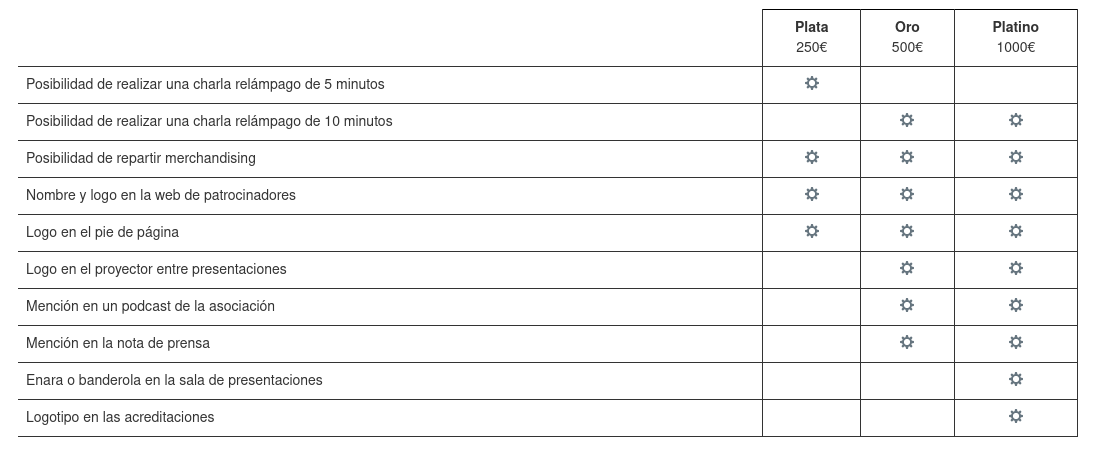
De esta forma, si quieres que tú, tu empresa, entidad o cualquier otro tipo de organización patrocine Akademy-es, como han hecho otras en pasadas ediciones simplemente se debe mandar un correo a akademy-es-org@kde-espana.org
Más información: KDE España
La entrada Akademy-es 2023 de Málaga busca patrocinadores se publicó primero en KDE Blog.

Restoring SteamDeck Unresponsive Touchscreen
Lanzada la tercera actualización de 5.27 edición ‘KDE 💖 Free Software’
Siguiendo el calendario de lanzamiento de los desarrolladores, la Comunidad KDE han comunicado que ha sido lanzada la tercera actualización de Plasma 5.27. Una noticia que aunque es esperada y previsible es la demostración palpable del alto grado de implicación de la Comunidad en la mejora continua de este gran entorno de escritorio de Software Libre.
Lanzada la tercera actualización de 5.27 edición ‘KDE  Free Software’
 Free Software’
No existe Software creado por la humanidad que no contenga errores. Es un hecho incontestable y cuya única solución son las actualizaciones. Es por ello que en el ciclo de desarrollo del software creado por la Comunidad KDE se incluye siempre las fechas de las actualizaciones.
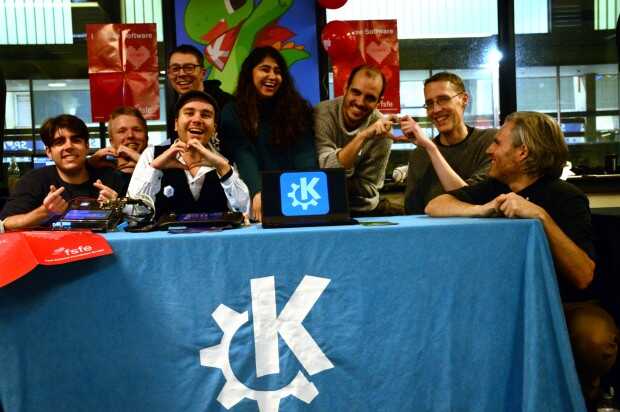
La Comunidad KDE ha publicado hoy que ha lanzado la tercera actualización de Plasma 5.27, una versión que nos ofrecen un gran conjunto de novedades y propuestas que nos acercan a lo que vendrá cuando se realice la transición a Plasma 6. No obstante, en esta versión se han dedicado a introducir la presentación en mosaico de las ventanas, las nuevas pantallas de bienvenida y mejoras notables en Discover, por nombrar solo tres de ellas.
Entre los errores solucionados nos encontramos con:
- Dr Konqi: Añadido selector emoji a los mapeados.
- Klipper: eliminados los elementos duplicados al cargar desde el historial.
- Powerdevil: Cambiado a suspender por defecto en perfil AC
Más información: KDE
Las novedades de Plasma 5.27
Ya he hablado largo y tendido de las novedades de Plasma 5.27 en el blog pero siempre me gusta dejar unas pinceladas para que tengamos una referencia de las mejoras de esta versión de soporte extendido:
- Nuevas pantallas de bienvenida.
- Mejoras en las preferencias de permisos para Flatpak.
- Mejoras en la refactorización multimonitor.
- Sistema de mosaicos de KWin.
- Añadido el Calendario Hebreo en el calendario emergente del reloj digital.
- Mejoras en Discover.
- Más funcionalidades para Krunner.
- Mejoras en los plasmoides
La entrada Lanzada la tercera actualización de 5.27 edición ‘KDE 💖 Free Software’ se publicó primero en KDE Blog.
HPC and me
Recently I found that quite a few of my Twitter and Mastodon followers are working in high-performance computing (HPC). At first I was surprised because I’m not a HPC person, even if I love high performance computers. Then I realized that there are quite few overlaps, and one of my best friends is also deeply involved in HPC. My work, logging, is also a fundamental part of HPC environments.
Let’s start with a direct connection to HPC: one of my best friends, Gabor Samu, is working in HPC. He is one of the product managers for one of the leading commercial HPC workload managers: IBM Spectrum LSF Suites. I often interact with his posts both on Twitter and Mastodon.
I love high performance computers and non-x86 architectures. Of course, high performance computers aren’t the exclusive domain of HPC today. Just think of web and database servers, CAD and video editing workstations, AI, and so on. But there is definitely an overlap. Some of the fastest HPC systems are built around non-x86 architectures. You can find many of those on the top500 list. ARM and POWER systems made it even into the top10 list, and occupied the #1 position for years.
The European Union is developing its own CPUs for HPC as part of the European Processor Initiative. Their target is a low power consumption but high performance system. They are working on ARM and RISC-V systems.
It’s not just HPC where non-x86 architectures can show significant performance benefits. For many years, IBM’s POWER9 CPU was the fastest to run syslog-ng. Running syslog-ng on X86 was not even half as fast. Currently my fastest measurement was on an AMD system, but I would not be surprised if I could measure higher syslog-ng message rates on POWER10 or Ampere systems (if I had access).
Logging is a fundamental part of HPC environments. With the scale of HPC systems, and the price of down time, logging is required for being able to isolate / identity issues rapidly. These systems run around the clock and are used to solve grand scale challenges for humanity like vaccine development, weather modeling, or analyzing data from the LHC. Logging gives you here better visibility into the system and makes you able to identify problems very quickly.
One of the most active syslog-ng users, Faxm0dem, is running thousands of syslog-ng instances in France, at CC-IN2P3. If you take a look at the powered by syslog-ng page, you will see that they are not the only ones. I learned at various conferences that there are many more HPC labs where syslog-ng is in use, but unfortunately they are not sharing infrastructure details publicly, only in private discussions.
TL;DR: I’m not surprised any more, if I see new HPC focused followers :-)
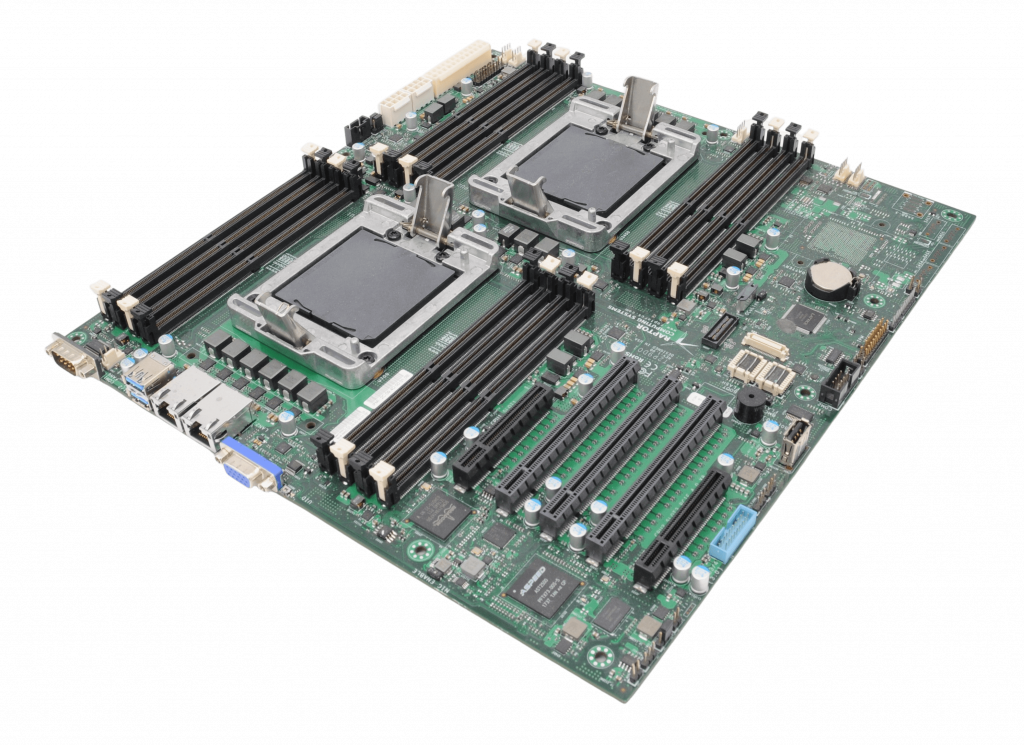
Talos II POWER9 mainboard
Syslog-ng 101, part 11: Enriching log messages
This is the eleventh part of my syslog-ng tutorial. Last time, we learned about message parsing using syslog-ng. Today, we learn about enriching log messages.
You can watch the video on YouTube:
and the complete playlist at https://www.youtube.com/playlist?list=PLoBNbOHNb0i5Pags2JY6-6wH2noLaSiTb
Or you can read the rest the tutorial as a blog at: https://www.syslog-ng.com/community/b/blog/posts/syslog-ng-101-part-11-enriching-log-messages

syslog-ng logo
Adding auto-installation support
AutoYaST is a crucial tool for our users, including customers and partners. So it was clear from the beginning that D-Installer should be able to install a system in an unattended manner.
This article describes the status of this feature and gives some hints about our plans. But we want to emphasize that nothing is set in stone (yet), so constructive comments and suggestions are more than welcome.
The architecture
When we started to build D-Installer, one of our design goals was to keep a clear separation of concerns between all the components. For that reason, the core of D-Installer is a D-Bus service that is not coupled to any user interface. The web UI connects to that interface to get/set the configuration settings.
In that regard, the system definition for auto-installation is another user interface. The D-Bus service behaves the same whether the configuration is coming from a web UI or an auto-installation profile. Let me repeat again: we want a clear separation of concerns.
Following this principle, the download, evaluation and validation of installation profiles are performed by our new command-line interface. Having an external tool to inject the profile can enable some interesting use cases, as you will discover if you keep reading.
Replacing XML with Jsonnet
Although you might have your own list, there are a few things we did not like about AutoYaST profiles:
- XML is an excellent language for many use cases. But, in 2023, there are more concise alternatives for an automated installation system.
- They are rather verbose, especially with all those type annotations and how collections are specified.
- Runtime validation, based on
libxml2, is rather poor. Andjingis not an option for the installation media.
For that reason, we had a look at the landscape of declarative languages and we decided to adopt Jsonnet, by Google. It is a superset of JSON, adding variables, functions, imports, etc. A minimal profile looks like this:
{


  "software": {


    "product": "ALP"


  },


  "user": {


    "fullName": "Jane Doe",


    "userName": "jane.doe",


    "password": "123456"


  }


}
But making use of Jsonnet features, we can also have dynamic profiles, replacing rules/classes or ERB with a single and better alternative for this purpose. Let's have a look to a complex profile:
local dinstaller = import 'hw.libsonnet';


local findBiggestDisk(disks) =


  local sizedDisks = std.filter(function(d) std.objectHas(d, 'size'), disks);


  local sorted = std.sort(sizedDisks, function(x) x.size);


  sorted[0].logicalname;


{


  software: {


    product: 'ALP',


  },


  user: {


    fullName: 'Jane Doe',


    userName: 'jane.doe',


    password: '123456',


  },


  // look ma, there are comments!


  localization: {


    language: 'en_US',


    keyboard: 'en_US',


  },


  storage: {


    devices: [


      {


        name: findBiggestDisk(dinstaller.disks),


      },


    ],


  },


  scripts: [


    {


      type: 'post',


      url: 'https: //myscript.org/test.sh',


    },


    {


      type: 'pre',


      source: |||


        #!/bin/bash


        echo hello


      |||,


    },


  ],


}
This Jsonnet file is evaluated and validated at installation time, generating a JSON profile where
the findBiggestDisk(dinstaller.disks) is replaced with the name of the biggest disk.
Beware that defining the format is still a work in progress, so those examples might change in the future.
Replacing the profile with an script
While working on the auto-installation support, we thought allowing our users to inject a script instead of a profile might be a good idea. That script could use the command-line interface to interact with D-Installer. Somehow, you would be able to set up your own auto-installation system.
#!/bin/bash


dinstaller config set software.product="Tumbleweed"


dinstaller config add storage.devices name=/dev/sda


dinstaller wait


dinstaller install
Please, bear in mind that it is just an idea, but we want to explore where it takes us.
Better integration with other tools
Integrating AutoYaST with other tools could be tricky because it does not provide a mechanism to report the installation progress. Again through our CLI, we plan to solve that problem by providing such a mechanism which, to be honest, is already available in many configuration systems.
What about backward compatibility?
In case you are wondering, we have plans to (partially) support good old AutoYaST profiles too. We know that many users have invested heavily in their profiles and we do not want all that work to be gone. However, not all the AutoYaST features will be present in D-Installer, so please expect some changes and limitations.
We now have a small tool that fetches, evaluates and validates an AutoYaST profile, generating a JSON-based one. It is far from finished, but it is a good starting point.
Current status
Now let's answer the obvious question: which is the current status? We expect to deliver the basic functionality in the following release of D-Installer, but with quite some limitations.
- The user interface is still needed to answer questions or watch the progress.
- Dynamic profiles are supported, but the hardware information injected in the profiles is incomplete.
- A mechanism for error reporting is missing.
- iSCSI and DASD are not supported in auto-installation yet.
Closing thoughts
We hope we have addressed your main concerns about the auto-installation support in D-Installer. As you may see, it is still a work in progress, but we expect to shape the implementation in the upcoming releases to have 1st class support for unattended installation sooner than later.
If you have any further questions, please, let us know.

Adding auto-installation support to D-Installer
AutoYaST is a crucial tool for our users, including customers and partners. So it was clear from the beginning that D-Installer should be able to install a system in an unattended manner.
This article describes the status of this feature and gives some hints about our plans. But we want to emphasize that nothing is set in stone (yet), so constructive comments and suggestions are more than welcome.
The architecture
When we started to build D-Installer, one of our design goals was to keep a clear separation of concerns between all the components. For that reason, the core of D-Installer is a D-Bus service that is not coupled to any user interface. The web UI connects to that interface to get/set the configuration settings.
In that regard, the system definition for auto-installation is another user interface. The D-Bus service behaves the same whether the configuration is coming from a web UI or an auto-installation profile. Let me repeat again: we want a clear separation of concerns.
Following this principle, the download, evaluation and validation of installation profiles are performed by our new command-line interface. Having an external tool to inject the profile can enable some interesting use cases, as you will discover if you keep reading.
Replacing XML with Jsonnet
Although you might have your own list, there are a few things we did not like about AutoYaST profiles:
- XML is an excellent language for many use cases. But, in 2023, there are more concise alternatives for an automated installation system.
- They are rather verbose, especially with all those type annotations and how collections are specified.
- Runtime validation, based on
libxml2, is rather poor. AndJingis not an option for the installation media.
For that reason, we had a look at the landscape of declarative languages and we decided to adopt Jsonnet, by Google. It is a superset of JSON, adding variables, functions, imports, etc. A minimal profile looks like this:
{
  software: {
    product: 'ALP',
  },
  user: {
    fullName: 'Jane Doe',
    userName: 'jane.doe',
    password: '123456',
  }
}
But making use of Jsonnet features, we can also have dynamic profiles, replacing rules/classes or ERB with a single and better alternative for this purpose. Let’s have a look to a complex profile:
local dinstaller = import 'hw.libsonnet';
local findBiggestDisk(disks) =
  local sizedDisks = std.filter(function(d) std.objectHas(d, 'size'), disks);
  local sorted = std.sort(sizedDisks, function(x) x.size);
  sorted[0].logicalname;

{
  software: {
    product: 'ALP',
  },
  user: {
    fullName: 'Jane Doe',
    userName: 'jane.doe',
    password: '123456',
  },
  // look ma, there are comments!
  localization: {
    language: 'en_US',
    keyboard: 'en_US',
  },
  storage: {
    devices: [
      {
        name: findBiggestDisk(dinstaller.disks),
      },
    ],
  },
  scripts: [
    {
      type: 'post',
      url: 'https: //myscript.org/test.sh',
    },
    {
      type: 'pre',
      source: |||
        #!/bin/bash

        echo hello
      |||,
    },
  ],
}
This Jsonnet file is evaluated and validated at installation time, generating a JSON profile
where the findBiggestDisk(dinstaller.disks) is replaced with the name of the biggest disk.
Beware that defining the format is still a work in progress, so those examples might change in the future.
Replacing the profile with an script
While working on the auto-installation support, we thought allowing our users to inject a script instead of a profile might be a good idea. That script could use the command-line interface to interact with D-Installer. Somehow, you would be able to set up your own auto-installation system.
#!/bin/bash

dinstaller config set software.product="Tumbleweed"
dinstaller config add storage.devices name=/dev/sda
dinstaller wait
dinstaller install
Please, bear in mind that it is just an idea, but we want to explore where it takes us.
Better integration with other tools
Integrating AutoYaST with other tools could be tricky because it does not provide a mechanism to report the installation progress. Again through our CLI, we plan to solve that problem by providing such a mechanism which, to be honest, is already available in many configuration systems.
What about backward compatibility?
In case you are wondering, we have plans to (partially) support good old AutoYaST profiles too. We know that many users have invested heavily in their profiles and we do not want all that work to be gone. However, not all the AutoYaST features will be present in D-Installer, so please expect some changes and limitations.
We now have a small tool that fetches, evaluates and validates an AutoYaST profile, generating a JSON-based one. It is far from finished, but it is a good starting point.
Current status
Now let’s answer the obvious question: which is the current status? We expect to deliver the basic functionality in the following release of D-Installer, but with quite some limitations.
- The user interface is still needed to answer questions or watch the progress.
- Dynamic profiles are supported, but the hardware information injected in the profiles is incomplete.
- A mechanism for error reporting is missing.
- iSCSI and DASD are not supported in auto-installation yet.
Closing thoughts
We hope we have addressed your main concerns about the auto-installation support in D-Installer. As you may see, it is still a work in progress, but we expect to shape the implementation in the upcoming releases to have 1st class support for unattended installation sooner than later.
If you have any further questions, please, let us know.

Visual ChatGPT a inteligência artificial que enxerga.

A inteligência artificial ChatGPT atraiu o interesse em diferentes campos de atuação, pois oferece uma interface de linguagem com impressionante competência conversacional e capacidade de raciocínio em vários domínios. Mas como o ChatGPT é treinado com linguagens, atualmente ele não é capaz de processar ou gerar imagens do mundo visual.
Na contra partida, modelos como Transformers ou Stable Diffusion, apesar de mostrarem grande compreensão e capacidade de geração imagem, eles são especialistas em tarefas específicas com entradas e saídas de uma única vez.
Então para facilitar esta integração entre ambos recursos, foi construído um sistema chamado Visual ChatGPT (ACABEI DE INSTALA NA MINHA MAQUINA!), incorporando diferentes Modelos para processamento de imagem. Assim permitindo que o usuário interaja com o ChatGPT enviando e recebendo não apenas textos, mas também imagens.
É possível também fornecer questões de imagens complexas ou instruções de edição imagens que exigem a colaboração de vários modelos de IA com etapas múltiplas. Podemos contar com o recursos de envio de feedback e solicitar correções do trabalho processado. Foi desenvolvido uma série de prompts para injetar as informações do modelo visual no ChatGPT, considerando modelos de múltiplas entradas/saídas e modelos que trabalham com feedback visual.
Os experimentos que efetuei mostram que o Visual ChatGPT abre a porta para analisar imagens no ChatGPT com a ajuda dos Modelos de Visão Computacional. O sistema está disponível com o código fonte aqui: https://github.com/microsoft/visual-chatgpt
Instruções de Instalação
# Download do repositório
git clone https://github.com/microsoft/visual-chatgpt.git

# Entre na pasta recém criada
cd visual-chatgpt

# Crie um ambiente com python 3.8
conda create -n visgpt python=3.8

# Ative o ambiente recém criado.
conda activate visgpt

#  Instale os requisitos básicos
pip install -r requirements.txt

# Insira a sua licença
export OPENAI_API_KEY={Your_Private_Openai_Key}

# comando para 4 GPUs Tesla V100 32GB
python visual_chatgpt.py --load "ImageCaptioning_cuda:0,ImageEditing_cuda:0,Text2Image_cuda:1,Image2Canny_cpu,CannyText2Image_cuda:1,Image2Depth_cpu,DepthText2Image_cuda:1,VisualQuestionAnswering_cuda:2,InstructPix2Pix_cuda:2,Image2Scribble_cpu,ScribbleText2Image_cuda:2,Image2Seg_cpu,SegText2Image_cuda:2,Image2Pose_cpu,PoseText2Image_cuda:2,Image2Hed_cpu,HedText2Image_cuda:3,Image2Normal_cpu,NormalText2Image_cuda:3,Image2Line_cpu,LineText2Image_cuda:3"
Memória utilizada da GPU
Aqui listamos o uso de memória da GPU para cada modelo, você pode especificar qual deles você deseja utilizar:
| Modelo | Memória da GPU (MB) |
|---|---|
| ImageEditing | 3981 |
| InstructPix2Pix | 2827 |
| Text2Image | 3385 |
| ImageCaptioning | 1209 |
| Image2Canny | 0 |
| CannyText2Image | 3531 |
| Image2Line | 0 |
| LineText2Image | 3529 |
| Image2Hed | 0 |
| HedText2Image | 3529 |
| Image2Scribble | 0 |
| ScribbleText2Image | 3531 |
| Image2Pose | 0 |
| PoseText2Image | 3529 |
| Image2Seg | 919 |
| SegText2Image | 3529 |
| Image2Depth | 0 |
| DepthText2Image | 3531 |
| Image2Normal | 0 |
| NormalText2Image | 3529 |
| VisualQuestionAnswering | 1495 |


Visual ChatGPT a inteligencia artificial que enxerga com GPU e CPU.

A inteligência artificial ChatGPT atraiu o interesse em diferentes campos de atuação, pois oferece uma interface de linguagem com impressionante competência conversacional e capacidade de raciocínio em vários domínios. Mas como o ChatGPT é treinado com linguagens, atualmente ele não é capaz de processar ou gerar imagens do mundo visual.
Na contra partida, modelos como Transformers ou Stable Diffusion, apesar de mostrarem grande compreensão e capacidade de geração imagem, eles são especialistas em tarefas específicas com entradas e saídas de uma única vez.
Então para facilitar esta integração entre ambos recursos, foi construído um sistema chamado Visual ChatGPT (ACABEI DE INSTALA NA MINHA MAQUINA!), incorporando diferentes Modelos para processamento de imagem. Assim permitindo que o usuário interaja com o ChatGPT enviando e recebendo não apenas textos, mas também imagens.
É possível também fornecer questões de imagens complexas ou instruções de edição imagens que exigem a colaboração de vários modelos de IA com etapas múltiplas. Podemos contar com o recursos de envio de feedback e solicitar correções do trabalho processado. Foi desenvolvido uma série de prompts para injetar as informações do modelo visual no ChatGPT, considerando modelos de múltiplas entradas/saídas e modelos que trabalham com feedback visual.
Os experimentos que efetuei mostram que o Visual ChatGPT abre a porta para analisar imagens no ChatGPT com a ajuda dos Modelos de Visão Computacional. O sistema está disponível com o código fonte aqui: https://github.com/microsoft/visual-chatgpt
Instruções de Instalação
# Download do repositório
git clone https://github.com/microsoft/visual-chatgpt.git

# Entre na pasta recém criada
cd visual-chatgpt

# Crie um ambiente com python 3.8
conda create -n visgpt python=3.8

# Ative o ambiente recém criado.
conda activate visgpt

#  Instale os requisitos básicos
pip install -r requirements.txt

# Insira a sua licença
export OPENAI_API_KEY={Your_Private_Openai_Key}

# comando para 4 GPUs Tesla V100 32GB
python visual_chatgpt.py --load "ImageCaptioning_cuda:0,ImageEditing_cuda:0,Text2Image_cuda:1,Image2Canny_cpu,CannyText2Image_cuda:1,Image2Depth_cpu,DepthText2Image_cuda:1,VisualQuestionAnswering_cuda:2,InstructPix2Pix_cuda:2,Image2Scribble_cpu,ScribbleText2Image_cuda:2,Image2Seg_cpu,SegText2Image_cuda:2,Image2Pose_cpu,PoseText2Image_cuda:2,Image2Hed_cpu,HedText2Image_cuda:3,Image2Normal_cpu,NormalText2Image_cuda:3,Image2Line_cpu,LineText2Image_cuda:3"
Memória utilizada da GPU
Aqui listamos o uso de memória da GPU para cada modelo, você pode especificar qual deles você deseja utilizar:
| Modelo | Memória da GPU (MB) |
|---|---|
| ImageEditing | 3981 |
| InstructPix2Pix | 2827 |
| Text2Image | 3385 |
| ImageCaptioning | 1209 |
| Image2Canny | 0 |
| CannyText2Image | 3531 |
| Image2Line | 0 |
| LineText2Image | 3529 |
| Image2Hed | 0 |
| HedText2Image | 3529 |
| Image2Scribble | 0 |
| ScribbleText2Image | 3531 |
| Image2Pose | 0 |
| PoseText2Image | 3529 |
| Image2Seg | 919 |
| SegText2Image | 3529 |
| Image2Depth | 0 |
| DepthText2Image | 3531 |
| Image2Normal | 0 |
| NormalText2Image | 3529 |
| VisualQuestionAnswering | 1495 |