
 Member
 Diamond_gr
Εγκατάσταση και ρυθμίσεις του i3-wm στο openSUSE

ΕΠΙΛΟΓΗ ΓΡΑΦΙΚΟΥ ΠΕΡΙΒΑΛΛΟΝΤΟΣ
Κατά την μετάβασή σας από Windows σε Linux, θα επιλέξετε ποια διανομή σας βολεύει περισσότερο (από πλευράς εργαλείων για την δουλειά που θέλετε τον υπολογιστή) και στη συνέχεια επιλέγετε ποιο γραφικό περιβάλλον σας αρέσει περισσότερο. Προσωπικά χρησιμοποιώ GNOME και έχω μάθει τις περισσότερες ρυθμίσεις του. Δεν συστήνω άλλο γραφικό περιβάλλον σε νέους χρήστες, γιατί γνωρίζω ότι θα μου τηλεφωνήσουν για κάποια ρύθμιση και είμαι σίγουρος ότι μπορώ να τους βοηθήσω.Τελευταία χρησιμοποιώ για εκπαιδευτικούς σκοπούς κάποιους υπολογιστές με όχι και τόσο προηγμένες δυνατότητες. Μιλάμε για 1GB μνήμη, για 4GB μνήμη. Έχω εγκατεστημένο ένα θεωρητικά απλό γραφικό περιβάλλον, αλλά έχω εγκαταστήσει και τον διαχειριστή παραθύρων i3wm. Με βόλεψε αρκετά και πλέον δεν μου είναι δύσκολο να το χρησιμοποιήσω και σε πιο δυνατούς υπολογιστές. Οπότε ξεκίνησα την εγκατάσταση και την ρύθιση. Βρήκα κάποια έτοιμα αρχεία ρυθμίσεων και προσάρμοσα έτσι όπως με βολεύουν. Θα τα μοιραστώ μαζί σας εδώ.
ΕΓΚΑΤΑΣΤΑΣΗ
Η εγκατάσταση είναι πολύ απλή. Υπάρχει στο wiki στο openSUSE. Γίνεται με μια απλή εντολή:Επειδή θα χρειαστούμε και κάποια εργαλεία (θα αναφέρω παρακάτω) καλύτερα να τα εγκαταστήσετε με τη μία, με την εντολή:
Έτοιμο...
ΡΥΘΜΙΣΕΙΣ
Το παιχνίδι θα παιχτεί στις ρυθμίσεις. Στο τέλος θα σας έχω link με τις δικές μου ρυθμίσεις. Εδώ θα δούμε 2-3 πραγματάκια. Όλα θα ρυθμιστούν στο αρχείο .config/i3/config.ΠΛΗΚΤΡΟ MOD
Πλήκτρο mod είναι αυτό που χρησιμοποιείται για διάφορες λειτουργίες (όπως να ανοίξετε ένα πρόγραμμα). Εγώ χρησιμοποιώ το πλήκτρο Windows (ή super key), επειδή θα χρησιμοποιήσω το alt για αλλαγή γλώσσας. Το πλήκτρο ρυθμίζεται κατά την πρώτη εκκίνηση του i3wm αλλά μπορείτε να το αλλάξετε και μετά. Εγώ έχω αυτά στην κορυφή του αρχείου config.# set $mod Mod1
# Windows key
set $mod Mod4
ΔΙΚΤΥΟ
Το δίκτυο είναι μεγάλο μανίκι. Στο netbook χρησιμοποιώ το wicd-curses. Στο openSUSE χρησιμοποιώ το nm-applet (στην φωτογραφία είναι αυτό που βλέπετε κάτω δεξιά). Γενικά υπάρχει τρόπος σύνδεσης στο ασύρματο δίκτυο μέσω τερματικού, αλλά δυσκολεύει πολλούς (και εμένα). Οπότε έψαξα ένα πιο εύκολο τρόπο. Το συγκεκριμένο applet έγινε εγκατάσταση με το πακέτο NetworkManager-applet. Πρόσθεσα στο τέλος του αρχείου config τις γραμμές.exec nm-applet
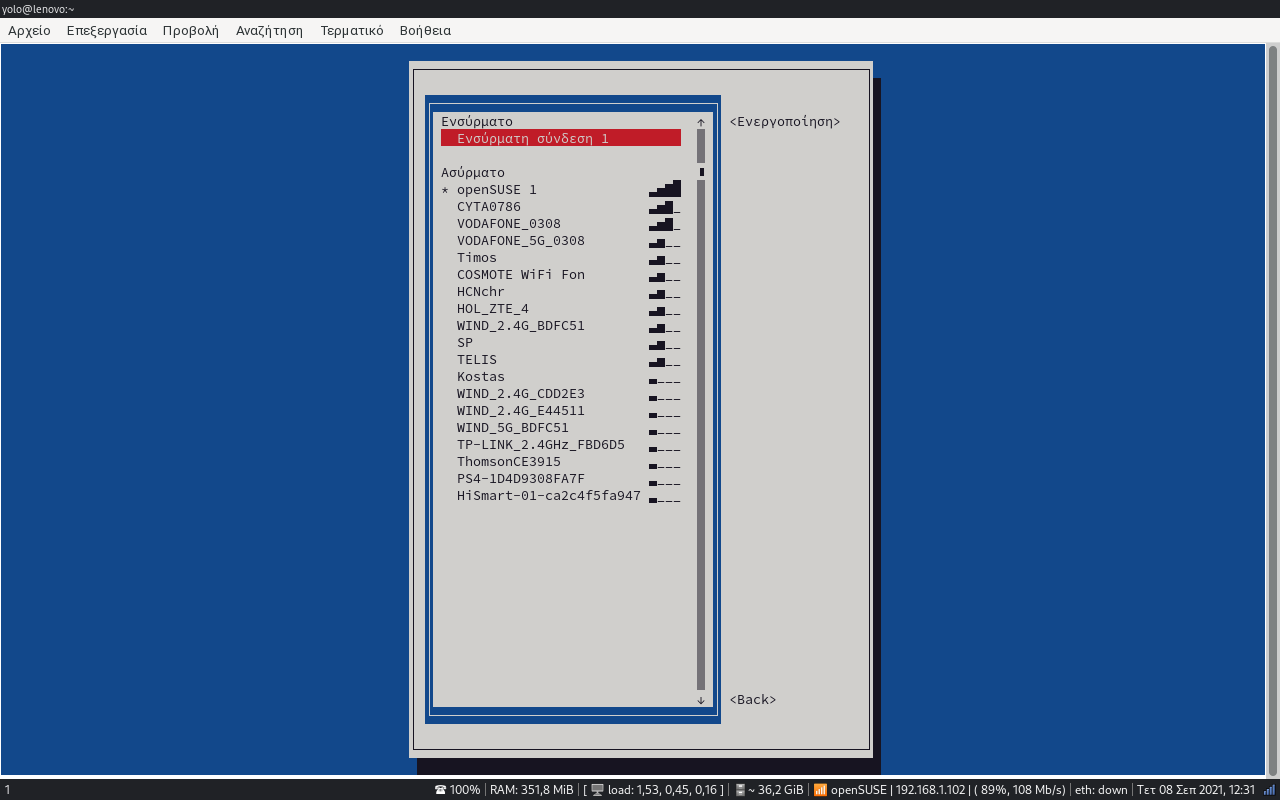
Εάν είστε λίγο πιο hardcore τύποι, μπορείτε να συνδεθείτε με τη βοήθεια του YaST. Όμως καλύτερα να ανοίξετε ένα τερματικό (mod+enter) και να γράψετε την εντολή:

Βλέπετε ότι η οθόνη είναι μεν στο τερματικό αλλά μπορείτε να χρησιμοποιήσετε τα βελάκια. Εάν επιλέξετε το ενεργοποιήστε μια σύνδεση, θα μπορείτε να επιλέξετε το ασύρματο δίκτυο που επιθυμείτε...
ΕΝΑΛΛΑΓΗ ΓΛΩΣΣΑΣ
Όπως είπα παραπάνω, άφησα το πλήκτρο alt για να κάνω την αλλαγή της γλώσσας. Πρόσθεσα στο τέλος του αρχείου config την εντολή:exec "setxkbmap -layout us,el"
exec "setxkbmap -option 'grp:alt_shift_toggle'"
Μια άλλη εναλλακτική είναι να προσθέστε την παρακάτω γραμμή.
exec_always "setxkbmap -option 'grp:alt_shift_toggle' -layout us,el -variant ,qwerty"
Στο αρχείο /etc/locale.conf είχα τα παρακάτω:
Ίσως να χρειάζεται να είναι διαφορετικό. Αν δεν σας αλλάζει η γλώσσα, θα πρεπει να πειράξετε αυτό το αρχείο.
ΠΡΟΣΘΗΚΗ WALLPAPER
Αυτό δεν είναι απαραίτητο. Απλά προσφέρει λίγη ομορφιά. Θα χρειστεί να έχετε εγκατεστημένο το πρόγραμμα feh. Εγώ έχω μια φωτογραφία και την έχω προσέσει σταθερά με την παρακάτω γραμμή στο τέλος του αρχείου config.exec --no-startup-id feh --bg-scale ~/Pictures/opensuse-wallpaper.jpg
Μια εναλλακτική, είναι να φτιάξετε ένα κατάλογο Wallpapers μέσα στον κατάλογο Pitures και να βάλετε όλα τα αρχεία που σας αρέσουν. Στη συνέχεια προσθέστε την παρακάτω γραμμή στο τέλος του αρχείου config και κάθε φορά που ανοίγει ο υπολογιστής, θα εμφανίζεται διαφορετική φωτογραφία στο background.
exec --no-startup-id feh --randomize --bg-scale ~/Pictures/Wallpapers/*
ΗΧΟΣ
Η αυξομοίωση του ήχου είναι ένα πρόβλημα. Πρόσθεσα τα παρακάτω:bindsym $mod+comma exec amixer set Master -q 5%-
bindsym $mod+period exec amixer set Master -q 5%+
Ουσιαστικά πατώντας το mod και το κόμμα, μειώνεται ο ήχος ενώ με το mod και την τελεία, αυξάνεται ο ήχος.
ΛΗΨΗ ΣΤΙΓΜΙΟΤΥΠΟΥ ΟΘΟΝΗΣ
Δοκίμασα πολλές λύσεις. Κάποιες δούλεψαν, κάποιες όχι. Θα γράψω πρώτα αυτή που χρησιμοποιώ και μετά τις υπόλοιπες. Σχεδόν για όλες τις λύσεις, χρειάζεται να έχετε εγκατεστημένα τα προγράμματα maim, xclip, byzanz.Κάπου ενδιάμεσα στο αρχείο config πρόσθεσα τις παρακάτω γραμμές.
# Screenshots
bindsym Print exec --no-startup-id maim "/home/$USER/Pictures/Screenshot-$(date -Iseconds | cut -d'+' -f1).png"
bindsym $mod+Print exec --no-startup-id maim --window $(xdotool getactivewindow) "/home/$USER/Pictures/Screenshot-$(date -Iseconds | cut -d'+' -f1).png"
bindsym Shift+Print exec --no-startup-id maim --select "/home/$USER/Pictures/Screenshot-$(date -Iseconds | cut -d'+' -f1).png"
## Clipboard Screenshots
bindsym Ctrl+Print exec --no-startup-id maim | xclip -selection clipboard -t image/png
bindsym Ctrl+$mod+Print exec --no-startup-id maim --window $(xdotool getactivewindow) | xclip -selection clipboard -t image/png
bindsym Ctrl+Shift+Print exec --no-startup-id maim --select | xclip -selection clipboard -t image/png
Τελειώσαμε με το αρχείο config. Απλά για reference, σας αφήνω από την ιστοσελίδα του project, την χρήση του πληκτρολογίου.

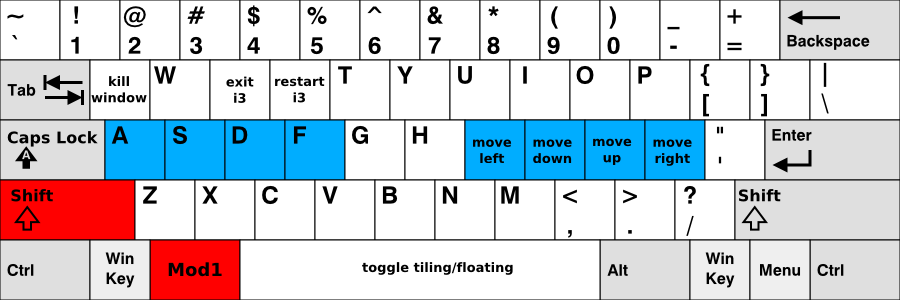
Επίσης μπορείτε να κατεβάσετε και το αρχείο pdf με όλες τις λειτουργίες των συνδυασμών των πλήκτρων.
ΡΥΘΜΙΣΕΙΣ ΑΡΧΕΙΟΥ .i3status.conf
Αυτο είναι ένα αρχείο που θα το αποθηκεύσετε στο home. Ουσιαστικά θα κάνει την ρύθμιση με τις πληροφορίες που θέλετε να φαίνεται στην κάτω μπάρα.
- Ένταση ηχείων
- Κατανάλωση μνήμης
- Φόρτωση διεργασιών (αριθμός των διεργασιών έτοιμων προς εκτέλεση για τα τελευταία 1 λεπτό, 5 λεπτά, 15 λεπτά)
- Ελεύθερος αποθηκευτικός χώρος στο /home
- Ασύρματο δίκτυο (IP, ποιότητα, ταχύτητα)
- Ενσύρματο δίκτυο (IP, ποιότητα, ταχύτητα)
- Ημερομηνία και ώρα
- nm-applet (για σύνδεση στο ασύρματο με την χρήση ποντικιού)
Δείτε μερικές φωτογραφίες:
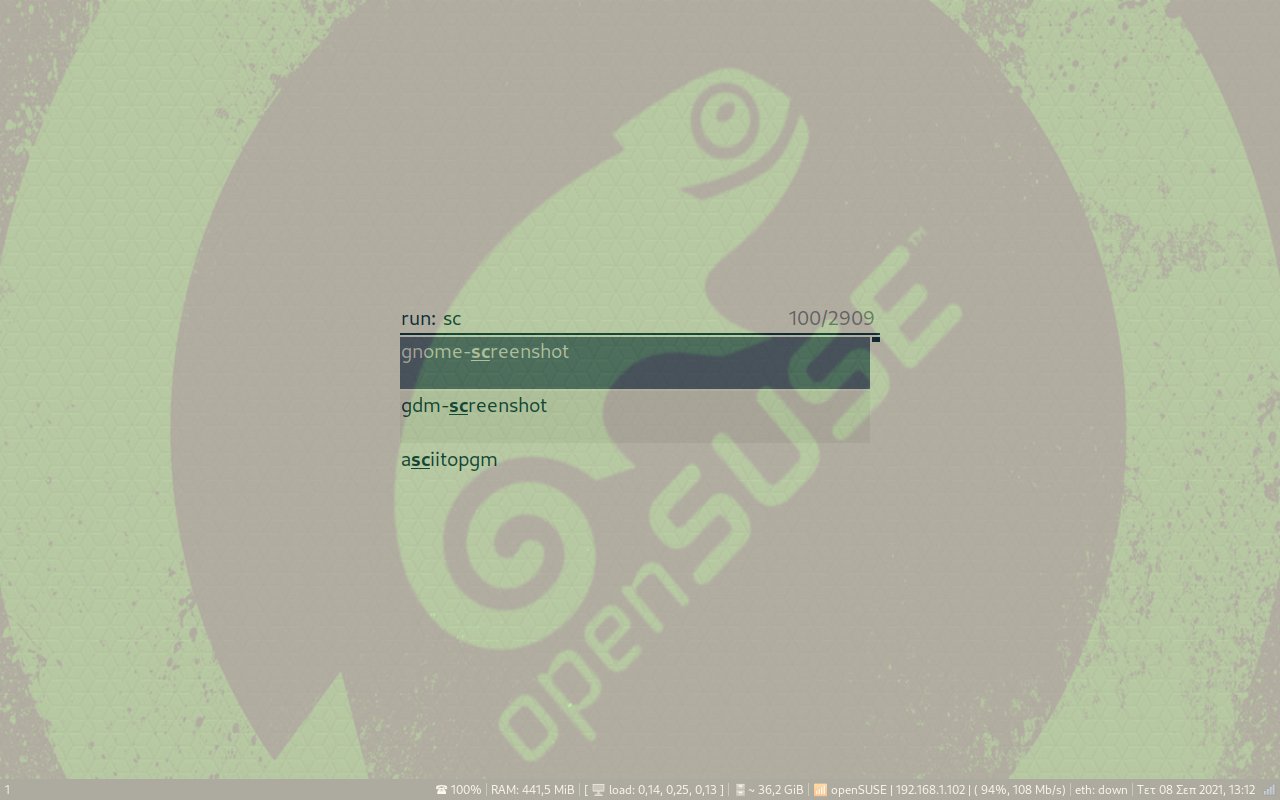 i3 dmenu: Με την χρήση του πλήκτρου mod (πλήκτρο με το σήμα των windows) και το d, ανοίγει το πλαίσιο αυτό. Εδώ πληκτρολογείτε το πρόγραμμα που θελετε να ανοίξετε.
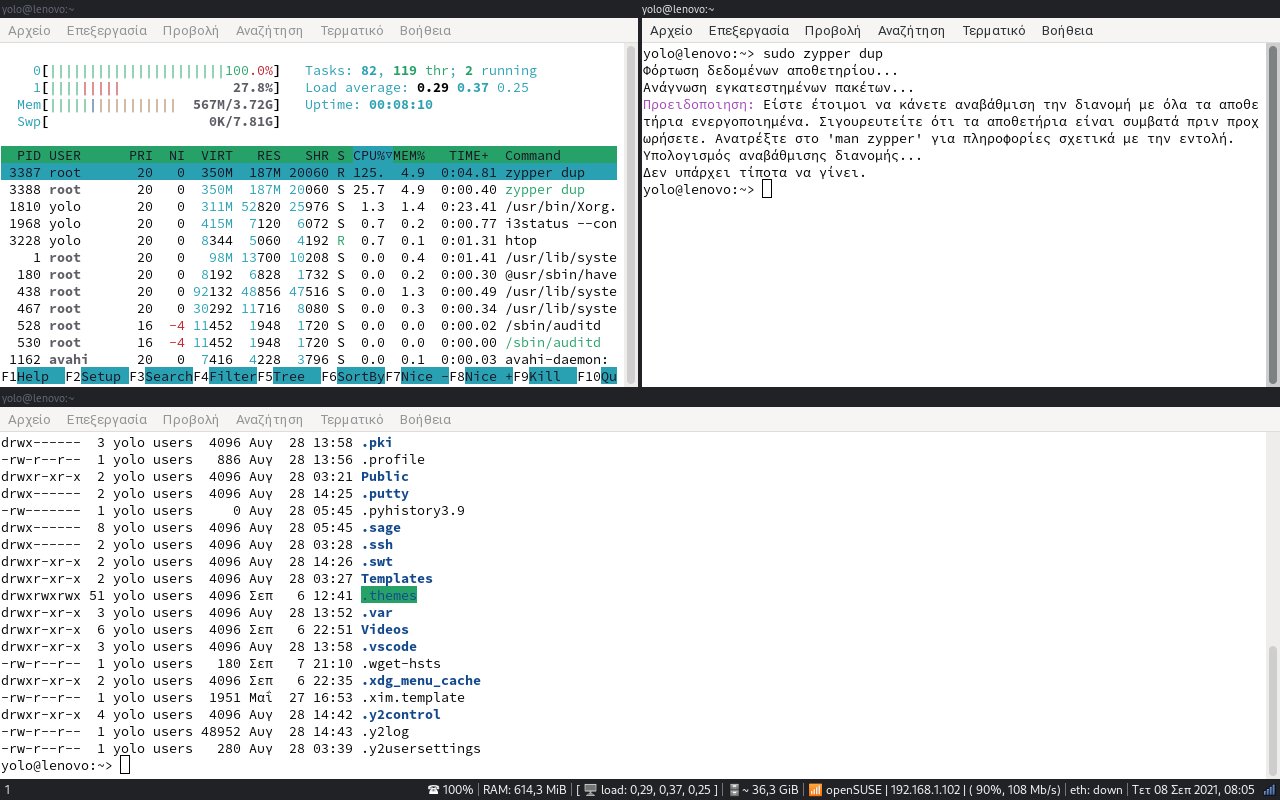 Υπάρχουν και προγράμματα που μπορείτε να κάνετε αυτό (Tmux). Εδώ βλέπουμε 3 τερματικά ανοικτά (μπορείτε να έχετε και άλλα προγράμματα ανοικτά)
 Εδώ είναι ανοικτό το Firefox με 2 παράθυρα ανοικτά και τακτοποιημένα σε καρτέλες (πάνω φαίνεται να είναι χωρισμένα στη μέση)
Όλα τα αρχεία βρίσκονται εδώ:
- Αποθήκευση του config στον φάκελο .config/i3/
- Αποθήκευση του αρχείου .i3status.conf στον φάκελο του χρήστη (~)
Είχα γράψει παλιά ένα άρθρο:
Διαχειριστής παραθύρων i3. Ότι πιο γρήγορο έχω χρησιμοποιήσει...στο openSUSE
Περιέχει παλιές ρυθμίσεις. Αυτό είναι ανανεωμένο με τελευταίες πληροφορίες.

Usando funciones en la shell Fish en #Linux
Veamos cómo crear nuestros propios comandos con las funciones en la shell Fish en nuestro sistema GNU/Linux

Fish es una de las shells disponibles y alternativas a Bash y es mi shell predeterminada desde hace mucho. Fish nos ofrece cosas como autocompletado, resaltado de sintaxis, sugerencias de comandos según escribimos, y mucho más.
Esto nos ahorra tiempo, y nos hace más amigable el uso de la terminal.
Las funciones, tanto en fish como en bash, son programas o scripts escritos en el lenguaje propio de la shell que agrupan varios comandos con sus argumentos y ejecutamos al llamarlas por un nombre.
Es como si escribiéramos nuestros propios comandos, usando varias instrucciones, que se ejecutarían al escribir el nombre de nuestro comando personalizado, que es el nombre de la función.
Verás que es más sencillo de lo que he explicado, que nos pueden ser muy útiles. Podemos crear por ejemplo un comando que nos sirva de calculadora en la terminal, podemos hacer una función que al crear una directorio entre directamente en él, etc.
Las funciones en fish las puedes encontrar y crear en ~/.config/fish/functions/ ahí es donde las puedes encontrar y donde poner las tuyas. Tienen un nombre y acaban en .fish
Tienen la siguiente sintaxis, vamos a ver un ejemplo sencillo de una función de fish. Esta función lo que hace es crear un directorio y después entrar en él:
function mkdir --description 'Crea un directorio y entra directamente a el' --argument directorio
    command mkdir $directorio
    if test $status = 0
        switch $argv[(count $directorio)]
            case '-*'

            case '*'
                cd $argv[(count $directorio)]
                return
        end
    end
end
Para crear una función podemos hacerlo mediante el editor de funciones de fish y después guardarla con un comando específico o podemos crear el archivo en la ruta que he especificado y después salir de la terminal y volver a entrar.
Vamos a utilizar el primer método. Para ello ejecutamos el comando, que nos abrirá el editor configurado en $EDITOR en nuestro sistema:
funced mkdir
Y el editor ya nos crea la primera y última línea de nuestra función, que comienza con function y el nombre que le queremos dar y será el que después ejecutaremos para llamarla y termina con end.
Podemos modificarla y crearla a nuestro gusto, por ejemplo en la función anterior de ejemplo hemos añadido una descripción de qué realiza y hemos nombrado el parámetro que le pasamos con un nombre, esto no es estrictamente necesario, pero es aconsejable.
Después escribiremos los comandos necesarios, usando la sintaxis de fish, para realizar la tarea que queremos. Cerramos el editor guardando el archivo, pero aún deberemos decirle a fish que tenga en cuenta esta nueva función, para esto ejecutamos:
funcsave mkdir
Ahora ya podremos utilizar la función mkdir, que nos creará un directorio y luego entrará en el, para ejecutar la función simplemente ejecutamos:
mkdir nombre_directorio
Otra función que puede resultar interesante (y que surgió gracias a una duda del compañero Krovikan en los foros oficiales de openSUSE) sería una que nos convirtiera un archivo de vídeo a otro en formato .mp4 usando ffmpeg
La función sería la siguiente:
function mp4 --description 'convierte un video de entrada a uno de salida en mp4' --argument vid_entrada vid_salida
    ffmpeg -i $vid_entrada -b:a 128k -c:a aac -c:v libx264 -framerate 29 -threads 2 $vid_salida
end
Llamaremos a la función pasándole el nombre del archivo existente que queremos convertir y el nombre del archivo de salida en mp4. Si el nombre tiene espacios en blanco deberemos escaparlos con una barra invertida.
Podemos hacer que nuestras funciones en fish se ejecuten cuando se den ciertos eventos en nuestro sistema, al arrancar fish, al salir, después de producirse un error, etc.
Después de esta introducción, lo mejor es leer la documentación oficial y empezar a crear nuestras propias funciones en fish para tareas repetitivas que ejecutemos o aquellas que impliquen varios pasos.
¿Alguna función útil que sea imprescindible para ti? Compártela en los comentarios del blog.
Enlaces de interés
- https://fishshell.com/docs/current/cmds/function.html#cmd-function
- https://fishshell.com/docs/current/language.html#syntax-function

Las mejoras en la gestión del color de Plasma 5.25
Tras los cuatro meses de rigor en los que los desarrolladores han estado trabajando en el siguiente paso del escritorio de la Comunidad KDE, ésta se congratuló en anunciar que había sido lanzado Plasma 5.25. Ha pasado casi una semana y es hora de empezar a repasar con detalle sus novedades. Iniciamos ayer esta travesía con las mejoras en los espacios de trabajo y seguimos hoy con las mejoras en la gestión del color del escritorio.
Las mejoras en la gestión del color de Plasma 5.25
Sigue la evolución y la constante mejora de KDE Plasma 5.25, el cual da un paso más y nos permite sicnronizar el color de acentuación con el fondo de pantalla.
De esta forma, se puede aplicar el color dominante del fondo a todos los componentes que usan el color de acentuación. Además, con la presentación de fondos de pantalla, el color se actualiza cada vez que cambia el fondo de pantalla.
Pero la cosa no acaba aquí, ya que se puede ajustar todavía más tiñendo todos los colores de cualquier esquema de color usando el color de acentuación y asó poder adaptar el color de los elementos las ventanas al fondo.
Para finalizar, también se puede escoger la cantidad de tinte que desea ver para que se mezcle con el esquema de color normal.
De nuevo, estas mejoras se pueden entender mejor con el siguiente vídeo.
Las novedades de Plasma 5.25
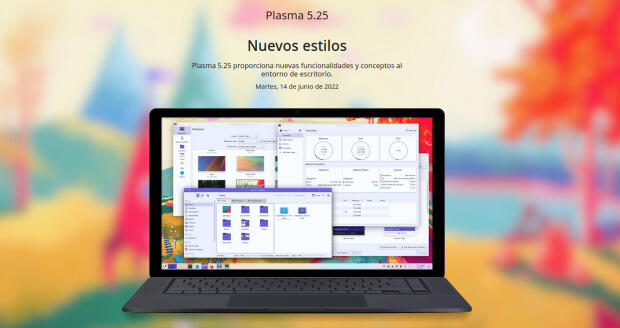
La Comunidad KDE publicó el 14 de junio Plasma 5.25, una versión que nos ofrecen un gran conjunto de novedades y propuestas que nos acercan a lo que vendrá cuando se realice la transición a Plasma 6.
En otras palabras, esta nueva versión de Plasma nos presenta una gran cantidad de nuevas funciones y geniales conceptos de Plasma 5.25 le traen un anticipo del futuro del escritorio de KDE.
El martes fue el día de descarga y actualizaciones, y mientras espero que esté disponible para mi KDE Neon, os comenté algunas de sus novedades:
- Rediseñado y mejorado la forma de navegar entre las ventanas y los espacios de trabajo.
- Gran actualización en la gestión del control de nuestro dispositivo mediante gestos.
- Sincronización del color de acentuación con el fondo de pantalla, de esta forma se puede aplicar el color dominante del fondo a todos los componentes que usan el color de acentuación.
- Activación del modo táctil desprendiendo la pantalla, rotándola 360° o seleccionándolo de forma manual.
- Añadidos los paneles flotantes que añaden un margen a su alrededor para hacer que floten, mostrando una animación cuando se vuelven normales al maximizar una ventana.
- Los efectos de mezcla entre esquemas se animan con elegancia, por ejemplo en la transición al cambiar el esquema de color actual.
- Posibilidad de mover todo el escritorio, con carpetas, widgets y paneles, de un monitor a otro con la ventana de gestión del contenedor.
Más información: KDE
La entrada Las mejoras en la gestión del color de Plasma 5.25 se publicó primero en KDE Blog.

Token Party!
Las mejoras en los espacios de trabajo de Plasma 5.25
Tras los cuatro meses de rigor en los que los desarrolladores han estado trabajando en el siguiente paso del escritorio de la Comunidad KDE, esta se congratuló en anunciar que había sido lanzado Plasma 5.25. Ha pasado casi una semana y es hora de empezar a repasar con detalle sus novedades y nada iniciar esta travesía que con las mejoras en los espacios de trabajo, es decir, la forma que tenemos de manejar la pantalla con la que organizamos nuestras tareas.
Las mejoras en los espacios de trabajo de Plasma 5.25
Sigue la evolución y la constante mejora de KDE Plasma 5.25, el cual rediseña y mejora la forma de navegar entre las ventanas y los espacios de trabajo.
Para empezar el efecto de vista general que nos muestra todas las ventanas abiertas y los escritorios virtuales ha recibido sustanciales mejoras, como podemos ver en el vídeo inferior.
Por otra parte, los gestos, esos movimiento que realizamos con los dedos sobre nuestro touchpad o directamente sobre la pantalla táctil ha sufrido un buen número de
De esta forma, en nuestro touchpad, ahora podemos:
- Pellizcar con cuatro dedos para abrir la vista general.
- Deslizar tres dedos en cualquier dirección para cambiar entre escritorios virtuales.
- Deslizar hacia abajo con cuatro dedos para ir a Presentar ventanas.
- Deslizar hacia arriba con cuatro dedos para activar la Cuadrícula del escritorio.
Podéis ver todos los vídeos de estos nuevos controles en el anuncio oficial.
Mientras que en la pantalla táctil podemos configurar deslizamientos desde el borde de la pantalla para abrir la Vista general, la Cuadrícula del escritorio, Presentar ventanas y Mostrar el escritorio como si siguieran directamente su dedo.
Las novedades de Plasma 5.25
La Comunidad KDE publicó el 14 de junio Plasma 5.25, una versión que nos ofrecen un gran conjunto de novedades y propuestas que nos acercan a lo que vendrá cuando se realice la transición a Plasma 6.
En otras palabras, esta nueva versión de Plasma nos presenta una gran cantidad de nuevas funciones y geniales conceptos de Plasma 5.25 le traen un anticipo del futuro del escritorio de KDE.
El martes fue el día de descarga y actualizaciones, y mientras espero que esté disponible para mi KDE Neon, os comenté algunas de sus novedades:
- Rediseñado y mejorado la forma de navegar entre las ventanas y los espacios de trabajo.
- Gran actualización en la gestión del control de nuestro dispositivo mediante gestos.
- Sincronización del color de acentuación con el fondo de pantalla, de esta forma se puede aplicar el color dominante del fondo a todos los componentes que usan el color de acentuación.
- Activación del modo táctil desprendiendo la pantalla, rotándola 360° o seleccionándolo de forma manual.
- Añadidos los paneles flotantes que añaden un margen a su alrededor para hacer que floten, mostrando una animación cuando se vuelven normales al maximizar una ventana.
- Los efectos de mezcla entre esquemas se animan con elegancia, por ejemplo en la transición al cambiar el esquema de color actual.
- Posibilidad de mover todo el escritorio, con carpetas, widgets y paneles, de un monitor a otro con la ventana de gestión del contenedor.
Más información: KDE
La entrada Las mejoras en los espacios de trabajo de Plasma 5.25 se publicó primero en KDE Blog.
kkc.el はどんなものなのか
Emacs で日本語テキストを入力する場合、通常は Windows 上のかな漢字変換システムを使っています(Teraterm からつなぎ込んで作業をすることが大半なので)。ATOK 、Google日本語入力、MS-IME(どうしても、という場合)のどれかを使うのですが、コンソールのみで漢字変換が出来ればもう少し楽になります。
色々調べたところ、Ctrl+\ でかな漢字変換モードになる事が分かりました。かな漢字変換モードになると、Emacs 内部でかな漢字変換が出来るようになります。しかし、かな漢字変換のための変換サーバやライブラリをインストールした覚えはありません。しかも、その手のソフトを全く入れていない、FreeBSD でもかな漢字変換モードが動いてしまうのですね。そこで、一体どうやっているのかを探ってみました。
Ctrl+\ でかな漢字変換モードになると、kkc-なんとか というコマンドが使えるようになります。ただ、一覧を出してみても、バージョン情報等はでてきませんでした。そこで、emacs のソースを展開し、kkc というキーワードで展開してみると、 kkc.el というのが見つかりました。中身をみると、この emacs lisp 自体でかな漢字変換作業をしているようです。コメント欄には AIST が作ったと書いてありました。AIST から GNU に寄贈され、GNU Emacs の一部になっていることのようです。ソースは
http://git.savannah.gnu.org/cgit/emacs.git/tree/lisp/international/kinsoku.el?h=emacs-28
にありました。
確かに、他のかな漢字変換システムを使わなくとも、Emacs だけでかな漢字変換作業が出来るのは便利なのですが、機能がちょっと低すぎます。最低限のことしか出来ません。また、カスタマイズも出来ません。どちらかというと、他のかな漢字変換システムが動いていないときの非常用、という感じがします。

container 設定時區整理小記
container 設定時區整理小記
OS: openSUSE Leap 15.3
這篇文章的起因是因為在測試 zabbix 經由 telegram 推送通知時
發現通知時間的部份是使用 UTC time, 如果想要收到通知的時候上面的時間符合目前的時間
想法上解法有 2 個方向
使用自訂訊息的部份, 標示 Problem started 時間為 UTC
將 container 內的時區訂為自己所在地區的時區
今天這篇文章就是整理將 container 內的時區設定為目前時區的小記
先整理一下實體主機 openSUSE Leap 15.3 時區相關資訊
系統預設時區設定觀察
# cat /etc/sysconfig/clock
DEFAULT_TIMEZONE="US/Eastern"
本地時區設定觀察
# ls -l /etc/localtime
lrwxrwxrwx 1 root root 33 Nov 28 2021 /etc/localtime -> ../usr/share/zoneinfo/Asia/Taipei
現在的作業系統可以使用 timedatectl 來觀察相關設定
# timedatectl
Local time: Sun 2022-06-19 08:17:36 CST
Universal time: Sun 2022-06-19 00:17:36 UTC
RTC time: Sun 2022-06-19 00:17:36
Time zone: Asia/Taipei (CST, +0800)
System clock synchronized: yes
NTP service: active
RTC in local TZ: no
不同的作業系統可能會採取 /etc/localtime 或是 /etc/timezone 的方式, 可以參考網路上找到的文章 http://www.freekb.net/Article?id=965
當然在 openSUSE 內, 最方便的作法就是使用
# yast2 timezone 來設定 :)

接下來回到 container 的部份
參考網路上的文章
原則上可以使用 -e TZ=Asia/Taipei 方式來設定 container 內的時區
但是前題是要安裝相關套件, 整理如下
openSUSE
安裝 timezone 套件
有 tzselect 指令可以執行
CentOS
安裝 tzdata
Ubuntu
安裝 tzdata
實際驗證
> docker run -it opensuse/leap:15.3 /bin/bash
dfc4994abd1d:/ # date
Sun Jun 19 00:30:22 UTC 2022
> docker run -it -e TZ=Asia/Taipei opensuse/leap:15.3 /bin/bash
940407fada80:/ # date
Sun Jun 19 00:31:39 Asia 2022
這邊可以觀察到, 雖然傳遞 -e TZ=Asia/Taipei, 目前顯示的時間還不是 local time
預設沒有裝 timezone 套件, 然後容器內也沒有 /etc/localtime 檔案
嘗試自己來建立 container image 測試
以下是 Dockerfile 內容
FROM opensuse/leap:15.3
RUN zypper install -y timezone
建立 container image
> docker build -t sakana/testtimezone2 .
再次測試
> docker run -it sakana/testtimezone2 /bin/bash
23460ce0b35f:/ # date
Sun Jun 19 00:37:43 UTC 2022
傳入時區
> docker run -it -e TZ=Asia/Taipei sakana/testtimezone2 /bin/bash
7c48052f9d9e:/ # date
Sun Jun 19 08:38:42 CST 2022
這邊就可以發現時間顯示已經變成我們傳入的 Asia/Taipei
另外 centos:7 以及 ubuntu:latest 的 container image 我也測試過 ( 如果有安裝 tzdata 套件就可以設定時區 )
先記下來
~ enjoy it
Reference
Las novedades de Impress de LibreOffice 7.4
LibreOffice, junto con Firefox y VLC Player, son las aplicaciones libres que más éxito han tenido fuera de los sistemas GNU/Linux, lo cual es muy importante para dar a conocer las bondades y ventajas de este tipo de programas. Hace mucho tempor que no hablo de esta suite ofimática, es por ello que me complace compartir las novedades de Writer de LibreOffice 7.4.
Un poco de historia de LibreOffice
No es fácil competir con grandes empresas del mundo de la informática… y no se podría pretender presentar GNU/Linux sin una suite ofimática decente, lo cual es imprescindible para la mayoría de los usuarios, es por ello que una de las joyas de las aplicaciones libres es LibreOffice.

Este proyecto fue fruto de una escisión (fork en inglés) que se produjo en 2010 de OpenOffice.org auspiciada por The Document Foundation debido a discrepancias de un grupo de desarrolladores con Sun/Oracle Corporation que eran las empresas a las que pertenecía OpenOffice.
El resultado fue el nacimiento de LibreOffice, y un espectacular aumento en el desarrollo de la suite ofimática, que pronto empezó a aumentar su numeración gracias al trabajo constante de la Comunidad.
Poco a poco ganó estabilidad, funcionalidades, mejoras visuales, menor consumo de recursos y un largo etcétera, lo que han convertido a LibreOffice como una aplicación imprescindible entre muchos usuarios y una alternativa más que válida para todo el mundo.
Las novedades de Impress de LibreOffice 7.4
La versión 7.4 de LibreOffice (prevista para agosto), trae actualizaciones periódicas de los módulos principales, incluyendo Calc, Writer e Impress, con características y mejoras. Además, en esta versión se ha mejorado la compatibilidad con Microsoft Office con cambios en los filtros del núcleo y actualizaciones de la plataforma.
Hoy vamos a comentar la novedad máas destacada de Impress, el creador de presentaciones de LibreOffice que no tiene nada que envidiar a cualquier otro editor, ya sea libre o privativa.
Se trata de la nueva ·Pestaña Tema» presente en las propiedades de la diapositiva maestra. Esta nueva pestaña contiene varias opciones de colores de acento que controlan todos las diapositivas de tu presentación. Será una característica muy interesante en esta versión y a la que seguro que le podemos sacar un buen rendimiento.

Vía: Debug Point
La entrada Las novedades de Impress de LibreOffice 7.4 se publicó primero en KDE Blog.
Las novedades de Writer de LibreOffice 7.4
LibreOffice, junto con Firefox y VLC Player, son las aplicaciones libres que más éxito han tenido fuera de los sistemas GNU/Linux, lo cual es muy importante para dar a conocer las bondades y ventajas de este tipo de programas. Hace mucho tempor que no hablo de esta suite ofimática, es por ello que me complace compartir las novedades de Writer de LibreOffice 7.4.
Un poco de historia de LibreOffice
No es fácil competir con grandes empresas del mundo de la informática… y no se podría pretender presentar GNU/Linux sin una suite ofimática decente, lo cual es imprescindible para la mayoría de los usuarios, es por ello que una de las joyas de las aplicaciones libres es LibreOffice.
Este proyecto fue fruto de una escisión (fork en inglés) que se produjo en 2010 de OpenOffice.org auspiciada por The Document Foundation debido a discrepancias de un grupo de desarrolladores con Sun/Oracle Corporation que eran las empresas a las que pertenecía OpenOffice.
El resultado fue el nacimiento de LibreOffice, y un espectacular aumento en el desarrollo de la suite ofimática, que pronto empezó a aumentar su numeración gracias al trabajo constante de la Comunidad.
Poco a poco ganó estabilidad, funcionalidades, mejoras visuales, menor consumo de recursos y un largo etcétera, lo que han convertido a LibreOffice como una aplicación imprescindible entre muchos usuarios y una alternativa más que válida para todo el mundo.
Las novedades de Writer de LibreOffice 7.4
La versión 7.4 de LibreOffice (prevista para agosto), trae actualizaciones periódicas de los módulos principales, incluyendo Calc, Writer e Impress, con características y mejoras. Además, en esta versión se ha mejorado la compatibilidad con Microsoft Office con cambios en los filtros del núcleo y actualizaciones de la plataforma.
Hoy vamos a repasar las de Writer, la hoja de cálculo de LibreOffice que no tiene nada que envidiar a cualquier otro editor de texto, ya sea libre o privativa.
Sus novedades principales son:
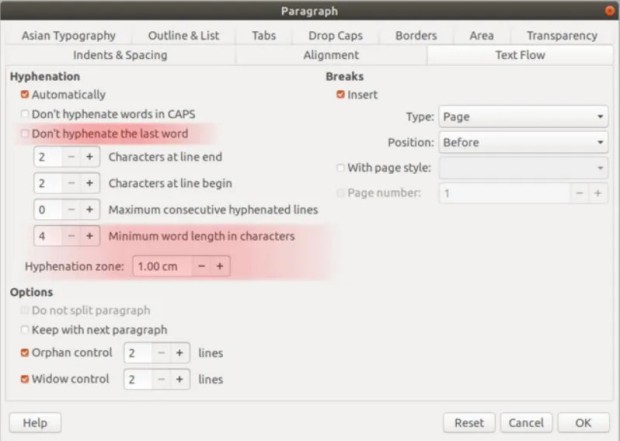
- La configuración de la separación silábica recibe tres nuevas opciones. Ahora puede especificar el tamaño de la zona de separación, la longitud mínima de la palabra y la posibilidad de dejar de separar la última palabra.
- En el menú Herramientas > Actualizar > Actualizar ahora se actualiza la vista previa de todos los objetos OLE. Además, si está importando un archivo DOCX en LibreOffice 7.4, los bordes de los párrafos aportan más claridad. Además, la importación también mejora el texto enriquecido y el contenido de las casillas de verificación dentro del cuadro de texto para las importaciones DOCX.
- Writer 7.4 admite ahora la eliminación de saltos de los archivos de Word, lo que mejora la coherencia del diseño.
Vía: Debug Point
La entrada Las novedades de Writer de LibreOffice 7.4 se publicó primero en KDE Blog.
#openSUSE Tumbleweed revisión de la semana 24 de 2022
Tumbleweed es una distribución «Rolling Release» de actualización contínua. Aquí puedes estar al tanto de las últimas novedades.

openSUSE Tumbleweed es la versión «rolling release» o de actualización continua de la distribución de GNU/Linux openSUSE.
Hagamos un repaso a las novedades que han llegado hasta los repositorios esta semana.
El anuncio original lo puedes leer en el blog de Dominique Leuenberger, publicado bajo licencia CC-by-sa, en este este enlace:
Esta semana se han publicado 5 snapshots (0609, 0611, 0612, 0613 y 0614)
Los cambios a destacar que han llegado a los repositorios son:
- GNOME 42.2 – ya completo
- GTK 4.7.0
- openssl 1.1.1o
- KDE Gear 22.04.2
- KDE Plasma 5.25.0
- python 3.10 como el intérprete de Python predeterminado. pymodules todavía disponibles paraare python 3.8, 3.9, y 3.10
Y para próximas snapshots:
- Linux kernel 5.18.4
- Mozilla Firefox 101.0.1
- KDE Frameworks 5.95
- Inkscape 1.2
- systemd 251.2
- SELinux 3.4
- krb5 1.20.0
- Sphinx 5
Si quieres estar a la última con software actualizado y probado utiliza openSUSE Tumbleweed la opción rolling release de la distribución de GNU/Linux openSUSE.
Mantente actualizado y ya sabes: Have a lot of fun!!
Enlaces de interés

——————————–