
 Member
 DimStar
openSUSE Tumbleweed – Review of the week 2022/45
Dear Tumbleweed users and hackers,
This week (the last weekend) has been a bit of a challenge for many of our users, due to an ill-prepared sudo config change. It was attempted to closer align how sudo works on other distros (using user’s password instead of root’s) but the configuration was far from complete and made nobody able to sudo anymore (su still worked, luckily). A heartfelt apology if you were hit by that. The change was reverted on Monday (through the update channel) to get you back to the usual config asap. But of course, the week was not defined by that one incident. Tumbleweed has been rolling on steadily with daily snapshots (1104…1110).
The main changes delivered during this week were:
- KDE Gear 22.08.3
- Qt 5.15.7 (broke Deepin/qt5platform-plugins, I submitted a fix for that to the devel project)
- Libvirt 8.9.0
- SQLite 3.93.4
- cmake 3.24.2
- PostgreSQL 15.0 (final release, out of RC)
- Mozilla Firefox 106.0.5
- Linux kernel 6.0.7
- GNU Make 4.4
- git 2.38.1
- gnome-shell & mutter 43.1
- Mesa 22.2.3
- KDE Plasma 5.26.3
- gnutls 3.7.8
- systemd 251.8
Quite the list that accumulated there over just one week. And of course, these are just the major changes.OBS reports for the last week: During this period 902 commits were added to packages in this project. Out of those commits, 714 were version updates
The staging projects are currently testing these updates:
- icu 72.1 (nodejs fixes were submitted, needs retesting)
- icewm 3.2.0
- Linux kernel 6.0.8
- Python (all versions): Fixes for CVE-2022-45061
- postgresql10, 11, 12, 13, 14, and 15 – all bump to their latest minor version
- rubygem-rspec 3.12.0: YaST is in the progress of catching up with the needed changes
- FFmpeg-5 as default (ffmpeg-4 will stay around, and spec files can pin to it)
Unix vs. GNU. La historia de cómo comenzó Unix
Muchos de los comandos de la segunda edición de Unix de 1972 todavía se usan en los sistemas basados en Unix como las distribuciones GNU/Linux actuales. Repasemos cómo comenzó Unix y cómo ha cambiado con el tiempo

Hoy en día, pensamos en Unix como GNU/Linux, y mucha gente ve el Unix original a través de la lente de GNU/Linux. Pero Unix tiene una larga historia, y la apariencia de Unix ha cambiado con el tiempo.
Cuando hablamos de «cómo era en los primeros días de Unix», en realidad no tenemos una idea sólida porque la forma en que trabajamos ha cambiado mucho desde entonces.
Este artículo en una traducción/adaptación del artículo original en inglés escrito por Jim Hall y publicado bajo una licencia libre en el blog de redhat.com.
En el artículo original se confunde (u omite deliberadamente) Linux (el kernel) con GNU el sistema operativo que usa el kernel Linux. GNU (acrónimo recursivo de GNU is Not Unix) fue desarrollado por Richard Stallman en 1983 como versión de software libre del sistema Unix con licencia privativa.
Los comandos de Unix que mencionan, forman parte del sistema GNU, no del kernel Linux. Aunque de manera popular se conozca al sistema con el nombre general de Linux, cabe destacar y dar crédito a GNU, que fue el sistema que liberó las herramientas y comandos de Unix.
Empezamos a indagar en la «prehistoria» de la informática.

Del prototipo a un primigenio Unix
Echemos un vistazo a cómo comenzó Unix. En 1969, Ken Thompson, investigador de Bell Labs, estaba experimentando con diseños de sistemas operativos. Bell Labs tenía una computadora PDP-7 con un dispositivo periférico interesante: una unidad de disco muy rápida (para la época). Ken experimentó escribiendo una interfaz personalizada para maximizar el rendimiento de la unidad.
En algún momento, Ken se dio cuenta de que había trabajado tanto en la interfaz que era casi un sistema operativo en sí mismo. Thompson calculó que necesitaba tres semanas más para convertirlo en un sistema operativo prototipo: cada una de esas tres semanas para escribir un editor, un ensamblador y un kernel.
Ese prototipo fue el comienzo del sistema Unix.
Ese primer sistema operativo prototipo resultó ser una idea bastante buena. Y con el tiempo, Thompson y otras personas en Bell Labs le agregaron nuevos programas, con el patrón de diseño general de que cada programa debe ser pequeño y hacer una cosa realmente bien. (filosofía Unix)
El nuevo sistema se denominó Unix, un juego con el nombre Multics, un proyecto fallido en el que Bell Labs había participado unos años antes.
Crecimiento de los primeros Unix
En noviembre de 1971, Bell Labs recopiló los programas y lanzó la 1.ª edición de Unix, seguida de la 2.ª edición de Unix en julio de 1972. Estas primeras versiones de Unix no están muy alejadas de los sistemas GNU/Linux actuales.
Muchos de los comandos en los que confiamos todos los días en Linux ya estaban presentes en la segunda edición de Unix, incluidos cat, chdir (como cd), chmod, chown, cmp, cp, date, df, du, echo, find, ln, ls, man, mkdir, mount, mv, rm, rmdir, sort, umount, wc, y who. Y algunos otros comandos que aún existen pero que no se usan con frecuencia, como ar (archivo), dc (calculadora de escritorio), ed (editor) y sum (suma de verificación del archivo).
La segunda edición de Unix también admitía versiones anteriores de correo electrónico y mensajes instantáneos, con mail (correo electrónico), mesg y write (mensajes a los usuarios).
Los programadores tenían una variedad de compiladores y herramientas para ayudarlos a escribir nuevos programas, incluidos as (ensamblador), bas (programación BASIC), cc (compilador C), db (depurador), fc (compilador FORTRAN), ld (enlazador), nm (lista de nombres), od (volcado octal), strip y un (búsqueda de símbolos indefinidos).
Es posible que reconozca estas herramientas en los sistemas GNU actuales, aunque podríamos usar nombres ligeramente diferentes para ellas, como gcc el compilador GNU para compilar programas en C.
Algunos comandos de Unix han cambiado de nombre con el tiempo, pero es posible que aún reconozca a sus predecesores anteriores en Unix 2nd Edition. Programas como sh shell (compatible con versiones anteriores de : etiquetas, goto e if), check y salv (como fsck), dsw (como rm -i), istat (proviene de inode), m6 (un procesador de macros temprano, el predecesor a m4 de hoy) y tm (información de tiempo del sistema, similar a uptime y otros comandos modernos).
Otros comandos eran reliquias de su tiempo, dedicados a sistemas que ya no existen. Por ejemplo, el manual Unix 2nd Edition define herramientas para comunicarse con un mainframe Honeywell 6070, incluyendo dpd (daemon de teléfono de datos), tss (sistema de tiempo compartido de Honeywell 6070) y opr (imprimir archivos «fuera de línea» en Honeywell 6070).
Procesando texto
Unix se convirtió rápidamente en una plataforma popular dentro de Bell Labs, por lo que Thompson buscó un hardware más potente para ejecutar el nuevo sistema. Desafortunadamente, la dirección no quería invertir en la investigación del sistema operativo, ya que se sintió desilusionada por el fallido proyecto Multics. Pero el pequeño equipo de Unix encontró una solución.
El departamento de Patentes estaba a punto de comprar un nuevo sistema informático que podrían usar para escribir solicitudes de patentes. Sin embargo, el nuevo software no estaría listo de inmediato. El equipo de Unix hizo una contrapropuesta: comprar un nuevo PDP-11 para que los laboratorios desarrollen la próxima versión de Unix y, a su vez, el equipo de Unix actualizaría el sistema de procesamiento de texto roff para admitir las funciones necesarias para escribir solicitudes de patentes.
Y es por eso que la 2.ª edición de Unix también incluye una variedad de herramientas de procesamiento e impresión de documentos que incluyen nroff (la «nueva versión de roff»), ov (superposición de páginas impresas), pr (preprocesador de impresión) y type (imprimir en un teletipo).
Más tarde, cuando los laboratorios compraron una máquina tipográfica, el programa de composición tipográfica nroff se actualizó con nuevas funciones. troff (la «versión tipográfica de roff») apareció por primera vez en Unix 4th Edition en 1973. Otras herramientas de formato de texto admitían troff, como eqn para generar ecuaciones y tbl para crear tablas.
Otras herramientas de procesamiento de texto ahora familiares no aparecerían en Unix hasta revisiones posteriores. En particular, la capacidad de enviar la salida de un comando a otro (usando «conductos»tuberías») no apareció hasta la 3. Unix 5ª edición, 1974).
El primer shell de Unix todavía era bastante primitivo y no sería reemplazado por un Bourne Shell más rico en funciones hasta la séptima edición de Unix en 1979.
Las raices de Unix en GNU
Realmente es fascinante esta «arqueología informática». No solemos pensar en los orígenes de los comandos de GNU/Linux que usamos todos los días. Estos comandos se originaron en una época más simple cuando la memoria de la computadora se medía en kilobytes, por lo que las herramientas debían ser de pequeño tamaño y de naturaleza enfocada.
Sin duda, Unix de hace 50 años carecía de la amplitud de opciones de línea de comandos que disfrutamos hoy. Por ejemplo, el comando ls moderno anuncia 60 opciones de línea de comandos diferentes, mientras que ls de la segunda edición de Unix admitía solo cinco. Pero claramente se mostró prometedor, incluso en los primeros días, y creció rápidamente.
Hoy en día, cada sistema Unix puede rastrear su ascendencia hasta el Unix original. Eso incluye GNU/Linux, que utiliza herramientas GNU que se basan en la documentación de Unix.
GNU/Linux definitivamente está muy alejado de sus raíces Unix, admite arquitecturas modernas y dispone de una gama de herramientas modernas útiles, pero la experiencia de la línea de comandos central sigue siendo bastante similar a la de Unix de la década de 1970.
La próxima vez que uses ls para listar archivos en tu equipo o servidor, ten presente que estás usando un comando de hace 50 años o más. Y todavía sigue.


Git, PostgreSQL, Btrfs update in Tumbleweed
This week saw a new all-time high of continuous openSUSE Tumbleweed snapshots released, which surpasses the previous streak of 26.
That streak continues and the snapshots have provided a few major version software updates along with several bug fixing updates.
The latest snapshot bringing the distribution to an all-time high of 29 is 20221109. This snapshot updates Mesa and Mesa-drivers to versions 22.2.3. The 3D graphics package dropped a package related to Intel Vulkan Application Programming Interfaces and it fixed some regressions affecting continuous integration. An update of libzypp 17.31.5 created a .no_auto_prune in the package to prevent an auto cleanup of orphaned repositories. The text-based user interface writer package ncurses 6.3.20221105 fixed another memory leak and added a few patches from October. Other packages to update in the snapshot were mobile-broadband-provider-info 20221107, elfutils 0.188, perl-Image-ExifTool 12.50 and a half a dozen more.
A major version package update in snapshot 20221108 was made to paper setting package libpaper 2.0.3. The package fixes a segmentation fault when /HOME is unset. The package also dropped a patch and fixed a space leak in case of an error parsing paper specifications. Developers will not have to worry about two Common Vulnerabilities and Exposures fixed in git 2.38.1. A fix for surprising behavior with --local clone optimization had resolved CVE-2022-39253 and a fix for CVE-2022-39260, which could be exploited by victims who had git shell exposed as a login shell, and have enabled its interactive mode by creating the directory /HOME/git-shell-commands. A fixed migration to OpenSSL 3 was made in the nodejs19 19.0.1 update. An update of bind 9.18.8 added new features like support for parsing and validating the dohpath service parameter, which added DNS record type SVCB. The package now logs the supported cryptographic algorithms during startup and in the output of named -V. GNOME’s gedit 43.1 had a fix that cut text off at the bottom in certain situations, and dnsmasq 2.87 added snooping of IPv6 prefix-delegations to the DHCP-relay system. Other packages to update in the snapshot were libsoup 3.2.2, a few GNOME 43.1 updates and several other packages.
The 20221107 snapshot was super small. It updated xterm 375, which fixed a couple regressions and changed the default for sixel scrolling resource to better match VT330/VT340 DECSDM settings. Fingerprint reading package libfprint had a fork allowing the loading of external modules and the non-free modules will be included in Packman repositories, according to the changelog. The make 4.4 version warned of future backward-incompatibility for the next release with several warnings for build requirements and other backward-incompatibility issues. There were also several new features and functions in the minor update like a function that “allows user-defined functions to define a set of local variables: values can be assigned to these variables from within the user-defined function and they will not impact global variable assignments.”
Snapshot 20221106 updated a few packages as well. Mozilla Firefox 106.0.5 had a fix for crashes experienced by users with Intel Gemini Lake CPUs. Linuxl kernel-firmware 20221031 added firmware for Cirrus CS35L41, which is the industry’s first 55 nm smart audio amplifier solution for mobile devices. The update of the kernel-source to version 6.0.7 also focused on audio having several Advanced Linux Sound Architecture changes. There were a few USB adjustments made with the DWC3 driver in the kernel as well. XML security library xmlsec1 1.2.36 had a migration to OpenSSL 3.0 Application Programming Interfaces and the package deprecated OpenSSL before 1.1.0 and LibreSSL before 2.7.0.
The Guy Fawkes Day snapshot, 20221105, seemed fitting to have an update of firewalld 1.2.1 and configuration-management library augeas 1.13.0. The firewalld package fixed nftables with dropping invalid packets before a zone dispatch, and the package added documentation protocols to rich language to extend current zone elements. Augeas improved readline integration to handle quoting issues and a new lens to parse the /proc/cmdline parameters that were added. Another major version in this week’s snapshot was the translation from the release candidate (RC) to the official postgresql 15 release. The package has noticeable gains for managing workloads in both local and distributed deployments, and it improves on its in-memory and on-disk sorting algorithms; according to the announcement benchmarks show speedups of 25 to 400 percent based on which data types are sorted. A few other packages were updated.
Snapshot 20221104 updated KDE Gear 22.08.3. An update of KDE file manager Dolphin fixed the opening of a new window unnecessarily, and Bahrain, which was not showing in Asia on KGeography maps, was fixed, so make sure to tell the people you know using Plasma that Bahrain isn’t some mystical island continent like Australia, only smaller. KDE Gear 22.08.3 also had an update for its travel reservation package KItinerary, which added an Italo train ticket extractor script, so ticket checkers in Italy will have less awkward conversations. An update of sqlite3 3.39.4 fixed a long-standing problem that in rare cases caused database corruption if the application uses an application-defined page cache. Several other packages were updated in the snapshot including libvirt 8.9.0, php7 7.4.33 and more.
There were a few packages worth mentioning in the two snapshots that started off the week. Snapshot 20221103 updated btrfsprogs to version 6.0, and it now has a option -O that accepts values from -R to unify the interface, but -R will continue to work. The file system utilities also put in some experimental mkfs support for block-group-tree related to RC Linux Kernel 6.1. A couple of regressions made their way into xwayland 22.1.4 like a double-scroll wheel event and a key repeat, which were fixed with the 22.1.5 update. Snapshot 20221102 updated to the 6.0.6 kernel-source and mpg123 to version 1.31.1.
The continuous streak of Tumbleweed snapshots stands at 29.
Mi escritorio Plasma de noviembre 2022 #viernesdeescritorio Plasma 5.26 Dark Edition
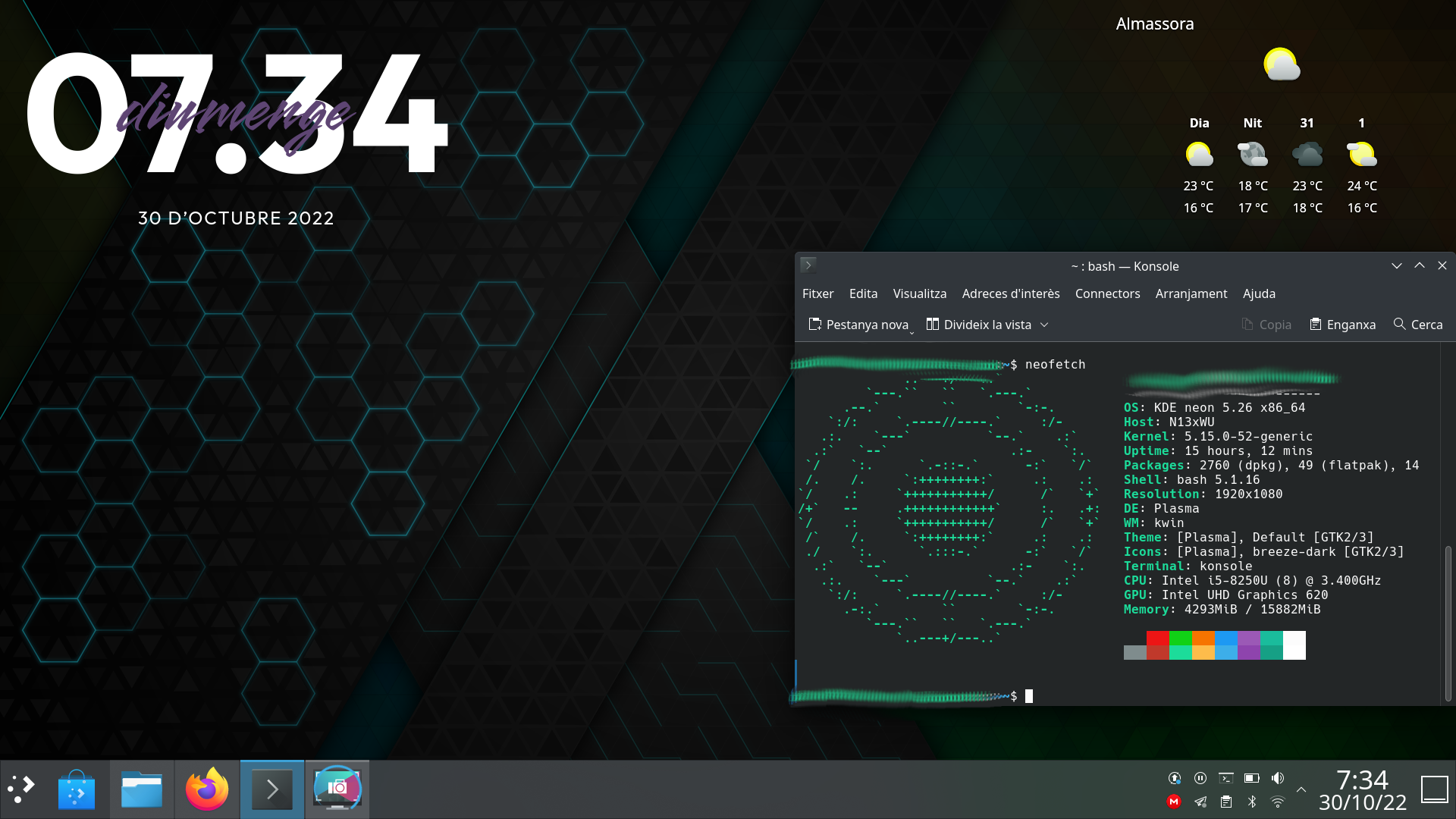
Continuo con la serie de la iniciativa #viernesdeescritorio con una nueva captura, con la que llegaré a más de un año y medio compartiendo «Mi escritorio», una mirada a la intimidad de mi entorno de trabajo. De esta forma, bienvenidos a mi escritorio Plasma de noviembre 2022 que cambia a un tema oscuro, justo el del lanzamiento de Plasma 5.26.
Mi escritorio Plasma de noviembre 2022 #viernesdeescritorio Plasma 5.26 Dark Edition
Esta va a ser la vigesimonovena vez que muestro mi escritorio Plasma 5 en público, lo cual es número nada desdeñable de entradas que sigue creciendo de forma constante. Tengo pendiente hacer una entrega recopilatorio con los 25 primeros escritorios para ver la evolución… a ver si lo consigo antes de que acabe el año.
Respecto al mes pasado, he cambiado a una tema oscuro ya que quería experimentar las mejoras de Plasma 5.26 con su tema dark. Para controlar ventnas sigo con la barra de tareas inferior (un poco más ancha de lo normal para que la bandeja del sistema sea doble) y el lanzador de aplicaciones por defecto «Menú de aplicaciones»
En cuanto a plasmoides, uno de los protagonistas de Plasma de 5.26, he añadido un par:
- el plasmoide meteorológico por defecto de plasma, al cual le he quitado el fondoo.
- Clear Clock, el reloj elegante del cual ya he hablado en el blog.
Y sigo, tras unos meses enseñando mi Slimbook Kymera AMD de sobremesa, sigo realizando a captura está realizada sobre mi portátil Slimbook Pro de 13 pulgadas, el cual tiene instalado un ¡KDE Neon 22.04! con el recientemente actualzado Plasma 5.26, siendo mi sistema gráfico Wayland.
El resultado de mi escritorio de noviembre de 2022 es un entorno de trabajo claro y, como siempre, funcional que podéis ver en la imagen inferior (pinchad sobre ella para verlo un poco más grande).
La entrada Mi escritorio Plasma de noviembre 2022 #viernesdeescritorio Plasma 5.26 Dark Edition se publicó primero en KDE Blog.

Checking changelogs with zypper
I have heard way to often the question from Linux and specially SUSE Linux users that “How can I check the changelog of a package or new version of a package available on the repository, but not yet installed”.
There was no easy answer for that question, so I have decided to make a little tool for that.
How it is done
All the enabled repositories have a bunch of configuration files in a well structured directory tree under the /var/cache/zypp/raw/.
Running Shell in Builder
Builder has been absolutely wonderful for a designer to dive in and fix up graphics assets for Application. It allows to easily build and test run patches before submitting a merge/pull request on apps hosted on gitlab or github. Ideally you'd press the run button and voilá.
What has been far from wonderful — doing even one line fixes for the GNOME Shell was very hard to test for anyone not building shell daily. getting the environment ready every release has been a chore. From virtual machines, jhbuild, toolbox, jhbuild in VMs to jhbuild in toolbox there was a dozen of way to fail building the latest shell.

Builder 43, impressively marathoned into perfection, features (among many other things) the ability to target Toolbox/podman containers as development environments. So I was really happy to see Bylan McCall have a nested session going on the run button.
Now I couldn't get the full detailed receipe out of him, but as they say it's easier to get the internet prove you wrong than to give you advice, here's my terrible way (with some help from the most authoritative capacities that probably don't want anything to do with this pkexec hack):
- Create a toolbx container and install all gnome-shell dependencies.
toolbox create shell
toolbox enter shell
sudo dnf install gnome-shell mutter ninja-build meson
sudo dnf builddep gnome-shell mutter
While at the beginning of a cycle packages cover most of the dependencies, at the later stages you'll have to build more things (Usually gsettings-desktop-schemas, libgweather, gjs, gcr and mutter). We're in a container so I just oldschool brute install to --prefix=/usr. To build mutter for example I'd
mkdir ~/Projects
cd ~/Projects
git clone https://gitlab.gnome.org/GNOME/mutter.git
cd mutter
meson --prefix=/usr build '-Dman=false'
ninja -C build
sudo ninja -C build install
So assuming we have successfuly built shell in the shell toolbox container, we'll move over to Builder.
-
In Builder, open the project we cloned to
~/Projects/gnome-shell. Create a new configuration (Alt+,) by duplicating theDefault. Change the runtime toshell(the toolbx containers are below the usual flatpak runtimes). Set the Installation Prefix to/usr. Don't forget to make it active (Make Active). -
Still in configuration, in the
Commandssection, create a new command (call it Run Nested Shell):
dbus-run-session gnome-shell --wayland --nested
At the bottom of the dialog add a Variable:
MUTTER_DEBUG_DUMMY_MODE_SPECS=1920x1080
This will make the shell run at least in HD, rather than the super tiny default size.
-
In the Application section, change the
Run Commandfrom Automatically Discover to our Run Nested Shell. Now we only need to do the last nasty bit to allow for the install to/usrto succeed. -
Open a new runtime terminal (
Ctrl+Alt+T) and replace pkexec with ajust-do-itscript. It's a container, it's fiiiiine, chill.
cd /usr/bin
mv pkexec pkexec.orig
Now with your preferred CLI editor create the following shell script in place of pkexec:
#!/bin/bash
su -c "$*"
Set it executable with chmod +x pkexec.

Now pressing the run button should build your shell, install it and run the nested session. Hopefully stylesheet patches will be less painful now, maybe?
Please do not hesistate to toot at me what the proper way is rather than installing to /usr
Selingan Waktu, Menulis Blog dan Akselerasi Usaha
Sekali atau dua kali dalam seminggu saya biasanya main ke toko pertanian dan kebun anggur Zeze Zahra di Tambun, Kabupaten Bekasi. Selain untuk tujuan mengecek operasional dan kemajuan usaha, kunjungan ke toko atau ke kebun ini juga bagian dari selingan. Ada kalanya saya, Achos Maryadi Arismunandar dan Qchen Marsan Susanto bertemu disana untuk diskusi mengenai perkembangan PT Excellent Infotama Kreasindo dan PT Aktiva Kreasi Investama.
Waktu yang ada dimanfaatkan semaksimal mungkin. Jika ke Tambun saya biasanya berusaha menyempatkan diri main ke keluarga atau kerapkali saya sengaja datang pagi untuk ziarah ke makam keluarga. Setelah itu meluncur ke toko atau kebun yang masing-masing jaraknya tidak sampai 1 KM.
Sampai di toko atau kebun saya biasanya foto-foto suasana untuk tulisan di blog https://www.vavai.com atau bisa juga memvideokan hal tertentu (tanaman, suasana toko, suasana kebun atau tips terkait ternak dan tanaman anggur) untuk nantinya diupload ke Youtube Zeze Zahra (https://youtube.com/zezevavai)
Setelah itu semua, baru kami bertiga ngobrol mengenai rencana dan review perkembangan Excellent dan Aktiva. Adul dan Satir yang biasanya menjaga toko menyediakan air kelapa muda yang dipetik dari pohon kelapa di pekarangan toko Zeze Zahra.
Untuk makan siang, kami biasanya fleksibel. Kadang memesan masakan dari keluarga di Tambun seperti sop daging sapi atau kikil, belut atau sop ayam kampung. Kadang membeli di Rumah Makan masakan Padang atau bisa juga membeli gado-gado dan sayur gabus pucung dari rumah makan di sekitar toko pertanian Zeze Zahra.


Budget untuk membeli makanan ini biasanya lebih rendah dibandingkan jika kami kumpul di mall di sekitaran markas Excellent dan Aktiva di kota Bekasi.
Saya biasanya meluncur selepas mengantar Vivian di sekolah. Perjalanan ke toko pertanian saya isi dengan mendengarkan Youtube, bisa dalam bentuk pembelajaran bahasa Inggris, pembelajaran terkait kuliah, wawancara para tokoh usaha terkenal, insight bisnis dari para CEO (misalnya insight dari pak TP Rachmat, pak Chairul Tanjung, Steve Jobs, Bill Gates, Jack Ma dan lain-lain) atau bisa juga sekedar mendengarkan musik atau pengajian tergantung mood saat itu ☺️🤭
Saat diskusi, saya juga biasanya memonitor pekerjaan dan group diskusi team, termasuk mengadakan meeting atau koordinasi dengan team secara online. Dengan cara demikian, waktunya bisa benar-benar efektif dan terisi dengan kegiatan yang baik untuk berbagai keperluan.
Agenda yang dilakukan juga tidak selalu sama. Bisa saja saya ke toko pertanian dan kebun anggur sekedar untuk membaca buku, menyelesaikan tugas kuliah atau sekedar menonton video tertentu. Bisa juga menonton Netflix atau Curiosity Stream. Jadi fleksibel sesuai dengan situasi yang ada.
Menjelang Ashar saya biasanya selesai di toko atau kebun dan meluncur kembali untuk menjemput Vivian di sekolah.
Kegiatan-kegiatan yang dilakukan ini bisa menjadi selingan yang baik dan menyenangkan. Saya bisa menjalaninya dengan ritme yang bisa diatur sendiri. Tidak monoton dan juga tidak overload. Kalau terlalu capek ya istirahat.
Saya ingat perkataan pak TP Rachmat mantan CEO Astra International dan pendiri Triputra Group di salah satu kesempatan : “Saat keluar dari Astra, saya usia 59 tahun. Disebut tua iya, disebut nggak tua juga iya. Apakah saya ingin pensiun dengan main golf saja atau bagaimana. Akhirnya saya memilih untuk membuat perusahaan karena pengalaman dan hobby saya disitu…”
Jadi bukan soal banyak sedikitnya kegiatan atau karena usia atau karena nilai kekayaaan, namun adakalanya kita menjalani berbagai kegiatan karena itu bagian dari upaya kita menjadikan hidup lebih bernilai. Syukur-syukur bisa memberikan manfaat bagi orang lain dan bagi komunitas atau masyarakat di sekitar kita.
Warren Buffet di usia 80-an masih menyetir mobil sendiri. Bukan karena dia tidak mampu membayar driver (dia langganan masuk daftar orang terkaya di dunia) atau karena dia egois, melainkan karena dia bisa beraktivitas dan bukan sekedar rebahan saja menikmati kekayaan yang dimiliki.
Saya tidak tahu nantinya usaha yang dilakukan maupun kegiatan yang dilakukan akan membawa arah kehidupan kemana, namun saya percaya jika kita mempersiapkan dan melakukan kegiatan yang positif, pada akhirnya tetap ada benefit yang bisa dicapai. Apakah itu dalam bentuk keberhasilan usaha, pembelajaran usaha, pembelajaran hidup maupun yang lainnya.
Hidup kita milik kita, susah maupun senang, kita juga yang menjalaninya.
Running Shell in Builder
Builder has been absolutely wonderful for a designer to dive in and fix up graphics assets for Application. It allows to easily build and test run patches before submitting a merge/pull request on apps hosted on gitlab or github. Ideally you’d press the run button and voilá.
What has been far from wonderful — doing even one line fixes for the GNOME Shell was very hard to test for anyone not building shell daily. getting the environment ready every release has been a chore. From virtual machines, jhbuild, toolbox, jhbuild in VMs to jhbuild in toolbox there was a dozen of way to fail building the latest shell.

Builder 43, impressively marathoned into perfection, features (among many other things) the ability to target Toolbox/podman containers as development environments. So I was really happy to see Bylan McCall have a nested session going on the run button.
Now I couldn’t get the full detailed receipe out of him, but as they say it’s easier to get the internet prove you wrong than to give you advice, here’s my terrible way (with some help from the most authoritative capacities that probably don’t want anything to do with this pkexec hack):
1) Create a toolbx container and install all gnome-shell dependencies.
toolbox create shell
toolbox enter shell
sudo dnf install gnome-shell mutter ninja-build meson
sudo dnf builddep gnome-shell mutter
While at the beginning of a cycle packages cover most of the dependencies, at the later stages you’ll have to build more things (Usually gsettings-desktop-schemas, libgweather, gjs, gcr and mutter). We’re in a container so I just oldschool brute install to --prefix=/usr. To build mutter for example I’d
mkdir ~/Projects
cd ~/Projects
git clone https://gitlab.gnome.org/GNOME/mutter.git
cd mutter
meson --prefix=/usr build '-Dman=false'
ninja -C build
sudo ninja -C build install
So assuming we have successfuly built shell in the shell toolbox container, we’ll move over to Builder.
2) In Builder, open the project we cloned to ~/Projects/gnome-shell. Create a new configuration (Alt+,) by duplicating the Default. Change the runtime to shell (the toolbx containers are below the usual flatpak runtimes). Set the Installation Prefix to /usr. Don’t forget to make it active (Make Active).
3) Still in configuration, in the Commands section, create a new command (call it Run Nested Shell):
dbus-run-session gnome-shell --wayland --nested
At the bottom of the dialog add a Variable:
MUTTER_DEBUG_DUMMY_MODE_SPECS=1920x1080
This will make the shell run at least in HD, rather than the super tiny default size.
4) In the Application section, change the Run Command from Automatically Discover to our Run Nested Shell. Now we only need to do the last nasty bit to allow for the install to /usr to succeed.
5) Open a new runtime terminal (Ctrl+Alt+T) and replace pkexec with a just-do-it script. It’s a container, it’s fiiiiine, chill.
cd /usr/bin
mv pkexec pkexec.orig
Now with your preferred CLI editor create the following shell script in place of pkexec:
#!/bin/bash
su -c "$*"
Set it executable with chmod +x pkexec.

Now pressing the run button should build your shell, install it and run the nested session. Hopefully stylesheet patches will be less painful now, maybe?
Please do not hesistate to toot at me what the proper way is rather than installing to /usr
Tinta tu fondo de pantalla según la hora del día con Day/night Tinted Wallpaper, otro gestor de fondos para Plasma
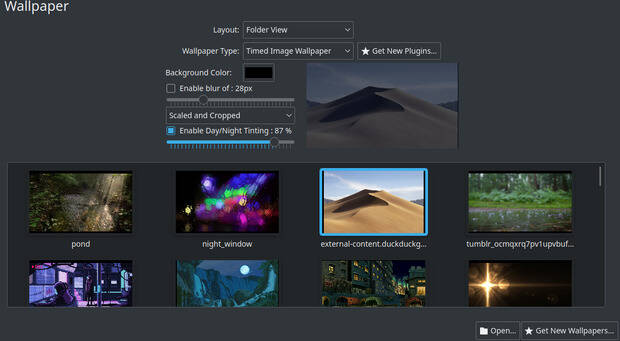
Que el escritorio Plasma de la Comunidad KDE es increiblemente configurable es un hecho incontestable. Y desde hace unas cuantas versiones de Plasma todavía más ya que es posible descargar nuevos tipos de fondos de pantalla en nuestro escritorio. De esta forma se puede ampliar las opciones básicas como el color plano, la imagen fija o el carrusel de imágenes. Hoy me congratula compartir con vosotros uno más, uno que Tinta tu fondo de pantalla según la hora del día y que se llama Day/night Tinted Wallpaper, una opción más de la Comunidad KDE.
Tinta tu fondo de pantalla según la hora del día con Day/night Tinted Wallpaper, otro gestor de fondos para Plasma
Ya llevo presentados en el blog unos cuantos plugins que sirven para personalizar de forma extrema nuestro fondo de pantalla del escritorio Plasma de la Comunidad KDE. A modo de resumen he presentado:
- Video Wallpaper, un plugin con el que podíamos poder un vídeo como fondo de pantalla en Plasma. Un tiempoEra una opción muy interesante y, que según el vídeo a reproducir, consumía pocos recursos.
- Animated Image Wallpaper otro plugin de fondo de pantalla creado por Dark-Eye con el que podemos poner imágenes animadas como fondo de pantalla y que soporta los formatos animado GIF, MNG y WEBP.
- Flip Clock, un wallpaper animado para nuestro entorno de trabajo y que queda de fábula. No tiene ninguna opción y se instala directamente desde la configuración del fondo de pantalla.
- Game of Life un fondo de pantalla animado para nuestro escritorio que simula el clásico juego de cero jugadores, lo que quiere decir que su evolución está determinada por el estado inicial y no necesita ninguna entrada de datos posterior. (Vía: Wikipedia).
- Reddit Wallpaper, un plugin que selecciona una imagen de reddit, concretamente del subreddits que elijas, los cuales son muchos y variados.
- Shader Wallpaper, una creación de y4my4my4m que nos proporciona un número desmesurado de fondos animados con los que decorar nuestro escritorio.
- Wallpaper Engine Kde Plugin, un gestor de fondos para Plasma que nos viene de la mano catsout y que nos permite controlar de forma muy precisa tanto imágenes o vídeos.
En esta ocasión os presento Day/night Tinted Wallpaper, otro gestor de fondos creado por dark-eye que nos permite hacer dos cosas interesantes: la primera es tintar de forma gradual nuestro fondo de pantalla según la hora del día de modo que por la noche sea más oscuro. La cantidad de tinte puede ser seleccionada a nuestro gusto, y nada mejor para verlo que el vídeo inferior:
La segunda es poder difuminar nuestro fondo a nuestro gusto, con lo que no debemos tocar nada del fondo original para adaptarlo a nuestro estilo.
Y como siempre digo, si os gusta este plugin para el fondo de pantalla podéis “pagarlo” de muchas formas en la página de KDE Store, que estoy seguro que el desarrollador lo agradecerá: puntúale positivamente, hazle un comentario en la página o realiza una donación. Ayudar al desarrollo del Software Libre también se hace simplemente dando las gracias, ayuda mucho más de lo que os podéis imaginar, recordad la campaña I love Free Software Day 2017 de la Free Software Foundation donde se nos recordaba esta forma tan sencilla de colaborar con el gran proyecto del Software Libre y que en el blog dedicamos un artículo.
Más información: KDE Store
La entrada Tinta tu fondo de pantalla según la hora del día con Day/night Tinted Wallpaper, otro gestor de fondos para Plasma se publicó primero en KDE Blog.
