
 Member
 Victorhck
#openSUSE Tumbleweed revisión de la semana 47 de 2022
Tumbleweed es una distribución de GNU/Linux «Rolling Release» o de actualización contínua. Aquí puedes estar al tanto de las últimas novedades.

openSUSE Tumbleweed es la versión «rolling release» o de actualización continua de la distribución de GNU/Linux openSUSE.
Hagamos un repaso a las novedades que han llegado hasta los repositorios esta semana.
El anuncio original lo puedes leer en el blog de Dominique Leuenberger, publicado bajo licencia CC-by-sa, en este este enlace:
Esta semana se han publicado 7 snapshots (1118…1124).
Los cambios más relevantes que han traido son:
- libinput 1.22.0
- Mesa 22.2.4
- bind 9.18.9
- Virtualbox 7.0.4
- MariaDB 10.10.2
- llvm 15.0.5
- Nodejs 19.1.0
- pipewire 0.3.60
- Samba 4.17.3
- Poppler 22.11.0
- Memcached
- Apparmor 3.1.2
- Meson 0.64.0
Y para próximas snapshots podremos encontrar:
- VLC 3.0.18
- Meson 0.64.1
- Icewm 3.2.2
- SQLite 3.40.0
- Python setuptools 65.6.3
- Libgcrypt 1.10.1
- gawk 5.2.1
- rubygem-rspec 3.12.0
- Cambios de ffmpeg4 a ffmpeg5
- Cambio a openSSL 3
Si quieres estar a la última con software actualizado y probado utiliza openSUSE Tumbleweed la opción rolling release de la distribución de GNU/Linux openSUSE.
Mantente actualizado y ya sabes: Have a lot of fun!!
Enlaces de interés
- ¿Por qué deberías utilizar openSUSE Tumbleweed?
- zypper dup en Tumbleweed hace todo el trabajo al actualizar
- ¿Cual es el mejor comando para actualizar Tumbleweed?
- ¿Qué es el test openQA?
- http://download.opensuse.org/tumbleweed/iso/
- https://es.opensuse.org/Portal:Tumbleweed

——————————–
openSUSE Tumbleweed – Review of the week 2022/47
Dear Tumbleweed users and hackers,
Apologies for sending out the review a day late, somehow I was drowning myself in build fixes yesterday, lost track of time, and suddenly it was too late. But of course, you are all curious to hear what happened during this week and, most likely even more interested in what the future holds for us. We again published a full 7 snapshots (1118…1124), of which 1124 did not have a Changes file generated, and thus no announcement mail was sent out (which will need to be investigated).
The most relevant changes in those snapshots were:
- libinput 1.22.0: A new flat acceleration profile for trackpoints, making them more usable in some cases
- ibus: switch to systemd service to start ibus daemon (boo#1201421)
- Mesa 22.2.4
- bind 9.18.9
- Virtualbox 7.0.4
- MariaDB 10.10.2
- llvm 15.0.5
- Nodejs 19.1.0
- pipewire 0.3.60
- Samba 4.17.3
- Poppler 22.11.0
- Memcached: binary was moved to /usr/bin to be aligned with RHEL and Debian (some of our build scripts explicitly expect it in /usr/sbin, those need to be adjusted)
- Apparmor 3.1.2
- Meson 0.64.0
Things that are currently in stagings or already passed and will be part of the next few snapshots:
- VLC 3.0.18
- Meson 0.64.1
- Icewm 3.2.2
- SQLite 3.40.0
- Python setuptools 65.6.3
- Libgcrypt 1.10.1
- gawk 5.2.1
- rubygem-rspec 3.12.0: YaST is in the progress of catching up with the needed changes
- Switch default from ffmpeg4 to ffmpeg5 (opencv3 is the last package missing)
- Switch to openSSL 3 (Status can be tracked in Staging:N)
Tips & Trik Ayam KUB : Pemindahan Ayam KUB Remaja ke Kandang Umbaran
Ayam KUB (Kampung Unggul Balitbangtan) adalah ayam kampung galur baru hasil seleksi secara genetik oleh team peneliti Balai Penelitian Dan Pengembangan Pertanian (Balitbangtan). Zeze Zahra memelihara ayam KUB di pekarangan toko pertanian Zeze Zahra sebagai simulasi ternak mulai dari awal anakan ayam DOC (Day Old Chicken).
Saat ini anakan ayam sudah berusia 1 bulan. Kandang yang awalnya longgar kini jadi sempit. Anak ayam jadi kerap berbenturan dengan kawannya. Jika dibiarkan nanti anakan ayam terganggu pertumbuhannya.
Untuk keperluan itu, Zeze Zahra membuat kandang umbaran untuk anakan ayam remaja (usia 1 bulan) hingga nantinya berusia dewasa. Bagaimana proses dan seluk beluk pemindahannya, yuk simak pada video ini.
El Black Friday es Blue Friday para KDE
Por fin llegó el día más pesado del año. Un día que deseo que llegue pronto y para que pase. Y es que es la oda al consumismo, el reclamo al gasto sin buscar ninguna excusa, nos inunda a lo largo de todo el mes de noviembre (o antes) desde hace unos años. Pues bien, la Comundidad KDE ha elegido esta mal que nos acecha para hacerse su propia promooción. Y es que el Black Friday es Blue Friday para KDE, con descuentos nunca vistos que hacen que no puedas dejar la oportunidad de hacerte con todo el Software KDE a un precio ridículo.
El Black Friday es Blue Friday para KDE

Es una broma. Todas las cosas de KDE serán siempre gratuitas.
En lugar de gastar todo el dinero que te ha costado ganar en las dudosas ofertas del Black Friday, ¿por qué no donar a KDE? ¡Te traemos lo mejor cada día del año!
Con tu ayuda, podremos seguir ofreciéndote (y al mundo) las mejores aplicaciones libres y de código abierto; entornos para tu escritorio, teléfono móvil y televisión inteligente; frameworks; y todo lo demás.
En consecuencia, esto ha dado pie a una nueva campaña de recaudación de fondos para que la Comunidad KDE siga creciendo y ofreciendo más y más software de calidad de form gratuita, tanto de forma monetaria como en forma de datos personales.
Yo ya he donado, como suelo donar a otros proyectos como Wikipedia, OpenClipart, Gimp o Inkscape… y creo que esto debería hacerse público para ir mentalizando al resto de usuarios que una cosa es que sea gratis y otra es que no colabores en nada en su desarrollo. Creo que es un buen momento para invitaros a leer este artículo ya algo viejo que publiqué en su día en este humilde blog.
La entrada El Black Friday es Blue Friday para KDE se publicó primero en KDE Blog.
Anggur Pepaya Jambu di Toko Pertanian Zeze Zahra
Sebagai bahan promosi sekaligus menyemarakkan tampilan, Zeze Zahra menanam Anggur, Pepaya dan Jambu Air di halaman dan pekarangan belakang toko. Tujuannya agar lebih sejuk dipandang sekaligus sebagai contoh kualitas bibit yang disediakan.
Jambu didalam pot sudah berbunga. Pepaya sudah mulai tumbuh besar. Demikian juga dengan anggur. Malah ada salah satu tanaman anggur yang dipindah dari atap rumah dan ditanam di tanah langsung, begitu muncul tunas baru langsung membawa bunga.
Seperti apa suasana dan penampilannya, yuk simak pada video ini :
Cómo crear tus pinceles para Krita, vídeo de Ramón Miranda
Hoy os traigo una nueva obra de Ramón Miranda en que nos explicaCómo crear tus pinceles para Krita, vídeo de Ramón Miranda. Y para hacerlo nada mejor que hacerlo mediante un vídeo donde nos explica todas las opciones.
Cómo crear tus pinceles para Krita, vídeo de Ramón Miranda

Estas entradas ya son un clásico del blog los vídeos de Ramón Miranda y el fabuloso Krita. Ya han aparecido en esta bitácora 10 trucos para Krita, pintando con Krita el «Tajo de Ronda», perspectiva con Krita y cómo grabar con Krita así que no es de extrañar que esta serie siga creciendo, como es el caso de hoy en el que os presento hoy.
En sus propias palabras:
Vídeo largo, pero si te fías de mí  , míralo entero. Está lleno de trucos, cosas nunca explicadas y buenas ideas sobre cómo hacer pinceles. Disfrútalo!.. y por favor apoya a Krita
El vídeo tiene subtítulos en inglés para la gente con discapacidad auditiva y está separado en partes ya que los tiempos están en la descripción de Youtube. No obstante, para el que solo quiera ver el vídeo lo pongo abajo
Recuerdo bien a Ramón Miranda, al cual tuve el gusto de conocer en la Akademy y Akademy-es de 2013 de Bilbao, y que sigue promocionando Krita con su maravilloso trabajo.
¿Qué es Krita?
Para los que no lo sepan, Krita es el software de pintura digital e ilustración basado en las librerías de la plataforma KDE que antes estaba incluido en Calligra Suite.
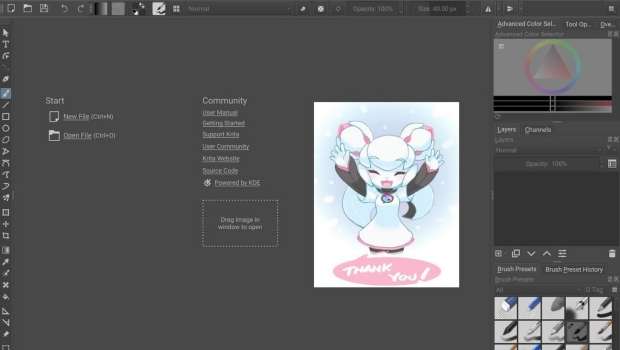
A diferencia de otras aplicaciones gráficas, se diseño hace énfasis en la creación de imágenes desde cero, es decir, está especialmente orientado para los artistas gráficos como ilustradores, dibujantes de cómics, etc.
Krita es software libre distribuido bajo la licencia GNU GPL y fue lanzado por primera vez como parte de la versión 1.4.0 de KOffice, el 21 de junio de 2005. (Vía: Wikipedia)
Para ver el funcionamiento de esta aplicación nada mejor que ver un vídeo de Odysseas Stamoglou en la que nos muestra como dibujar una chica futurística con Krita.
La entrada Cómo crear tus pinceles para Krita, vídeo de Ramón Miranda se publicó primero en KDE Blog.
Visiting the German Climate Computing Centre (DKRZ) in Hamburg
Yesterday, I had an opportunity to visit the German Climate Computing Centre (Deutsches Klimarechenzentrum – DKRZ) here in Hamburg to learn more about their research and tour their data center.

They recently installed a new supercomputer named HLRE-4 Levante, and it was very impressive. What surprised me most was how quiet a data center can be inside when it’s water-cooled.
Some specs of this system include:
- 2,832 compute nodes
- Peak performance: 14 PetaFLOPS
- Main memory (total): 815 Terabyte
- 60 GPU nodes each equipped with 2 AMD 7713 CPUs (main memory 512 Gigabyte) and 4 Nvidia A100 GPUs
- Peak performance: : 2.8 PetaFLOPS
- Main memory: approx. 30 Terabyte
- Graphics memory: approx. 5 Terabyte
- Networking: NVIDIA Mellanox InfiniBand HDR 100G/200G
- Disk storage: 130 Petabyte (Lustre) by DDN
- Long-term storage is performed via an array of 8 Oracle/StorageTek SL8500 tape libraries (over 300 Petabytes total capacity)
I took some pictures that you can find here – enjoy!

PipeWire, Flatpak, YaST packages update in Tumbleweed
This week saw the continuous release of openSUSE Tumbleweed snapshots reach 42.
Packages to arrive this week include Mesa, bind, Flatpak and more.
These three above packages arrived in snapshot 20221122. Mesa 22.2.4 fixed some flickering issues in Spider-Man Remastered related to RADV for AMD, and it fixed some other flaws affecting gaming. An update of bind 9.18.9 fixed a recovery related to connectivity issues during startup, and it fixed an overflow in certain resolution scenarios. Flatpak 1.14.1 added new features like a httpbackend variable that allows dependent projects like GNOME Software to detect whether they are compatible with libflatpak. The cross-distro package also fixed an issue so that applications do not inherit outdated Wayland and X11 socket addresses. After a year, hxtools moved from version 20211204 to 20221119; the collection of tools and scripts added a new utility and implemented an aspect ratio correction for selective file-dump outputs. There were a few yast2 package updates like yast2-storage-ng 4.5.14, which proposes support for LUKS2 encryption with a configurable PBKDF to be used by the D-Installer. Several other packages were updated as well.
The 20221121 snapshot updated just two packages. The GStreamer plugins written in Rust, gstreamer-plugins-rs, provided a recent November git 0.9+ update. The package added support for the muxing video VP9 codec stream and added a new mux subdirectory for container formats. Xfce’s configuration system was updated with the xfce4-settings 4.16.5 package. The minor update fixed a regression introduced in version 4.16.4 that caused exo-open not to work with the path spaces inside.
A handful of packages were updated in snapshot 20221120. Among those was an update of terminal emulator xterm 376; this update modified a configuration script to always check for GNU Compiler Collection attributes and it fixed a copy/paste error. An update of multiple-precision floating-point library was updated. The mpfr 4.1.1 version improved manual formatting, updated the keyring and fixed multiple bugs, which included one in particular for macros implemention function. The library and command line tool for compressed files, xz 5.2.8, had a change that matches GNU gzip and it is now a more logical treatment of the output file, which successfully closes when xz cannot remove an input file. The package also fixed displaying the file sizes in the progress indicator. Input device management and event handling library libinput 1.22.0 includes quirks for laptops from Lenovo, Acer as well as for arm-based Chromebooks. The package has a new flat acceleration profile for trackpoints that make them more usable in some cases. The last package to update in the snapshot was the Portable Open Source UPnP Development Kit libupnp 1.14.15, which made a fix for some CMake missing files in the autotools distro.
PDF renderer poppler updated to version 22.11.0 in snapshot 20221119. The update had some small code refactoring and protects against file breakage. A 1.0.2+git20 update of kdump disabled a build on arm 32bit. An update of NetworkManager-openvpn 1.10.2 updated translations, fixed secret flags initialization and added support for the DOMAIN-SEARCH option. Other packages updated in the snapshot including quota 4.09, libpipeline 1.5.7, taglib 1.13 and more.
The 20221118 snapshot had several YaST packages updated. An update of yast2-installation 4.5.9 wrote a configuration script to enable a security policy, and the package fixed with help in the installation summary to include text from corresponding proposals. An update of yast2-security 4.5.3 fixed hash vs keyword argumentations in the testing tool RSpec, which was also reflected in the yast2 4.5.19 update. An update of autoyast2 4.5.9 added the necessary packages for kdump even when a kdump section is not defined if the product enabled kdump by default. A couple patches were removed from llvm15 15.0.5 and a support function mocking on Node.js test runner was made with the nodejs19 19.1.0 update. The audio package update of pipewire 0.3.60 added a patch from upstream that fixes some devices that don’t seem to work in 48,000Hz, and a new Real-time Transport Protocol module was added with a sender and receiver that is compatible with the PulseAudio RTP modules. A 4.17.3+git update of samba fixed a Common Vulnerability and Exposure that had a buffer overflow on 32-bit systems.
To end the week, a discussion has been started on the openSUSE fatory mailing list about coming changes to the distro’s microarchitecture level specific to x86-64. News about this discussion and a path forward will be published next week.
Paco Estrada en Salmorejo Geek
Hoy voy a hacer un poco de promoción del gran podcaster sobre tecnología que es Yoyo Fernández. Y es que cuando se unen dos monstruos como Yoyo y Paco no es de recibo no dedicarle una entrada. Por tanto, únete a Paco Estrada en Salmorejo Geek en una de esas charlas distendidas sobre el mundo del Software Libre
Paco Estrada en Salmorejo Geek
Debo que reconocer que Salmorejo Geek es un podcast que sigo, aunque no escucho toda su producción ya que me abruma pero debo reconocer que cada vez un poco menos y poco a poco me pongo al día (que cada vez esté más cerca de la Comunidad KDE ayuda).
Y también debo reconocer que su creador Yoyo Fernández me encanta ya que toca todos los palos tecnológicos sin casarse con ninguno, lo cual significa que si habla de GNU/Linux es porque es rival de los privativos.
En el blog ha aparecido pocas veces como protagonista, pero muchas veces ha sido nombrado, ya que por norma general sus temas son muy abiertos y ha tocado pocas veces la Comunidad KDE, algo que está cambiando ya que parece ser que Yoyo le acaba de dar otra oportunidad a Plasma, el escritorio de la Comunidad KDE.

En palabras de Yoyo:
Paco Estrada es una de las grandes voces del software libre y open source, voz portentosa y un saber moverse por el mundo del audio digno de un profesional de la radio como es él con una larga trayectoria en el medio.
Amante de GNU/Linux y el software libre, además de otras muchas cosas, ha dirigido podcast como Compilando Podcast, Más allá de la innovación y algunos más.
Podéis encontrarlo por aquí: Twitter Personal, Twitter Compilando Podcast, Página Web Compilando.
.
Como es habitual en este tipo de charlas, os dejo el vídeo y os invito a seguir a Yoyo:
Además del vídeo, el gran Yoyo nos deja disponible la charla en formato audio en el podcast de Salmorejo Geek que está listo para se escuchado en las principales plataformas de podcasting.
- Escucha o descarga el episodio en spreaker.
- Escucha o descarga el episodio en ivoox.
- Escucha o descarga el episodio en Apple Podcasts.
- Escucha o descarga el episodio en Google Podcasts
- Escucha o descarga el episodio en Spotify.
La entrada Paco Estrada en Salmorejo Geek se publicó primero en KDE Blog.
Paco Estrada en Salmorejo Geek #20
Hoy voy a hacer un poco de promoción del gran podcaster sobre tecnología que es Yoyo Fernández. Y es que cuando se unen dos monstruos como Yoyo y Paco no es de recibo no dedicarle una entrada. Por tanto, únete a Paco Estrada en Salmorejo Geek en una de esas charlas distendidas sobre el mundo del Software Libre
Paco Estrada en Salmorejo Geek
Debo que reconocer que Salmorejo Geek es un podcast que sigo, aunque no escucho toda su producción ya que me abruma pero debo reconocer que cada vez un poco menos y poco a poco me pongo al día (que cada vez esté más cerca de la Comunidad KDE ayuda).
Y también debo reconocer que su creador Yoyo Fernández me encanta ya que toca todos los palos tecnológicos sin casarse con ninguno, lo cual significa que si habla de GNU/Linux es porque es rival de los privativos.
En el blog ha aparecido pocas veces como protagonista, pero muchas veces ha sido nombrado, ya que por norma general sus temas son muy abiertos y ha tocado pocas veces la Comunidad KDE, algo que está cambiando ya que parece ser que Yoyo le acaba de dar otra oportunidad a Plasma, el escritorio de la Comunidad KDE.
En palabras de Yoyo:
Paco Estrada es una de las grandes voces del software libre y open source, voz portentosa y un saber moverse por el mundo del audio digno de un profesional de la radio como es él con una larga trayectoria en el medio.
Amante de GNU/Linux y el software libre, además de otras muchas cosas, ha dirigido podcast como Compilando Podcast, Más allá de la innovación y algunos más.
Podéis encontrarlo por aquí: Twitter Personal, Twitter Compilando Podcast, Página Web Compilando.
.
Como es habitual en este tipo de charlas, os dejo el vídeo y os invito a seguir a Yoyo:
Además del vídeo, el gran Yoyo nos deja disponible la charla en formato audio en el podcast de Salmorejo Geek que está listo para se escuchado en las principales plataformas de podcasting.
- Escucha o descarga el episodio en spreaker.
- Escucha o descarga el episodio en ivoox.
- Escucha o descarga el episodio en Apple Podcasts.
- Escucha o descarga el episodio en Google Podcasts
- Escucha o descarga el episodio en Spotify.
La entrada Paco Estrada en Salmorejo Geek #20 se publicó primero en KDE Blog.