
packagesの説明文書を訳しつつ、使えるものを探してみました(p編その1)
今回は rainbow を紹介します。
rainbow は コマンドの出力に色を付け、見やすくするツールです。たとえば、ping の結果に対して、IP アドレス部分に色を付けることができます。
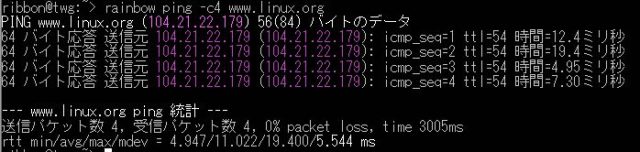
いくつかのプログラムについては、あらかじめ色を付けるパターンが用意されています。上記の例では、 ping の場合には、IPv4 アドレスに対してマゼンタで着色するように定義ファイルが用意されています。あらかじめ用意されているパターンについては rainbow の引数としてコマンドを指定できます。
そのほかに、個別のパターンを指定して色を付けることもできます。たとえば、IP アドレスに対して黄色を着色したい場合は、下記のようにします。
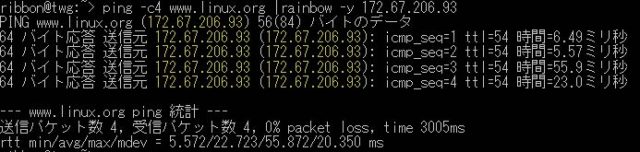
あらかじめ用意されているパターンは、df、env、ifconfig、jboss、mvn、tomcat、diff、host、java-stack-trace、md5sum、ping、traceroute があります。そのほかに、太字(bold)、網掛け(faint)、イタリック(italic)なども指定できます。
 Member
 benJIman
Supporting Sustainability
Many software teams struggle with ever growing cost of change, and technical debt that risks overwhelming them.
It’s always interesting to talk with folks and understand, how the system and incentives created this state.
Often I hear from software engineers that management doesn’t give them permission for (or doesn’t prioritise) work such as tidying, refactoring, testing, observability.
Blaming management in this way may be accurate in many situations (they are indeed probably accountable for the system that created this outcome). However, the problem with blame is that it tends to short-circuit further thinking. How could the system be improved with the influence and control you do have, perhaps with minimal authority.
But what about from the management side? I often hear from engineering and product managers that they’re unaware, or learn too late, that folks were accumulating debt. It becomes visible when teams are no longer able to achieve goals.
Management has a bad reputation in the tech community. I’ve been very fortunate to work almost exclusively with managers who genuinely care deeply about the people and teams they support; who want what’s best for them in the long term.
And yet, it’s still common, with the best of intentions, to create systems that result in unsustainable software development, and lots of technical debt.
How does this happen?
The risks are not very visible. If managers were given the option of twice as much this month, in exchange for nothing for the next 6 months, they probably wouldn’t take it (perverse incentives like annual bonuses notwithstanding). Would that it were so simple.
The decks are stacked against sustainability. It requires active effort from managers to combat the natural incentives.
Here’s three practical ways you can help as a manager.
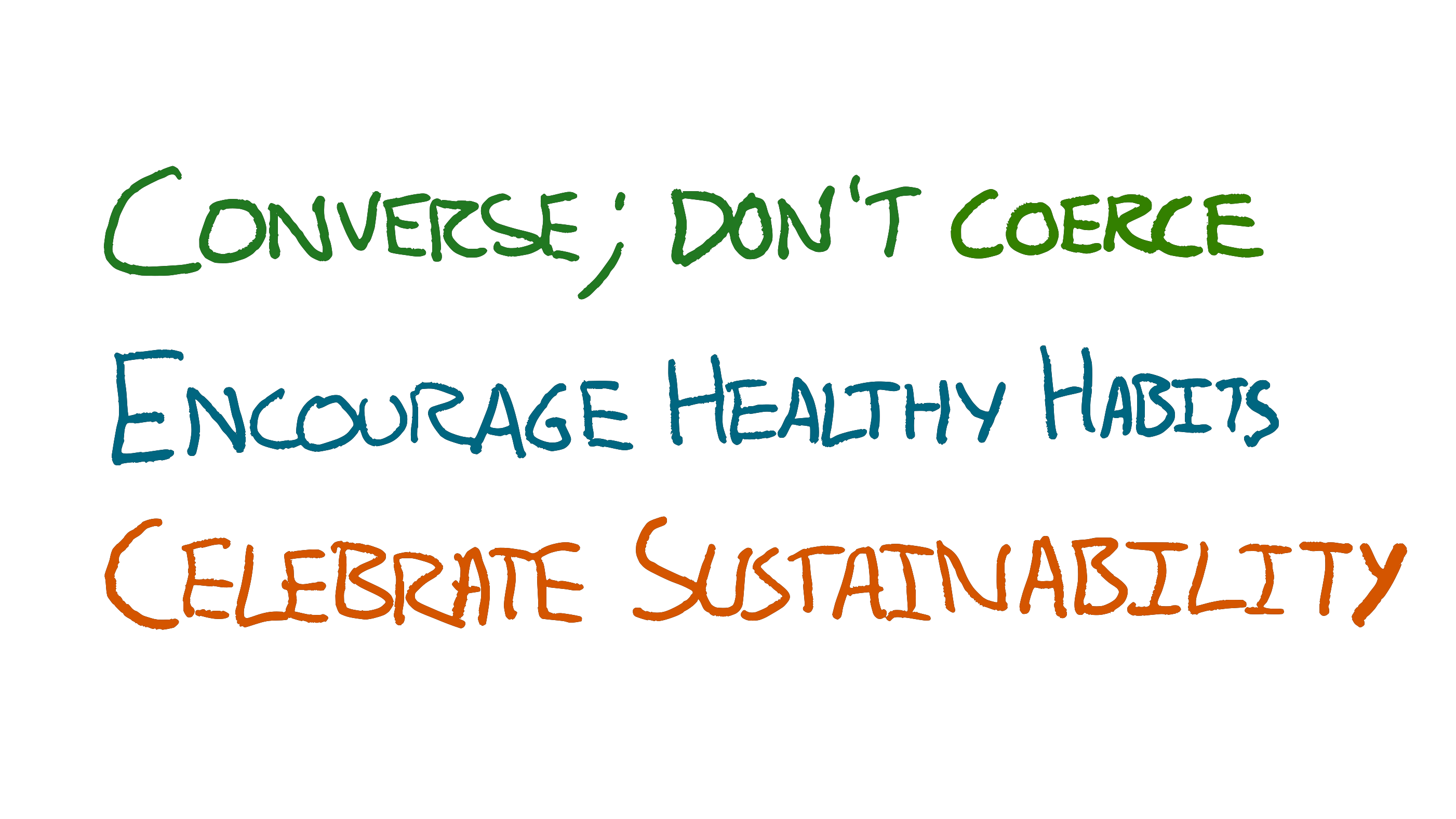
Converse; don’t Coerce
Get Curious
People will always want more than you’re able to achieve. Meaning we’re often starting from a position of saying no to lots of things that are very valuable; it’s faster to identify opportunities than it is to win them.
Most people don’t want to give bad news. Most people don’t want to hear bad news.
This sets us up for miscommunication.
<Manager> we need to do X this week
<Maker> Ok [unsaid: I’m going to risk a production outage by skipping testing]
If sufficient trust exists then it’s possible the risk will be vocalised, but the manager has not invited this feedback. Nor have they provided enough information for the maker to form their own opinion on the merits of the risk.
It’s an instruction. There’s no curiosity as to what the impact or tradeoffs are, which shuts off thinking.
It encourages risks. Some might infer an unsaid “…whatever it takes”. This could lead to taking risks such as skipping normal safety, or working long hours
It’s informationless. It’s a blanket “we need”. It doesn’t say what the value or tolerable costs are. The recipient has no information to make good judgements themselves with.
Things get a little better with even the slightest bit of curiosity.
<Manager> can we do X this week?
<Maker> I think so [unsaid: cutting corners]
* next week *
<Manager> can we do Y this week?
<Maker> I think so [unsaid: that means they’ve decided not to clean up the debt from X]
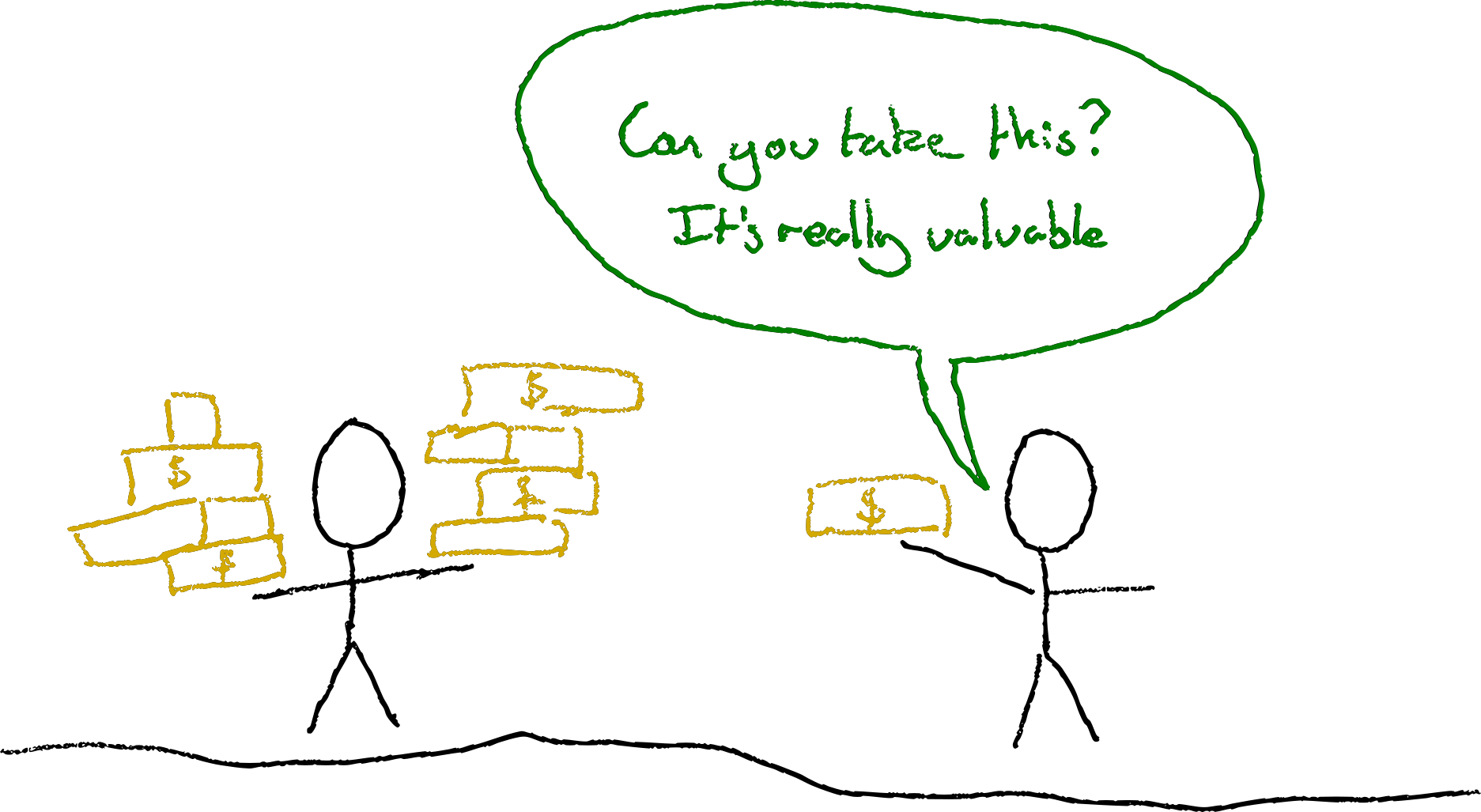
At least the manager is now making it clear that there’s some degree of choice, although the power dynamic might make the choice seem illusionary.
It’s a closed question. The manager’s likely to get yes or no answers. They’re not showing curiosity about the consequences of the team making X or Y happen.
The manager is still asking the team to do things. Having to ask a team to do something is often a sign of a bug in the organisation. An organisational smell.
What’s stopping the team self-organising to the most important work? What information were the team missing to help them spot that X&Y were more important? What skills or perspectives are they missing to be able to make the best choices?
Use Open Questions
Things improve further if we ask open questions:
<Manager> what would we drop if we tried to do X this week?
<Maker> well we were planning on implementing the actions from last week’s post mortem, if we postponed those we might be able to do X.
or
<Manager> on a scale of 1-5, how risky would it be to release X this week?
<Maker> Hmm, probably a 4, we’d not have any time to test or do a canary deployment so we’d lose our usual safety nets
Here the manager has asked open questions, and solicited information that might help make better decisions. Even if the manager then asks the maker to do the same thing, the risks have at least been taken more intentionally.
Prefer information over instructions
What if we didn’t ask the team to do X at all?
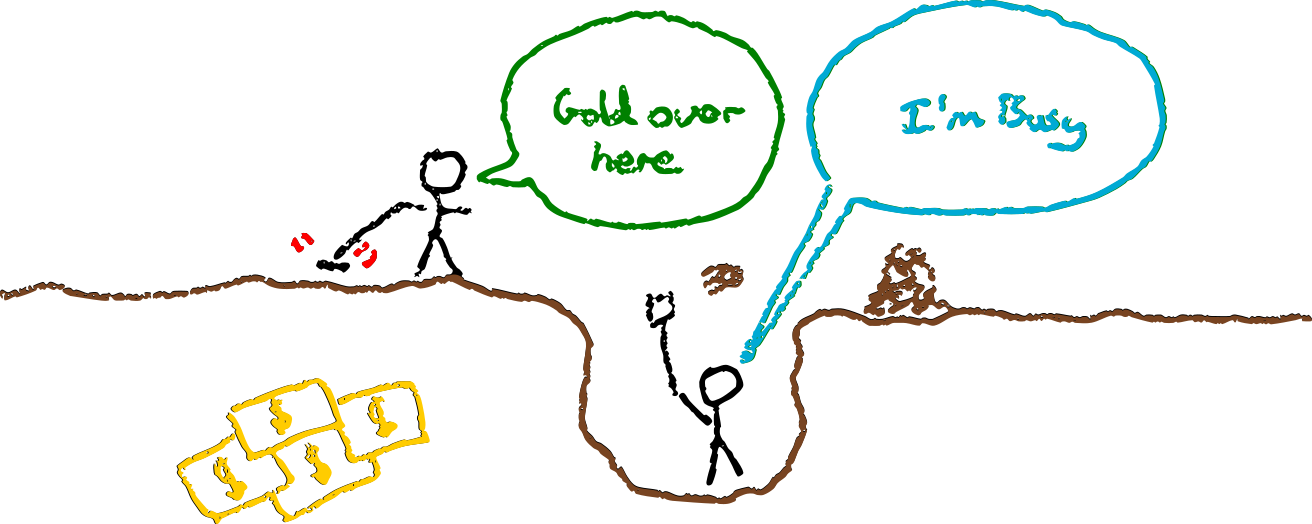
<Manager> I’ve learned that we could close a $n deal if we can ship X this week.
<Maker> Hey that’s more than the total cost savings from what we were working on, let’s do X instead.
or
<Manager> I’ve learned that we could close a $n deal if we can ship X this week.
<Maker> Hmm, but if we rush we risk breaking the service. Last time this cost us $10*n
However, this is somewhat optimistic. Even with all the information, people often have recency bias and eagerness to please. The power dynamic between manager and maker often exacerbates this.
Incentives conspire to eliminate slack time that would be used to keep development sustainable.
Combining Curiosity and Information
<Manager> I’ve learned that we could close a $n deal if we can ship X this week.
<Maker> Hmm, that sounds like a lot, I can get it done
<Manager> How risky is it on a scale of 1-5?
<Maker> Probably a 1, we’ve still got time to test it carefully.
<Manager> What things are we dropping that we’d otherwise be doing?
<Maker> Oh we were going to refactor Y as changes in that area are slow
<Manager> Oh I thought Y was done months ago
<Maker> We shipped it months ago but have since noticed the design trips us up and we never have time to fix it with all these urgent opportunities.
<Manager> How much time has it cost us?
<Maker> More than it takes to ship X just this month
Here the manager and maker have built a much richer understanding of the situation and tradeoffs. They are much better placed to make a decision than if the maker had simply been asked to ship X.
Encourage Healthy Habits
Team habits can help people escape the trap of needing permission from unsupportive or oblivious management. You will probably be unsupportive or oblivious at some point. Unintentionally coercing people is so easy.
You can counter this by encouraging your team to adopt habits that will resist your efforts to coerce them into doing the wrong thing.
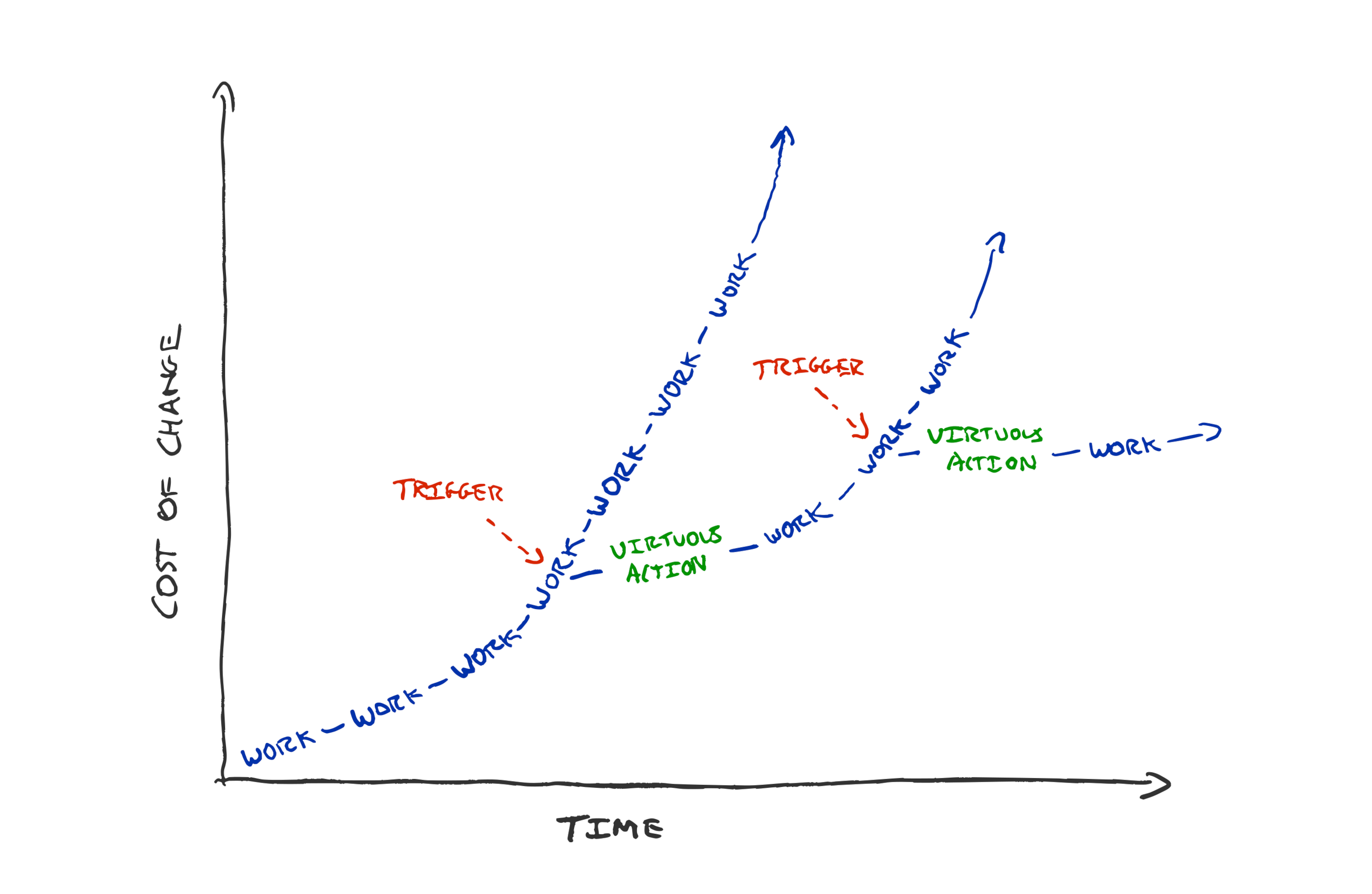
If your team practices TDD then you’d have to break a strong habit to encourage people to release a feature without tests.
If your team habitually drops everything to bring the build time down every time it creeps above 5 minutes, then they’re more likely to do the same even if you’ve asked them to deliver a feature.
If your team habitually prioritises work based on cost of delay, then they’ll likely ask you questions to find out the value before jumping on it. Even if you have omitted the information in your request.
Habits are hard to break. This can be a good thing. The right habits can add resistance to the forces that conspire to create creeping loss of sustainability.
Celebrate Sustainability
If you publicly appreciate internal improvements you will signal for more.
If your only questions about the work are inquiries about when it will be finished, you’ll incentivise unsustainable working.
If your promo process only recognises features and customer impact, you’ll discourage sustainability.
Do you celebrate with the team as much when they halve their deploy time, as when the ship that flagship feature?
Do you thank folks for taking extra days to refactor and clean up the code?
Do you ask “how much more could we simplify it?” or “when will we be done?”
Do you ask “what if tried doing less?” or “how can we do more?”
The post Supporting Sustainability appeared first on Benji's Blog.
Pondering Agile Principles
I’ve worked in and with teams who would identify as agile for many years. I’ve written about how I think the most interesting part of the agile manifesto is the “uncovering better ways” mindset.
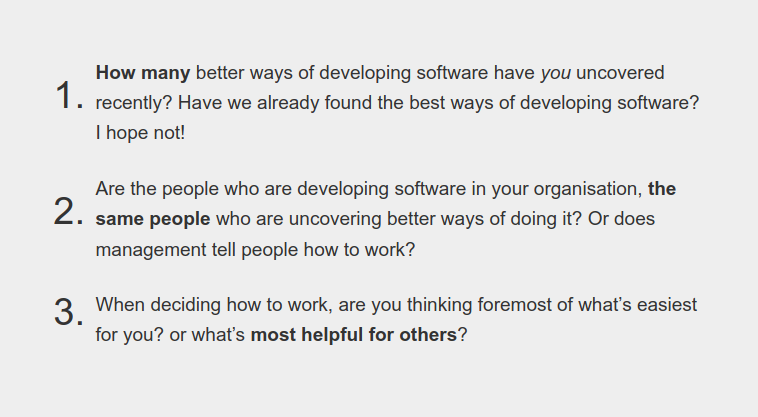
With this in mind, I’ve been pondering how the principles in the agile manifesto have aged. Where do (and don’t) I share the same principles.
Given the “better ways” of developing software we’ve uncovered, can we “turn up the dials” on the principles as well as the ways of working?
Principles tend to stand the test of time better than specifics. The agile manifesto still reads as an aspirational document today, but I think there’s room for improvement.
Here’s my take on things I’d tweak in each principle; hopefully staying true to the values.
Bettering Ourselves

Building working software is a powerful tool to achieve our ends. However, I wouldn’t consider it the highest priority of a team. If we can achieve our goals without software (which can be a liability) that’s even better.
Moreover, if the software we’re asked to build is harmful for humanity, or counter to our organisational/personal values; avoiding that comes before satisfying the customer. The negative impact software can have on society is increasingly evident as more of our society is controlled by software.
“Bettering ourselves” (optimise for learning) is at the heart of agile to me. To borrow from Captain Picard, I’d state our highest priority as:
Our highest priority is to better ourselves, our organisation, and the rest of humanity. Continuous delivery of software is our tool to achieve this.
Learning we’re Wrong

We’re not passively waiting for requirements. We can take more ownership over our goals and understand customer needs ourselves. We’ve shifted from requirements to forming our own hypotheses of what customers need.
It’s not that requirements change, it’s our understanding that improves. We learn how we were wrong and adapt our goals in response.
We don’t need to build for a customer-proxy (stakeholder who wants the software). We’re can build products for people; they are our customers. By meeting customer needs, we build a competitive advantage for ourselves.
We welcome learning that we’re wrong, even late in development. Changing our software in response to what we learn helps us meet customer needs and gives us a competitive advantage.
Continuous Delivery
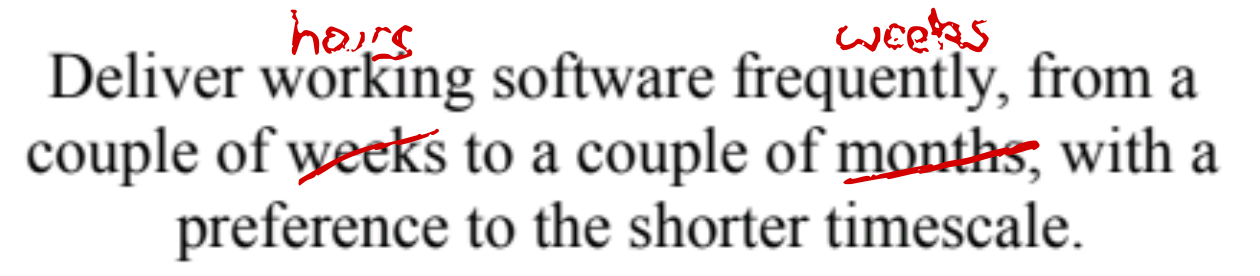
The only thing worth changing in the continuous delivery principle, is that our tooling and platforms are so much better now than 20 years ago. We can deliver considerably faster and smaller.
A team can feasibly ship multiple times a day—given a good continuous delivery pipeline, reliable & fast tests, production safety net from canary deploys, and production observability. We’re no longer having to burn CDs with software builds.
Deliver increments to working software frequently, from a couple of hours to a couple of weeks, with a preference to the shorter timescale.
All the Brilliant People
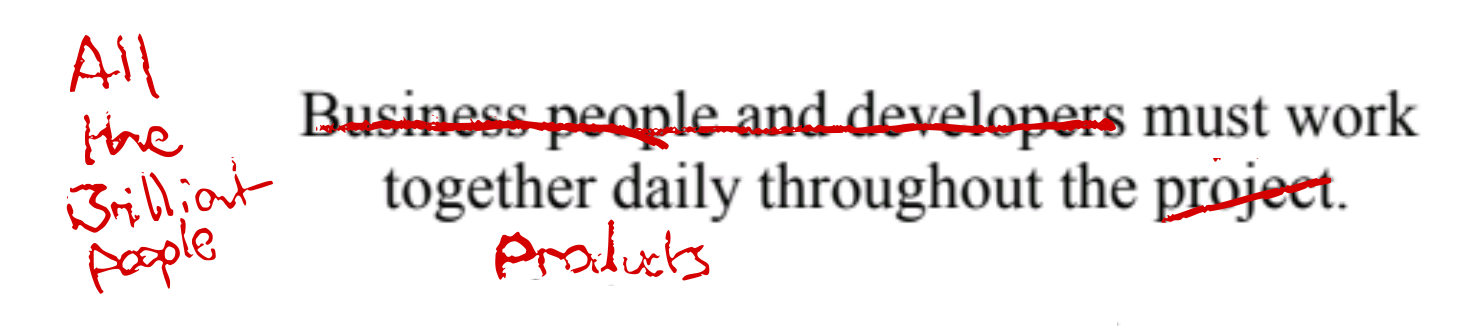
I’d replace project with product; due to the temporary-team fixed time/budget/requirements connotations of project.
I think longer lived product teams are more effective. I appreciate this won’t be for folks working in a project/consultancy context but I avoid those ;)
I’d also expand to “all the brilliant people” as per Woody Zuill’s description of mob programming. Get everyone needed to achieve the goals together into the team, collaborating together every day. Minimising dependencies and handoffs.
All the brilliant people work together daily on the product. Developers, businesspeople, customers, designers, testers, ux, data scientists …
Product Teams over Individuals on Projects
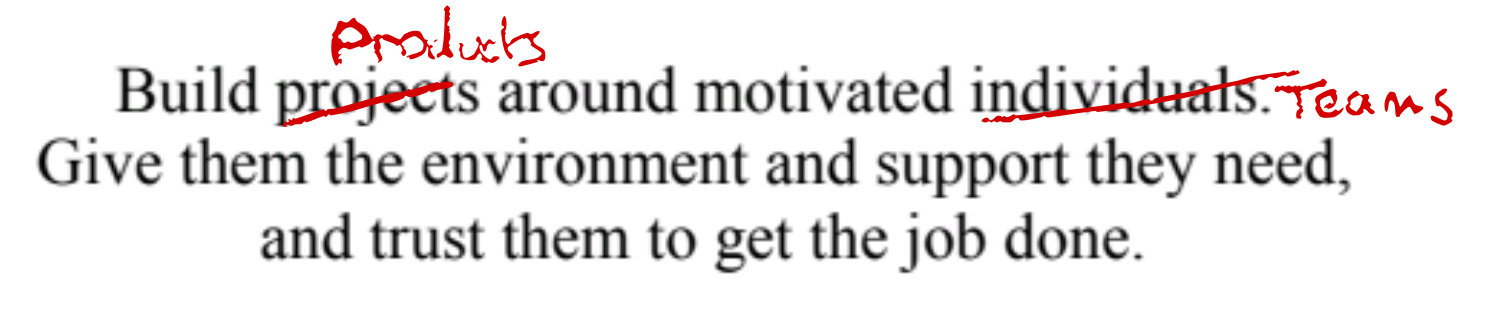
As per above, I prefer sustained investment in stable product teams over the project model.
Teams of motivated individuals build products. Give them the environment and support they need, and trust them to get the job done.
Communication Quality over Efficiency

This is the only principle I feel like I’m watering down rather than turning up.
I think face to face conversation is still the highest bandwidth communication method. However, face to face communication is not always feasible for practical & inclusion reasons. Reasons such as geographic location, neurodiversity, family commitments, carbon footprints, and global pandemics!
If face to face communication is infeasible then it’s not the most effective method of communication; even if it would be the highest bandwidth method.
I think the general principle is it’s better to trade off efficiency for quality of communication. Be willing to sacrifice time for better communication. You’ll save time in the long run. Prefer the highest bandwidth communication you can enable, even if it feels inefficient.
Prioritise communication quality over time efficiency. Learn the most effective method of conveying information to and within your team, for your context and each other’s individual needs.
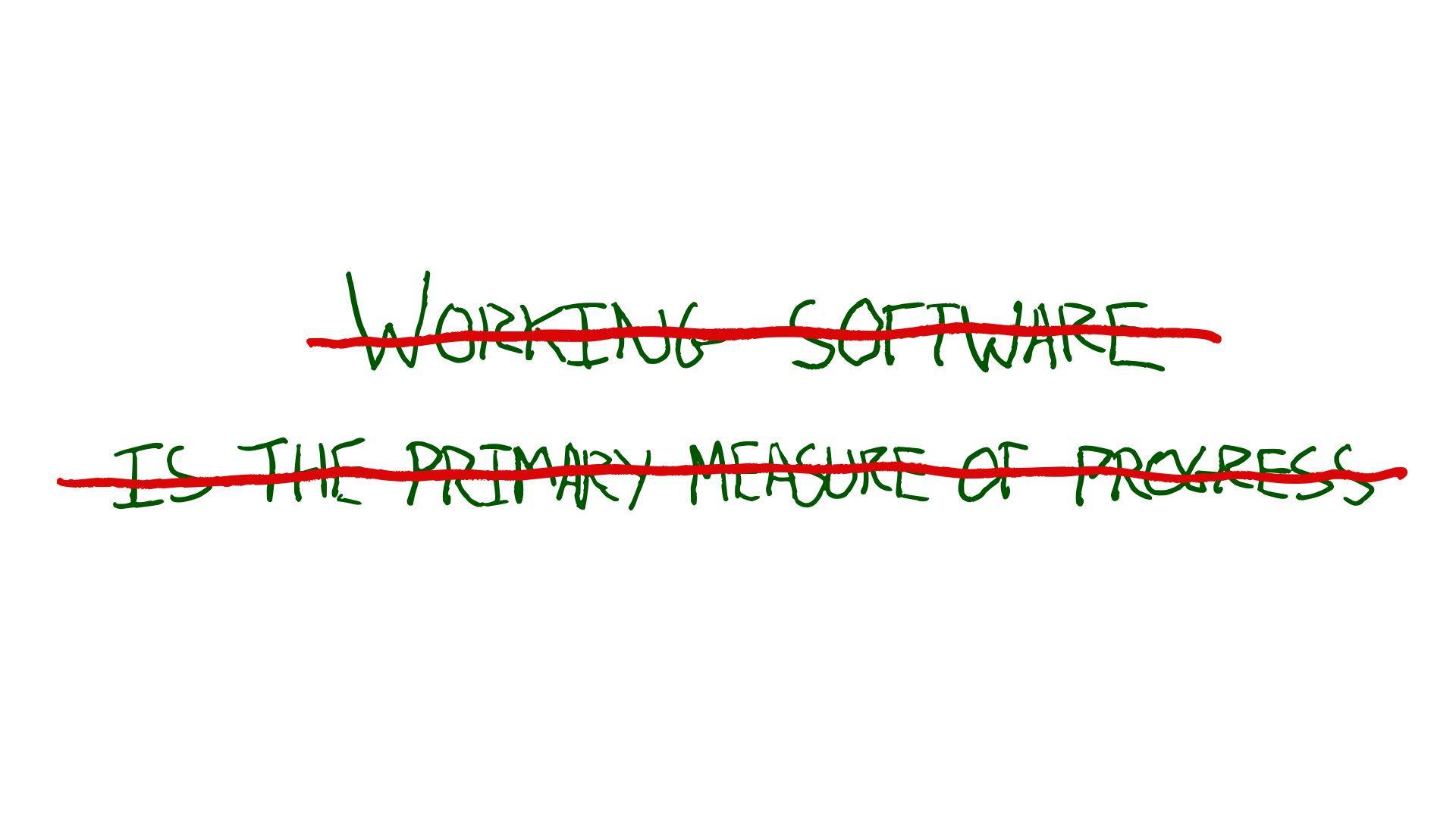
Results are the primary measure of progress

I don’t see working software as the primary measure of progress. We can ship oodles of working software every day and benefit nobody.
How are people’s lives enriched by our toil? How are our organisational goals furthered by our software? How is society better?
Have we achieved what we set out to? What have we learned from our experiments?
The less software needed the better!
The results of working software in production is the primary measure of progress. Get software into production early, starting with a walking skeleton.
Sustainability

I’d make the call for sustainbility more imperative. We don’t rely on static processes to keep development sustainable. It requires active effort and adaptation to combat the natural incentives in play.
We don’t go fast now at the expense of tomorrow. We strive to keep the cost of change curve low.

Prioritise sustainable development over speed. The sponsors, developers, and users should be able to maintain a constant pace indefinitely.
Technical Excellence

I find myself avoiding the words agile and agility since “agile” has become so semantically diffused it can create confusion.
Continuous attention to technical excellence and good design keeps cost of change low and lets us learn and adapt swiftly.
Simplicity

The principle of simplicity is timeless.
Diverse Teams

I’d add diversity to the description of teams that produce the best results. Self-organising teams with a monoculture are not going to produce the best ideas; there’ll be shared blind spots.
I think it can also be useful to expound on some of the things teams need to self-organise effectively.
The best architectures, requirements, and designs emerge from diverse teams that can self organise. Having the skills needed, clarity on their goals, with a high level of psychological safety.
Double-loop Learning

I’d just add adjusting goals, in addition to tuning team behaviours. The most effective teams benefit from double loop learning. Learning-through-doing that our goals are wrong, or our assumptions when choosing our goals were wrong.
At regular intervals, the team reflects on how to become more effective, then tunes and adjusts its behaviour accordingly, reviewing their goals based on what they have learned.
Your Team’s Principles
How do your principles differ? I’ve only thought about things I’d tweak from the manifesto principles above, not what I’d add. What would you add?
The post Pondering Agile Principles appeared first on Benji's Blog.

mdbook-pdf: A mdBook backend for generating PDF files


Introduction
mdBook allows you to create book from markdown files. It’s pretty much alike Gitbook but implemented in Rust. However, unlike Gitbook that supports using calibre for generating PDF, for a long time, mdBook doesn’t support generating PDF files natively, and supporting that is also not in their roadmap. Existing plugins (backends) such as mdbook-latex that utilize Tectonic as well as pandoc solutions will generate a PDF page that doesn’t unify with the existing mdBook generated HTML version. Considering these facts, I created a mdBook backend named mdbook-pdf for generating PDF based on headless chrome and Chrome DevTools Protocol Page.printToPDF.
mdbook-pdf depends on Google Chrome / Microsoft Edge / Chromium. The generated page are pretty much alike the one you manually print to PDF in your browser by opening print.html or executing google-chrome-stable --headless --print-to-pdf=output.pdf file:///path/to/print.html, but with customization of PDF paper orientation, scale of the webpage rendering, paper width and height, page margins, generated PDF page ranges, whether to display header and footer as well as customize their formats, and more, as well as automation. It supports all the platform where Google Chrome / Microsoft Edge / Chromium would work. You can check samples of the generated PDF files in the Artifacts here (The Rust book collections generated in x86_64 Windows, macOS as well as Linux).
Installation & Usage
Since it’s a plugin (backend) for mdBook, first of all you should ensure that mdbook is available.
If your machine’s architecture is x86_64, or you are using Linux for ARM64, check the successful build GitHub Actions workflows, click into the latest one, and then you can get a binary from the Artifacts (including Windows, Linux, macOS).
Otherwise, make sure the rust compiling environment is available, execute cargo install mdbook-pdf to compile and install.
If you want to compile the latest version, make sure the Rust build environment is available (cargo build). Then run git clone https://github.com/HollowMan6/mdbook-pdf.git, in the cloned folder, run cargo build --release , get the executable in target/release/, and put it in PATH.
For running, have Google Chrome / Chromium / Microsoft Edge available (installed at the default location, in PATH or binary location configured) as currently, automatically downloading Chromium binary isn’t available (will update once upstream fixes such support).
- On Windows 10 and above, the program can generate PDF normally without installing any additional software, because Microsoft Edge is the browser provided with Windows system. Of course, considering the support for the older versions of Windows without Edge, you can install Google Chrome on your computer.
- In MacOS, you need to install Google Chrome / Microsoft Edge or Chromium.
- In Linux, you can choose to install any of the Google Chrome / Chromium / Microsoft Edge browsers. It is recommended to install Chromium. The name of this software package in your Linux distribution is commonly
chromiumorchromium-browser(Note: for Ubuntu later than 18.04, you have to installchromium-browserthroughsnap).
Make sure the following exists in your book.toml:
[output.html]

[output.pdf]
And also [output.html.print] is not disabled (it should be enabled by default, so don’t worry if the following lines doesn’t occur in you book.toml).
[output.html.print]
enable = true
A simplest book.toml is as follows:
[book]
title = "An Example"

[output.html]

[output.pdf]
Finally you can build your book and get the PDF file with mdbook build command, your PDF file will be available at book/pdf/output.pdf.

Configuration
Check book.toml and comments for details for the available configurations of [output.pdf].
Credits
This project relies on headless_chrome. Because the new version has not been released, and the default timeout is not friendly to PDF generation, I use my Fork version to publish mdbook-pdf-headless_chrome for expanding the relevant timeout to 300 seconds as a submodule of this project, thus enabling the project to be published on Crates.io as well.
Some Notes and Thoughts
mdBook supports adding alternative backend. When the mdbook build command is invoked, if the book.toml in the book folder has an [output.pdf] item in addition to the default [output.html] for generating the html web page, mdbook-pdf will be called, and the relevant book information and parameter configuration in JSON are passed to the standard input of the program. Relevant mdBook documentation can be found here.

A headless browser means that all the operations will be in the background without a graphical interface.
Before decided to use Chrome DevTools Protocol Page.printToPDF, I also tried wkhtmltopdf which is based on QT4 Webkit. Hovewer, wkhtmltopdf doesn’t seem to support CSS Printing @media Rule, which will make some extra components visible and printed in the PDF.
I’ve also tried directly making HTTP calls to the WebDriver in python based on W3C WebDriver Protocol Print Page, as well as using selenium for calling Chrome DevTools Protocol Page.printToPDF in Python. All those methods are not robust for large pages with the errors as follows for just the same reason for the original upstream headless_chrome: the default timeout is 10 seconds, which is not friendly to large page PDF generation.
timeout: Timed out receiving message from renderer: 10.000
selenium.common.exceptions.WebDriverException: Message: unknown error: session deleted because of page crash
from unknown error: cannot determine loading status
from tab crashed
At present, I have tested that Firefox does not support using headless_chrome for PDF generation, and the Safari browser even does not support the W3C WebDriver Protocol Print Page, let alone Chrome DevTools Protocol.
I’ve noticed that for some book, by using this backend, when click on some links that link inside the book, a html page that points to the original generated HTML storing path of the book will be opened, just as the issue mentioned here. I guess for those “internal” links inside the book, work should be done in the mdbook side for print.html referring here so that all the links linked “internally” would jump inside the generated print.html, as all the contents should already be on the print.html, there shouldn’t be any hyperlinks that jump to other html files in the book. By resolving in this way, the generated PDF would also jump internally instead of opening a browser that won’t connect to anything. I have already created a PR for this, hope it will get merged soon.
In addition, as I found that special characters such as : are very likely to appear in the title of the book, which will cause the generation of the related PDF file to fail, so the file name does not use the form of <book name>.pdf but output.pdf
Hope you enjoy it.
Plasma 5.24 tendrá soporte extendido (LTS)
Me complace compartir con vosotros que la siguiente versión del entorno de trabajo de la Comunidad KDE, Plasma 5.24 tendrá soporte extendido, lo cual significa que durante año y medio recibirá correcciones para convertirla en un lanzamiento que destacará por su estabilidad.
Plasma 5.24 tendrá soporte extendido (LTS)
Las versiones del escritorio Plasma suelen tener una vida de unos cuatro meses, durante los cuales se realizan 5 actualizaciones corrigiendo los errores.
Con este sistema se consigue tener un entorno de trabajo puntero y con pocos errores ya que las actualizaciones siguen un intervalo de una serie de Fibonacci (en otra entrada las explico en profundidad) pero la idea es solucionar los errores mayores las primeras semanas desde su lanzamiento.

No obstante, existen usuarios que no pretenden tener lo más nuevo ya que prefieren (o necesitan) mucho más la estabilidad de su sistema por delante de nuevas funcionalidades. Para todos ellos se crean cada 18 meses las versiones Plasma LTS (acrónimo de Long Time Support,)
Pues bien, me complace anunciar que Plasma 5.24 tendrá soporte extendido, es decir, será LTS que es como se suelen denominar estar versiones, siguiendo la estela de Plasma 5.8, 5.12 o 5.18.
Muchas de las novedades de Plasma 5.24 se han ido desgranando en el blog de Nate Graham, e incluso ya ha sido presentado su nuevo fondo oficial, pero si queréis saber qué nos espera no dejéis de ver el anuncio oficial donde veréis el ingente número de novedades para Wayland, el lanzador de aplicaciones, Discover, Breeze, plasmoides, Krunner, etc.
Aprovecho para recordar que la versión final de Plasma 5.24 estará disponible para el público en general el 8 de febrero, que en la actualidad se encuentra en fase beta de corrección de errores, que si encuentras uno deberías reportarlo (como se explica en esta entrada del blog) y que ahora sabemos que se mantendrá sin importantes cambios hasta octubre de 2023.
Primeras contribuciones a Season of KDE 2022
Un año más se está celebrando una nueva edición de un programa cuyo objetivo es incorporar nuevos estudiantes al gran proyecto mundial que es KDE. En otras palabras, me complace presentar las primeras contribuciones a Season of KDE 2022, que a lo largo de su más de una década de existencia se ha consolidado como una alternativa bastante fiable a otros programas como Google Summer of Code o Google Code In que consiguen incorporar sabia nueva al proyecto.
Primeras contribuciones a Season of KDE 2022
Uno de los objetivos del proyecto KDE es involucrar al mayor número de personas en él y para ello organiza todo tipo de acciones: eventos como Akademy, encuentros como los Sprints, blogs colaborativos como KDE Planet, participación en proyectos para estudiantes como el Google Code In o Google Summer of Code, y, por supuesto, mejorar el código de sus múltiples proyectos con sus programas de incubación.

No contento con esto, una vez al año organiza Season of KDE, es decir, su programa para involucrar a nuevos estudiantes en KDE. Una especie de Google Summer of Code pero para colaborar directamente en KDE y con la posibilidad de desarrollar proyectos no vinculados necesariamente con la programación, es decir, proyectos de promoción, documentación, diseño, etc.
Este año, en el Dot de KDE se ha redactado un artículo escrito por Johnny Jazeix, donde nos explica nueve de estos proyectos que se han iniciado el pasado mes de diciembre.
Para dar visibilidad al proyecto creo que es positivo darlos a conocerlos en el blog en perqueñas contribuciones. De esta forma tenemos a:
- Ayush Singh que trabajará en una capa de Rust para KConfig. Con esta capa, y las existentes para qmetaobject y ki18n, será más fácil desarrollar aplicaciones KDE en Rust. Se puede encontrar más información en la lista de correo kde-devel. Ayush tendrá como mentor a Jos van den Oever.
- Pablo Marcos añadirá un nuevo panel para mostrar notificaciones en Tokodon, el cliente Mastodon de KDE. Pablo tendrá como mentor a Carl Schwan.
- Snehit Sah ayudará a empaquetar más aplicaciones KDE para Flathub. Algunos paquetes están casi listos para Flathub, pero les falta información o archivos de manifiesto, por lo que aún no están disponibles en la plataforma. El objetivo del proyecto es mejorar los paquetes existentes y publicar más aplicaciones en Flathub. Snehit tendrá como mentor a Timothée Ravier.
En próximas entradas más proyectos de este Season of KDE 2022.
#openSUSE Tumbleweed revisión de la semana 4 de 2022
Tumbleweed es una distribución «Rolling Release» de actualización contínua. Aquí puedes estar al tanto de las últimas novedades.

openSUSE Tumbleweed es la versión «rolling release» o de actualización continua de la distribución de GNU/Linux openSUSE.
Hagamos un repaso a las novedades que han llegado hasta los repositorios esta semana.
El anuncio original lo puedes leer en el blog de Dominique Leuenberger, publicado bajo licencia CC-by-sa, en este este enlace:
Nueva semana de actualizaciones sin sobresaltos, lo que da un total de 6 nuevas snapshots publicadas.
Como siempre, hagamos un repaso a las novedades más importantes:
- systemd 249.9
- Un montón de cambios en YaST (la mayoría cambios no visibles, y algunos cambios en la interfaz del instalador)
- Mozilla Firefox 96.0.2
- Samba 4.15.3 & 4.15.4
- Virtualbox 6.1.32
- Bash 5.1.16
- Linux kernel 5.16.2
- Cambio del gestor predeterminado de red de wicked a NetworkManager: hasta ahora, esto solo se hizo para instalaciones gráficas, pero recientemente NetworkManager también es el predeterminado en instalaciones solo de servidor/consola. Con nmtui es bastante cómodo configurarlo. Los actualizadores (todavía) no se migran a NetworkManager, pero permanecen con wicked. Por supuesto, wicked todavía está disponible en los repositorios.
Y para próximas actualizaciones, ya se está trabajando entre otras muchas en cosas como:
- Linux kernel 5.16.3
- KDE Plasma 5.24
- Ruby 3.1 será el intérprete predeterminado de Ruby. Y Ruby 2.7 y 3.0 desaparecerán.
- Python 3.6 será eliminado
- Python 3.10 será el intérprete de Python predeterminado
- GCC 12 ya se ha ido introduciendo, preparándose para cuando se publique definitivamente, lo que implicará la recompilación de TODOS los paquetes de la distro, como es normal y habitual.
Si quieres estar a la última con software actualizado y probado utiliza openSUSE Tumbleweed la opción rolling release de la distribución de GNU/Linux openSUSE.
Mantente actualizado y ya sabes: Have a lot of fun!!
Enlaces de interés
-
-
- ¿Por qué deberías utilizar openSUSE Tumbleweed?
- zypper dup en Tumbleweed hace todo el trabajo al actualizar
- ¿Cual es el mejor comando para actualizar Tumbleweed?
- Comprueba la valoración de las «snapshots» de Tumbleweed
- ¿Qué es el test openQA?
- http://download.opensuse.org/tumbleweed/iso/
- https://es.opensuse.org/Portal:Tumbleweed
-

——————————–
Cara mengubah hostname tanpa restart
Bismillah,
Pada kesempatan kali ini saya akan menjelaskan cara merubah hostname tanpa perlu merestart komputer. Langkah ini sangat sederhana dan mudah, tanpa merubah beberapa parameter yang ada di dalam file (misalnya hostname dan host yang ada di dalam folder /etc/). Berikut langkah-langkahnya.
- Ketik
hostnameuntuk mengetahui nama dari hostname yang sekarang. - Kemudian ketik
hostnamectl set-hostname <nama_hostname_baru>. - Untuk memastikan hasilnya, ketik kembali
hostname.
Perlu diketahui, hostnamectl hanya tersedia pada distro GNU/Linux yang menggunakan systemd.
Semoga tutorial yang sangat singkat ini bisa membantu pembaca.

KTorrent friert ein
Die Tage musste ich leider Feststellen, dass mein KTorrent beim Download der aktuellen Pwned-Passwords-List von Have I been Pwned komplett einfror. Eine Suche nach dem Problem liefert nicht viele Treffer, aber fördert einen 5 Jahre alten Forenbeitrag zutage, der eine Lösung für das Problem liefert. Den Firefox einmal kurz zu schließen taut KTorrent wieder auf.
Das Problem scheint nur aufzutreten, wenn KTorrent aus dem Firefox startet. Das passiert wenn man Firefox einen Link auf eine Torrent-Datei mit KTorrent öffnen lässt, dieser aber noch nicht lief. Dadurch gibt zwei einfache Wege das Problem zu umgehen und die obige Lösung dann gar nicht erst zu brauchen:
- Ist KTorrent bereits gestartet bevor Firefox die Datei übergibt, so scheint das Problem nicht aufzutreten.
- Kopiert man die URL der Torrent-Datei in die Zwischenablage, kann man diese auch aus KTorrent direkt mit Datei - Adresse öffnen bzw.
Strg+Pöffnen und umgeht die Interaktion zwischen Firefox und KTorrent komplett.
