
 Member
 Victorhck
¿Un ataque al software libre? El caso de Tornado Cash
El pasado 10 de agosto de 2022 las autoridades holandesas han arrestado al desarrollador Alexey Pertsev que ha desarrollado código para la aplicación de software libre Tornado Cash

¿Es el software libre peligroso? ¿Te pueden arrestar por desarrollar software libre? Eso es lo que le ha pasado al desarrollador ruso que vive en Holanda, Alexey Pertsev que ha desarrollado código para el software libre Tornado Cash.
En esta historia ha habido tres hitos que vamos a ir desgranando con la información que tengo para contemplar los hechos y ver en perspectiva.
La semana pasada, la United States Treasury’s Office of Foreign Assets Control (OFAC) algo así como una organización de los EE.UU. que gestiona las divisas, sancionó el software Tornado Cash que está publicado bajo licencias de software libre.
A grandes rasgos, este software creado por Roman Semenov, anonimiza el uso de criptomonedas y el uso de Ethereum, haciendo que se pierda el rastro de las transacciones con estas monedas, lo que otorga más privacidad y anonimato a quienes las usan.
Tornado Cash es software libre y cualquiera puede utilizar el software y además cualquiera puede colaborar en el código con sus aportes. Ya sabes : derecho a utilizar, compartir, estudiar y modificar el código.
A raíz de esto, GitHub cierra las cuentas de usuario de los desarrolladores de este código que hospedaba su código en esta plataforma de desarrollo propiedad de Microsoft desde hace unos años. También elimina el código de su plataforma, GitHub se debe a las leyes de EE.UU.
Y para terminar el acoso a este software, las autoridades holandesas han arrestado a Alexey Pertsev, que no era el creador del software y que simplemente había colaborado escribiendo código para Tornado Cash.
Ni siquiera es empleado de la empresa de ciberseguridad que creó Tornado Cash, simplemente colaboró con el código como cualquier otra persona con intereses por la ciberseguridad y el código podría haberlo hecho y como seguro han hecho otras personas con Tornado Cash.
La cosa es que la agencia estadounidense cree que hay unos delincuentes que han utilizado Tornado Cash para borrar el rastro de sus criptomonedas y a raíz de ese acto quizás criminal, arrestan como culpable a un desarrollador que colaboró con su código en la herramienta Tornado Cash que usaron «los malos».
¿Detenemos a las personas detrás del desarrollo del navegador Mozilla porque algún desalmado ha entrado en una web sin permiso?
¿Detenemos a las personas detrás del desarrollo del protocolo Tor, porque hay algún delincuente que lo ha utilizado para infringir alguna ley en EE.UU.?
¿Eres un delincuente por desarrollar una herramienta que después se utiliza para fines criminales? hay mucha tela que cortar si empezamos con esta línea de pensamiento.
¿Es un aviso a navegantes? Quizás una cabeza de turco para que otras personas se lo piensen dos veces. ¿alguien más pensó en el malogrado genio hacker de Aaron Swartch?
¿Es hora de que muchos proyectos abandonen GitHub por otros servicios autogestionados?
Te dejo los enlaces que he consultado para que te formes una idea de lo acontecido y si quieres comparte tus comentarios al respecto.
Enlaces de interés
- https://www.theblock.co/post/163297/arrested-tornado-cash-developer-is-alexey-pertsev-his-wife-confirms
- https://www.criptonoticias.com/mercados/que-es-tornado-cash-polemico-protocolo-privacidad-sancionado-ee-uu/
- https://conandaily.com/2022/08/15/alexey-pertsev-biography-10-things-about-tornado-cash-developer/
- https://sfconservancy.org/GiveUpGitHub/

Oficina de Software Libre de la Universidad Complutense de Madrid
Después de escuchar el podcast de Mancomún sobre el «Concilio de lo Libre» y en aras de conocer un poco mejor la relación entre Software Libre y las universidades he decidido realizar una serie de artículos donde de a conocer las Oficinas de Software Libre que tenemos en España. Inicié la serie con la Oficina Software Libre de la Universidad de Zaragoza, OSLUZ, y seguí con la Oficina de Software Libre de la Universidad de La Laguna, hoy me complace presentar la Oficina de Software Libre de la Universidad Complutense Madrid que la conocí a partir de Concurso Universitario de Software Libre
Oficina de Software Libre de la Universidad Complutense de Madrid
Nos encontramos con una Oficina que ha sido un descubrimiento para mi… lo cual parece ser un gran error por mi parte ya que navegando por su web he visto que es bastante activa.
En sus propias palabras:

La Oficina de Software Libre podría ser considerada como un proyecto que recoge la esencia de lo que la Universidad Complutense de Madrid significa: una Institución educativa que pretende ser un núcleo de formación, investigación y construcción con una meta clara: el desarrollo de sujetos LIBRES (LIBERTAD) que, con su talento, contribuyen a un mundo cada vez más complejo y global (UNIVERSO, UNIVERSIDAD).
De esto se deduce que la Oficina de Software Libre de la Universidad Complutense de Madrid dedica su actividad a la promoción del software libre en el ámbito de esta universidad, dedicando recursos a acciones y actividades de divulgación, destinadas a dar a conocer sus beneficios: el estudio, desarrollo e investigación independientes en el marco de una facultad y Universidad que aspiran a ser un centro de encuentro para los estudiantes que persiguen dicho objetivo.
¿Qué ofrece la Oficina de Software Libre de la Universidad Complutense de Madrid?
Si navegamos un poco entre su web conoceremos pronto sus actividades principales:
- «Penguin on tour»: regularmente se acude al hall de un centro diferente de la Universidad Complutense de Madrid y, durante unas horas, se ayudará a instalar el sistema operativo GNU/Linux en el ordenador de las personas que allí se acerquen.
- «Talleres que molan»: para convencer a la comunidad complutense de las bondades de las tecnologías libres, no hay nada mejor que talleres en los que se muestran cosas interesantes que pueden realizarse a través de estas.
- «Alejandría»: Si apostaste por liberar el código de tu Trabajo Fin de Grado o Máster, el catálogo «Alejandría» es tu siguiente parada yq eu esta iniciativa pretende ser un escaparate más del trabajo de aquellos estudiantes que han decidido apostar por el software libre contribuyendo con su propio código, así como una muestra de la apuesta de la Universidad Complutense de Madrid por esta filosofía.
No obstante, encontramos otras actvidades bastante interesantes:
- Publicaciones: sección donde además de libros para aprender LaTeX nos encontramos plantillas para elaborar documentos con este lenguaje, cursos de Gimp o de GNU Octave.
- Videojuegos: sección dedicado al juego libre online Teeworlds y al Museo Interactivo del Videojuego.
Y no os perdáis la sección de Historial para ver todo lo que han organizado a lo largo de los años.
Editado: !Añado su canal de youtube!
Más información: Oficina de Software Libre de la Universidad Complutense de Madrid
¿Qué son las Oficinas de Software Libre?
Las oficinas del Software Libre de las universidades son departamentos de estas instituciones que tienen como objetivo general, como no podía ser de otra forma, promocionar el Software Libre.
Lamentablemente deben su existencia a que las universidades, fuera de toda lógica, no promocionan ni utilizan prioritariamente Software Libre en sus actividades, enseñanzas o procesos, así que alguien debe hacerlo y es aquí donde entran las Oficinas de Software Libre (OSL).
Existen muchas OSL en todo el territorio español y es el momento de hacer un repaso de las mismas en el blog. Espero que os guste y que, sobre todo, os anime a acercaros a ellas para realizar todo tipo de actividades.
La entrada Oficina de Software Libre de la Universidad Complutense de Madrid se publicó primero en KDE Blog.

Request Page Redesign
New Alert Sounds
In the classic analog synthesizer, a sound is created by a simple oscillator and then carving/shaping the sound with filters. That's why it's sometimes called subtractive synthesis.
The sound effects in the Settings' panel have been recreated with a method called Frequency Modulation where some oscillators aren't used to generate the sound itself (carrier), but modulate it futher. Even here the significant role of filtering remains. In addition more complex sounds are achieved with so called layereing which is exactly what the name hints to, just using a bunch of sounds together in a mix.
Sounds created for GNOME 43 were generated on a mini-computer called Teensy (currently unavailable due to the global chip shortage), running software called Dirtywave Headless written by Timothy Lamb. The software includes other synthesizer engines, but majority of the sounds were made using the 4 operator FM engine. To further complicate things, my favorite algorithm is No.16 where all of the 4 oscillators are carriers, effectively being equivalent to a 4 oscillator analog synth.

Finally everything was cleaned up in Audacity.
To form a complete circle, and to my genuine surprise, my old friend Noggin from the Jeskola Buzz days has composed a great track using only samples from the gitlab issue (my involvement with music trackers predates GNOME or Free software in general. An old friend indeed).
I wish I had published the project bundle to allow for easier adjustments, but better late than never.
New Alert Sounds
In the classic analog synthesizer, a sound is created by a simple oscillator and then carving/shaping the sound with filters. That’s why it’s sometimes called subtractive synthesis.
The sound effects in the Settings’ panel have been recreated with a method called Frequency Modulation where some oscillators aren’t used to generate the sound itself (carrier), but modulate it futher. Even here the significant role of filtering remains. In addition more complex sounds are achieved with so called layereing which is exactly what the name hints to, just using a bunch of sounds together in a mix.
Sounds created for GNOME 43 were generated on a mini-computer called Teensy (currently unavailable due to the global chip shortage), running software called Dirtywave Headless written by Timothy Lamb. The software includes other synthesizer engines, but majority of the sounds were made using the 4 operator FM engine. To further complicate things, my favorite algorithm is No.16 where all of the 4 oscillators are carriers, effectively being equivalent to a 4 oscillator analog synth.

Finally everything was cleaned up in Audacity.
To form a complete circle, and to my genuine surprise, my old friend Noggin from the Jeskola Buzz days has composed a great track using only samples from the gitlab issue (my involvement with music trackers predates GNOME or Free software in general. An old friend indeed).
I wish I had published the project bundle to allow for easier adjustments, but better late than never.
Actualización de agosto del 2022 de KDE Frameworks
Estando en el mes, a priori más caluroso del año, siguen las entradas recurrentes de las actualizaciones mensuales de rigor que demuestra que los desarrolladores de KDE no dejan de trabajar en sus librerías. Así que se congratulan en anunciar la actualización de agosto del 2022 de KDE Frameworks. Con esta se llega a la versión 5.97, un suma y sigue de compromiso y constancia que no parece que tenga un final cercano, y que ofrece una novedad, como mínimo, controvertida.
Actualización de agosto del 2022 de KDE Frameworks
La razón de esta afirmación es que KDE Frameworks es básicamente la base de trabajo de los desarrolladores para realizar sus aplicaciones, es como el papel y las herramientas de dibujo para un artista: cuanto mejor sea el papel y mejores pinceles tenga, la creación de una artista será mejor.

De esta forma, las mejoras en KDE Frameworks facilitan el desarrollo del Software de la Comunidad KDE, haciendo que su funcionamiento, su estabilidad y su integración sea la mejor posible.
El domingo 14 de agosto de 2022 ha sido lanzado KDE Frameworks 5.97, la nueva revisión del entorno de programación sobre el que se asienta Plasma 5, el escritorio GNU/Linux de la Comunidad KDE, y las aplicaciones que se crean con para él.
Más información: KDE
La constancia del equipo de desarrollo de la Comunidad KDE
Hay que recordar que los desarrolladores de KDE decidieron lanzar actualizaciones mensuales de este proyecto y lo están cumpliendo con puntualmente. La idea es ofrecer pocas pero consolidadas novedades, a la vez que se mantiene el proyecto evolucionando y siempre adaptándose al vertiginoso mundo del Software Libre.
Una gran noticia para la Comunidad KDE que demuestra la evolución continua del proyecto que continua ganando prestigio en el mundo de los entornos de trabajo Libres.
¿Qué es KDE Frameworks?
Para los que no lo sepan, KDE Frameworks añade más de 70 librerías a Qt que proporcionan una gran variedad de funcionalidades necesarias y comunes, precisadas por los desarrolladores, testeadas por aplicaciones específicas y publicadas bajo licencias flexibles. Como he comentado, este entorno de programación es la base para el desarrollo tanto de las nuevas aplicaciones KDE y del escritorio Plasma 5.

Aquí podéis encontrar un listado con todos estos frameworks y la serie de artículos que dedico a KDE Frameworks en el blog,
Recuerda que puedes ver una introducción a Frameworks 5.0 en su anuncio de lanzamiento.
La entrada Actualización de agosto del 2022 de KDE Frameworks se publicó primero en KDE Blog.
Make notes Spectacle – Service menu para KDE (22)
Hoy os presento el Service menu para KDE número 22 de esta serie y que puede ser más que útil. Si hace unos días presenté las anotaciones de Spectacle hoy toca hablar de Make notes Spectacle, la demostración de que tener las aplicaciones integradas le da una sinergía impresionante al ecosistema KDE.
Make notes Spectacle – Service menu para KDE (22)

Seguimos con uno de esos servicios complementarios para Dolphin, el explorador de archivos del escritorio Plasma de la Comunidad KDE, que seguro que vendrá bien para algunos usuarios, como es mi caso que suelo trabajar con imágenes.
Se trata de Make notes Spectacle, de diversalizando, que nos permite utilizar el botón derecho sobre una imagen para pasarla al modo de anotaciones de Spectacle y, de esta forma, sacar todo el partido directamente desde Dolphin a esta increíble funcionalidad del capturador de pantalla del escritorio Plasma de la Comunidad KDE.
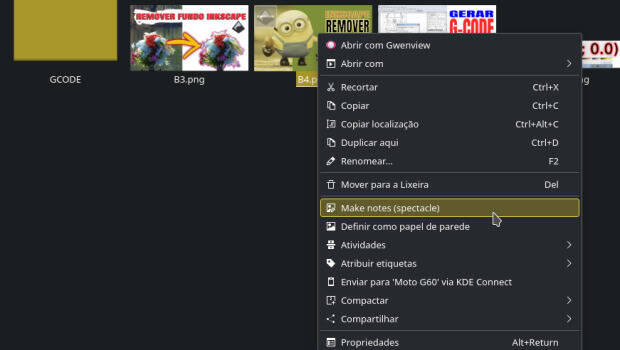
Lo cierto es que este Service Menu es la demostración de que la colaboración de diversos proyectos que trabajan bajo un mismo marco o estructura hace que el escritorio o el entorno de trabajo sea mucho más eficiente ya que se aprovecha el código de forma optimizada.
Y como siempre digo, si os gusta el pack de iconos podéis “pagarlo” de muchas formas en la página de KDE Store, que estoy seguro que el desarrollador lo agradecerá: puntúale positivamente, hazle un comentario en la página o realiza una donación. Ayudar al desarrollo del Software Libre también se hace simplemente dando las gracias, ayuda mucho más de lo que os podéis imaginar, recordad la campaña I love Free Software Day 2017 de la Free Software Foundation donde se nos recordaba esta forma tan sencilla de colaborar con el gran proyecto del Software Libre y que en el blog dedicamos un artículo.
Más información: KDE Store
¿Qué son los Dolphin Service Menu?
La personalización de KDE y Plasma está más que demostrada y prueba de ello son los Dolphin Service Menu, que no son más que la posibilidad de disponer un menú auxiliar en el gestor de archivos Dophin o en Konqueror que se activa con el botón derecho del ratón.
Con ellos tendremos nuevas acciones como:
- Accesos directos a los servicios de Dropbox.
- Accesos directos a las acciones de 7zG.
- Realizar acciones como root automáticamente.
- Enviar un adjunto con el Thunderbird
- Convierte de LibreOffice a pdf
- Comic book kservicemenu Original
Y muchos más como hemos explicado en varias ocasiones en el blog. Puedes encontrar estos servicios se pueden encontrar en la sección Dolphin Service Menu en la Store de KDE y en esta categoría de este humilde blog, que poco a poco va creciendo para mostrar lo mucho que se puede personalizar el entorno de trabajo Plasma de KDE.
La entrada Make notes Spectacle – Service menu para KDE (22) se publicó primero en KDE Blog.

Microsoft Reinforcement Learning Open Source Fest 2022 – Native CSV Parser
PR: https://github.com/VowpalWabbit/vowpal_wabbit/pull/4073
Tutorial: https://vowpalwabbit.org/docs/vowpal_wabbit/python/latest/tutorials/cmd_csv_with_iris_dataset.html
Introduction
My project here at the Reinforcement Learning Open Source Fest 2022 is to add the native CSV parsing feature for the Vowpal Wabbit.
So why do I choose to implement native CSV parsing? CSV is one of the most popular file formats used in the machine learning dataset and is often delivered as the default format in competitions such as Kaggle. CSV files have the same schema for each example, while VW text format doesn’t. Although converters in Python and Perl have been written which convert these files to VW text format, it would be convenient if VW could understand CSV files natively. I also want to challenge myself, as there is a surprising amount of complexity in the design of implementing a generalized parser for CSV, so this project is as much about considering all of the design pieces as implementing a working parser. My choice and time devoted also pay off since my project has already got merged into the VW upstream !!!
About CSV
CSV files are often separated by commas (,) or tabs. however, alternative delimiter-separated files are often given a .csv extension despite the use of a non-comma field separator. This loose terminology can cause problems in data exchange. Many applications that accept CSV files have options to select the delimiter character and the quotation character. Semicolons (;) are often used instead of commas in many European locales in order to use the comma (,) as the decimal separator and, possibly, the period (.) as a decimal grouping character.
Separating fields with the field separator is CSV’s foundation, but commas in the data have to be handled specially.
How do we handle CSV files?
The short answer is that we follow the RFC 4180 and MIME standards.
The 2005 technical standard RFC 4180 formalizes the CSV file format and defines the MIME type “text/csv” for the handling of text-based fields. However, the interpretation of the text of each field is still application-specific. Files that follow the RFC 4180 standard can simplify CSV exchange and should be widely portable. Here are its requirements:
- Lines will end with CR or CRLF characters, and it is optional for the last line.
- CSV files can have an optional header record. There is no sure way to detect whether it is present, so care is required when importing.
- Each record should contain the same number of separated fields.
- Any field may be quoted with double quotes.
- Fields containing a double-quote or commas should be quoted.
- If double-quotes are used to enclose fields, then a double-quote in a field must be represented by two double-quote characters.
Dig into details
- Allows specifying the CSV field separator by –csv_separator, default is
,, but"|or:are reserved and not allowed to use, since the double quote (") is for escape, vertical bar(|) for separating the namespace and feature names,:can be used in labels. - For each separated field, auto remove the outer double-quotes of a cell when it pairs.
--csv_separatorsymbols that appeared inside the double-quoted cells are not considered as a separator but a normal string character. - Double-quotes that appear at the start and end of the cell will be considered to enclose fields. Other quotes that appear elsewhere and out of the enclose fields will have no special meaning. (This is also how Microsoft Excel parses.)
- If double-quotes are used to enclose fields, then a double-quote appearing inside a field must be escaped by preceding it with another double quote, and will remove that escape symbol during parsing.
- Use header line for feature names (and possibly namespaces) / specify label and tag using
_labeland_tagby default. For each separated field in header except for tag and label, it may contain namespace and feature name separated by namespace separator, vertical bar(|). -
--csv_headerto override the CSV header by providing the header. Combined with--csv_no_file_header, we assume that there is no header in the CSV file and under such condition specifying--csv_headerfor the header is a must. - If the number of the separated fields for current parsing line is greater than the header, an error will be thrown.
- Trim the field for ASCII “white space”(
\r\n\f\v) as well as some UTF-8 BOM characters(\xef\xbb\xbf) before separation. - If no namespace is separated, will use empty namespace.
- Separator supports using
\tto represent tabs. Otherwise, if assigning more than one character, an error will be thrown. - Directly read the label as string, interpret it using the VW text label parser.
- Will try to judge if the feature values are float or string, if NaN, will consider it as a string. quoted numbers are always considered as strings.
- If the feature value is empty, will skip that feature.
- Reset the parser when EOF of a file is met (for possible multiple input file support).
- Support using
--csv_ns_valueto scale the namespace values by specifying the float ratio. e.g. –csv_ns_value=a:0.5,b:0.3,:8, which the namespace a has a ratio of 0.5, b of 0.3, empty namespace of 8, other namespaces of 1. - If all the cells in a line are empty, then consider it an empty line. CSV is not a good fit for the multiline format, as evidenced by many empty fields. The multiline format often means different lines have different schemas. However, I still leave the empty line support to ensure that it’s flexible and extendable. In this case, users can still express multiline examples in CSV files, although it is not listed as supported. We still throw an error if the number of fields separated by the line doesn’t match the previous, even if all the fields are empty, as this usually means typos that users may not intend.
Some statistics to share
The project reaches 100% Test and Code Coverage. On my computer, it takes only 829 ms to handle 200000 examples, which is comparable to the equivalent VW custom format data file’s parsing speed of 623 ms, and is equivalent to 21.7 MB/s throughput.
I have expected that little bit of slower between VW custom text format and the CSV format. The VW text parser can parse as it reads since generally the elements have a fixed position, while CSV parser needs to store the split elements into an array, and look up that array according to the header for labels, tags, namespace and feature values, also there’s double quotes trimming and escape support, which will definitely cost more time.
After all, I have tried my best to optimize it and the performance is also to my satisfaction. You can check using the throughput tool for the unoptimized one during the project. And that was actually 10 times improvement!
- VW text Parser:
2239418 bytes parsed in 60581μs
36.9657MB/s
- Unoptimized CSV Parser:
1799450 bytes parsed in 912927μs
1.97108MB/s
- Optimized CSV Parser:
1799450 bytes parsed in 87728μs
20.5117MB/s
My optimization mainly involves turn all the functions used by the parser into force inline. During the parsing, instead of parsing column by column, I categorize all the features by its namespace and parse those features by namespace to avoid double caculating the namespace hash. I also replace the map with unordered map, use vw’s own data structure v_array to replace std::vector, and use VW’s realization of parsefloat to replace std::stof, which is much faster. The statistics show that these really improved the performance a lot.
Credits
That’s all, thanks for reading, and also special thanks to my mentors Jack Gerrits and Peter Chang from Microsoft Research – New York City Lab, who really helped me a lot during the project.
Reference
Tencent Rhino-bird Open-source Training Program 2022 – SunEC sm2p256v1 Key Pairs Generation
For 2022 final result, I passed the final evaluation, obtained all the honor titles (Only 2/4000+ in all participants): Tencent Open Source Contributor Certificate (only issued 30+ around the globe at that time), Intern of Excellence, Task Scholarship.
Task 1
https://github.com/openjdk/jdk/pull/9541
Task 2
Tested computing the signature as well as verifying the signature for comparing between secp256r1 and secp256k1 using SHA256withECDSA with the help of the SunEC provider.
The result clearly shows that secp256r1 has a better performance than secp256k1 with regard to SHA256withECDSA when signing. But secp256r1 has almost the same performance as secp256k1 when verifying.
Benchmark                                 Mode  Cnt     Score    Error  Units
BenchmarkSigning.secp256k1_1024B         thrpt   25  1237.482 ± 30.518  ops/s
BenchmarkSigning.secp256k1_1024K         thrpt   25   318.589 ±  2.656  ops/s
BenchmarkSigning.secp256k1_128B          thrpt   25  1266.561 ± 32.311  ops/s
BenchmarkSigning.secp256k1_256B          thrpt   25  1254.327 ± 36.935  ops/s
BenchmarkSigning.secp256r1_1024B         thrpt   25  1746.453 ± 33.358  ops/s
BenchmarkSigning.secp256r1_1024K         thrpt   25   340.530 ±  3.970  ops/s
BenchmarkSigning.secp256r1_128B          thrpt   25  1763.460 ± 31.179  ops/s
BenchmarkSigning.secp256r1_256B          thrpt   25  1756.899 ± 32.715  ops/s
BenchmarkVerifying.secp256k1_1024B       thrpt   25   486.545 ± 13.410  ops/s
BenchmarkVerifying.secp256k1_1024K       thrpt   25   228.638 ±  2.478  ops/s
BenchmarkVerifying.secp256k1_128B        thrpt   25   491.065 ± 13.948  ops/s
BenchmarkVerifying.secp256k1_256B        thrpt   25   499.466 ±  4.558  ops/s
BenchmarkVerifying.secp256r1_1024B       thrpt   25   402.902 ± 53.489  ops/s
BenchmarkVerifying.secp256r1_1024K       thrpt   25   212.743 ± 23.301  ops/s
BenchmarkVerifying.secp256r1_128B        thrpt   25   401.215 ± 65.401  ops/s
BenchmarkVerifying.secp256r1_256B        thrpt   25   393.021 ± 79.755  ops/s
Further investigation shows that before secp256k1 was removed from JDK, all the curves seem to be realized by C using the OS library instead of Java. https://github.com/openjdk/jdk/blob/jdk-11+28/src/jdk.crypto.ec/share/native/libsunec/impl/oid.c#L95
JDK-8238911 in 2020 reported the weaknesses in the implementation of the native library EC code make it necessary to remove support for future releases. The most common EC curves (secp256r1, secp384r1, and secp521r1) had been re-implemented in Java in the SunEC JCE provider.
After some communications with my mentor Johns Jiang, he tells me that JDK-8181594 introduces the optimized finite field implementations in Java. Previously before that implementation was introduced, pure Java realization was really slow, then we use the OS library to realize all the curves so that the performance can be improved. But now, instead, with the help of that optimized Java library, Java realization takes the advantage and becomes the most efficient one, it’s now even comparable with the pure C realization.
Our flame graph also some kind confirms this, as you can see here, the Java Flight Recorder (JFR) can record the secp256r1 methods calling stacks, but it’s not the case for secp256k1. So it’s likely that secp256r1 has a better performance than secp256k1 for signing since it’s fully realized in Java and using that optimized library, thus reduces the calling costs for the OS library. If they are both realized in Java using the optimized method, I guess there should be no difference.
As secp256k1 has already been removed in JDK and now secp256r1 does have a better performance, so I guess here we will have no obvious further room for improvement.
Task 3
The final report (in Chinese) is not limited to the following content, it also includes some more security analysis for different ways of realization.
With modification of SunEC provider
As for Elliptic-curve based cryptography algorithms, the curve parameters are used to generate the keys. The official recommended curve parameters for SM2 can be seen here: https://www.oscca.gov.cn/sca/xxgk/2010-12/17/1002386/files/b965ce832cc34bc191cb1cde446b860d.pdf
That curve parameters is also known as sm2p256v1, since it’s also a prime curve just like secp256r1, we can use the existing implementation of secp256r1 in the SunEC library to help us realize our implementation.
The OID for sm2p256v1 is 1.2.156.10197.1.301: http://gmssl.org/docs/oid.html
https://github.com/HollowMan6/jdk/tree/sm2 https://github.com/HollowMan6/jdk/commit/c3e924641bb3a838f6abc496dd380ceb619df163
We first fill the curve parameters into the CurveDB
Then add the OID and names.
The most important part is FieldGen. FieldGen is used to automatically generate optimized finite field implementations, which is also the library I mentioned in Task 2 JDK-8181594 for improving Java version’s efficiency. https://github.com/HollowMan6/jdk/blob/c3e924641bb3a838f6abc496dd380ceb619df163/make/jdk/src/classes/build/tools/intpoly/FieldGen.java We need to generate two fields, Integer Polynomial (corresponds to parameter p) and Order Field (corresponds to parameter n).
As:
FFFFFFFE FFFFFFFF FFFFFFFF FFFFFFFF FFFFFFFF 00000000 FFFFFFFF FFFFFFFF
=
FFFFFFFF FFFFFFFF FFFFFFFF FFFFFFFF FFFFFFFF FFFFFFFF FFFFFFFF FFFFFFFF $2^{256} – 1$
–
00000001 00000000 00000000 00000000 00000000 00000000 00000000 00000000 $2^{224}$
–
00000000 00000000 00000000 00000000 00000000 FFFFFFFF FFFFFFFF FFFFFFFF $2^{96} – 1$
+
00000000 00000000 00000000 00000000 00000000 00000000 FFFFFFFF FFFFFFFF
$2^{64} – 1$
= $2^{256} – 2^{224} – 2^{96} + 2^{64} – 2^0$
So the Integer Polynomial shall fill just like that. We can copy other parameters from secp256r1 as they are all 256 digit prime curve.
The private keys in Hex can be printed directly with no special format.
Since the public keys in Hex can be compressed, it does have a special format, that if it starts with 04, then the keys are uncompressed and we just then concat the X and Y coordinate together. The compressed ones always start with 02 or 03, and then only the X coordinate is needed. The 02 and 03 is determined by that, when Y coordinate is even, we use 02, use 03 when odd. In addition, we have to also make sure that both X and Y coordinates are 64 in length for Hex.
As the Bouncy Castle library has already fully realized the SM2, to ensure that the generated keys fit the sm2p256v1, I also use the generated keys for signing using SM3withSM2. The validity of the keys can be verified during the signature verification processes, during which we recover the sm2p256v1 elliptic curve point from the Bouncy Castle library based on the Hex format public key. If we use keys generated based on other curves, like secp256r1, error will be thrown.
Demo result:
Public Key (Uncompressed): 040A8FB35CA4761FAAA36B2A24E77EC657D96F74147C50EE2D5B50E3AAFD8304D8CBB65FB2E661D37B7C3B900E1BDBEDE894D9CBB9079E8DD704B9465BFF65EE17
Public Key: 030A8FB35CA4761FAAA36B2A24E77EC657D96F74147C50EE2D5B50E3AAFD8304D8
Private Key: 42756D22960A58D08F9E7E3A0D56D9630D8D051D082F4D2BFCE22FD2653524EB
To sign: How are you?
Signed: MEUCIAgvYgl0ydHwd536MkmwaRuhmkD/klh79VmHEBJI1zCRAiEAo9jNkGM+Tjh/0AmX82nSPOMYgRPaWm6SUXiB63YGAD4=
Verification OK!
Error thrown when using secp256r1 (faulty key pairs):
Public Key (Uncompressed): 0456A3205C7B47BF303F4B65CDAB5B94C343BE7220E5AAAB001B7263DBCD113B42447A9E41BF1374D4ABC7A2AE31E7441E3EB20D5808CCB7D88BFE4F8F2C9887C3
Public Key: 0356A3205C7B47BF303F4B65CDAB5B94C343BE7220E5AAAB001B7263DBCD113B42
Private Key: A33048CC39925B5D4BA4C34FE846C85D41DA5AABA0CFDE4092A7A4ED716D557
To sign: How are you?
Signed: MEYCIQCktncEmfLbC9rLC1Im9gj/AvZRUIQ5Z1plrq1X0L/5YwIhAOa0JeSoQFnV51kAJsFRY3T4cpCn2O7bKoN+M+nPpv6y
Exception in thread "main" java.lang.IllegalArgumentException: Invalid point coordinates
        at org.bouncycastle.math.ec.ECCurve.validatePoint(Unknown Source)
        at org.bouncycastle.math.ec.ECCurve.decodePoint(Unknown Source)
        at org.sample.SM2Util.verify(SM2Util.java:103)
        at org.sample.SM2Util.main(SM2Util.java:129)
JMH Performance test for compressed and uncompressed public key generation result shows that the compressed public keys generation has a better performance than the uncompressed ones. You can find the reason from the flame graph of Java Flight Recorder (JFR), that it’s because the uncompressed ones also need to caculate the Y coordinate Hex format, which takes a lot of time.
Benchmark                                         Mode  Cnt       Score       Error  Units
BenchmarkPublicKeys.sm2p256v1_compressed         thrpt   25  1212201.531 ± 248181.084  ops/s
BenchmarkPublicKeys.sm2p256v1_uncompressed       thrpt   25   760033.805 ±  35058.515  ops/s
Homemade
Our realization refers to the JavaScript implementation here, Wikipedia Elliptic curve point multiplication and the official documentation .
The homemade one is based on purely mathematical methods, no other dependencies.
We use SecureRandom to generate the private key, we also tried public key generation using the Standard Projective Coordinates and Jacobian Coordinates, as well as the binary expansion and addminus algorithm.
See result for more performance comparisons.
JMH Performance test for compressed and uncompressed public key generation result shows that the uncompressed public keys generation has almost the same performance as the compressed ones. Though it seems like a contradiction, here the uncompressed Y coordinate Hex caculation counts significantly smaller when you take the overall time into consideration.
My Google Summer of Code 2022 – Google Blockly Workspace MultiSelect Plugin
More about 2023 Blockly Summit


PRs and issues resolved during GSoC 2022:
- PR #1
- PR #2
- Issue #3
- PR #4
- PR #5
- google/blockly-samples PR #1202
- ThibaultJanBeyer/DragSelect PR #128
Introduction
Hi there! If you prefer watching videos, check this out for an episode demoing the plugin:
For you guys who prefer reading, in this blog post I will introduce you to my work on the plugin for selecting, dragging, and doing actions on multiple blocks. The project is sponsored by Google Summer of Code (GSoC) 2022, under MIT App inventor.
Backgrounds
Aim
The project aims to enable the selection of multiple blocks at the same time and allow moving and doing actions on multiple blocks on Blockly.
This behavior is the same as when you try to manage your files on your Operating System. You can click on the files while pressing the control key, drag a rectangle to select multiple files. Then move them around, copying and deleting.
It sounds a little bit easy, but actually, I would say that it’s not. Multiple selections can become a crazy-complex feature when you start thinking about the details.
History
This feature request has remained open on GitHub Issues for six years. However, it was still in the discussion phase and far from the beginning of Implementation before my project began.
Since the Blockly community long wants this feature, we base our plugin on the latest Blockly so that it can be applied to everyone’s project. The App Inventor uses a Blockly version that is much older, so it’s a pity that we can’t see it work on App Inventor now. Let’s hope that the App Inventor can upgrade the Blockly version to the latest soon.
Realization
The “drag a rectangle to select” feature is realized with the help of the DragSelect plugin. I submitted a PR to add the pointer-events so that it can work for Blockly, and it got merged into v2.4.4.
In addition, I disable the drag surface feature in Blockly, which stops us from moving multiple blocks simultaneously. Also, there’s evidence suggesting that we can perform better without a drag surface.
So, how does the plugin work? Well, generally, the plugin acts like an adapter. It maintains its own multiple selection set, which keeps currently selected blocks and make sure we always have one of the selected blocks as the selected one in Blockly core. When users do some actions, the plugin also passes all the actions to the other blocks in our set besides the selected one in Blockly core.
Functionalities
Let’s check out what the plugin can do!
- Additional blocks can be selected by holding the SHIFT key while clicking the new block. You can also deselect the block by clicking the already selected block.
- Clicking on the button above the trashcan is equivalent to holding or releasing the SHIFT key for switching between the multiple selection mode and the normal mode.
- We can clear the selection by clicking on the workspace background.
- Clicking a new block without holding SHIFT key can clear the multiple selections and change the selection to only that block.
- Holding SHIFT key to drag a rectangle area to select can reverse their selection state for the blocks touched by the rectangle.
- In multiple selection mode, workspace dragging and block dragging will all be disabled. You can only drag to draw a rectangle for selection.
- When some of the selected blocks are in one block stack, for example, some top blocks and some of their children blocks are in the selection simultaneously. If applicable, the plugin only disconnects the selected most top block in that stack with its parent block. Move along with all the children’s blocks of that most top block as a whole.
- You can also drag all the blocks to the trash can.
- When you edit the fields while selecting multiple blocks, we will automatically apply that to all the blocks with the same type.
- There’s also an MIT App Inventor-only feature that has been migrated into this plugin, that you can double click to collapse or expand currently selected blocks.
- For the context menu, the
Duplicatewill duplicate the selected most top block in the block stack and all the children blocks of that most top block. The selection will be changed to all newly created duplicate blocks’ most top blocks. For all the other items, The actions to show are determined by the state of the block which the user right-clicks on, and the same action will be applied to all the blocks no matter their individual state. We will append the currently applicable number of user-selected state-changing blocks, and the number will only be shown when it is greater than 1. - The
Add Comment/Remove Commentoption will add / remove comment buttons to all the selected blocks. - The
Inline Inputs/External Inputsoption will convert the input format with all the selected blocks. - The
Collapse Block/Expand Blockoption will only apply to the selected most top block in the block stack. - The
Disable Block/Enable Blockoption will only apply to the selected most top block in the block stack. All the children blocks of that most top block will also get disabled. - The number in
Delete [X] Blocksis the count of the selected most top block in the block stack as well as all children of those selected most top block. Clicking on that option will delete the blocks mentioned. - The
Helpoption displays just the helping information of the block the user just right-clicked on. - We add
Select all Blocksin the workspace context menu. - For the shortcut keys, These actions will only apply to the selected most top block in the block stack. when you press
Ctrl A, you can select all the blocks in the current workspace.Ctrl Cto copy the selected blocks,Ctrl Xto cut the selected blocks to the clipboard, andCtrl Vto paste all the blocks currently in the clipboard and get all the newly pasted blocks selected. - Bumping neighbors after dragging to avoid overlapping is disabled in this plugin by default, since I find it disturbing sometimes for multiple selections.
- Click on a block will bring that block to the front in case Bumping neighbours is disabled.
Usage
If you want to integrate the plugin into your project, you can add the dependency into your package.json. In the source code, pass the workspace to the plugin, and initialize the plugin, and then it’s done! You can choose to disable double-click the blocks to collapse or expand and enable bumping neighbors after dragging to avoid overlapping. For the multi-select controls, you can also choose to hide the icon and customize the icons of each state. More details can be found in the README.
You can also choose to integrate the plugin with other ones, like the scroll options, which enable the edge scroll and wheel scroll for Blockly. The only thing you have to pay attention for the scroll options plugin to work is to assign the original blockDragger value required for scroll options to baseBlockDragger in our plugin. During the project period I also submitted a PR for fixing the a bug that makes scroll options unable to work without the drag surface, and it has already got merged.
Finally
That’s all for this blog post. Before it ends, I would like to say thank you to my mentors, Evan Patton and Li Li, as well as the MIT App Inventor Team for guiding me throughout the project. They are really supportive. Also, special Thanks to Beka Westberg. She devoted a lot of time to giving suggestions and helping review the code. We can’t have this plugin without her! Finally, thanks for reading this blog post!