
 Member
 Victorhck
Microsoft loves «open source» solo cuando puede sacar provecho
Microsoft vuelve a dar ejemplos de la política de monopolio que subyace en sus venas por muy bonito que quede el eslogan de que ama al «open source»

Os traigo un par de ejemplos recientes de cómo Microsoft sigue siendo… Microsoft ¿sorpresa? la empresa se niega a ceder sus beneficios y parte de pastel a proyectos de código abierto o software libre… aunque quede muy bonito poner lo contrario en la publicidad.
El primer ejemplo tiene como protagonista a Nextcloud, software libre para crear tu propia nube con un montón de opciones que podemos ir implementando y sí, es software libre.
En una reciente entrevista al creador y CEO de Nextcloud, una persona que viene del software libre desde hace años, en la revista Wall Street Journal, este comentaba que a principios de año 2022 fue contactado por un abogado de Microsoft.
En la reunión, la persona de Microsoft ofreció beneficios en forma de colaboración y marketing a Nextcloud. Por ejemplo, querían promocionar el logotipo de Nextcloud en el material de marketing de Microsoft, si Nextcloud consideraría retirar su denuncia antimonopolio.
Esta queja antimonopolio es que a principios de 2021, bajo el liderazgo de Nextcloud, un grupo de empresas presentó una queja oficial ante la Dirección General de Competencia de la UE sobre el comportamiento de Microsoft. Esta coalición de empresas europeas en la nube aboga por la igualdad de condiciones en la UE.
Es decir Microsoft trata de seguir manteniendo su potencial en cuanto a la nube en Europa, donde va perdiendo poco a poco posiciones, chantajeando al CEO de Nextcloud para que sea bueno y retire la denuncia y a cambio le dan una palmadita en la espalda y poco más.
En la entrevista del Wall Street Journal el CEO de Nextcloud comenta:
“Básicamente nos estaba ofreciendo una galletita. No se trata de tener un logo en algún lado o hacer un trato rápido. No estamos interesados en eso. Estamos preocupados por la situación antimonopolio en general”.
El Zasca todavía resuena en Redmond
Pero hay más ejemplos.
Según ha denunciado a principios de julio de 2022 la Free Software Conservacy, Microsoft quiere prohibir en su «store» todo el software que sea FOSS (Free Open Source Software).
Han añadido una nueva cláusula que revierte las políticas de la tienda de aplicaciones y ya está interrumpiendo el comercio en su plataforma. En particular, Microsoft ahora prohíbe a los redistribuidores de FOSS cobrar dinero por casi todos los FOSS.
Sí el mismo «open source» que dicen querer, ahora les niegan que los proyectos de software libre cobren dinero y se financien a través de su «tienda». Bueno es su tienda y hacen lo que quieran, eso sí, están dañando seriamente el software libre.
Durante décadas, Microsoft hizo un gran esfuerzo para asustar al sector del software comercial con historias de cómo FOSS (y Linux en particular) no eran productos comercialmente viables. Microsoft incluso afirmó una vez que cualquiera que desarrollara FOSS bajo copyleft estaba en contra del estilo americano. (¡Qué tiempos aquellos que Microsoft no se escondía!)
Hoy en día, hay muchos desarrolladores que se ganan la vida creando, apoyando y redistribuyendo FOSS, que financian (en parte) cobrando por FOSS en las tiendas de aplicaciones.
Esto es, ante todo, una afrenta a todos los esfuerzos por ganarse la vida escribiendo software de código abierto. Esta no es una consideración meramente hipotética. Muchos desarrolladores ya respaldan su desarrollo FOSS (legítimamente, al menos bajo las propias licencias FOSS) a través de implementaciones de tiendas de aplicaciones que Microsoft prohibió recientemente en su Store.
Bueno, eso sí adoran el software libre que alojan en GitHub y del que Autopilot ahora puede beneficiarse. ¡Es hora de abandonar GitHub!
Os dejo los enlaces por aquí para que consultéis las fuentes de primera mano y saquéis vuestras propias conclusiones, podéis usar los comentarios del blog para compartirlas. Siempre con respeto y con ánimo constructivo, por favor.


MicroOS Install Workshop, Feedback Sessions Planned
In an effort so gain more user insight and perspective for the development of the Adaptable Linux Platform (ALP), members of the openSUSE community workgroup will have a MicroOS Desktop install workshop on August 2.
There will be feedback sessions the following weeks during the community workgroup and community meeting.
Users are encouraged to install the MicroOS Desktop (ISO image 3.8 GiB) during the week of August 1. There will be a short Installation Presentation during the ALP Workgroup Meeting at 14:30 UTC on August 2 for those who need a little assistance.
During the next two weeks’ meetings, follow ups will be given with a final Lucid Presentation on August 16 during the regularly scheduled workgroup.
Users are encouraged to note how their use, installation and experience goes on a spreadsheet while also using it as a reference for tips and examples on what to try.
Workflow examples like tweaking the immutable system by running sudo transactional-update shell or podman basics with container port forwarding and podman volumes are also on the list.
The call for people to test spin MicroOS Desktop has received a lot of feedback like the need for documentations for Flatpak on flatpak user profiles (located at ~/.var/app) and many other key points, which is the whole point of the exercise to try MicroOS to gain some valuable lessons for ALP.
In managing expectations, people testing MicroOS should be aware that it is based on openSUSE Tumbleweed, that YaST is not available and that MicroOS’ release manager would appreciate contributions rather than bug reports. MicroOS currently supports two desktop environments. GNOME is currently supported as a Release Candidate and KDE’s Plasma is in Alpha. MicroOS Desktop is currently the closest representation of what users can expect from next generation Desktop by SUSE.
Users have download the MicroOS Desktop at https://get.opensuse.org/microos/ and see instructions and record comments on the spreadsheet.
Scripts para subir texto o imágenes al servicio susepaste
Comparto unas modificaciones que he realizado a sendos scripts en Bash que sirven para subir texto o una imagen al servicio de paste mantenido por la comunidad openSUSE

Hace tiempo que he estado modificando y adaptando un par de scripts existentes que suben un texto o archivo de texto o una imagen al servicio susepaste para compartir logs o capturas en foros, listas de correo, etc.
Comparto con vosotros el resultado, que quizás lejos de ser perfecto es perfectamente válido y así me sirve para ver si hay que mejorar algo. Ya sabes: «release soon, release often».
susepaste.org es un sitio en el que poder compartir de forma efímera, textos, archivos o imágenes, para compartir con otras personas esa url que genera y así compartir un log, un mensaje de error, una captura de pantalla con un problema específico, etc.
Si usas openSUSE, seguro que ya tienes instalado en la ruta /usr/bin los scripts susepaste y susepaste-screenshot. Mis versiones actualizan y corrigen algún error además de eliminar partes que no se utilizaban y añadir nuevas opciones.
Si queremos utilizar mis scripts, lo primero vamos a renombrar los scripts originales, para ello en la ruta /usr/bin renombramos (como usuario root) ambos scripts añadiendo por ejemplo _orig al nombre de ambos archivos.
Ahora descargamos desde mi repositorio en Codeberg los scripts que he modificado en la misma ruta, ejecutando:
wget https://codeberg.org/victorhck/paste_scripts/raw/branch/main/susepastewget https://codeberg.org/victorhck/paste_scripts/raw/branch/main/susepaste-screenshot
Y ya los podremos utilizar. Si queremos volver atrás borramos los scripts descargados y volvemos a renombrar los scripts originales eliminando _orig del nombre.
susepaste
Este script sirve para enviar un archivo de texto, la salida de un comando o un texto que escribamos al servicio de susepaste y nos genera una url que nos devuelve y será la que podemos compartir. La modificación de mi script sigue haciendo eso, pero algunas cosas más.
¿Cómo utilizarlo?
Si ejecutamos susepaste -h nos muestra una pequeña información de cómo usar este sencillo script.
susepaste [-n nick] [-t title] [-e expire] [-f <file> or <path/to/file>]
(expire: 30m=30minutes; 1h=1hour; 6h=6hours; 12h=12hours; 1d=1day; 1w=1week; 1m=1month; 3m=3months; 1y=1year; 2y=2years; 3y=3years; 0=never)
Podemos especificar nuestro nick, un título, un periodo después del cual el archivo desaparecerá y un archivo.
Si no especificamos el nick, el título o el tiempo de expiración, se asignarán valores predeterminados. Y el archivo es opcional, ya que podemos poner la salida de un comando o escribir nosotros un texto. Si escribimos nosotros el texto deberemos terminar el comando con Ctrl+d
Vamos con unos ejemplos:
susepaste -n Victorhck -t repositorios -e 3m -f lista_repos.txt
Subimos el archivo lista_repos.txt indicando mi nick un título y que dure 3 meses en el servidor de susepaste. Otro:
zypper lr | susepaste -t repos -e 1h
Envía la salida del comando que muestra los repositorios (zypper lr) al script y este lo sube al servidor con un título y que dure 1 hora. Otro:
uname -a | susepaste
Envía la salida del comando al servicio susepaste. Y te devuelve la url y también la copia en el portapapeles.
susepaste-screenshot
Este script sirve para tomar una captura de pantalla y enviarla al servidor o para subir una captura que tengamos ya realizada.
¿Cómo utilizarlo?
Si ejecutamos susepaste-screenshot -h nos muestra una pequeña información de cómo usar este sencillo script.
susepaste-screenshot [--all] [-n nick] [-t title] [-e expire] [-d delay secs] [-f <file> or <path/to/file>]
(expire: 30m=30minutes; 1h=1hour; 6h=6hours; 12h=12hours; 1d=1day; 1w=1week; 1m=1month; 3m=3months; 1y=1year; 2y=2years; 3y=3years; 0=never)
Muy similar al anterior, pero se incluye la opción -d para indicar unos segundos de retraso a la hora de realizar la captura, para poder cambiar de pantalla, escritorio, etc…
Vamos con unos ejemplos:
susepaste-screenshot -n Victorhck -t error -e 3m -f /home/mi_usuario/capturas/mi_captura.png
Establecemos un nick, un título un tiempo de 3 meses de duración en el servidor y la ruta al archivo donde está la captura.
susepaste-screenshot -e 1m -d 5
La imagen durará 1 mes en el servidor y esperará 5 segundos antes de tomar una captura y enviarla.
Bueno, tanto si usas openSUSE como si no, podrás usar el servicio susepaste o paste.opensuse.org que en definitiva son los mismos para alojar textos o imágenes.
Y si usas estos scripts te ahorrarán tiempo y quizás te hagan la vida más fácil. Si los usas y encuentras algo que no funciona, o que habría que mejorar usa los comentarios del blog para compartir tu aporte.
No quiere decir que lo vaya a hacer  dependerá del tiempo que tenga, de las ganas, pero sin duda tu aporte será leído y tenido muy en cuenta.
Enlaces de interés
- https://codeberg.org/victorhck/paste_scripts
- https://github.com/openSUSE/paste/tree/master/script
- https://susepaste.org/

Community to celebrate openSUSE Birthday
The openSUSE Project is preparing to celebrate its 17th Birthday on August 9.
The project will have a 24-hour social event with attendees visiting openSUSE’s virtual Bar.
Commonly referred to as the openSUSE Bar or slash bar (/bar), openSUSE’s Jitsi instance has become a frequent virtual hang out with regulars and newcomers.
People who like or use openSUSE distributions and tools are welcome to visit, hang out and chat with other attendees during the celebration.
This special 24-hour celebration has no last call and will have music and other social activities like playing a special openSUSE skribble.io edition; it’s a game where people draw and guess openSUSE and open source themed topics.
People can find the openSUSE Bar at https://meet.opensuse.org/bar.
There will be an Adaptable Linux Platform (ALP) Work Group (WG) feedback session on openSUSE’s Birthday on August 9 at 14:30 UTC taking place on https://meet.opensuse.org/meeting. The session follows an install workshop from August 2 that went over installing MicroOS Desktop. The session is designed to gain feedback on how people use their Operating System to help progress ALP development.
The openSUSE Project came into existence on August 9, 2005. An email about the launch of a community-based Linux distribution was sent out on August 3 and the announcement was made during LinuxWorld in San Francisco, which was at the Moscone Convention Center from August 8 to 11, 2005. The email processing the launch discussed upgrading to KDE 3.4.2 on SuSE 9.3.
El responsable de Latte Dock deja el proyecto
El desarrollador griego Michail Vourlakos aka psifidotos creador de Latte Dock se despide del proyecto

Latte Dock es uno de esos «docks» o muestrario animado de aplicaciones que vino a dar un nuevo aspecto a los escritorios Plasma de KDE hace 6 años creado por psifidios.
Algunos ususarios lo adoptaron desde el principio en sus escritorios y quitaron la ya más que conocida barra (normalmente inferior) y pusieron en su lugar este nuevo dock.
Ofrece unas animaciones muy visuales, flexibilidad para adaptarlo a tus gustos y que se integraba perfectamente con el escritorio Plasma de KDE.
Poco a poco ha ido corrigiendo fallos e integrando nuevas opciones hasta la versión 0.10.8 publicada en febrero de 2022.
Y hoy el desarrollador que llevaba a cabo buena parte del trabajo ha anunciado en su blog que después de 6 años se despide del proyecto por falta de tiempo, motivación o interés por su parte en Latte Dock.
Iba a publicar una versión 0.11 pero eso implicaría que alguien debería mantenerla, y como (de momento) no es el caso, ahí se ha quedado estancado el proyecto.
Esto no quiere decir que Latte Dock vaya a desaparecer, seguirá estando funcional y disponible, peeeero con el tiempo se irá quedando obsoleta… a menos que alguien tome el relevo y mantenga este código corrigiendo, puliendo y mejorando.
El desarrollador se despide agradeciendo estos 6 años de desarrollo en el que ha aprendido mucho a la comunidad de KDE (miembros, desarrolladores, entusiastas, etc)
Así que si lo deseas puedes ponerte manos a la obra con este proyecto y retomarlo para seguir que siga mantenido y actual. ¡Todos las personas que usen Latte Dock te lo agradecerán!
Enlaces de interés
- https://psifidotos.blogspot.com/2022/07/latte-dock-farewell.html
- https://invent.kde.org/plasma/latte-dock/
- https://store.kde.org/p/1169519

Berlin Mini GUADEC

The Berlin hackfest and conference wasn't a polished, well organized experience like the usual GUADEC, it had the perfect Berlin flavor. The attendance topped my expectations and smaller groups formed to work on different aspects of the OS.
GNOME shell's quick settings, the mobile form factor, non-overlapped window management, Flathub and GNOME branding, video subsystems and others.
I've shot a few photos and edited the short video above. Even the music was done during the night sessions at C-Base.
Big thanks to the C-Base crew for taking good care of us in all aspects -- audio-visual support for the talks and following the main event in Mexico, refreshments and even outside seating. Last but not least the GNOME Foundation for sponsoring the travel (mostly on the ground).

Berlin Mini GUADEC

The Berlin hackfest and conference wasn’t a polished, well organized experience like the usual GUADEC, it had the perfect Berlin flavor. The attendance topped my expectations and smaller groups formed to work on different aspects of the OS.
GNOME shell’s quick settings, the mobile form factor, non-overlapped window management, Flathub and GNOME branding, video subsystems and others.
I’ve shot a few photos and edited the short video above. Even the music was done during the night sessions at C-Base.
Big thanks to the C-Base crew for taking good care of us in all aspects – audio-visual support for the talks and following the main event in Mexico, refreshments and even outside seating. Last but not least the GNOME Foundation for sponsoring the travel (mostly on the ground).


.fr à gogo ? /! Attention /! au phishing ou pire…
Vous avez surement lu comme moi au sujet de l’attribution des : .fr : peut être attribué à toute entité ou personne ayant une existence légale en France, sans autre condition. Le choix d’un suffixe .fr peut être rassurant pour les contacts commerciaux de l’entreprise. Il atteste d’une proximité de l’entreprise vis-à-vis du marché français ainsi que de …
.fr à gogo ? /!\ Attention /!\ au phishing ou pire…Read More »
The post .fr à gogo ? /!\ Attention /!\ au phishing ou pire… appeared first on Cybersécurité, Linux et Open Source à leur plus haut niveau | Network Users Institute | Rouen - Normandie.
15 Tahun openSUSE-ID

Hari ini, Sabtu 23 Juli 2022, Komunitas openSUSE Indonesia merayakan ulang tahun yang ke 15.
Berikut ini tangkapan layar mengenai sejarah pembentukan Komunitas openSUSE Indonesia yang sempat diambil cuplikan layarnya dari halaman http://wiki.opensuse-id.org:80/index.php?title=Sejarah_Komunitas_openSUSE_Indonesia yang sudah mati.


GNOME at 25: A health checkup
Around the end of 2020, I looked at GNOME's commit history as a proxy for the project's overall health. It was fun to do and hopefully not too boring to read. A year and a half went by since then, and it's time for an update.
If you're seeing these cheerful-as-your-average-wiphala charts for the first time, the previous post does a better job of explaining things. Especially so, the methodology section. It's worth a quick skim.
What's new
- Fornalder gained the ability to assign cohorts by file suffix, path prefix and repository.
- It filters out more duplicate authors.
- It also got better at filtering out duplicate and otherwise bogus commits.
- I added the repositories suggested by Allan and Federico in this GitHub issue (diff).
- Some time passed.
Active contributors, by generation
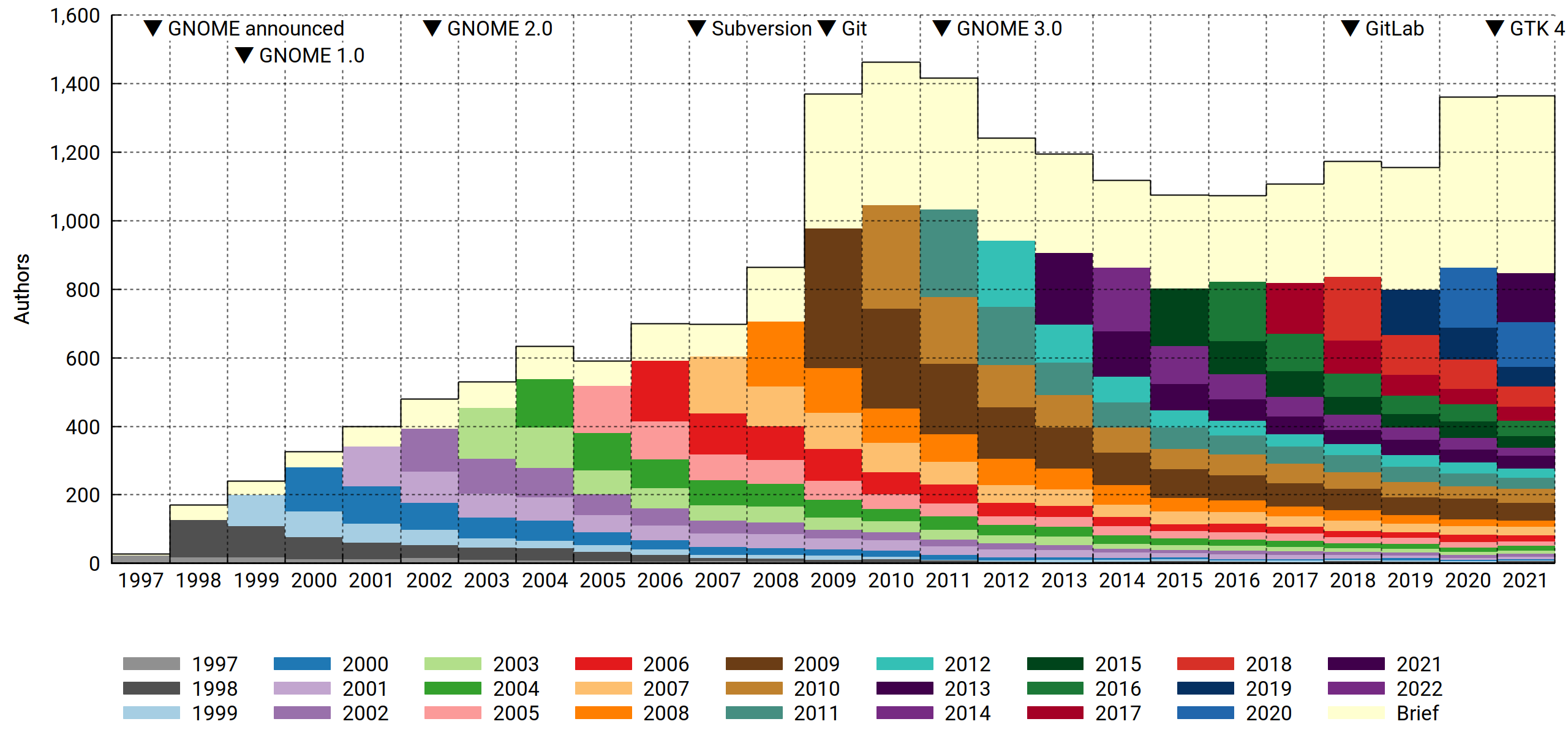
As expected, 2020 turned out interesting. First-time contributors were at the gates, numbering about 200 more than in previous years. What's also clear is that they mostly didn't stick around. The data doesn't say anything about why that is, but you could speculate that a work-from-home regime followed by a solid staycation is a state of affairs conductive to finally scratching some tangential — and limited — software-themed itch, and you'd sound pretty reasonable. Office workers had more time and workplace flexibility to ponder life's great questions, like "why is my bike shed the wrong shade of beige" or perhaps "how about those commits". As one does.
You could also argue that GNOME did better at merging pull requests, and that'd sound reasonable too. Whatever the cause, more people dipped their toes in, and that's unequivocally good. How to improve? Rope them into doing even more work! And never never let them go.
2021 brought more of the same. Above the 2019 baseline, another 200 new contributors showed up, dropped patches and bounced.
Active contributors, by affiliation

Unlike last time, I've included the Personal and Other affiliations for this one, since it puts corporate contributions in perspective; GNOME is a diverse, loosely coupled project with a particularly long and fuzzy tail. In terms of how spread out the contributor base is across the various domains, it stands above even other genuine community projects like GNU and the Linux kernel.
Commit count, by affiliation
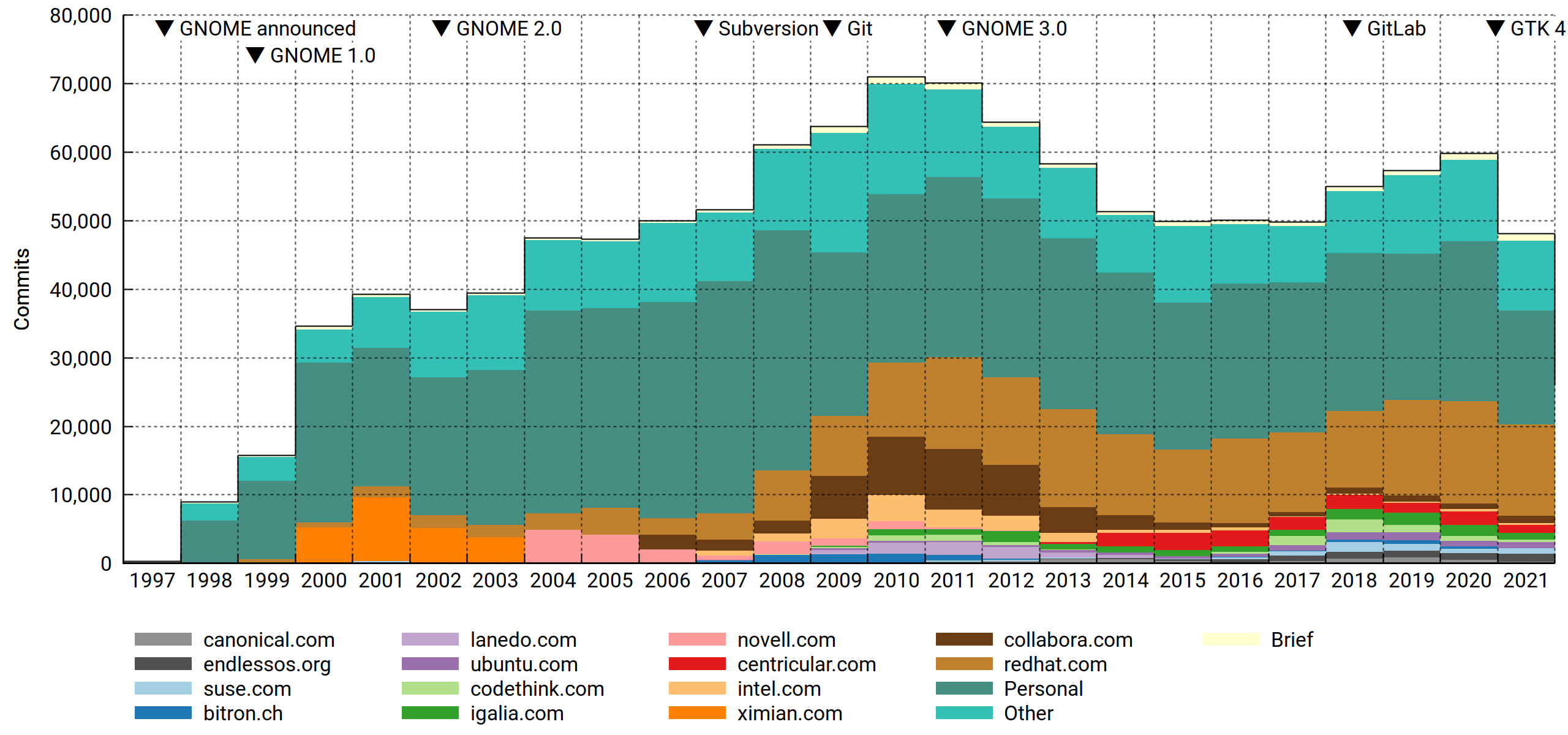
To be fair, the volume of contributions matters. Paid developers punch way above their numbers, and as we've seen before, Red Hat throws more punches than anyone. Surely this will go on forever (nervous laugh).
Eazel barely made the top-15 cut the last time around. It's now off the list. That's what you get for pushing the cloud, a full decade ahead of its time.
Active contributors, by repository
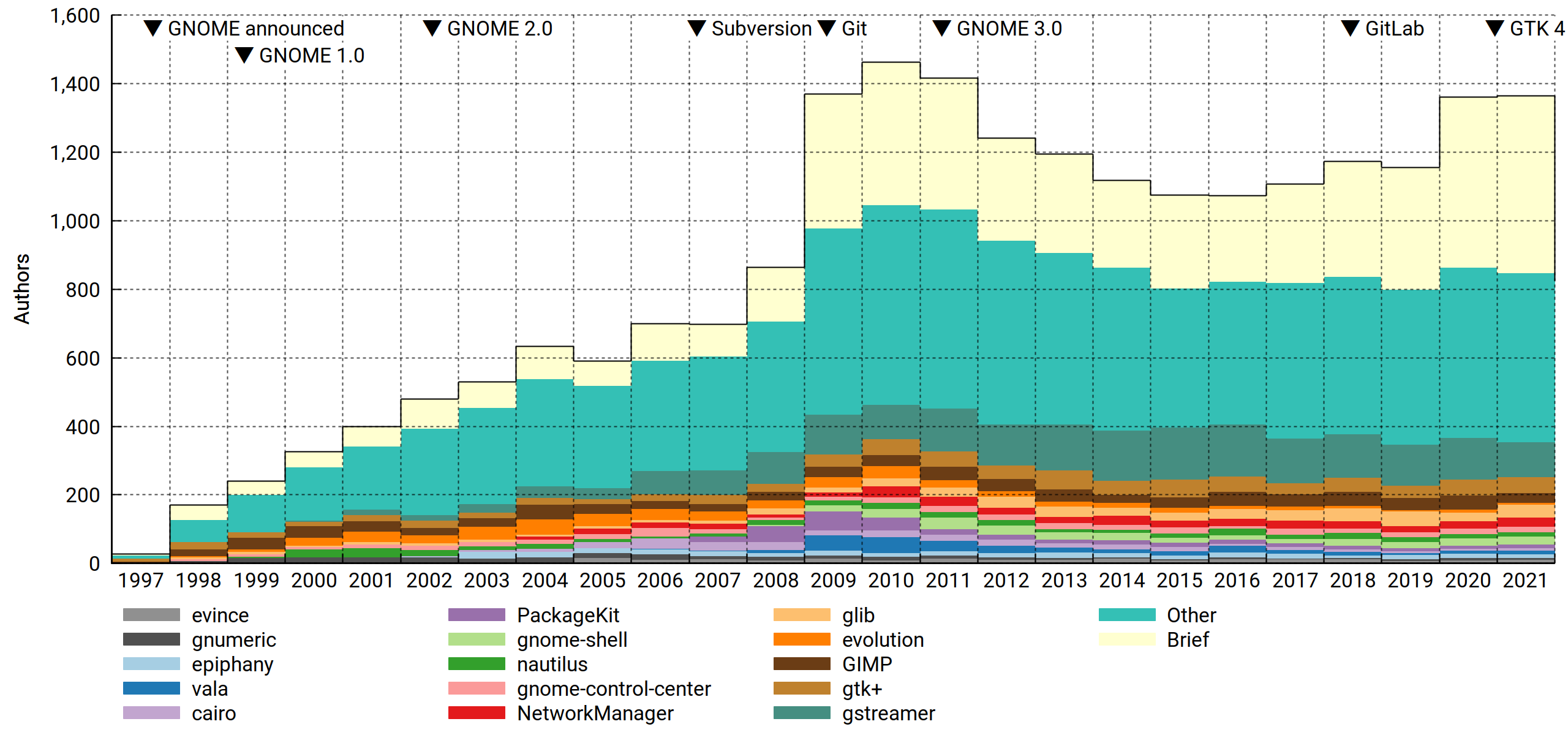
Slicing the data per repository makes for some interesting observations:
- Speaking of Eazel… Nautilus may be somewhat undermaintained for what it is, but it's seen worse. The 2005-2007 collapse was bad. In light of this, the drive to reduce complexity (cf. eventually removing the compact view etc) makes sense. I may have quietly gnashed my teeth at this at one point, but these days, Nautilus is very pleasant to use for small tasks. And for Big Work, you've got your terminal, a friendly shell and the GNU Coreutils. Now and forever.
- Confirming what "everyone knows", the maintainership of Evolution dwindled throughout the 2010s to the point where only Milan Crha is heroically left standing. For those of us who drank long and deep of the kool-aid it's something to feel apprehensive (and somewhat guilty) about.
- Vala played an interesting part in the GNOME infrastructure revolution of 2009-2011. Then it sort of… waned? Sure, Rust's the hot thing now, but I don't think it could eat its entire lunch.
- GLib is seriously well maintained!
Commit count, by repository

With commit counts, a few things pop out that weren't visible before:
- There's the not at all conspicuously named Tracker, another reminder of how transformative the 2009-2011 time frame really was.
- The mid-2010s come off looking sort of uneventful and bland in most of the charts, but Builder bucked that trend bigly.
- Notice the big drop in commits from 2020 to 2021? It's mostly just the GTK team unwinding (presumably) after the 4.0 release.
Active contributors, by file suffix
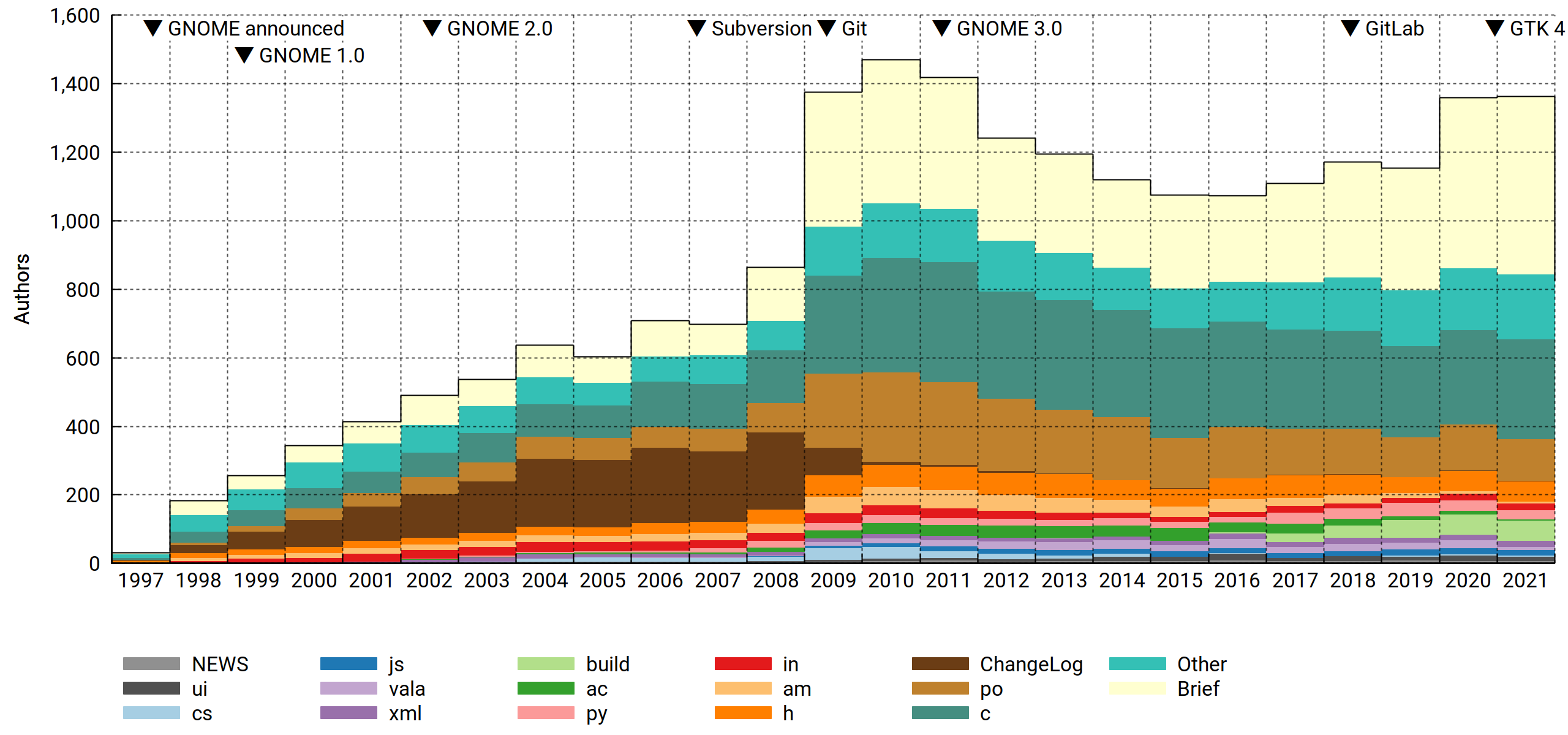
I devised this one mainly to address a comment from Smeagain. It's a valid concern:
There are a lot of people translating with each getting a single commit for whatever has been translated. During the year you get larger chunks of text to translate, then shortly before the release you finish up smaller tasks, clean up translations and you end up with lots of commits for a lot of work but it's not code. Not to discount translations bit you have a lot of very small commits.
I view the content agnosticism as a feature: We can't tell the difference in work investment between two code commits (perhaps a one-liner with a week of analysis behind it vs. a big chunk of boilerplate being copied in from some other module/snippet database), so why would we make any assumptions about translations? Maybe the translator spent an hour reviewing their strings, found a few that looked suspicious, broke out their dictionary, called a friend for advice on best practice and finally landed a one-line diff.
Therefore we treat content type foo the same as content type bar, big commits the same as small commits, and when tallying authors, few commits the same as many — as long as you have at least one commit in the interval (year or month), you'll be counted.
However! If you look at the commit logs (and relevant infrastructure), it's pretty clear that hackers and translators operate as two distinct groups. And maybe there are more groups out there that we didn't know about, or the nature of the work changed over time. So we slice it by content type, or rather, file suffix (not quite as good, but much easier). For files with no suffix separator, the suffix is the entire filename (e.g. Makefile).
A subtlety: Since each commit can touch multiple file types, we must decide what to do about e.g. a commit touching 10 .c files and 2 .py files. Applying the above agnosticism principle, we identify it as doing something with these two file types and assign them equal weight, resulting in .5 c commits and .5 py commits. This propagates up to the authors, so if in 2021 you made the aforementioned commit plus another one that's entirely vala, you'll tally as .5 c + .5 py + 1.0 vala, and after normalization you'll be a ¼ c, ¼ py and ½ vala author that year. It's not perfect (sensitive to what's committed together), but there are enough commits that it evens out.
Anyway. What can we tell from the resulting chart?
- Before Git, commit metadata used to be maintained in-band. This meant that you had to paste the log message twice (first to the ChangeLog and then as CVS commit metadata). With everyone committing to ChangeLogs all the time, it naturally (but falsely) reads as an erstwhile focal point for the project. I'm glad that's over.
- GNOME was and is a C project. Despite all manner of rumblings, its position has barely budged in 25 years.
- Autotools, however, was attacked and successfully dethroned. Between 2017 and 2021,
acandamgradually yielded to Meson'sbuild. - Finally, translators (
po) do indeed make up a big part of the community. There's a buried surprise here, though: Comparing 2010 to 2021, this group shrank a lot. Since translations are never "done" — in fact, for most languages they are in a perpetual state of being rather far from it — it's a bit concerning.
The bigger picture
I've warmed to Philip's astute observation:
Thinking about this some more, if you chop off the peak around 2010, all the metrics show a fairly steady number of contributors, commits, etc. from 2008 through to the present. Perhaps the interpretation should not be that GNOME has been in decline since 2010, but more that the peak around 2010 was an outlier.
Some of the big F/OSS projects have trajectories that fit the following pattern:
f (x) = ∑ [n = 1:x] (R * (1 – a)(n – 1))
That is, each year R new contributors are being recruited, while a fraction a of the existing contributors leave. R and a are both fairly constant, but since attrition increases with project size while recruitment depends on external factors, they tend to find an equilibrium where they cancel each other out.
For GNOME, you could pick e.g. R = 130 and a = .15, and you'd come close. Then all you'd need is some sharpie magic, and…
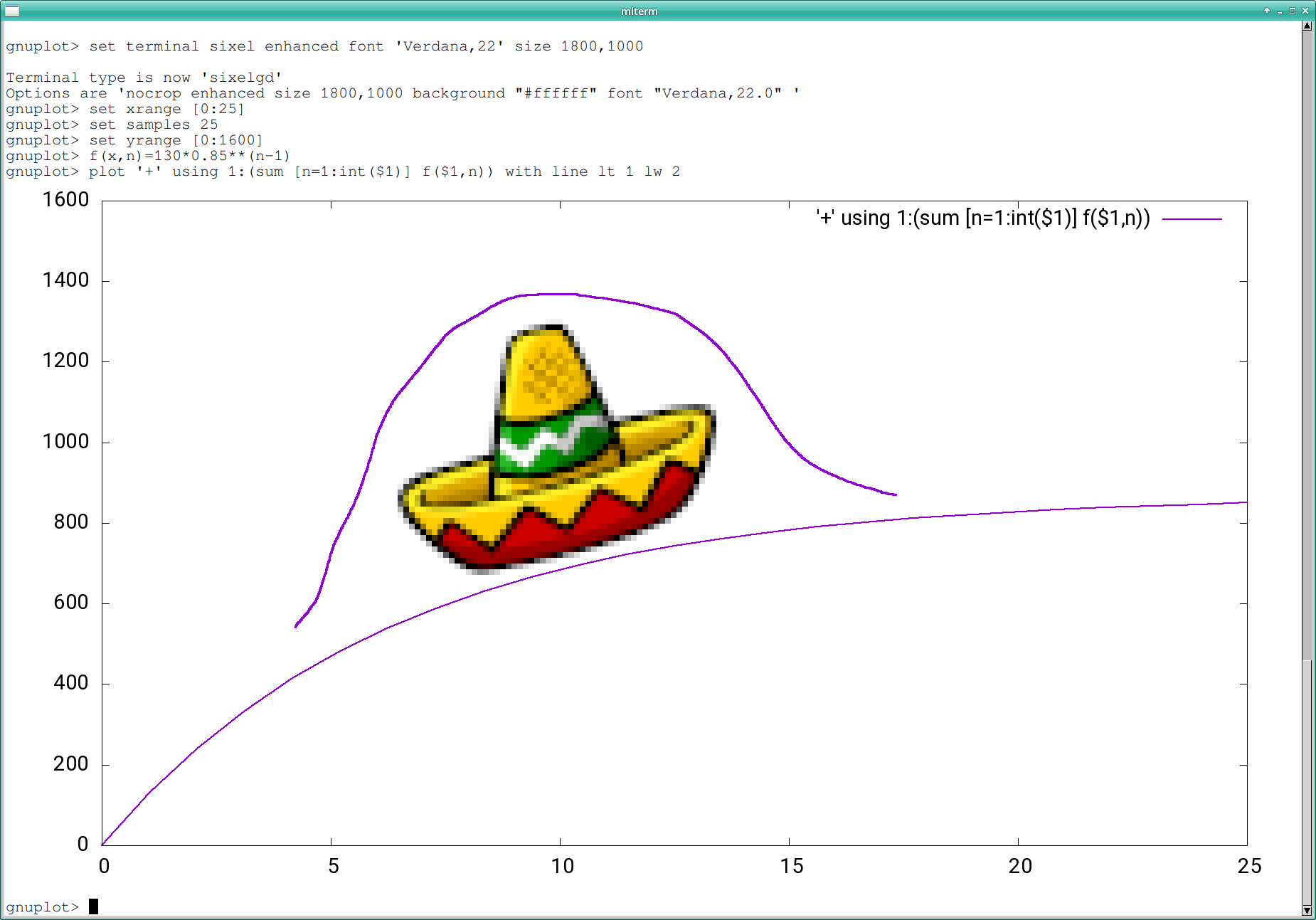
Not a bad fit. Happy 25th, GNOME.