
 Member
 DimStar
openSUSE Tumbleweed – Review of the week 2021/15
Dear Tumbleweed users and hackers,
After I left you and Tumbleweed in the capable hands of Richard for two weeks, it is good to be back. The week has seen a slightly lower count of published snapshots, but only because openQA was nice enough to find bugs that we did not you having to fight with. So, we only released two snapshots (0408 and 0414). As usual, the large gap means a few snapshots were tested in between, and things accumulated.
As a result, we managed to deliver these updates to the users:
- openSSL 1.1.1k
- systemd 246.13
- libvirt 7.2.0
- KDE frameworks 5.81.0
- KDE Plasma 5.21.4
- GNOME 40.0
- GStreamer 1.18.4
- Linux kernel 5.11.12
- Ruby 2.7.3 and Ruby 3.0.1
Staging projects are busy, but luckily with a bit of space to actually stage new requests. The main changes currently being tested and coming to you in the future are:
- LXQt 0.17.0
- Python 3.9 modules: besides python36-FOO and python38-FOO, we are testing to also shop python39-FOO modules; we already have the interpreter after all. Python 3.8 will remain the default for now. Building in snapshot 0415
- Linux kernel 5.11.14+
- LibreOffice 7.1.2.2
- UsrMerge is progressing well, thanks to Ludwig for his continued work here
- GCC 10.3.0
- GCC 11 as the default compiler
Historia y Geografía en GCompris – A fondo @g_compris (6)
Sigo aprovechándome de una publicación de Valencia Tech en la que se realizaba un listado completo de juegos que ofrece GCompris he empezado una serie donde se describen con más detalles los juegos. Seguimos la serie con la sección de conjunto de «Historia y geografía» en GCompris la cual, evidentemente, nos ofrece conocimientos sobre estas dos disciplinas.
Historia y Geografía en GCompris – A fondo @g_compris (6)
Para poder tener claro lo que hacen las aplicaciones de GCompris he pensado hacer una revisión a su enorme colección de juegos y actividades, realizando una simple captura de pantalla y una breve descripción.
Ya hemos descrito la sección de «Descubre la computadora». los «Juegos de lógica«, las «Bellas Artes«, la «Música» y «Experimenta«, es hora de hablar de la actividades de la sección «Historia y geografía» en GCompris.

Familia: una actividad donde aprenderemos las relaciones que hay entre las personas de una familia. Nosotros somos la persona del círculo blanco y debemos decir quien es la persona del círculo naranja

Señala los familiares: actividad parecida a la anterior donde debemos ir seleccionando la pareja que cumple la relación deseada. En el ejemplo inferior sería el padre (seleccionado en naranja) y el único hijo que aparece.

Historia de Louis Braille: en una serie de pantallas va apareciendo la historia del creador del sistema Braille y al finalizar las mismas tendremos una pequeña actividad donde debemos reordenar los hechos más importantes de su vida.

Números romanos: una excelente forma de ir aprendiendo los número romanos, los cuales ahora están en entredicho por su «dificultad».

Chronos: sencilla aplicación en la que debemos reordenar algunas imágenes de forma cronológica. Ideal para ordenar ideas.

Ubica países y Ubica regiones: las dos actividades de geografía, que me parecen pocas aunque pensemos que KDE tiene KGeography y Marble para este tipo de aplicaciones, donde debemos situar este tipo de organización territorial en su lugar correcto.


packagesの説明文書を訳しつつ、使えるものを探してみました(T編)
前回は Q でしたが、今回は T です。
パッケージ名 tcptraceroute
バージョン tcptraceroute-1.5.beta7-lp152.48.5
動作 ○
詳細
tcp を使った traceroute と同等の機能を実行するツールです。ICMP ではなくて、TCPで特定のポートを叩く形で traceroute 相当の出力を表示します。インストール時にはlibnet9-1.2~rc3-lp152.3.4 も必要となります(自動でインストールされます)。また、Thumbleweed には入っていません。LEAP のみです。
とあるサーバにtraceroute をしてみてもうまく動かなかったのですが、ポート 22 を指定して tcptraceroute を実行したところ、うまく表示できました。
% traceroute -n 210.171.174.178
traceroute to 210.171.174.178 (210.171.174.178), 30 hops max, 60 byte packets
 1  172.31.255.254  0.875 ms  0.529 ms  0.612 ms
 2  124.155.82.121  26.090 ms  25.900 ms  25.712 ms
 3  124.155.82.69  25.762 ms  25.571 ms  25.651 ms
 4  124.155.82.2  25.465 ms  25.627 ms  25.441 ms
 5  202.224.52.170  62.408 ms  62.183 ms  61.993 ms
 6  202.224.52.5  24.652 ms  27.474 ms  27.147 ms
 7  202.224.52.13  27.300 ms  16.913 ms  16.556 ms
 8  203.190.230.13  16.553 ms  16.760 ms  16.508 ms
 9  61.211.190.90  16.626 ms  16.458 ms 61.211.190.98  16.564 ms
10  219.124.151.210  16.147 ms  20.514 ms  19.783 ms
11  210.171.170.10  19.491 ms  19.283 ms  8.395 ms
12  210.171.170.34  7.396 ms  18.154 ms  17.967 ms
13  * * *
14  * * *
15  * * *
16  * * *
17  * * *
18  * * *
19  * * *
20  * * *
21  * * *
22  * * *
23  * * *
24  * * *
25  * * *
26  * * *
27  * * *
28  * * *
29  * * *
30  * * *

% tcptraceroute -n 210.171.174.178 22
Selected device eth0, address 172.31.255.189, port 57123 for outgoing packets
Tracing the path to 210.171.174.178 on TCP port 22 (ssh), 30 hops max
 1  172.31.255.254  0.614 ms  0.723 ms  0.702 ms
 2  124.155.82.121  4.183 ms  3.435 ms  3.461 ms
 3  124.155.82.69  4.362 ms  4.036 ms  3.909 ms
 4  124.155.82.2  3.690 ms  3.572 ms  4.257 ms
 5  202.224.52.170  6.843 ms  6.607 ms  10.887 ms
 6  202.224.52.5  6.634 ms  6.954 ms  6.597 ms
 7  202.224.52.13  5.601 ms  4.822 ms  5.065 ms
 8  203.190.230.13  5.674 ms  6.073 ms  7.402 ms
 9  61.211.190.90  6.423 ms  5.553 ms  6.690 ms
10  219.124.151.214  5.680 ms  6.735 ms  5.742 ms
11  210.171.170.10  6.646 ms  6.523 ms  7.012 ms
12  210.171.170.34  5.233 ms  7.322 ms  6.962 ms
13  192.168.3.252  10.616 ms  6.878 ms  10.268 ms
14  210.171.174.178 [open]  8.053 ms * *
ただ、万能ではないようです。Azure の中にある仮想マシンに、 tcptraceroute をポート 3389 や port 22 で実行してみたのですが、やはり繋がりませんでした。
パッケージ名 tdiff
バージョン tdiff-0.8.5-3.6.x86_64
動作 ◎
詳細
ディレクトリの比較をするコマンドです。diff とは違い、ファイルの差分を取るわけではありません。ディレクトリ中のファイルについて、日付や属性などを比較するためのツールです。たとえば、このような感じになります。
# tdiff . /home/ribbon
tdiff: (top-level): mode: 0700 0755
tdiff: (top-level): uid: root(0) ribbon(1000)
tdiff: (top-level): gid: root(0) users(100)
tdiff: (top-level): nlink: 9 21
tdiff: .bash_history: uid: root(0) ribbon(1000)
tdiff: .bash_history: gid: root(0) users(100)
tdiff: .bash_history: size: 1382 3546
tdiff: .bash_history: contents differ
tdiff: .bashrc: only present in /home/ribbon
tdiff: .cache: uid: root(0) ribbon(1000)
また、-v オプション( -vv,-vvv,-vvvv もあります)を指定すると統計情報を出力します。
tdiff: inode cache statistics:
 Hashing statistics for inode cache (@0x55916e3e4610):
    Table size              :      101
    Entry count             :       11
    Occupied buckets        :       10
    Distribution efficiency :    90.91%
    Average bucket length   :      1.1
    Max bucket length       :        2
tdiff: end
そのほかにもオプションが多数あります。数字の0 から 9 までのオプションを指定すると、チェックする項目が徐々に増えていくようになっています。
# tdiff -0 .local /home/ribbon/.local
# tdiff -1 .local /home/ribbon/.local
tdiff: share/RecentDocuments: only present in /home/ribbon/.local
tdiff: share/baloo: only present in /home/ribbon/.local
tdiff: share/flatpak/.changed: only present in .local
(略)
# tdiff -2 .local /home/ribbon/.local
tdiff: (top-level): mode: 0755 0700
tdiff: share/RecentDocuments: only present in /home/ribbon/.local
tdiff: share/baloo: only present in /home/ribbon/.local
tdiff: share/flatpak: mode: 0700 0755
tdiff: share/flatpak/.changed: only present in .local
(略)
# tdiff -3 .local /home/ribbon/.local
tdiff: (top-level): mode: 0755 0700
tdiff: (top-level): uid: root(0) ribbon(1000)
tdiff: (top-level): gid: root(0) users(100)
tdiff: share: uid: root(0) ribbon(1000)
tdiff: share: gid: root(0) users(100)
tdiff: share/RecentDocuments: only present in /home/ribbon/.local
tdiff: share/baloo: only present in /home/ribbon/.local
tdiff: share/flatpak: mode: 0700 0755
tdiff: share/flatpak: uid: root(0) ribbon(1000)
tdiff: share/flatpak: gid: root(0) users(100)
tdiff: share/flatpak/.changed: only present in .local
(略)
tdiff は、ファイルの有無や、属性の違いなどを一気に調べるときに便利に使えそうです。

GNOME 40, KDE Frameworks, Plasma Update in Tumbleweed
Two openSUSE Tumbleweed snapshots were released since last week’s blog.
The snapshots brought the much anticipated GNOME 40 as well as an update of KDE Frameworks 5.81.0, Plasma 5.21.4 and several other packages.
The 20210414 snapshots was a monster; the amount of packages updated in the snapshot was ginormous. The update to GNOME 40 brought some significant changes to the desktop environment. New visual changes with rounded corners, and gestures like a three-finger swipe to move between workspaces were among the improvements in the release. The app launcher is more customizable and more intuitive to navigate with a mouse. Another desktop environment that was updated in the snapshot was Plasma 5.21.4, which had color scheme fixes and a fix for a broken keyboard configurations with single layout on Wayland. The release also set the preferred aspect ratio to “21:9” over “64:27” with KScreen. KDE Frameworks 5.81.0 added high-brightness and low-brightness Breeze Icons and the user interface builder Kirigami fixed a potential crash in the SizeGroup. Even Xfce had in update in the snapshot; this update in the xfce4-settings 4.16.1 package fixed scaling and updated translations. Dependencies were update in the upgrade to nodejs15 15.14. There was a minor fix for the cups printing package and xterm 367 updated some patches and improved responsiveness of the terminal. Linux Kernel 5.11.12 arrived in the snapshot and had several Advanced Linux Sound Architecture fixes and a commit for a nosy driver with Common Vulnerabilities and Exposures (CVE)2021-3483. Both ruby2.7 and ruby3.0 received minor updates to fix an XML vulnerability and GStreamer 1.18.4 fixed mpeg-2 video handling and a memory leak. Several YaST packages also had updates.
A major version update of audacity 3.0.0 arrived in snapshot 20210408. The format to save Audacity projects was changed and a new analyzer called Label Sounds can label sounds and silences for more effective use of the application. Less than a handful of CVEs were updated in curl 7.76.0; the command line tool strips credentials from the auto-referer header field and adds support to read and store the referrer header. An update of systemd 246.13 had some changes to handle large packets more gracefully and rubygem-rubocop 1.12.1 had an enormous amount of fixes jumping from version 1.8.1. Another package that received a large amount of updates was vim 8.2.2725; there were fixes for a memory leak when compiling and a fix for hangs with the terminal when resized. The xf86-input-libinput package moved from version 0.30.0 to 1.0.0 and its biggest change was the change to an MIT Licence. Other packages updated in the snapshot were bind 9.16.12, fwupd 1.5.8 and openssl 1.1.1k, which fixed CVE-2021-3450 that had a problem with verifying a certificate chain when using a certain flag.
Más vídeos de Plasma 5.21
Hoy vamos de entrada ligera y visual, y que además del oficial hay más vídeos de Plasma 5.21 que demuestran lo pulido que ha salido esta nueva versión del escritorio de la Comunidad KDE.
Más vídeos de Plasma 5.21
De la mano de The Linux Experiment os presento un vídeo donde se comentan algunas de las novedades más destacadas de nuestro entorno favorito.

De esta forma nos comentan en un vídeo de unos 10 minutos el nuevo lanzador de aplicaciones y el nuevo aspecto de las barras de herramientas de las aplicaciones, bien sean qt o gtk.
También comenta el nuevo tema crepúsculo, que aúna lo mejor del tema calro y del oscuro de Breeze, y el nuevo Monitor del Sistema.
Las novedades de Plasma 5.21
Ya he hablado largo y tendido sobre las novedades de Plasma 5.21, podéis encontrarlos con esta etiqueta, pero he aquí un breve resumen de las novedades más destacada:
- Nuevo lanzador de aplicaciones que presenta una interfaz de usuario de doble panel, mejoras en la navegación con el teclado y con el ratón, mejor accesibilidad y soporte para idiomas con escritura de derecha a izquierda.
- Mejoras visuales en el tema por defecto de Plasma que disponen ahora de una combinación de colores renovada y lucen un nuevo estilo de barra de encabezado unificado con un aspecto limpio y refrescante.
- Presentación de Breeze Crepúsculo («Twilight») nevo tema oficial disponible que combina lo mejor de los temas claros y oscuros.
- Nueva interfaz de información del sistema llamdo Plasma System Monitor para monitorizar los recursos del sistema construido sobre Kirigami y un servicio de estadísticas del sistema llamado «KSystemStats».
- Mejoras y avances importantes en Kwin con Wayland cuyo código de composición de KWin se ha refactorizado mejorando la latencia (tiempo de respuesta del escritorio) .
- Nueva página para las «Preferencias del sistema»: las preferencias del cortafuegos de Plasma. Este módulo de configuración le permite ajustar y editar el cortafuegos de su sistema y constituye una interfaz gráfica para «UFW» y «firewalld».
¿De dónde viene #Vim? La historia de este gran editor
Veamos la historia que hay detrás del editor Vim y cómo este ha llegado a ser lo que es hoy

¿Te has preguntado alguna vez por qué para salir de Vim hay que pulsar :wq? ¿Sabes cual es la historia del editor Vim?
Viajemos hacia atrás en el tiempo y encontrémonos en los orígenes de la informática con algunos de los pioneros de mentes lúcidas.
Este artículo es una nueva entrega del curso “improVIMsado” que desde hace meses vengo publicando en mi blog sobre el editor Vim y que puedes seguir en estos enlaces:
- https://victorhckinthefreeworld.com/tag/vim/
- https://victorhck.gitlab.io/comandos_vim/articulos.html
Este artículo es una traducción que he realizado del artículo en inglés “Where Vim came from” escrito por Sinclair Target y publicado bajo una licencia CC-by-sa. Comenzamos…

Recientemente me encontré con un formato de archivo conocido como Intel HEX. Por lo que puedo deducir, los archivos Intel HEX (que usan la extensión .hex) están destinados a hacer que las imágenes binarias sean menos opacas al codificarlas como líneas de dígitos hexadecimales.
Aparentemente, son utilizados por personas que programan microcontroladores o necesitan grabar datos en ROM. En cualquier caso, cuando abrí un archivo HEX en Vim por primera vez, descubrí algo impactante. Aquí estaba este formato de archivo que, al menos para mí, era profundamente esotérico, pero Vim ya lo sabía todo.
Cada línea de un archivo HEX es un registro dividido en diferentes campos; Vim se había adelantado y coloreó cada uno de los campos con un color diferente. Ejecuté y pregunté con asombro :set ft? Y Vim me contestó triunfante: filetype = hex
Vim está en todas partes. Es utilizado por tanta gente que algo como la compatibilidad con archivos HEX no debería ser una sorpresa. Vim viene preinstalado en MacOS y tiene una gran participación en el mundo de Linux.
Es familiar incluso para las personas que lo odian, porque bastantes herramientas de línea de comandos populares arrojarán a los usuarios a Vim de forma predeterminada y los no iniciados que se quedan atrapados en Vim se ha convertido ya en un meme.
Hay sitios web importantes, incluido Facebook, que se desplazarán hacia abajo cuando presione la tecla j y hacia arriba cuando presione la tecla k, el testigo inesperado de la propagación de Vim a través de la cultura digital.
Y, sin embargo, Vim también es un misterio. A diferencia de React, por ejemplo, que todo el mundo sabe que es desarrollado y mantenido por Facebook, Vim no tiene un patrocinador obvio. A pesar de su ubicuidad e importancia, no parece haber ningún tipo de comité u organización que tome decisiones sobre Vim.
Podría pasar varios minutos hurgando en el sitio web de Vim sin tener una mejor idea de quién creó Vim o por qué. Si inicia Vim sin darle un argumento de archivo, verá el mensaje de inicio de Vim, que dice que Vim fue desarrollado por “Bram Moolenaar et al.” Pero eso no dice mucho.
¿Quién es Bram Moolenaar y quiénes son sus sombríos cómplices?
Quizás lo más importante, mientras hacemos preguntas, ¿por qué salir de Vim implica escribir :wq ? Claro, es una operación de “escritura” (write en inglés) seguida de una operación de “salida” (quit en inglés), pero esa no es una convención particularmente intuitiva.
¿Quién decidió que copiar texto debería llamarse “yank”? ¿Por qué: %s/foo/bar/gc es la abreviatura de “buscar y reemplazar”? Las idiosincrasias de Vim parecen demasiado arbitrarias para haber sido inventadas, pero ¿de dónde vienen?
La respuesta, como suele ser el caso, comienza con ese antiguo crisol de la informática, que es Bell Labs. En cierto sentido, Vim es solo la última versión de un software, llámelo el “editor de texto wq”, que se ha desarrollado y mejorado continuamente desde los albores de la época Unix.
Ken Thompson escribe un editor de líneas
En 1966, Bell Labs contrató a Ken Thompson. Thompson acababa de completar una maestría en Ingeniería Eléctrica y Ciencias de la Computación en la Universidad de California, Berkeley.
Mientras estaba allí, había utilizado un editor de texto llamado QED, escrito para el sistema de tiempo compartido de Berkeley entre 1965 y 1966.1 Una de las primeras cosas que hizo Thompson después de llegar a Bell Labs fue reescribir QED para el sistema de tiempo compartido compatible con MIT.
Más tarde escribiría otra versión de QED para el proyecto Multics. En el camino, expandió el programa para que los usuarios pudieran buscar líneas en un archivo y hacer sustituciones usando expresiones regulares.
El proyecto Multics, que al igual que el Berkeley Timesharing System buscaba crear un sistema operativo de tiempo compartido comercialmente viable, fue una asociación entre el MIT, General Electric y Bell Labs. AT&T finalmente decidió que el proyecto no iba a ninguna parte y se retiró.
Thompson y el investigador de Bell Labs Dennis Ritchie, ahora sin acceso a un sistema de tiempo compartido y sin la “sensación de computación interactiva” que ofrecían tales sistemas, se propusieron crear su propia versión, que eventualmente se conocería como Unix.
En agosto En 1969, mientras su esposa y su hijo pequeño estaban de vacaciones en California, Thompson reunió los componentes básicos del nuevo sistema, asignando “una semana a cada uno, al sistema operativo, el shell, el editor y el ensamblador”.
El editor se llamaría ed. Se basó en QED pero no fue una reimplementación exacta. Thompson decidió deshacerse de ciertas funciones de QED. La compatibilidad con las expresiones regulares se redujo para que solo se entendieran las expresiones regulares relativamente simples.
QED permitía a los usuarios editar varios archivos a la vez abriendo varios búferes, pero ed solo funcionaría con un búfer a la vez. Y mientras que QED podría ejecutar un búfer que contenga comandos, ed no haría tal cosa.
Estas simplificaciones pueden haber sido necesarias. Dennis Ritchie ha dicho que prescindir de las expresiones regulares avanzadas de QED “no fue una gran pérdida”.
ed ahora es parte de la especificación POSIX, por lo que si tiene un sistema compatible con POSIX, lo tendrá instalado en su computadora.
Vale la pena jugar con él, porque muchos de los comandos ed son hoy parte de Vim. Para escribir un búfer en el disco, por ejemplo, debe usar el comando w. Para salir del editor, debe usar el comando q. Estos dos comandos se pueden especificar en la misma línea a la vez, por lo tanto, wq.
Como Vim, ed es un editor modal; para ingresar al modo de entrada desde el modo de comando, debe usar el comando de inserción (i), el comando de agregar (a) o el comando de cambio (c), dependiendo de cómo esté tratando de transformar su texto. ed también introdujo la sintaxis s/foo/bar/g para buscar y reemplazar o “sustituir” texto.
Dadas todas estas similitudes, es de esperar que el usuario promedio de Vim no tenga problemas para usar ed. Pero ed no se parece en nada a Vim en otro aspecto importante. ed es un verdadero editor de líneas. Fue escrito y ampliamente utilizado en los días de la impresora de teletipos.
Cuando Ken Thompson y Dennis Ritchie estaban hackeando creando Unix, se veían así:

ed no te permite editar líneas ubicadas entre las otras líneas del búfer abierto, o mover un cursor, porque ed tendría que volver a imprimir todo el archivo cada vez que le hiciera un cambio.
En 1969 no existía ningún mecanismo para que ed “borrara” el contenido de la pantalla, porque la pantalla era solo una hoja de papel y todo lo que ya había salido se había impreso en tinta.
Cuando sea necesario, puede pedirle a ed que imprima un rango de líneas usando el comando list (l), pero la mayoría de las veces está operando con texto que no puede ver.
Por lo tanto, usar ed es un poco intentar orientarse en una casa oscura con una linterna de poca potencia. Solo puede ver una cantidad limitada a la vez, por lo que debe hacer todo lo posible para recordar dónde está todo.
A continuación, se muestra un ejemplo de una sesión de educación. Agregué comentarios (después del carácter #) que explican el propósito de cada línea, aunque si realmente se ingresaran esos caracteres, ed no los reconocería como comentarios y se quejaría:
[sinclairtarget 09:49 ~]$ ed
i                           # Enter input mode
Hello world!
Isn't it a nice day?
.                           # Finish input
1,2l                        # List lines 1 to 2
Hello world!$
$
2d                          # Delete line 2
,l                          # List entire buffer
Hello world!$
Isn't it a nice day?$
s/nice/terrible/g           # Substitute globally
,l
Hello world!$
Isn't it a terrible day?$
w foo.txt                   # Write to foo.txt
38                          # (bytes written)
q                           # Quit
[sinclairtarget 10:50 ~]$ cat foo.txt
Hello world!
Isn't it a terrible day?
Como podéis ver, ed no es un programa especialmente hablador.
Ed funcionó bastante bien para Thompson y Ritchie. A otros les resultó difícil de usar y adquirió la reputación de ser un ejemplo particularmente atroz de la hostilidad de Unix hacia el novato.
En 1975, un hombre llamado George Coulouris desarrolló una versión mejorada de ed en el sistema Unix instalado en el Queen Mary’s College de Londres. Coulouris escribió a su editor para aprovechar las pantallas de video que tenía disponibles en Queen Mary’s.
A diferencia de ed, el programa de Coulouris permitía a los usuarios editar una sola línea mostrada en la pantalla, navegando a través de la línea pulsación de tecla por pulsación de tecla (imagínese usando Vim en una línea a la vez).
Coulouris llamó a su programa em, o “editor para mortales“, que supuestamente se había inspirado a hacer después de que Thompson hizo una visita a Queen Mary’s, vio el programa que Coulouris había construido y lo descartó, diciendo que no tenía necesidad de ver el estado de un archivo mientras lo edita.
En 1976, Coulouris los llevó consigo a UC Berkeley, donde pasó el verano como visitante del departamento de informática. Esto fue exactamente diez años después de que Ken Thompson dejara Berkeley para trabajar en Bell Labs.
En Berkeley, Coulouris conoció a Bill Joy, un estudiante graduado que trabajaba en Berkeley Software Distribution (BSD). Coulouris se los mostró a Joy, quien, comenzando con el código fuente de Coulouris, creó una versión mejorada de ed llamada ex, que significa “edición extendida”.
La versión 1.1 de ex se incluyó con el primer lanzamiento de BSD Unix en 1978. ex era en gran parte compatible con ed, pero agregó dos modos más: un modo “abierto”, que permitía la edición de una sola línea como había sido posible con em, y un modo “visual”, que se apoderó de toda la pantalla y permitió la edición en vivo de un archivo completo como estamos acostumbrados hoy.
Para la segunda versión de BSD en 1979, se introdujo un ejecutable llamado vi que hacía poco más que abrir ex en modo visual.
ex/vi (de ahora en adelante vi) estableció la mayoría de las convenciones que ahora asociamos con Vim que aún no formaban parte de ed.
El terminal de video que estaba usando Joy era un Lear Siegler ADM-3A, que tenía un teclado sin teclas de cursor. En cambio, se pintaron flechas en las teclas h, j, k y l, razón por la cual Joy usó esas teclas para el movimiento del cursor en vi.
La tecla de escape en el teclado ADM-3A también estaba donde hoy encontraríamos la tecla de tabulación, lo que explica cómo a una tecla tan difícil de alcanzar se le asignó una operación tan común como salir de un modo.
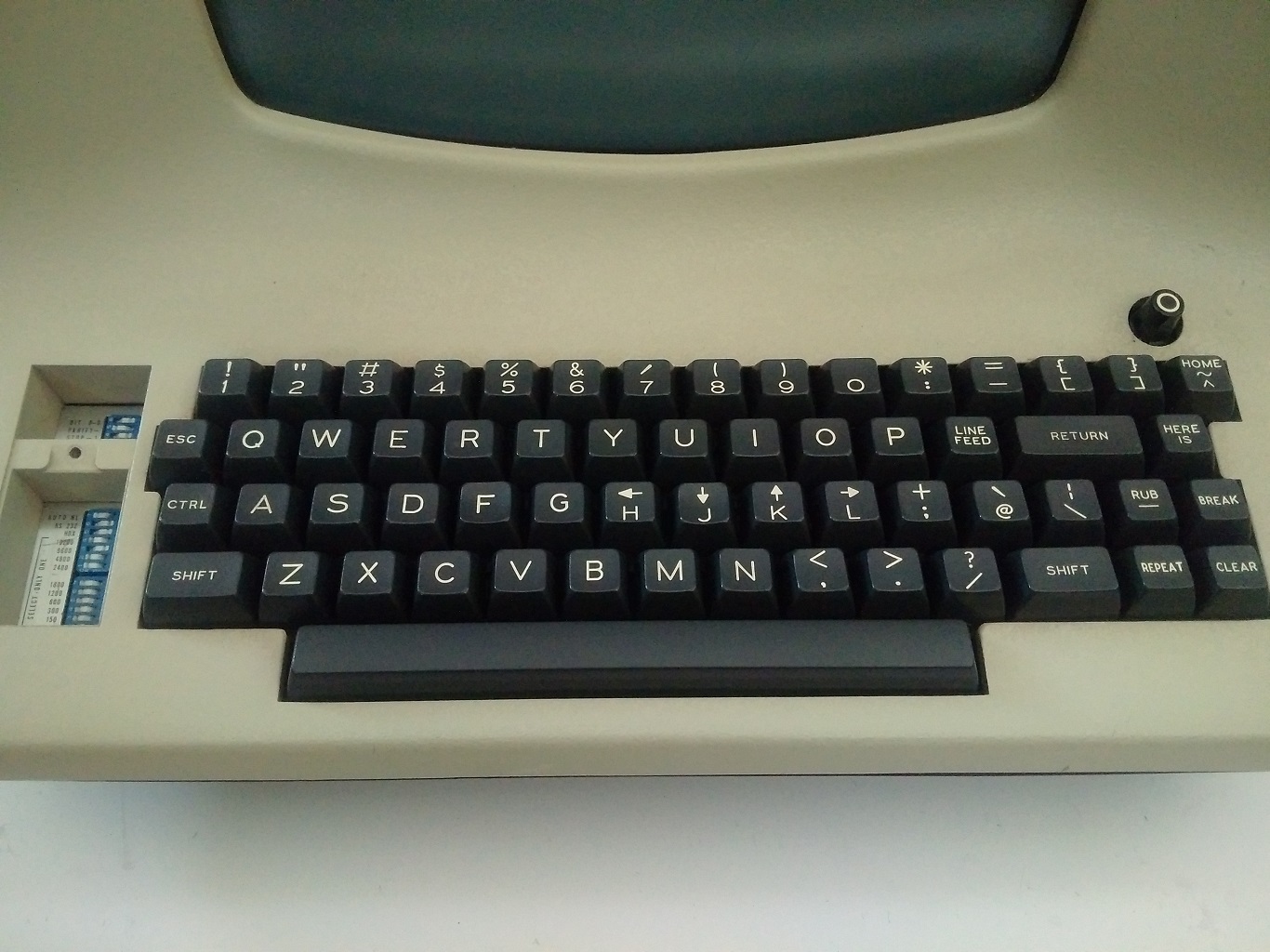
El caracter : que precede a los comandos también proviene de vi, que en el modo normal (es decir, el modo ingresado al ejecutar ex) usaba : como indicador.
Esto abordó una queja que había desde hace tiempo sobre ed, que, una vez lanzada, saluda a los usuarios con absoluto silencio. En modo visual, guardar y salir ahora implicaba escribir el clásico :wq.
Las acciones de “yank” (copiar) y “put“ (pegar o poner), las marcas y el comando set para configurar las opciones eran parte del vi original. Las funciones que usamos en el curso de la edición básica de texto hoy en Vim son en gran parte funciones de vi.
vi fue el único editor de texto incluido con BSD Unix además de ed. En ese momento, Emacs podía costar cientos de dólares (esto fue antes de GNU Emacs), por lo que vi se volvió enormemente popular.
Pero vi era un descendiente directo de ed, lo que significaba que el código fuente no podía modificarse sin una licencia fuente de AT&T. Esto motivó a varias personas a crear versiones de código abierto de vi.
STEVIE (Editor ST para entusiastas de VI) apareció en 1987, Elvis apareció en 1990 y nvi apareció en 1994. Algunos de estos clones agregaron características adicionales como resaltado de sintaxis y ventanas divididas. Elvis, en particular, vio muchas de sus características incorporadas en Vim, ya que muchos usuarios de Elvis presionaron por su inclusión.
Bram Moolennar escribe Vim

“Vim”, que ahora es la abreviación de “Vi mejorado”, originalmente significaba “Vi imitación”. Como muchos de los otros clones de vi, Vim comenzó como un intento de replicar vi en una plataforma donde no estaba disponible.
Bram Moolenaar, un ingeniero de software holandés que trabaja para una empresa de fotocopiadoras en Venlo, Países Bajos, quería algo como vi para su nuevo equipo Amiga 2000. Moolenaar se había acostumbrado a usar vi en los sistemas Unix en su universidad y ahora estaba “en sus dedos.”
Así que en 1988, utilizando el clon existente de STEVIE vi como punto de partida, Moolenaar comenzó a trabajar en Vim.
Moolenaar tenía acceso a STEVIE porque STEVIE había aparecido previamente en algo llamado “Fred Fish disk”. Fred Fish era un programador estadounidense que enviaba por correo un disquete todos los meses con una cuidada selección del mejor software de código abierto disponible para la plataforma Amiga.
Cualquiera podía solicitar un disco por nada más que el precio del envío. Se lanzaron varias versiones de STEVIE en “Fred Fish disk”. La versión que usó Moolenaar había sido lanzada en el disco 256.11 de Fred Fish (lamentablemente, los discos de Fred Fish parecen no tener nada que ver con Freddi Fish).
A Moolenaar le gustaba STEVIE, pero rápidamente se dio cuenta de que faltaban muchos comandos vi. Así que, para la primera versión de Vim, Moolenaar hizo de la compatibilidad con vi su prioridad.
Alguien más había escrito una serie de macros vi que, cuando se ejecutaban a través de un editor compatible con vi, podían resolver un laberinto generado aleatoriamente. Moolenaar pudo hacer que estas macros funcionaran en Vim.
En 1991, Vim fue lanzado por primera vez en el disco 591 de Fred Fish como “Vi Imitation”. Moolenaar había agregado algunas características (incluyendo deshacer multinivel y un modo de “corrección rápida” para errores del compilador) que significaban que Vim había superado vi . Pero Vim seguiría siendo “Vi Imitation” hasta Vim 2.0, lanzado en 1993 a través de FTP.
Moolenaar, con la ayuda ocasional de varios colaboradores de Internet, agregó funciones a Vim a un ritmo constante.
Vim 2.0 introdujo soporte para la opción de ajuste y para el desplazamiento horizontal a través de largas líneas de texto. Vim 3.0 agregó soporte para ventanas divididas y búferes, una característica inspirada en el clon de vi nvi.
Vim ahora también guarda cada búfer en un archivo de intercambio, para que el texto editado pudiera resistir a un bloqueo del equipo o editor.
Vimscript hizo su primera aparición en Vim 5.0, junto con soporte para resaltado de sintaxis. Mientras tanto, la popularidad de Vim fue creciendo. Fue portado a MS-DOS, a Windows, a Mac e incluso a Unix, donde compitió con el vi original.
En 2006, Vim fue votado como el editor más popular entre los lectores de Linux Journal. En la actualidad, según la Encuesta para desarrolladores de Stack Overflow 2018, Vim es el editor en modo texto (es decir, emulador de terminal) más popular, utilizado por el 25,8% de todos los desarrolladores de software ( y el 40% de la gente de Sysadmin / DevOps).
Durante un tiempo, a fines de la década de 1980 y durante la de 1990, los programadores libraron las “Guerras de los editores”, que enfrentaron a los usuarios de Emacs contra los usuarios de vi (y eventualmente Vim). Si bien Emacs ciertamente todavía tiene seguidores, algunas personas piensan que las guerras de los editores terminaron y que Vim ganó.
La Encuesta de desarrolladores de Stack Overflow de 2018 sugiere que esto es cierto; sólo el 4,1% de los encuestados utilizó Emacs.
¿Cómo llegó Vim a tener tanto éxito? Obviamente, a la gente le gustan las características que Vim ofrece. Pero yo diría que la larga historia detrás de Vim ilustra que tiene más ventajas que unicamente su conjunto de características.
El código base de Vim se remonta solo a 1988, cuando Moolenaar comenzó a trabajar en él. El “editor de texto wq”, por otro lado, la visión más amplia de cómo debería funcionar un editor de texto Unix, se remonta a medio siglo.
El “editor de texto wq” tenía algunas expresiones concretas diferentes, pero gracias en parte a la inusual atención prestada a la compatibilidad con versiones anteriores tanto por Bill Joy como por Bram Moolenaar, las buenas ideas se acumularon gradualmente con el tiempo.
El “editor de texto wq”, en ese sentido, es uno de los proyectos de código abierto más antiguos y exitosos, habiendo disfrutado de las contribuciones de algunas de las mentes más brillantes del mundo de la informática.
No creo que el enfoque de desarrollo de “compañía-reciente-que-desecha-todos-precedentes-y-crea-nuevo-software-disruptivo” sea necesariamente malo, pero Vim es un recordatorio de que el enfoque colaborativo e incremental también puede producir maravillas.
Y hasta aquí el artículo y mi traducción. Espero que te resulte interesante la lectura de este pedazo de historia en cuentión tecnológica. Y cómo el software libre es una pieza importante a la hora de mejorar el software junto con el aporte de muchas personas.
Te invito a leer el artículo original y descubrir sus enlaces, y te suscribas a sus feeds.

Slimbook ofrece serigrafía por láser para sus dispositivos
Hoy me congratula presentaros un nuevo servicio de la compañía de ensamblaje valenciana de ordenadores GNU/Linux. Y es que Slimbook ofrece serigrafía por láser para sus dispositivos con lo que podemos personalizar de forma única sus portátiles (tecla SUPER y tapa de portátil) u ordenadores de sobremesa.
Slimbook ofrece serigrafía por láser para sus dispositivos
Una de las ventajas de adquirir productos de una empresa que monta ordenadores a medida y que siempre está buscando nuevas formas de complacer a sus clientes es que suele ofrecer soluciones únicas y que van mas allá del hardware.
Juesto eso es el nuevo servicio que ofrece Slimbook desde hace poco, y es que a partir de ahora, y por un precio razonable, podemos serigrafiar con nuestro diseño favorito algunas partes de los dispositivos que les adquiramos.
De esta forma, se puede personalizar:
- La tecla SUPER (más conocida como tecla Windows)
- La tapa de nuestro portátil
- La carcasa del ordenador de sobremesa KYMERA

En todos los casos la serigrafía cumplirá las siguientes normas:
- El logo SLIMBOOK no se eliminará (evidentemente la marca del producto se debe mantenir por motivos de marketing).
- En el caso de portátil o sobremesa, el logo se pondrá junto al de Slimbook en la posición que valore nuestro departamento de diseño para que quede lo mejor posible.
- El diseño que enviará en formato svg, cuando se responda al correo de confirmación del pedido.
- Es importante enviar el archivo svg del dibujo en negro, siendo el negro la parte que se serigrafiará.
Los precios van desde 15 a 40 € según qué queramos personalizar, una cantidad que en mi humilde opinión, no es desorbitado si queremos obtener un producto único.
Y para muestra nada mejor que un pequeño vídeo del equipo de Slimbook serigrafiando un KDE Slimbook en segunda pasada, un proceso que impresiona mucho, sobre todo al verlo en directo.
Geoestrategías de Big Data, control de la libertad. Software libre y educación – Mesa Redonda
En esta ocasión casi que no llego pero al final lo puedo anunciar con más de un día de antelación. Me congratula promocionar una nueva actividad de la Asociación GNU/Linux València que lleva por título «Geoestrategías de Big Data, control de la libertad. Software libre y educación» una mesa redonda moderada por D. José M. Mira Ros con la participación de lo Doctores Wim Dierckxsens y Richard M. Stallman.
Geoestrategías de Big Data, control de la libertad. Software libre y educación – Mesa Redonda
De nuevo me complace compartir con vosotros los eventos de un grupo de personas que en Valencia está impulsado el Software Libre gracias a sus reuniones tanto presenciales cuando se podía como virtuales.
Se trata un nuevo encuentro organizado del grupo de GNU/Linux València que el próximo miércoles 41 de abril de 2021 realizarán de forma online y que tiene por temática: Geoestrategías de Big Data, control de la libertad. Software libre y educación

En esta ocasión se trata de una mesa redonda que contará con la presencia del doctor Richard M. Stallman y el doctor Wim Dierckxsens moderada por D. José M. Mira Ros en la que hablarán de los retos futuros que tiene una educación que ser verá muy afectada por el uso datos masivos y su posible (y probable) injerencia en la libertad del alumnado.
Si tenéis preguntas las podéis formular preguntas enviando un correo a preguntas (@) sicsal.net
Resumiendo, la información básica es:
- Fecha: miércoles, 14 de abril de 2021
- Horario: 21:00 CEST (19:00 UTC)
- Lugar: Streaming https://streaming.gnulinuxvalencia.org/talk.webm
- ¿Registro necesario? No
Si podéis asistir no os lo perdáis, seguro que no quedáis decepcionados.
Más información: GNU/Linux València
¡Únete a GNU/Linux València!
Aprovecho para recordar que desde hace unos meses, los chicos de GNU/Linux Valencia ya tienen su menú propio en el blog, con lo que seguir sus eventos en esta humilde bitácora será más fácil que nunca, y así podréis comprobar su alto nivel de actividades que realizan que destacan por su variedad.
Y que además, GNU/Linux València ha crecido y se ha ¡¡¡convertido en asociación!!! Así que si buscas una forma de colaborar con el Software Libre, esta asociación puede ser tu sitio. ¡Te esperamos!
De Mandrake a /e/ OS y e.foundation en Compilando Podcast #53
Sigo con los podcast atrasados de 24H24L, con lo que me está costando ponerme al día con todos los podcast de Software lIbre que hay, pero debo reconocer que cuando sale uno de Compilando Podcast lo subo rápidamente al principio de las lista. Así que os quiero recomendar el «De Mandrake a /e/ OS y e.foundation» de Compilando Podcast, un audio que llega en forma de crossover con Más Allá de la Innovación.
De Mandrake a /e/ OS y e.foundation en Compilando Podcast #53
En palabras del gran Paco Estrada que sirven de introducción del episodio 53 de Compilando Podcast:

La edición de hoy de Compilando Podcast es un crossover con Más Allá de la Innovación y estará dedicado a Gaël Duval. No podemos hablar de Gaël sin mencionar Mandrake. Así que antes de conocer la persona de Gaël y sus nuevos retos, empezaremos preguntando : ¿Qué significó Mandrake y qué trajo al ecosistema GNU/Linux?
De Mandrake a Eelo (que nace 2017 en Kickstarter, mediante crouwdfounding) y que después se transforma en /e/OS, … hay un largo viaje que conoceremos de primera mano.
Cuando hablamos de los usos o quizás abusos de nuestros datos de compañías como Google, ha surgido en el mundo Linux un debate sobre la privacidad en ciertas distribuciones como Ubuntu o Deepin ¿Se está siguiendo en estas distribuciones una filosofía similar a la de Google, en algunos aspectos, como forma de hacer negocio?
¿Cuánto y cómo de compatible es /e/ OS con el store de Google? Y ¿cómo están planteado la privacidad en las apps que corren sobre / e / os y que ya en sus términos reconocen un rastreo? Y, dentro de mismo ámbito , ¿Se usa algún sistema para detectar y avisar o alertar de uso indebido o backports en aquellas aplicaciones que lo advierten, al estilo delo que plantea IOS en su próxima entrega?

Terminaremos sabiendo como las personas, empresas u organismos públicos pueden colaborar en el proyecto que lidera Gaël Duval.
Como siempre os invito a escuchar el podcast completo y compartirlo con vuestro entorno cercano y en vuestras redes sociales.
Más información: #53 De Mandrake a /e/ OS y e.foundation con Gaël Duval
¿Qué es Compilando Podcast?
Dentro del mundo de los audios de Software Libre, que los hay muchos y de calidad, destaca uno por la profesionalidad de la voz que lo lleva, el gran Paco Estrada, y por el mimo con el que está hecho. No es por nada que ganó el Open Awards’18 al mejor medio, un reconocimiento al trabajo realizado por la promoción .
A modo de resumen, Compilando Podcast es un proyecto personal de su locutor Paco Estrada que aúna sus pasiones y que además, nos ofrece una voz prodigiosa y una dicción perfecta.
Más información: Compilando Podcast
Recopilación del boletín de noticias de la Free Software Foundation – abril de 2021
Boletín de noticias relacionadas con el software libre publicado por la Free Software Foundation.

La Free Software Foundation (FSF) es una organización creada en Octubre de 1985 por Richard Stallman y otros entusiastas del software libre con el propósito de difundir esta filosofía.
La Fundación para el software libre (FSF) se dedica a eliminar las restricciones sobre la copia, redistribución, entendimiento, y modificación de programas de computadoras. Con este objeto, promociona el desarrollo y uso del software libre en todas las áreas de la computación, pero muy particularmente, ayudando a desarrollar el sistema operativo GNU.
Además de tratar de difundir la filosofía del software libre, y de crear licencias que permitan la difusión de obras y conservando los derechos de autorías, también llevan a cabo diversas campañas de concienciación y para proteger derechos de los usuarios frentes a aquellos que quieren poner restricciones abusivas en cuestiones tecnológicas.
Mensualmente publican un boletín (supporter) con noticias relacionadas con el software libre, sus campañas, o eventos. Una forma de difundir los proyectos, para que la gente conozca los hechos, se haga su propia opinión, y tomen partido si creen que la reivindicación es justa!!
- En este enlace podéis leer el original en inglés: https://www.fsf.org/free-software-supporter/2021/april
- Y traducido en español (cuando esté traducido) en este enlace: https://www.fsf.org/free-software-supporter/2021/abril-s

Puedes ver todos los números publicados en este enlace: http://www.fsf.org/free-software-supporter/free-software-supporter
Después de muchos años colaborando en la traducción al español del boletín, desde inicios del año 2020 he decidido tomarme un descanso en esta tarea.
Pero hay detrás un pequeño grupo de personas que siguen haciendo posible la difusión en español del boletín de noticias de la FSF.
¿Te gustaría aportar tu ayuda en la traducción? Lee el siguiente enlace:
Por aquí te traigo un extracto de algunas de las noticias que ha destacado la FSF este mes de abril de 2021
Trabajo en curso para mejorar la gobernanza en la FSF
Del 29 de marzo
Desde el anuncio de que el fundador de la FSF, Richard Stallman, había retornado a la junta de dirección de la FSF, la juntaha estado trabajando duro para esforzarse en hacer la FSF más transparente y sensible a las necesidades de la comunidad del software libre.
Los cambios en las operaciones y el liderazgo en la FSF todavía están en curso mientras se escribe esto, y próximamente se darán nuevos anuncios. Puedes estar al día en estos enlaces: https://www.fsf.org/news y las redes sociales de la FSF.
Los cambios en los estatutos y estructura de la FSF deben hacerse con un gran cuidado, pero la junta está actuando de urgencia. Leemos todo el “feedback” que nos mandáis a info@fsf.org.
- https://www.fsf.org/news/preliminary-board-statement-on-fsf-governance
- https://www.fsf.org/news/update-on-work-to-improve-governance-at-the-fsf
- https://www.fsf.org/news/welcoming-ian-kelling-to-staff-seat-on-fsfs-board-of-directors
- https://www.fsf.org/news/statement-from-the-fsf-board-of-directors-meeting-on-march-29-2021
Reembolso de un Windows preinstalado. Lenovo debe pagar 20.000 euros en daños
Del 3 de marzo por FSFE
En un juicio histórico en Italia, en un caso iniciado por un colaborador de la FSFE llamado Luca Bonissi, Lenovo fue sentenciado a pagar 20.000 euros por daños por un comportamiento abusivo por negar un reembolso del precio de una licencia de Windows preinstalado.
Las novedades de marzo de GNU Emacs
Del 29 de marzo por Sacha Chua
Sacha Chua realiza un repaso semanal de las novedades dentro de GNU Emacs. En este caso encontraremos información sobre varios aspectos de GNU Emacs y Org-mode que siempre son interesantes.

Estas son solo algunas de las noticias recogidas este mes, pero hay muchas más muy interesantes!! si quieres leerlas todas (cuando estén traducidas) visita este enlace:
Y todos los números del “supporter” o boletín de noticias de 2021 aquí:
—————————————————————