
 Member
 baltolkien
Mouse wheel Window Control – Plasmoides de KDE (173)
La lista de plasmoides no para de crecer y sigue aumentando con nuevas alternativas para personalizar y adaptar nuestro escritorio para nuestras necesidades. En esta ocasión os presento Mouse wheel Window Control, un simple widget que nos permite añadir más funcionalidades a la rueda de nuestro ratón, una forma más de adaptar nuestro entorno de trabajo a nuestras costumbres.
Mouse wheel Window Control – Plasmoides de KDE (173)
Aunque normalmente las opciones por defecto suelen ser las más utilizadas nunca viene mal tener a nuestra disposición otras posibilidades por si tenemos otros usos y maneras de utilizar nuestro ordenador.

De la mano y mente de borealis nos llega un pequeño plasmoide que nos permitirá modificar el comportamiento de la rueda del ratón sobre la barra de tareas de Plasma.
Para ser más concreto las acciones que podemos seleccionar son las siguientes:
- Desplazando hacia arriba
- Abre una nueva instancia
- Selecciona una tarea
- Maximiza o restaura una ventana o grupo
- Desplazando hacia abajo
- Minimiza o restaura la ventana o el grupo
- Cierra la ventana o el grupo
Todo ello controlado por una completa ventana de opciones.

Y como siempre digo, si os gusta el plasmoide podéis “pagarlo” de muchas formas en la nueva página de KDE Store, que estoy seguro que el desarrollador lo agradecerá: puntúale positivamente, hazle un comentario en la página o realiza una donación. Ayudar al desarrollo del Software Libre también se hace simplemente dando las gracias, ayuda mucho más de lo que os podéis imaginar, recordad la campaña I love Free Software Day 2017 de la Free Software Foundation donde se nos recordaba esta forma tan sencilla de colaborar con el gran proyecto del Software Libre y que en el blog dedicamos un artículo.
Más información: KDE Store
¿Qué son los plasmoides?
Para los no iniciados en el blog, quizás la palabra plasmoide le suene un poco rara pero no es mas que el nombre que reciben los widgets para el escritorio Plasma de KDE.
En otras palabras, los plasmoides no son más que pequeñas aplicaciones que puestas sobre el escritorio o sobre una de las barras de tareas del mismo aumentan las funcionalidades del mismo o simplemente lo decoran.
packagesの説明文書を訳しつつ、使えるものを探してみました(B編)
前回は G でしたが、今回は B です。
パッケージ名 bats
バージョン bbe-0.2.2-3.5
動作 ◎
詳細
ブロック単位で処理が出来る sed のようなストリームエディタです。sed はあくまでもストリームとして処理しますが、 bbe ではバイト位置やブロック単位での処理が出来ます。
http://bbe-.sourceforge.net/bbe.html#bbe-programs に例がありますが、
echo “The quick brown fox jumps over a lazy dog” | bbe -b “/The/:21” -e “j 4” -e “s/ /X/”
を実行すると
The quickXbrownXfoxXjumps over a lazy dog
と言う結果が得られます。まず、処理ブロックとして “The” という文字列から21文字目までを対象とし、さらに、 “j” から4文字は対象外とし、そののち、空白を大文字の “X” に置き換えるという動作をします。また、
echo “The quick brown fox jumps over a lazy dog” | bbe -b “:5” -e “A XYZ”
は5バイトのブロックを定義し、そのブロックの後に “XYZ” という文字列を付加します。
The qXYZuick XYZbrownXYZ fox XYZjumpsXYZ overXYZ a laXYZzy doXYZg
バイト位置を考えねばならない文字列変換を行うときには便利に使えそうです。
パッケージ名 bing
バージョン
動作 ◎
詳細
2つのポイントの間のスループットを ICMP パケットで調べるツールです。ping の結果を整理して表示するようなイメージです。結果は以下のようになります。
2つの host を指定する意味はあまりないように思えますが、ping の結果を整理(平均を取るなど)しなくてもすむのは便利かもしれません。
% bing  localhost www.opensuse.org
BING    localhost (127.0.0.1) and proxy-nue.opensuse.org (195.135.221.140)
        44 and 108 data bytes
1024 bits in 3.896ms: 262834bps, 0.003805ms per bit
1024 bits in 0.000ms
1024 bits in 0.090ms: 11377778bps, 0.000088ms per bit
1024 bits in 0.000ms
^C
--- localhost statistics ---
bytes   out    in   dup  loss   rtt (ms): min       avg       max
   44  1275  1275          0%           0.037     0.057     0.160
  108  1275  1275          0%           0.017     0.025     0.126

--- proxy-nue.opensuse.org statistics ---
bytes   out    in   dup  loss   rtt (ms): min       avg       max
   44  1275  1274          0%         241.446   244.020   402.245
  108  1274  1273          0%         241.444   244.103   329.752

--- estimated link characteristics ---
warning: rtt big host1 0.017ms < rtt small host2 0.037ms
warning: rtt big host2 241.444ms < rtt small host2 241.446ms

minimum delay difference is zero, can't estimate link throughput.
Thinking in Questions with SQL
I love SQL, despite its many flaws.
Much is argued about functional programming vs object oriented. Different ways of instructing computers.
SQL is different. SQL is a language where I can ask the computer a question and it will figure out how to answer it for me.
Fluency in SQL is a very practical skill. It will make your life easier day to day. It’s not perfect, it has many flaws (like null) but it is in widespread use (unlike, say, prolog or D).
Useful in lots of contexts
As an engineer, sql databases often save me writing lots of code to transform data. They save me worrying about the best way to manage finite resources like memory. I write the question and the database (usually) figures out the most efficient algorithm to use, given the shape of the data right now, and the resources available to process it. Like magic.
SQL helps me think about data in different ways, lets me focus on the questions I want to ask of the data; independent of the best way to store and structure data.
As a manager, I often want to measure things, to know the answer to questions. SQL lets me ask lots of questions of computers directly without having to bother people. I can explore my ideas with a shorter feedback loop than if I could only pose questions to my team.
SQL is a language for expressing our questions in a way that machines can help answer them; useful in so many contexts.
It would be grand if even more things spoke SQL. Imagine you could ask questions in a shell instead of having to teach it how to transform data
Why do we avoid it?
SQL is terrific. So why is there so much effort expended in avoiding it? We learn ORM abstractions on top of it. We treat SQL databases as glorified buckets of data: chuck data in, pull data out.
Transforming data in application code gives a comforting amount of control over the process, but is often harder and slower than asking the right question of the database in the first place.
Do you see SQL as a language for storing and retrieving bits of data, or as a language for expressing questions?
Let go of control
The database can often figure out the best way of answering the question better than you.
Let’s take an identical query with three different states of data.
Here’s two simple relations with 1 attribute each. a and b. With a single tuple in each relation.
create table a(id int);
create table b(id int);
insert into a values(1);
insert into b values(1);
explain analyze select * from a natural join b;
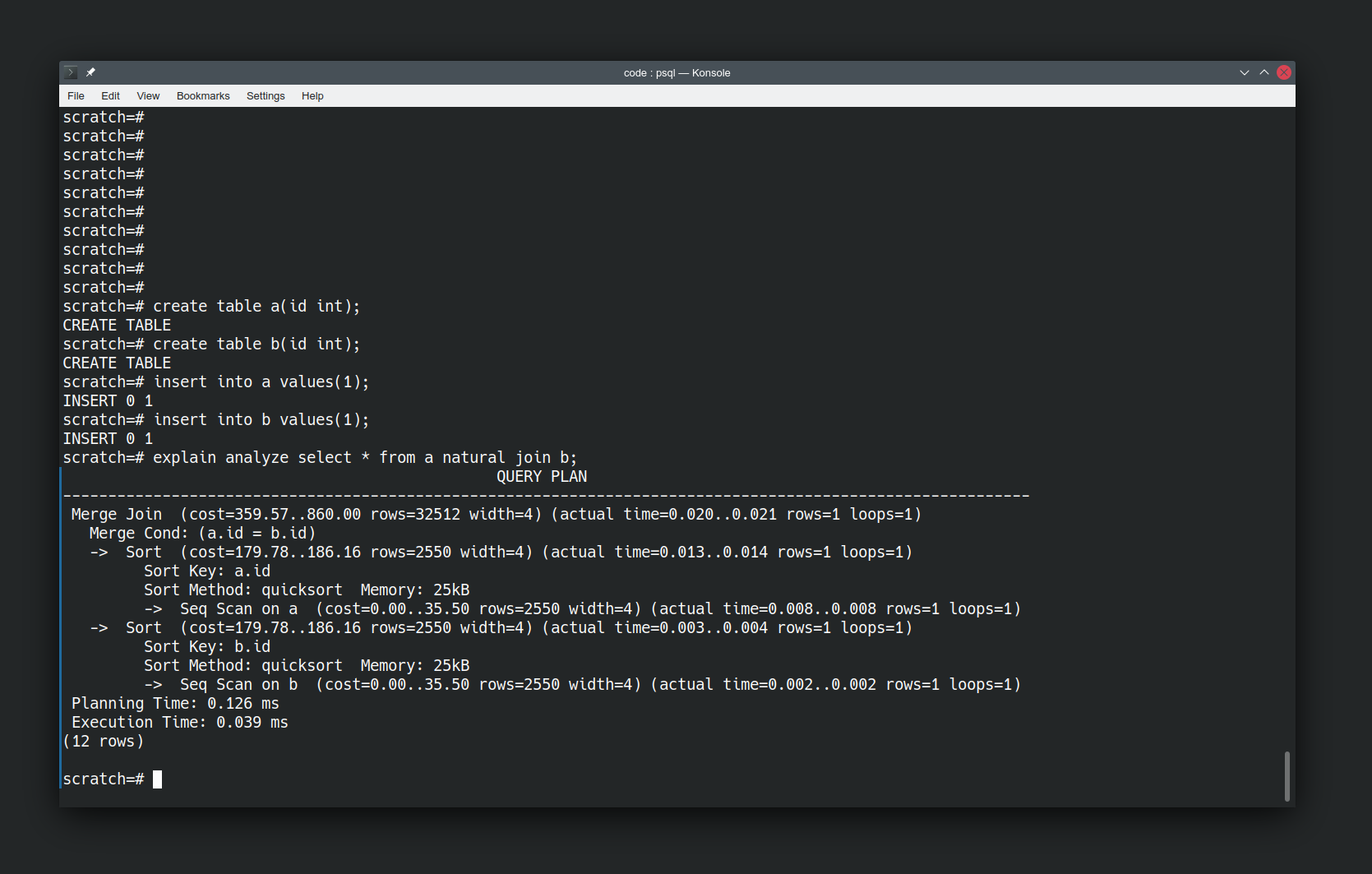
“explain analyze” is telling us how postgres is going to answer our question. The operations it will take, and how expensive they are. We haven’t told it to use quicksort, it has elected to do so.
Looking at how the database is doing things is interesting, but let’s make it more interesting by changing the data. Let’s add in a boatload more values and re-run the same query.
insert into a select * from generate_series(1,10000000);
explain analyze select * from a natural join b;
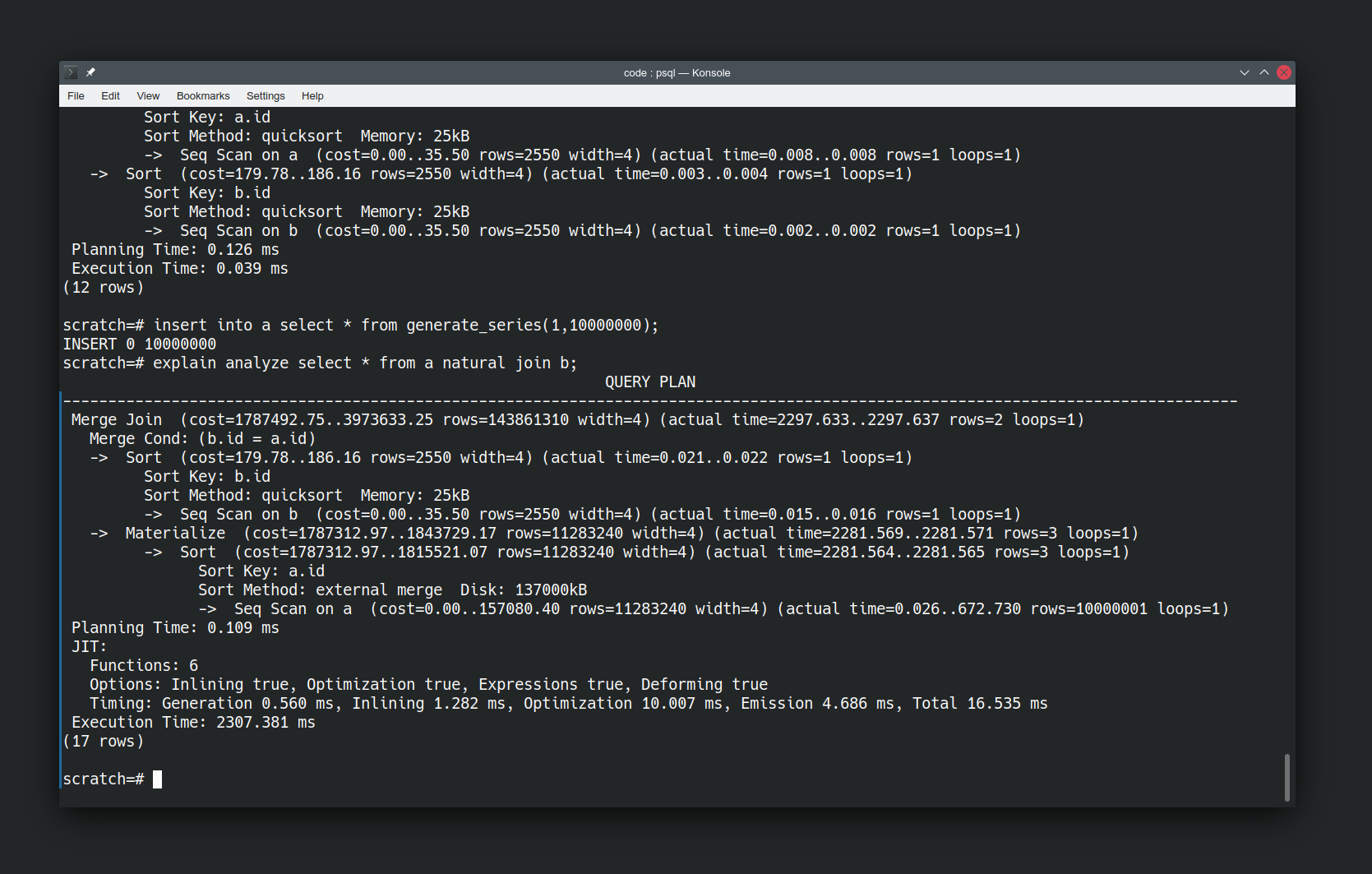
We’ve used generate_series to generate ten million tuples in relation ‘a’. Note the “Sort method” has changed to use disk because the data set is larger compared to the resources the database has available. I haven’t had to tell it to do this. I just asked the same question and it has figured out that it needs to use a different method to answer the question now that the data has changed.
But actually we’ve done the database a disservice here by running the query immediately after inserting our data. It’s not had a chance to catch up yet. Let’s give it a chance by running analyze on our relations to force an update to its knowledge of the shape of our data.
analyze a;
analyze b;
explain analyze select * from a natural join b;
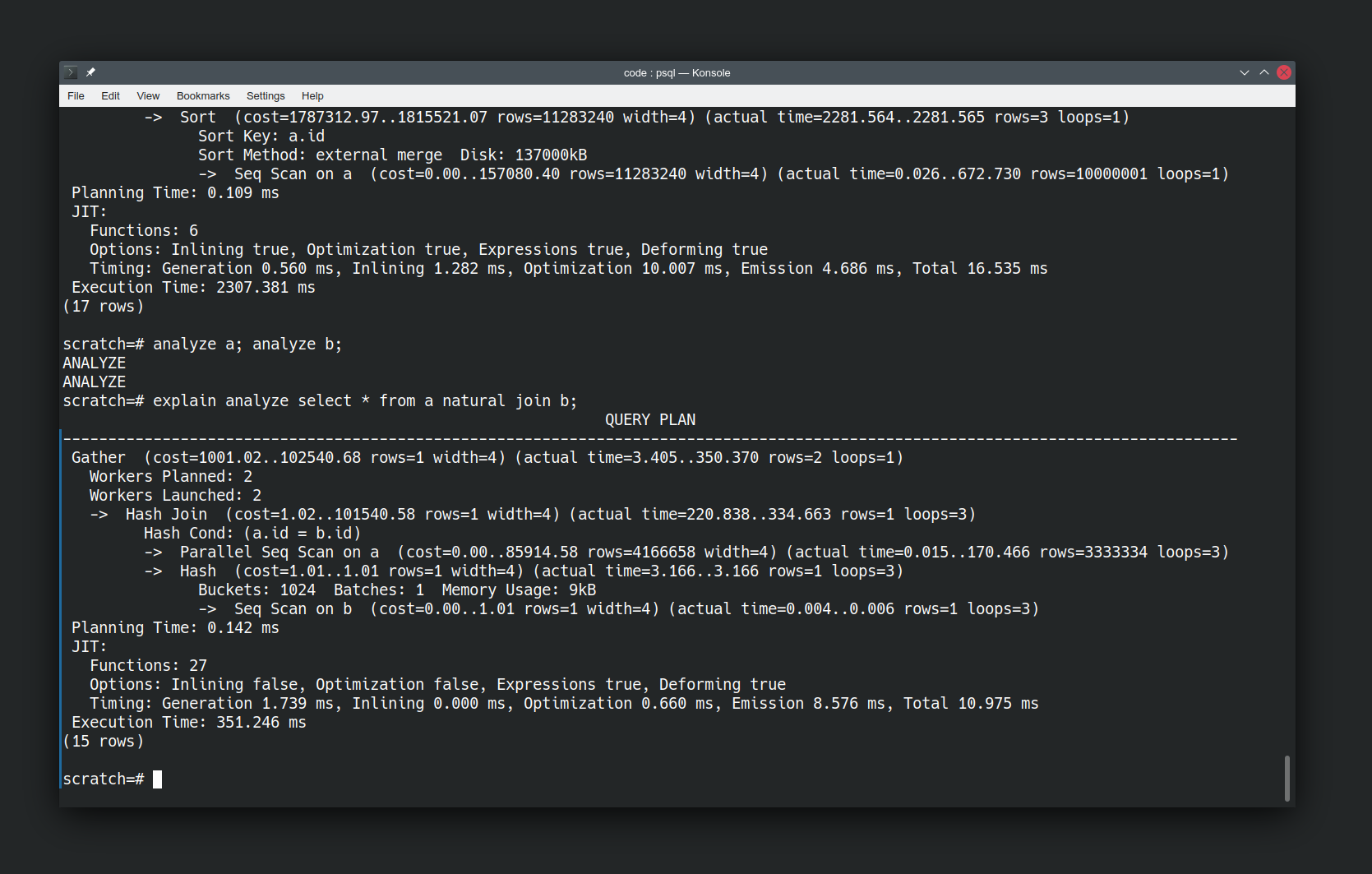
Now re-running the same query is a lot faster, and the approach has significantly changed. It’s now using a Hash Join not a Merge Join. It has also introduced parallelism to the query execution plan. It’s an order of magnitude faster. Again I haven’t had to tell the database to do this, it has figured out an easier way of answering the question now that it knows more about the data.
Asking Questions
Let’s look at some of the building blocks SQL gives us for expressing questions. The simplest building block we have is asking for literal values.
SELECT 'Eddard';
SELECT 'Catelyn';
A value without a name is not very useful. Let’s rename them.
SELECT 'Eddard' AS forename;
SELECT 'Catelyn' AS forename;
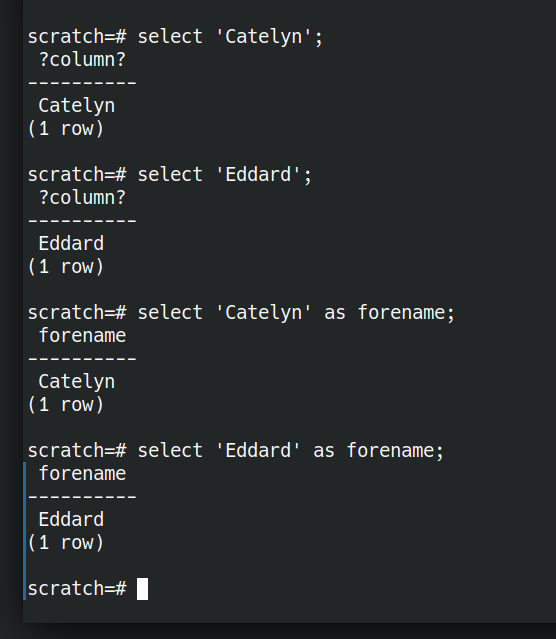
What if we wanted to ask a question of multiple Starks: Eddard OR Catelyn OR Bran? That’s where UNION comes in.
select 'Eddard' as forename
UNION select 'Catelyn' AS forename
UNION SELECT 'Bran' AS forename;

We can also express things like someone leaving the family. With EXCEPT.
select 'Eddard' as forename
UNION select 'Catelyn' AS forename
UNION select 'Bran' AS forename
EXCEPT select 'Eddard' as forename;

What about people joining the family? How can we see who’s in both families. That’s where INTERSECT comes in.
(
  SELECT 'Jamie' AS forename
  UNION select 'Cersei' AS forename
  UNION select 'Sansa' AS forename
)
INTERSECT
(
  select 'Sansa' AS forename
);

It’s getting quite tedious having to type out every value in every query already.
SQL uses the metaphor “table”. We have tables of data. To me that gives connotations of spreadsheets. Postgres uses the term “relation” which I think is more helpful. Each “relation” is a collection of data which have some relation to each other. Data for which a predicate is true.
Let’s store the starks together. They are related to each other.
create table stark as
SELECT 'Sansa' as forename
UNION select 'Eddard' AS forename
UNION select 'Catelyn' AS forename
UNION select 'Bran' AS forename ;

create table lannister as
SELECT 'Jamie' AS forename
UNION select 'Cersei' AS forename
UNION select 'Sansa' AS forename;
Now we have stored relations of related data that we can ask questions of. We’ve stored the facts where “is a member of house stark” and “is a member of house lannister” are true. What if we want people who are in both houses. A relational AND. That’s where NATURAL JOIN comes in.
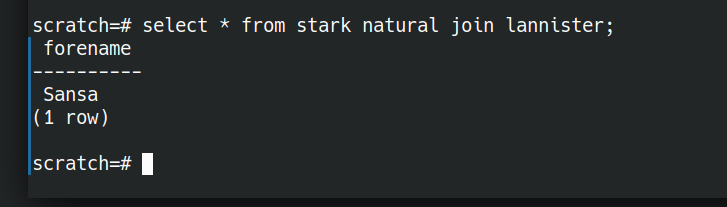
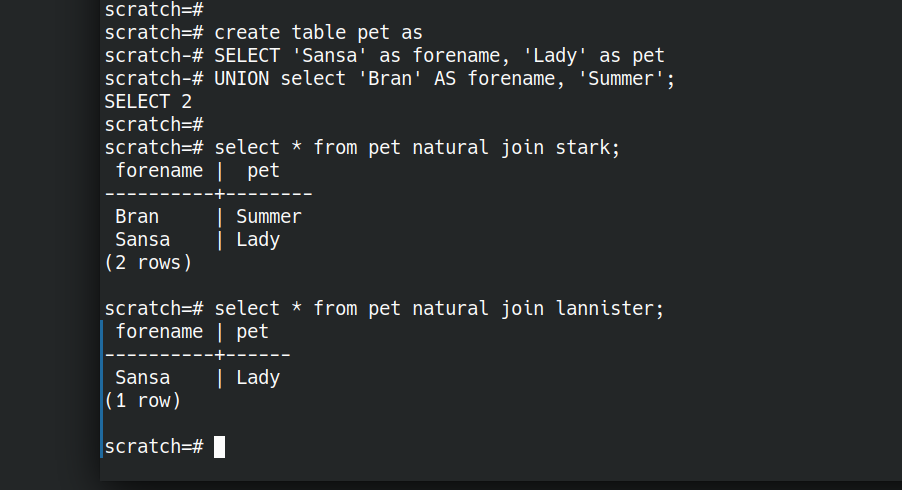
NATURAL JOIN is not quite the same as the set based and (INTERSECT above). NATURAL JOIN will work even if there are different arity tuples in the two relations we are comparing.
Let’s illustrate this by creating a relation pet with two attributes.
create table pet as
CREATE TABLE pet as
SELECT 'Sansa' as forename, 'Lady' as pet
UNION select 'Bran' AS forename, 'Summer' as pet;
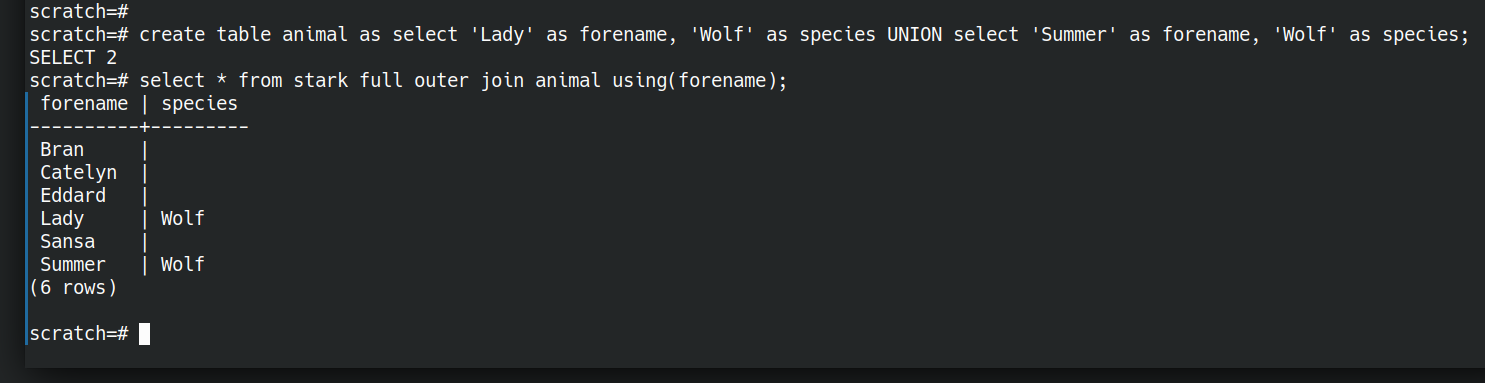
Now we have an AND, what about OR? We have a set-or above (UNION). I think the closest thing to a relational OR is a full outer join.
create table animal as select 'Lady' as forename, 'Wolf' as species UNION select 'Summer' as forename, 'Wolf' as species;
select * from stark full outer join animal using(forename);
Ok so we can ask simple questions with ands and ors. There are also equivalents of most of the relational algebra operations.
What if I want to invade King’s Landing?
What about more interesting questions? We can do those too. Let’s jump ahead a bit.
What if we’re wanting to plan an attack on Kings Landing and need to consider the routes we could take to get there. Starting from just some facts about the travel options between locations, let’s ask the database to figure out routes for us.
First the data.
create table move (place text, method text, newplace text);
insert into move(place,method,newplace) values
('Winterfell','Horse','Castle Black'),
('Winterfell','Horse','White Harbour'),
('Winterfell','Horse','Moat Cailin'),
('White Harbour','Ship','King''s Landing'),
('Moat Cailin','Horse','Crossroads Inn'),
('Crossroads Inn','Horse','King''s Landing');
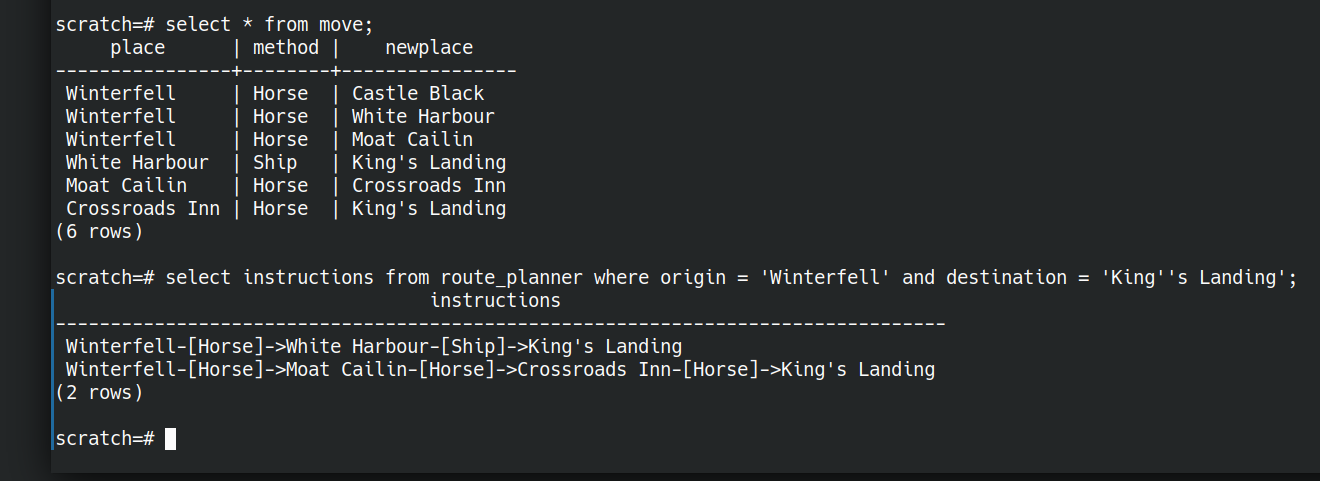
Now let’s figure out a query that will let us plan routes between origin and destination as below
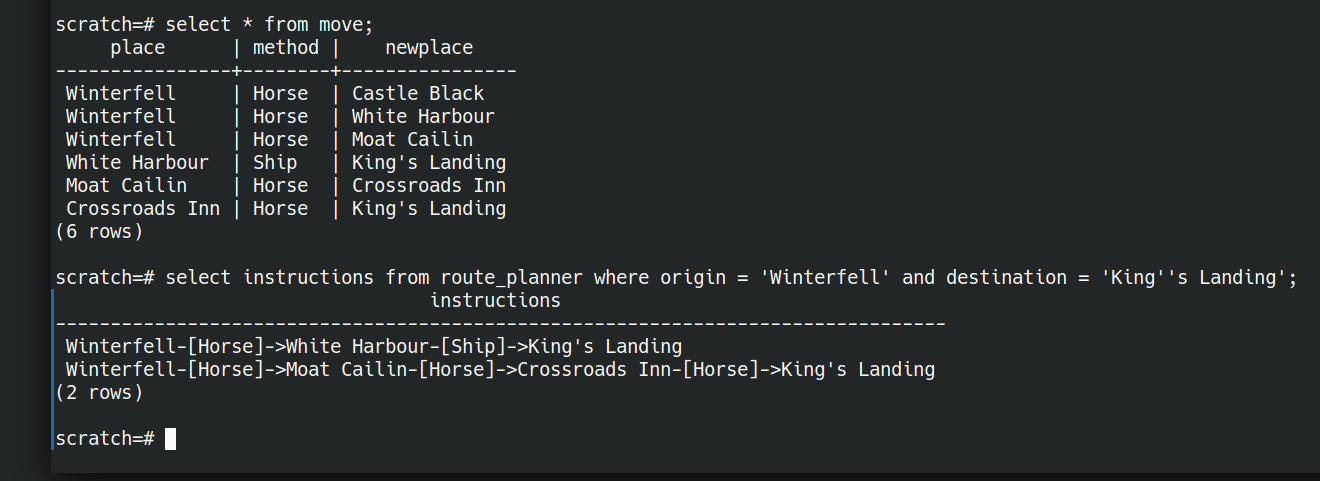
We don’t need to store any intermediate data, we can ask the question all in one go. Here “route_planner” is a view (a saved question)
create view route_planner as
with recursive route(place, newplace, method, length, path) as (
	select place, newplace, method, 1 as length, place as path from move --starting point
		union -- or
	select -- next step on journey
		route.place,
		move.newplace,
		move.method,
		route.length + 1, -- extra step on the found route
		path || '-[' || route.method || ']->' || move.place as path -- describe the route
	from move
	join route ON route.newplace = move.place -- restrict to only reachable destinations from existing route
)
SELECT
	place as origin,
	newplace as destination,
	length,
	path || '-[' || method ||  ']->' || newplace as instructions
FROM route;
I know this is a bit “rest of the owl” compared to what we were doing above. I hope it at least illustrates the extent of what is possible. (It’s based on the prolog tutorial). We have started from some facts about adjacent places and asked the database to figure out routes for us.
Let’s talk it through…
create view route_planner as
this saves the relation that’s the result of the given query with a name. We did this above with
create table lannister as
SELECT 'Jamie' AS forename
UNION select 'Cersei' AS forename
UNION select 'Sansa' AS forename;
While create table will store a static dataset, a view will re-execute the query each time we interrogate it. It’s always fresh even if the underlying facts change.
with recursive route(place, newplace, method, length, path) as (...);
This creates a named portion of the query, called a “common table expression“. You could think of it like an extract-method refactoring. We’re giving part of the query a name to make it easier to understand. This also allows us to make it recursive, so we can build answers on top of partial answers, in order to build up our route.
select place, newplace, method, 1 as length, place as path from move
This gives us all the possible starting points on our journeys. Every place we know we can make a move from.
We can think of two steps of a journey as the first step OR the second step. So we represent this OR with a UNION.
join route ON route.newplace = move.place
Once we’ve found our first and second steps, the third step is just the same—treating the second step as the starting point. “route” here is the partial journey so far, and we look for feasible connected steps.
path || '-[' || route.method || ']->' || move.place as path;
here we concatenate instructions so far through the journey. Take the path travelled so far, and append the next mode of transport and next destination.
Finally we select the completed journey from our complete route
SELECT
	place as origin,
	newplace as destination,
	length,
	path || '-[' || method ||  ']->' || newplace as instructions
FROM route;
Then we can ask the question
select instructions from route_planner
where origin = 'Winterfell'
and destination = 'King''s Landing';
and get the answer
                                 instructions
-------------------------------------------------------------------------------
Winterfell-[Horse]->White Harbour-[Ship]->King's Landing
Winterfell-[Horse]->Moat Cailin-[Horse]->Crossroads Inn-[Horse]->King's Landing
(2 rows)
Thinking in Questions
Learning SQL well can be a worthwhile investment of time. It’s a language in widespread use, across many underlying technologies.
Get the most out of it by shifting your thinking from “how can I get at my data so I can answer questions” to “How can I express my question in this language?”.
Let the database figure out how to best answer the question. It knows most about the data available and the resources at hand.
The post Thinking in Questions with SQL appeared first on Benji's Blog.
Ningún proyecto de GNU seleccionado para GSoC 2021
Ninguno de los proyectos GNU que se presentaban han sido seleccionados para la edición 2021 del Google Summer of Code (GSoC)

En un correo a la lista de correo de GNU, Jose E. Marchesi ha informado que ninguno de los proyectos del proyecto GNU (valga la redundancia) han sido seleccionados para la edición 2021 del GSoC.
El Google Summer of Code (GSoC) es un proyecto puesto en marcha por Google, donde se seleccionan varios proyectos de software libre que servirán de mentores y a varios estudiantes.
Estos estudiantes durante un periodo de tiempo (un verano) trabajarán codo con codo con los desarrolladores de dichos proyectos en diferentes tareas y durante ese tiempo, se les pagará por su trabajo.
Es una gran oportunidad para que los estudiantes trabajen en proyectos reales, junto con desarrolladores profesionales que les irán dirigiendo y dando consejos, y así tener más prácticas y tablas, mientras les remuneran sus trabajos.
Y a los proyectos de software libre les sirve para que se vayan puliendo algunos aspectos, se creen nuevas funcionalidades, etc.
Los proyectos de software libre que se presentan son muchos de los más importantes. Y después de una selección por parte de Google, quedan unos cuantos proyectos como elegidos.
Este año al GSoC, se presentaban varios proyectos importantes de GNU, como el compilador GCC, GNU Radio, GNU Octave o GNU Mailman.
Pero ninguno de estos proyectos de GNU ha sido escogido, así que después de 12 años participando en este evento, el proyecto GNU no tendrá representación y ningún estudiante podrá optar por participar en ninguno de sus proyectos.
Cierto que no hace falta un GSoC para participar en el proyecto, pero ese medio da a conocer el proyecto y hace que se desarrollen nuevas funcionalidades, se corrijan errores, etc.
Espero que a pesar de quedar fuera del GSoC después de 12 años, los proyectos sigan creciendo, sigan siendo objetivo de desarrolladores profesionales y nuevas personas que quieran aportar con código.

KDE estará presente en SWYP 2021 VIGO
Eventos, eventos y eventos. El blog se llena de eventos y es que hay muchos, variados y para todos los públicos. Y algunos son nuevos en esta bitácora, como es el caso de Students, Women in Engineering and Young Professionals (aka SWYP) que se va a celebrar en Vigo de forma virtual. Y es protagonista en el blog porque KDE estará presente en SWYP 2021 VIGO gracias a la presencia de Rubén Gómez, representando a KDE España, y de Miguel Muíños, de Enxeñería Sen Fronteiras.
¿Qué es SWYP?
Para los que no lo conozcan, entre los que me incluyo, la SWYP es el evento más importante del IEEE en España a nivel estudiantil y de juventud que cCada año congrega a aproximadamente a más de 80 estudiantes y jóvenes profesionales de ingeniería de todo el país.
Es de detcar que anteriormente el evento era conocido como Congreso Nacional de Ramas (CNR), desde el 2017 se decidió cambiar el nombre por SWYP: Students, Women in Engineering and Young Professionals, para dar visibilidad a todos los grupos integrantes del congreso.

Está apoyado y patrocinado por la Sección España del IEEE, la mayor asociación de ingenieros del mundo. Pueden asistir todos los miembros del IEEE de la Sección España y personas interesadas.
Este año SWYP se va a realizar del 24 al 28 de Marzo en línea utilizando los servicios de Big Blue Button. Serán un poco técnicas pero seguro que algunos de mis lectores les puede interesar.
KDE estará presente en SWYP 2021 VIGO
El programa ya está publicado y está más que completo, así que podéis encontrar cosas como Predicción dinámica COVID-19, Tu primer modelo de Inteligencia Artificial o Mujeres en ingeniería, etapas en nuestro camino y cómo mejorarlas.
No obstante, si buscamos la presencia de KDE nos tenemos que ir al domingo 27 a las 19 horas de la mano de Rubén Gómez y Miguel Muíños – KDE España & Enxeñería Sen Fronteiras y que lleva por título «Visión y experiencias en ingenieria con software libre» en Sala de exhibición 1 – Palacio de congresos.
Como pequeño aperitivo podemos decir que nos darán una visión global acerca de la situación actual del software libre en la ingeniería y del empleo de Octave y R como alternativas libres para el cálculo numérico.
Más información: swyp 2021 VIGO

User Friendly Printer Management | openSUSE YaST
Música en GCompris – A fondo @g_compris (4)
Sigo aprovechándome de una publicación de Valencia Tech en la que se realizaba un listado completo de juegos que ofrece GCompris he empezado una serie donde se describen con más detalles los juegos. Seguimos la serie con la sección de «Música» en GCompris la cual tiene como objetivo hacer que aprendamos la base de este disciplina tan bella y humana.
Música en GCompris – A fondo @g_compris (4)
Para poder tener claro lo que hacen las aplicaciones de GCompris he pensado hacer una revisión a su enorme colección de juegos y actividades, realizando una simple captura de pantalla y una breve descripción.
Ya hemos descrito la sección de «Descubre la computadora». los «Juegos de lógica» y las «Bellas Artes», es hora de hablar de la «Música» en GCompris.
En la subsección de Música nos encontramos con:
Toca el piano: actividad básica donde nos enseñarás las teclas básicas del piano con la nomenclatura habitual. Evidentemente la melodía que creemos sonará con las notas correctas. Tiene 10 niveles de dificultad.

Toca el ritmo: dado que el ritmo en básico en la música con esta actividad aprenderemos a controlarlo. Además, en algunas de las sesiones dispondremos un metrónomo.

Melodía: con un sencillo xilófono debemos reproducir la melodía que nos sugiere GCompris.

Juego de memoria auditiva: el clásico juego de memoria de cartas pero en el que debemos emparejar sonidos en vez de imágenes.

Juego de memoria auditiva contra Tux: variante competitiva del juego anterior. Tux no nos lo pondrá fácil.

Composición para piano: es hora de que compongas libremente con tu piano de GCompris… he incluso grabar y cargar tus creaciones.

Explora la música del mundo: la cultura musical también es importante, así que te invitamos a conocer un poco mejor la música que se hace alrededor del mundo.

Instrumentos musicales: tener un oído musical también significa distinguir los instrumentos musicales por su timbre. Desde una simple guitarra hasta el complicado acordeón todos tienen su sonido característico.

El nombre de esta nota: para finalizar este conjunto de aplicaciones nos encontramos con la más complicada ya que deberemos distinguir las notas musicales que nos aparezcan… eso si, con un poco de ayuda.

.
#openSUSE Tumbleweed revisión de la semana 11 de 2021
Tumbleweed es una distribución “Rolling Release” de actualización contínua. Aquí puedes estar al tanto de las últimas novedades.

openSUSE Tumbleweed es la versión “rolling release” o de actualización continua de la distribución de GNU/Linux openSUSE.
Hagamos un repaso a las novedades que han llegado hasta los repositorios estas semanas.
El anuncio original lo puedes leer en el blog de Dominique Leuenberger, publicado bajo licencia CC-by-sa, en este enlace:
El mayor problema esta semana fue el problema con la infraestructura de servidores de réplica después de la recompilación completa de la distribución. Más peticiones, más trafico, mayor “stres” para los servidores.
La propia Tumbleweed como es normal, se ha mantenido sólida después de toda la renovación de paquetes. En total se han publicado 4 snapshots (0312, 0315, 0316 y 0317) esta semana.
De entre todos los cambios, podemos destacar:
- Mozilla Thunderbird 78.8.1
- Mozilla Firefox 86.0.1
- KDE Frameworks 5.80.0
- Bison 3.7.6
- grub2
- PipeWire 0.3.23
- Linux kernel 5.11.6
- SQLite 3.35.0
- Systemd 246.11
De entre los paquetes de software que próximamente podremos disfrutar, podemos destacar:
- KDE Plasma 5.21.3
- Perl 5.32.1
- SELinux 3.2
- Módulos de Python 3.9
- GCC 11 como compilador principal
Si quieres estar a la última con software actualizado y probado utiliza openSUSE Tumbleweed la opción rolling release de la distribución de GNU/Linux openSUSE.
Mantente actualizado y ya sabes: Have a lot of fun!!
Enlaces de interés
-
-
- ¿Por qué deberías utilizar openSUSE Tumbleweed?
- zypper dup en Tumbleweed hace todo el trabajo al actualizar
- ¿Cual es el mejor comando para actualizar Tumbleweed?
- Comprueba la valoración de las “snapshots” de Tumbleweed
- ¿Qué es el test openQA?
- http://download.opensuse.org/tumbleweed/iso/
- https://es.opensuse.org/Portal:Tumbleweed
-

——————————–
openSUSE Tumbleweed – Review of the week 2021/11
Dear Tumbleweed users and hackers,
The biggest trouble of the week was the mirror infrastructure having a hard time catching up to the full rebuild. Tumbleweed itself was, as usual, solid and has been steadily rolling. In total, there were 4 snapshots (0312, 0315, 0316, and 0317) released last week.
The main changes in those snapshots included:
- Mozilla Thunderbird 78.8.1
- Mozilla Firefox 86.0.1
- KDE Frameworks 5.80.0
- Bison 3.7.6
- grub2: boothole v2 fixes: the first iteration was blocked, as dual boot was broken. New signing certs and revocation of old certs will follow.
- PipeWire 0.3.23
- Linux kernel 5.11.6
- SQLite 3.35.0
- Systemd 246.11
The staging projects are largely unchanged, the main topics there are still:
- KDE Plasma 5.21.3
- Perl 5.32.1
- SELinux 3.2
- Python 3.9 modules: besides python36-FOO and python38-FOO, we are testing to also shop python39-FOO modules; we already have the interpreter after all. Python 3.8 will remain the default for now.
- UsrMerge is gaining some traction again, thanks to Ludwig for pushing for it
- GCC 11 as the default compiler