
 Member
 DimStar
openSUSE Tumbleweed – Review of the week 2021/09
Dear Tumbleweed users and hackers,
This week has proven to be challenging for Tumbleweed. We have built and tested 6 snapshots, and only 2 of them were of sufficient quality to send out to the users. Of course, that means our QA infrastructure is well suited in protecting you, the users, from running into trouble – and that is the best thing we can show with this.
The two snapshots published were 0227 and 0302, containing these interesting changes:
- NetworkManager 1.30 – with WPA3 support
- The YaST stack update, as recently announced by the YaST team
- Mozilla Firefox 86.0
- Mozilla Thunderbird 78.8.0
- KDE Plasma 5.21.1
- Dracut 053
- krb5 1.19.1
- pipewire 0.3.22: pipewire-pulseaudio should mostly be able to replace PulseAudio
- podman 3.0.1
A big chunk of what was announced last week was thus delivered, a few things are still on the todo – together with a few new things:
- Linux kernel 5.11.2
- openssl 1.1.1i, based on centralized crypto-policies package
- KDE Plasma 5.21.2
- glibc fix for our i586 users
- GCC 11 as the default compiler
Disponible el vigesimoquinto número de la revista digital SoloLinux
Ya tenemos disponible el vigesimoquinto número de la revista digital SoloLinux la cual cumple más de 2 años de publicaciones mensuales sin interrupciones y que, como siempre, podéis leer online o descargar para poder disfrutar en vuestro lugar de vacaciones si tenéis una conexión de internet limitada o donde queráis, que para eso el Software Libre promueve la libertad.
Disponible el vigesimoquinto número de la revista digital SoloLinux
La introducción es repetitiva, pero es que es interesante hacer un poco de historia cada mes para aquellos que llegan de rebote a esta sección.
Hubo un tiempo en que las revistas sobre Linux digitales estuvieron de moda. Tenemos todavía publicándose Atix y Full Circle Magazine (en inglés, gracias Vampiro Nocturno), pero antes teníamos a Linux+, Papirux, Begins o TuxInfo, por citar algunas discontinuadas.
Desde hace un tiempo una revista digital SoloLinux tiene su entrada mensual en el blog, tener todas las alternativas posibles para compartir conocimiento es algo que caracteriza al Conocimiento Libre.
Como siempre les dejo a ellos decir unas palabras:
«Bueno… después del atracón de alegría por cumplir dos años en nuestro anterior número, volvemos a la vida real. Hoy presentamos el número 25 de nuestra revista digital sololinux, que como siempre viene cargada de manuales, noticias y una entrevista realmente interesante.
Poco queda ya, de la razón por la que nació «sololinux.es« hace unos 7 años. Ante una situación de inmovilidad causada por un accidente, el tiempo pasaba muy despacio y, me consumía el aburrimiento sin poder desarrollar mis labores habituales al 100%.

Así nació un proyecto, con el que solo pretendía ayudar a los recién llegados a linux. Lo que nunca espere, es lograr el éxito de audiencia que tenemos en la actualidad, en la que gran parte de culpa la tienen mis principales colaboradores, a los que ya me une algo más que una simple colaboración. Es evidente que hablo de Adrián y Henry.
«Cada vez somos más conocidos y, son miles de usuarios los que nos siguen a diario. Después de darle vueltas y vueltas… considero que llego el momento de diversificar. Aunque «sololinux.es» sea el núcleo, debemos crear satélites que giren a su alrededor. Este mes entrante veremos un aperitivo de los nuevos cambios, que facilitarán el acceso a ciertos contenidos de forma directa. De momento es secreto, jejeje.»
Más información: Revista Sololinux N25
Así que, ya tenemos disponible el vigésimoquinto número de la revistas digital SoloLinux, el cual llega, como siempre, cargado de contenidos y con el siguiente índice.
|
MANUALES Usar el comando apt-cache para buscar paquetes Instalar paquetes deb en Ubuntu, Debian y derivados Uso del comando Alias en linux 8 formas de crear archivos en linux Uso del comando printf en linux Listar servicios con systemctl en linux Ocultar dispositivos montados en el dock de Ubuntu 20.04 Instalar Etcher en Ubuntu 20.04 y otros linux Como crear enlaces simbólicos en linux Desinstalar MySQL Server en Ubuntu Instalar Google Cloud SDK en Ubuntu 20.04 Como firmar documentos pdf en linux Detectar cuellos de botella con el comando sysdig HARDWARE Deshabilitar el Bluetooth en Linux con systemctl Raspberry Pi 3 vs Raspberry Pi 4 |
SCRIPTS Colorear la salida del comando echo Web Scraping con Python SOFTWARE Uso de AppImage en Ubuntu y otros linux Instalar LeoCAD en linux Ver listas IPTV online con TV-Lite Master PDF Editor 4.3.89 – Gratis para linux DISTROS LINUX Ubuntu 20.04.2 lanzado con el kernel 5.8 Instalar AlmaLinux Beta – El sucesor de CentOS 8 Diferencias entre Ubuntu y Gentoo Los 7 mejores derivados de Gentoo OPINIÓN Opinion de Jose Luis desde México ENTREVISTAS Entrevista a Diego Caraballo, administrador del Blog Mi diario Python |
La revista puede ser descargada o simplemente visualizarla en línea, ya que se cuelga en diferente servicios como Calameo. A continuación os dejo los enlaces de descarga y visualización directa de todos los números publicados hasta la fecha.
Además, recordar que desde el número anterior se ha abierto el canal oficial sololinux.es de Telegram: https://t.me/sololinux_es
Descarga:
Visualización directa:
Evidentemente, este proyecto no se centra en exclusivo a los contenidos de su web y está abierto a colaboraciones de todo tipo. De esta forma si estas interesado en insertar publicidad en nuestra revista, o quieres que publiquemos algún articulo que hayas escrito tu mismo, puedes contactar con «Adrián» por correo electrónico: adrian @ sololinux. com
Muchos ánimos en este proyecto que ya parecer estar consolidad y que que facilita la difusión del Software Libre de una forma que ya no es tan habitual en estos tiempos pero que es igual de válida y necesaria en algunas ocasiones.
freewear.org tu tienda geek. Entrevista exclusiva a los creadores
Si buscas un sitio web donde comprar tus camisetas, sudaderas, gorras, tazas o pegatinas sobre GNU/linux y software libre, entonces freewear.org es tu tienda

Los geeks del software libre y GNU/Linux en general somos muy de mostrar nuestra pasión.
Nos gusta mostrar nuestros escritorios y nos gusta llevar camisetas, sudaderas, tener pegatinas en nuestros equipos, tomar café en tazas, etc con el logo de nuestra distribución de GNU/linux preferida, o de nuestro escritorio preferido o de nuestro editor de texto, nuestro lenguaje de programación predilecto, etc.
Mostrar todo eso en los eventos a los que asistimos o para ir a comprar el pan. En estos días raros podemos seguir saliendo a comprar el pan, pero no así el poder asistir a eventos de esos geeks que nos gustan.
Pero no por ello vamos a dejar de comprar una camiseta, no de nuestro grupo de rock preferido, si no de quizás openSUSE, Debian, Arch, Python, KDE o Vim y mostrarle al mundo que somos geeks pero con estilo.
Para comprar nuestras camisetas, tazas, sudaderas, vinilos, etc hay muchas tiendas on-line, pero no todas son como freewear.org regentada con pasión por Ramón y Xulia desde Galicia en España (con quienes compartí mantel y mesa en Akademyes en Vigo)
Una tienda on-line donde conseguir un montón de cosas para nuestra pasión geek y en la misma compra donar al proyecto en cuestión ¿cómo?
Sí, en freewear.org por cada compra que hagas, la tienda dona al proyecto sobre el que has comprado algo. Es decir, si por ejemplo compras una camiseta de LibreOffice, freewear.org dona parte del dinero de la compra a dicho proyecto.
Una gran manera de vestir tu lado más geek y ayudar a tu proyecto de software libre preferido.
Ya hace un tiempo escribí un artículo sobre freewear.org en el blog. Y esta vez quería volver a dar a conocer el proyecto, pero dando voz a las personas detrás del proyecto, Ramón y Xulia, y que nos expliquen algunas cosas de primera mano.
No sé si es necesario recordar que mi blog no inserta publicidad ni escribo artículos por encargo con contraprestaciones económicas. Si escribo este artículo y publico esta entrevista es porque freewear.org me parece un proyecto interesante que colabora con el software libre, y sobre el que me apetece difundir. Sin más preámbulos os dejo con la entrevista:

Vhck: ¿Hace cuanto empezó freewear.org y cómo fueron los orígenes de esta aventura?
Freewear: Empezamos en 2005 en otro sitio web, que mantenemos por mera nostalgia aunque es un lugar vacío, KillerMundi.org. Allí empezamos, además de con otras cosas, con nuestra apuesta por las camisetas FOSS, con algunos modelos que todavía perviven en FreeWear, como nuestro clásico Tux–Linux Powered.
Comenzamos la andadura con camisetas de KDE Hispano, Gnome Hispano, Debian y esa Tux que mencionamos. Tanto Xulia como yo veníamos de mundos distintos pero convergentes: ella es Licenciada en Bellas Artes y yo había trabajado en una empresa de serigrafía industrial.
Entonces, conjuntamos vida y trabajo. Vimos un hueco que cubrir, nos gustaba el software libre, nos compramos una máquina de serigrafía y todo eso empezó a rodar.
FreeWear, como tal es una salida natural de KillerMundi, como ya una apuesta decidida por el FOSS sin ambages: una página específica de materiales de software libre. La página, algo viejuna y vintage no ha cambiado su estética y preferimos mantenernos terca y cariñosamente en ella. Las tripas han cambiado, pero la apariencia es la misma. Y no tenemos intención de cambiar ese aire vintage de 13 años de edad.
Vhck: freewear.org es una empresa pequeña y me atrevería a decir que artesanal ¿cómo es el proceso de trabajo?
Freewear: Muy pequeña, muy artesanal, aunque a su vez el proceso está muy mecanizado por la labor ingente y en la sombra de Ismael (webmaster y programador de todo el sistema de gestión), nuestro particular ingeniero que ha mecanizado al máximo el tratamiento de los pedidos que se integran en un gestor sql donde se guardan referencias, stocks, registro de donaciones…
El resultado es una rápida capacidad de respuesta ante un pedido que logramos librar en unos minutos sin posibilidad de error pues no tocamos ni una coma, solo cuando detectamos algún error en un teléfono o similar.
Vhck: ¿Utilizáis herramientas de software libre para la realización de vuestros diseños y creación de vuestros artículos?
Freewear: Siempre. En la oficina técnica utilizamos Inkscape como herramienta básica y muy colateralmente Gimp, pues los mapas de bits no son apropiados para la serigrafía, donde se imponen los vectores. Para labores de oficina, LibreOffice. Y Ubuntu como sistema operativo. Somos serígrafos de cosas de software libre y entusiastas usuarios de software libre, pero no programadores. De eso se encarga Ismael, hermano de Xulia.
Vhck: Uno de los incentivos de comprar en freewear.org es que donáis parte de la compra al proyecto relacionado con el elemento comprado ¿cómo se os ocurrió eso y cómo se hace esto?
Freewear: Cuando decidimos ofrecer camisetas de proyectos FOSS, el primer paso es comunicarlo a los proyectos, para pedir permiso para vender prendas con su logo y para dar a conocer nuestras prendas entre la gente que las puede desear.
Y lo natural también era dar algo a cambio de ese permiso, funcionar con un sistema que nos favoreciese a todos. A las organizaciones (que perciben donación) a los entusiastas de las organizaciones (que tiene la camiseta o sudadera de ella, donando y ayudando) y a nosotros, que podemos trabajar. Es una triple retroalimentación positiva.
Nunca ofrecemos prendas sin contactar antes con la organización/proyecto implicado. Damos a la organización/proyecto un login y password con el que poder loguearse a nuestra web y acceder en tiempo real a la información sobre el estado de las donaciones, el dinero acumulado que hay pendiente de ser donado.
Realizamos las donaciones cada año, en diciembre, para acumular una buena cantidad y minimizar el impacto de las comisiones. Solo conservamos datos del ítem vendido y que debe ser donado en nuestro histórico, además del de la fecha de venta y del lugar de procedencia de la compra.
Los datos personales de la persona que compra los conservamos prudencialmente un tiempo (por si hay problemas de entrega en el porte y después los eliminamos. Esos datos (fecha/país/ítem/precio/donación) son exclusivamente los que facilitamos a las organizaciones como aval de nuestras ventas y los que mantenemos a nivel estadístico interno.
Vhck: Una curiosidad ¿Tenéis datos del dinero que habéis donado en total a los diferentes proyectos?
Freewear: En nuestra web puede verse la cantidad acumulada (lo donado + lo pendiente de donación) de donación por las ventas web a cada organización/proyecto. Y a esa cantidad habría que sumar lo donado a las organizaciones de los eventos FOSS en los que hemos participado.
Esa es otra modalidad de colaboración que ahora, sin eventos presenciales, lamentablemente no es posible. En los eventos FOSS, además de imprimir por encargo las camisetas (o bolsas, sudaderas, pegatinas…) conmemorativas del evento, solíamos enviar material de nuestro catálogo web para su venta en el evento y, además de la donación por cada ítem a la organización/proyecto implicado, donamos una parte a la organización del evento por encargarse de la venta.

Vhck: En un ranking de popularidad, cual es el elemento estrella de ventas y cuales son los cinco primeros más vendidos?
Freewear: Python se ha vendido siempre muy bien. Y Vim. Con KDE, Gnome y Debian. Estos últimos meses notamos una subida potente de Arch Linux. GNU es un goteo discreto pero sostenido.
Vhck: No paráis de buscar nuevos proyectos a los que poner imagen ¿cuales han sido las incorporaciones más recientes?
Freewear: Libre Office y openSUSE, ambos nos hacen mucha ilusión. Y desde luego, seguir buscando nuevas organizaciones, quizá en un giro algo más radical hacia el free software dejando más de lado el open source.
Vhck: Trabajáis a la demanda, es decir, si voy a hacer un evento por ejemplo de “NextCloud” y quiero camisetas relacionadas con esto, se pueden pedir aunque no estén en vuestro catálogo?
Freewear: Claro. Y no solo camisetas: sudaderas, bolsas, pegatinas, botellas, tazas… Y nos gusta especialmente salir de nuestro catálogo al mundo exterior, muchas veces los encargos nos plantean retos técnicos que nos estimulan y vivifican.
Es bastante habitual que una persona nos encargue una prenda específica fuera de catálogo, incluso de su propia invención.
Vhck: Cual es vuestro mercado ¿vendéis a todo el mundo?
Freewear: Si, vendemos a todo el mundo con algunas limitaciones debidas a como funcionan en algunos países los servicios de transporte. Y por cuestiones políticas, no podemos recibir pagos de algunos países. Pero son muy pocos sitios.
Vhck: ¿La falta de eventos por la pandemia se ha notado en vuestro negocio?
Freewear: Si… muchísimo, brutalmente. Sin eventos presenciales, no hay encargos ni envío de materiales en depósito para su venta en los eventos. Se mantiene solo la venta web, que intentamos potenciar con la incorporación de nuevas organizaciones/proyectos.
Hemos trabajado para algunos eventos online (Akademy2020, DebConf2020, GHCon2020, MDCO…), una nueva modalidad muy muy laboriosa pues, donde antes enviábamos -por ejemplo- 300 camisetas al lugar del evento, ahora debemos hacer 300 envíos individuales (o más, pues el evento online es más cómodo y asequible, se pierden los abrazos pero la camiseta, de alguna manera, refuerza el sentimiento de grupo en la distancia…), además de su posterior seguimiento, y en algunos casos gestionar también la recepción de los pedidos individuales.
Estamos deseando que vuelvan los eventos presenciales, y mientras tiramos con la web que queremos potenciar al máximo la web: es nuestro objetivo ahora, no queda otra.
Vhck: La última palabra es vuestra para poder decir lo que queráis
Freewear: Como tanta gente, tenemos dificultades y buscamos el modo de mantenernos en un mundo que, por varias razones, es cada vez más difícil para las empresas o iniciativas pequeñas.
Mientras deseamos fervientemente que vuelvan los eventos presenciales, hacemos el esfuerzo que haga falta para mantenerles el pulso a los eventos online e intentamos potenciar, como comentábamos, la web con nuevas organizaciones.
Las grandes plataformas de personalización de prendas y otros ítems -que también ofrecen camisetas FOSS (muchas veces sin permiso ni aportación a los proyectos)- son otra de las crecientes dificultades con las que nos encontramos.
Pensamos que la vía para intentar salvar esta merma de trabajo es acercarnos a organizaciones también más pequeñas, insistimos: más cerca del software libre que del opensource. Una cierta radicalización de la apuesta.
Y agradecerte esta ventana al mundo que nos ha abierto y saludar muy cordialmente a toda la comunidad.

Cerrando la brecha del salto entre SUSE y openSUSE
El día de hoy, el proyecto openSUSE anunció el inicio de la fase beta pública de openSUSE Leap 15.3. Esta versión es un hito importante para openSUSE y SUSE.
Leap 15.3 es la primera versión en la que openSUSE Leap y SUSE Linux Enterprise comparten el mismo código fuente y utilizan exactamente los mismos paquetes binarios. Echemos un vistazo a la siguiente imagen para examinar en detalle lo que esto significa.
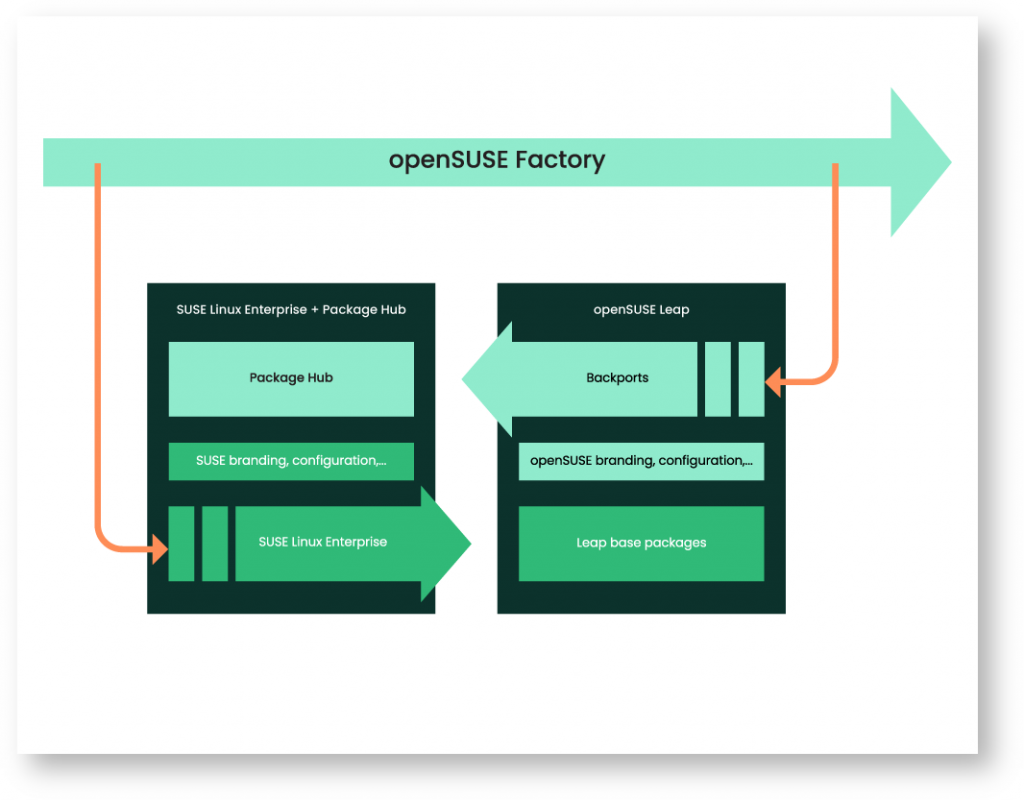
En la mayoría de los casos, los paquetes de software de las distribuciones openSUSE o SUSE Linux Enterprise se originan en el proyecto openSUSE Factory. Se utilizan para producir varias distribuciones como Tumbleweed, Leap, Kubic, por nombrar algunas. Factory se actualiza constantemente con el flujo de cambios lanzados por los diversos proyectos de código abierto ascendentes. Leap es la serie de versiones estables de openSUSE. Se alimenta del "flujo de código" de fábrica a través de dos rutas diferentes. Por un lado, un subconjunto de Factory es la fuente que utiliza SUSE para crear los productos SUSE Linux Enterprise. Desde Leap 15.3 en adelante, SUSE también (además de las fuentes) aporta los paquetes binarios de SUSE Linux Enterprise (SLE) a la comunidad openSUSE, donde forman la base de openSUSE Leap. La comunidad openSUSE continúa construyendo los otros paquetes de Leap, ahora llamados "Backports", a partir de las últimas fuentes de Factory. La combinación de los binarios SLE, backports de openSUSE y una fina capa de marca y configuración conformarán openSUSE Leap 15.3 y sus sucesores. Los backports de openSUSE también contribuyen a SUSE Package Hub, que ofrece a los clientes de SUSE la misma opción de miles de paquetes respaldados por la comunidad además del producto SLE básico y el soporte de nivel empresarial de SUSE.
¿Por qué debería de importarme?
Imaginemos que estamos creando software para ejecutar en SUSE Linux Enterprise. Necesitamos probar esto lo mejor que se pueda. Lo más probable es que apliquemos un enfoque escalonado en un canal de prueba. Al principio, una pregunta clave es: ¿mi software se crea, instala y funciona correctamente en mi plataforma de destino? Probar esto de manera automatizada requiere que se ponga en marcha una nueva máquina (probablemente virtual), instale el sistema operativo de destino, compile e implemente su software y lo pruebe. Es esencial minimizar todo el tiempo que toma, ya que el número de iteraciones de prueba por día es el límite máximo para la velocidad de su función. Hacer esto con SLE requiere que registre el sistema operativo recién instalado en cada iteración, lo cual es un poco complicado de automatizar y, lo que es más importante, lleva bastante tiempo completarlo. ¿No sería fantástico si hubiera una forma de omitir el paso de registro y obtener resultados de prueba igualmente significativos? Con 15.3, simplemente se puede usar openSUSE Leap como un reemplazo equivalente para SLE 15 SP3 en esta etapa de nuestro canal de prueba. También elimina cualquier limitación en el número de instancias de prueba en paralelo.
Otro ejemplo son los típicos ingenieros y desarrolladores de infraestructura “masiva” de los que se dependen para hacer el trabajo. Hacer girar rápidamente una máquina virtual en la estación de trabajo del desarrollador o en la nube o construir un contenedor experimental se ha convertido en el pan de cada día para todos los expertos en tecnología y nerds de todo el mundo. Todo lo que restrinja su capacidad para hacerlo es una grave limitación para la productividad y la innovación. Esta es la razón por la que las distribuciones gratuitas de Linux son tan populares entre los desarrolladores para la creación de prototipos y la experimentación. Sin embargo, el uso de una distribución de Linux para la creación de prototipos y otra no compatible en producción lo prepara para problemas: está impulsando la detección de problemas de integración para un momento posterior. Y todos sabemos que cuanto más tarde se identifica un problema, más costoso es solucionarlo. Con Leap 15.3, se obtiene una distribución de Linux gratuita que es esencialmente idéntica al Enterprise Linux comercial de SUSE. También está disponible sin restricciones en cuanto a cuántas CPU puede ejecutar, cuántas máquinas virtuales puede alojar, cuánto tiempo puede mantener las cosas en funcionamiento y otras restricciones que se encuentran a menudo con los niveles gratuitos de productos de nivel empresarial. Además, se puede migrar un servidor, máquina virtual o contenedor existente a SUSE Linux Enterprise en cuestión de minutos si se necesita "activar" el soporte empresarial en otro momento.
La conclusión es: openSUSE Leap es una fuerte alternativa para cualquier persona interesada en SLE, pero por alguna razón requiere una opción sin costo o necesita evitar la complejidad técnica del registro.
¿Qué pasa si cambio de opinión?
Otro beneficio más de este movimiento es que la migración local entre Leap y SLE es realmente fácil. "Si bien antes era comparable a un café grande, ahora se parece a un trago de espresso".
El procedimiento se describe en detalle aquí. En pocas palabras, los pasos son:
Instalar las herramientas de migración: sudo zypper en yast2-registration rollback-helper
Habilitar el servicio de reversión: sudo systemctl enable rollback
Registrar la máquina: sudo yast2 register
Ejecutar la migración real: sudo yast2 migrate 5. Reinicie el sistema: sudo reboot
Además, gracias a la magia de Btrfs y snapper, siempre se puede volver al estado de nuestro sistema anterior. Aquí, el asistente de reversión se asegura de que el estado del sistema local se mantenga sincronizado con los sistemas registrados en SCC, ya que de lo contrario podría terminar con registros obsoletos.
No olvides..... "el poder de muchos"
La combinación de calidad empresarial y "El poder de muchos" en la comunidad openSUSE trae un par de ventajas adicionales.
Una distribución comunitaria que es binariamente compatible con una distribución Linux Enterprise ofrece una elección inigualable. openSUSE Leap no solo ofrece la misma calidad que SLE. También combina eso con el increíble ecosistema de openSUSE, que ofrece miles de paquetes de software adicionales mantenidos por la comunidad. Anteriormente, se tenía que elegir entre súper sólido como una roca (debemos enfatizar que Leap, por supuesto, ya era muy sólido) y una gran variedad de paquetes de software, pero nada más. Puedes tener ambos al mismo tiempo ahora.
Además, SUSE y la comunidad openSUSE han creado una forma de permitir el envío de código contra la propia base de código SLE. Por lo tanto, si como usuario de openSUSE Leap, te encuentras con un problema que tiene sus raíces en uno de los paquetes heredados de SLE, se puede influir tanto en openSUSE Leap como en SUSE Linux Enterprise al mismo tiempo.
¿Suena demasiado bueno para ser verdad?
Combinar paquetes integrados en dos procesos de construcción diferentes en una sola distribución no es nada fácil. Al principio, la comunidad enfrentó alrededor de 150 paquetes que debían bifurcarse y reconstruirse desde la fuente en el servicio de compilación de openSUSE debido a varias razones. En un esfuerzo casi heroico, hasta el momento de escribir este artículo, la comunidad redujo esto a 7 paquetes que no son binarios idénticos. Se comportan de la misma manera pero tienen una suma de comprobación diferente a sus contrapartes SLE.
¿Cómo y cuándo puedo conseguirlo?
La fecha límite de envío del código (es decir, el momento en el que todos los repositorios de paquetes están congelados, excepto las correcciones de errores) para SLE 15 SP3 y openSUSE Leap 15.3, fue el 17 de febrero de 2021 a las 14:00 UTC. La primera versión beta se publicó el 3 de marzo. La línea de tiempo de los eventos previos al lanzamiento oficial se describe en la Hoja de ruta de openSUSE.
Si deseas participar en la beta pública, visita https://get.opensuse.org/testing, que se actualizará con toda la información relevante.
Si tienes problemas con la versión beta, el mejor lugar para acudir es el correo de openSUSE Factory, al que te puedes suscribirse aquí. Y, dado que los informes de errores son el objetivo de una versión beta pública, puedes presentarlos aquí. Hay una lista de procedimientos típicos de pruebas beta en caso de que se necesite algo de inspiración sobre cómo comprobar si todo funciona bien. Si necesitas ayuda para presentar un informe de error, consulta esta página o contáctanos en los foros de openSUSE.
El lanzamiento oficial de Leap 15.3 está previsto para junio de 2021. Marquen sus calendarios: organizaremos una gran fiesta (tal vez).
#openSUSE Leap 15.3 Beta disponible
Ya está disponible la versión Beta de la distribución de GNU/Linux openSUSE Leap 15.3, para probar y testear en tus equipos

Hoy 3 de marzo de 2021 openSUSE Leap entra en su fase beta para la versión menor 15.3 o service pack 3 de la versión 15.
Esta versión 15.3 de openSUSE Leap es una publicación que centra no tanto en la actualización de paquetes de software si no más en el propio sistema operativo.
Muchos de los paquetes de esta versión 15.3 serán los mismos que la versión de openSUSE Leap 15.2, salvo algunas actualizaciones de seguridad y otras opciones de compatibilidad con nuevo hardware.
Por ejemplo el escritorio Xfce tendrá disponible la versión 4.16 de este popular entorno de escritorio. Y también habrá versión disponible para arquitecturas s390x.
Pero el cambio más significativo que trae esta versión, es cómo está construida y la nueva relación más estrecha y colaborativa con SUSE Linux Enterprise (SLE), la versión empresarial de esta distribución de GNU/Linux desarrollada por SUSE.
Ya que como has podido leer en otros artículos del blog, esta openSUSE Leap 15.3 está compilada desde los mismos binarios que forman SUSE Linux Enterprise 15.3, encima de los que se añaden los paquetes propios comunitarios de la comunidad openSUSE.
Este cambio de desarrollo de openSUSE Leap, hará que la transición de Leap a SLE sea sencilla y prácticamente instantánea si así lo deseas. Solo se diferencian en apenas 50 paquetes que principalmente corresponden a paquetes no esenciales.
Durante la fase de desarrollo hasta la publicación final de openSUSE Leap 15.3, el modelo de desarrollo de la distribución se pone en modo “rolling release”. Cuando se publique la versión final, se vuelve al modo de publicaciones periódicas de 1 año + 6 meses de vida del service pack.
La versión Beta se pone a disposición de quien quiera probarlo en su hardware, para que se encuentren incompatibilidades o fallos y se reporten mediante bugzilla. Con el aliciente que a quienes reporten errores se les regalará una camiseta. Si quieres la tuya asegúrate de testear y reportar.
Así se asegurará que la versión final que se espera para principios de junio de 2021 este lo más pulida posible, para asegurar una buena experiencia de uso con GNU/Linux gracias a openSUSE Leap 15.3.
Tienes más información en el anuncio oficial.

Día de los Datos Abiertos de A Coruña
Ya hablé hace unos días del Día de los datos abiertos 2021 que se celebrará en línea el próximo sábado 6 de marzo. Un evento en el que he participado activamente este año de la mano de Jorge Lama ya que me invitó a realizar una charla en la versión local del Día de los Datos Abiertos de A Coruña que hoy quiero resaltar con más énfasis y al que os invito a participar de forma interactiva.
Día de los Datos Abiertos 2021

Para los que no lo sepan, entre los que me incluía yo en el 2020, el «Día de los Datos Abiertos» es una celebración anual de los datos abiertos alrededor del mundo.
Y es que los datos abiertos son mucho más importantes de lo que nos pueda parecer, según la Wikipedia, uno de lo estandartes de esta una filosofía y práctica que persigue que determinados tipos de datos estén disponibles de forma libre para todo el mundo, sin restricciones de derechos de autor, de patentes o de otros mecanismos de control.
Con esta se llega a la décima edición del evento, en la que grupos de todo el mundo crearán eventos locales que utilizarán datos abiertos en sus comunidades para crear aplicaciones, visualizaciones, liberar datos o publicar análisis.
Día de los Datos Abiertos de A Coruña
Uno de lo eventos locales que se han organizado en España tiene su sede en A Coruña, que de la mano de Jorge Lama y Asociaicón Melisa han preparado una interesante jornada que con las siguientes charlas:
- Datos abiertos, SL y medio ambiente por David Marzal y Voro MV
- Datos abiertos y otros dramas legislativos por Bárbara Román
- GeoAprendizaje Libre por Baltasar Ortega (un servidor)
- Archive.org: Tu repositorio multimedia Creative Commons por Juan Febles
- Tráfico y calidad de aire en Santiago de Compostela por Rafael R. Gaioso
- Análisis de datos abiertos con Radiant por Miguel Muíños
- Exportando datos de OSM con overpass-turbo para la creación de un mapa en umap por Jorge Lama
- Tus libros ya no son tuyos por Javier Teruelo
- Los datos abiertos en la lucha contra incendios por Marta Rodríguez Barreiro (ITMATI) y Mª José Ginzo Villamayor (USC)
Para seguirlo en directo el sábado 6 de marzo simplemente debes pinchar en el siguiente imagen a partir de las 10:00 horas peninsular para la jornada matinal y de las 15:30 horas jornada vespertina.

Más información: Día de los Datos Abiertos A Coruña 2021

Μετατροπή αρχείου vdi του Virtual Box σε αρχείο raw img

ΕΠΙΛΟΓΗ 1: Η πιο εύκολη είναι να εγκαταστήσουν την διανομή σε Virtual Box (εικονική μηχανή).
ΠΛΕΟΝΕΚΤΗΜΑΤΑ:
- Εγκατάσταση και δοκιμή (εγκατάσταση, κατατμήσεις, ρυθμίσεις κλπ) και αν γίνει κάποιο λάθος, διαγράφει ο χρήστης ένα αρχείο ενώ το host μηχάνημά με Windows ή MAC OSX δουλεύει κανονικά. Στην επόμενη δοκιμή απλά φροντίστε να μην κάνετε το ίδιο λάθος.
ΜΕΙΟΝΕΚΤΗΜΑΤΑ:
- Περιορίζονται οι πόροοι (μνήμη, δίσκος) αφού χρειάζεται μνήμη και το host λειτουργικό σύστημα.
- Το εικονικό λειτουργικό Linux μπορεί να έχει πρόσβαση στα αρχεία του host, μέσω ενός κοινόχρηστου φακέλου που θα δηλωθεί στο πρόγραμμα Virtual Box. Αντιθέτως μέσα από τα Windows δεν μπορεί κάποιος να έχει πρόσβαση στα αρχεία του εικονικού συστήματος Linux (έχει μόνο πρόσβαση στον κοινόχρηστο φάκελο).
ΕΠΙΛΟΓΗ 2: Η λίγο πιο δύσκολη λύση είναι η dual boot, δηλαδή να εγκατασταθούν στον ίδιο δίσκο, τόσο Windows όσο και Linux. Στην επιλογή αυτή θα εκτελείται ένα λειτουργικό σύστημα την φορά.
ΠΛΕΟΝΕΚΤΗΜΑΤΑ:
- Kαι τα δυο λειτουργικά έχουν την απόλυτη επίδοση που μπορούν να έχουν όταν είναι σε λειτουργία.
ΜΕΙΟΝΕΚΤΗΜΑΤΑ:
- Δεν υπάρχει πρόσβαση αρχείων από τα Windows στον δίσκο με το Linux (μόνο εάν έχει εγκατασταθεί πρόγραμμα). Η λύση δίνεται μόνο εάν δημιουργηθεί μια κατάτμηση NTFS όπου θα προσαρτείται τόσο στα Windows όσο και στο Linux και εκεί αποθηκεύονται τα αρχεία.
- Δυσκολία για έναν αρχάριο να διαχειριστεί τις κατατμήσεις κατά την εγκατάσταση. Από τη στιγμή που αυτό λυθεί, μετά δεν υπάρχει κάποια δυσκολία.
Ίσως μια τρίτη επιλογή θα ήταν το Live ISO αλλά δεν κερδίζει κάποιος κάτι από αυτή την επιλογή. Δεν διατηρούνται ρυθμίσεις (υπάρχει η επιλογή του persistent storage αλλά προσωπικά δεν την εμπιστεύομαι).
ΠΡΟΒΛΗΜΑ
Θέλω να εγκαταστήσω Linux αλλά φοβάμαι επειδή δεν γνωρίζω. Θα εγκαταστήσω σε Virtual Box για να μάθω την διαδικασία.
Αυτή είναι η φράση που έχει χιλιοειπωθεί. Όταν πετύχουν την εγκατάσταση, μετά υπάρχει η "βαρεμάρα" να το στήσει κάποιος σε κανονικό μηχάνημα από την αρχή.
ΛΥΣΗ
Η λύση έρχεται να δοθεί εν μέρη με την μετατροπή του εικονικού λειτουργικού σε img όπου στη συνέχεια μπορεί να περαστεί σε κανονικό υπολογιστή. Εδώ θα δούμε πως γίνεται τόσο σε Windows, όσο και σε Linux (ουσιαστικά είναι η ίδια διαδικασία-εντολή).WINDOWS
Σε Windows, ανοίξτε το τερματικό (cmd ή Command Line) και μετακινηθείτε στον κατάλογο:Εδώ θα βρείτε το πρόγραμμα VBoxManage. Στη συνέχεια πρέπει να αντιγράψετε την παρακάτω εντολή:
Ας εξηγήσουμε λίγο το σενάριο. Στην παραπάνω εντολή υποθέτουμε ότι έχετε εγκαταστήσει openSUSE. Η εγκατάσταση έγινε μέσα στον φάκελο opensuse. Οπότε το όνομα του αρχείου που δημιουργήθηκε είναι opensuse.vdi. Προσέξτε λίγο και τον χρήστη (stathis). Πρέπει να δώσουμε την ακριβή διαδρομή που βρίσκεται το αρχείο vdi. Και επειδή σίγουρα θα έχει κενά κάπου, καλύτερα να χρησιμοποιήσετε και τα "".
Περιμένετε λίγο και θα έχετε έτοιμοι το αρχείο opensuse.img. Τι μπορείτε να κάνετε με αυτό; Μπορείτε να χρησιμοποιήσετε κάποιο live usb και να αντιγράψετε με την εντολή dd (ή άλλο εργαλείο) από ένα εξωτερικό μέσο στον δίσκο του υπολογιστή.
LINUX
Εδώ ίσως είναι ακόμα πιο εύκολα τα πράγματα. Ανοίξτε το τερματικό και μετακινηθείτε στον φάκελο με τα VM (VirtualBox VMs). Αφού το κάνετε αυτό, εκτελέστε την εντολή:Στο σενάριο εδώ, έχουμε εγκαταστήσει ένα σύστημα με Ubuntu και θέλουμε να το μεταφέρουμε σε έναν υπολογιστή. Το αρχείο ubuntu.img το αντιγράφουμε σε ένα δίσκο και μετά με live usb και την εντολή dd το μεταφέρουμε σε υπολογιστή.
ΑΝΤΙΣΤΡΟΦΗ ΔΙΑΔΙΚΑΣΙΑ
Μπορείτε να κάνετε και την αντίστροφη διαδικασία. Εάν έχετε ένα πλήρως λειτουργικό σύστημα, μπορείτε να δημιουργήσετε ένα αρχείο img (με την εντολή dd). Στη συνέχεια μετατρέπετε το img σε vdi με την παρακάτω εντολή:Στη συνέχεια δημιουργούμε μια νέα εικονική μηχανή:


Εάν έχετε και εσείς κάποιον φίλο-γνωστό που φοβάται να εγκαταστήσει Linux ενώ το θέλει, ενημερώστε τον για τις παραπάνω διαδικασίες.

openSUSE Leap 15.3 Reaches Beta Build Phase
openSUSE Leap has entered into the beta release phase today for its 15.3 minor version.
This openSUSE Leap 15.3 version is a solidified release that focuses more on the building of the distribution rather than refreshing the distribution’s packages, but there are some significant changes to the distribution.
Many of the packages will remain the same as those in openSUSE Leap 15.2 with a bit of hardware enablement and security backports. An updated version of glibc brings some Power10 support and the Xfce desktop users will have the new 4.16 version. The distribution also gains adds s390x architecture.
The biggest change for this release is how Leap is built and its relationship with SUSE Linux Enterprise. Leap transitioned to a new way of building openSUSE Leap releases in the fall of 2020 through a prototype project called Jump. The Jump prototype was used as a proof of concept, but no longer exists; it did prove to work at building a distribution and bringing the code streams of both openSUSE Leap and SLE closer together. The proof of concept was implemented for building the release of openSUSE Leap 15.3 as seen in the beta release today. Building Leap on top of binary packages from SLE, which was part of the rationale for the Jump prototype, allows for easy development on a community release to be put into production on an enterprise release should the need arise.
The changes make the migration from openSUSE Leap 15.3 to SLE 15 Service Pack 3 practically instantaneous and there are no socket or virtual machine limitations. A little more than 50 packages are not identical with SLE, but these are mostly branding, patterns and openSUSE branding packages.
Entering this beta phase, testers are encouraged to test the migration from Leap to SLE. People testing the beta are encouraged to record their Leap Beta testing efforts on the following spreadsheet: https://docs.google.com/spreadsheets/d/1AGKijKpKiJCB616-bHVoNQuhWHpQLHPWCb3m1p6gXPc/edit#gid=801313279
Leap beta testers have an option to receive a T-shirt, so make sure to fill in all the proper information and bug reports to get one. Then send an email to ddemaio (at) opensuse.org with your address, size and name corresponding to the spreadsheet. Please make the subject title “beta test t-shirt”.
Bugs should be reported on openSUSE’s bugzilla and if any are found on SLE should be reported to SUSE’s bugzilla products for desktop, server and High Availability.
Leap has a rolling development model during both its Alpha and Beta phases. After the gold master and Public Availability of Leap is released, the rolling development model stops; the release then shifts into a supported release model with maintenance and security updates until its End of Life (EOL). Leap has an extended life cycle greater than 12 months per release. Leap ideal for desktop and server environments.
There are no concrete milestones in the Leap rolling development model. As bugs are fixed and new packages introduced or excluded, snapshots of the latest beta phase builds will be released once they pass openQA testing; this will take place over the next few months as the road map shows openSUSE Leap 15.3 will be have a Release Candidate in late April and the Gold Master on May 21, which will be follow by a public release on June 2. The documentation and translations deadline is May 14.
Architectures available for testing include x86_64, aarch64, PowerPC and s390x. People interested in armv7 and other architectures should read the announcement about openSUSE Step.
Those interested in beta testing images for openSUSE Leap 15.3 Windows Subsystem for Linux can contact the Leap release manager Luboš Kocman or the factory mailing list.
Lanzada la segunda actualización de Plasma 5.21
Tal y como estaba previsto en el calendario de lanzamiento de los desarrolladores, hoy martes 2 de marzo la Comunidad KDE ha comunicado que ha sido lanzada la segunda actualización de Plasma 5.21. Una noticia que aunque es esperada y previsible es la demostración palpable del alto grado de implicación de la Comunidad en la mejora continua de este gran entorno de escritorio de Software Libre.
Lanzada la segunda actualización de Plasma 5.21
No existe Software creado por la humanidad que no contenga errores. Es un hecho incontestable y cuya única solución son las actualizaciones. Es por ello que en el ciclo de desarrollo del software creado por la Comunidad KDE se incluye siempre las fechas de las actualizaciones.

De esta forma, el martes 2 de marzo ha sido lanzada la segunda actualización de Plasma 5.21, la cual solo trae (que no es poco) soluciones a los bugs encontrados en esta semana de vida del escritorio y mejoras en las traducciones. Es por tanto, una actualización 100% recomendable.
Más información: KDE
Las novedades básicas de Plasma 5.21
Os dejo las novedades más destacada de esta nueva versión son:
- Nuevo lanzador de aplicaciones que presenta una interfaz de usuario de doble panel, mejoras en la navegación con el teclado y con el ratón, mejor accesibilidad y soporte para idiomas con escritura de derecha a izquierda.
- Mejoras visuales en el tema por defecto de Plasma que disponen ahora de una combinación de colores renovada y lucen un nuevo estilo de barra de encabezado unificado con un aspecto limpio y refrescante.
- Presentación de Breeze Crepúsculo («Twilight») nevo tema oficial disponible que combina lo mejor de los temas claros y oscuros.

- Nueva interfaz de información del sistema llamdo Plasma System Monitor para monitorizar los recursos del sistema construido sobre Kirigami y un servicio de estadísticas del sistema llamado «KSystemStats».
- Mejoras y avances importantes en Kwin con Wayland cuyo código de composición de KWin se ha refactorizado mejorando la latencia (tiempo de respuesta del escritorio) .
- Nueva página para las «Preferencias del sistema»: las preferencias del cortafuegos de Plasma. Este módulo de configuración le permite ajustar y editar el cortafuegos de su sistema y constituye una interfaz gráfica para «UFW» y «firewalld».
Plasma Brezze oscuro especial para #openSUSE
Puedes “vestir” tu escritorio Plasma de KDE con un tema oscuro especialmente pensado para openSUSE

Los escritorios de nuestras distribuciones GNU/Linux están hechos para que los acomodemos a nuestro gusto hasta los más pequeños detalles. Y si hablamos de personalización, quizás el escritorio que gana en posibilidades es Plasma de la comunidad KDE.
La propia comunidad de KDE hizo un gran trabajo con el tema Breeze. Un tema de colores, Plasma, iconos, etc. que supusieron un gran salto visual en cuanto a diseño, con lo que había anteriormente.
Desde hace un tiempo, me decanté por temas oscuros en mi escritorio, por ser más cómodos para mis ojos, que el omnipresente blanco de los temas claros que causan más fatiga visual. Y utilizaba Plasma Breeze Dark.
Para aquellos que disfrutamos de estos temas oscuro, ahora tenemos otra opción más que podemos probar y dejar como opción predeterminada en nuestra distribución GNU/Linux openSUSE.
Se trata de openSUSE Breeze Dark Plasma Style, un estilo para Plasma de KDE inspirado en el trabajo de Breeze Dark. También está disponible un tema de colores llamado openSUSE Breeze Dark Plasma Scheme.
Todo esto le da un tono oscuro a tu openSUSE con el gran trabajo de Plasma Breeze pero añadiéndole unos toques verdes para que encajen con el color de openSUSE.
Por supuesto que no es exclusivo para openSUSE y que podrás utilizar en tu distribución de GNU/Linux, sea cual sea, siempre que utilices Plasma.
Estos dos aportes los ha realizado Nate, y ya está pensando en crear un tema global con estos elementos para que este disponible para KDE. Sería una buena idea que la comunidad de openSUSE los utilizara como temas predeterminados cuando se utilice el tema oscuro.
Para instalarlos, lo podemos hacer fácilmente desde los “Ajustes de sistema” de Plasma en el apartado de Aspecto → Estilo de Plasma o Aspecto → Colores y pulsando sobre el botón Obtener nuevos. Y filtrando por más recientes o buscándolos simplemente por sus nombres.

Como verás es muy sencillo de probar y quedarte con este nuevo aspecto a tu distribución si te gusta. Yo desde que se ha publicado me lo he quedado ¿y a ti te gusta?
Enlaces de interés
- https://cubiclenate.com/2021/02/23/opensuse-breeze-dark-plasma-style/
- https://cubiclenate.com/2021/02/20/opensuse-dark-breeze-plasma-color-scheme-published/
- https://www.pling.com/p/1484870/
- https://www.pling.com/p/1484031/
