
 cabelo
synergy não funciona no MacOS Catalina
Se você é aquele usuário Mac que utiliza o equipamento apenas fazer o build de APP iPhone e foi obrigado atualiza o sistema para o Catalina, muito provavelmente enfrenta problemas com o Synergy. Então basta fazer o download neste link e Pronto: https://snapshots.symless.com/public/1.11.1-rc2/


 Member
Iso Mount – Service menu para KDE (13)
A partir de la entrada dedicada a Reserve Image Search, decidií numerar los Service Menu que voy presentando en el blog, igual que hago con los plasmoides. De esta forma me congratula compartir con vosotros Iso Mount, un Service Menu para KDE que nos permite montar imágenes Iso en nuestro sistema de forma rápida y sencilla.
Iso Mount – Service menu para KDE (13)
Como los seguidores habituales del blog sabrán, la idea de los Service Menu es simple: añadir al botón derecho de Plasma en Dolphin la opción de realizar cualquier acción que se nos ocurra.
Hoy me complace presentar Iso Mount, un Service Menu de Loup con el que podemos montar en una carpeta cualquier imagen Iso que tengamos. Para los que no lo sepan, un fichero Iso es un tipo especial de archivo que es un «reflejo» exacto de todo lo que contenga un dispositivo de almacenamiento de CD, o DVD (entre otros formatos) a partir del que se haya creado.
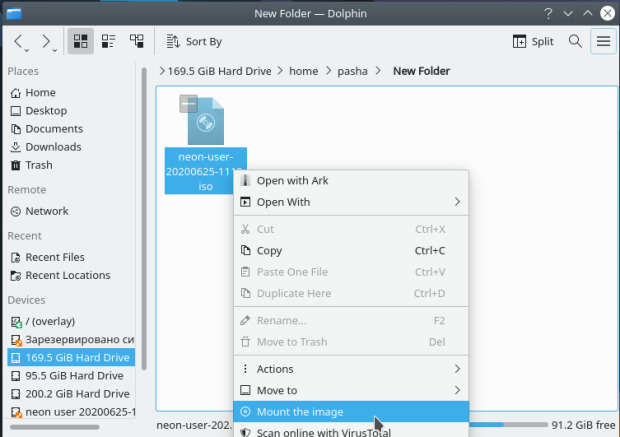
Una cosa interesante de este Service Menu es que no se requiere permisos de superusuario para crearlo y que utiliza la utilidad udisksctl que suele venir instalada en KDE.
Eso si para desmontar la imagen debemos utilizar la terminal o consola para escribir:
$ udisksctl loop-delete -b /dev/loop0
Hay que insistir que al programador de este Iso Mount le encantará que le deis me gusta en la KDE Store y que le comentéis como os funciona. Os recuerdo que ayudar al desarrollo del Software Libre también se hace simplemente dando las gracias, ayuda mucho más de lo que os podéis imaginar, recordad la campaña I love Free Software Day 2017 de la Free Software Foundation donde se nos recordaba esta forma tan sencilla de colaborar con el gran proyecto del Software Libre y que en el blog dedicamos un artículo.
Más información: KDE Store
¿Qué son los Dolphin Service Menu?
La personalización de KDE y Plasma está más que demostrada y prueba de ello son los Dolphin Service Menu, que no son más que la posibilidad de disponer un menú auxiliar en el gestor de archivos Dophin o en Konqueror que se activa con el botón derecho del ratón.
Con ellos tendremos nuevas acciones como:
- Accesos directos a los servicios de Dropbox.
- Accesos directos a las acciones de 7zG.
- Realizar acciones como root automáticamente.
- Enviar un adjunto con el Thunderbird
Y muchos más como hemos explicado en varias ocasiones en el blog. Puedes encontrar estos servicios se pueden encontrar en la sección Dolphin Service Menu en la Store de KDE.
GNU/Linux Valencia pide explicaciones al Conseller de Hacienda
La asociación GNU/Linux Valencia ha escrito una carta abierta al Conseller de Hacienda de dicha comunidad para pedirle respuestas por las inversiones realizadas con dinero público en soluciones de software privativas

La asociación de GNU/Linux Valencia ha llevado a cabo una acción en la que ha decidido escribir una carta al Conseller de Hacienda de la Comunidad Valenciana para pedirle explicaciones respecto a una inversión económica que se ha realizado en favor de software privativo.
Ya la Free Software Foundation Europe hace unos años puso en marcha la campaña para pedir que el dinero público que recaudan los diferentes gobiernos se invierta en soluciones de software libre y público.
La carta que ha enviado la asociación GNU/Linux Valencia va en esa línea y en la que piden explicaciones de por qué dinero público de los presupuestos se utiliza para invertir en empresas con sedes sociales ni siquiera Europeas y soluciones de software privativas en vez de opciones de software libre.
La carta en su totalidad se puede leer en la página web de la asociación GNU/Linux Valencia, y en ella piden que se den los motivos sobre el gasto de 2.162.404,35 € en un contrato para “SUMINISTRO DE LICENCIAS SOFTWARE Y SERVICIOS ASOCIADOS PARA FACILITAR EL TELETRABAJO EN LA GENERALITAT, para dotar al personal empleado público de la Generalitat de herramientas informáticas colaborativas que permitan utilizar adecuadamente las facilidades de teletrabajo en una situación de alerta como nos encontramos actualmente”
¡Los políticos y sus políticas del despiste! Por un lado se hacen la foto oportunista de gobierno que apoya el software libre y el tejido empresarial propio y por otro juegan la baraja de emplear dinero público en empresas y productos cerrados y privativos.
Recomiendo leer el texto completo de la carta abierta, en la que con datos y de manera muy concreta piden saber los motivos para dicha licitación. Al fin y al cabo, el dinero es público, por lo tanto tendremos el derecho de saber donde se gasta y los motivos para esa inversión.
Sé los motivos, y me puedo imaginar las respuestas. Y no sé si servirá de mucho pedir esas explicaciones, pero está bien que se retraten y definan en cuanto a esta materia se refiere.
De los políticos no espero gran cosa, pero aún así suscribo cada palabra y pregunta que hace GNU/Linux Valencia y desde aquí todo mi apoyo para su iniciativa como hace tiempo di al colectivo PicaPica en Oviedo.
Se trata de mover, y remover. Se trata de dar a conocer y difundir. Se trata de hacer saber que hay alternativas. Se trata de hacer saber que hay opciones funcionales, libres y profesionales.
No caigamos en dejar nuestra soberanía tecnológica, crucial en la sociedad en la que estamos, en manos de monopolios cerrados.
Enhorabuena a GNU/Linux Valencia por la iniciativa y esperamos novedades al respecto. Si eres de la zona apoya siendo una persona más detrás de la asociación, suscríbete a su blog, sigue sus redes sociales, etc…
Enlaces de interés


Software War (Keith Curtis)
Hello there! Do you know who Keith Curtis? If yes then good! If no and you are someone who using opensource software then you should get to know who are this guy.
I never meet him personally but I my love with linux start with Debian and I like to read his blog about debian, opensource vs proprietary software, questioning about Ubuntu existant etc (which is how this thing lead me to his weblog 10 years ago).. I just silent reader, I read this articles including everyone comments which I believe everyone have they own implicit objective and mutual objective for everything about IT.
Ok, sorry for the crap introduction taking too long. Today, I visited his weblog and found out he releasing “Software Wars, the Movie”.
You can download the torrent file HERE or watch it on the Peertube that he already setup.
P/s: If you wonder which articles lead me to his weblog 10 years ago..then let me tell you. That articles was “Should Ubuntu Have Been Created?”. From the title itself you can already smell how controversial yet so brave. Even Mark Shuttleworth come and leave a comment there.
#openSUSE Tumbleweed revisión de la semana 26 de 2020
Tumbleweed es una distribución “Rolling Release” de actualización contínua. Aquí puedes estar al tanto de las últimas novedades.

openSUSE Tumbleweed es la versión “rolling release” o de actualización continua de la distribución de GNU/Linux openSUSE.
Hagamos un repaso a las novedades que han llegado hasta los repositorios estas semanas.
El anuncio original lo puedes leer en el blog de Dominique Leuenberger, publicado bajo licencia CC-by-sa, en este enlace:
Semana 26, lo que significa que hemos pasado la mitad de este año 2020. Pero ya sabes que el desarrollo de Tumbleweed, no entiende de temperaturas, del tiempo, estaciones del año y todo eso.
En esta semana la media de publicaciones ha bajado, pero aún así han llegado a los repositorios, 3 nuevas snapshots (0618, 0621, y 0622). Con actualizaciones de paquetes importantes, como el kernel, Plasma o LibreOffice
Como siempre, destacamos algunas de las actualizaciones:
- VLC 3.0.11
- KDE Plasma 5.19.1
- Linux kernel 5.7.2
- LibreOffice 7.0 beta2 (por favor reportar bugs y regresiones, si es que se encuentran algunas)
Los proyectos que están esperando próximas actualizaciones son:
- Linux kernel 5.7.5
- KDE Plasma 5.19.2
- systemd 245.6
- LibreOffice 7.0
- openSSL 3.0
Si quieres estar a la última con software actualizado y probado utiliza openSUSE Tumbleweed la opción rolling release de la distribución de GNU/Linux openSUSE.
Mantente actualizado y ya sabes: Have a lot of fun!!
Enlaces de interés
-
-
- ¿Por qué deberías utilizar openSUSE Tumbleweed?
- zypper dup en Tumbleweed hace todo el trabajo al actualizar
- ¿Cual es el mejor comando para actualizar Tumbleweed?
- Comprueba la valoración de las “snapshots” de Tumbleweed
- ¿Qué es el test openQA?
- http://download.opensuse.org/tumbleweed/iso/
- https://es.opensuse.org/Portal:Tumbleweed
-

——————————–
openSUSE Tumbleweed – Review of the week 2020/26
Dear Tumbleweed users and hackers,
Week 26, aka half of the year, is over. But as we all know, Tumbleweed does not care much about the weather, the temperatures, or the season at all. It only cares for its contributors to have fun – at any given moment. So, week 26 has seen 3 snapshots (0618, 0621, and 0622).
The snapshots contained these changes:
- VLC 3.0.11
- KDE Plasma 5.19.1
- Linux kernel 5.7.2
- LibreOffice 7.0 beta2 (please report bugs if you see regressions)
The staging projects are filled with these relevant changes:
- Linux kernel 5.7.5
- KDE Plasma 5.19.2
- systemd 245.6: the maintainer started adding the minor release number to the package version to make it clearer, what the openSUSE package is based on
- LibreOffice 7.0 will enable skia
- openSSL 3.0
- RPM change: %{_libexecdir} is being changed to /usr/libexec. This exposes quite a lot of packages that abuse %{_libexecdir} and fail to build

Webslice, una página web en tu escritorio – Plasmoides de KDE (150)
Llegamos a los 150 plasmoides presentados en el blog, con Webslice, que te permite tener una simple página web en tu escritorio, algo que puede ser útil en determinadas circunstancias.
Webslice, una página web en tu escritorio – Plasmoides de KDE (150)
De la mano y la mente de Cqoicebordel nos llega uno de estos plasmoides que sueles pensar que son poco útiles pero que seguro que hay personas que le encuentran su uso.
Se trata de Webslice, un widget que te permite tener una visor de una página web en tu fondo de escritorio, eso si, sin los controles de navegación típicos de los navegadores web.
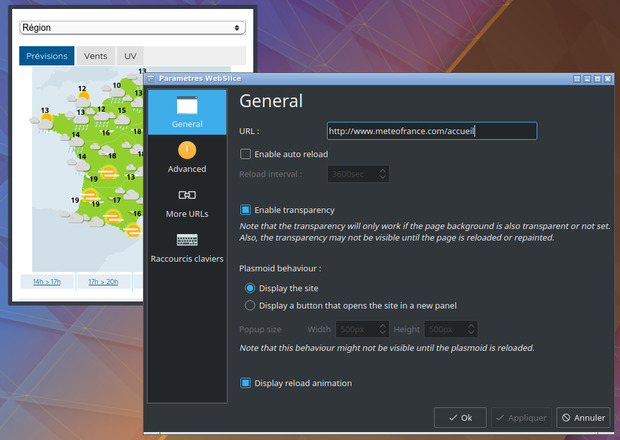
Sus características son las siguientes:
- Visualizar una página web
- Configurar la URL en las preferencias
- Refresco automático configurable desde las opciones
- «Hack» para tener un buen zoom en la página
- Fondo transparente
- Recargar manualmente la página con el menú del botón derecho del ratón
- Ajuste del ancho preferido (útil para activar la versión móvil o de escritorio de los sitios web)
- Posibilidad de poner tu propio JS en la página
- Usar como barra de tareas el plasmoide
- Configuración desde el menú contextual
- Elección entre un diseño compacto o uno completo
- Elección del tamaño del popup
- Más URLs a través del menú de contexto
- Multilenguaje (en+fr+es+pt_BR+zh_TW)
- Clic en el medio o ctrl+clic en los enlaces para abrirlos en el navegador predeterminado
Y como siempre digo, si os gusta el plasmoide podéis “pagarlo” de muchas formas en la nueva página de KDE Store, que estoy seguro que el desarrollador lo agradecerá: puntúale positivamente, hazle un comentario en la página o realiza una donación. Ayudar al desarrollo del Software Libre también se hace simplemente dando las gracias, ayuda mucho más de lo que os podéis imaginar, recordad la campaña I love Free Software Day 2017 de la Free Software Foundation donde se nos recordaba esta forma tan sencilla de colaborar con el gran proyecto del Software Libre y que en el blog dedicamos un artículo.
Más información: KDE Store
¿Qué son los plasmoides?
Para los no iniciados en el blog, quizás la palabra plasmoide le suene un poco rara pero no es mas que el nombre que reciben los widgets para el escritorio Plasma de KDE.
En otras palabras, los plasmoides no son más que pequeñas aplicaciones que puestas sobre el escritorio o sobre una de las barras de tareas del mismo aumentan las funcionalidades del mismo o simplemente lo decoran.
Creative Common license (CC)
Have you heard keyword such as intellectual property, copyright, pattern, watermark, plagiarize etc? Well of coz you heard it everywhere. It all about licenses and permission.
If someone creating opensource software, we normally heard it under “Free and open-source software software licenses” such as GNU GPL, BSD, Apache, MIT, Mozilla public, Common public and many more.
How about books, plays, movies, music, articles, photographs, blogs, and websites? Okey,it is also eligible to file for a license. Creative Common license (CC) is one of several public copyright licenses we can use.
The CC licenses are appropriate for all types of content you want to share publicly, except software and hardware. The CC licenses all grant the “baseline rights”, such as the right to distribute the copyrighted work worldwide, for non-commercial purposes and without modification.
The details of each of these licenses depend on the version, and comprises a selection out of four conditions:
| Icon | Right | Description |
|---|---|---|
 |
Attribution (BY) | Licensees may copy, distribute, display and perform the work and make derivative works and remixes based on it only if they give the author or licensor the credits (attribution) in the manner specified by these. Since version 2.0, all Creative Commons licences require attribution to the creator and include the BY element. |
 |
Share-alike (SA) | Licensees may distribute derivative works only under a license identical (“not more restrictive”) to the license that governs the original work. (See also copyleft.) Without share-alike, derivative works might be sublicensed with compatible but more restrictive license clauses, e.g. CC BY to CC BY-NC.) |
 |
Non-commercial (NC) | Licensees may copy, distribute, display, and perform the work and make derivative works and remixes based on it only for non-commercial purposes. |
 |
No Derivative Works (ND) | Licensees may copy, distribute, display and perform only verbatim copies of the work, not derivative works and remixes based on it. Since version 4.0, derivative works are allowed but must not be shared. |
Reference : wikipedia.org/wiki/Creative_Commons_license
This weblog work is under “CC BY-NC-ND 4.0”
As per title said, this weblog work is under CC BY-NC-ND 4.0 - Attribution-NonCommercial-NoDerivatives 4.0 International

This license is the most restrictive of CC six main licenses, only allowing others to download my works and share them with others as long as they credit back, but you can’t change them in any way or use them commercially purpose.
I choose to CC BY-NC-ND 4.0 in order to be able to protect my own contents from getting stolen. Although things that I write might be full of crap and bulls**t, broken grammar, not interesting but at least it is a way to practice on using the intellectual property rights.
