
 Member
 DimStar
openSUSE Tumbleweed – Review of the week 2020/25
Dear Tumbleweed users and hackers,
7 days – 6 snapshots. That’s the quick summary of the last week. Felt unspectacular from that point of view, even though, unfortunately, the Tumbleweed users did have to fight a few problems this time aroud. The 6 snapshots released were 0611, 0612, 0614, 0615, 0616 and 0617. No worries, we did not skip 0613 for superstitious reasons – it just so happened that OBS needed a bit more time to build 0612.
The releases brought you these changes:
- git 2.27.0
- OpenSSH 8.3p1
- PostgreSQL 12.3
- SQLite 3.32.2
- SSSD 2.3.0
- Linux kernel 5.7.1: failures when loading firmware for iwlwifi based cards. The next kernel should bring the fix for that. As a workaround, you could use the uncompressed kernel-firmware package (instead of kernel-firmware-*)
- KDE Applications 20.04.2
- KDE Frameworks 5.71.0
- Mesa 20.1.1
The following changes are being worked on in staging areas:
- Linux kernel 5.7.2
- VLC 3.0.11
- KDE Plasma 5.19.1
- LibreOffice 7.0 (beta)
- RPM change: %{_libexecdir} is being changed to /usr/libexec. This exposes quite a lot of packages that abuse %{_libexecdir} and fail to build
- openSSL 3.0
Build tensorflow2 with CUDA support
Build Tensorflow 2.1.1 with CUDA support
Tensorflow 2.1.1 is available in Tumbleweed and Leap 15.2 but has no CUDA support enabled, due to legal issues with NVIDIA. As CUDA support speeds up training and inference of neuronal networks a lot, it is desirable to have it enabled.
This post explains how to build a tensorflow package with CUDA support.
Prerequisites
The CUDA packages for building will be added via the -p flag to the osc command, but due to a bug you need at least version 0.169.1. This version is already included in Tumbleweed but for Leap 15.2 you will have to add the openSUSE Tools repository with the command and update osc
sudo zypper ar https://download.opensuse.org/repositories/openSUSE:/Tools/openSUSE_15.2/openSUSE:Tools.repo
sudo zypper ref
sudo zypper up --allow-vendor-change osc
It is also recommended to have a decent equipped machine for building as at least 10GB memory are needed and the build takes also a lot of time. On my twelve core machine it took more than two hours.
Create CUDA archive
In this step all the relevant CUDA packages are put into a single repository so that osc can access them. For this create the repository directory ($HOME/opt/cuda-10-1 in this case) with the command
mkdir -p $HOME/opt/cuda-10-1
The in next step downloaded work with Tumbleweed and openSUSE Leap 15.2.
CUDA
Download from https://developer.nvidia.com/cuda-10.1-download-archive-update2 the rpm(local) for openSUSE and install it. After that copy the rpms to the local directory with
cp /var/cuda-repo-10-1-local-10.1.*/*rpm $HOME/opt/cuda-10-1
NCCL
Visit https://developer.nvidia.com/nccl/nccl-download and download Local installer for RedHat/CentOS 7. After you installed the downloaded rpm you have to copy the packages with the command
cp /var/nccl-repo-2.7.3-ga-cuda10.1/*rpm $HOME/opt/cuda-10-1
CUdnn
You have to register at NVIDA in order to download from https://developer.nvidia.com/cudnn . There download cuDNN Runtime Library for RedHat/Centos 7.3 (RPM) and cuDNN Developer Library for RedHat/Centos 7.3 (RPM). After that copyt the rpms to $HOME/opt/cuda-10-1.
Create local repository
Now you can create a local repository which can be used with osc with the commands
cd $HOME/opt/cuda-10-1
createrepo .
where you might have to install the createrepo package.
Compile Tensorflow
With all the packages in place you have to get the tensorflow sources. This can be done with
osc co science:machinelearning/tensorflow2
Tensorflow can now compiled in the directory science:machinelearning/tensorflow2 with the command
osc build --ccache -p $HOME/opt/cuda-10-1 -k . -M cuda-10-1 openSUSE_Leap_15.2
which will start the build of the tensorflow package. You should always use the --ccache option as this speeds up rebuild. For Tumbleweed used the command
osc build --ccache -p $HOME/opt/cuda-10-1 -k . -M cuda-10-1 openSUSE_Tumbleweed
After some hours the build should have finished and the resulting tensorflow rpms should be in the directory where you have started the build.
Installation
For a proper installation copy the rpms to $HOME/opt/cuda-10-1 and rerun createrepo. You might want to add this repository to you system with
zypper ar $HOME/opt/cuda-10-1/repodata tensorflow
in order to install the package tensorflow2.
Publica en Mastodon desde la terminal de #Linux con tut
Tut es un cliente para la red social Mastodon para la terminal de GNU/Linux inspirado en el editor Vim

Desde hace varios años Mastodon, PixelFed y diaspora* son las únicas redes sociales en las que me podrás encontrar y seguir.
Hace ya un tiempo escribí en el blog sobre toot, un cliente para Mastodon para manejarlo desde la línea de comandos.
En este caso te traigo otra interfaz de Mastodon para la terminal llamada tut con los atajos de teclado inspirados en el editor Vim y utilizando este editor para componer tus “toots”. Tiene licencia MIT.
Para utilizar tut, si utilizas Arch Linux, lo podrás instalar desde los repositorios, si como yo utilizas otra distribución de GNU/Linux puedes compilarlo tu misma o descargarte los binarios desde su página de GitHub.
Le damos permisos de ejecución y si queremos podemos renombrarla para que sea más sencillo ejecutarla y moverla una ruta de nuestro $PATH. Hecho esto, ya podremos ejecutarla.
Lo primero será “conectarla” con nuestra cuenta, así que para ello introducimos el nombre de la instancia donde estamos registrados y permitimos que esta aplicación pueda gestionar nuestra cuenta.
Et voila!! Ya aparecerán nuestra línea de tiempo local en la aplicación. Podremos navegar por ella, leer los toots, ver las imágenes, marcar como favoritos, etc.
Y sí, también podremos por supuesto escribir nuestros propios “toots” desde la terminal. Es la hora de sorprender a nuestro cuñado!! Para ello, pulsamos sobre “c” para crear el post y “e” para editarlo.
Esto nos abrirá el editor Vim, donde podremos escribir nuestro post. Guardamos y salimos de Vim (no me digas que no sabes cómo hacerlo) y volverá a la interfaz de tut. Para publicarlo pulsaremos sobre “p” y ya está.
Podremos comprobar desde el navegador que el “toot” se ha publicado correctamente en nuestra cuenta.
Aquí tienes un vídeo demostrativo de este sencillo proceso… Este vídeo está alojado en archive.org. Espero que disfrutes de la herramienta y ya sabes, no me busques en feisbuk, instagramo ni tuiter…
El vídeo también está disponible en YouTube. Puedes verlo en tu equipo con el reproductor VLC o descargarlo desde esta dirección (youtube-dl -f 22 <url>):
https://www.youtube.com/watch?v=2EP_QEfmhRE

Short network timeouts expected during the weekend
The SUSE office in Nuremberg will get disconnected from any former Microfocus network over the upcoming weekend (2020-06-20/21). Most of the changes should go unnoticed. But SUSE-IT needs to replace some hardware and they informed us that there might be short outages or curious network timeouts during this time. Especially around Sunday, 2020-06-21, in the afternoon.
We will keep you updated via our status page, if we get aware of any longer outage.
Vídeo de las novedades de Plasma 5.19 de The Linux Experiment
Gracias a las continuos lanzamiento de actualizaciones, novedades de Software y los eventos, que ahora son online, no tengo día que no tenga alguna noticia relacionada. Y es que hoy me complace compartir con vosotros este vídeo de las novedades de Plasma 5.19 de The Linux Experiment. Un breve recorrido por algunas de las mejoras que nos ofrece este entorno de trabajo que cada día enamora a más y más usuarios.
Vídeo de las novedades de Plasma 5.19 de The Linux Experiment
Lo cierto es que no puede estar más de acuerdo con el texto de introducción de este vídeo, y es que el gusto por armonizar todo el entorno de trabajo cada vez es más fino.
Pero dejemos que lo diga The Linux Experiment:
«KDE Plasma 5.19 ya está disponible y es una versión mayor. Toneladas de esfuerzo se dedicaron a añadir más pulido y hacer todo más coherente, como lo hicieron las versiones anteriores, y debo decir, que Plasma está ahora en el punto donde realmente no se pueden sentir las pequeñas inconsistencias y diferencias entre sus diversas partes. ¡Echemos un vistazo a las novedades!»
No os entretengo más y os dejo con el vídeo de 6 minutos donde nos cuentan las novedades de Plasma 5.19
Y para los que no puedan ver el vídeo, os dejo un resumen de las mismas:
- Mejoras en los plasmoides: reescrito al pack de widgets de System Monitor o los de la bandeja del sistema, por poner un par de ejemplos. Ahora son mśa bonitos y funcionales.
- Añadida un espaciador de tamaño variable para que los plasmoides contenedores se ajusten al aspecto deseado por el usuario.
- Mayor consistencia en las notificaciones, que ahora son más coherentes.
- Añadido el nombre del creador del fondo de pantalla en el selector de fondos de pantalla.
- Completada la colección por defecto de avatares de usuarios.
- Mejoras en las Preferencias del Sistema.
- Krunner abre ahora el módulo específico de las Preferencias del Sistema cuando se le pide.
- Rediseñado KinfoCenter.
- Mejoras en Kwin, Wayland y Discover.

Y para finalizar el artículo os dejo el vídeo del lanzamiento, realizado con un gusto exquisito.
Más información: KDE.org
Recopilación del boletín de noticias de la Free Software Foundation – junio de 2020
Boletín de noticias relacionadas con el software libre publicado por la Free Software Foundation.

¡El boletín de noticias de la FSF está aquí!
La Free Software Foundation (FSF) es una organización creada en Octubre de 1985 por Richard Stallman y otros entusiastas del software libre con el propósito de difundir esta filosofía.
La Fundación para el software libre (FSF) se dedica a eliminar las restricciones sobre la copia, redistribución, entendimiento, y modificación de programas de computadoras. Con este objeto, promociona el desarrollo y uso del software libre en todas las áreas de la computación, pero muy particularmente, ayudando a desarrollar el sistema operativo GNU.
Además de tratar de difundir la filosofía del software libre, y de crear licencias que permitan la difusión de obras y conservando los derechos de autorías, también llevan a cabo diversas campañas de concienciación y para proteger derechos de los usuarios frentes a aquellos que quieren poner restricciones abusivas en cuestiones tecnológicas.
Mensualmente publican un boletín (supporter) con noticias relacionadas con el software libre, sus campañas, o eventos. Una forma de difundir los proyectos, para que la gente conozca los hechos, se haga su propia opinión, y tomen partido si creen que la reivindicación es justa!!
- En este enlace podéis leer el original en inglés: https://www.fsf.org/free-software-supporter/2020/june
- Y traducido en español en este enlace: https://www.fsf.org/free-software-supporter/2020/junio

Puedes ver todos los números publicados en este enlace: http://www.fsf.org/free-software-supporter/free-software-supporter
Después de muchos años colaborando en la traducción al español del boletín, desde inicios de este año 2020 he decidido tomarme un descanso en esta tarea.
Pero hay detrás un pequeño grupo de personas que siguen haciendo posible la difusión en español del boletín de noticias de la FSF.
¿Te gustaría aportar tu ayuda en la traducción? Lee el siguiente enlace:
Por aquí te traigo un extracto de algunas de las noticias que ha destacado la FSF este mes de junio de 2020
La FSF provee un servicio de videoconferencia, que respecta tu libertad, a todos sus miembros asociados.
Del 28 de mayo
La Free Software Foundation(FSF) está ofreciendo a todos sus miembros asociados un servicio de videoconferencia libre “como en libertad” a través de una instancia exclusiva de Jitsi Meet como un beneficio a sus miembros asociados.
Para proveer un servicio sostenible y confiable, nosotros estamos ofreciendo la habilidad de crear conversaciones en el servidor exclusivo para miembros asociados. Los miembros pueden crear un canal usando sus credenciales y cualquier persona o grupo puede participar en la conversación.
Personas que no sean miembros pueden ser invitados; pero no pueden crear un canal.
Informacion acerca de como usar la instancia de videoconferencia de la FSF para miembros asociados
Este es uno de los muchos esfuerzos que hemos hecho en los pasados meses para rechazar la presión de la sociedad que se está incrementando para usar software no libre para comunicarse con empleados, amigos y seres queridos durante la pandemia de COVID-19 y después de esta.
- https://www.fsf.org/blogs/community/fsf-gives-freedom-respecting-videoconferencing-to-all-associate-members
- https://www.fsf.org/news/free-software-foundation-announces-freedom-respecting-videoconferencing-for-its-associate-members
La educación remota no requiere que renuncies a tus derechos de libertad y privacidad
Del 14 de mayo
El incremento en el uso de software para realizar evaluaciones y otro tipo de software educacional es un desarrollo peligroso, primero por la naturaleza del software propietario y segundo por su propósito inherente de exponer los datos de los estudiantes, o en algunos casos de su familia, a que sean vigilados.
En esquemas como estos los usuarios al final sacrifican su información personal y su informacion biometrica. Esto dado que el software es propietario y no hay posibilidad de entender cómo funciona -aparte de que puede haber una fuga de datos, esto puede crear preocupaciones acerca de la seguridad o entregar evaluaciones de mala calidad (y resultados también).
Requerir que los estudiantes cedan el control de su computador completamente a una compañía que realice evaluaciones es fundamentalmente injusto. Lo peor es que no podemos estar seguros que algunas de sus dependencias, que no son libres, y sus técnicas de vigilancia serán reversadas una vez que los lineamientos de distanciamiento social no sean obligatorias.
Es importante que las decisiones hechas en el sector de la educación sean primariamente y por sobre todo motivadas éticamente.
Aquí en la FSF hemos comenzado un grupo de comunicaciones libre. Las iniciativas incluyen una lista de correo para comunicaciones remota, asi como una pagina con recursos colaborativos para documentar y compartir herramientas libres que ayuden a compartir la conciencia por las decisiones éticas que pueden ser tomadas. También hemos estado ayudando a profesionales en la educación acerca de cómo realizar sus clases online usando solamente software libre.
Hemos estado leyendo muchas historias acerca del activismo en educación de una amplia comunidad de personas y queremos compartir estas historias con usted. estas nos han motivado e inspirado.
Necesitamos mas personas como estas alrededor del mundo que sean críticos y alcen su voz acerca de las infracciones a las libertades del usuario en el área de el aprendizaje remoto.
Microsoft Build: Las mismas cosas recicladas, no hay actualización
Del 21 de mayo
Frecuentemente, el silencio de una compañía de software propietario puede ser más ruidoso que su última campaña de contra el derecho a la libertad de un usuario de computadora.
Este es el caso del evento conocido como “Build” centrado en el desarrollo de Microsoft. Mientras Microsoft anunciaba unas pocas adiciones a su resultado de software libre, ellos perdieron la oportunidad de demostrar el compromiso real con la libertad de los usuarios al reutilizar de manera productiva su recientemente abandonado sistema operativo Windows 7 bajo una licencia de software libre.
El denunciante de Apple sale públicamente a hablar sobre la “Falta de acción”
Del 20 de mayo por Alex Hern
Un antiguo contratista de Apple quien ayudó a denunciar el programa de la compañía que escuchaba las grabaciones de Siri ha decidido mostrarse en público en protesta por la falta de acción tomada como resultado de sus revelaciones.
En una carta anunciando sus decisión, enviada a todos los organismos de protección de información, Thomas le Bonniec dice: “Es preocupante que Apple (y seguramente no solamente Apple) se mantenga ignorando y violando los derechos fundamentales y continúe su masiva recolección de información.”
“Estoy extremadamente preocupado de que las grandes compañías de tecnología están básicamente grabando a toda la población a pesar de que los ciudadanos europeos se les ha dicho que tienen las leyes más fuertes para la protección de datos en el mundo. Realizar una ley no es suficiente: se necesita que sea aplicada con estas empresas.”
La contínua y fragrante violación de privacidad es por mucho la única razon para evitar productos Apple: Lee más acerca de cómo Apple rutinariamente viola los derechos de sus usuarios en https://www.fsf.org/blogs/community/apple-app-store-anniversary-marks-ten-years-of-proprietary-appsploitation.

Estas son solo algunas de las noticias recogidas este mes, pero hay muchas más muy interesantes!! si quieres leerlas todas (cuando estén traducidas) visita este enlace:
Y todos los números del “supporter” o boletín de noticias de 2020 aquí:
—————————————————————

openSUSE Tumbleweed on an HP Zbook 15 G2 with Nvidia Quadro K2100M
Abierto el registro a Akademy 2020
En esta ocasión no tienes la excusa de la distancia, y es que este año, y debido al COVID-19, los eventos físicos se han convertido en virtuales, lo cual no quiere decir que no sea real. Esta semana se ha anunciado que se ha abierto el registro a Akademy 20120 que se celebrará en línea del 4 al 11 de septiembre.
Abierto el registro a Akademy 2020
Como suele ser habitual, los eventos relacionados con el Software Libre, aunque son de entrada libre y gratuita requieren un registro previo para contabilizar participantes y poder prevenir problemas de espacio.
Este año no sería necesario, pero en un evento de estas características siempre viene bien tener cierto control de los asistentes por varias razones, siendo una de ellas poder demostrar a las administraciones públicas que esto del Software Libre no es cosa de 4 gatos.
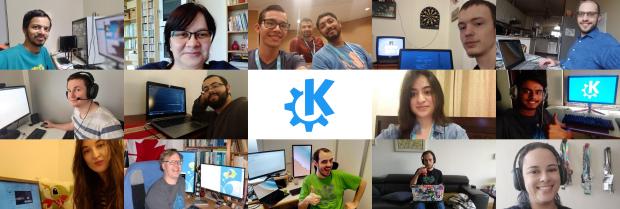
De esta forma, Akademy 2020 no es una excepción desde hace unos días está abierta su plataforma de registro de asistentes, donde se conseguirá una estimación de asistentes, algo además muy necesario para dimensionar las salas virtuales.
Si eres simpatizante del Proyecto KDE creo que te encuentras con una oportunidad única ya que no solo podrás compartir pantalla con los principales desarrolladores KDE sino que ayudarás a dar una visibilidad nunca vista de este evento.
Yo ya estoy registrado y espero poder ver vuestro nombre o pseudónimo en el listado de asistente.
¿Qué es Akademy?
Para los que no lo sepan, Akademy es el evento de la Comunidad KDE que aúna en una gran conferencia todo tipo de simpatizantes de KDE como desarrolladores, diseñadores, usuarios, traductores, promotores. Allí se reunirán a lo largo de una semana para compartir charlas, cenas, ponencias, talleres y, en definitiva, para trabajar juntos.
Es una gran semana que sirve para unir más fuerte los lazos que unen nuestra Comunidad, así como para crear nuevos.
Akademy lleva realizándose anualmente bajo este nombre desde 2004, en la página web oficial o en la wikipedia podéis encontrar los nombres y fechas anteriores eventos.
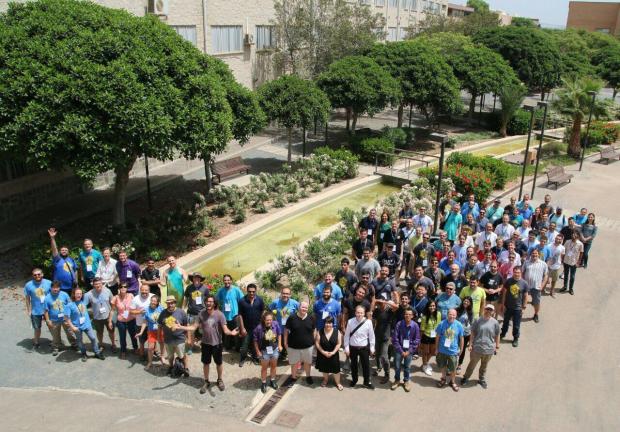
Para que os hagáis una ligera idea de la magnitud del evento, os dejo una imagen de grupo de Akademy 2017 de Almería en la que tuve la suerte de participar.
Volver a seleccionar la misma área en el editor Vim
Veamos cómo poder “reutilizar” una área de selección de texto que hayamos usado para volver a seleccionar la misma parte una y otra vez

En Vim nunca dejas de aprender cosas, bien porque pruebas y descubres algo por casualidad o bien porque lees un truco, una funcionalidad y la echas al montón de las cosas que aprendes sobre este editor de texto.
Este artículo forma parte de la serie de artículos sobre el editor Vim que desde hace meses vengo publicando en mi blog y que puedes encontrar reunidos en estos enlaces:
- https://victorhckinthefreeworld.com/tag/vim/
- https://victorhck.gitlab.io/comandos_vim/articulos.html
En este caso veremos cómo en el modo visual, podemos seleccionar un área del texto para con él hacer lo que queramos: copiar, pegar, etc. Y cómo volver a “reutilizar” ese mismo área que seleccionamos anteriormente.
Vayamos por partes con este pequeño tutorial. Lo primero tenemos un texto en nuestro editor Vim. Nos ponemos en modo visual con v y seleccionamos la parte que queramos (una palabra, una frase, un párrafo, etc)
Y realizamos la acción que queramos, copiar, borrar, etc. Si después de esto, queremos volver a realizar la misma acción y “reutilizar” la parte seleccionada anteriormente simplemente escribiremos:
gv
Esto volverá a seleccionar la zona que hemos seleccionado anteriormente, para volver a realizar la acción que queramos. ¡Pruébalo!
Bola extra
Y ya que estoy hablando de selección de textos, etc. Voy con otro pequeño truco que nos puede servir a la hora de trabajar con el editor Vim
Mediante el comando
:%
seleccionamos el documento completo para realizar la acción que queramos. Por ejemplo:
- :%d → Borrará todo el documento
- :%y → copiará todo el documento
- :%> → “sangrará” todo el documento
Y estos son los dos pequeños trucos sobre Vim que te traigo hoy. Pero echa un vistazo a la lista de artículos publicados quizás hay otros que te resulten interesantes y útiles para aprender un poco más sobre este editor de texto.


openSUSE + LibreOffice Conference Update
Organizers of the openSUSE + LibreOffice Conference have been slightly adjusted the conference dates from the original dates of Oct. 13 – 16 to the new dates of Oct. 15. - 17.
The new dates are a Thursday through a Saturday. Participants can submit talks for the live conference until July 21 when the Call for Papers is expected to close.
The length of the talks for the conference have also been changed. There will be a 15-minute short talk, a 30-minute normal talk and a 60-minute work group sessions to select. Organizers felt that shortening the talks were necessary to keep attendees engaged during the online conference. The change will also help with the scheduling of breaks, social video sessions and extra segments for Questions and Answers after each talk.
The live platform that will be used will allow presenters with limited bandwidth to play a talk they record should they wish not to present a live talk. The presenter will have the possibility to control the video as well as pause, rewind, fast-forward, etc., which is built into the system.
Organizers have online, live conference sponsorship packages available. Interested parties should contact ddemaio (at) opensuse.org for more information.