
Pengumuman Pemenang #KuisLiburan2019
Komunitas openSUSE Indonesia (openSUSE-ID) mengucapkan terima kasih atas antusiasme peserta pada #KuisLiburan2019 kali ini. Dari 127 jawaban yang masuk, kami harus mengkurasi jawaban yang salah maupun kurang tepat. Tersaring 42 jawaban yang tepat dan kami harus mengundi lagi untuk menentukan siapa peserta yang beruntung. Peserta yang beruntung adalah sebagai berikut.
Peserta yang beruntung untuk mendapatkan new SSD 120 GB adalah Sabilil Maromi.
sementara untuk peserta berikut mendapatkan bingkisan menarik dari openSUSE ID
- Arif Setyo Nugroho
- abi permana
- Heru Juwardi
- Aji Revaldi
- Surya Handika Putratama
- Yaumul Majid
- Muhammad Rofi
- Wuri Nugrahadi
- Arif Dermawan
- A Mu’ammar Afinas
- Rizal Amrr
- abdi weef
- Kristian Valent
- Rokib Munawir
- Satrio Adi Prawiro
- iqbalfr@nevtik.org
- gatoti
- lazuardi senja
- Muhamad Andhika Prasetya
Diharapkan kepada seluruh pemenang untuk mengirimkan informasi alamat dan nomor handphone di tautan berikut ini selambatnya tanggal 14 Januari 2020, jika sampai waktu tersebut tidak mengisi form pemenang maka hadiah dinyatakan hangus.
Bingkisan menarik akan dikirimkan oleh tim openSUSE-ID secara gratis! Jangan lupa bagi para pemenang untuk memposting bingkisan tersebut ke media sosial dengan tagar #KuisLiburan2019 #openSUSE dan mention ke @openSUSE dan @openSUSEID (di Twitter).
Selamat dan sampai jumpa lagi di Kuis berikutnya!
Salam,

 Member
 Futureboy
Noodlings 12 | Lighting the Emby Server with Kdenlive
openSUSE Tumbleweed – Review of the week 2020/02
Dear Tumbleweed users and hackers,
Week 2 this year brings you what many have been asking for: Kernel 5.4! YES, After the holiday season came to an end and the right people were back in business, we could address the issue around the invalid certificate chain and correct the issue. In total, Week 2 brought you five snapshots: 0103, 0105, 0106, 0107 and 0108, with all these nice changes:
- Linux kernel 5.4.7 (Snapshot 0108, fresh off the press)
- NetworkManager 1.22.2
- Flatpak 1.6.0
- Mesa 19.3.1
- Rust 1.40
Also, the staging projects are making progress and some of the long-standing areas are likely to be checked in rather soon. The major things coming your way in the near (or maybe distant) future are:
- RPM 4.15.1: tests have all passed, you can expect this to come your way next week
- systemd 244: one package’s test suite keeps on failing without anybody understanding what’s going on. Since this is a legacy package, it was decided to disable the test suite. So systemd 244 should now also be ready and be checked in soon
- Qt 5.14: we are awaiting some legal reviews. Tests by openQA have all passed
- Kubernetes 5.17: the last tests were still failing, but just today we received a submission that is supposedly fixing it
- Python 3.8: not going to happen very soon – but it’s being worked on
- Removal of python 2: python 2 is now officially no longer maintained by upstream. Work is undertaken to lower the usage footprint of python2, to the point where it can be removed from the distro
- SQlite 3.30: python-Django is still failing
- More kernels from the Linux 5.4 branch. You can expect them to come more frequent again
- Mozilla Firefox 72
- KDE Applications 19.12.1
- KDE Plasma 5.17.5
As you can see, the holiday is over – and things are being thrown at me at a high pace, in the hope to get it all integrated into Tumbleweed quickly. I’ll do what I can – but OBS and openQA resources tend to be limited 
High Availability PostgreSQL Cluster dengan Pgpool-II (Bagian ke-3)
TL;DR: Karena cukup panjang tulisan akan dibagi dalam 3 tulisan
- Bagian 1 : membahas instalasi dan konfigurasi master postgresql
- Bagian 2 : membahas instalasi dan konfigurasi slave postgresql
- Bagian 3 : membahas instalasi dan konfigurasi pgpool-II
Tulisan ini adalah Bagian ke-3.
4. Instalasi pgpool
Pgpool-II sudah terdapat di OBS repositori. Versinya sedikit terlambat dari versi rilis di web Pgpool. Saat tulisan ini dibuat versi Pgpool di website Pgpool adalah 4.1. Sementara paket di OBS repositori masih versi 4.0.6.
Tambah repositori, install pgpool dan postgresql. Sebenarnya postgresql di mesin pgpool kita butuhkan hanya clientnya saja, untuk mengakses database (psql) dan backup (pg_dump) misalnya. Tapi untuk memudahkan kita install juga postgresql-server walaupun tidak perlu dijalankan
zypper ar -e -f https://download.opensuse.org/repositories/server:/database:/postgresql/openSUSE_Leap_15.1/ postgresql
zypper in --no-recommends pgpool-II postgresql12-pgpool-II postgresql12 postgresql12-server postgresql12-contrib
Selanjutnya edit file /etc/hosts, misalnya pgsql1 untuk master, pgsql2 untuk slave1, pgsql3 untuk slave2.
127.0.0.1       localhost
10.100.1.5      pgpool
10.100.1.6      pgsql1
10.100.1.7      pgsql2
10.100.1.8      pgsql3
Perhatikan bahwa kita menginstal pula paket postgresql12-pgpool-II, paket ini berisi library dan extension pgpool untuk PostgreSQL, ditandai dengan .sql dan .control. File-filenya tersimpan di direktori /usr/lib/postgresql12/lib64/, /usr/lib/postgresql12/lib64/bitcode/ dan /usr/share/postgresql12/extension/.
Langkah berikutnya kita memasang extension pgpool tersebut pada database postgresql. Kita pasang extension pgpool tersebut pada template1. Lakukan 1 kali saja di master karena nanti akan otomatis tereplikasi di slave.
sudo -i -u postgres
psql template1
CREATE EXTENSION pgpool_recovery;
CREATE EXTENSION pgpool_adm;
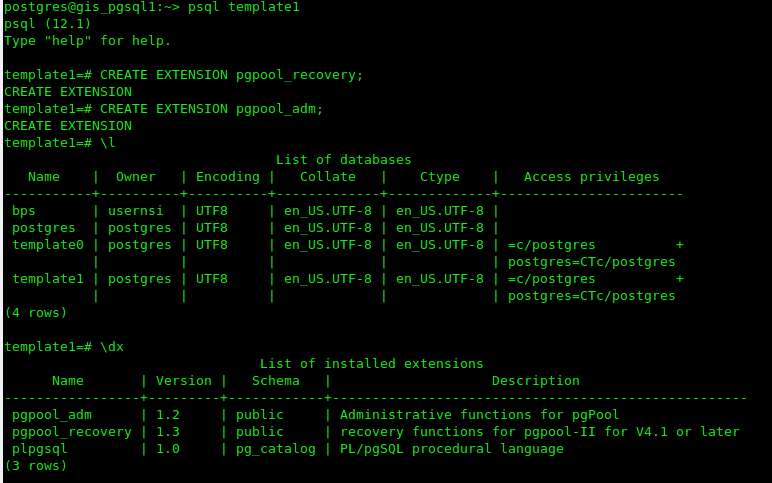
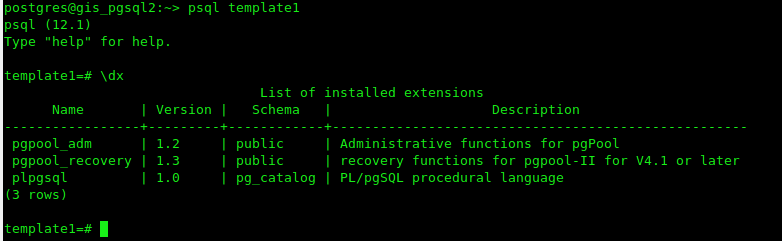
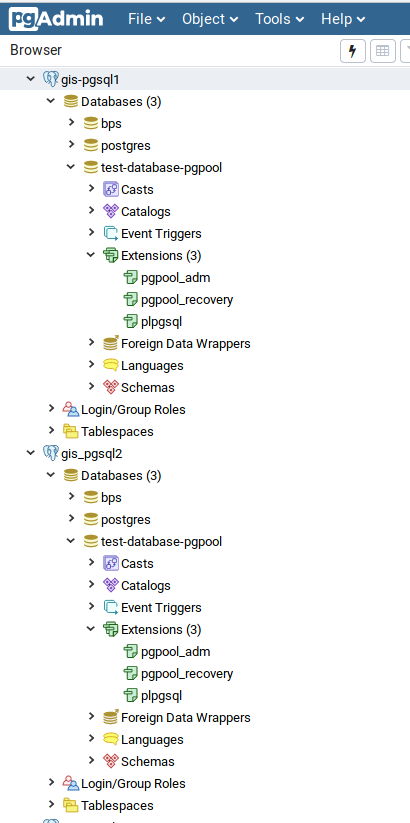
Periksa bahwa extension telah terpasang pada template1
\dx
Pada master akan seperti
Pada slave
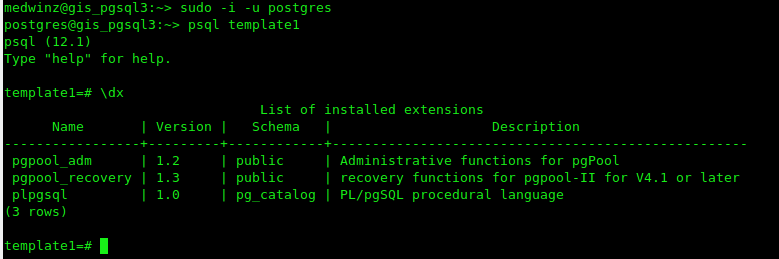
Pada saatnya nanti kita gunakan template1 sebagai template database yang akan kita buat sehingga otomatis database yang terbentuk akan memiliki extension pgpool. Misalnya gunakan pgadmin, buatlah sebuah database baru dengan dengan menggunakan template1 di master, maka database akan dibuat dengan extension pgpool_adm dan pgpool_recovery. Database dengan kondisi yang sama otomatis akan terbentuk di slave. Kalau berhasil artinya sulapan kita bekerja 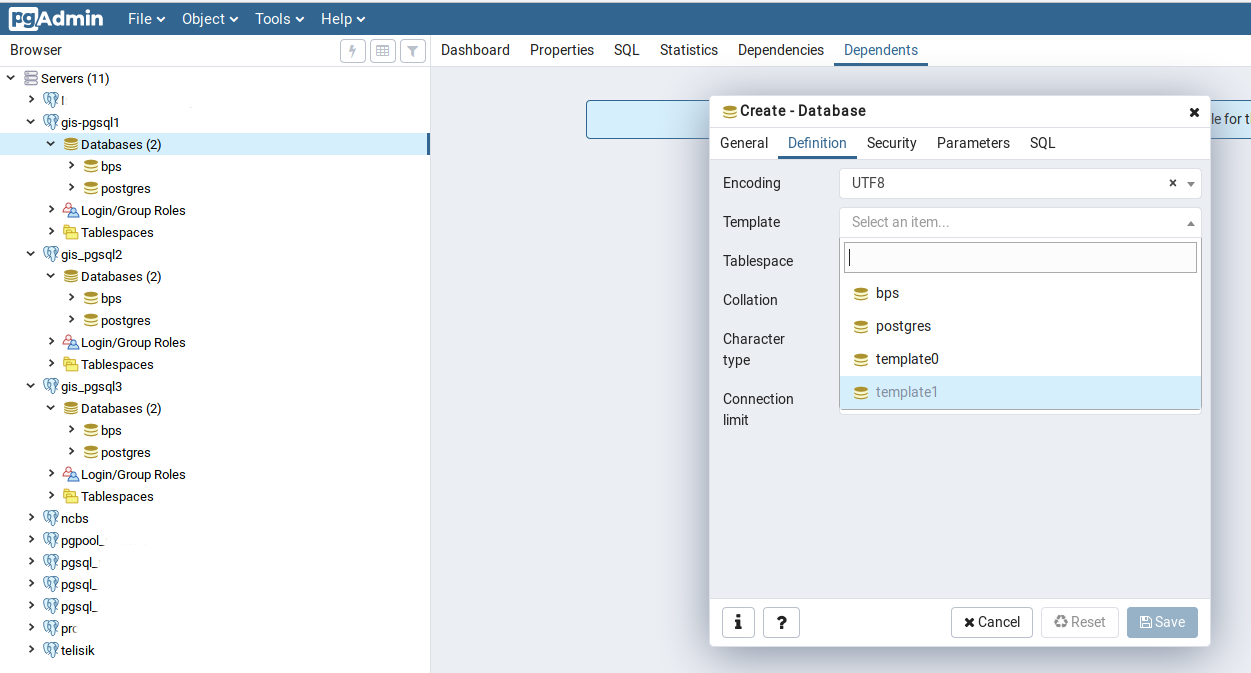
Langkah berikutnya adalah mengkonfigurasi file /etc/pgpool-II/pcp.conf. File ini berisi user dan password pgpool untuk admnistrasi management pgpool. Password dihash md5 dan formatnya adalah
username:[md5 encrypted password]
Buat password dalam format md5 dengan
$ pg_md5 your_password
    1060b7b46a3bd36b3a0d66e0127d0517
Atau jika anda tidak ingin memperlihatkan password anda dengan cara:
 $ pg_md5 -p
    password: your_password
Isi file pcp.conf dengan menggunakan hasil md5 tersebut misal
admin:97bf34d31a8710e6b1649fd33357f783Walaupun tidak wajib kita bisa mengisikan username dan password yang sama dengan user PostgreSQL agar mempermudah dalam mengakses dan mengingatnya.
Jangan lupa lengkapi file /etc/pgpool-II/pool_hba.conf dengan ip address dari masing-masing server PostgreSQL (sesuaikan dengan ip mesin master dan slave), misalnya
# "local" is for Unix domain socket connections only
local   all         all                               trust
# IPv4 local connections:
host    all         all         127.0.0.1/32          trust
host    all         all         ::1/128               trust
host    all         all         10.100.1.6/32         md5
host    all         all         10.100.1.7/32         md5
host    all         all         10.100.1.8/32         md5
Selanjutnya kita harus mengkonfigurasi file /etc/pgpool-II/pgpool.conf. Sesuai dengan dokumentasi pgpool maka running mode yang dianjurkan secara default adalah streaming replication mode. Dalam mode ini PostgreSQL bertanggung jawab terhadap sinkronisasi database. Load balancing dimungkinkan untuk dijalankan dalam mode ini. Contoh konfigurasinya diberikan ketika kita menginstall pgpool yaitu pada file /etc/pgpool-II/pgpool.conf.sample-stream. Di bawah ini adalah contoh dari /etc/pgpool-II/pgpool.conf
# - pgpool Connection Settings -
listen_addresses = '*'
port = 5432
socket_dir = '/var/run/pgpool'

# - pgpool Communication Manager Connection Settings -
pcp_listen_addresses = '*'
pcp_port = 9898
pcp_socket_dir = '/var/run/pgpool'
listen_backlog_multiplier = 2
serialize_accept = off

# - Backend Connection Settings -
backend_hostname0 = 'gis_pgsql1' # sesuaikan dengan HOSTNAME master postgresql
backend_port0 = 5432
backend_weight0 = 1
backend_data_directory0 = '/data'
backend_flag0 = 'ALLOW_TO_FAILOVER'

backend_hostname1 = 'gis_pgsql2' # sesuaikan dengan HOSTNAME slave postgresql
backend_port1 = 5432
backend_weight1 = 1
backend_data_directory1 = '/data'
backend_flag1 = 'ALLOW_TO_FAILOVER'

backend_hostname2 = 'gis_pgsql3' # sesuaikan dengan HOSTNAME slave postgresql
backend_port2 = 5432
backend_weight2 = 1
backend_data_directory2 = '/data'
backend_flag2 = 'ALLOW_TO_FAILOVER'

# - Authentication -
enable_pool_hba = on
pool_passwd = 'pool_passwd'
authentication_timeout = 60
allow_clear_text_frontend_auth = off

# - SSL Connections -
ssl = off
ssl_ciphers = 'HIGH:MEDIUM:+3DES:!aNULL'
ssl_prefer_server_ciphers = off

#------------------------------------------------------------------------------
# POOLS
#------------------------------------------------------------------------------

# - Concurrent session and pool size -
num_init_children = 80
max_pool = 4

# - Life time -
child_life_time = 300
child_max_connections = 0
connection_life_time = 0
client_idle_limit = 0

#------------------------------------------------------------------------------
# LOGS
#------------------------------------------------------------------------------

# - Where to log -
log_destination = 'syslog'

# - What to log -
log_line_prefix = '%t: pid %p: '
log_connections = on
log_hostname = off
log_statement = on
log_per_node_statement = on
log_client_messages = on
log_standby_delay = 'if_over_threshold'

# - Syslog specific -
syslog_facility = 'LOCAL0'
syslog_ident = 'pgpool'

# - Debug -
log_error_verbosity = default

#------------------------------------------------------------------------------
# FILE LOCATIONS
#------------------------------------------------------------------------------

pid_file_name = '/var/run/pgpool/pgpool.pid'
logdir = '/var/run/pgpool'

#------------------------------------------------------------------------------
# CONNECTION POOLING
#------------------------------------------------------------------------------

connection_cache = on
reset_query_list = 'ABORT; DISCARD ALL'

#------------------------------------------------------------------------------
# REPLICATION MODE
#------------------------------------------------------------------------------

replication_mode = off
replicate_select = off
insert_lock = off
lobj_lock_table = ''

# - Degenerate handling -
replication_stop_on_mismatch = off
failover_if_affected_tuples_mismatch = off

#------------------------------------------------------------------------------
# LOAD BALANCING MODE
#------------------------------------------------------------------------------

load_balance_mode = on
ignore_leading_white_space = on
white_function_list = ''
black_function_list = 'currval,lastval,nextval,setval'
black_query_pattern_list = ''

database_redirect_preference_list = ''
app_name_redirect_preference_list = ''
allow_sql_comments = off
disable_load_balance_on_write = 'transaction'

#------------------------------------------------------------------------------
# MASTER/SLAVE MODE
#------------------------------------------------------------------------------

master_slave_mode = on
master_slave_sub_mode = 'stream'

# - Streaming -
sr_check_period = 10
sr_check_user = 'postgres'
sr_check_password = 'password'
sr_check_database = 'postgres'
delay_threshold = 10000000

# - Special commands -
follow_master_command = ''

#------------------------------------------------------------------------------
# HEALTH CHECK GLOBAL PARAMETERS
#------------------------------------------------------------------------------
health_check_period = 5
health_check_timeout = 20
health_check_user = 'postgres'
health_check_password = 'password'
health_check_database = ''
health_check_max_retries = 0
health_check_retry_delay = 1
connect_timeout = 10000

#------------------------------------------------------------------------------
# FAILOVER AND FAILBACK
#------------------------------------------------------------------------------
failover_command = ''
failback_command = ''
failover_on_backend_error = on
detach_false_primary = off
search_primary_node_timeout = 300

#------------------------------------------------------------------------------
# ONLINE RECOVERY
#------------------------------------------------------------------------------

recovery_user = 'postgres'
recovery_password = 'password'
recovery_1st_stage_command = ''
recovery_2nd_stage_command = ''
recovery_timeout = 90
client_idle_limit_in_recovery = 0

#------------------------------------------------------------------------------
# WATCHDOG
#------------------------------------------------------------------------------

# - Enabling -
#use_watchdog = on
use_watchdog = off

# -Connection to up stream servers -
trusted_servers = ''
ping_path = '/bin'

# - Watchdog communication Settings -
wd_hostname = ''
wd_port = 9000
wd_priority = 1

wd_hostname = ''
wd_port = 9000
wd_priority = 2

wd_hostname = ''
wd_port = 9000
wd_priority = 3

wd_authkey = ''
wd_ipc_socket_dir = '/tmp'

# - Virtual IP control Setting -
delegate_IP = ''
if_cmd_path = '/sbin'
if_up_cmd = 'ip addr add $_IP_$/24 dev eth0 label eth0:0'
if_down_cmd = 'ip addr del $_IP_$/24 dev eth0'
arping_path = '/usr/sbin'
arping_cmd = 'arping -U $_IP_$ -w 1'

# - Behaivor on escalation Setting -
clear_memqcache_on_escalation = on
wd_escalation_command = ''
wd_de_escalation_command = ''

# - Watchdog consensus settings for failover -
failover_when_quorum_exists = on
failover_require_consensus = on
allow_multiple_failover_requests_from_node = off

# - Lifecheck Setting -

# -- common --
wd_monitoring_interfaces_list = ''
wd_lifecheck_method = 'heartbeat'
wd_interval = 10

# -- heartbeat mode --
wd_heartbeat_port = 9694
wd_heartbeat_keepalive = 2
wd_heartbeat_deadtime = 30
heartbeat_destination0 = 'host_ip1'
heartbeat_destination_port0 = 9694
heartbeat_device0 = ''

other_pgpool_hostname0 = 'host_ip1'
other_pgpool_port0 = 5432
other_wd_port0 = 9000

# -- query mode --
wd_life_point = 3
wd_lifecheck_query = 'SELECT 1'
wd_lifecheck_dbname = 'template1'
wd_lifecheck_user = 'nobody'
wd_lifecheck_password = ''

#------------------------------------------------------------------------------
# OTHERS
#------------------------------------------------------------------------------
relcache_expire = 0
relcache_size = 256
check_temp_table = on
check_unlogged_table = on

#------------------------------------------------------------------------------
# IN MEMORY QUERY MEMORY CACHE
#------------------------------------------------------------------------------
memory_cache_enabled = off
memqcache_method = 'shmem'
memqcache_memcached_host = 'localhost'
memqcache_memcached_port = 11211
memqcache_total_size = 67108864
memqcache_max_num_cache = 1000000
memqcache_expire = 0
memqcache_auto_cache_invalidation = on
memqcache_maxcache = 409600
memqcache_cache_block_size = 1048576
memqcache_oiddir = '/var/log/pgpool/oiddir'
white_memqcache_table_list = ''
black_memqcache_table_list = ''
Perhatikan pada bagian Backend Connection Setting pada file konfigurasi di atas kita set weight=1. Ini artinya kita berusaha agar perbandingan beban dari masing-masing backend adalah sama.
Selanjutnya ada 1 file lagi yang harus kita lengkapi yaitu /etc/pgpool-II/pool_passwd. Isilah file ini dengan username dan password yang sama dengan user postgresql. Entry dari file ini pool_passwd ini harus dibuat dengan menjalankan
pg_md5 -f /etc/pgpool-II/pgpool.conf -m -u postgres postgrespassword
Terakhir jalankan service pgpool
sudo systemctl start pgpool-II.service
sudo systemctl enable pgpool-II.service
Kita bisa mencoba bagaimana pgpool bekerja dengan mentest membuat database dan menghapusnya melalui pgadmin. Kita koneksikan pgadmin kita ke server pgpool (masukkan ip address dan port mesin pgpool, username dan password pgpool), buat database maka database akan terbentuk di master dan slave. Hapus database melalui pgpool maka database akan terhapus di master dan slave.
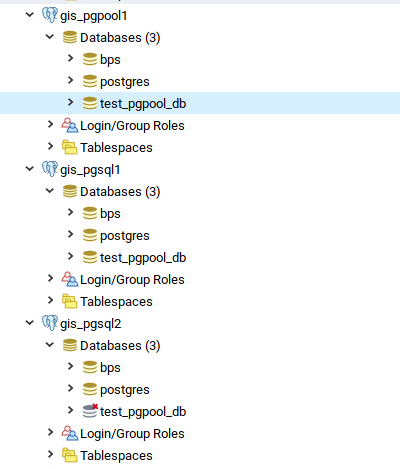
Koneksi ke database dari aplikasi kita tinggal diarahkan ke mesin pgpool (tidak lagi ke mesin postgresql). Dengan cara demikian, proses WRITE akan dilakukan oleh pgpool ke mesin master, sedangkan proses READ akan dibagi ke mesin master dan slave. Untuk membuktikannya anda dapat menjalankan htop di setiap mesin postgresql dan lihat distribusi bebannya. Bisa juga dengan membandingkan log dari pgpool untuk melihat proses INSERT, UPDATE, SELECT dilakukan ke mesin mana saja. Misalnya dengan menjalankan
sudo journalctl -u pgpool-II | grep "node id: 0" | grep INSERT
sudo journalctl -u pgpool-II | grep "node id: 1" | grep INSERT
sudo journalctl -u pgpool-II | grep "node id: 2" | grep INSERT
sudo journalctl -u pgpool-II | grep "node id: 0" | grep SELECT
sudo journalctl -u pgpool-II | grep "node id: 1" | grep SELECT
sudo journalctl -u pgpool-II | grep "node id: 2" | grep SELECT
Masih ada yang belum ditulis dalam artikel ini yaitu bagaimana membuat mesin pgpool menjadi HA juga. Mudah-mudahan kedepannya dapat saya tuliskan.
Selamat mencoba, have fun
medwinz
#MozTalk – Open Source Day (openSUSE and Mozilla Firefox Edition)
Apakah kamu salah satu pengguna software open source yang ingin berkontribusi kembali ke proyeknya?
Pada kesempatan MozTalk kali ini kami akan membahas tentang cara berkontribusi ke proyek open source seperti openSUSE dan Mozilla Firefox. Akan ada 2 pembicara pada acara ini:
- Kukuh Syafaat
“Berkenalan (lagi) dengan openSUSE”
Ngobrol mengenai teknologi, komunitas dan kontribusi di openSUSE - Herpiko Dwi Aguno
“Ngoprek Mozilla Firefox”
Siklus kontribusi kode di Mozilla Firefox dari ujung ke ujung
MozTalk adalah salah satu program Mozilla Indonesia berupa sesi diskusi bertemakan teknologi dan perkembangannya. Untuk mengikuti acara ini, peserta diharapkan untuk memiliki ketertarikan untuk berkontribusi ke proyek open source
Simpan tanggal berikut untuk ikut acara ini ya:
Hari / Tanggal: Minggu / 19 Januari 2020
Pukul : 14.00 – 17.00
Tempat: Mozilla Community Space Jakarta, Gedung TIFA – ANNEX Suite Jl. Kuningan Barat I no.26 Jakarta Selatan (Google Map: https://goo.gl/maps/mjZZGmxdQzC2 )
Perlu kami beritahukan, acara ini gratis dan tidak berbayar, dan kami tidak akan menyediakan makan siang, namun tersedia berbagai minuman dan snack/kue yang dapat dikonsumsi secara gratis oleh peserta secara/free flow/
Pendaftaran: bit.ly/OSDayJakarta
Sampai berjumpa!
Mencoba Podman dan Buildah di openSUSE Tumbleweed

Podman
Apa itu Podman? Podman adalah mesin kontainer tanpa daemon untuk mengembangkan, mengelola, dan menjalankan container OCI di GNU/Linux. Kontainer dapat dijalankan sebagai root atau dalam mode tanpa root.Sederhananya: `alias docker=podman`.
Podman dapat mengelola seluruh ekosistem container yang mencakup pod, container, container image, dan volume menggunakan pustaka libpod. Podman dapat menjalankan semua perintah dan fungsi yang membantu memelihara dan memodifikasi container image OCI, seperti menarik dan memberi tag. Ini memungkinkan untuk membuat, menjalankan, dan memelihara container yang dibuat dari image dalam lingkungan produksi.
Memasang Podman
sudo zypper in slirp4netns podman
Menjalankan Podman Tanpa Akses Root
sudo bash -c 'echo 10000 > /proc/sys/user/max_user_namespaces'

sudo bash -c "echo $(whoami):100000:65536 > /etc/subuid"

sudo bash -c "echo $(whoami):100000:65536 > /etc/subgid"
Ujicoba Podman
podman pull nginx:stable

podman run --name nginx nginx:stable

podman rm nginx
Podman Cheat Sheet
podman login docker.io

podman search tuanpembual

podman run docker.io/tuanpembual/hello

podman run --rm --name hello -p 8080:80/tcp docker.io/tuanpembual/hello

podman rm hello
Sampe batas ini, ya memang benar kita bisa dengan entengnya membuat
alias docker=podman
di file .zshrc.

Buildah
Buildah – a tool that facilitates building OCI container images.
Buildah adalah tool buat bikin container images, dengan beberapa fitur yang menawan, diantaranya:
- Tidak ada Daemon. Jadi kalo mau build image ya tinggal build aja.
- Buat image dari nol(scratch) atau dari image yang sudah jadi.
- Merupakan Build tools external, sehingga memiliki karakter;Ukuran image lebih kecil,Membuat lebih aman dengan tidak memasukkan software untuk membuat container (like gcc, make, and dnf), Membutuhkan resource yang lebih kecil untuk mengirim images.
Memasang Buildah
sudo zypper in buildah
Membuat image dengan Buildah dari Dockerfile
# ls

Dockerfile  myecho

# cat Dockerfile

FROM registry.access.redhat.com/ubi8/ubi

ADD myecho /usr/local/bin

ENTRYPOINT "/usr/local/bin/myecho"

# cat myecho

echo "This container works!"

# chmod 755 myecho

# ./myecho

This container works!
Build Step
# buildah bud -t tuanpembual/myecho .

STEP 1: FROM registry.redhat.io/ubi8/ubi

STEP 2: ADD myecho /usr/local/bin

STEP 3: ENTRYPOINT "/usr/local/bin/myecho"
Docker Format dan Push Image
buildah bud --format=docker -t docker.io/tuanpembual/myecho .

buildah push docker.io/tuanpembual/myecho
Melihat List images
buildah images

podman images
Menjalankan Container dan Memeriksa Container
podman run --rm tuanpembual/myecho

buildah inspect tuanpembual/myecho | less
Dah itu saja dulu. Ngoprek selanjutnya bagaimana menggunakan dua perkakas ini ke Gitlab-CI.
Estu~
AppImageLauncher | AppImage Manager on openSUSE
High Availability PostgreSQL Cluster dengan Pgpool-II (Bagian ke-2)
TL;DR: Karena cukup panjang tulisan akan dibagi dalam 3 bagian
- Bagian 1 : membahas instalasi dan konfigurasi master postgresql
- Bagian 2 : membahas instalasi dan konfigurasi slave postgresql
- Bagian 3 : membahas instalasi dan konfigurasi pgpool-II
Tulisan ini adalah Bagian ke-2.
3. Instalasi PostgreSQL slave node
Instal PostgreSQL di mesin anda (instal di dua mesin slave, jika saat ini anda hanya punya satu mesin slave tidak mengapa)
sudo zypper ar -e -f https://download.opensuse.org/repositories/server:/database:/postgresql/openSUSE_Leap_15.1/ postgresql
sudo zypper in --no-recommends postgresql postgresql-server postgresql-contrib postgresql12-pgpool-II postgresql12 postgresql12-server postgresql12-contrib
Pastikan bahwa instalasi anda bekerja, service postgresql dapat berjalan.
sudo systemctl start postgresql.service
sudo systemctl enable postgresql.service
sudo systemctl status postgresql.servie
Pastikan bahwa tidak ada error. Selanjutnya matikan service postgresql.
sudo systemctl stop postgresql.service
Kemudian masuk ke mesin slave, hapuslah directory /var/lib/pgsql/data
rm -rf /var/lib/pgsql/data
selanjutnya jalankan
pg_basebackup -h ip_address_master -p 5432 -U nama_user_replication -v -D /var/lib/pgsql/data -Fp -Xs -P -R
Kalau sukses maka akan muncul seperti:

Setelah proses di atas selesai maka direktori /var/lib/pgsql/data akan terbentuk dan berisi:

Ada sebuah berkas penting yang terbentuk di direktori data pada slave setelah menjalankan pg_basebackup yaitu file standby.signal. File ini musti ada dalam direktori tersebut sehingga postgres dapat menentukan bahwa status server adalah slave/standby. File ini terbentuk otomatis saat menjalankan pg_basebackup dengan opsi “-R”. Jika tidak terbentuk maka buatlah file tersebut secara manual
touch standby.signal
Hal ini berhubungan dengan replication slot yang telah dibicarakan di atas. Pada PostgreSQL 12 akan terbentuk 2 file secara otomatis postgresql.auto.conf dan standby.signal. File postgresql.auto.conf secara otomatis berisi
# Do not edit this file manually!
# It will be overwritten by the ALTER SYSTEM command.
primary_conninfo = 'user=nama_user_replikasi password=password_user_replikasi host=ip_address_master port=port_master sslmode=prefer sslcompression=0 gssencmode=prefer krbsrvname=postgres target_session_attrs=any'
Sedangkan penanda bahwa server adalah standby/slave adalah file standby.signal
Untuk PostgreSQL 11 ke bawah maka ada versi di mana postgresql.auto.conf terbentuk tetapi tidak ada isinya. Sehingga secara manual harus dibuat file recovery.conf yang berisi seperti:
standby_mode = 'on'
primary_conninfo = 'user=nama_user-replikasi password=password_user_replikasi host=ip_address_master port=port_master sslmode=prefer sslcompression=0 gssencmode=prefer krbsrvname=postgres target_session_attrs=any'
Sedangkan file standby.signal tidak terbentuk, dan sebagai gantinya diganti dengan baris standby_mode = ‘on’ pada file recovery.conf.
Jika kita yakin bahwa database sudah tereplikasi dan direktori data sudah terbentuk dengan baik maka tambahkan konfigurasi postgresql.conf di slave dengan 2 baris ini:
hot_standby = on
hot_standby_feedback = on
hot_standby berfungsi untuk memberi tahu server bahwa server hanya digunakan untuk query read-only (load balancing).
hot_standby_feedback berfungsi untuk mencegah baris-baris data dihapus terlalu cepat dari sisi slave. Hal ini dilakukan dengan memberi tahu server master ID transaksi yang terlama sehingga proses vacuum menunda penghapusan baris tertentu. Penjelasan mengenai vacuum dapat dibaca di sini.
Selanjutnya aktifkan postgresql di mesin slave:
sudo systemctl start postgresql.service
sudo systemctl enable postgresql.service
Memeriksa status replikasi
Untuik memastikan bahwa replikasi antara master dan slave sudah berjalan sempurna maka login ke server master dan jalankan
sudo -i -u postgres
psql -x -c "select * from pg_stat_replication"
Jika sukses maka akan memperlihatkan status replikasi, misalnya

atau jika menggunakan pgadmin misalnya:

Coba juga misalnya dengan membuat database baru di master. Harusnya langsung terbentuk pula di slave
Master

Slave

Bersambung ke Bagian ke-3.
Have fun,
medwinz

Tumbleweed Provides Some Stability to 2020
 The year of 2020, at least in the openSUSE world, is starting out to be pretty stable. In little more than a week into the new year, there have been five openSUSE Tumbleweed snapshots released.
The releases, with the exception of one, are either posting a stable rating or are trending at a stable rating, according to the Tumbleweed snapshot reviewer.
With the release of snapshot 20200107, more OpenGL and Vulkan driver features and improvements came in the update of the Mesa 19.3.1 package. The newer version update also provides better AMD Radeon Accelerated Processing Unit (APU) performance.
The bluez-tools package that is a set of tools to manage Bluetooth devices for Linux had a minor update from the previous three-year-old package included in Tumbleweed. GNOME’s web browser package epiphany provided some security AdBlocker preferences in the 3.34.3.1 version. Message transfer agent exim reduced the start up process initialization with version 4.93.0.4 and fixed more than a half dozen bugs. KDE’s kdevelop5 5.4.6 version fixed some wrong text in the license. Network detector, packet sniffer, and intrusion detection system package for wireless network kismet updated to its December release in the snapshot. One package update that stands out in the snapshot is the release of the finger reader package for Linux devices libfprint 1.0; this first major release provides better documentation and bug fixes related to restarting a failed verification immediately.The osc 0.167.2 package fixed regression in osc chroot. Other packages updated in the snapshot were rubygem-parser 2.7.0.1 and tigervnc 1.10.0 among others.
Snapshot 20200106 snapshot provided an update of ImageMagick 7.0.9.13 that fixed the a bug for custom profile (CMYK or RGB) conversions and the -layers optimize option now requires a fully transparent previous image. Argyll Color Management System package argyllcms had a new major version update; the 2.1.1 version update removes bundled zlib source, that could trigger a fatal rpm check failure on Leap 15.x. The library for handling OpenGL function pointer management libepoxy 1.5.4 requires only the python3-base package for building instead of full python3 package. GNOME’s photo manager shotwell 0.30.8 updated translations and fixed Tumblr publishing.
Several updated YaST packages came in the 20200105 snapshot. Improved sorting by device name and size in tables were made with the yast2-storage-ng 4.2.67 update and an improved warning when all repositories are disabled were made with the yast2-packager 4.2.42 update. The same version number for yast2-network added support for reading / writing Maximum Transmission Unit (MTU). The libstorage-ng 4.2.44 package improved the sort-key for block devices and libyui 3.9.1 added sort key to the table cell. Python-passlib 1.7.2 added some new features like supports Argon2 and utility program to control and monitor computer storage systems smartmontools 7.1 added enhancements for AT Attachment (ATA) ACS-4 and ACS-5. The snapshot also provided an update to the 2.6.0 version of usb_modeswitch, which added several devices and changed the Makefile to prevent parallel build issues.
ImageMagick also had an update in the 20200103 snapshot. NetworkManager 1.22.2 fixed multiple issues in the internal DHCP client and drop support for BlueZ 4 for BlueZ 5, which has been around since 2012. The Advanced Linux Sound Architecture (ALSA) 1.2.1.2 package brought about 30 upstream patches. File searching tool catfish 1.4.12 adds support for running on Wayland and provided dialog improvements, which were introducted in the 1.4.10 version. Flatpak 1.6.0 made a change in the support for OCI and only support the use of labels, not annotations, as labels work with more registries. Pre-existing OCI flatpak registries (like Fedora) may need some changes, according to the changelog. The new major 7.0 glusterfs, which is an open source platform for scale-out public and private cloud storage, provided improved read workload latency in a cluster, especially in a cloud setup along with load balancing with the outstanding pending requests. The library for reading raw files from digital cameras, libraw 0.19.5, fixed a possible buffer underrun in the modern Samsung loader. Improved responsiveness during large file transfers were made with the sshfs 3.7.0 and vim text editor 8.2.0063 fixed several problems. This snapshot is trending at a rating of 83, according to the Tumbleweed snapshot reviewer, but most of the issues recorded with the rating were related to the NetworkManager.
Tumbleweed had a New Year’s snapshot this year. Snapshot 20200101 had 13 packages updated. Of those, key ones to point out were the update of diffstat 1.63, which improved parsing for git diffs, and Fast Light Toolkit, which is a cross-platform widget library for graphical user interfaces, had some security fixes with the fltk 1.3.5.

Interview - Qu'est-ce ça fait d'être au conseil openSUSE ?

Vous savez déjà qu'openSUSE est une fantastique plateforme pour faire à peu près tout avec Linux. Alors, qu'est-ce qui se cache derrière cette distribution facile à utiliser et super puissante que nous connaissons et aimons et sur laquelle nous comptons ? Dans de nombreux esprits, il y a la perception que c'est simplement SUSE avec le code propriétaire supprimé. Il est vrai qu'une grande partie du travail de développement découle de SUSE, mais il existe également une communauté active de bénévoles dévoués qui conduisent et font fonctionner le projet, apportant toutes les bonnes choses que nous tenons pour acquises dans le cadre de la myriade d'utilisations que nous avons d'openSUSE et sur lesquelles nous comptons.
Nous sommes en période d'élection à openSUSE et le comité électoral a demandé à un membre du conseil, Gertjan (aka Knurpht), qui a accepté de se présenter à nouveau et de se présenter à la réélection de ce que cela fait d’être membre du conseil. Vous trouverez ci-dessous une transcription d'une interview hors ligne entre un autre membre du comité électoral, Edwin et Gertjan, mettant en évidence ce que c'est que d'être membre du conseil openSUSE.
Edwin: Souhaites-tu nous parler de ton emploi du temps quotidien et quel impact cela a-t-il sur le fait d'être membre du conseil openSUSE ?
Gertjan: Pour être honnête, mon planning quotidien varie beaucoup, selon ce que j'ai à faire. La plupart du temps, cela me laisse suffisamment de temps libre pour faire des choses liées au conseil. Mais avant d'être à bord, j'ai également passé du temps dans openSUSE, c'est-à-dire les forums, l'IRC, etc., donc le principal impact sur mon horaire quotidien a été les appels bimensuels en vidéoconférence. Pour le reste, je répartis le temps libre un peu différemment. Cela prend cependant quelques heures, sur une semaine moyenne.
Edwin: Te souviens-tu toujours de ce qui t'a motivé à candidater pour la première fois? Et puis pourquoi une deuxième fois?
Gertjan: Ô, oui, je m'en souviens. Richard (Brown, le précédent représentant du conseil) m'a demandé si j'avais déjà envisagé de me présenter au conseil. Ma réponse a été "Hé, tu me connais, je suis celui qui pousse les autres à candidater"… Après d'une petite discussion, d'une nuit de sommeil et d'autres demandes à me porter candidat, je sentais que je ne pouvais pas ignorer tout cela, et au moins voir si la communauté m'accepterait au sein du conseil. Donc, fondamentalement, la communauté m'a motivé et a estimé que je devais y aller. La deuxième fois n'était pas très différente. Et, dans les deux cas, la plus grosse motivation était l'amour que je ressens pour le projet et les gens de sa communauté.
Edwin: Quelle a été ta première tâche en tant que membre du conseil ?
Gertjan: Lire tous les documents. Comme beaucoup de gens, j'ai dû découvrir que mon impression sur ce que fait le conseil n'était pas exacte.
Edwin: Quelle est ton meilleur souvenir dans le cadre de tes...