
High Availability Postgresql Cluster dengan Pgpool-II (Bagian ke-1)
TL;DR: Karena cukup panjang tulisan akan dibagi dalam 3 bagian
- Bagian 1 : membahas instalasi dan konfigurasi master postgresql
- Bagian 2 : membahas instalasi dan konfigurasi slave postgresql
- Bagian 3 : membahas instalasi dan konfigurasi pgpool-II
Tulisan ini adalah Bagian ke-1.
Sebagai pengguna postgresql kadang kita membutuhkan cluster database baik karena pertimbangan HA maupun karena pertimbangan pembagian beban (load balancing). Sayangnya postgresql hanya memiliki implementasi native untuk replikasi tetapi tidak untuk cluster. Sehingga untuk membangun cluster harus menggunakan aplikasi lain. Ada banyak solusi untuk membuat cluster di postgresql dan yang dijelaskan di sini adalah Pgpool-II.
Tulisan ini membahas konfigurasi postgresql cluster (master-slave load balancing). Penjelasan singkatnya:
- Postgresql dipasang di 3 mesin, 1 master dan 2 slave
- Pgpool dipasang di 1 mesin terpisah.
- Replikasi diserahkan kepada postgresql
- Pgpool akan mengatur load balancing, proses tulis/write (insert, update, delete, dll) akan dilakukan di master sedangkan proses baca/read (select, dll) akan dibagi 3, ke master dan ke-2 slave.
Desain logikal adalah sbb:

Dalam contoh ini dibutuhkan 4 mesin, walaupun bisa saja pgpool dipasang pada mesin master. Pgpool tidak membutuhkan resource yang besar dan tugasnya adalah mendistribusikan beban ke setiap mesin postgresql. Dengan cara demikian postgresql terasa jauh lebih ringan kerjanya dibanding jika kita memiliki 1 mesin postgresql dengan jumlah CPU dan RAM yang sama dengan gabungan 3 mesin postgresql yang bekerja secara load balance.

1. Instalasi openSUSE
Siapkan mesin. Untuk implementasi server biasanya saya menggunakan openSUSE Jeos dari http://download.opensuse.org/distribution/leap/15.1/jeos/ atau openstack image dari http://download.opensuse.org/repositories/Cloud:/Images:/Leap_15.1/images/
Tentu saja anda tetap bisa menggunakan image DVD seperti biasa dan menginstall minimum server. Silakan dipilih yang sesuai dengan kondisi anda. Dalam implementasi tulisan ini digunakan 1 mesin untuk pgpool dan 3 mesin untuk postgresql.
Sebagai catatan postgresql bekerja mengandalkan CPU karena itu tuninglah instalasi kernel openSUSE dan konfigurasi postgresql anda. Postgresql.conf harus dituning sesuai dengan kondisi mesin dan implementasinya. Untuk implementasi standar seperti untuk blog, website sederhana atau aplikasi kecil yang transaksinya tidak besar, menggunakan konfigurasi bawaan postgresql.conf sudah memadai, tetapi untuk aplikasi yang membutuhkan kinerja database yang optimum, konfigurasi postgresql.conf harus disesuaikan. Bagaimana melakukan tuning postgresql dan kernel silakan dibaca di sini. Pgpool karena hanya bekerja sebagai proxy cukup hemat dalam penggunaan CPU dan RAM. Sebagai gambaran saya menggunakan postgresql yang saat ini besaran datanya sekitar 15 juta baris, dengan penambahan data sekitar 100 ribu baris perhari. Data kami di-backup per hari, dan setiap sebulan sekali data berumur di atas 6 bulan diarsip. Masing-masing VM postgresql memiliki 4 vCPU dan 4GB RAM. Kondisi beban 100% sekitar 50% dari waktu sisanya dibawah 70%.
2. Instalasi PostgreSQL master node
Tambah repositori, install postgresql
sudo zypper ar -e -f https://download.opensuse.org/repositories/server:/database:/postgresql/openSUSE_Leap_15.1/ postgresql
sudo zypper in --no-recommends postgresql12-pgpool-II postgresql12 postgresql12-server postgresql12-contrib
Di contoh ini saya menggunakan postgresql12, sekiranya anda ingin menggunakan versi yang lain silakan diganti. Di repo postgresql tersedia versi 9.4, 9.5, 9.6, 10, 11 dan 12.
Selanjutnya jalankan service postgresql, secara otomotasi postgresql akan menginisiasi database dan membentuk direktori /var/lib/pgsql/data
sudo systemctl start postgresql.service
sudo systemctl enable postgresql.service
Silakan login ke postgresql, tambahkan user baru dan beri privilege sebagai replicator. Menggunakan user postgres tidak dianjurkan.
postgres=# CREATE USER nama_user WITH REPLICATION ENCRYPTED PASSWORD 'rahasia';
postgres=# \du
Kalau anda sudah punya instalasi postgresql dan sudah ada user, cukup tambahkan role saja
postgres=# ALTER ROLE nama_user Replication;
Jangan lupa user tersebut diberi pula role/privilege untuk mengakses database sesuai aplikasi anda (ya iyalah).
Streaming replication di postgresql bekerja melalui pengiriman log dari master ke slave. Setiap transaksi ditulis dalam log transaksi yang dinamakan WAL (write-ahead log). Slave menggunakan segmen WAL ini untuk secara kontinu mereplikasi setiap perubahan dari master.
Untuk menjalankan streaming replication postgresql melakukannya melalui 3 proses utama, wal sender, wal receiver dan startup.
Proses wal sender berjalan di master sedangkan wal receiver dan startup berjalan di slave. Ketika replikasi dimulai, proses wal receiver mengirimkan LSN (Log Sequence Number) menjelaskan status sampai WAL data mana telah di-reply oleh slave ke master. Kemudian prose wal sender akan mengirimkan WAL data ke slave sesuai dengan status terakhir LSN yang dikirimkan oleh wal receiver. wal receiver selanjutnya menulis data tersebut ke WAL segments di mesin slave. Proses startup di slave kemudian me-reply ke master bahwa data mulai ditulis ke WAL segment sebagai tanda dimulainya replikasi
Berdasarkan pengalaman saya, di bawah ini beberapa parameter konfigurasi postgresql yang wajib dipahami untuk membuat replikasi database. YMMV, silakan baca-baca dokumentasi postgresql untuk pemahaman lebih lanjut.
- archive_mode : Kalau anda ingin untuk mengarsip WAL anda musti menset ke ON (saya tidak menggunakannya karena pertimbangan disk saja, karena sudah menggunakan 2 slave dan melakukan backup harian).
- wal_level : diset ke replica kalau versi postgresql di atas 9.5, versi 9.5 ke bawah set ke hot_standby.
- max_wal_senders : sebagai acuan untuk satu buah slave di set ke 3, setiap penambahan slave ditambah 2.
- wal_keep_segments : jumlah WAL yang dipertahankan di direktori pg_wal (postgresql 10 ke atas) atau pg_xlog (sampai PostgreSQL 9.x). Setiap WAL file/segmen berukuran 16 MB. Bisa dimulai dengan 100, artinya anda membutuhkan sekitar 1.6GB disk.
- max_wal_size dan min_wal_size : parameter ini akan menimpa konfigurasi max_wal_senders. Jadi kalau anda menset max_wal_senders = 100, tetapi max_wal_size = 2GB maka wal segmen akan terus diisi sampai ukuran direktori 2GB. Saya menggunakan ini dan menset max_wal_size = 2 GB dan min_wal_size = 1 GB
- archive_command : Jika anda ingin mengarsip/mengcopy WAL segment ke tempat lain maka anda bisa menjalankan shell/bash command atau program lain dengan parameter ini.Saya juga tidak menggunakannya karena alasan yang sama dengan archive_mode di atas.
- listen_addresses : tetapkan IP address atau gunakan ‘*’.
- hot_standby : set ke ON pada slave (standby/replica), pada master tidak berefek apa-apa. Ini adalah parameter koentji, tanpa menset ke ON slave tidak dapat melakukan query READ (baca: SELECT).
Lakukan pengaturan untuk parameter-parameter di atas pada file /var/lib/pgsql/data/postgresql.conf. Sebagai contoh, konfigurasi yang digunakan adalah sebagai berikut:
listen_addresses = '*'
port = 5432
max_connections = 30
shared_buffers = 512MB
huge_pages = on

work_mem = 8738kB
maintenance_work_mem = 256MB
dynamic_shared_memory_type = posix
effective_io_concurrency = 300
max_worker_processes = 4
max_parallel_workers_per_gather = 2
max_parallel_workers = 4

wal_level = replica
wal_buffers = 16MB
min_wal_size = 1GB
max_wal_size = 2GB
checkpoint_completion_target = 0.9
max_wal_senders = 10
wal_keep_segments = 64
max_replication_slots = 4

enable_partitionwise_join = on
enable_partitionwise_aggregate = on
seq_page_cost = 1.0
random_page_cost = 4.0
effective_cache_size = 2048MB
default_statistics_target = 100

shared_preload_libraries = 'pg_stat_statements'
track_activity_query_size = 2048
pg_stat_statements.track = all

log_destination = 'stderr'
logging_collector = on
log_line_prefix = '%m %d %u [%p]'
log_timezone = 'UTC'
datestyle = 'iso, mdy'
timezone = 'UTC'

lc_messages = 'en_US.UTF-8'
lc_monetary = 'en_US.UTF-8'
lc_numeric = 'en_US.UTF-8'
lc_time = 'en_US.UTF-8'
default_text_search_config = 'pg_catalog.english'
Sebenarnya konfigurasi di atas sudah disesuaikan dengan implementasi aplikasi saya. Ada beberapa parameter seperti pengaturan memory/cache/buffer/huge pages yang harusnya diset khusus sesuai implementasi dan kondisi mesin. Silakan baca kembali tulisan sebelumnya mengenai cara mentuning konfigurasi postgresql di sini.
Langkah berikutnya adalah memberikan hak akses untuk mesin slave agar dapat melakukan replikasi ke master. Lakukan pengaturan pada file /var/lib/pgsql/data/pg_hba.conf. Tambahkan seperti di bawah dan sesuaikan ip mesin slave anda:
host    replication     replication      10.100.1.7/32            md5
host    replication     replication      10.100.1.8/32            md5
Replication Slots
Replication slots merupakan catatan permanen dari kondisi sebuah replika yang disimpan di master server walaupun kondisi replika sedang offline atau terputus. pg_replication_slots view akan memberikan daftar replication slots yang ada pada kondisi tertentu di database cluster beserta statusnya.
Replication slots merupakan pendekatan baru: di mana mengizinkan server master mengetahui kondisi setiap slave dan status replikasinya, serta menjaga WAL selama dibutuhkan. Dengan cara ini server master pada dasarnya akan menahan WAL file selamanya, menunggu server slave/standby untuk mengambilnya. Secara teoritis kita dapat menyalakan server slave/standby setelah mati berminggu-minggu, dan secara otomatis akan mengcopy WAL dan membuat datanya menjadi sama tanpa perlu intervensi dari kita.
Cara membuat replication slot adalah dengan login ke master postgresql dan jalankan
SELECT * FROM pg_create_physical_replication_slot('nama_slot');
nama_slot bisa diisi dengan nama server slave anda, dan buatlah slot sebanyak jumlah slave anda. Jika sudah anda dapat memeriksanya, misalnya:

Periksa ulang postgresql.conf anda dan pastikan 3 baris di bawah sudah ada:
wal_level = replica
max_replication_slots = 4
max_wal_senders = 20
wal_level bisa diisi hot_standby jika memang anda menginginkan slave hanya standby dan akan mengambil-alih database jika master tidak berfungsi, atau replica dimana slave juga bekerja (dalam hal ini kita akan mengalihkan query READ ke slave)
max-replication adalah jumlah maksimum slot replikasi (slave server)
max_wal_senders adalah jumlah maksimum proses WAL sender yang berjalan bersamaan dari slave server, default = 10.
Lanjutkan dengan restart postgresql.service di master
sudo systemctl restart postgresql.service
Catatan:
Untuk anda yang menyimpan direktori data di NAS/SAN atau koneksi isci lain (remote disk) perlu memodifikasi script systemd untuk postgresql.service. Ada beberapa laporan bahwa postgresql.service tidak dapat jalan otomatis setelah reboot. Jika anda mengalami masalah ini, modifikasi script /usr/lib/systemd/system/postgresql.service menjadi:
[Unit]

Description=PostgreSQL database server
After=syslog.target
After=network.target remote-fs.target data\xxxx.mount dev-hugepages.mount

[Service]
Type=forking
User=postgres
EnvironmentFile=-/etc/sysconfig/postgresql
LimitMEMLOCK=infinity
ExecStart=/usr/share/postgresql/postgresql-script start
ExecStop=/usr/share/postgresql/postgresql-script stop
ExecReload=/usr/share/postgresql/postgresql-script reload

# The server might be slow to stop, and that's fine. Don't kill it
SendSIGKILL=no

[Install]
WantedBy=multi-user.target
Perhatikan bagian ini
After=network.target remote-fs.target data\xxxx.mount dev-hugepages.mount
Aslinya hanya After=network.target
Kemudian karena pada implementasi seringkali $PG_DATA itu diletakkan di iscsi disk maka harus dipastikan bahwa iscsi disk sudah di-mount dan remote-fs sudah terbentuk sebelum postgresql dijalankan. Hal ini bisa dicek dengan perintah di bawah dan tambahkan dari hasilnya ke dalam start-up script yang menurut anda logis.
systemctl list-units --type=mount
systemctl list-units --type=target
Bersambung ke Bagian ke-2
Have fun,
medwinz
Memasang JDownloader di openSUSE Leap 15.1
Bagi yang terbiasa mengunduh file menggunakan download manager, mungkin banyak pilihan download manager yang dapat digunakan baik melalui ekstensi browser maupun melalui tools di konsole/terminal linux, beberapa alasan saya menggunakan download manager adalah agar dapat melakukan pause dan resume pada file yang di unduh.
pada tulisan ini saya akan memberikan sedikit panduan untuk memasang download manager berbaskasih komentar dan saranyais desktop yaitu JDownlader. JDownloader sendiri adalah tools download manager berbasis open source yang dapat di pasang di banyak platform salah satunya di Linux openSUSE, oke langsung saja buka konsole/terminal dan ketik perintah berikut
wget -c http://installer.jdownloader.org/JD2Setup_x64.sh
kemudian berikan executable pada file
chmod +x JD2Setup_x64.sh
lanjutkan proses pemasangan dengan mengetik perintah berikut
sh JD2Setup_x64.sh
dan lanjutkan intruksi yang tertera di layar

setelah selsai dapat langsung digunakan, jangan lupa untuk di integerasikan dengan ekstensi browser yang di pakai.
apabila ada kendala silahkan berikan komentar dan sarannya, sekian dan terimakasih.

 Member
 Futureboy
Kdenlive 19.12 on openSUSE | Review
Emby Media Server on openSUSE Linux | Review

Εγκατάσταση Greenfoot σε openSUSE

ΤΙ ΕΙΝΑΙ ΤΟ GREENFOOT
Το Greenfoot είναι ένα Ολοκληρωμένο Περιβάλλον Ανάπτυξης Εφαρμογών (IDE) που έχει ως σκοπό τη διδασκαλία του Αντικειμενοστραφούς προγραμματισμού με τη γλώσσα Java. Με το Greenfoot μπορεί να δημιουργηθεί ένας κόσμος μέσα στον οποίο αλληλεπιδρούν μορφές (actors) με τις οποίες μπορούν να προγραμματιστούν παιχνίδια, προσομοιώσεις και άλλα προγράμματα με γραφικά. Χρησιμοποιείται δε για την εξοικείωση των μαθητών Δευτεροβάθμιας Eκπαίδευσης με την γλώσσα προγραμματισμού Java.Στην ιστοσελίδα των λήψεων βλέπουμε ότι είναι διαθέσιμο για όλα τα λειτουργικά συστήματα. Όσον αφορά δε τα συστήματα GNU/Linux, υπάρχει διαθέσιμο ως deb (για Ubuntu και Debian). Εμείς εδώ θα δούμε την περίπτωση του Pure Java πακέτου.
Επίσης λίγη προσοχή στην έκδοση που δουλεύει η ομάδα εργασίας σας. Για παλαιότερες εκδόσεις, μπορείτε να επισκεφθείτε την σελίδα των λήψεων παλαιών εκδόσεων.
ΕΓΚΑΤΑΣΤΑΣΗ
0. Πρέπει να τσεκάρετε ότι έχετε εγκατεστημένη την java.
Εγκατάσταση του πακέτου java-1_8_0-openjdk-devel (πιθανό να θέλει και άλλα πακέτα. Εγώ εγκατέστησα java develipement pattern από το Yast).
Στη συνέχεια ελέξτε την έκδοση της java με την εντολή:
Βλέπετε ποια έκδοση έχετε εγκατεστημένη. Εγώ είχα τα εξής:
OpenJDK Runtime Environment (IcedTea 3.14.0) (build 1.8.0_232-b08 suse-1.1-x86_64)
OpenJDK 64-Bit Server VM (build 25.232-b09, mixed mode)
Με την εντολή θα χρειαστεί να επιλέξετε πως θα εκτελείται η Java:
τσεκάρετε την επιλογή:
1. Τώρα πρέπει να εγκαταστήσετε το openjfx, έτσι ώστε να μπορείτε να φτιάξετε προγράμματα-παιχνίδια με Java. Για το openSUSE, μπορείτε να το εγκαταστήσετε από εδώ.
https://software.opensuse.org/package/java-1_8_0-openjfx
2. Στη συνέχεια ανοίξτε το τερματικό στον κατάλογο που έγινε η λήψη και εκτελέστε το αρχείο με την εντολή:

3. Στο παράθυρο που θα ανοίξει, φροντίστε τους καταλόγους.
Προτιμώ τον κατάλογο bin μέσα στον προσωπικό μου κατάλογο, ώστε να γνωρίζω που έκανα την εγκατάσταση. Όσον αφορά τον JDK κατάλογο, τον βρήκε αυτόματα (Tumbleweed). Εάν δεν τον βρει, τότε προσπαθήστε να βρείτε εδώ /usr/lib64/jvm/java-1.8.0-openjdk-1.8.0. Εάν δεν υπάρχει, μάλλον δεν έχει εγκατασταθεί σωστά η Java.
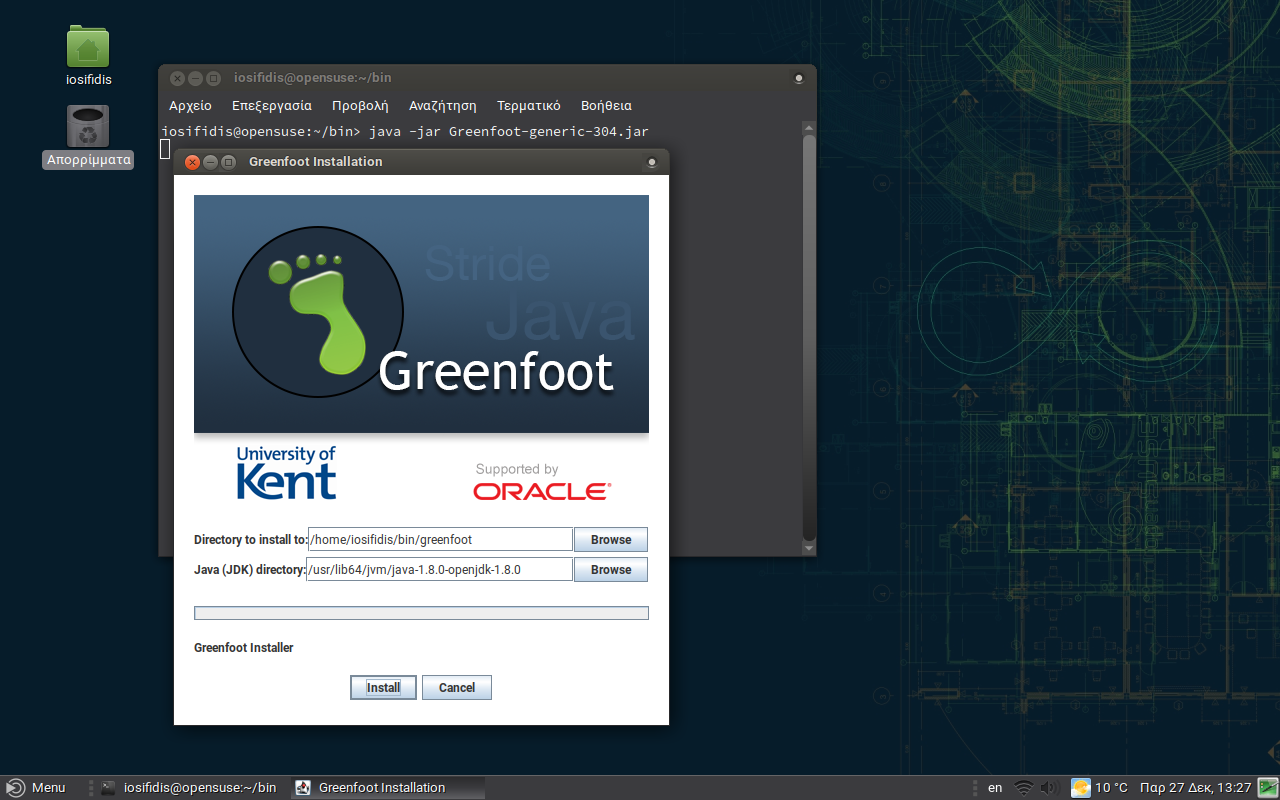
Απλά πατήστε το Install και περιμένετε να ολοκληρωθεί η εγκατάσταση.
ΡΥΘΜΙΣΕΙΣ
1. Το πρώτο που πρέπει να κάνετε είναι να προσθέσετε μια συντόμευση στο μενού σας. Αλλιώς θα πρέπει να ανοίγετε τον κατάλογο /bin/greenfoot και να εκτελείτε το greenfoot.2. Αλλαγή γλώσσας στα Ελληνικά.
Ανοίξτε το Greenfoot.

Στη συνέχεια πάμε στο Edit.
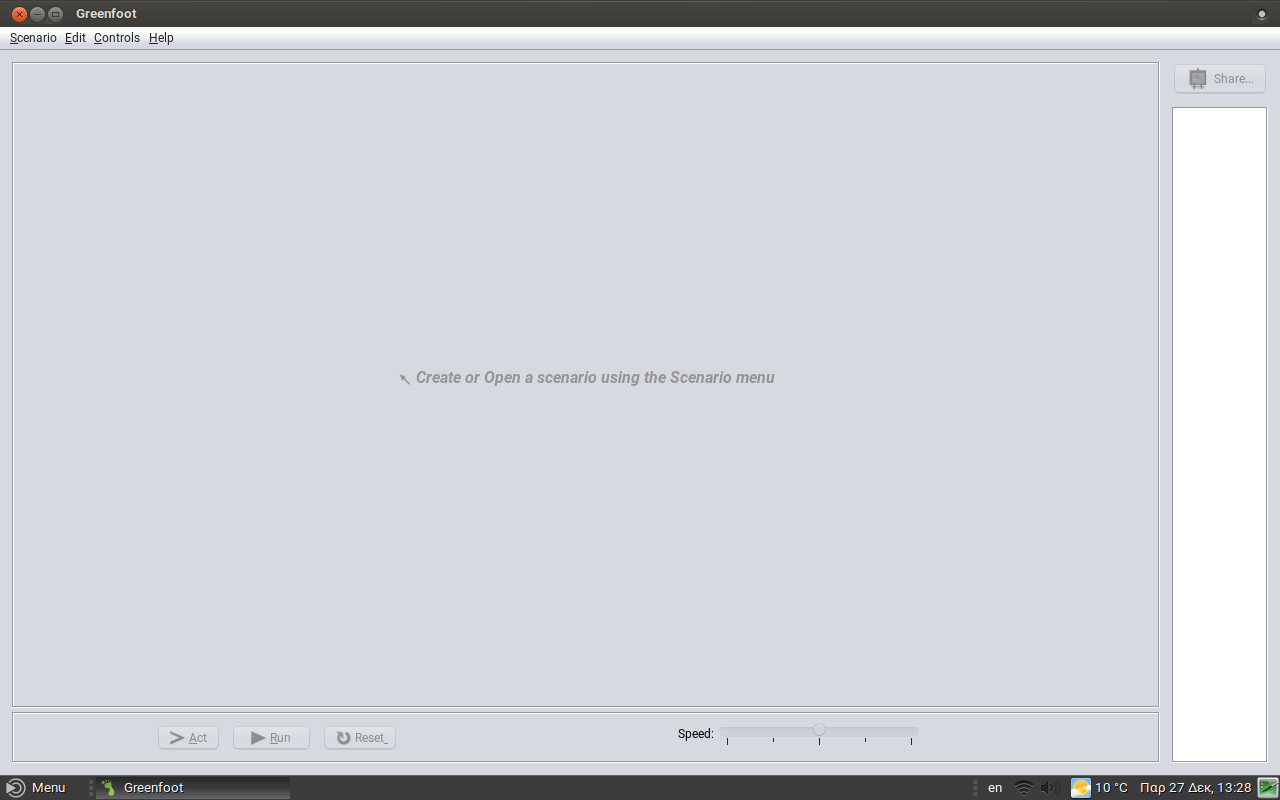
Στο Preferences.

Στην καρτέλα Interfaces αλλάζουμε σε Greek.

Αφού τελειώσει, κλείστε και ανοίξτε ξανά το πρόγραμμα.
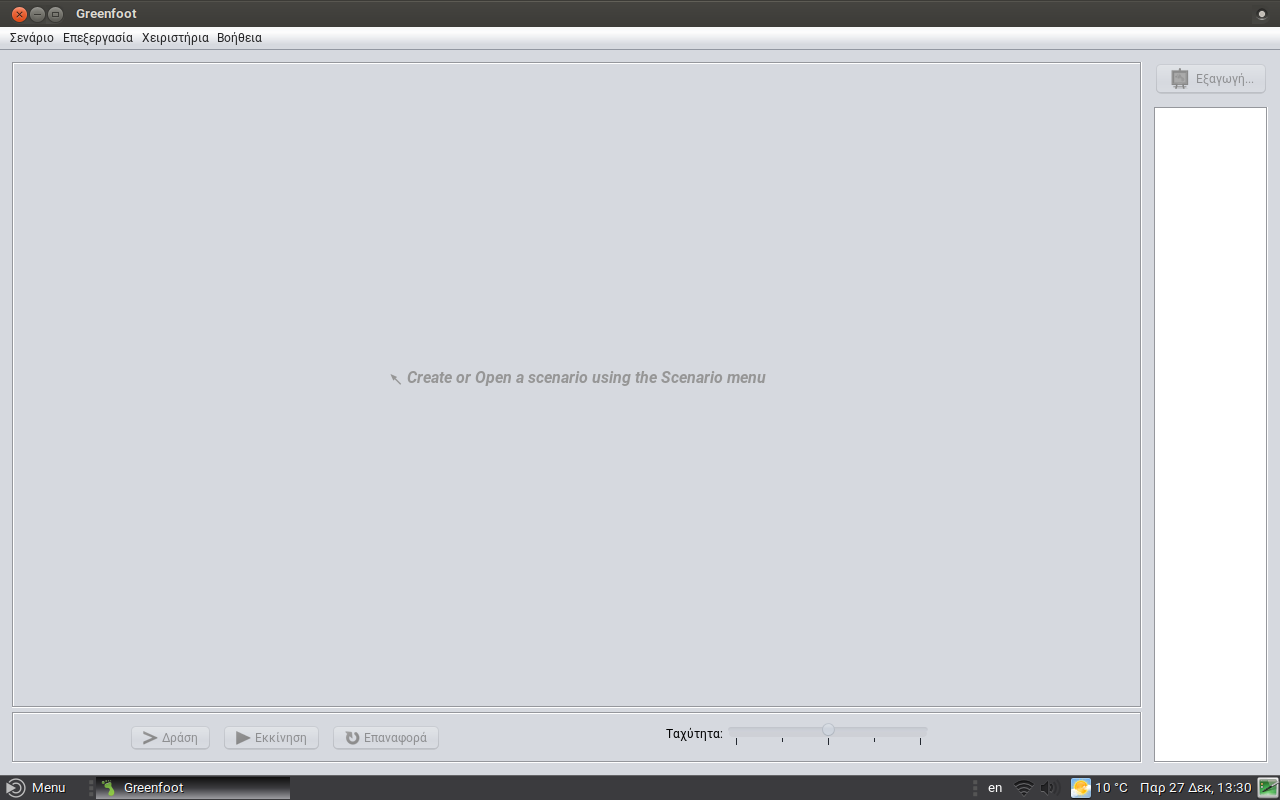
3. Μπορείτε να φτιάξετε την δικιά σας εφαρμογή.

Εάν θέλετε να κατεβάσετε και να δοκιμάσετε τα αρχεία που δημιούργησα στα πλαίσια του σχολικού μαθήματος, μπορείτε να επισκεφθείτε το github μου εδώ.

Q&A: What it is like to be on the openSUSE Board
 You already know what a fantastic platform openSUSE is for doing just about anything with Linux. So what’s behind that easy-to-use and super powerful distribution that we know and love, and have come to rely on. In many minds there is a perception that its simply SUSE with the proprietary code stripped out. It’s true that a lot of the development work does flow down from SUSE but there is also an active community of dedicated volunteers who drive and make the project work, adding the goodies we have come to take for granted for the myriad of uses we have come to rely on it for.
It’s election time at openSUSE and the election board asked an existing board member Gertjan who has agreed to step up again and run for re-election of what it is like to be on the board. Below is a transcript of an offline interview between fellow election committee member Edwin and Gertjan highlighting what it’s like to be on the board of openSUSE.
Edwin: Would you like to tell us about your daily schedule and how does being an openSUSE Board member impacts on that?
Gertjan: To be fair, my daily schedule varies a lot, depending on what is on my table. Most of the time this leaves me with enough spare time to do board related things. But before I was on board, I spent that time in openSUSE too, i.e. forums, IRC etc., so the main impact on my daily schedule were the bi-weekly video conference calls. For the rest I just spread the spare time a bit differently. It does take a couple of hours though, on an average week.
Edwin: Do you still remember what motivated you to step up for Board candidacy the first time? And then why a second time?
Gertjan: O, yes, I do. I was asked by Richard whether I had ever considered running for board. My reply was “Hey, you know me, I’m the one that considers others to run”… Followed by a small discussion, a night of sleep, some others asking me to step up as a candidate. All in all, I felt I could not ignore all that, and at least see if the community would have me on board. So basically the community motivated me, and felt I had to go for it. The second time was not much different. And, in both cases, a huge motivation was the love I feel for the project and the people in its community.
Edwin: What was your first task as a Board member?
Gertjan: To read all the docs. Like many people, I had to find out that my impression of what the board does wasn’t accurate.
Edwin: What’s your best memory serving on the openSUSE Board?
Gertjan: Lots of good memories, but to summarize: The learning experience re. all the aspects of the openSUSE Project, the relationship with SUSE.
Edwin: Any negative incident that you recall and would like to share?
Gertjan: I do recall some, yeah. Most of them with the PRIVATE stamp all over them, but the thing I disliked most was me crossing ( a.o. my own ) lines on a couple of occasions.
Edwin: Could you tell us what is the biggest transformation / change in the openSUSE community that you witnessed after becoming Board member?
Gertjan: For me that would be the current process of getting some form of openSUSE Foundation on its feet.
Edwin: How is life as an openSUSE Board member?
Gertjan: Not too bad. I loved the biweekly video meetings, the F2F meetings, working together with people passionate about the project and the community.
Edwin: Any message or suggestion for members unsure about running for Board?
Gertjan: Don’t doubt, do it. It’s fun. And, the project needs you !!!
Edwin: Is there anybody you would like to nominate?
Gertjan: O, yes !!! Stasiek Michalski, a.k.a. hellcp, a.ka. LCP
Edwin: Would you still be involved in the project as your second and last term ends?
Gertjan: No doubt. I’m still a forums admin / mod, mod on Discord, Matrix, Facebook, so I’ll be around on those a bit more after my term ends. And who knows, I might go for another term next year.
So you can see there is no magic to being a board member the main criteria is to have a love for the project and a desire to move it forward. You don’t have to be a geek or niche expert, the project and the board needs all types of skill-sets so if you feel you have some free time and something to contribute jump in and put in your nomination, as Gertjan says “Don’t doubt, do it. It’s fun. And, the project needs you !!!”
This article was revised at 10:35 on Jan. 7, 2020.
Building an AMD Server and Game Machine out of Yester-Year’s Parts

Etherpad updated (again)
As you might have noticed on our status page, our etherpad instance at https://etherpad.opensuse.org/ was updated to the latest version 3 days ago.
But this time,we did not only upgrade the package (which lives, btw, in our openSUSE:infrastructure project), we also migrated the underlying database.
As often, the initial deployment was done with a "just for testing" mindset by someone, who afterward left his little project. And - also as often - these kind of deployments suddenly became productive. This means - in turn - that our openSUSE heroes team suddenly gets tickets for services we originally did neither set up, nor maintain.
For etherpad, this means that we suddenly faced a "dirty.db" file of over 2GB in size, filling up the root-fs of the machine. Upstream even has a warning in their boot script, telling everyone that a dirty.db is NOT for production... :-/
The first try, using the dirty-db-cleaner.py script to reduce the size, did not finish after 2 days. So we decided to dump the data directly from the dirty.db into our Galera cluster. After fixing the initially created table scheme from MyISAM to InnoDB (Galera does not like MyISAM), the migration script took "only" 16 hours.
With this final migration, we hope to be prepared for the next update - and hope that this only takes minutes again.
Podman dan Buildah di openSUSE Tumbleweed

Ini cuma ulasan pendek di sela-sela kegalauan turing nyepeda.
Masih mengingat beberapa pe-er komunitas, bareng Ish Sookun untuk mengerjakan beberapa tulisan terkait Kubic, dan turunannya. Belum sempat nyolek lagi. Saya mencoba menulis catatan kecil tentang mainan di akhir tahun. Ini sebenarnya merupakan catatan lama, namun tersisih di mesin berbeda.
Balik ke tema, saya sedang coba-coba menggunakan container daemon selain docker.

Podman
What is Podman? Podman is a daemonless container engine for developing, managing, and running OCI Containers on your Linux System. Containers can either be run as root or in rootless mode. Simply put:
alias docker=podman.Containers under the control of Podman can either be run by root or by a non-privileged user. Podman manages the entire container ecosystem which includes pods, containers, container images, and container volumes using the libpod library. Podman specializes in all of the commands and functions that help you to maintain and modify OCI container images, such as pulling and tagging. It allows you to create, run, and maintain those containers created from those images in a production environment.
podman.io
Kira-kira begitu pengertiannya.
Persiapan Lab
Saya mencoba podman di minipc saya dan di laptop dalam vagrant. Step-step berikut saya lakukan dalam vagrant. Berikut Vagrantfile saya:
Vagrant.configure("2") do |config|
  config.vm.box = "opensuse/Tumbleweed.x86_64"
  config.vm.box_version = "1.0.20191231"

  config.vm.define :podman do |podman|
    podman.vm.host_name="podman"
    podman.vm.network "private_network", ip: "192.168.33.99", bridge: "wlan0"
    podman.vm.provider "virtualbox" do |vb|
      vb.memory = "1024"
    end
  end
end
Lanjut dengan vagrant up dan vagrant ssh. Akan login sebagai user vagrant
Bacaan Podman
Memasang Podman
sudo zypper in slirp4netns podman
Rootless
sudo bash -c 'echo 10000 > /proc/sys/user/max_user_namespaces'
sudo bash -c "echo $(whoami):100000:65536 > /etc/subuid"
sudo bash -c "echo $(whoami):100000:65536 > /etc/subgid"
Menjalankan Podman
FYI: ubi=Red Hat universal base image
podman pull registry.access.redhat.com/ubi8/ubi
podman run --name redhat registry.access.redhat.com/ubi8/ubi cat /etc/os-release
podman rm redhat
Podman Cheat Sheet
podman login docker.io
podman search tuanpembual
podman run docker.io/tuanpembual/hello
podman run --rm --name hello -p 8080:80/tcp docker.io/tuanpembual/hello
podman rm hello
Sampe batas ini, ya memang benar kita bisa dengan entengnya membuat alias docker=podman.

Buildah
Bacaan Buildah
Buildah – a tool that facilitates building OCI container images.
Buildah.io
Buildah adalah tool buat bikin container images, dengan beberapa fitur yang menawan, diantaranya:
- Tidak ada Daemon. Jadi kalo mau build image ya tinggal build aja.
- Buat image dari nol(scratch) atau dari image yang sudah jadi.
- Merupakan Build tools external, sehingga memiliki karakter:
- Ukuran image lebih kecil
- Membuat lebih aman dengan tidak memasukkan software untuk membuat container (like gcc, make, and dnf) within the resulting image.
- Membutuhkan resource yang lebih kecil untuk mengirim images.
Buildah is able to operate without Docker or other container runtimes by storing data separately and by including features that let you not only build images, but run those images as containers as well. By default, Buildah stores images in an area identified as containers-storage (/var/lib/containers).
Buildah.io
Kira kira gitu pengantar teorinya.
Memasang Buildah
sudo zypper in buildah
Membuat image dengan Buildah dari Dockerfile
# ls
Dockerfile  myecho
# cat Dockerfile
FROM registry.access.redhat.com/ubi8/ubi
ADD myecho /usr/local/bin
ENTRYPOINT "/usr/local/bin/myecho"
# cat myecho
echo "This container works!"
# chmod 755 myecho
# ./myecho
This container works!
Build Step:
# buildah bud -t tuanpembual/myecho .
STEP 1: FROM registry.redhat.io/ubi8/ubi
STEP 2: ADD myecho /usr/local/bin
STEP 3: ENTRYPOINT "/usr/local/bin/myecho"
Docker format and push
buildah bud --format=docker -t docker.io/tuanpembual/myecho .
buildah push docker.io/tuanpembual/myecho
List images:
buildah images
podman images
Running dan Inspect Images
podman run --rm tuanpembual/myecho
buildah inspect tuanpembual/myecho | less
Dah itu saja dulu. Ngoprek selanjutnya bagaimana menggunakan dua perkakas ini ke Gitlab-CI.
Estu~