
 knocte
Introducing geewallet
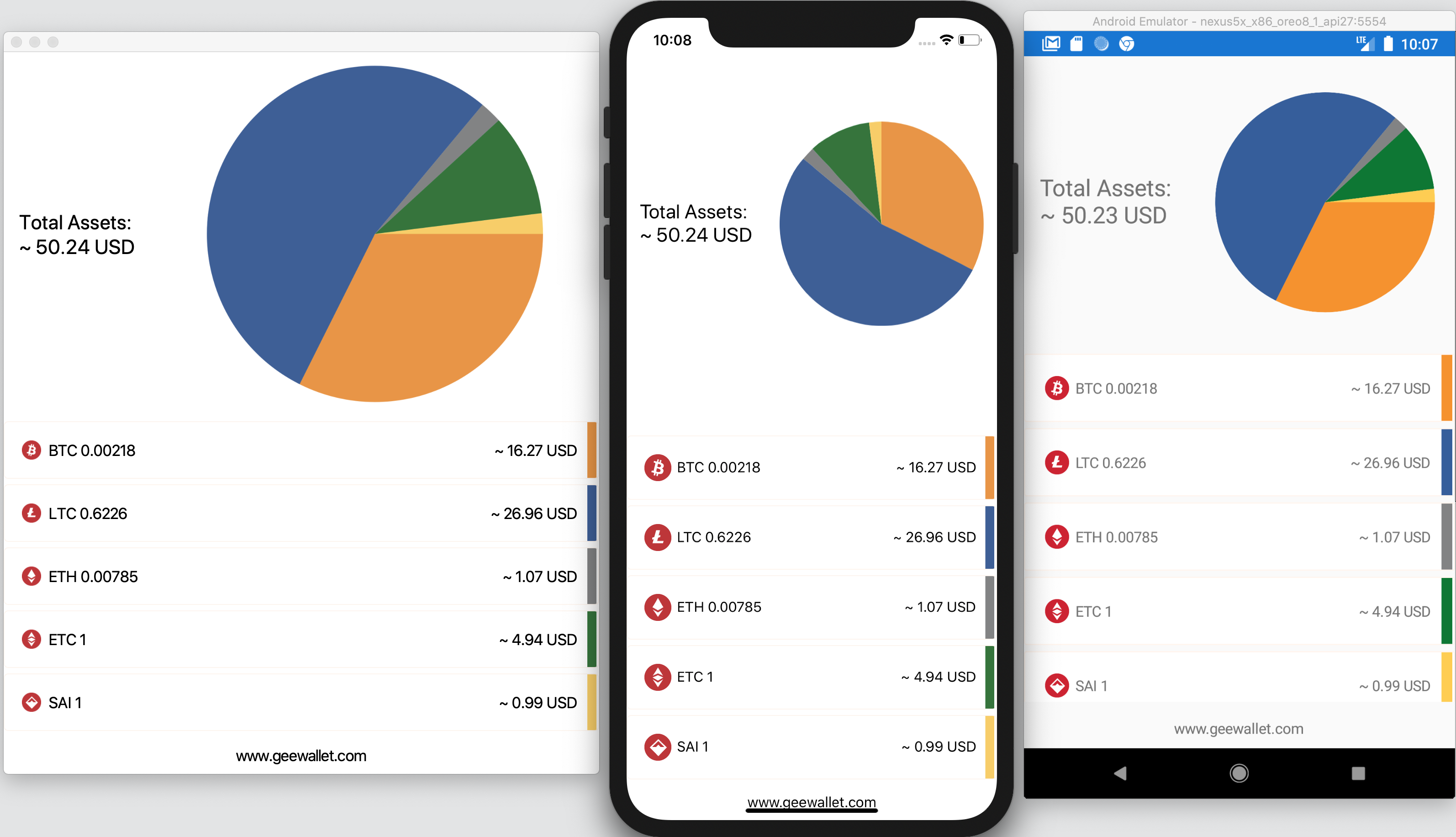
- Make it even more user friendly: blockchain addresses are akin to the numeric IP addresses of the early 80s when DNS still didn’t exist. We plan to use either ENS or IPNS or BNS or OpenCAP so that people can identify recipients much more easily.
- Implement Layer2 technologies: we’re already past the proof of concept phase. We have branches that can open channels. The promise of these technologies is instantaneous transactions (no waits!) and ridiculous (if not free) fees.
- Switch the GTK Xamarin.Forms driver to work with the new “GtkSharp” binding under the hood, which doesn’t require glue libraries. (I’ve had quite a few nightmares with native dependencies/libs when building the sandboxed snap package!)
- Integrate with some Rust projects: MimbleWimble(Grin) lib, the distributed COMIT project for trustless atomic swaps, or other Layer2-related ones such as rust-lightning.
- Cryptography work: threshold keys or deniable encryption (think "duress" passwords).
- NFC support (find recipients without QR codes!).
- Tizen support (watches!).
- Acceptance testing via UI Selenium tests (look up the Uno Platform).
- Flatpak support: unfortunately I haven’t had time to look at this sandboxing technology, but it shouldn’t be too hard to do, especially considering that there’s already a Mono-based project that supports it: SparkleShare.
- Ubuntu packaging: there’s a patch blocked on some Ubuntu bug that makes the wallet (or any .NET app these days, as it affects the .NET package manager: nuget) not build in Ubuntu 19.10. If this patch is not merged soon, the next LTS of Ubuntu will have this bug :( As far as I understand, what needs to be solved is this issue so that the latest hotfixes are bundled. (BTW I have to thank Timotheus Pokorra, the person in charge to package Mono in Fedora, for his help on this matter so far.)
- GNOME community: I’m in search for a home for this project. I don’t like that it lives in my GitLab username, because it’s not easy to find. One of the reasons I’ve used GitLab is because I love the fact that being open source, many communities are adopting this infrastructure, like Debian and GNOME. That’s why I’ve used as a bug tracker, for merge requests and to run CI jobs. This means that it should be easy to migrate to GNOME’s GitLab, isn’t it? There are unmaintained projects (e.g. banshee, which I couldn’t continue maintaining due to changes in life priorities...) already hosted there, so maybe it’s not much to ask if I could host a maintained one? It's probably the first Gtk-based wallet out there.
- Please don’t ask me to add support for your favourite %coin% or <token>.
- If you want to contribute, don’t ask me what to work on, just think of your personal itch you want to scratch and discuss it with me filing a GitLab issue. If you’re a C# developer, I wrote a quick F# tutorial for you.
- Thanks for reading up until here! It’s my pleasure to write about this project.
PS: If you're still not convinced about these technologies or if you didn't understand that PoW video I posted earlier, I recommend you to go back to basics by watching this other video produced by a mathematician educator which explains it really well.

 Member
Creating Onion Services on OpenBSD
OpenBSD is a new beast for me. I’m still learning, experimenting, and trying out new things. Yesterday I was able to create 3 onion services on it quite easily but it takes time to learn the correct order of operations and to learn how to find out why things don’t work when you think they should.
A word about OpenBSD
OpenBSD isn’t friendly to newbies. The developers, users, and management work to make the best and most secure OS that they can. When you work with OpenBSD, it is assumed that you have at least a moderate to advanced amount of Linux or Unix knowledge and experience before starting and that you know how to read documentation, man pages, etc. Don’t bother asking for help unless you’ve done your homework first. Here’s an unedited quote from a recent mailing list post:
> I never read
Please stop wasting our time then.
Setting up Tor
It will become obvious in a minute, but it’s important to set up your Tor onion services first and your web server later. We will be setting up 3 onion services with 3 completely different addresses that have completely different websites associated with them.
First install Tor:
pkg_add tor
Enable the tor service:
rcctl enable tor
Here is my torrc file. It can be a little hard to see, but I enabled separate logging and debugging for Tor when I was working through this. If you don’t, it can be hard to see why something isn’t working. For example, mine kept failing but I couldn’t get a good error as to why until I did this. The reason was because I hand’t actually created the /var/tor/ directories nor set them to the correct permissions. I didn’t see that until I starting watching those logs.
Here is how I set up the configuration for each site. These are the directories that I forgot to create. They contain the public and private keys and the hostname for each onion service.
HiddenServiceDir /var/tor/site1
HiddenServicePort 80 127.0.0.1:8080

HiddenServiceDir /var/tor/site2
HiddenServicePort 80 127.0.0.1:8081

HiddenServiceDir /var/tor/site3
HiddenServicePort 80 127.0.0.1:8082
Each onion service is running internally on port 8080, 8081, or 8082, etc. This is the port that the actual OpenBSD OS will see running. However, tor will be expecting traffic to come in on the standard http port 80. You might be wondering how this works. Tor will be advertising my onion service on port 80. That traffic will come in via tor and get translated to the internal port that the OS will use.
Once I had this running correctly, I finally started tor.
rcctl start tor
Once tor is up an running, check each HiddenServiceDir for the hostname of each onion service. You will need them to test the web server.
Setting up httpd
OpenBSD has it’s own web server that comes with the standard installation called httpd. This is not the same as the Apache httpd that comes with Redhat or Ubuntu. This is a secure minimalist webserver which might actually be ideal for Onion services.
By default, you can’t just start the httpd service and have it running with a default configuration like you can with Apache or Nginx. You actually need to create an /etc/httpd.conf file first. Here is mine.
## Site 1

server "tpsh5cb4zl73pwymkkuopl4roibk4envf6k3ybdcdzuhuztrytsnxxqd.onion" {
listen on * port 8080
root "/htdocs/tpsh5cb4zl73pwymkkuopl4roibk4envf6k3ybdcdzuhuztrytsnxxqd.onion"
}

# Include additional MIME types
types {
include "/usr/share/misc/mime.types"
}

## Site 2

server "ueaireabdst7uqupz5dlrt5vhltgid3wyz4esgwd7buug7nc2absawyd.onion" {
listen on * port 8081
root "/htdocs/ueaireabdst7uqupz5dlrt5vhltgid3wyz4esgwd7buug7nc2absawyd.onion"
}

## Site 3

server "r6udfh5el5bigkpnh7twtsx3j6w6cxmyexlaa23vacqugq7jo6hxlryd.onion" {
listen on * port 8082
root "/htdocs/r6udfh5el5bigkpnh7twtsx3j6w6cxmyexlaa23vacqugq7jo6hxlryd.onion"
}
The first things is the define the name of the url that traffic will be coming in on. I got this from the onion hostname that was generated by tor. Secondly, that hostname needs to be matched with the internal port number that tor will be sending traffic to. Finally you need to tell the web server where to find the actual html that make up that website. I used the complete onion name for that directory. That’s not actually necessary but to me it is helpful. Be careful: although the line of code says “root” it is not the compete directory. htdocs is actually under /var/www/.
You can test your web server’s configuration without actually starting it by running:
httpd -n
Once you get a “configuration OK” status, you can enable and start it
rcctl enable httpd

rcctl start httpd
A really great resource for starting to work with this web server is here. I would suggest waiting 30 seconds or so after starting the web server to check the urls with the Tor Browser or you can check them directly using the internal ports with curl.
Final thoughts:
OpenBSD put security before performance.
OpenBSD believes in strong security. Our aspiration is to be NUMBER ONE in the industry for security (if we are not already there). Our open software development model permits us to take a more uncompromising view towards increased security than most vendors are able to. We can make changes the vendors would not make. Also, since OpenBSD is exported with cryptography, we are able to take cryptographic approaches towards fixing security problems.
Security is not privacy and it is certainly not anonymity and yet these things work well together. This focus makes OpenBSD the right match for those who want to use Tor and why I will always suggest that people avoid Windows or Macs for those who are serious about privacy because they put those platforms put user experience and sales before anything else on top of being closed source.

Scrcpy on openSUSE | Display and Control Android devices over USB

三大雲平台工具容器升級小記 - 使用 python 3 with openSUSE Leap 15.1 Container
- Google SDK 已經GA 支援 python 3, 274.0.0 以後的版本就支援 Python 3
- awscli 使用 python 3 來安裝
- Ansible with azure 使用 pip3 安裝
- 我有比較過 docker build 以及使用現有的 docker image 修改後再使用 docker commit 建立的 image 大小還是很有差異的
- 檔案在 Github 上面
- Update time
- 使用 pip3 安裝 ansible[azure]
- 使用 pip3 安裝 awscli
- Google SDK 版本還有下載的檔案路徑以及檔案名稱
- 我檔案的名稱取名爲 opensuseLeap151_ansible_20200105_Dockerfile
- 使用 -f 指定 Dockerfile 名稱
- 最後是 ” . “ 目前的目錄
Tuning Konfigurasi PostgreSQL
Tuning konfigurasi dilakukan agar instalasi PostgreSQL kita dapat bekerja secara optimal. Sebagian besar kita mungkin menganggap bahwa yang penting adalah CPU dan RAM yang besar, kenyataannya tidak demikian. Seringkali ditemukan instalasi PostgreSQL di mesin-mesin yang memadai secara spesifikasi tapi tidak berjalan sesuai yang diharapkan. Memang hal ini tidak hanya tergantung dari database saja, tapi juga bagaimana efisiensi aplikasi (baca coding), efisiensi query serta teknik mengolah datanya. Tulisan ini membahas cara untuk men-tuning konfigurasi PostgreSQL server. Walaupun tidak ada aturan baku bagaimana men-tuning PostgreSQL, tulisan ini mudah-mudahan dapat dijadikan acuan.
1. Menggunakan pgtune website
Silakan masukan konfigurasi mesin dan data lain yang dibutuhkan pada website tersebut. Konfigurasi postgresql.conf akan dihasilkan dari masukan informasi yang diberikan.

2. Menggunakan postgresqltuner
Download postgresqltuner script dari halaman github. Salin berkas postgresqqltuner.pl ke direktori /var/lib/pgsql/data dan jalankan dengan
perl postgresqltuner.pl --host=127.0.0.1 --database=nama_database --user=nama_user --password=password_user
Silakan ikuti saran yang dihasilkan oleh script tersebut.
3.Penggunaan shared buffer
Halaman dokumentasi postgresql 12 menyebutkan:
Shared_buffers adalah jumlah memory yang digunakan sebagai shared memory buffers. Nilai defaultnya adalah 128 MB, tetapi bisa saja lebih kecil jika pengaturan kernel tidak mendukung. Ukuran minimum adalah 128 KB, biasanya diset agak lebih tinggi dari nilai minimumnya untuk mencapai unjuk kerja yang lebih baik. Pengubahan nilai membutuhkan restart database. Jika anda memiliki database server dengan 1 GB RAM atau lebih, mulailah dengan menset shared_buffers sebesar 25% dari total RAM. Kemungkinan akan ada beban kerja dimana dibutuhkan shared_buffers yang lebih besar, tetapi karena PostgreSQL juga bergantung kepada cache sistem operasi maka alokasi yang lebih besar dari 40% untuk shared_buffers tidak meningkatkan unjuk kerja PostgreSQL. Biasanya pengalokasian yang besar untuk shared_buffers dibutuhkan ketika kita meningkatkan ukuran max_wal_size, untuk kebutuhan menjalankan beberapa proses tulis data yang besar dalam periode yang lama (sumber: https://www.postgresql.org/docs/12/runtime-config-resource.html).
Beberapa poin penting dari dokumentasi di atas:
- gunakan shared_buffers dengan ukuran 25% dari total RAM
- jika ukuran max_wal_size diperbesar (default=1GB) kemungkinan dibutuhkan memperbesar ukuran shared_buffers, tetapi perhatikan pula kebutuhan memori untuk sistem operasi
- PostgreSQL juga bergantung kepada cache sistem operasi, jadi peningkatan shared_buffers tidak dianjurkan karena bisa diganti dengan pemanfaatan cache sistem operasi
Sebelum kita melangkah lebih jauh, perhatikan kalimat dari dokumentasi PostgreSQL di atas “… PostgreSQL juga bergantung kepada cache sistem operasi …” . Saatnya kita ulang sedikit pengetahuan kita tentang konsep sistem operasi.
a. Aplikasi dan sistem operasi berjalan dalam virtual memory
Setiap proses memiliki impresi bahwa proses bekerja dengan bagian memori yang besar dan berurutan (contigous) (https://en.wikipedia.org/wiki/Virtual_memory).

b. Sistem operasi mengelola sebuah page table untuk memetakan virtual memory ke dalam memori fisik (lihat http://courses.teresco.org/cs432_f02/lectures/12-memory/12-memory.html)

c. Address translation logic diimplementasikan oleh memory management unit (MMU) (baca https://en.wikipedia.org/wiki/Memory_management_unit)
d. MMU menggunakan cache pages yang sering digunakan ulang dikenal sebagai Translation Lookaside Buffer (TLB) (baca https://en.wikipedia.org/wiki/Memory_management_unit)

e. Aplikasi akan memanfaatkan TLB, yang pertama dilakukan adalah mencari di TLB:
- jika alamat address mapping yang dicari ditemukan di TLB maka alamat fisik memori akan dikembalikan ke aplikasi untuk diakses. Ini dinamakan TLB Hit dan costnya hanya 1 kali memory akses.
- jika alamat address mapping yang dicari tidak ditemukan di TLB maka proses akan mencari (men-scan) page table untuk mencari address map nya sampai ditemukan. Ini dinamakan TLB miss dan costnya 2 kali memory akses.

(sumber https://en.wikipedia.org/wiki/Page_table)
Kesimpulan dari pengulangan singkat kuliah sistem operasi ini adalah PostgreSQL dapat ditingkatkan kinerjanya dengan meningkatkan efisiensi (menurunkan TLB miss atau dengan kata lain meningkatkan TLB Hit) dengan cara:
- memanfaatkan huge pages dan TLB, pendekatan ini mudah dilakukan
- memperbesar ukuran huge pages dan memanfaatkan TLB, ini juga bisa dilakukan
- memperbesar ukuran TLB, ini mahal karena harus ganti CPU
4. Memanfaatkan huge pages dan Translation Lookaside Buffer (TLB)
Dokumentasi PostgreSQL menyebutkan bahwa menggunakan huge pages akan mengurangi overhead ketika menggunakan memory yang besar dan berurutan, sebagaimana dilakukan oleh PostgreSQL, khususnya ketika menggunakan shared_buffers yang berukuran besar (https://www.postgresql.org/docs/12/kernel-resources.html#LINUX-HUGE-PAGES).
Secara desain PostgreSQL sudah dibuat untuk memanfaatkan huge pages, tinggal dimanfaatkan.
Untuk aplikasi yang tidak didesain untuk memanfaatkan huge pages maka sistem operasi mendukungnya dengan apa yang dinamakan Transparent Huge Pages (THP). Dalam hal ini secara singkat dapat dijelaskan:
- kernel bekerja di latar belakang (khugepaged) dengan mencari blok memori berurutan yang cukup dan tidak dipakai selanjutnya mengubahnya menjadi huge pages
- secara transparan mengalokasikannya ke proses yang dianggap sesuai oleh kernel.
Silakan baca https://www.kernel.org/doc/Documentation/vm/hugetlbpage.txt untuk lebih detail
Karena PostgreSQL sudah didesain dengan memanfaatkan huge pages kita malah dianjurkan untuk menon-aktifkan THP dan mengalokasikan memori secara khusus untuk huge pages yang akan digunakan untuk PostgreSQL, tentu saja jika mesin kita memang dialokasikan khusus hanya untuk PostgreSQL.
Jalankan di teminal
cat /proc/meminfo | grep Huge
Maka hasilnya akan terlihat seperti

Terlihat ada Transparent Huge Pages (THP) yaitu AnonHugePages sebesar 6144 kB.
Kita akan memberikan alokasi huge page yang lebih besar ke postgresql sehingga TLB miss tidak perlu sampai ke disk cukup di RAM
Untuk memanfaatkan huge pages kita harus menghitung perkiraan kebutuhan memori dari postgresql dan mengalokasikan huge page sebesar kebutuhan tersebut.
head -1 /var/lib/pgsql/data/postmaster.pid
1395
pmap 1395 | awk '/rw-s/ && /zero/ {print $2}'
1096672
grep ^Hugepagesize /proc/meminfo
Hugepagesize: 2048 kB
1096672 / 2048 = 535.48, maka dalam contoh ini dibutuhkan sekitar 536 huge pages. Secara default ukuran setiap huge pages adalah 2048 kB. Kemudian kita set huge page lebih besar, siapa tahu ada program lain yang juga membutuhkan, katakan menjadi 700, jadi total alokasi huge pages menjadi 1,4 GB.
sysctl -w vm.nr_hugepages=700
Agar persisten kita sesuaikan juga di file /etc/sysctl.conf tambahkan vm.nr_hugepages=700
Jangan lupa kita harus memberikan privilege kepada group postgres untuk dapat memanfaatkan huge page ini di userland. Cari tahu nomer entry dari group postgres dan berikan akses sebagai pengguna Translation Lookaside Buffer (TLB)
getent group postgres
26
echo 26 > /proc/sys/vm/hugetlb_shm_group
Agar persisten jangan lupa untuk memasukkan parameter vm.hugetlb_shm_group=26 di dalam file /etc/sysctl.conf
Sekarang buka terminal dan jalankan lagi
cat /proc/meminfo | grep Huge
maka terlihat ada total huge pages sebesar 700 pages dan ada alokasi (Reserved) untuk PostgreSQL sebesar 510 pages atau sekitar 1GB

Jangan lupa menambahkan huge_pages di postgresql.conf dan restart postgresql.service
huge_pages = on
Jika mesin anda hanya khusus untuk PostgreSQL anda dapat menon-aktifkan THP secara menyeluruh, caranya adalah edit file /etc/default/grub dan tambahkan “transparent_hugepage=never” pada GRUB_CMDLINE_LINUX_DEFAULT= . Jangan lupa setelah mengedit jalankan mkinitrd dan mereboot mesin anda.
grub2-mkconfig -o /boot/grub2/grub.cfg
mkinitrd
reboot

Setelah reboot cek kembali huge page, dan akan terlihat bahwa sudah tidak ada Transparent Huge Page (THP), ukurannya = 0 kB. Semua huge page hanya digunakan untuk aplikasi yang didesain memanfaatkan huge page, postgresql salah satunya,

5. Memperbesar ukuran huge pages dan memanfaatkan Translation Lookaside Buffer (TLB)
Secara default ukuran huge pages adalah 2048 kB. Ukuran ini dapat diperbesar selama hardware/CPU anda mendukungnya. Periksa dengan
cat /proc/meminfo | grep Huge

cat /proc/cpuinfo

Jika terdapat pse artinya CPU anda mendukung huge pages berukuran 2048 kB dan jika terdapat pdpe1gb artinya CPU anda mendukung huge pages berukuran 1 GB.
Kemudian edit file /etc/default/grub dan tambahkan “hugepagesz=1GB default_hugepagesz=1G” pada GRUB_CMDLINE_LINUX_DEFAULT=
vim /etc/default/grub

Kemudian update grub dan reboot mesin anda
grub2-mkconfig -o /boot/grub2/grub.cfg
mkinitrd
reboot
Periksa ulang besarnya total huge page, pastikan besarnya sudah 1GB.
cat /proc/meminfo | grep Huge

Selanjutnya kita akan menonaktifkan Transparent Huge Page (THP). Edit lagi file /etc/default/grub dan tambahkan “transparent_hugepage=never”

Sebenarnya anda bisa menyesuaikan ukuran huge page ini sesuai dengan jumlah ukuran RAM anda. Misalnya mesin anda mempunya RAM sebesar 64 GB. Anda bisa menset huge page ini menjadi katakan 32 GB. Caranya adalah dengan menambahkan jumlah pages di /etc/default/grub. Misalnya
GRUB_CMDLINE_LINUX_DEFAULT="(...) hugepagesz=1GB default_hugepagesz=1G hugepages=32 transparent_hugepage=never"
Kita harus memberikan privilege kepada group postgres untuk dapat memanfaatkan huge page ini di userland. Cari tahu nomer entry dari group postgres dan berikan akses sebagai pengguna Translation Lookaside Buffer (TLB)
getent group postgres
26
echo 26 > /proc/sys/vm/hugetlb_shm_group

Agar persisten jangan lupa untuk memasukkan parameter vm.hugetlb_shm_group=26 di dalam file /etc/sysctl.conf
Komparasi
Saya melakukan komparasi kecepatan antara huge_page=2048kB dan huge_page=1GB. Karena mesin yang dipakai hanya memiliki RAM 4GB maka perlu sedikit modifikasi untuk postgresql.conf. Pada kondisi huge_page=2048kB parameter shared_buffers = 1GB, sedangkan ketika huge_page=1GB parameter shared_buffers = 512MB. Selain itu saya mengaktifkan shared library, shared_preload_libraries = ‘pg_stat_statements’ dan mengaktifkan extension pg_stat_statements di database. Database yang digunakan cukup besar sekitar 29,5 juta row berukuran sekitar 4 GB dengan ukuran tabel sekitar 3,3 GB dan index sekitar 650 MB
Ini adalah contoh postgresql.conf nya
listen_addresses = '*'
port = 5432
max_connections = 30
shared_buffers = 1GB
#shared_buffers = 512MB
huge_pages = on

effective_cache_size = 3GB
maintenance_work_mem = 256MB
checkpoint_completion_target = 0.9
dynamic_shared_memory_type = posix
wal_buffers = 16MB

default_statistics_target = 100
random_page_cost = 1.1
effective_io_concurrency = 300
work_mem = 8738kB
min_wal_size = 1GB
max_wal_size = 2GB
max_worker_processes = 4
max_parallel_workers_per_gather = 2
max_parallel_workers = 4

shared_preload_libraries = 'pg_stat_statements'
track_activity_query_size = 2048
pg_stat_statements.track = all

log_destination = 'stderr'

logging_collector = on
log_line_prefix = '%m %d %u [%p]'
log_timezone = 'Asia/Jakarta'
datestyle = 'iso, mdy'
timezone = 'Asia/Jakarta'

lc_messages = 'en_US.UTF-8'
lc_monetary = 'en_US.UTF-8'
lc_numeric = 'en_US.UTF-8'
lc_time = 'en_US.UTF-8'
default_text_search_config = 'pg_catalog.english'
Selalu jalankan postgresqltuner.pl seperti dalam poin 2 di atas setiap melakukan perubahan terhadapa konfigurasi postgresql. Script tersebut sangat membantu sekali dalam memahami cara kerja postgresql.
Lama query SELECT COUNT (*) saat huge_pages=2048kb adalah 249 detik
Lama query SELECT COUNT (*) saat huge_pages=1GB adalah 228 detik

Perbedaannya sekitar 21 detik. Silakan mencoba sendiri pada database anda.
Ada beberapa cara lain untuk membuat performance postgresql makin optimum, antara lain:
1. penggunaan message broker, RabbitMQ misalnya
2. penggunaan connection pooling, misalnya dengan pgpool
3. cluster load balancing.
Kalau ada kesempatan mudah-mudahan bisa saya tulis. Semoga bermanfaat.
Have fun
medwinz
Linux in the Kitchen | Life Enhancement Blathering
openSUSE Tumbleweed – Review of the week 2020/01
Dear Tumbleweed users and hackers,
Happy new year! The year 2020 has started in full swing and I wish everybody a great new year!
For Tumbleweed, things have started off reasonably well: Snapshot 20200101 (first one of the year) has been published, and 0102 will be discarded. Ups  But let’s step back a bit and do the review of the whole week (which was the crossing over of 2019 to 2020). In the last week, we have released a total of 6 snapshots! Ok, I admit, they were all rather ‘small’ updates, as many contributors are with their families and have better things to do than submitting breaking updates. The six updates released were, still from 2019: 1227, 1228, 1229, 1230 and 1231 and from 2020 the one mentioned earlier: 20200101. The snapshots contained these package changes:
- Ruby RSpec 3.9.0
- Wireshark 3.2.0
- Mozilla Firefox 71.0
- Rust 1.39.0
Obviously, with so many contributors on leave, the stagings that are actually in need of attention barely moved. So it is no big surprise that the list of ‘things being forged’ is largely unchanged:
- RPM 4.15: most issues are solved by now, one final piece of post-build-checks has been submitted and supposedly makes this acceptable soon
- Python 3.8
- systemd 244: mostly ready, but python-prompt_toolkit1 keeps on failing with this update
- Qt 5.14. Build and testing have been completed. There are some legal reviews pending
- Kubernetes 5.17: openQA still failing
- Linux kernel 5.4.x: Issues to be resolved in the used signing CA and the certificate in use.
- SQLite 3.30: python-django still failing, despite fix-patches added to sqlite
- Rust 1.40
I expect, with the holiday season mostly being over, to see an increase in submissions again. Let’s hope OBS will not meltdown under the pressure

Kraft Version 0.90
Zum Jahresabschluss 2019 wurde noch die neue Kraft Version 0.90 herausgegeben.
Das wichtigste neue Feature ist die Überarbeitung der Folgedokumente. Als Folgedokumente werden Dokumente bezeichnet, die bei der Abwicklung von Aufträgen aufeinander folgen, zum Beispiel eine Rechnung, die auf ein Angebot folgt.
In Kraft gibt es Unterstützung dafür: Anstatt die Rechnung, die auf das Angebot folgen soll, ganz neu anzulegen, kann das Angebot selektiert werden und im Menü der Punkt Nachfolgedokument erzeugen ausgewählt werden. In dem darauf folgenden Dialog kann in der neuen Version ausgewählt werden, ob und aus welchem Quelldokument die Posten in die Rechnung kopiert werden sollen. 
Wenn zb. eine Abschlagsrechnung als erstes Folgedokument des Angebotes angelegt wurde, möchte man nicht deren Posten, sondern die des Angebotes kopieren.
Ebenfalls neu ist die Unterstützung von Abschlagsrechnungen. Wenn eine als Folgedokument gestellt wurde, wird der Schlussrechnung automatisch ein Posten eingefügt, der die Summe der Abschlagsrechnung abzieht. Er kann dort angepasst werden.
Weitere Änderungen sind eine weiter vereinfachte Benutzeroberfläche, um die Arbeit mit Kraft noch einfacher zu machen. Die Übersetzung der Dokument-Vorlagen wurde vereinfacht und die Vorlagen wurden in Details verbessert. Daneben gibt es viele andere kleine sichtbare und unsichtbare Verbesserungen.
Nicht unerwähnt sollen Beiträge aus der Kraft-Community bleiben: Es wurde eine komplette Übersetzung der Software ins Niederländische beigetragen und ein neuer Dokument-Typ Angebot ohne Preise hinzugefügt, der von der Community vorgeschlagen wurde. Dafür besten Dank, davon lebt Kraft!
Viel Erfolg mit Kraft in 2020!
Quick Tiling in KDE Plasma on openSUSE

Δοκιμάστε το GNUHealth 3.6 στο Raspberry Pi

Εδώ και καιρό κυκλοφόρησε η έκδοση GNU Health 3.6.x. Η πιο εύκολη δοκιμή που μπορείτε να κάνετε είναι με την χρήση του Raspberry Pi. Η εικόνα του GNU Health 3.6 για το Raspberry Pi 3, είναι βασισμένη σε openSUSE Leap 15.1, με γραφικό περιβάλλον LXQT και με προεγκατεστημένη την βάση δεδομένων.
ΓΕΝΙΚΕΣ ΠΛΗΡΟΦΟΡΙΕΣ
- Η εικόνα είναι για Raspberry Pi 3 και πρέπει να γραφεί σε κάρτα μεγέθους 32GB
- Η γλώσσα είναι ρυθμισμένη στα Αγγλικά
- Τα συνθηματικά για τον root και χρήστη είναι 'test' και 'test'
- Το συνθηματικό για την δοκιμαστική βάση δεδομένων είναι τα GNU Health-Standard: admin:gnusolidario
ΕΓΚΑΤΑΣΤΑΣΗ
- Κατεβάστε το αρχείο από εδώ

- Εισάγετε την κάρτα SD στον υπολογιστή σας και βρείτε πως την αναγνωρίζει (εντολή: lsblk). Έστω ότι την αναγνωρίζει ως /dev/sdd
- Αντιγράψτε το αρχείο που κατεβάσατε στην κάρτα με την εντολή (μία σειρά):xzcat gnuhealth*.img.xz | dd bs=4M of=/dev/sdd iflag=fullblock oflag=direct; sync
Εναλλακτικά μπορείτε να χρησιμοποιήσετε το etcher - Εισάγετε την κάρτα στον Raspberry Pi και εκκινήστε το με αυτήν.

Δείτε ένα βίντεο πως μπορείτε να το κάνετε ολοκληρωμένη εγκατάσταση σε υπολογιστή:
Για περισσότερες πληροφορίες, μπορείτε να δείτε την σελίδα wiki.