
 Member
 Futureboy
Ultimate 64 | A New Commodore 64 main board

Aktivasi VPN (PPTP, OpenVPN & L2TP) pada Synology
Excellent memiliki beberapa markas. Ada markas Excellent DJ yang merupakan rumah saya sekaligus menjadi awal lokasi “kantor” Excellent pertama kali, ada markas Excellent Premier Serenity yang menjadi kantor operasional saat ini, ada juga markas Taman Bacaan Excellent berupa kebun buah dan kolam ikan (Excellent Farm).
Markas Excellent DJ dan markas Excellent Premier Serenity merupakan lokasi data center kecil-kecilan, ditambah dengan data center kecil juga di Gedung Tifa Jakarta. Untuk melakukan pengelolaan sistem di lokasi berbeda ini, saya kerap menggunakan aplikasi SSH, Remote Desktop (RDP), Team Viewer atau AnyDesk.
Karena koneksinya timbul tenggelam, pengalaman remote berbasis desktop ini kurang menyenangkan. Saya lebih memilih untuk mengaktfikan akses VPN.
Kebetulan di masing-masing markas Excellent ada Synology yang digunakan sebagai shared storage, media penyimpanan file sekaligus backup data. Synology memiliki feature yang cukup komplit dan konfigurasinya relatif mudah.
AKTIVASI VPN SERVER
Untuk mengaktifkan VPN pada Synology, berikut adalah prosesnya :
- Login ke Synology
- Masuk ke menu Package Center dan search VPN
- Aplikasi VPN ada pada group Utilities. Klik Install untuk melakukan instalasi package-nya
- Setelah package terinstall, pilih menu Open
- Aktifkan salah satu atau beberapa pilihan VPN server. Ada VPN server berbasis PPTP, OpenVPN dan L2TP. Sebagai contoh, saya menggunakan OpenVPN. Lakukan setting terkait OpenVPN termasuk maksimum koneksi, authentikasi, port dan lain-lain

- Setelah selesai, klik Apply
- Pastikan port 1194 UDP disisi firewall sudah diopen
- Scroll ke bagian bawah konfigurasi dan pilih menu Export Configuration. File konfigurasi dalam format .zip ini berisi file konfigurasi OpenVPN, readme dan file SSL Certificate dan bisa dipergunakan sebagai media import konfigurasi koneksi menggunakan VPN Client
KONEKSI KE VPN SERVER
- Download aplikasi OpenVPN Client sesuai dengan sistem operasi yang dipergunakan. Jika menggunakan Windows bisa menggunakan aplikasi VPN dari website OpenVPN sedangkan jika menggunakan Linux bisa melakukan instalasi paket OpenVPN melalui repo Linux masing-masing. Karena saya menggunakan Mac, saya memilih aplikasi TunnelBlick.
- Pada aplikasi yang digunakan, pilih menu import file .opvn yang ada dalam file .zip. Jangan lupa sesuaikan alamat server pada file konfigurasi tersebut. Jika menggunakan Linux, bisa menggunakan perintah : openvpn –config client.ovpn
- Jika sudah terkoneksi, test akses IP lokal disisi VPN server, seharusnya sudah bisa diakses

Contoh diatas saya menggunakan OpenVPN namun aktivasi PPTP dan L2TP secara prosedur hampir sama. Sedikit perbedaan hanya disisi klien saja.
Dengan menggunakan VPN, saya bisa bekerja dengan mudah dan memiliki banyak pilihan akses terhadap server yang ada disisi remote. Karena server disisi data center Tifa memiliki spesifikasi yang cukup tinggi, saya bisa menggunakannya sebagai server simulasi untuk keperluan penulisan update buku VMware vSphere 6.7.
Disisi lain, saya juga tidak perlu selalu melakukan remote GUI, baik ke data center Tifa maupun ke markas Excellent lainnya karena bisa melakukannya dengan mekanisme SSH atau akses via Web tanpa perlu melakukan setting port forwarding berbagai macam port.
CATATAN
- Dalam beberapa kasus, segmen IP lokal disisi VPN server tetap tidak bisa diakses/ping meski sudah memilih menu “Allow clients to access servers LAN”. Jika ini yang terjadi, jangan berputus asa atau mutung
 melainkan cari solusinya, hehehe… Solusinya, edit file konfigurasi .opvn dan hilangkan tanda pagar (#) dari baris berikut : redirect-gateway def1
 melainkan cari solusinya, hehehe… Solusinya, edit file konfigurasi .opvn dan hilangkan tanda pagar (#) dari baris berikut : redirect-gateway def1
# If redirect-gateway is enabled, the client will redirect it's
# default network gateway through the VPN.
# It means the VPN connection will firstly connect to the VPN Server
# and then to the internet.
# (Please refer to the manual of OpenVPN for more information.)
redirect-gateway def1
- Secara default, OpenVPN akan menggunakan authentikasi yang dipergunakan untuk login ke Synology. Kita bisa mengatur list user yang diberikan akses melalui menu Privilege

The worst ANSI art renderer, except for all the others

Chafa (github) started out as a small piece of supporting code for an obscure personal project I may announce at some indefinite point in the future. Then I decided to release it as a tongue-in-cheek thing for the VT100 anniversary last year, and, well… it gathered a bit of steam.
Chafa 1.0
Since I'm not one to leave well enough alone, I packaged it up over the holidays for the 1.0 release. It brings a pile of improvements, e.g. new symbol ranges like ASCII and Braille, better image preprocessing and a new --fill option for halftone/dithering. It's also, like, real fast now, and the build is much less brittle.
Big thanks to everyone who contributed to this release: Adam Borowski, Felix Yan, Lajos Papp, Mo Zhou, Ricardo Arguello, Robert-André Mauchin, @dcb314 and @medusacle.
You'll find packages out there for Arch, Debian, Fedora, Gentoo and Ubuntu now; check your repositories. Extra big thanks to the package maintainers.
As the post title implies, I think Chafa is now the least bad tool in this tiny but tradition-rich niche. So what's so not-quite-terrible about it?
Only the best for your aixterm
If you've been around text terminals for a while, you'll know what this means:

Up until fairly recently, the most colorful terminal applications would operate within the confines of some variant of the above palette, and many still do. It's a nice and distinct (not to mention cheerful) set of colors, but it's not a great match for most image material you'll come across, which makes legible Chafa output a challenge. And that is precisely why I had to try (here with a nice woodblock print):

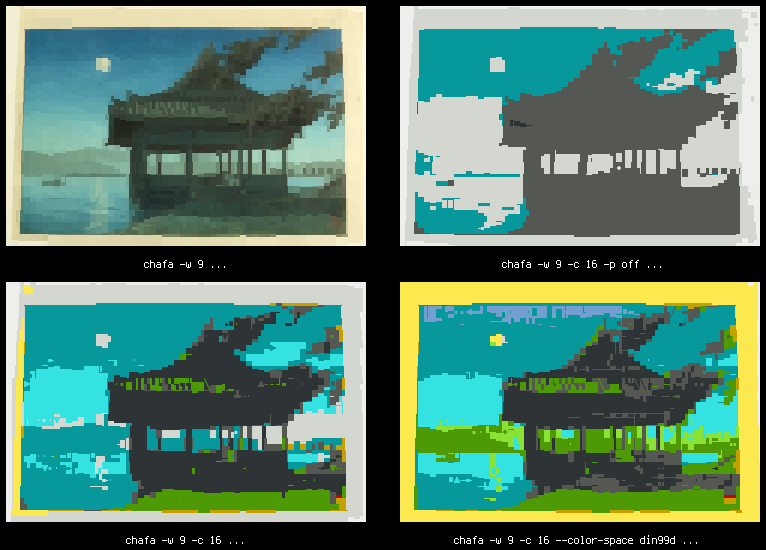
The top left image is the best reproduction you can get with Chafa using a modern 24-bit color terminal emulator (in this case, GNOME Terminal) at 60 characters wide. At top right is the 16-color mapping you get without applying any tricks; this is pretty close to the mark given the muted moonlight colors of the input image, but it doesn't make good use of our palette, nor does it convey the essence of the scene very well. Blue sky, rolling hills, green grass. A shady waterfront pavilion. Given our limitations, the output will look nothing like the original anyway, so we're better off trying to capture the gist of it.
We do this simply by cranking up the contrast and saturation to levels where our cheerful old palette can do a decent job (bottom left). Chafa no longer relies on ImageMagick for this, so it's available in the library API, and integer-only math makes it performant enough to run in real time on animations and video (more on this in a later post, perhaps).
It gets even better if you do color assignment in DIN99d space (bottom right), but that's way slow, so you have to explicitly enable it.
No ANSI? No problem
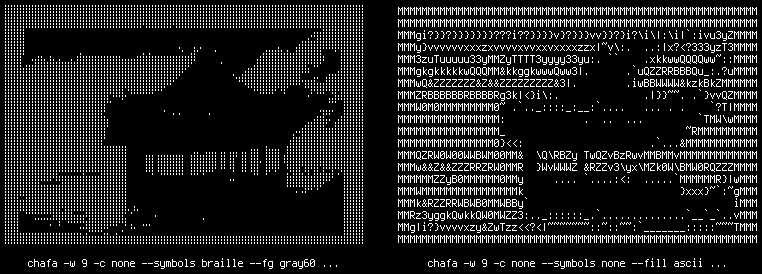
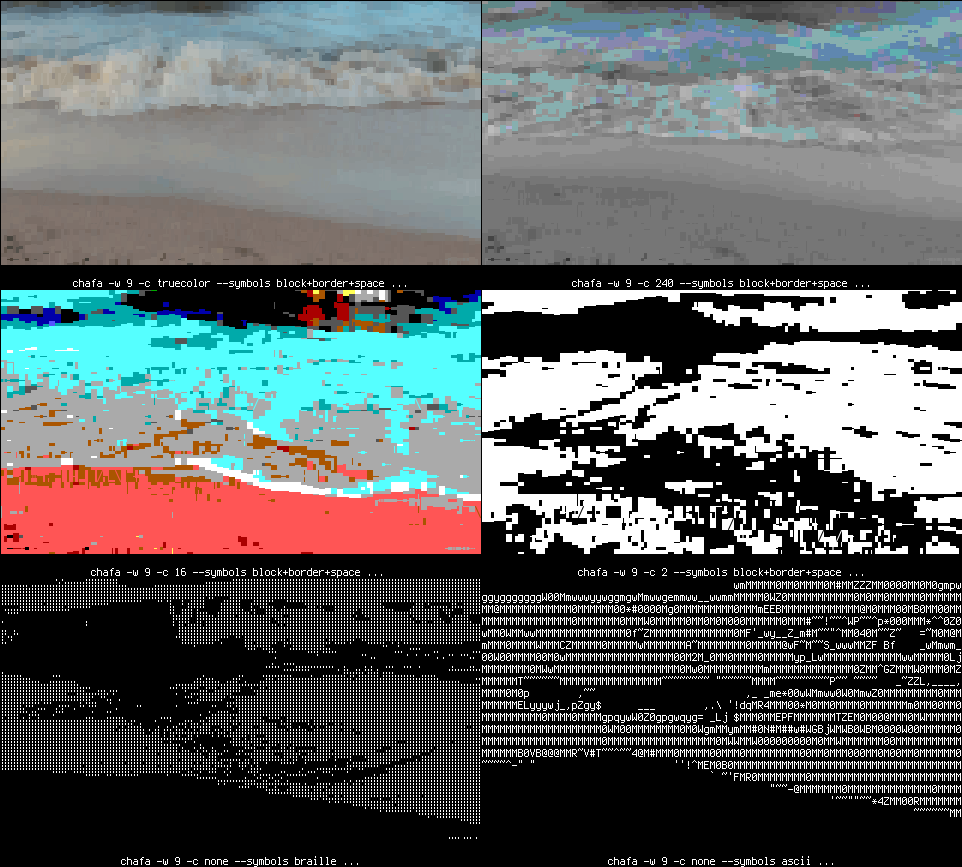
You can generate varied output without any color codes at all. The above examples also demonstrate use of the --fg option, which, along with --bg, exists to tell Chafa what your terminal's default colors look like so it can target those, but is equally useful for tweaking monochrome output thresholds.
So if for some reason your terminal can't handle ANSI or you still have one of those warm & fuzzy monochrome tubes sitting around, we've got you covered. Or break out your civil rights-era dot-matrix printer and make some precision banners to hang in your lab!
Running for openSUSE Board
You might have heard that openSUSE’s board elections are underway for three open seats to be filled. I’ve been thinking about running for board for a while and now it seems to be the right time to step up.
The following text is a plain, unedited copy of my application.
Introduction, Biography and Contributions
My name is Vinzenz Vietzke but sticking with the much short “vinz” or “vinzv” is what I prefer. I’m 34 years, live in a small town in southern Germany. Like most German Linux users around my age I made my first steps with S.u.S.E. back in the late 90s. Over the years I moved across various distributions and contributed to quite a few of them in different ways. My day job is product management and marketing at Linux hardware vendor TUXEDO Computers.
openSUSE and TUXEDO
Starting with just one laptop running openSUSE we at TUXEDO now offer around 20 different models plus a wide range of desktop PCs all with Leap 15 pre-installed. Customers also get free lifetime support for their preinstalled system. Therefore of course our free phone/email tech support team need to be trained for openSUSE as well. For this whole project I was and still am in charge as the tech and project lead so to say to “bring” openSUSE on TUXEDO’s computers. I got in touch with oS, worked out how and when we get everything done.
In addition to technical affairs I’m the pushing person at TUXEDO Computers to make our company step up supporting openSUSE. As a result since October 2018 we are officially sponsoring the openSUSE project. We offer any of our models as demo and workshop devices at no cost and take care for the logistics and event booth support. Furthermore we’re sponsoring oSC19 in Nuremberg with demo and install fest machines.
Of course these things are mainly financial efforts and company internal projects. But yet to get openSUSE a wider reception there needs to be someone coordinating, pushing and taking care. That’s why I call my contributions to openSUSE mostly “meta contributions”.
i18n
Besides the TUXEDO stuff which is partly paid and partly free time efforts I’m coordinating translation teams of upstream Xfce, actively translating openSUSE and quite a lot of other projects. For details please check my profiles at Crowdin, Gnome, Transifex as well as my personal website.
Aims/Goals
Like every volunteer-run project openSUSE has it’s issues to tackle. Most of them are obvious and already under work: consolidating web appearances, cleaning the wiki, sorting out the communication infrastructure and possible extensions to it. I don’t think there’s anything further needed to push these things besides time. The board has done a really awesome job in the past on these things and surely will in the future.
Major and Minor Issues
One of the major issues I experience is public reception like in how openSUSE as a distribution is seen. When people talk about openSUSE they’re mostly telling from their experiences they made (literally!) a decade ago. You ran into some YaST issues in 2011 and this is why you stopped recommending openSUSE and you never ever re-thought your opinion? Jeez. These memories need to get overhauled and put into correct contexts. Most of them are prejudices anyway.
On the other side people who have heard about Linux but hardly any knowledge mostly equate one specific distribution with Linux. Though it’s not technically correct end-users do this – which is fine. But they don’t equate it with openSUSE and that is shame. oS really has come a long way and is easy to install, to run and to use. People just need to know about and this is where the prejudices mentioned earlier come into play. The “tech guy” inside a circle of friends is some multiplier and needs to be convinced that openSUSE is something he totally can recommend in good conscience.
Role of the board
From my perspective the board has two main roles: First and foremost it is some kind of service provider. It serves the whole project as contact point for questions, projects coordination and pointing in directions etc. This is crucial for the whole openSUSE project and should never be changed but merely extended if possible.
The second role might be named as “ideas sparking pot”. Most ideas coming from the community are of a technical nature which is entirely logical. Just sometimes there are things that the whole project would benefit from but no one sees them or has time to do so. This is where the board could jump in throwing sparks and giving input from someone being able to take a step back for viewing the bigger picture.
My role in this board team would both being approachable and helpful for part one. But also to give thoughts and ideas when needed, especially in the second part mentioned.
Why you should vote for me?
I’ve been into Linux and open source communities for about 10 years now. Though I’m not a long term contributor for openSUSE I know how “things work” in such a big, diverse project and how to handle this stuff. If you want to get someone with no “Geeko glasses” on you should vote for me. Not that being deeply inside openSUSE’s community is a bad thing! But I can bring in new perspectives, most of them related to end-users, Windows-ditchers and curious but not tech-savvy people. I both understand developers and tech people on the one hand as well as people who are buying Linux preinstalled hardware with little will to tinker around. This way I act as some proxy between those worlds which in the end might be good for everyone involved.
Conclusion
As elaborated above my main goal boils down to people thinking of easy but powerful Linux when they hear openSUSE. The project in total is big and strong enough to really serve as “the makers’ choice for sysadmins, developers and desktop users” – all of them!
Ask me anything
If you made it this far – thanks for your time and interest. For any questions, comments or disagreements feel free to contact me. I appreciate any of it via:
Kandidatur für das openSUSE Board
Du hast vielleicht schon gehört, dass die Wahlen für drei offene Sitze im openSUSE Board im Gange sind. Ich habe eine Weile darüber nachgedacht, für das Board zu kandidieren und jetzt scheint es der richtige Zeitpunkt zu sein, um mich einzubringen.
Der nachfolgende Text ist die deutsche Übersetzung einer einfachen, unbearbeiteten Kopie meiner Bewerbung.
Einführung, Biographie und Beiträge
Mein Name ist Vinzenz Vietzke, aber ich bevorzuge es, beim viel kürzeren “vinz” oder “vinzv” zu bleiben. Ich bin 34 Jahre alt, lebe in einer kleinen Stadt in Süddeutschland. Wie die meisten deutschen Linux-Anwender in meinem Alter habe ich bereits Ende der 90er Jahre meine ersten Schritte mit S.u.S.E. gemacht. Im Laufe der Jahre wechselte ich zwischen verschiedenen Distributionen und trug auf verschiedene Weise zu etlichen von ihnen bei. Mein Hauptberuf ist Produktmanagement und Marketing beim Linux-Hardwareanbieter TUXEDO Computers.
openSUSE und TUXEDO
Ausgehend von nur einem Laptop mit openSUSE bieten wir bei TUXEDO heute rund 20 verschiedene Modelle sowie eine große Auswahl an Desktop-PCs mit vorinstalliertem Leap 15. Kunden erhalten außerdem kostenlosen lebenslangen Support für ihr vorinstalliertes System. Deshalb muss natürlich auch unser kostenloses Telefon/E-Mail-Supportteam für openSUSE geschult werden. Für dieses ganze Projekt war und bin ich als Technik- und Projektleiter sozusagen verantwortlich, um openSUSE auf die Computer von TUXEDO zu “bringen”. Ich bin mit oS in Kontakt getreten, habe ausgearbeitet, wie und wann wir alles realisieren können.
Zusätzlich zu den technischen Angelegenheiten bin ich die treibende Kraft bei TUXEDO Computers, damit unser Unternehmen die Unterstützung von openSUSE intensiviert. Seit Oktober 2018 sponsern wir daher offiziell das openSUSE-Projekt. Wir bieten jedes unserer Modelle als Vorführ- und Workshop-Gerät kostenlos an und kümmern uns um die Logistik- und Event-Betreuung. Außerdem sponsern wir die oSC19 in Nürnberg mit Geräten zur Demonstration und für Installationsfeste.
Natürlich sind das vor allem finanzielle Anstrengungen und unternehmensinterne Projekte. Aber um openSUSE einen größeren Bekanntheitsgrad zu verschaffen, braucht es jemanden, der koordiniert, vorantreibt und sich kümmert. Deshalb nenne ich meine Beiträge zu openSUSE meist “Meta-Beiträge”.
i18n
Neben den teils bezahlten und teils Freizeitaktivitäten für TUXEDO koordiniere ich Upstream-Übersetzungsteams von Xfce, übersetze aktiv openSUSE und vielen anderen Projekten. Für Details siehe meine Profile bei Crowdin, Gnome, Transifex sowie meine persönliche Website..
Ziele
Wie jedes von Freiwilligen geführte Projekt hat auch openSUSE seine Probleme zu lösen. Die meisten von ihnen sind offensichtlich und bereits in Arbeit: Konsolidierung von Webauftritten, Reinigung des Wikis, Sortierung der Kommunikationsinfrastruktur und mögliche Erweiterungen. Ich glaube nicht, dass es noch etwas mehr braucht, um diese Dinge außer der Zeit voranzutreiben. Der Vorstand hat in der Vergangenheit bei diesen Dingen eine wirklich großartige Arbeit geleistet und wird es sicherlich auch in Zukunft tun.
Große und kleine Probleme
Eines der Hauptthemen, die ich erlebe, ist die öffentliche Wahrnehmung, z. B. wie openSUSE als Distribution wahrgenommen wird. Wenn Menschen über openSUSE sprechen, erzählen sie hauptsächlich von ihren Erfahrungen, die sie vor einem Jahrzehnt gemacht haben (wörtlich!). Du bist 2011 auf einige YaST-Themen gestoßen und deshalb hast du aufgehört, openSUSE zu empfehlen, und du hast nie deine Meinung geändert? Meine Güte. Diese Erinnerungen müssen überarbeitet und in einen korrekten Zusammenhang gebracht werden. Die meisten von ihnen sind sowieso Vorurteile.
Auf der anderen Seite setzen Menschen, die von Linux gehört haben, aber kaum Kenntnisse haben, meist eine bestimmte Distribution mit Linux gleich. Obwohl es technisch nicht korrekt ist, tun Endbenutzer dies – was in Ordnung ist. Aber sie setzen es nicht mit openSUSE gleich, und das ist schade. oS ist wirklich weit gekommen und ist einfach zu installieren, zu betreiben und zu bedienen. Die Menschen müssen nur etwas darüber wissen, und genau hier kommen die oben genannten Vorurteile ins Spiel. Der ” Technik-Typ ” in einem Freundeskreis ist ein Multiplikator und muss überzeugt werden, dass openSUSE etwas ist, das er mit gutem Gewissen uneingeschränkt empfehlen kann.
Rolle des Boards
Aus meiner Sicht hat das Board zwei Hauptrollen: In erster Linie ist es eine Art Dienstleister. Es dient dem gesamten Projekt als Anlaufstelle für Fragen, Projektkoordination und Richtungsweisung etc. Dies ist entscheidend für das gesamte openSUSE-Projekt und sollte nie geändert, sondern nach Möglichkeit nur erweitert werden.
Die zweite Rolle könnte als “Zündfunke für Ideen” bezeichnet werden. Die meisten Ideen aus der Community sind technischer Natur, was völlig logisch ist. Nur manchmal gibt es Dinge, von denen das ganze Projekt profitieren würde, aber niemand sieht sie oder hat Zeit dafür. Hier könnte das Board einspringen, um Zündfunken zu erzeugen und Input von jemandem zu geben, der in der Lage ist, einen Schritt zurückzutreten, um das Gesamtbild zu betrachten.
Meine Rolle in diesem Board-Team wäre sowohl für Teil eins zugänglich als auch hilfreich zu sein. Aber auch, wie im zweiten Teil erwähnt, bei Bedarf Überlegungen und Ideen zu äußern.
Warum solltest du für mich stimmen?
Ich beschäftige mich seit etwa 10 Jahren mit Linux und Open Source Communities. Obwohl ich kein langfristiger Mitwirkender bei openSUSE bin, weiß ich, wie in einem so großen, vielfältigen Projekt “Dinge laufen” und wie man damit umgeht. Wenn du jemanden ohne “Geekobrille” haben willst, solltest du für mich stimmen. Nicht, dass es schlecht ist, tief in der Community von openSUSE verankert zu sein! Aber ich kann neue Perspektiven einbringen, die meisten davon bezogen auf Endanwender, Windows-Flüchtlinge und neugierige, aber technisch nicht versierte Menschen. Ich verstehe sowohl Entwickler und Techniker auf der einen Seite als auch Leute, die vorinstallierte Linux-Hardware mit wenig Lust zum Basteln kaufen. Auf diese Weise fungiere ich als Stellvertreter zwischen den Welten, was am Ende für alle Beteiligten gut sein könnte.
Zusammenfassung
Wie bereits erwähnt, läuft mein Hauptziel darauf hinaus, dass Leute an einfaches, aber leistungsfähiges Linux denken, wenn sie openSUSE hören. Das Gesamtprojekt ist groß und stark genug, um wirklich als “die erste Wahl für Sysadmins, Entwickler und Desktop-Anwender” zu fungieren – und zwar alle!
Frag mich irgendwas
Wenn du es so weit geschafft hast – danke für deine Zeit und dein Interesse. Für Fragen, Kommentare oder Widersprüche stehe ich dir gerne zur Verfügung. Ich freue mich über alles davon via:
board_candidates++ - or: running for the openSUSE Board again
About two years ago, I wrote a mail titled "Another openSUSE Board candidate". These two years passed quickly, and I really enjoyed being part of the Board and helping the community whenever needed.
I'd like to continue this "job", and therefore decided to run for re-election.
I use openSUSE since years (it was still named „SuSE Linux“ with lowercase „u“ back then) and started annoying people in bugzilla, err, started betatesting in the 9.2 beta phase. Since then, I reported more than 1300 bugs. Nowadays, OBS ruins my bugzilla statistics by introducing the option to send a SR ;-)
One of my current activities in openSUSE is working in the Heroes team, where I started with moving and upgrading the wiki. I also help out on various *.opensuse.org servers since someone was evil enough to give me root permissions on lots of them ;-) (Transparency note: I helped to setup the elections.opensuse.org server before last year's elections - but will of course not touch it until the elections finish.)
My other openSUSE hobbies ;-) are AppArmor and PostfixAdmin, where I'm active in upstream development and as packager. AppArmor also turned out to be a good opportunity for cross-distribution collaboration.
You can find me on several mailinglists and on IRC (nickname "cboltz"), and of course I still scare people in bugzilla. I‘m also a regular visitor and speaker at the openSUSE Conference, and visit other conferences as time permits.
My day job has nothing to do with computers. I produce something you can drink that is named after a software we ship in openSUSE ;-)
Oh, and I collect funny quotes from various mailinglists, IRC, bugzilla etc. that then end up as random [1] signatures under my mails, so be careful what you write ;-)
There are some things I‘ll never do (you might remember them from two years ago):
- use a stable release on my main computer – Tumbleweed is just too good ;-)
- open a bugreport if fxing the bug and sending a SR is faster
- be too serious – hey, our motto is „Have a lot of fun...“ ;-)
- drink beer ;-) (sorry, not even openSUSE beer)
If you want to read more from or about me, have a look at
- https://blog.cboltz.de (some more posts would be nice, but I prefer actually doing something over writing about it ;-)
- https://connect.opensuse.org/pg/profile/cboltz
- https://en.opensuse.org/user:cboltz
I wish all candidates good luck, and hope that we‘ll see some more candidates and lots of voters!
[1] sometimes I hand-pick signatures, and this is one of these cases with a non-random signature ;-) (yes, I know it's unusual for a blog post to have a signature at all, so this will stay a rare exception)
--
Christian, there are times you are a pain in the ass, there are times I really like you.
This is one of both of those times ;)
[Richard Brown]

S'investir dans un projet Libre: ma candidature au Conseil openSUSE
J'ai décidé ce jour de présenter ma candidature aux éléctions au Conseil openSUSE. Voici pourquoi.
Je ne suis pas un super hacker très expérimenté, je serais plutôt un bidouilleur très intéressé, toujours en apprentissage et aimant partager autour de savoir-faire techniques.
Depuis que je suis passé à openSUSE (voir ici), j'ai pris plaisir à créer et maintenir des paquets, dont certains sont maintenant dans les dépôts officiels. Petit à petit, j'ai rejoins la communauté française, jusqu'à devenir président de son association, Alionet, l'an dernier. J'ai aussi écrit quelques articles, avec l'aide de Seb95 de passionlinux, je traduit et relaie les news du projet openSUSE et je suis régulièrement présent sur le stand openSUSE lors des événements du Libre en France.
Et pourquoi je voudrais candidater au conseil openSUSE alors ?
Eh bien, simplement parce que c'est un projet qui me plaît. Je prends plaisir à y contribuer, c'est simple et accueillant, même quand j'ai fait des erreurs lors de la construction de mes premiers paquets les discussions étaient ouvertes et détendues, chose parfois rare dans le Libre. Je n'ai pas non plus trouvé de guerres de chapelles dans ce projet, ou moins qu'ailleurs il m'a semblé. Faire acte de candidature est donc pour moi un moyen de rendre à ce projet ce que j'ai pu en apprendre et c'est aussi une façon de démontrer mon intérêt et qu'il compte pour moi.
Si je venais à être élu au sein du Conseil, il y a deux sujets sur lesquels je souhaite plus particulièrement travailler:
- le lien avec les communautés d'utilisateurs: comment les encourager et les accompagner à contribuer ? comment mieux coopérer avec les groupes d'utilisateurs existants ?
- il y a eu de nombreuses discussions très intéressantes sur la forme juridique du projet il y a plusieurs mois. Si ces sujets sont encore d'actualité, je souhaite m'y pencher. Réfléchir et travailler à la transformation d'un tel projet sera sûrement une expérience passionnante.
Vous pouvez trouver plus d'infos sur mes contributions sur:
- ma page wiki: https://en.opensuse.org/User:Sogal
- ma page Connect: https://connect.opensuse.org/pg/profile/sogal
Si vous êtes membre du projet, je vous encourage à vous intéresser au processus d'éléctions en cours, voire même à vous présenter également!
PeppermintOS | Review from an openSUSE User

Marcar las patas - Dos mesitas de noche, parte 2
Dos mesitas de noche:
- Parte 1: Preparar las piezas
- Parte 2: Marcar las patas
- Parte 3: Los cajones
En la parte 1 preparé la madera para todas las piezas principales de las mesitas de noche / burós. Esto es lo que voy a construir:

Siempre me da nervios que las patas sean tan delgadas que no vayan a aguantar las cajas/espigas a 90° que las unen a los travesaños y a los faldones. Hice un dibujito a escala 1:1 de los ensambles, para ver dónde debían quedar, y para convencerme a mí mismo de que en efecto las patas son suficientemente anchas.

Aquí, los travesaños están a 90° uno del otro y se encuentran con un corte a 45° en las espigas. Todas las medidas las determina el ancho del formón, en este caso, ¼ de pulgada. ¿Por qué pulgadas? Porque las herramientas que tengo así vienen. No me importa mucho la medida numérica de las piezas, pues las marcas que hago en las piezas de madera no son con regla con numeritos, sino que se hacen a partir de un escantillón.
El dichoso escantillón
Una forma muy conveniente de marcar la madera es poner cada pieza sobre un dibujo a escala 1:1 y luego hacer las marcas, en vez de hacerse bolas con una regla con numeritos. Pero para evitarse tener dibujos tan grandes, para piezas no muy complicadas como ésta, se puede hacer un escantillón con una tira de madera: es una guía a escala 1:1 que contiene todas las medidas importantes de la pieza. El escantillón se pone junto a cada pieza y se usa para marcar directo en la pieza, sin andar midiendo con regla. Así no hay errores de medición.
Una de las caras de la tira de madera se usa para marcar las dimensiones verticales, y otra cara para las horizontales. Por ejemplo, aquí transfiero las posiciones horizontales de dónde van las espigas con respecto a las patas:

Cada marca se hace con cuchillo sobre la esquina de la tira de madera. Además, cada marca se pinta con lápiz para poder verla fácilmente, o para hacerle anotaciones y saber cuál es cuál.
Luego, marco todo el ancho del buró en esa cara de la tirita de madera: las dos patas a 40cm una de la otra, y cada pata con su espiga para el travesaño o el faldón.
En la foto siguiente sólo salen esas marcas de una de las patas, y el centro horizontal del buró — que luego me servirá para ubicar la jaladera del cajón.

De igual manera, en otra de las caras del escantillón pongo las dimensiones verticales: la altura final de las patas, y las posiciones del travesaño inferior, el travesaño debajo del cajón y los faldones.

Marcar los travesaños
Aquí es donde el escantillón entra en acción. El chiste es marcar todas las piezas iguales al mismo tiempo, para minimizar errores. Aquí tengo prensados todos los travesaños. Transfiero las marcas del largo total de los travesaños y la posición de las espigas. Para transferir la posición, el cuchillo de marcar se hace entrar en la marca que había en el escantillón, y esto hace que también quede marcada la esquina de una de las piezas.


Se pone el cuchillo de marcar en una de las ranuritas de las marcas, se hace coincidir la escuadra con el cuchillo, y se marcan todas las piezas de un jalón:

Por ahora, lo único que hay que cortar es el largo final de los travesaños. Muevo con cuidado las prensas para no desalinear los travesaños y los serrucho todos de un jalón para que queden idénticos:

Marcar las patas
De igual manera, hay que marcar las patas en su dimensión vertical, es decir, a lo largo. Aquí está la parte interesante del escantillón para las patas:

Se transfieren las marcas...

... se marcan las patas al mismo tiempo con escuadra y cuchillo. Aquí lo hice de cuatro en cuatro, porque es para lo que alcanza mi escuadrita.

Así quedan marcadas todas las patas perfectamente iguales.

¿Cómo distinguimos las patas?
Las patas izquierdas y derechas son imágenes de espejo entre sí, pues el buró es simétrico. Pero las patas traseras y delanteras no lo son: cada pata trasera une dos faldones, pero cada pata delantera une un faldón y el travesaño del cajón.
Para no hacerse bolas, se dibujan triángulos en el extremo de cada juego de patas. La mesita número 1 tiene un triángulo sencillo, y la mesita número 2 tiene un triángulo con líneas dobles:

Así, si las patas se desacomodan, podemos volver a orientarlas armando el triángulo.
Extender las marcas alrededor de las patas
Al marcar todas las patas al mismo tiempo, sólo quedo marcada una de las caras. Sin embargo, se requieren las mismas marcas en una de las caras adyacentes. Hay que tomar cada pata y transferir cada marca de forma individual. Se puede hacer así, o volviendo a prensar todas las patas según lo requieren.

Marcas con el gramil
Ahora hay que poner la posición de las espigas. Se puede ajustar el gramil junto al escantillón, o transferir las medidas al gramil con una regla; aquí hice lo segundo a partir del escantillón. La separación entre las puntas del gramil es de ¼", igual que el ancho del formón:


Ahora se marca cada pata con el gramil, en el área de cada espiga. Como la espiga no está centrada en ancho de la pata, tuve que tener cuidado de hacer las marcas con respecto a la cara exterior, pues así estaba puesto el gramil.

Así se ven las puntas del gramil al hacer las marcas:

Este proceso se lleva un buen tiempo; son 44 espigas que hay que marcar. Al final verifiqué que en efecto hubiera puesto todas las marcas en donde deben ir; es fácil confundirse y marcar con respecto a la cara incorrecta.
Cortar las cajas con el formón
Ahora hay que cortar las cajas donde van a ir las espigas. Puse cinta azul en el formón para marcar la profundidad máxima a la que debe llegar.

Hay varias técnicas para formonear cajas. Me gusta la de comenzar un corte en V al centro de la caja, con el formón inclinado, ir haciendo la V más grande hacia los extremos.


El último corte en cada extremo es con el formón vertical, para definir la pared de la caja.

Luego hay que batallar un rato con el formón para sacar la basurita.
Las cajas donde van las espigas de los travesaños se encuentran entre sí; es un túnel en la madera en forma de L. Aquí se puede ver el formón desde el otro lado.

Aquí hay un video de cómo corté una caja.
Y bien, fueron dos sesiones a lo largo de dos días de cortar y cortar cajas. Son 44 entre las dos mesitas:

Dos mesitas de noche, parte 2
En la parte 1 preparé la madera para todas las piezas principales de las mesitas de noche / burós. Esto es lo que voy a construir:
Siempre me da nervios que las patas sean tan delgadas que no vayan a aguantar las cajas/espigas a 90° que las unen a los travesaños y a los faldones. Hice un dibujito a escala 1:1 de los ensambles, para ver dónde debían quedar, y para convencerme a mí mismo de que en efecto las patas son suficientemente anchas.
Aquí, los travesaños están a 90° uno del otro y se encuentran con un corte a 45° en las espigas. Todas las medidas las determina el ancho del formón, en este caso, ¼ de pulgada. ¿Por qué pulgadas? Porque las herramientas que tengo así vienen. No me importa mucho la medida numérica de las piezas, pues las marcas que hago en las piezas de madera no son con regla con numeritos, sino que se hacen a partir de un escantillón.
El dichoso escantillón
Una forma muy conveniente de marcar la madera es poner cada pieza sobre un dibujo a escala 1:1 y luego hacer las marcas, en vez de hacerse bolas con una regla con numeritos. Pero para evitarse tener dibujos tan grandes, para piezas no muy complicadas como ésta, se puede hacer un escantillón con una tira de madera: es una guía a escala 1:1 que contiene todas las medidas importantes de la pieza. El escantillón se pone junto a cada pieza y se usa para marcar directo en la pieza, sin andar midiendo con regla. Así no hay errores de medición.
Una de las caras de la tira de madera se usa para marcar las dimensiones verticales, y otra cara para las horizontales. Por ejemplo, aquí transfiero las posiciones horizontales de dónde van las espigas con respecto a las patas:
Cada marca se hace con cuchillo sobre la esquina de la tira de madera. Además, cada marca se pinta con lápiz para poder verla fácilmente, o para hacerle anotaciones y saber cuál es cuál.
Luego, marco todo el ancho del buró en esa cara de la tirita de madera: las dos patas a 40cm una de la otra, y cada pata con su espiga para el travesaño o el faldón.
En la foto siguiente sólo salen esas marcas de una de las patas, y el centro horizontal del buró — que luego me servirá para ubicar la jaladera del cajón.
De igual manera, en otra de las caras del escantillón pongo las dimensiones verticales: la altura final de las patas, y las posiciones del travesaño inferior, el travesaño debajo del cajón y los faldones.
Marcar los travesaños
Aquí es donde el escantillón entra en acción. El chiste es marcar todas las piezas iguales al mismo tiempo, para minimizar errores. Aquí tengo prensados todos los travesaños. Transfiero las marcas del largo total de los travesaños y la posición de las espigas. Para transferir la posición, el cuchillo de marcar se hace entrar en la marca que había en el escantillón, y esto hace que también quede marcada la esquina de una de las piezas.
Se pone el cuchillo de marcar en una de las ranuritas de las marcas, se hace coincidir la escuadra con el cuchillo, y se marcan todas las piezas de un jalón:
Por ahora, lo único que hay que cortar es el largo final de los travesaños. Muevo con cuidado las prensas para no desalinear los travesaños y los serrucho todos de un jalón para que queden idénticos:
Marcar las patas
De igual manera, hay que marcar las patas en su dimensión vertical, es decir, a lo largo. Aquí está la parte interesante del escantillón para las patas:
Se transfieren las marcas...
... se marcan las patas al mismo tiempo con escuadra y cuchillo. Aquí lo hice de cuatro en cuatro, porque es para lo que alcanza mi escuadrita.
Así quedan marcadas todas las patas perfectamente iguales.
¿Cómo distinguimos las patas?
Las patas izquierdas y derechas son imágenes de espejo entre sí, pues el buró es simétrico. Pero las patas traseras y delanteras no lo son: cada pata trasera une dos faldones, pero cada pata delantera une un faldón y el travesaño del cajón.
Para no hacerse bolas, se dibujan triángulos en el extremo de cada juego de patas. La mesita número 1 tiene un triángulo sencillo, y la mesita número 2 tiene un triángulo con líneas dobles:
Así, si las patas se desacomodan, podemos volver a orientarlas armando el triángulo.
Extender las marcas alrededor de las patas
Al marcar todas las patas al mismo tiempo, sólo quedo marcada una de las caras. Sin embargo, se requieren las mismas marcas en una de las caras adyacentes. Hay que tomar cada pata y transferir cada marca de forma individual. Se puede hacer así, o volviendo a prensar todas las patas según lo requieren.
Marcas con el gramil
Ahora hay que poner la posición de las espigas. Se puede ajustar el gramil junto al escantillón, o transferir las medidas al gramil con una regla; aquí hice lo segundo a partir del escantillón. La separación entre las puntas del gramil es de ¼", igual que el ancho del formón:
Ahora se marca cada pata con el gramil, en el área de cada espiga. Como la espiga no está centrada en ancho de la pata, tuve que tener cuidado de hacer las marcas con respecto a la cara exterior, pues así estaba puesto el gramil.
Así se ven las puntas del gramil al hacer las marcas:
Este proceso se lleva un buen tiempo; son 44 espigas que hay que marcar. Al final verifiqué que en efecto hubiera puesto todas las marcas en donde deben ir; es fácil confundirse y marcar con respecto a la cara incorrecta.
Cortar las cajas con el formón
Ahora hay que cortar las cajas donde van a ir las espigas. Puse cinta azul en el formón para marcar la profundidad máxima a la que debe llegar.
Hay varias técnicas para formonear cajas. Me gusta la de comenzar un corte en V al centro de la caja, con el formón inclinado, ir haciendo la V más grande hacia los extremos.
El último corte en cada extremo es con el formón vertical, para definir la pared de la caja.
Luego hay que batallar un rato con el formón para sacar la basurita.
Las cajas donde van las espigas de los travesaños se encuentran entre sí; es un túnel en la madera en forma de L. Aquí se puede ver el formón desde el otro lado.
Aquí hay un video de cómo corté una caja.
Y bien, fueron dos sesiones a lo largo de dos días de cortar y cortar cajas. Son 44 entre las dos mesitas: